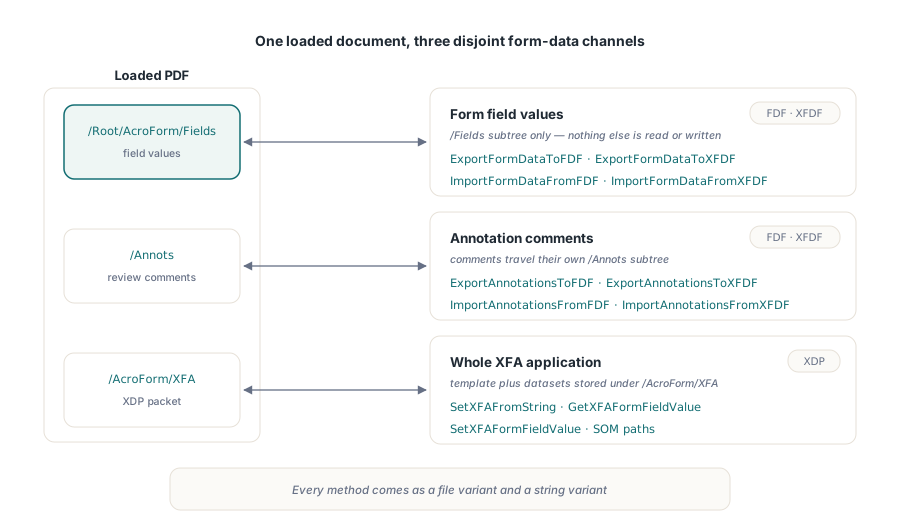
losLab PDF Library moves form data in and out of a PDF in three distinct ways: FDF and XFDF for AcroForm field values, those same two formats for annotation comments, and a whole XFA XDP packet written straight into the form. ExportFormDataToXFDF, ImportFormDataFromXFDF, ImportAnnotationsFromFDF, ExportAnnotationsToXFDF and SetXFAFromString are the entry points, and every one of them has a file variant and a string variant
The reason there are so many methods is that PDF form data is not one thing. A filled AcroForm has field values, it may also carry review comments, and a legacy XFA form embeds an entire XML application description that has nothing to do with either. losLab PDF Library keeps those three concerns on separate APIs on purpose, because merging them would force the wrong data model onto at least two of them. Deciding which family you need is the first design choice, and it is usually settled the moment you know what the receiving system on the other side actually consumes
What is the difference between FDF, XFDF and XFA form data?
FDF and XFDF carry the same information in two different syntaxes, and XFA is a separate world. FDF is a miniature PDF-syntax document (ISO 32000-2 §12.7.8): a /Fields array of << /T (name) /V (value) >> dictionaries, with strings escaped exactly the way literal strings are escaped inside a PDF. XFDF is the XML form of the same data (ISO 19444), a <fields> tree that Acrobat and most form back ends read and write natively. XFA is neither: it is an XML Forms Architecture template plus its data, stored as an XML Data Package (XDP) that the PDF references from /AcroForm/XFA. Pick FDF or XFDF when you interoperate on field values, and reach for XFA only when you are maintaining a document that was authored as an XFA form in the first place
Within FDF and XFDF, losLab PDF Library draws a second line: field values versus annotation comments. The form-data family (ExportFormDataToFDF, ImportFormDataFromFDF, ExportFormDataToXFDF, ImportFormDataFromXFDF) reads and writes the /Fields subtree and touches nothing else. The annotation family (ExportAnnotationsToFDF, ImportAnnotationsFromFDF, ExportAnnotationsToXFDF, ImportAnnotationsFromXFDF) reads and writes the /Annots subtree instead, which is what Acrobat means by Export Comments. The two never overlap, so exporting field values will not sweep up stray review notes, and importing comments will not disturb the values a user already typed. What a widget does when it is clicked or recalculated is a third concern again, covered in the companion note on interactive form actions and JavaScript
How do you populate a PDF form from FDF or XFDF in Delphi?
Load the document, call one import method, and save. ImportFormDataFromXFDF and ImportFormDataFromFDF each parse the incoming form data, match every entry to an AcroForm field by its fully qualified name, set the value, and return the count of fields actually updated. Both methods only update fields that already exist in the target PDF; neither invents a field for a name the form does not define, which keeps a stray or hostile data file from silently growing your form
var
  Lib: TPDFlib;
  FieldsSet: Integer;
begin
  Lib := TPDFlib.Create;
  try
    Lib.LoadFromFile('application-blank.pdf', '');
    // XFDF produced by a case-management system, already UTF-8 on disk
    FieldsSet := Lib.ImportFormDataFromXFDF('applicant-1042.xfdf');
    if FieldsSet > 0 then
      Lib.SaveToFile('application-filled.pdf');
  finally
    Lib.Free;
  end;
end;
Two details decide whether non-trivial data survives the trip. The first is escaping: FDF stores values as PDF literal strings, so a value containing a parenthesis, a backslash or a non-printable byte arrives wrapped in the octal escaping defined in ISO 32000-2 §7.3.4.2, and losLab PDF Library inverts that escaping on import so the parentheses and slashes come back as the literal characters the user typed. The second is encoding: the file-based methods write and read XFDF and FDF as UTF-8, which is what the XFDF declaration promises and what any non-ASCII field value (an accented name, a currency symbol, a CJK address) needs in order to round-trip without corruption. If you build the XFDF yourself, declare UTF-8 and write UTF-8, and the import will agree with you
Hierarchical fields, multi-value choices and rich text
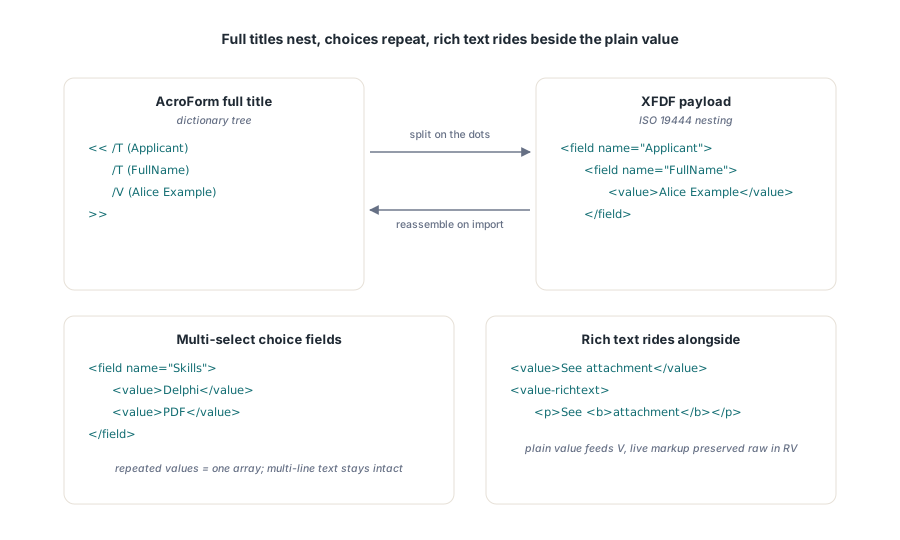
Hierarchical field names are the first place a naive exporter breaks. AcroForm addresses a nested field with a dotted full title such as Applicant.FullName, but XFDF does not put that dotted string in a single name attribute; ISO 19444 nests it, as <field name="Applicant"><field name="FullName">. losLab PDF Library splits the dotted title into nested <field> elements on export and reassembles the nested elements back into the full title on import, so the two directions stay symmetric. On export it also skips non-terminal parent fields, because a parent node in an AcroForm carries only the naming level and has no value of its own; emitting it would produce an empty <value></value> that does not match the real form. Multi-select list boxes are the second trap: a choice field can hold several selected values at once, which XFDF expresses as repeated <value> elements and FDF expresses as a /V array, and losLab PDF Library only splits a field into multiple values when it is genuinely a multi-select choice, so an ordinary multi-line text field keeps its line breaks instead of shattering into bogus values
Rich text is the third, and the one people get wrong most often. A field with formatting stores its markup in the RV entry as an XHTML subtree, and XFDF carries it in <value-richtext>. losLab PDF Library writes that subtree as a live XML fragment rather than escaping it, so a downstream tool reads real rich text instead of a string of visible tags; on import it preserves the raw RV subtree and still applies the plain <value> to V. Where a field offers both, the plain value wins for V and the rich text rides alongside in RV, which is the interoperability rule that stops a rich-text import from quietly rewriting a value another tool already set. When your rich text exists to convey document structure to assistive technology, treat it the same way you would treat the reading order discussed in the note on tagged PDF and accessibility structure
var
  Lib: TPDFlib;
const
  XFDF =
    '<?xml version="1.0" encoding="UTF-8"?>' +
    '<xfdf xmlns="http://ns.adobe.com/xfdf/" xml:space="preserve">' +
    '<fields>' +
    '  <field name="Applicant">' +
    '    <field name="FullName"><value>Alice Example</value></field>' +
    '  </field>' +
    '  <field name="Skills">' +
    '    <value>Delphi</value><value>PDF</value>' +
    '  </field>' +
    '  <field name="Notes">' +
    '    <value>See attachment</value>' +
    '    <value-richtext><body><p>See <b>attachment</b></p></body></value-richtext>' +
    '  </field>' +
    '</fields></xfdf>';
begin
  Lib := TPDFlib.Create;
  try
    Lib.LoadFromFile('intake.pdf', '');
    // Applicant.FullName reassembles; Skills fills the /V + /I arrays;
    // Notes gets V from <value> and RV from <value-richtext>
    Lib.ImportFormDataFromXFDFString(XFDF);
    Lib.SaveToFile('intake-filled.pdf');
  finally
    Lib.Free;
  end;
end;
How do you round-trip annotation comments as FDF or XFDF?
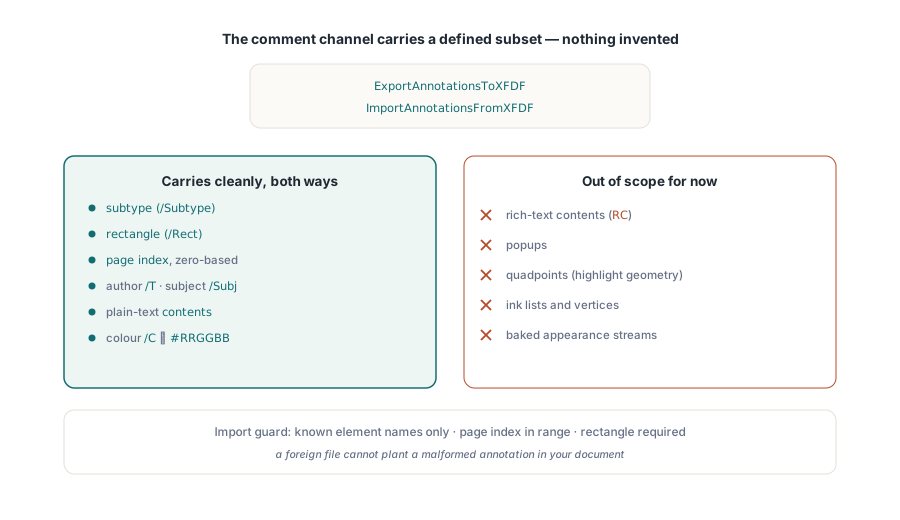
Comments travel on the annotation family, and the supported subset is deliberately small. ExportAnnotationsToXFDF and ImportAnnotationsFromXFDF, with their FDF counterparts, carry text-style markup with the fields that actually round-trip cleanly: the annotation subtype, its rectangle, its 0-based page index, the author in T, the subject in Subj, the plain Contents, and the colour, which maps the PDF /C DeviceRGB triple to and from an XFDF #RRGGBB attribute. Import accepts only known element names and skips any entry whose page is out of range or whose rectangle is missing, so a hand-edited or foreign XFDF cannot drop a malformed annotation into the document. What the subset does not yet carry is worth stating plainly: rich-text contents (RC), popups, quadpoints, ink lists, vertices and baked appearance streams are out of scope for now, so highlight geometry and custom stamp appearances will not survive this path. To confirm what actually landed, walk the page annotations or the wider element tree covered in text search and page element enumeration
var
  Src, Dest: TPDFlib;
  Xfdf: WideString;
begin
  Src := TPDFlib.Create;
  Dest := TPDFlib.Create;
  try
    Src.LoadFromFile('reviewed.pdf', '');
    Xfdf := Src.ExportAnnotationsToXFDFString;   // <annots> subset only

    Dest.LoadFromFile('clean-copy.pdf', '');     // pages must line up by index
    Dest.ImportAnnotationsFromXFDFString(Xfdf);
    Dest.SaveToFile('clean-copy-commented.pdf');
  finally
    Dest.Free;
    Src.Free;
  end;
end;
Writing a full XFA XDP packet with SetXFAFromString
XFA is the outlier, and SetXFAFromString is how you write the whole thing at once. The method takes a complete XML Data Package, the <xdp:xdp> document with its template and datasets packets, and stores it as the stream referenced from /AcroForm/XFA. losLab PDF Library creates the AcroForm container on demand when the document has none, so you do not have to add a throwaway field just to give the XFA somewhere to hang, and it discards any parsed XFA state it was holding so a later read reflects the packet you just wrote rather than a stale cache. Because an XFA packet is XML and not necessarily UTF-8, the library detects a UTF-16 byte-order mark and decodes the packet correctly before parsing, which matters for packets produced by tools that default to UTF-16
Once the packet is in place, GetXFAFormFieldValue and SetXFAFormFieldValue address individual fields through their Scripting Object Model path. losLab PDF Library accepts the standard SOM roots as well as bare relative paths, so form1.FullName, $data.form1.FullName and xfa.datasets.data.form1.FullName all resolve to the same data node, and the template side accepts $template and xfa.template the same way. That tolerance matters when the SOM paths are generated by another system that always emits the fully qualified form
var
  Lib: TPDFlib;
const
  Xdp =
    '<?xml version="1.0" encoding="UTF-8"?>' +
    '<xdp:xdp xmlns:xdp="http://ns.adobe.com/xdp/">' +
    '  <template xmlns="http://www.xfa.org/schema/xfa-template/3.3/">' +
    '    <subform name="form1">' +
    '      <field name="FullName"><ui><textEdit/></ui></field>' +
    '    </subform>' +
    '  </template>' +
    '  <xfa:datasets xmlns:xfa="http://www.xfa.org/schema/xfa-data/1.0/">' +
    '    <xfa:data><form1><FullName>Alice Example</FullName></form1></xfa:data>' +
    '  </xfa:datasets>' +
    '</xdp:xdp>';
begin
  Lib := TPDFlib.Create;
  try
    Lib.SetXFAFromString(Xdp, 0);      // creates the AcroForm container if none exists
    // read back through the data DOM with an SOM path
    if Lib.GetXFAFormFieldValue('form1.FullName') = 'Alice Example' then
      Lib.SetXFAFormFieldValue('form1.FullName', 'Bob Example');
    Lib.SaveToFile('xfa-packet.pdf');
  finally
    Lib.Free;
  end;
end;
The honest summary is that field values round-trip fully through FDF and XFDF, including hierarchy, multi-select and rich text; annotation comments round-trip as a defined text-markup subset with clear gaps; and XFA is written and read as a whole packet with per-field SOM access on top. Match the format to the consumer, declare UTF-8 for anything you build by hand, and remember that the import methods only ever touch fields and annotations that already fit the document. The form-data, annotation and XFA methods described here are part of the losLab PDF Library for Delphi and C++Builder, whose reference carries the full parameter list for every export and import entry point