Eine Tabellenkalkulation trägt zwei Identitätsebenen. Da ist das Zellraster, und da sind die Dokument-Metadaten, die nebenher mitreisen: Titel, Autor, Firma, Schlüsselwörter, die Zeitstempel. Excel zeigt diese zweite Ebene nie im Raster, und doch ist sie die Ebene, die die Windows-Suche indiziert, die SharePoint liest, um ein Dokument zu betiteln, und nach der ein Records-Management-System ablegt. Wenn eine generierte Arbeitsmappe Autor und Titel von der Vorlage erbt, aus der sie gebaut wurde, verzeichnet jedes nachgelagerte System den Vorlagen-Designer als Autor von viertausend Kundenabrechnungen. Die Metadaten stimmen nirgends und werden überall herangezogen
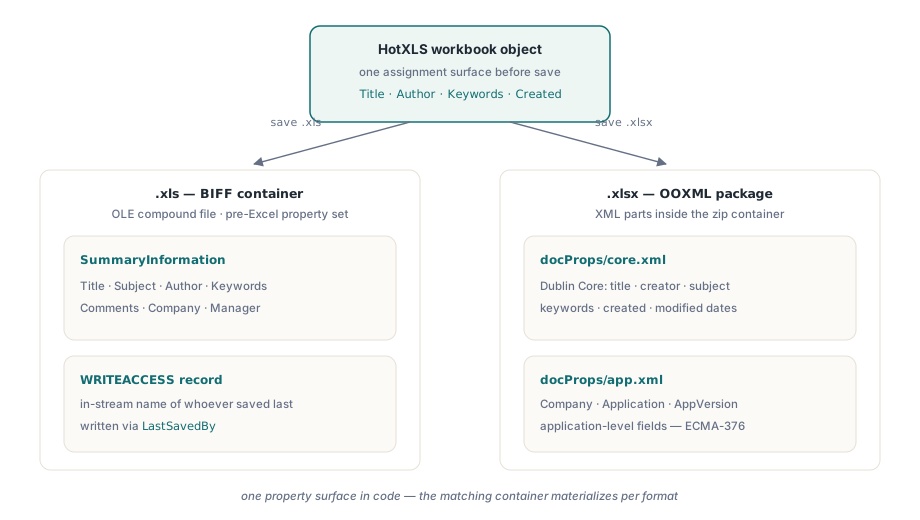
HotXLS stellt diese Ebene auf beiden Engines als gewöhnliche Eigenschaften auf Arbeitsmappenebene bereit: der BIFF-Fassade für .xls und der OOXML-Fassade für .xlsx. Sie lesen ein Feld nach dem Öffnen einer Datei und schreiben ein Feld vor dem Speichern. Die Bibliothek entscheidet, in welchem physischen Container der Wert landet. Was es sich zu verstehen lohnt, bevor Sie einen Generator schreiben, ist, welche Felder jedes Format tatsächlich unterstützt, wo diese Felder physisch liegen, und die eine Torregel, die bestimmt, ob eine .xlsx überhaupt irgendwelche Metadaten aufzeichnet
Zwei Formate, zwei Speichermodelle
Der Grund, warum eine Tabellenkalkulationsbibliothek zwei Metadaten-Implementierungen braucht, und der Grund, warum halbfertige Werkzeuge ein Format korrekt stempeln und das andere vergessen, ist, dass .xls und .xlsx ihre Eigenschaften an nicht verwandten Orten aufbewahren. Eine BIFF-Arbeitsmappe schreibt sie in Streams der OLE-Verbunddatei, vor allem in den Eigenschaftssatz SummaryInformation, der älter ist als Excel selbst, neben dem im Stream liegenden WRITEACCESS-Datensatz, der denjenigen benennt, der die Datei zuletzt gespeichert hat. Eine OOXML-Arbeitsmappe bewahrt sie als XML-Parts im Zip-Paket auf, nach Zweck getrennt: docProps/core.xml enthält die Dublin-Core-Felder (Titel, Ersteller, Thema, Schlüsselwörter, Daten) und docProps/app.xml die Felder auf Anwendungsebene wie Firma und erzeugende Anwendung, gemäß ECMA-376 Teil 1
HotXLS flacht beide Speichermodelle zu direkten Eigenschaften des Arbeitsmappenobjekts ab. Sie öffnen nie einen Eigenschaftssatz-Stream und bearbeiten nie von Hand einen XML-Part. Sie weisen der Arbeitsmappe Zeichenketten und Daten zu, und der richtige Container materialisiert sich für das Format, in dem Sie speichern
Generierte Arbeitsmappen aus dem Geschäftsdatensatz stempeln
Auf der XLSX-Seite stellt TXLSXWorkbook Title, Subject, Author, Keywords, Description, Category, LastModifiedBy, Company, Application und AppVersion als Zeichenketten bereit, dazu Created und Modified als TDateTime-Werte, bei denen null „nicht gesetzt“ bedeutet. Die Regel, die das Vererbungsloch schließt, ist ein Satz: Weisen Sie jedes Feld bei jedem Lauf zu, und nehmen Sie die Werte aus dem Geschäftsdatensatz, statt darauf zu vertrauen, was die Vorlage zufällig mitbringt
var
  Book: TXLSXWorkbook;
begin
  Book := TXLSXWorkbook.Create;
  try
    if Book.Open('statement-template.xlsx') <> 1 then
      raise Exception.Create('Template not available');

    // Jedes Feld überschreiben: alles, was unangetastet bleibt,
    // wird von demjenigen geerbt, der die Vorlage entworfen hat.
    Book.Title := 'Account Statement 2026-06 / ACME Corp';
    Book.Subject := 'Monthly account statement';
    Book.Author := 'Billing Service 4.2';
    Book.LastModifiedBy := 'Billing Service 4.2';
    Book.Company := 'Northwind Financial';
    Book.Category := 'Customer Delivery';
    Book.Keywords := 'statement;billing;2026-06;acct-10024';
    Book.Description := 'Generated document - manual edits are not retained';
    Book.Created := Now;
    Book.Modified := Now;

    Book.SaveAs('statement-10024.xlsx');
  finally
    Book.Free;
  end;
end;
Das Feld Keywords verdient mehr Überlegung, als es gewöhnlich bekommt. Suchinfrastruktur indiziert es wörtlich, Windows-Suche, SharePoint und die meisten DMS-Produkte gleichermaßen, sodass eine durch Semikolons getrennte Konvention mit Kontonummer und Zeitraum jede ausgelieferte Arbeitsmappe zu einem auffindbaren Datensatz ohne Datenbankzugriff macht. Dieselbe Reichweite ist der Haken. Eigenschaften reisen mit jeder Kopie der Datei, weit über die Zugriffskontrollen des Systems hinaus, das sie geschrieben hat, daher gehören personenbezogene Daten dort nicht hinein
Das Zeitstempelpaar trägt eine Semantik, die es sich lohnt, per Richtlinie festzulegen, statt sie der Gewohnheit zu überlassen. Created sollte den Moment markieren, in dem Ihre Pipeline das Dokument erzeugt hat, und dann eingefroren bleiben. Modified ist das Feld, das Excel aktualisiert, wann immer ein Empfänger die Datei speichert, sodass ein Auseinanderlaufen der beiden nach der Auslieferung ein positiver Beleg dafür ist, dass jemand die Arbeitsmappe nachträglich bearbeitet hat, was mehr als einen Streit darüber klärt, wessen Zahlen eine weitergeleitete Tabelle wirklich enthält. Eine Falle steckt im ungesetzten Zustand: Er ist der wörtliche Wert null, keine Exception und kein Null-Wert, sodass Audit-Code explizit auf null prüfen muss. Formatieren Sie ein ungesetztes TDateTime ohne diese Absicherung, füllen sich Ihre Logs mit einem selbstbewusst falschen Datum aus dem Dezember 1899
DocPropsTouched: die Arbeitsmappe, die ohne docProps ausgeliefert wird
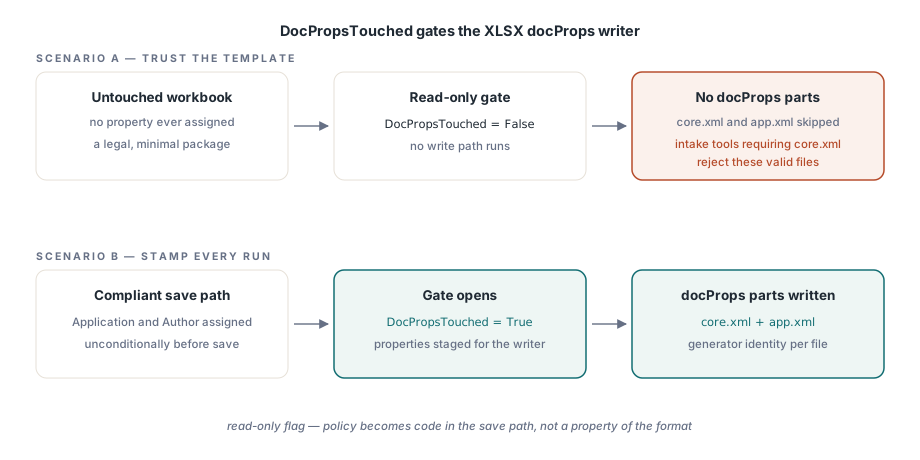
Ein Nur-Lese-Flag, DocPropsTouched, steuert den XLSX-Eigenschaftsschreiber. Eine Arbeitsmappe, in der nie eine Eigenschaft zugewiesen wurde, erzeugt überhaupt keine docProps-Parts; HotXLS verzichtet darauf, ein leeres Metadaten-Skelett zu schreiben. Das Verhalten ist sauber, und es hat zwei Konsequenzen, um die herum man planen sollte
Eingangscode auf der konsumierenden Seite darf nicht annehmen, dass core.xml in jedem Paket existiert. Ein Werkzeug, das es zwingend voraussetzt, wird völlig gültige minimale Dateien zurückweisen. Und wenn Ihre Compliance-Haltung verlangt, dass jedes ausgehende Dokument mindestens eine Generator-Identität trägt, wird diese Forderung zu Code statt zu einer Eigenschaft des Formats: Weisen Sie Application und Author im Speicherpfad bedingungslos zu, denn eine unangetastete Arbeitsmappe ist nach der Spezifikation völlig legal, während sie Ihre Richtlinie stillschweigend verletzt
Die Legacy-XLS-Oberfläche und die Comments-Falle
Die BIFF-Fassade trägt den älteren, kleineren Feldsatz: Title, Subject, Author, Keywords, Comments, Company und Manager, dazu LastSavedBy, ein Alias von UserName, der den WRITEACCESS-Datensatz schreibt, den Excel anzeigt, wenn ein anderer Benutzer die Datei gesperrt hat
var
  Legacy: IXLSWorkbook;     // referenzgezählte Schnittstelle: kein manuelles Free
begin
  Legacy := TXLSWorkbook.Create;
  if Legacy.Open('archive-1999.xls') <= 0 then
    raise Exception.Create('Cannot open archive file');

  Legacy.Title := 'FY1999 ledger (migrated copy)';
  Legacy.Author := 'Archive Migration Batch';
  Legacy.Company := 'Northwind Financial';
  Legacy.Comments := 'Migrated 2026-06-11; source retained in cold storage';
  Legacy.LastSavedBy := 'migration-svc';   // BIFF-WRITEACCESS-Datensatz

  Legacy.SaveAs('archive-1999-stamped.xls');
end;
Eine Namenskollision sorgt für wiederkehrende Verwirrung. Die Eigenschaft Comments auf Dokumentebene ist hier die Freitextbemerkung, die im Eigenschaftendialog der Datei erscheint. Sie hat nichts mit Zellkommentaren zu tun, die Objekte der Zeichnungsebene sind und über eine völlig separate API an Bereiche angehängt werden. Ein Code-Review, das „wir schreiben Comments bereits“ akzeptiert, ohne zu prüfen, welches gemeint ist, hat eine Behauptung über das falsche Feature akzeptiert, und das passiert häufiger, als der gemeinsame Name vermuten lässt. Die beiden teilen vier Buchstaben und nicht ein Byte Speicher
Metadaten beim Eingang lesen, und die Sondierungslücke
Das Lesen ist symmetrisch. Nach Open kommen dieselben Eigenschaften aus der Datei befüllt zurück, was ein Metadaten-Audit eingehender Arbeitsmappen zu einer kurzen Schleife macht
var
  Book: TXLSXWorkbook;
begin
  Book := TXLSXWorkbook.Create;
  try
    if Book.Open(FileName) = 1 then
    begin
      Writeln(Format('%s | title="%s" author="%s" created=%s',
        [ExtractFileName(FileName), Book.Title, Book.Author,
         FormatDateTime('yyyy-mm-dd', Book.Created)]));
      if Book.Created = 0 then
        Writeln('  no creation date recorded');
    end;
  finally
    Book.Free;
  end;
end;
Planen Sie dabei um eine Einschränkung herum. Es gibt keine reine Eigenschaften-Sonde. GetSheetNames kann Blätter auflisten, ohne eine Arbeitsmappe zu laden, aber Title oder Author zu lesen bedeutet ein vollständiges Open, sodass eine Metadaten-Triage über ein großes Archiv bei jeder Datei die vollen Parsing-Kosten zahlt. Auf der BIFF-Seite können Sie diese Kosten für Nur-Lese-Audits senken, indem Sie _DisableGraphics vor dem Öffnen auf true setzen, was die Zeichnungsebene gänzlich überspringt. Das passt zu einer Schleife, die nur Eigenschaften und Zellstatistiken liest, und ist in dem Moment genau falsch, in dem dieselbe Instanz speichern könnte, denn der übersprungene Zeichnungsinhalt würde verworfen. Wenn die Blattstruktur allein die Menge vorfiltern kann, wobei Einzelblatt-Exporte das Offensichtliche sind, was man überspringt, reduzieren die günstigen Techniken in unserem Artikel über Blattauflistung und leichtgewichtige Inspektion, wie viele Dateien den teuren Durchlauf erreichen. Und bei Massen-Stempeljobs, bei denen Tausende Ausgaben geschrieben statt inspiziert werden, lassen sich die schreibseitigen Durchsatzmuster aus unserem Artikel über Streaming-Schreibvorgänge für Batch-Jobs unverändert übertragen, da die Eigenschaftszuweisung der Speicherzeit nichts Messbares hinzufügt
Formate überschreiten und das Leck eindämmen
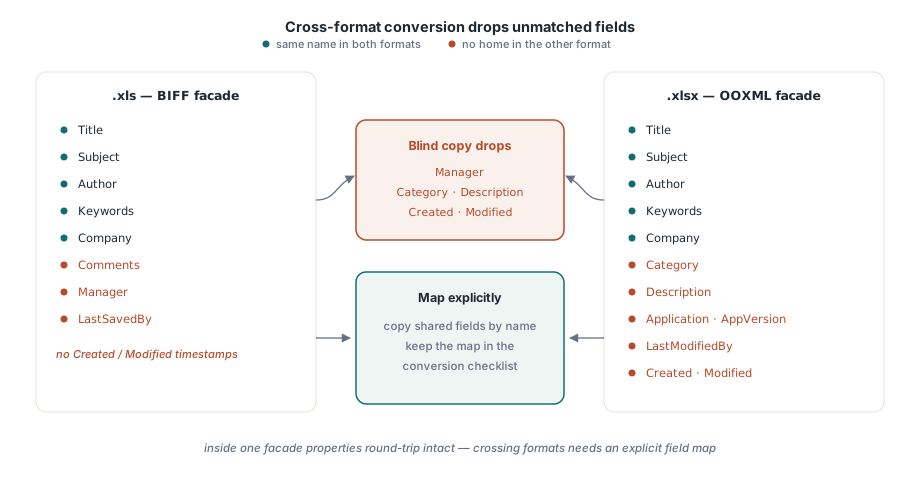
Eigenschaften machen innerhalb einer einzelnen Fassade einen sauberen Roundtrip: Öffnen Sie eine .xlsx, bearbeiten Sie sie, speichern Sie sie, und der Satz kommt unversehrt zurück. Beim Formatwechsel bricht die Annahme der Parität, denn die Feldsätze von BIFF und OOXML decken sich nicht eins zu eins. BIFF hat Manager und keine Zeitstempel; OOXML hat Category, Description und das Paar Created/Modified. Ein Konverter, der blind kopiert, verliert alles, was das Zielformat nicht aufnehmen kann, also bilden Sie die Felder explizit ab und nehmen Sie die Abbildung in Ihre Konvertierungs-Checkliste auf, neben allem anderen, was die Reise nicht überlebt
Das Leck, das die Vorlagenvererbung öffnet, verläuft in die andere Richtung: Informationen, die Sie nie hinausschicken wollten. Autorennamen, interne Projektbezeichnungen, die in Schlüsselwörtern geparkt sind, ein Entwurfstitel, den niemand freigegeben hat. Die Disziplin des Alles-Überschreibens aus dem Generator oben ist die ganze Verteidigung, und es lohnt sich, sie so zu prüfen, wie ein Außenstehender es täte: indem Sie den Eigenschaftendialog öffnen, den jeder Kunde erreichen kann, oder indem Sie die .xlsx entpacken und docProps/core.xml direkt aus dem Paket lesen. Was Sie dort sehen, ist genau das, was jeder nachgelagerte Indexer sieht
Diese nachgelagerte Sichtbarkeit ist auch der Grund, warum einige Felder mehr Sorgfalt verdienen als der Rest. Title, Author, Keywords (die als Tags erscheinen) und Comments oder Description tragen in SharePoint und der Windows-Suche den Großteil des Indexierungsgewichts. Ein Title, der pro Dokument wirklich eindeutig ist und Zeitraum und Konto trägt, leistet für die Auffindbarkeit mehr als jedes darübergelegte Ordnerbenennungsschema, und er kostet eine Zuweisung pro Speichervorgang
Dokumenteigenschaften sind der günstigste professionelle Schliff, den eine generierte Arbeitsmappe tragen kann, und der am häufigsten ausgelieferte Defekt, wenn niemand sie verantwortet. Beide hier beschriebenen Eigenschaftsoberflächen gehören zur HotXLS Delphi Component, die sie für XLS und XLSX nativ ohne Excel-Automatisierung schreibt