Manchmal ist die einzige Frage, die eine Eingangsroutine beantworten muss, struktureller Art: Hat diese Arbeitsmappe ein Blatt namens „Mapping“, oder wie viele Registerkarten trägt sie. Diese Frage über einen Aufruf von Open zu beantworten ist der teure Weg. Ein vollständiges Öffnen bläht die Shared-String-Tabelle auf, decodiert jeden Stildatensatz und durchläuft die Zellen jedes Arbeitsblatts, weil es nicht wissen kann, dass Sie nur das Inhaltsverzeichnis wollten. Bei einer großen Datei sind das Hunderte Megabyte an Allokationen und mehrere Sekunden CPU-Zeit, um eine Liste zu lesen, die wenige Kilobyte belegt. HotXLS, die native Delphi-Tabellenkalkulationsbibliothek von losLab, liefert diese Liste für sich allein: GetSheetNames gibt die Arbeitsblattnamen in Arbeitsmappenreihenfolge zurück, ohne eine einzige Zelle zu materialisieren
Warum der Katalog billig zu lesen ist
Beide Tabellenformate legen ihr Inhaltsverzeichnis nahe am Anfang ab, und genau das macht einen Auflistungsaufruf schnell statt raffiniert. Ein OOXML-Paket hält den Blattkatalog in xl/workbook.xml, einem Part, der klein bleibt, ob die Arbeitsmappe zehn Zeilen oder zehn Millionen enthält. Eine BIFF8-.xls-Datei speichert ihre BoundSheet-Datensätze am Anfang des Workbook-Globals-Streams, vor allen Zelldaten. Die Arbeit, die ein Auflistungsaufruf einspart, ist also kein Rundungsfehler gegenüber einem vollständigen Öffnen. Es ist der Großteil der Datei. Das Lesen des Katalogs kostet unabhängig von der Zeilenzahl dieselbe Handvoll Kilobyte, während ein vollständiges Öffnen mit den Daten skaliert, und bei einer Arbeitsmappe von mehreren Megabyte beträgt dieser Abstand mehrere Größenordnungen, sowohl bei den berührten Bytes als auch beim allokierten Speicher
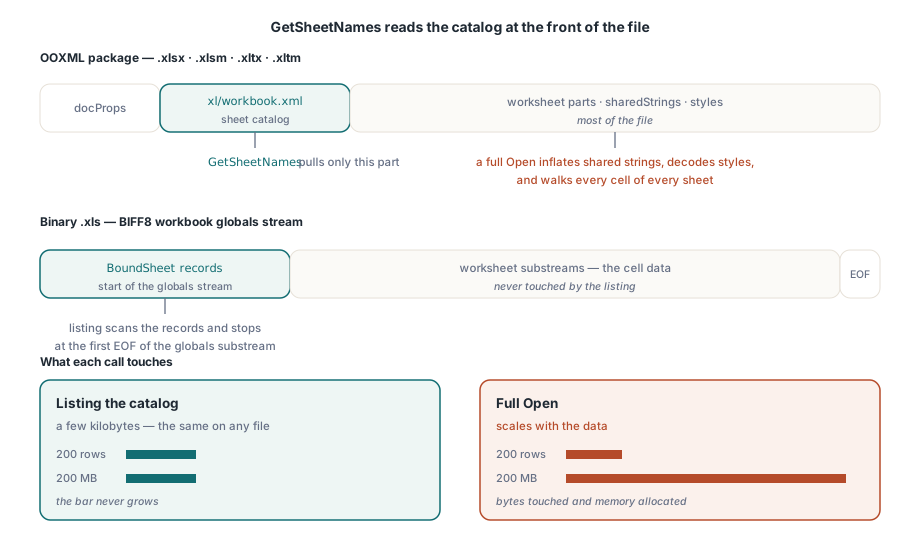
Diese konstanten Kosten sind die Eigenschaft, um die herum es sich zu entwerfen lohnt. Ein auf GetSheetNames aufgebautes Eingangstor verhält sich bei einer Datei mit 200 Zeilen genauso wie bei einer mit 200 MB, sodass die langsamste Datei eines Stapels nicht mehr das Tempo für die Entscheidung vorgibt, ob eine Datei überhaupt die Verarbeitung wert ist
Ein Aufruf für .xls, .xlsx und die Vorlagenformate
Auf der XLS-Fassade liest TXLSWorkbook.GetSheetNames mehr als nur .xls. Es akzeptiert auch die zip-basierten Formate .xlsx, .xlsm, .xltx und .xltm und zieht nur workbook.xml aus dem Archiv. Bei echter .xls-Eingabe scannt es BoundSheet-Datensätze und stoppt beim ersten EOF-Datensatz des Globals-Substreams, sodass eine große Binärdatei weiterhin nur ihre ersten Kilobyte kostet. Die XLSX-Fassade bringt eine Garantie mit, die für langlaufenden Dienstcode wichtiger ist, als es zunächst scheint: TXLSXWorkbook.GetSheetNames lässt die Workbook-Instanz weder zurückgesetzt noch befüllt zurück, sodass eine Instanz, die bereits ein geöffnetes Dokument hält, andere Dateien sondieren kann, ohne das vorliegende zu stören. GetODSSheetNames wendet denselben Ansatz auf OpenDocument-Pakete an, und jeder dieser Aufrufe hat eine Stream-Überladung, mit der sich ein Upload prüfen lässt, der nie auf der Festplatte landet
var
  Book: TXLSXWorkbook;
  Names: TStringList;
  I: Integer;
begin
  Names := TStringList.Create;
  Book := TXLSXWorkbook.Create;
  try
    if Book.GetSheetNames('upload-7f3a.xlsx', Names) <= 0 then
      raise Exception.Create('unreadable workbook package');
    if Names.IndexOf('Mapping') < 0 then
      raise Exception.Create('required Mapping sheet is missing');
    for I := 0 to Names.Count - 1 do
      Writeln(Format('sheet %d: %s', [I, Names[I]]));
  finally
    Book.Free;
    Names.Free;
  end;
end;
Derselbe Aufruf ergibt einen guten Desktop-Importdialog. Die Blätter auflisten, den Nutzer eines wählen lassen und den Preis für das vollständige Öffnen erst nach der Wahl zahlen. Bei einer Arbeitsmappe mit fünfzig Blättern ist der Unterschied sichtbar: eine Auswahl, die sofort erscheint, gegenüber einer, die stockt, während dahinter die ganze Datei lädt
Makrofähige .xlsm-Dateien und die Vorlagenformate listen sich genau wie eine einfache .xlsx-Datei, da der Katalog in derselben workbook.xml sitzt, ob nun eine vbaProject.bin im Paket mitfährt oder nicht. Eine Eingangspipeline kann daher die Blätter einer Makro-Arbeitsmappe fürs Routing aufzählen, ohne die Makro-Nutzlast je anzufassen und ohne irgendetwas zu tun, das sie ausführen würde, und die Entscheidung zur Makrorichtlinie der Stufe überlassen, die die Datei tatsächlich öffnet
Den Rückgabewert lesen, ohne sich selbst zu täuschen
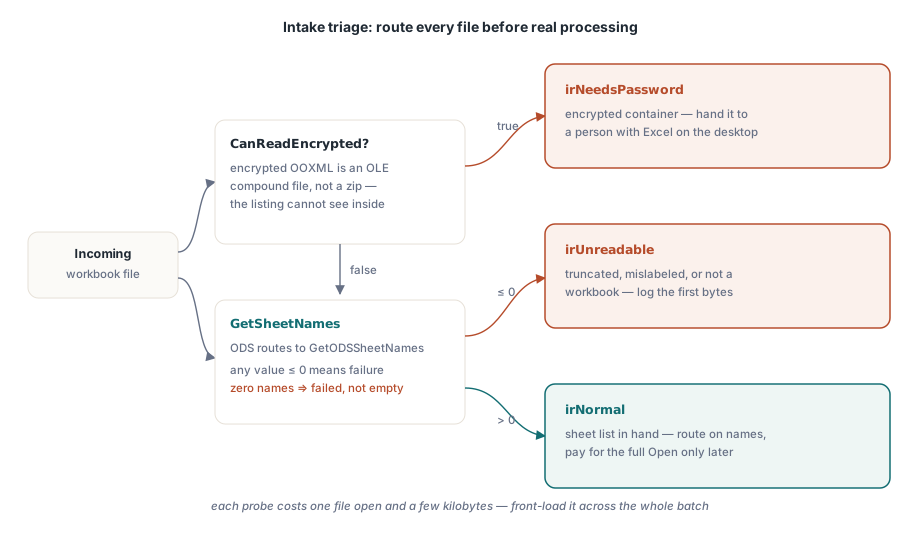
Die Rückgabekonventionen sind in HotXLS nicht einheitlich. Manche Aufrufe geben bei Erfolg 1 zurück, andere eine Anzahl, sodass für die Auflistungsfunktionen die einzige belastbare Prüfung ist, jeden Wert von null oder darunter als Fehlschlag zu behandeln, bei dem die Stringliste geleert wurde. Widerstehen Sie der Versuchung, eine leere Liste als „Arbeitsmappe ohne Blätter“ zu lesen. Sowohl ECMA-376 als auch die BIFF8-Spezifikation verlangen mindestens ein Blatt in einer gültigen Arbeitsmappe, sodass null Namen immer bedeuten, dass das Lesen fehlgeschlagen ist, und nie, dass die Datei legitim leer ist
Eine fehlgeschlagene Auflistung ist selbst ein Signal, das man festhalten sollte. Eine .xlsx-Datei, bei der der Aufruf fehlschlägt, ist eines von wenigen konkreten Dingen: abgeschnitten, gar kein echtes OOXML-Paket (falsch benannte CSV-Exporte aus anderen Systemen tauchen hier ständig auf) oder ein verschlüsselter Container. Diese auseinanderzuhalten ist Aufgabe der nächsten Prüfung. Die ersten Bytes der abgewiesenen Datei zusammen mit dem Fehlschlag zu protokollieren, macht aus einem Support-Thread meist eine einzige Nachricht
Verschlüsselte Container vor dem Routing erkennen
Eine verschlüsselte .xlsx-Datei ist kein Zip. Sie ist eine OLE-Compound-Datei, die die Streams EncryptionInfo und EncryptedPackage umhüllt, sodass GetSheetNames nicht hineinsehen kann und wie bei jeder anderen unlesbaren Datei einen Fehlschlag zurückgibt. CanReadEncrypted prüft auf diese Containerform, womit der Eingang eine verschlüsselte Datei gezielt routen kann, statt einen generischen Lesefehler aus den Tiefen eines Workers zu schlucken:
type
  TIntakeRoute = (irNormal, irNeedsPassword, irUnreadable);

function ClassifyUpload(const FileName: string; Names: TStrings): TIntakeRoute;
var
  Book: TXLSXWorkbook;
begin
  Book := TXLSXWorkbook.Create;
  try
    // Verschlüsseltes OOXML ist ein OLE-Container, kein Zip: zuerst prüfen,
    // weil die Auflistungsaufrufe nicht hineinsehen können.
    if Book.CanReadEncrypted(FileName) then
      Exit(irNeedsPassword);
    if SameText(ExtractFileExt(FileName), '.ods') then
    begin
      if Book.GetODSSheetNames(FileName, Names) <= 0 then
        Exit(irUnreadable);
    end
    else if Book.GetSheetNames(FileName, Names) <= 0 then
      Exit(irUnreadable);
    Result := irNormal;
  finally
    Book.Free;
  end;
end;
Bei der Verschlüsselung ist HotXLS bewusst asymmetrisch, und das Routing muss das respektieren. Legacy-.xls-Verschlüsselung (RC4, RC4 CryptoAPI, XOR) ist lesbar: TXLSWorkbook.Open(FileName, Password) entschlüsselt mit einem hinterlegten Passwort, und diese Dateien können auf dem automatisierten Pfad bleiben. Verschlüsselte OOXML-Pakete gehen den anderen Weg. HotXLS kann eines mit SaveAsEncrypted schreiben, es aber nicht zurücklesen. OpenEncrypted löst EXlsxEncryptionNotImplemented aus, wenn ihm ein verschlüsseltes Paket übergeben wird, weshalb ein ehrliches Eingangsdesign verschlüsselte .xlsx-Dateien an eine Person mit Excel schickt und die passwortgeschützten .xls-Dateien im Code behält
Bei Stapelarbeit verdient sich dieser Klassifizierer seinen Platz, indem er über ein ganzes Eingangsverzeichnis läuft, bevor irgendein Worker mit der eigentlichen Verarbeitung beginnt, da jede Sondierung etwa ein Datei-Öffnen und wenige Kilobyte Lesezugriffe kostet. Ihn vorzuziehen verändert den Fehlermodus, der den Betrieb wirklich interessiert. Statt eines Jobs, der um 3 Uhr nachts an Datei 412 von 600 stirbt, erhält man 412 Dateien in der Warteschlange und 5 am Eingang abgewiesene, jede mit einem Grund versehen. Dieselben Bibliotheksaufrufe, eine weit bessere Betriebsgeschichte
Die Fragen, die ein Auflistungsaufruf nicht beantworten kann
Namen und Reihenfolge sind alles, was man bekommt. Die Auflistungsaufrufe sagen nichts über die Sichtbarkeit, sodass ausgeblendete und sehr ausgeblendete Blätter in der Liste wie alle anderen erscheinen. Sie melden keine Abmessungen des benutzten Bereichs, keine Zellanzahlen und keine Dokumenteigenschaften. Der Part docProps/core.xml ist ebenfalls klein, aber es gibt derzeit keine reine Eigenschaftssonde, sodass Autor- und Titelmetadaten weiterhin ein vollständiges Open kosten. Der saubere Umgang damit ist, die billigen Fakten jede Datei routen zu lassen und die teuren für Dateien aufzuheben, die das Routing überstehen. Für die Dateien, die tatsächlich in ein tiefes Lesen übergehen, läuft ein reiner Lesescan einer großen .xls-Datei mit _DisableGraphics := True, das das OfficeArt-Parsen überspringt, spürbar schneller. Nur niemals aus dieser Instanz speichern: Die übersprungene Zeichnungsebene fehlt im Modell, und ein Speichern würde sie aus der Datei entfernen
Dateien, die die Triage bestehen, gehen meist in eine tiefere Analyse. Die Werkbank für Arbeitsmappen-Audit und -Konvertierung behandelt die Zähler je Blatt, die sich zu erfassen lohnen, sobald ein vollständiges Öffnen gerechtfertigt ist, und die Anleitung zur Leistung großer Arbeitsmappen behandelt, wie dieses vollständige Öffnen schnell bleibt
HotXLS ist eine native Object-Pascal-Tabellenkalkulationsbibliothek für Delphi und C++Builder; die vollständige API-Oberfläche einschließlich der hier gezeigten Inspektionsaufrufe ist auf der Produktseite der HotXLS Delphi Component dokumentiert