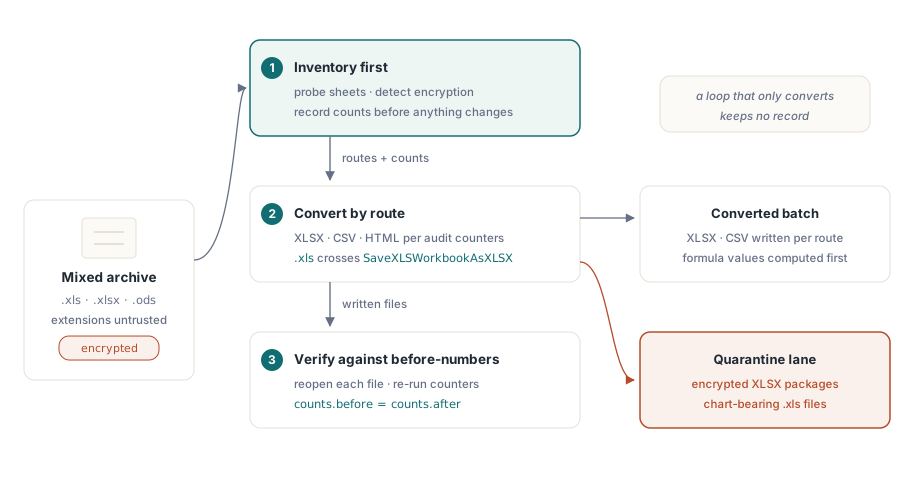
Eine Massen-Normalisierung von Tabellenkalkulationen sind drei Probleme in einem Mantel. Sie haben ein Archiv gemischter Formate: .xls aus der BIFF-Ära, modernes .xlsx, verstreute .ods aus irgendeinem LibreOffice-Experiment und eine Handvoll Dateien, die niemand öffnen kann, weil das Passwort mit einem ehemaligen Mitarbeiter das Haus verlassen hat. Ziel ist es, alles nach XLSX und CSV zu konvertieren. Die Version dieser Aufgabe, die die meisten schreiben, ist eine Schleife, die jede Datei öffnet und unter neuer Erweiterung speichert, und sie funktioniert genau so lange, bis jemand fragt, welche Dateien ihre Diagramme verloren, ihre Makros eingebüßt oder sich überhaupt nie geöffnet haben. Die Schleife hat darauf keine Antwort, denn Konvertieren allein führt kein Protokoll. Eine Werkbank tut das: Sie inventarisiert zuerst, konvertiert als Zweites und verifiziert als Drittes, und die drei Stufen müssen Informationen teilen, damit irgendetwas davon vertrauenswürdig ist
Diese Werkbank in Delphi oder C++Builder zusammenzusetzen bedeutet, vier HotXLS-Fähigkeiten zu verdrahten, von denen keine irgendwo in der Pipeline ein installiertes Excel braucht. Es gibt zwei native Engines, eine BIFF8-Fassade für .xls und eine OOXML-Fassade für .xlsx und .ods. Es gibt günstige Sondierungsaufrufe, die Metadaten lesen, ohne die ganze Datei zu parsen. Es gibt Audit-Zähler pro Blatt, die Ihnen sagen, was eine Arbeitsmappe tatsächlich enthält. Und es gibt eine Konvertierungsmatrix mit einem dokumentierten Treueprofil für jede Route. Die Arbeit besteht darin zu wissen, wo jede davon eine scharfe Kante hat, denn jede einzelne hat eine, und genau diese Kanten sind es, die aus einem sauberen nächtlichen Batch einen Montagmorgen-Vorfall machen
Sondieren vor dem Laden: Blattnamen und Verschlüsselungserkennung
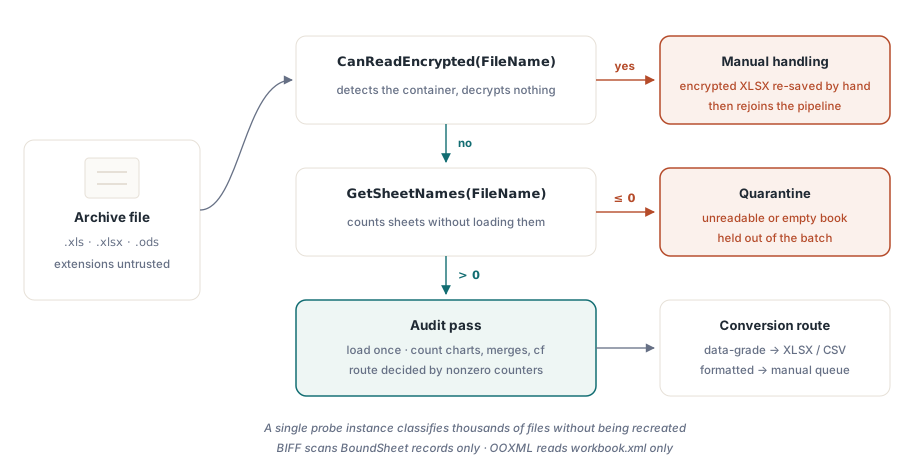
Eine 200 MB große Arbeitsmappe zu öffnen, nur um festzustellen, dass sie verschlüsselt ist, verschwendet Minuten pro Datei, und über ein großes Archiv multipliziert verschwendet es Tage. Beide Fassaden stellen GetSheetNames bereit, das Blatt-Metadaten liest, ohne die Arbeitsmappe zu befüllen. Die BIFF-Implementierung scannt nur die BoundSheet-Datensätze am Anfang des Streams; die OOXML-Implementierung liest nur workbook.xml innerhalb des Zip. Daneben erkennt CanReadEncrypted einen Verschlüsselungscontainer, ohne eine Entschlüsselung zu versuchen:
var
  Probe: TXLSXWorkbook;
  Names: TStringList;
begin
  Names := TStringList.Create;
  Probe := TXLSXWorkbook.Create;
  try
    if Probe.CanReadEncrypted(FileName) then
    begin
      Writeln(FileName + ': encrypted container - route to manual handling');
      Exit;
    end;
    if Probe.GetSheetNames(FileName, Names) <= 0 then
      Writeln(FileName + ': unreadable - quarantine')
    else
      Writeln(Format('%s: %d sheet(s), first "%s"',
        [FileName, Names.Count, Names[0]]));
  finally
    Probe.Free;
    Names.Free;
  end;
end;
Zwei operative Details machen diese Schleife günstig. GetSheetNames setzt die Arbeitsmappen-Instanz weder zurück noch befüllt es sie, sodass ein einzelnes Sondierungsobjekt Tausende Dateien klassifizieren kann, ohne neu erzeugt zu werden. Und die XLS-Fassaden-Variante desselben Aufrufs versteht auch .xlsx-Pakete, was sie zu einer bequemen Einzelsonde macht, wenn Dateierweiterungen nicht vertrauenswürdig sind, wie sie es in einem so alten Archiv selten sind. Die Triage vor dem Laden verdient eine eigene Betrachtung; die Mechanik der leichtgewichtigen Inspektion steht in unserem Artikel über Blattauflistung und leichtgewichtige Arbeitsmappen-Inspektion
Zählen, was eine Arbeitsmappe wirklich enthält
Sobald eine Datei die Triage besteht, entscheidet der Audit-Durchlauf über ihre Konvertierungsroute. Die XLSX-Fassade stellt für jede Merkmalsfamilie, die eine Treueentscheidung beeinflusst, einen Zähler bereit: verbundene Zellen, Diagramme, Bilder, bedingte Formatierungen, Datenüberprüfungen, Tabellen, Hyperlinks und Kommentare, dazu Flags auf Arbeitsmappenebene für Makros, Schutz und Quellformat. Die Konvertierungsroute einer Datei hängt fast vollständig davon ab, welche davon ungleich null zurückkommen
var
  Book: TXLSXWorkbook;
  Sheet: TXLSXWorksheet;
  I: Integer;
begin
  Book := TXLSXWorkbook.Create;
  try
    if Book.Open(FileName) <> 1 then Exit;
    for I := 0 to Book.Sheets.Count - 1 do
    begin
      Sheet := Book.Sheets[I];
      Writeln(Format('%s: cells=%d merges=%d charts=%d cf=%d dv=%d protected=%s',
        [Sheet.Name, Sheet.Cells.Count, Sheet.MergedCells.Count,
         Sheet.Charts.Count, Sheet.ConditionalFormats.Count,
         Sheet.DataValidations.Count, BoolToStr(Sheet.IsProtected, True)]));
    end;
    if Book.HasVbaProject then
      Writeln('  contains VBA project - macro policy applies');
    if Book.ExternalLinks.Count > 0 then
      Writeln(Format('  %d external link(s)', [Book.ExternalLinks.Count]));
  finally
    Book.Free;
  end;
end;
Lesen Sie Cells.Count mit einem Vorbehalt im Hinterkopf. Der Zellspeicher ist dünn besetzt, die Zahl zählt also instanziierte Zellen, nicht die rechteckige Fläche des benutzten Bereichs. Ein Blatt mit einem Wert in A1 und einem weiteren in ZZ9999 meldet zwei Zellen, nicht die rund eine Million, die dazwischen liegen. Der entsprechende Scan auf der BIFF-Seite verwendet die Grenzen von UsedRange zusammen mit ForEachCell, und er trägt den Off-by-one-Fehler in sich, über den beim ersten Mal fast jeder stolpert: UsedRange.FirstRow und seine Geschwister sind 0-basiert, während Cells.Item[Row, Col] 1-basiert ist. Eine Traversierung, die vergisst, zu jeder Grenze eins zu addieren, auditiert das falsche Rechteck und sagt das nie
Zwei Hebel senken die Kosten eines reinen Audit-Durchlaufs über große Legacy-Dateien. Wird _DisableGraphics vor dem Öffnen einer .xls auf true gesetzt, entfällt das Parsen der OfficeArt-Zeichnungsebene vollständig, was bei Arbeitsmappen voller Formen echte Zeit spart. Es ist allerdings strikt eine Nur-Lese-Optimierung: Das Speichern aus einer so geöffneten Instanz würde die Zeichnungen verwerfen, die sie nie geparst hat, daher gehört das Flag nur auf Pfade, die die Datei nie zurückschreiben. Wenn das Audit Zellinhalte statt Zähler braucht, durchläuft der ForEachCell-Callback die befüllten Zellen direkt und umgeht den Variant-Overhead pro Zugriff, den indizierte Zelleigenschaften bei jedem Lesen zahlen, was sich über Millionen Zellen schnell summiert
Die uneinheitlichen Rückgabecodes früh normalisieren
HotXLS-E/A-Aufrufe melden Fehler über Integer-Ergebnisse statt über Exceptions, und die Konventionen sind über die API hinweg nicht einheitlich. Die meisten Öffnen- und Speichern-Aufrufe geben bei Erfolg 1 und bei Fehlschlag -1 zurück. GetSheetNames gibt die Blattanzahl zurück, oder -1 mit geleerter Liste. XLSX-SaveAsHTML bricht das Muster erneut und gibt 0 für Erfolg zurück, -1 für einen Blattindex außerhalb des Bereichs. Eine Werkbank, die überall auf = 1 prüft, wird die Aufrufe stillschweigend falsch klassifizieren, die Erfolg auf andere Weise signalisieren, und eine, die auf <> -1 prüft, verschluckt diejenigen, die mit einem anderen Code fehlschlagen
Die Regel, die den Kontakt mit der gesamten API überlebt, ist enger, als sie aussieht: Behandeln Sie <= 0 bei zählenden Aufrufen als Fehlschlag, prüfen Sie für jede tatsächlich genutzte Speicherroutine den dokumentierten Erfolgswert, und legen Sie beides hinter eine kleine Ergebnisprüffunktion, damit die Konvention an genau einer Stelle lebt. Batch-Pipelines scheitern weit häufiger an einer langsamen Anhäufung ungeprüfter Rückgabecodes als an irgendeinem exotischen Parser-Fehler, und der Preis für einen Fehler an dieser Stelle zeigt sich vierzigtausend Dateien später, wenn sich niemand mehr erinnert, welche Konvertierungen tatsächlich gelungen sind
Die Konvertierungsmatrix und wo jeder Weg Daten verliert
Die beiden Fassaden teilen sich die Konvertierungsarbeit. TXLSXWorkbook öffnet XLSX, ODS und CSV und speichert XLSX, ODS, CSV, HTML, RTF und AES-verschlüsseltes XLSX. TXLSWorkbook öffnet und speichert BIFF und exportiert HTML, RTF und CSV. Das Nützliche daran ist, dass jeder Pfad mit einem dokumentierten Treueprofil kommt, nicht mit einem vagen Versprechen von Korrektheit, sodass Sie im Voraus entscheiden können, welche Routen für welche Dateien sicher sind
Der CSV-Export schreibt UTF-8 mit BOM, CRLF-Zeilenenden und Quoting nach RFC 4180. Was er nicht tut, ist Formeln auswerten: Eine Zelle mit =SUM(...) wird als wörtlicher Formeltext exportiert, sodass ein Blatt voller Formeln zu einem Blatt voller Zeichenketten wird, sofern Sie die Werte nicht zuerst berechnen. Der HTML-Export erzeugt eine einzige Tabelle, in der colspan und rowspan für verbundene Zellen einstehen und Basisstile inline gesetzt sind. Der RTF-Export hat eine schärfere Grenze: Er kann verbundene Zellen nicht über Spalten hinweg aufspannen, sodass die Fortsetzungszellen eines Verbunds leer herauskommen. Der ODS-Import ist laut der eigenen Dokumentation der Bibliothek absichtlich leichtgewichtig. Skalare Werte und zwischengespeicherte Formelergebnisse kommen durch; Stile, lebende ODF-Formelausdrücke und Zeichnungen nicht. Das zählt in dem Moment, in dem das Archiv echte OpenDocument-Dateien nach OASIS ODF 1.3 enthält, wo alles, was einer visuell treuen Konvertierung nahekommt, mehr braucht, als dieser Importpfad zu tragen gebaut wurde, und der Audit-Durchlauf ist es, der Ihnen sagt, dass diese Dateien existieren, bevor der Batch sie stillschweigend plattdrückt
SaveXLSWorkbookAsXLSX ist eine Datenbrücke, keine Layoutbrücke
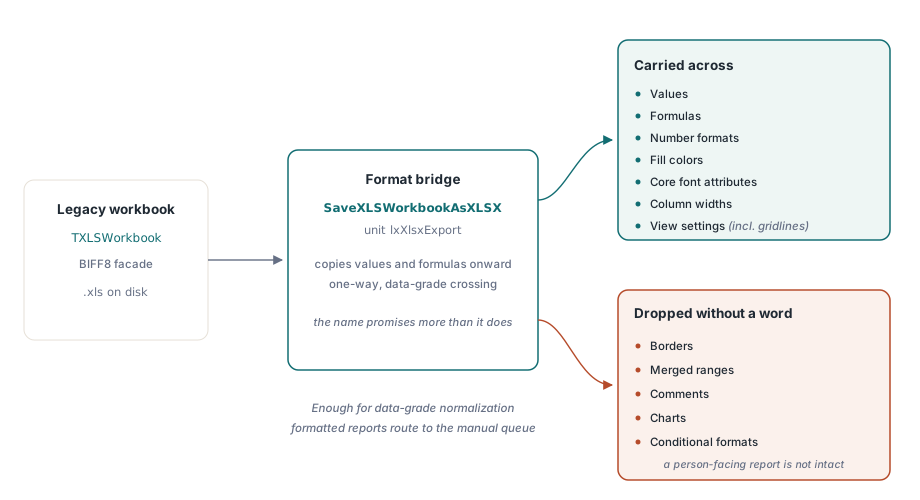
Die BIFF-Fassade kann OOXML nicht direkt schreiben, daher läuft der Übergang von .xls nach .xlsx über die Funktion SaveXLSWorkbookAsXLSX in der Unit lxXlsxExport. Die Treue dieser Brücke verdient es, klar benannt zu werden, denn der Name suggeriert mehr, als er leistet. Sie kopiert Werte, Formeln, Zahlenformate, Füllfarben, zentrale Schriftattribute, Spaltenbreiten und Ansichtseinstellungen wie Gitternetzlinien. Sie kopiert keine Rahmen, verbundenen Bereiche, Kommentare, Diagramme oder bedingten Formatierungen. Für eine Normalisierung auf Datenebene, bei der nachgelagerte Systeme das Ergebnis parsen und niemand auf die Formatierung schaut, ist das genau genug, und nichts geht verloren, was jemand braucht. Für einen formatierten Vorstandsbericht, der von einem Menschen gelesen werden soll, reicht es nicht, und genau hier verdienen sich die Audit-Zähler ihren Platz: Eine Datei, die das Audit als Träger von Diagrammen und bedingten Formatierungen markiert hat, sollte in eine manuelle Warteschlange geleitet werden, nicht über eine Brücke, die beides ohne ein Wort verwirft
var
  Legacy: IXLSWorkbook;        // Interface-Referenz: kein Free aufrufen
  Modern: TXLSXWorkbook;
begin
  if SameText(ExtractFileExt(FileName), '.xls') then
  begin
    Legacy := TXLSWorkbook.Create;
    if Legacy.Open(FileName) <= 0 then Exit;
    if SaveXLSWorkbookAsXLSX(Legacy,
         ChangeFileExt(FileName, '.xlsx')) <= 0 then
      Writeln('bridge failed: ' + FileName);
  end
  else
  begin
    Modern := TXLSXWorkbook.Create;
    try
      Modern.StreamingWrite := True;     // Blatt-XML direkt in das Zip streamen
      if Modern.Open(FileName) = 1 then
        Modern.SaveAsCSV(ChangeFileExt(FileName, '.csv'), 0, ',');
    finally
      Modern.Free;
    end;
  end;
end;
Die Schleife oben zeigt auch den Durchsatzhebel auf der OOXML-Seite. Wird StreamingWrite auf true gesetzt, wird Arbeitsblatt-XML direkt in das Ausgabepaket gestreamt, statt es als eine riesige Zeichenkette im Speicher zwischenzulagern, was den Unterschied zwischen einem komfortablen Lauf und einem Out-of-Memory-Absturz ausmacht, sobald Dateien Hunderttausende Zeilen erreichen. Dimensionierung und Speicherverhalten dieses Modus erhalten eine eigene Betrachtung in unserem Artikel über Streaming-Schreibvorgänge für Server-Batch-Jobs. Eine weitere Eigenschaft zählt für einen Batch, der jeden Kern nutzen will: Keine der Fassaden ist threadsicher, aber keine teilt auch globalen Zustand, sodass das unterstützte Muster für parallele Konvertierung eine Arbeitsmappen-Instanz pro Worker-Thread ist, ohne Sperren dazwischen
Die Passwortdateien, und was mit ihnen zu tun ist
Die gesperrten Dateien des Archivs teilen sich sauber nach Format, und diese Teilung entscheidet, wohin sie gehen. Legacy-.xls-Verschlüsselung, ob RC4, RC4 über CryptoAPI oder die alte XOR-Verschleierung, ist lesbar: Übergeben Sie das Passwort an Open, und die Datei konvertiert wie jede andere. Verschlüsselte .xlsx-Pakete sind eine andere Geschichte. HotXLS erkennt sie mit CanReadEncrypted, kann sie aber nicht entschlüsseln, daher ist der einzige ehrliche Schritt, sie in eine Warteschlange zu leiten, in der ein Mensch jede einzelne in Excel öffnet und neu speichert, bevor sie wieder in die Pipeline zurückkehrt. Diese Asymmetrie lohnt es, von Anfang an einzuplanen, denn die verschlüsselten XLSX-Dateien sind mit größter Wahrscheinlichkeit genau die Datensätze, die jemandem tatsächlich wichtig sind
Den Kreis mit Verifikation schließen
Die dritte Stufe ist die, die übersprungen wird, und sie zu überspringen ist es, was eine Massenkonvertierung zu einem Risiko macht. Kein Speicherpfad in HotXLS wertet Formeln aus. Excel berechnet beim Öffnen einer Datei neu, sodass eine XLSX-zu-XLSX-Konvertierung korrekt bleibt, aber ein CSV-Ziel erhält den Formeltext wörtlich, sofern die Pipeline nicht zuerst Calculate über die Zellen laufen lässt und die Ergebnisse zurückschreibt. Das im Voraus zu wissen ist der Unterschied zwischen einer CSV voller Zahlen und einer CSV voller =SUM(...)-Zeichenketten, die niemandem auffallen, bis ein nachgelagerter Import daran erstickt
Die Verifikation selbst ist günstig genug, dass es keine Entschuldigung gibt, sie wegzulassen. Öffnen Sie jede konvertierte Datei mit derselben Bibliothek erneut, lassen Sie die Audit-Zähler noch einmal laufen und vergleichen Sie sie mit den Zahlen vor der Konvertierung, die der Inventurdurchlauf bereits aufgezeichnet hat. Eine gesunkene Blattanzahl, eine Diagrammanzahl, die auf null ging, wo die Quelle drei hatte, eine Zellanzahl, die ins Bodenlose fiel: Jedes davon ist ein stiller Verlust, der für den Preis eines zweiten Öffnens gefangen wird. Prüfen Sie obendrein eine Stichprobe mit dem Auge in Excel oder LibreOffice, und die Kombination fängt die überwältigende Mehrheit der Konvertierungsschäden ab, bevor sie ausgeliefert werden. Das ist der ganze Grund, warum die Inventurstufe die Verifikationsstufe speist. Ohne die Vorher-Zahlen beweisen die Nachher-Zahlen nichts
Eine Audit-first-Werkbank verwandelt eine riskante Massenkonvertierung in einen messbaren Prozess mit einer Quarantänespur für die Dateien, die nicht sauber durchkommen. Alle hier gezeigten Sondierungs-, Zähl- und Konvertierungsaufrufe sind Teil der HotXLS Delphi Component, die sie nativ in-process ohne Excel-Automatisierung ausführt