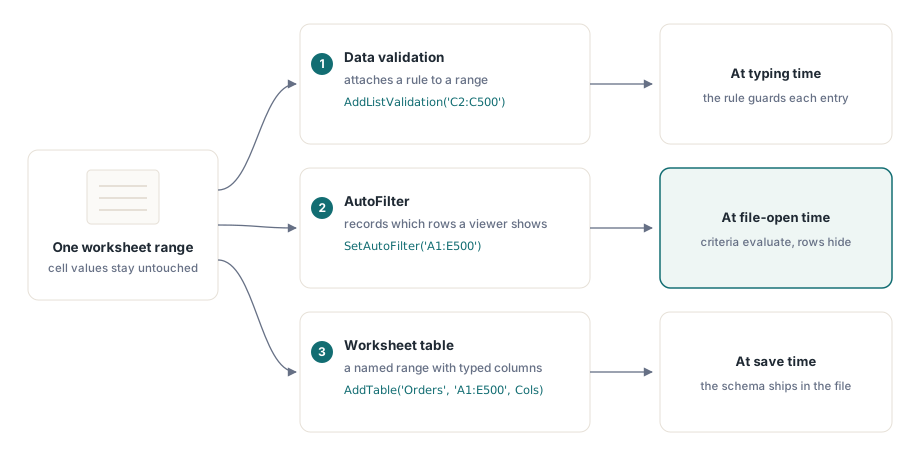
Drei Funktionen in HotXLS teilen sich ein Arbeitsblatt, arbeiten aber auf völlig verschiedenen Objekten, und der Ärger beginnt, wenn Sie annehmen, sie täten Ähnliches. Die Datenüberprüfung hängt einem Bereich eine Regel an, die einschränkt, was ein Nutzer hineintippen darf. Ein AutoFilter hängt einer Region eine gespeicherte Kriteriendefinition an und ändert, welche Zeilen ein Betrachter zeigt. Eine Tabelle hüllt einen Bereich in eine benannte, typisierte Struktur mit gebänderter Gestaltung. Eines schränkt Eingaben ein, eines hält eine Ansicht fest, eines erzwingt ein Schema. Keines davon verschiebt von sich aus einen einzigen Zellwert, und besonders der AutoFilter täuscht die Leute, weil das Wort eine Handlung nahelegt, während er nur eine Definition speichert. Zu wissen, welches Objekt jeder Aufruf berührt und wann die Wirkung tatsächlich eintritt, trennt eine Arbeitsmappe, die sich in Excel genauso verhält wie in Ihren Tests, von einer, die still abweicht
Der AutoFilter speichert eine Definition, er schneidet keine Zeilen weg
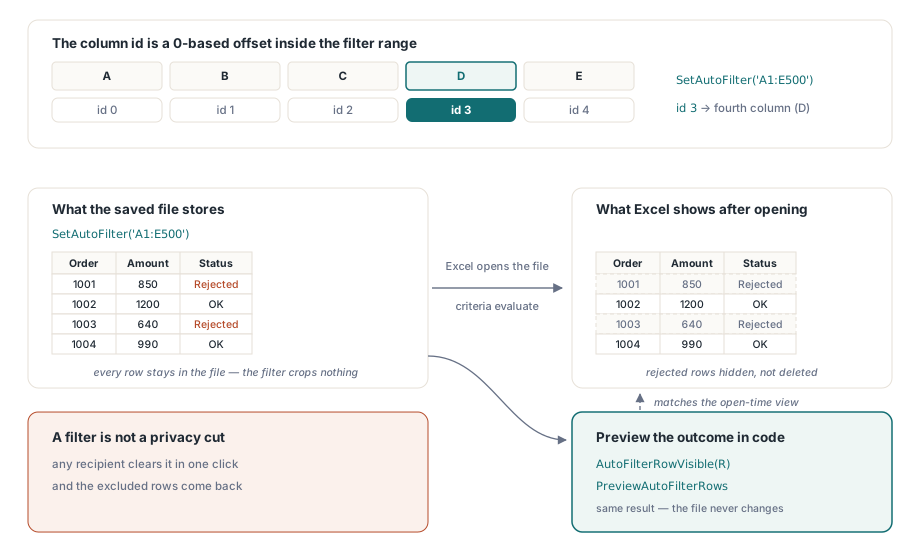
Ein AutoFilter ist in einer gespeicherten Datei ein Kriteriendatensatz. Das Ausblenden der Zeilen geschieht später, wenn Excel die Arbeitsmappe öffnet und die Kriterien gegen die Daten auswertet. HotXLS schreibt diesen Datensatz getreu und schneidet nichts weg: Jede Zeile, die Sie gefiltert haben, ist physisch weiterhin in der Datei. Eine Pipeline, die einen Filter anwendet, um abgelehnte Bestellungen wegzunehmen, und die Arbeitsmappe dann zurückliest, sieht sie alle, die abgelehnten eingeschlossen, und der Code ist gemessen an der API korrekt und gemessen am Denkmodell des Autors falsch. Auf dem XLSX-Arbeitsblatt erklärt SetAutoFilter die gefilterte Region und AddAutoFilterColumn hängt einer ihrer Spalten Kriterien an. Wenn serverseitiger Code das tatsächliche Ergebnis braucht, für eine Zeilenzahl in einer Zusammenfassung oder um nur passende Zeilen weiterzureichen, wertet die Bibliothek die Kriterien für Sie aus, statt so zu tun, als hätte sich die Datei geändert:
var
  Book: TXLSXWorkbook;
  Sheet: TXLSXWorksheet;
  R, Visible: Integer;
begin
  Book := TXLSXWorkbook.Create;
  try
    Book.Open('orders.xlsx');
    Sheet := Book.Sheets[0];

    Sheet.SetAutoFilter('A1:E500');
    // Spalten-Id 3 = vierte Spalte INNERHALB des Filterbereichs (0-basierter Versatz)
    Sheet.AddAutoFilterColumn(3, xlsxAfOpGreaterOrEqual, '1000');

    Visible := 0;
    for R := 2 to 500 do
      if Sheet.AutoFilterRowVisible(R) then
        Inc(Visible);
    // Visible entspricht jetzt dem, was Excel nach dem Öffnen der Datei zeigt

    Book.SaveAs('orders-filtered.xlsx');
  finally
    Book.Free;
  end;
end;
AutoFilterRowVisible antwortet je Zeile, und PreviewAutoFilterRows geht die ganze Region über einen Rückruf durch, wenn Sie die passende Menge in einem Durchgang brauchen. Es gibt einen Fall, in dem keines von beiden die richtige Antwort ist: Wenn die Anforderung lautet, dass ausgeschlossene Zeilen in der Datei überhaupt nicht existieren dürfen, also ein Datenschutzschnitt statt einer Ansicht, löschen Sie die Zeilen rundheraus. Ein Filter ist dort das falsche Werkzeug, denn jeder Empfänger räumt ihn mit einem Klick weg, und die Daten, die Sie zurückhalten wollten, stehen wieder auf dem Bildschirm
Die Spalten-Id ist ein Versatz, keine Spaltennummer
Der Kommentar im obigen Ausschnitt markiert die Falle, die in dieser API die meiste Fehlersuchzeit kostet. AddAutoFilterColumn bezeichnet sein Ziel über die 0-basierte Position innerhalb des Filterbereichs, nicht über die Arbeitsblattspalte. Bei einem Filter auf A1:E500 unterscheiden sich die beiden Zählweisen zufällig um eins, also genau die Art Beinahetreffer, der einen schnellen Test übersteht und in dem Moment bricht, in dem eine Kollegin eine andere Spalte filtert. Bei einem Filter, der in Spalte C beginnt, bedeutet Id 0 die Spalte C, und die Unstimmigkeit wird schnell offensichtlich. Wird der Filterbereich zur Laufzeit berechnet, leiten Sie die Spalten-Id aus derselben Variablen ab, die den Bereichsstring gebaut hat, nie aus einer Arbeitsblattspaltenkonstante. Jede Spalte nimmt über die Überladung mit zwei Operatoren, zwei Kriterien und einem und/oder-Verbinder eine zweite Bedingung an, was den Dialog für benutzerdefinierte Filter in Excel spiegelt. Die XLS-Fassade deckt dasselbe Feld mit SetAutoFilter plus ApplyAutoFilter ab, deren Kriterien- und Operatorparameter den älteren COM-artigen Konventionen folgen und das Feld ab 1 zählen. Die Fassade zu wechseln heißt, die Indexbasis zu wechseln, die Aufrufstelle verdient also einen Kommentar, der sagt, welche gerade gilt
Prüfregeln sind der Vertrag, unter dem Ihre Nutzer bearbeiten
Von den drei Funktionen ist die Überprüfung die einzige, die künftige Eingaben aktiv einschränkt, und sie verdient die meiste Entwurfsaufmerksamkeit in Arbeitsmappen, die zum Ausfüllen hinausgehen und zur Verarbeitung zurückkommen. Die Listenvariante trägt den größten Teil dieser Arbeit:
var
  Idx: Integer;
begin
  Idx := Sheet.AddListValidation('C2:C500', 'New,Approved,Blocked');
  Sheet.DataValidations[Idx].SetPrompt('Status',
    'Pick one of the listed states');
  Sheet.DataValidations[Idx].SetError('Invalid status',
    'Type or paste only listed values', xlsxDvErrStop);
  Sheet.DataValidations[Idx].AllowBlank := False;

  // Mengen: ganze Zahlen, null oder mehr
  Sheet.AddWholeNumberValidation('D2:D500', xlsxDvOpGreaterOrEqual, '0');
end;
Über Listen und ganze Zahlen hinaus deckt dieselbe Familie Dezimalzahlen, Datumsangaben, Uhrzeiten, Textlängen und freie Formeln über AddCustomValidation ab, und das allgemeine AddDataValidation stellt die vollständige Matrix aus Typ und Operator für konfigurationsgesteuerte Regelbauer bereit. Der Fehlerstil zählt mehr, als sein Name vermuten lässt. xlsxDvErrStop weist falsche Eingaben rundheraus zurück; die Warn- und Informationsstile lassen den Wert nach einem einzigen Klick durch. Wählen Sie je Spalte danach, ob der Code, der die Arbeitsmappe zurückliest, einen Wert außerhalb der Regel verkraften kann. Zwei Grenzen gehören in den Hinweistext oder in die README, die Sie mit der Datei ausliefern. Die Überprüfung in Excel bewacht das Tippen, aber das Einfügen eines Blocks über einen geprüften Bereich schlüpft an der Regel vorbei, jeder Code, der die Daten zurückliest, muss also erneut prüfen, statt den Zellen zu vertrauen. Und eine Regel deckt genau den Bereich ab, den Sie ihr übergeben haben, was bedeutet: Wer die Überprüfung anhängt, bevor die endgültige Zeilenzahl feststeht, lässt den angehängten Schwanz ungeschützt. Schreiben Sie zuerst die Daten und passen Sie die Regeln dann auf die tatsächliche Ausdehnung an
Die alte Fassade bietet dieselben Regelfamilien mit einem ergonomischen Unterschied. Die Erzeuger auf der XLS-Seite, nämlich AddWholeNumberValidation, AddDecimalValidation, AddDateValidation, AddTimeValidation, AddTextLengthValidation und AddCustomValidation, geben das TDataValidation-Objekt direkt zurück statt eines Index, Hinweis- und Fehlerkonfiguration hängen sich also an die zurückgegebene Referenz statt an eine Nachschlageoperation. Die Operatoraufzählung (xlsDvBetween, xlsDvGreaterThan und der Rest) spiegelt den XLSX-Satz, regelbauender Code lässt sich also bis auf diesen Unterschied im Rückgabestil zwischen den Fassaden portieren. Der Hinweistext selbst verdient so viel Nachdenken wie die Regel. Ein Dropdown, das Eingaben mit einem leeren Fehlerkasten zurückweist, erzieht Nutzer dazu, die IT anzumailen; eines, das die zulässigen Zustände nennt, erzieht sie dazu, die Zelle zu berichtigen und weiterzuarbeiten
Eine Umpolung, die die Bibliothek für Sie abfängt
Wer je OOXML-Prüf-XML von Hand gelesen hat, ist dem umgekehrten Attribut showDropDown begegnet: In ISO/IEC 29500 bedeutet ein true "den Dropdown-Pfeil unterdrücken", das Gegenteil dessen, wonach der Name klingt. HotXLS dreht das intern um, die Eigenschaft ShowDropDown an einer Prüfregel bedeutet also, was sie sagt, wobei true das Dropdown zeigt. Man kann sich nur verbrennen, indem man Wahrheitsebenen mischt, also die Eigenschaft aus dem Code setzt, während eine Kollegin das gespeicherte XML prüft und das Attribut "berichtigt", das ihr verkehrt herum vorkommt. Entscheiden Sie, ob die Eigenschaft oder das rohe XML für Prüfwerkzeuge maßgeblich ist, und schreiben Sie die Umkehrung dort auf, wo diese Entscheidung wohnt
Tabellen geben einem Bereich ein Schema und einen Namen
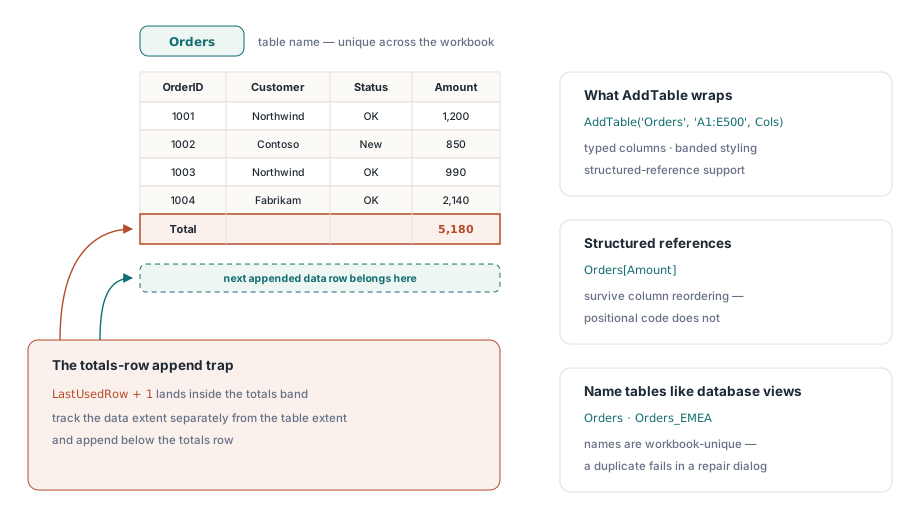
Eine Arbeitsblatttabelle, in Excel-Begriffen das ListObject, hüllt einen Bereich in einen Namen, typisierte Spalten, gebänderte Gestaltung und Unterstützung für strukturierte Verweise. Es ist die Funktion, die eine erzeugte Arbeitsmappe fertig wirken lässt, sobald Nutzer beginnen, sie zu sortieren und zu erweitern. Das Anlegen verläuft in beiden Fassaden symmetrisch, wobei AddTable einen Namen, einen Bereich und eine Spaltenliste nimmt:
var
  Cols: TStringList;
begin
  Cols := TStringList.Create;
  try
    Cols.CommaText := 'OrderId,Customer,Status,Amount,Owner';
    Sheet.AddTable('Orders', 'A1:E500', Cols);
  finally
    Cols.Free;
  end;
end;
Auf der XLSX-Seite stellt das entstehende Tabellenobjekt StyleName bereit (die eingebaute Familie TableStyleMedium2 und ihre Geschwister), dazu Schalter für die Streifen und ein Flag für die Ergebniszeile, das Anlegen der Hausgestaltung ist also eine Eigenschaftszuweisung statt eines manuellen Formatierungsdurchgangs. In alten .xls-Dateien schreibt derselbe Aufruf die BIFF8-Tabellendatensätze, und die Fassade bietet zusätzlich AddPivotTable für Übersichtsansichten aus Zeilen-, Spalten- und Datenfeldern, eine Erinnerung daran, dass "Tabellen" im älteren Format weiter reichen als das OOXML-ListObject. Benennen Sie Tabellen so, wie Sie Datenbanksichten benennen. Nachgelagerter Code, der Orders[Amount] über einen strukturierten Verweis liest, übersteht die Spaltenumordnung, die positionsabhängigen Code zerbricht
Zwei Konventionen ersparen späteres Aufräumen. Excel verlangt, dass Tabellennamen in der gesamten Arbeitsmappe eindeutig sind, ein Generator, der ein Blatt je Region ausgibt, braucht also ein Schema wie Orders_EMEA, statt Orders wiederzuverwenden. Ein Duplikat scheitert nicht beim Schreiben; es taucht als Reparaturdialog auf, wenn der Nutzer die Datei öffnet, also am denkbar schlechtesten Ort. Die andere Konvention betrifft die Ergebniszeile: Ist sie eingeschaltet, sitzt sie direkt unter dem Datenbereich, jeder Code, der später nach dem Muster "letzte belegte Zeile plus eins" anhängt, schreibt also in das Ergebnisband statt dahinter. Führen Sie die Datenausdehnung getrennt von der Tabellenausdehnung, und die Anhänge landen dort, wo Sie es erwarten
Die drei Funktionen fügen sich in Liefergütern zur Dateneingabe natürlich zusammen. Eine Tabelle legt die bearbeitbare Region fest, die Überprüfung schränkt die Spalten ein, in die Nutzer tippen, und ein voreingestellter Filter erspart dem Empfänger die ersten Klicks. Es spricht einiges dafür, einen Filter bereits angewendet auszuliefern, damit die Arbeitsmappe auf den wichtigen Zeilen fokussiert öffnet, solange Sie daran denken, dass die ausgeschlossenen Zeilen weiterhin in der Datei stehen und ein neugieriger Empfänger sie hervorholen kann. Wie Abfrageergebnisse effizient ins Blatt kommen, also die vorgelagerte Hälfte dieser Pipeline, behandelt der Export von Datenbankergebnissen nach Excel aus Delphi, und Arbeitsmappen, in denen Formeln die geprüften Daten zusammenfassen, profitieren von definierten Namen für stabile blattübergreifende Bezüge
Überprüfung, Filter und Tabellen sind der Unterschied zwischen dem Ausliefern eines Wertrasters und dem Ausliefern einer kleinen Anwendung. Die vollständige Referenz zu Regeln, Filtern und Tabellen steht auf der Produktseite der HotXLS Delphi Component