Eine Regel für bedingte Formatierung ist in OOXML zweierlei unter einem Namen. Die Bedingung (ein Vergleich, eine Formel, ein Textabgleich) entscheidet, welche Zellen infrage kommen. Das Aussehen (ein Datensatz für Differenzformatierung, in ECMA-376 dxf genannt) entscheidet, wie diese Zellen aussehen. Der Dialog von Excel verbirgt die Naht, indem er Sie beides auf einmal ausfüllen lässt. HotXLS tut das nicht. Legen Sie aus Delphi eine cellIs-Regel an und lassen Sie den Stil aus, dann ist die Regel gültig, der Bereich stimmt, die Formel liefert genau auf den richtigen Zellen true, und nichts ändert die Farbe, denn die Anweisung der Regel lautete "wahr, male nichts". Diese Lücke zwischen Bedingung und Folge ist das Erste, was stimmen muss, und sie erklärt die meisten Regeln, die in "Regeln verwalten" korrekt aussehen und trotzdem nichts hervorheben
HotXLS schreibt bedingte Formatierung nativ sowohl in BIFF8-Dateien .xls als auch in OOXML-Dateien .xlsx, und dasselbe tut es für Rich-Text-Runs und ein gepooltes Zellstilmodell. Die drei Funktionen teilen mehr Verkabelung, als die flache API-Oberfläche vermuten lässt, und die Stellen, an denen die Ausgabe von der Absicht abweicht, sind meist die Fugen zwischen ihnen
Eine Bedingung braucht eine Folge: der dxf-Stil
Auf dem XLSX-Arbeitsblatt stammen Vergleichsregeln aus AddConditionalFormat, das einen Bereich, einen Operator aus TXLSXCfOperator und eine Formel oder ein Literal nimmt und dann den Index der neuen Regel innerhalb der ConditionalFormats-Auflistung des Blattes zurückgibt. Das Regelobjekt an diesem Index stellt eine Style-Eigenschaft bereit, und dort wohnt die Hervorhebung. Setzen Sie darauf eine Füllung, und passende Zellen nehmen die Füllung an. Lassen Sie sie unberührt, und Sie haben die oben beschriebene unsichtbare Regel gebaut
![Diagramm einer aus Delphi in zwei Hälften gebauten HotXLS-cellIs-Regel: AddConditionalFormat gibt einen Regelindex für die Bedingung zurück, ConditionalFormats[Idx].Style.SetFillBgColor liefert die dxf-Folge, und eine Regel ohne gesetzten Stil validiert einwandfrei und malt nichts](../../assets/media/CfRuleConditionConsequence.svg)
var
  Book: TXLSXWorkbook;
  Sheet: TXLSXWorksheet;
  Idx: Integer;
begin
  Book := TXLSXWorkbook.Create;
  try
    Book.Open('kpi.xlsx');
    Sheet := Book.Sheets[0];

    // Negative Abweichung: hellrote Füllung
    Idx := Sheet.AddConditionalFormat('D2:D200', xlsxCfOpLessThan, '0');
    Sheet.ConditionalFormats[Idx].Style.SetFillBgColor($FFFFC7CE);

    // Doppelte Auftrags-IDs werden genauso markiert
    Idx := Sheet.AddCondFormatDuplicateValues('A2:A200');
    Sheet.ConditionalFormats[Idx].Style.SetFillBgColor($FFFFEB9C);

    // Eigene Formelregel: Zeilen hervorheben, in denen der Istwert 90% des Ziels verfehlt
    Idx := Sheet.AddCondFormatExpression('B2:B200', '$C2<$B2*0.9');
    Sheet.ConditionalFormats[Idx].Style.SetFillBgColor($FFFFC7CE);

    Book.SaveAs('kpi-flagged.xlsx');
  finally
    Book.Free;
  end;
end;
Farben sind hier 32-Bit-ARGB-Werte, $FFFFC7CE ist also das Excel-Hellrot, das Sie aus dem Dialog kennen, mit einem vollständig undurchsichtigen Alpha-Byte vor dem RGB. Jede Regelart, die auf einer Bedingung je Zelle auslöst, folgt derselben Form aus Anlegen und anschließendem Stilsetzen. Die Textabgleiche (AddCondFormatContainsText, AddCondFormatBeginsWith, AddCondFormatEndsWith) geben einen Index zurück, den Sie hinterher mit einem Stil versehen, und ebenso AddCondFormatTop10, AddCondFormatAboveAverage sowie die Erkenner für leere und fehlerhafte Zellen. Lernen Sie das Muster einmal, und die ganze Familie aus Text- und Vergleichsregeln verhält sich gleich
Datenbalken, Farbskalen und Symbolsätze malen sich selbst
Die visuellen Regelarten arbeiten andersherum. Sie tragen ihr Aussehen in der Regeldefinition und ignorieren die Style-Eigenschaft vollständig. Weisen Sie einer Datenbalkenregel eine Füllung zu, und nichts geschieht, was sich wie ein Fehler liest, bis die Systematik einrastet: AddCondFormatDataBar nimmt die Balkenfarbe als direktes Argument, die Farbskalen mit zwei und drei Punkten nehmen ihre Endpunktfarben genauso, und AddCondFormatIconSet wählt einen von 26 Symbolsatztypen wie icsTrafficLights3. Hier gibt es keinen getrennten Stildatensatz zu vergessen, weil es überhaupt keinen getrennten Stildatensatz gibt
Die Parameter, über die sich bei diesen Aufrufen nachzudenken lohnt, sind die Wertanker vom Typ TXLSCfValueKind. Ein Balken- oder Skalenendpunkt kann am Minimum oder Maximum des Bereichs sitzen, an einer literalen Zahl, an einem Prozentwert oder Perzentil oder am Ergebnis einer Formel. Die Vorgaben, Minimum und Maximum des Bereichs, benehmen sich auf hübschen Demodaten und verraten Sie dann an echten Daten mit Ausreißern: Ein einziger Ausbrecher dehnt die Skala und drückt jeden anderen Balken zum Stummel. Wenn ein Dashboard über Zeiträume hinweg gelesen werden soll, verankern Sie die Endpunkte stattdessen an festen Zahlen oder Perzentilen, damit ein halber Balken im März dieselbe Menge bedeutet wie ein halber Balken im April. Ein automatisch skalierter Balken ist nur mit sich selbst vergleichbar
Der XLS-Schreiber deckt vier Regelarten ab, mehr nicht
Die alte BIFF8-Seite ist kein kleineres Spiegelbild der XLSX-Seite; sie ist eine bewusste Teilmenge. Die XLS-Fassade kann genau vier bedingte Regelformen anlegen, Datenbalken, zweifarbige Skalen, dreifarbige Skalen und Symbolsätze, ausgegeben als CF12-Datensätze in den Stream. Sie hat keine Anlege-API für cellIs-, Ausdrucks- oder Textregeln. Regeln dieser Art, die bereits in einer geöffneten Datei leben, werden gelesen, behalten und unverändert zurückgeschrieben, das Öffnen und erneute Speichern einer Kunden-.xls beschädigt also nie eine mitgebrachte Formatierung. Was Sie nicht können, ist eine Schwellenwert-Hervorhebung von Grund auf in eine .xls zu erzeugen. Die Wahl besteht dort darin, sie mit gewöhnlichen, im Code berechneten Zellfüllungen nachzustellen, oder das Liefergut zu einer .xlsx zu machen, wo die ganze Regelfamilie zur Verfügung steht
Das ist eine Randbedingung, die vor der Datenschicht zu klären ist, nicht danach, weil sie die Entscheidung über das Dateiformat für alles Dashboard-Förmige verändert. Ein Team, das .xls aus Kompatibilitätsgründen gewählt hat und dann einen KPI-Bericht mit cellIs-Schwellen spezifiziert, hat zwei Dinge gewählt, die nicht zusammenpassen, und der günstigere Zeitpunkt, das zu merken, ist die Formatentscheidung und nicht die dritte Bauwoche
Regelstapel, Priorität und überlappende Bereiche
Echte Dashboards führen selten eine Regel je Bereich. Eine Abweichungsspalte trägt vielleicht einen Datenbalken für die Größenordnung, eine cellIs-Regel für die harte Schwelle und über beiden eine zeilenweite Ausdrucksregel für Eskalationen. Jedes TXLSXConditionalFormat stellt einen Priority-Wert bereit, und Excel löst konkurrierende Regeln in der Reihenfolge der Priorität auf. Wollen zwei Regeln dieselbe Zelle malen, entscheidet eine Zahl, die Sie setzen, wer gewinnt, und nicht die Reihenfolge, in der ein Prüfer zufällig durch den Dialog "Regeln verwalten" scrollt
Behandeln Sie die Priorität so, wie ein Zeichenprogramm die Stapelreihenfolge behandelt. Vergeben Sie sie absichtlich überall dort, wo zwei Regeln dieselben Zellen erreichen können, und lassen Sie Lücken zwischen den Werten, damit sich eine spätere Regel ohne Neunummerierung des Rests einfügt. Wo Regeln nicht kollidieren können, etwa ein auf Spalte E begrenzter Datenbalken und eine auf Spalte G begrenzte Textregel, genügt die Anlegereihenfolge, und die Priorität ist die Aufmerksamkeit nicht wert. Investieren Sie diese Aufmerksamkeit lieber in Bereichsgrenzen, denn die teuren Fehler hier sind fast nie Prioritätsumkehrungen. Es sind Bereiche wie B2:B200 in einem Bericht, der auf 350 Zeilen gewachsen ist, wo der ungedeckte Schwanz als schlichte Zellen erscheint, die genau wie gesunde Daten aussehen. Leiten Sie jeden Regelbereich aus demselben Wert für die endgültige Zeilenzahl ab, der auch Diagrammreihen und Gültigkeitsbereiche anderswo in der Arbeitsmappe steuert, und der Schwanz fällt nicht mehr ab
Eine Prüfgewohnheit verdient ihren Platz. Öffnen Sie die Datei nach der Erzeugung in Excel, markieren Sie den formatierten Bereich und gehen Sie "Regeln verwalten" bei jeder Vorlagenänderung einmal durch. Bedingte Formatierung ist einer der wenigen Bereiche, in denen der einzige maßgebliche Renderer die Anwendung ist, die die Datei konsumiert, ein Unit-Test über das XML beweist also, dass die Regel geschrieben wurde, nicht dass Excel sie so malt, wie Sie es meinten. Eine Minute Hinsehen schließt diese Lücke
Rich Text: viele Formate in einer Zelle
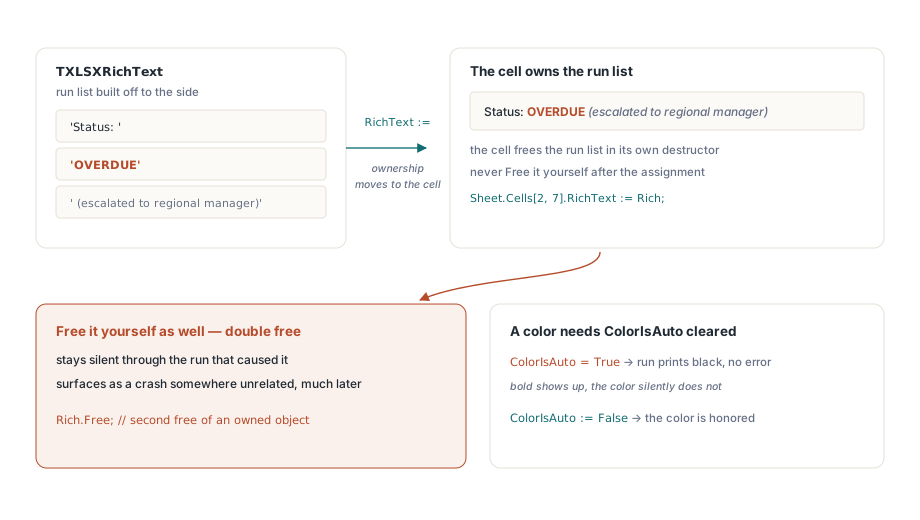
Eine Rich-Text-Zelle im XLSX-Modell hält eine Liste von Runs, wobei jeder Run eine Textspanne samt eigener Schriftattribute ist. Sie bauen die Liste daneben als TXLSXRichText-Objekt auf, fügen ihr Runs hinzu und hängen dann das Ganze an eine Zelle. Die Besitzregel ist der Teil, der zubeißt. Eine Zuweisung an Cell.RichText übergibt den Besitz dieses Objekts an die Zelle, und die Zelle gibt es bei ihrer eigenen Zerstörung frei. Geben Sie es zusätzlich selbst frei, haben Sie eine doppelte Freigabe, die Sorte, die während des verursachenden Laufs still bleibt und viel später als Absturz an ganz anderer Stelle auftaucht
var
  Rich: TXLSXRichText;
  Run: TXLSXRichTextRun;
begin
  Rich := TXLSXRichText.Create;
  Rich.AddRunText('Status: ');
  Run := Rich.AddRunText('OVERDUE');
  Run.Bold := True;
  Run.Color := $FFC00000;
  Run.ColorIsAuto := False;
  Run := Rich.AddRunText(' (escalated to regional manager)');
  Run.Italic := True;
  Sheet.Cells[2, 7].RichText := Rich;   // Besitz geht an die Zelle über: nicht freigeben
end;
Das ausdrückliche ColorIsAuto := False ist keine beliebige Zierde. Ein Run trägt ein Flag für automatische Farbe, und eine Farbzuweisung wird erst beachtet, wenn dieses Flag zurückgesetzt ist. Setzen Sie Color und vergessen Sie ColorIsAuto, kommt der Run fett, aber hartnäckig schwarz heraus, ohne Fehler, der auf die Ursache zeigt. Runs unterstützen außerdem Durchstreichen, die Unterstreichungsvarianten und vertikale Ausrichtung für Hoch- und Tiefstellung, während PlainText die ganze Liste wieder zu einem einzigen String verflacht, wenn Sie den Textinhalt exportieren oder vergleichen müssen
Rich Text auf Zellebene gibt es nur in XLSX. Die XLS-Fassade hat keine öffentliche API, um ihn zu schreiben, wobei Runs dort über TextRuns an Kommentaren und Textfeldern verfügbar sind und aus einer vorhandenen .xls gelesene Rich Strings einen Rundlauf unversehrt überstehen. Der Sog ist derselbe wie bei der bedingten Formatierung: Alles, was Formate innerhalb einer Zelle mischt, gehört in den XLSX-Schreiber
Der Stil-Pool und der Off-by-One, der in Produktion geht
Schlichte Zellgestaltung läuft im XLSX-Modell über gepoolte Auflistungen an der Arbeitsmappe. Fonts.Add, Fills.AddSolid und Borders.Add tragen jeweils eine Definition ein und geben ihren Index im Pool zurück. Diese Indizes sind 0-basiert. Die Eigenschaften auf Zellseite, die sie konsumieren, etwa FontIndex, reservieren 0 für "Standard", der Wert, den Sie einer Zelle zuweisen, ist also der Pool-Index plus eins:
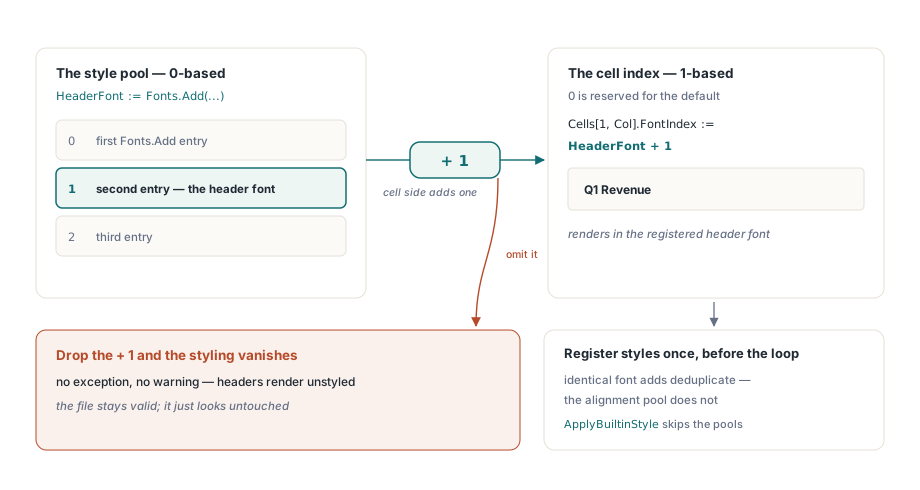
HeaderFont := Book.Fonts.Add('Calibri', 11, True, False);  // Pool-Index, 0-basiert
for Col := 1 to 6 do
  Sheet.Cells[1, Col].FontIndex := HeaderFont + 1;          // Zellindex, 1-basiert
Lassen Sie das + 1 weg, und jede Kopfzeile fällt auf die Standardschrift zurück. Es gibt keine Ausnahme und keine Warnung, nur eine Arbeitsmappe, die aussieht, als hätte sie niemand gestaltet. Der Fehler zweiter Ordnung versteckt sich in der Schleife: Fonts.Add einmal je Zeile aufzurufen. Identische Schriftdefinitionen werden entdoppelt, die Datei ist also nicht beschädigt, aber die Arbeit ist vergeudet, und gerade der Ausrichtungspool gibt bei jedem Aufruf ein frisches Objekt zurück, statt Duplikate zusammenzufalten. Bauen Sie die Handvoll Stile einmal vor der Schleife und verwenden Sie ihre Indizes wieder. Bei Berichten mit hunderttausend Zeilen ist diese eine Änderung einer der Hebel, die in Leistungsoptimierung für große Arbeitsmappen mit HotXLS behandelt werden. Wenn Sie nur ein fertiges semantisches Aussehen brauchen, stellen beide Fassaden ApplyBuiltinStyle auf Bereichen bereit, was auf die eingebauten Stile Gut, Schlecht, Neutral und die Akzentstile von Excel abbildet, ohne dass Sie die Pools überhaupt anfassen
Bedingte Formatierung, Rich Text und gepoolte Stile sind die letzte Meile eines Berichts, angewendet, nachdem Datenmodell und Layout feststehen, und diese früheren Stufen behandelt vorlagenbasierte Berichtserzeugung mit HotXLS. Die vollständige Referenz zu Regeln, Runs und Stilen finden Sie auf der Produktseite der HotXLS Delphi Component