Benennen Sie in einer erzeugten Arbeitsmappe ein Blatt von "Summary" in "Overview" um, und jeder interne Hyperlink, der auf Summary!A1 zeigte, führt nirgendwohin mehr. Keine Ausnahme beim Speichern, keine beim Öffnen. Der Link wird weiterhin dargestellt, sieht weiterhin anklickbar aus und löst still zu nichts auf. Dieselbe Sorte Bruch zeigt sich nach einer Speichern-unter-Umwandlung oder einem Rundlauf zwischen .xls und .xlsx, wenn ein Kommentar eine Spalte daneben landet oder ein relativer Link sein Ziel verliert. Beide Funktionen tragen Prüfzustand, auf den echte Menschen reagieren, wenn sie also brechen, bleibt der Fehler unsichtbar, bis ein Prüfer klickt und nichts geschieht
Das ist der praktische Grund, warum Kommentare und Hyperlinks mehr Sorgfalt verdienen, als ihr kosmetisches Erscheinungsbild vermuten lässt. HotXLS gibt Delphi- und C++Builder-Code direkten Schreibzugriff auf beides, in XLS und XLSX, ohne Excel-Automatisierung dazwischen. Die Kehrseite dieser Kontrolle ist Verantwortung: Die Bibliothek schreibt genau die Ziele, die Sie ihr übergeben, und prüft keines davon, einen Prüfablauf intakt zu halten ist also Aufgabe Ihres Codes, nicht die von Excel
Zellkommentare als maschinell geschriebene Prüfvermerke
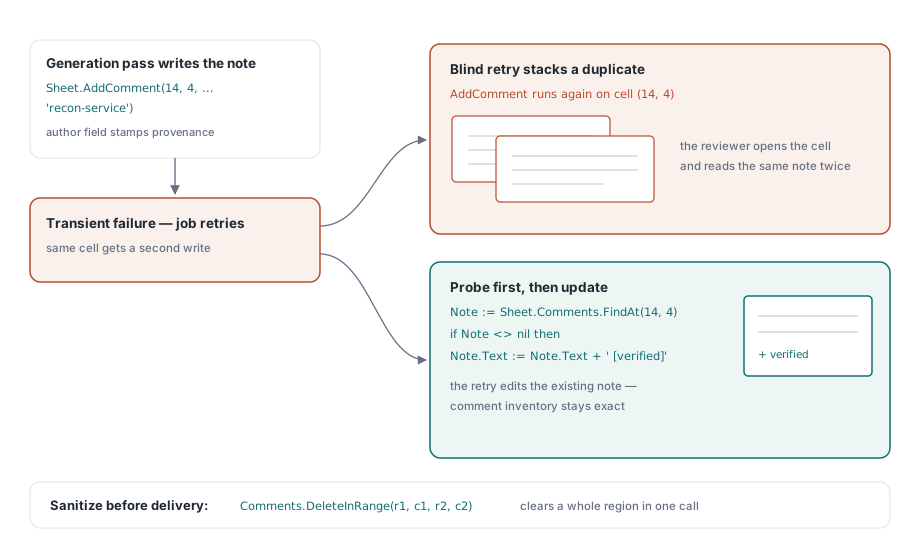
Im XLSX-Klassenmodell ist ein Kommentar ein Objekt auf Arbeitsblattebene: Er kennt seine Zeile, seine Spalte, einen Autor und einen Textkörper. Das Autorenfeld verdient seinen Platz. Wenn eine von Ihrem Code erzeugte Arbeitsmappe durch eine Prüfkette wandert, lautet die erste Frage eines Auditors, wer eine bestimmte Notiz geschrieben hat, und eine Notiz ohne Autor beantwortet diese Frage mit einer Leerstelle. Versehen Sie erzeugte Kommentare mit einer Dienstidentität, damit die Herkunft nie mehrdeutig ist
var
  Book: TXLSXWorkbook;
  Sheet: TXLSXWorksheet;
  Note: TXLSXComment;
begin
  Book := TXLSXWorkbook.Create;
  try
    Book.Open('reconciliation.xlsx');
    Sheet := Book.Sheets[0];

    // Notiz mit Autor an der angepassten Zahl
    Sheet.AddComment(14, 4, 'Manual adjustment: late FX rate, see ticket FIN-2214',
      'recon-service');

    // Eine vorhandene Notiz aktualisieren, statt eine zweite zu stapeln
    Note := Sheet.Comments.FindAt(14, 4);
    if Note <> nil then
      Note.Text := Note.Text + ' [verified 2026-06-11]';

    Book.SaveAs('reconciliation-reviewed.xlsx');
  finally
    Book.Free;
  end;
end;
Die FindAt-Sonde wiegt schwerer, als sie aussieht. Ein Stapeljob, der nach einem vorübergehenden Fehler erneut anläuft, ruft bereitwillig ein zweites Mal AddComment auf einer Zelle auf, die er bereits kommentiert hat, und die Zelle endet mit zwei gestapelten Notizen, die niemand bestellt hat. Sondieren Sie zuerst mit FindAt und aktualisieren Sie das zurückgegebene Objekt. Die Comments-Auflistung stellt außerdem DeleteAt und DeleteInRange bereit. Zu der Bereichsvariante greifen Sie, wenn Sie eine Arbeitsmappe säubern, bevor sie das Haus verlässt: Interne QA-Anmerkungen aus einer ganzen Region zu entfernen ist ein einziger Aufruf statt einer handgeschriebenen Schleife über Zellen
Externe URLs und Sprünge in der Arbeitsmappe sind verschiedene APIs
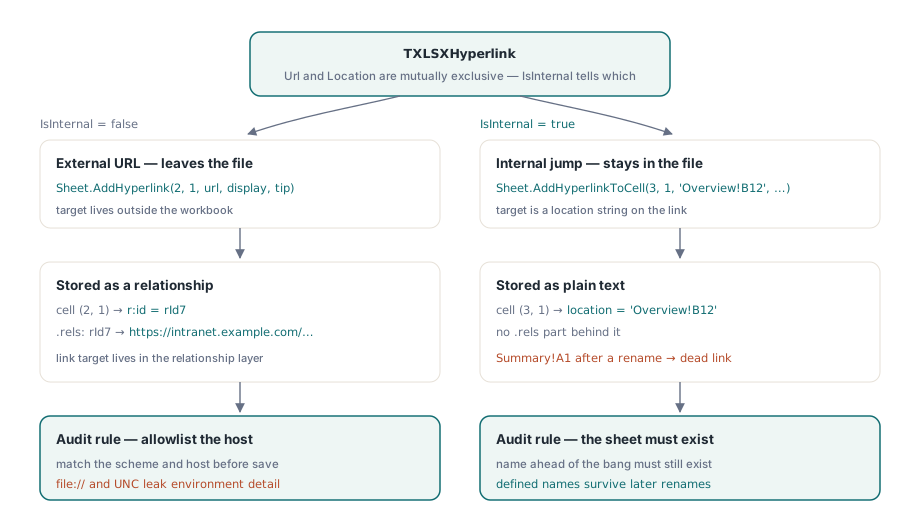
OOXML legt die beiden Linkarten an verschiedenen Stellen ab. Eine externe URL wird zu einem Beziehungseintrag im .rels-Teil des Blattes, wobei die Zelle über eine Id auf die Beziehung zeigt. Ein interner Sprung berührt die Beziehungsebene überhaupt nicht; er ist ein schlichter Ortsstring wie Summary!A1, direkt am Link gespeichert. HotXLS hält diesen Unterschied in der API sichtbar, statt eine einzelne Methode zu überladen, was bedeutet, dass Sie den richtigen Aufruf wählen, indem Sie wissen, wo das Ziel liegt:
Sheet.Cells[2, 1].Value := 'Source record';
Sheet.AddHyperlink(2, 1, 'https://intranet.example.com/records/2214',
  'Open record 2214', 'ERP source entry');

Sheet.Cells[3, 1].Value := 'Totals';
Sheet.AddHyperlinkToCell(3, 1, 'Overview!B12', 'Jump to totals');
Am entstehenden TXLSXHyperlink-Objekt schließen sich Url und Location gegenseitig aus, und IsInternal sagt Ihnen, welches der beiden gefüllt ist. Dieses Flag prüfen Sie, wenn Sie die Links einer geöffneten Arbeitsmappe inventarisieren und "verlässt die Datei" und "bleibt in der Datei" nach verschiedenen Regeln behandeln müssen: Ein externer Host trifft vielleicht auf eine Positivliste, während ein internes Ziel nur ein existierendes Blatt benennen muss. Hinter internen Links stehen keine Beziehungsteile, was sie auch beim massenhaften Umschreiben billiger macht
Der Bruch aus der Einleitung wohnt ganz auf der internen Seite, und er folgt aus einer Tatsache: Ein Ortsstring ist kein geparster Bezug. HotXLS schreibt genau den Text, den Sie ihm übergeben, und nichts richtet diesen Text neu aus, wenn ein Blatt später umbenannt wird. Zwei Verteidigungen halten in der Praxis. Die erste ist Disziplin bei der Reihenfolge: Benennen Sie jedes Blatt um, bevor Sie einen einzigen Link erzeugen, und behandeln Sie Blattnamen danach als eingefrorene Bezeichner. Die zweite ist robuster und übersteht auch nachträgliche Umbenennungen. Richten Sie den Link auf einen definierten Namen auf Arbeitsmappenebene statt auf eine rohe Sheet!Cell-Adresse, denn Excel schreibt die Definition eines Namens um, wenn sich das zugrunde liegende Blatt ändert, der Link fährt also automatisch mit. Dieser zweite Ansatz passt natürlich zu den Techniken aus definierte Namen und blattübergreifende Formeln in HotXLS
Die XLS-Seite: dieselben Begriffe, ältere Leitungen
Die BIFF8-Fassade hängt Kommentare an Bereiche statt an eine Auflistung auf Arbeitsblattebene. Sie rufen AddComment auf einem IXLSRange auf und bekommen einen TXLSComment zurück; die Comment-Eigenschaft des Bereichs liest eine vorhandene Notiz, und ClearComments löscht sie. Die scharfe Kante ist hier die Position. Ein TXLSComment gibt seine eigene Zeile und Spalte nicht öffentlich preis, die naheliegende Schleife "jeden Kommentar durchgehen und melden, wo er sitzt" läuft also gegen die API. Sie müssen bei den Zellen anfangen. Steuern Sie die Prüfung entweder über die Liste der Adressen, die Sie kommentiert haben, oder führen Sie beim Schreiben Ihr eigenes Positionsprotokoll, denn das Kommentarobjekt sagt Ihnen hinterher nicht, wo es wohnt
var
  Book: IXLSWorkbook;
  Sheet: IXLSWorksheet;
  Remark: TXLSComment;
begin
  Book := TXLSWorkbook.Create;
  Sheet := Book.Sheets.Add;
  Sheet.Name := 'Review';
  Sheet.Cells.Item[5, 2].Value := 4821.50;

  Remark := Sheet.Cells.Item[5, 2].AddComment('Awaiting sign-off from controller');
  Remark.Visible := True;   // die Notiz beim ersten Ansehen aufgeklappt zeigen

  Sheet.AddHyperlink(7, 2, 'https://intranet.example.com/signoff/4821',
    'Sign-off form', 'Opens the controller queue');
  Book.SaveAs('review.xls');
end;
Visible auf True zu setzen ist die alte Art, eine Notiz unübersehbar zu machen: Der gelbe Kasten bleibt auf dem Blatt offen, statt auf ein Überfahren mit der Maus zu warten. TXLSComment geht einen Schritt weiter als sein XLSX-Gegenstück, indem es TextRuns bereitstellt, sodass eine einzelne Notiz eine fette Warnung neben einer schlichten Erklärung tragen kann, eine Formatierung, die die XLSX-Kommentar-API so nicht anbietet. Hyperlinks kommen auf dieser Seite über drei aufeinander aufbauende Überladungen herein (nur Adresse, dann mit Anzeigetext, dann mit einem Bildschirmhinweis) und werden über die HyperLinks-Auflistung des Arbeitsblatts zurückgelesen, wo jeder Link Address, SubAddress, DisplayText und ScreenTip zeigt
Ein Prüfindexblatt schlägt verstreute Notizen
Jenseits von etwa einem Dutzend Anmerkungen hört das Lesen per Mausüberfahrung still auf zu skalieren. Notizen häufen sich auf Blättern, die ein Prüfer nie öffnet, und ausgerechnet die wichtigsten übersieht man am leichtesten. Die Struktur, die sich am besten gehalten hat, ist ein erzeugtes Indexblatt: eine Zeile je kommentierter Stelle, mit Blattname, Zelladresse, Autor und einem kurzen Auszug der Notiz. Die letzte Spalte trägt einen mit AddHyperlinkToCell gebauten internen Hyperlink, der direkt zur kommentierten Zelle springt. Jetzt liest der Prüfer eine Liste hinunter, statt über ein Raster zu jagen, und die Zeilenzahl dieses Index dient zugleich als Ihr Kommentarbestand für den Prüfdurchgang weiter unten
Der Index ist billig zu bauen, weil Ihr Generator ohnehin jede Position kennt, die er angefasst hat. Hängen Sie beim Schreiben jedes Kommentars ein Tupel aus (Blatt, Zeile, Spalte, Autor, Zusammenfassung) an eine Liste an und geben Sie das Indexblatt zuletzt aus, damit seine Zeilenzahl vor dem Speichern endgültig ist. Zwei Verfeinerungen zahlen sich aus: Ordnen Sie den Index nach Schweregrad oder nach Blatt statt nach Einfügereihenfolge, und setzen Sie einen Rücksprunglink in die Indexkopfzeile, damit ein Prüfer nach jedem Eintrag wieder nach oben springen kann. Weil interne Links schlichte Ortsstrings ohne Beziehungsebene dahinter sind, kostet selbst ein Index mit tausend Zeilen fast nichts an Dateigröße oder Speicherzeit
Dasselbe Blatt zahlt sich auf dem Rückweg erneut aus. Wenn die geprüfte Arbeitsmappe zurückkommt, liest Ihr Code Statuswerte, die in Zellen neben den Indexzeilen getippt wurden, statt jedes Blatt erneut nach möglicherweise veränderten Kommentaren zu durchsuchen. Eine Spalte strukturierter Statuszellen lässt sich sauber auswerten; ein Streufeld freier Textnotizen nicht
Ein Prüfdurchgang vor der Auslieferung, der den Bruch wirklich fängt
Keine dieser APIs prüft ein Ziel. Ein Link auf ein gelöschtes Blatt, ein falsch geschriebener Intranet-Host, eine im letzten Quartal abgeschaltete Dateifreigabe: Alle speichern sie ohne einen Mucks. ECMA-376 legt fest, wie ein Link abgelegt wird, nicht dass er auf irgendetwas auflöst. Eine Arbeitsmappe, die Prüfmetadaten trägt, verdient daher eine kurze eigene Prüfstufe, ausgeführt direkt vor SaveAs:
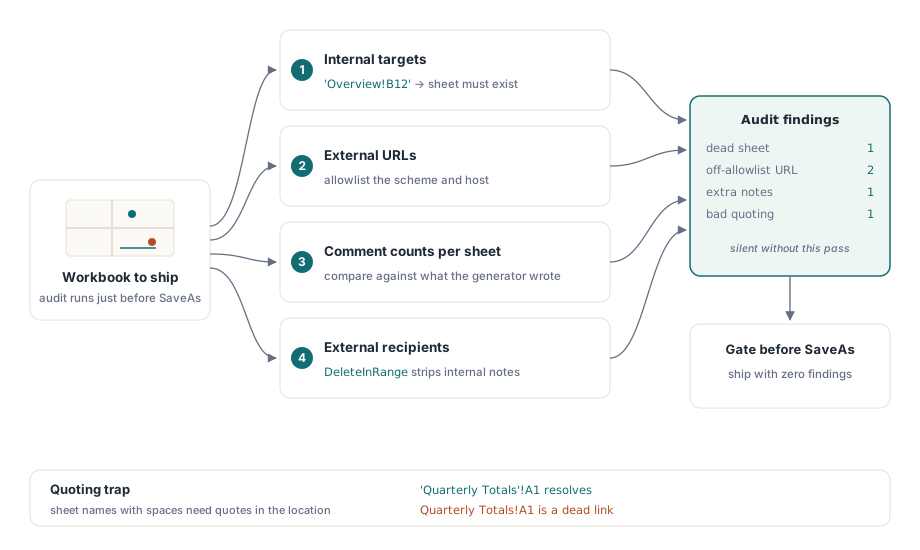
- Sammeln Sie jeden internen Ort, der bei der Erzeugung geschrieben wurde, und bestätigen Sie, dass der Blattname vor dem Ausrufezeichen noch in der Blattauflistung der Arbeitsmappe existiert
- Prüfen Sie externe URLs gegen eine Positivliste von Schemata und Hosts. Nackte
file://- und UNC-Pfade verraten Umgebungsdetails und brechen in dem Moment, in dem die Datei Ihr Netz verlässt - Zählen Sie Kommentare je Blatt und vergleichen Sie mit dem, was Ihr Generator schreiben wollte. Ein Wiederholungslauf, der die Notizen verdoppelt hat, taucht hier auf statt im Postfach des Prüfers
- Entfernen Sie nur intern gedachte Anmerkungen mit
DeleteInRange, sobald der Empfänger außerhalb der Organisation sitzt
Teams, die ihre Arbeitsmappen aus einer Datenschicht bauen, können diese Stufe in denselben Pipeline-Schritt falten, der bereits die Daten prüft, sodass die Metadatenkontrolle kostenlos mitfährt. Die Mechanik ist die in Export von Datenbankabfrageergebnissen in Excel-Berichte beschriebene, nur auf Links und Kommentare statt auf Zeilen gerichtet
Ein Detail der Anführungszeichen bringt die Leute zu Fall, wenn sie Ortsstrings von Hand bauen. Ein Blatt, dessen Name ein Leerzeichen enthält, muss innerhalb des Ortes in Anführungszeichen stehen, genau so, wie die Bearbeitungsleiste es tut: 'Quarterly Totals'!A1, nicht Quarterly Totals!A1. HotXLS wendet dieselben Regeln an, die die Formel-Engine für blattübergreifende Bezüge nutzt, wenn ein Link also in einer Arbeitsblattformel funktioniert, funktioniert seine Zitierweise auch hier. Übergeben Sie einen Namen mit Leerzeichen ohne Anführungszeichen, bekommen Sie denselben stillen toten Link, vor dem die Einleitung gewarnt hat
Kommentare und Hyperlinks sind die Teile einer erzeugten Arbeitsmappe, auf die Prüfer ohne zweiten Blick reagieren, und genau deshalb richtet ein Ziel, das ins Leere zeigt, echten Schaden an, bevor es jemandem auffällt. Bauen Sie den Prüfdurchgang einmal, lassen Sie ihn vor der Auslieferung über jede Arbeitsmappe laufen, und der Prüfablauf bleibt über Umbenennungen und Umwandlungen hinweg intakt. Die vollständige API-Oberfläche für die XLS- wie die XLSX-Fassade ist auf der Produktseite der HotXLS Delphi Component dokumentiert