PDFium 组件拆分 PDF 时提供了一个方法 ImportPages。无论你要抽取单页、按任意边界切分,还是按文档书签结构分段,核心都在于把哪些页放入每个输出文件里,执行机制保持一致,先学明白这一点就能少走很多弯路
拆分循环的工作方式
无论怎样拆分源文档,模式都一致。先创建一个新的 TPdf 实例,对它调用 CreateDocument 初始化空 PDF,再用 ImportPages 导入目标页面,调用 SaveAs 保存,然后在下次循环前把 Active 重置为 False。很多人会漏掉最后这步,CreateDocument 不会自动关闭内存中的旧文档,所以在再次调用前必须先保存并显式复位。外层复用同一个 TPdf 实例可以减少大任务下的分配开销
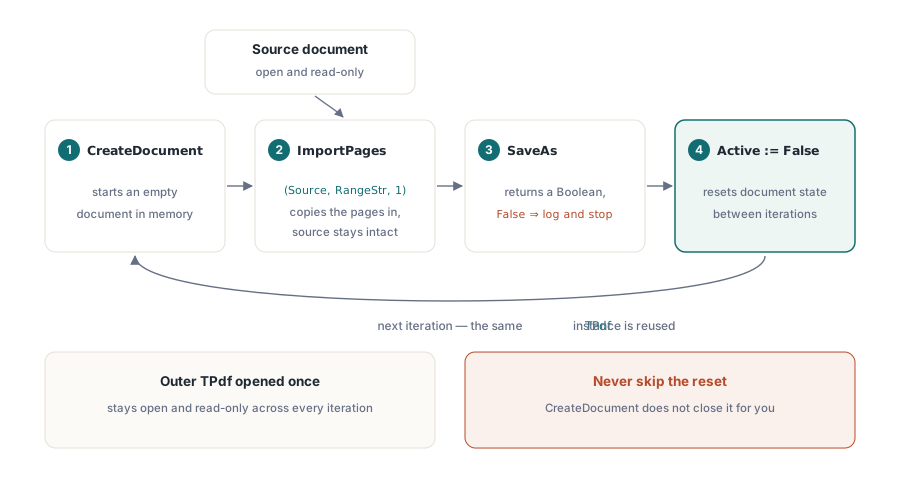
下面是按页拆分的精简示例
procedure SplitIntoPages(Source: TPdf; const OutputDir: string);
var
  I: Integer;
  PdfOut: TPdf;
  OutFile: string;
begin
  PdfOut := TPdf.Create(nil);
  try
    for I := 1 to Source.PageCount do
    begin
      PdfOut.CreateDocument;

      // Range 是 1-based 页码字符串;插入点 1 = 第一位置
      if not PdfOut.ImportPages(Source, IntToStr(I), 1) then
        raise Exception.CreateFmt('Failed to import page %d', [I]);

      OutFile := OutputDir + '\page_' + Format('%.4d', [I]) + '.pdf';
      if not PdfOut.SaveAs(OutFile) then
        raise Exception.Create('Failed to save ' + OutFile);

      PdfOut.Active := False;   // 下次 CreateDocument 前重置
    end;
  finally
    PdfOut.Free;
  end;
end;
ImportPages 的 Range 参数使用 PDFium 的内部字符串格式:以英文逗号分隔的页码或以连字符表示范围,且都为 1-based。'3' 代表第 3 页,'1-5' 代表 1 到 5 页,'2,5,8' 代表 2、5、8 三页。第三个参数是目标文档中的插入位置,传入 1 会把导入内容放在空文档开头,这正是这里需要的行为
按页码范围拆分
当调用方给出像 1-12,13-24,25-36 这样的范围串时,把它切成起止对后复用同一循环即可
procedure SplitByRanges(Source: TPdf; const RangeList: array of string;
  const OutputDir: string);
var
  I: Integer;
  PdfOut: TPdf;
  OutFile: string;
begin
  PdfOut := TPdf.Create(nil);
  try
    for I := 0 to High(RangeList) do
    begin
      PdfOut.CreateDocument;
      if not PdfOut.ImportPages(Source, RangeList[I], 1) then
        raise Exception.Create('Invalid page range: ' + RangeList[I]);
      OutFile := Format('%s\section_%d.pdf', [OutputDir, I + 1]);
      if not PdfOut.SaveAs(OutFile) then
        raise Exception.Create('Failed to save ' + OutFile);
      PdfOut.Active := False;
    end;
  finally
    PdfOut.Free;
  end;
end;
在进入 ImportPages 前做校验很有价值。若范围里出现超出 Source.PageCount 的页码,ImportPages 返回 False,不会抛异常,也不会自动产出可从文件名判断的明显错误文件。因此要检查 SaveAs 的返回并单独记录失败,否则空白输出不一定会被立刻发现
按书签边界拆分
第三种方式是直接使用文档内的书签结构。每个顶级书签都有目标页号,定义的区段从该页开始,到下一个书签页号减 1 结束;最后一个书签则延续到文档末尾
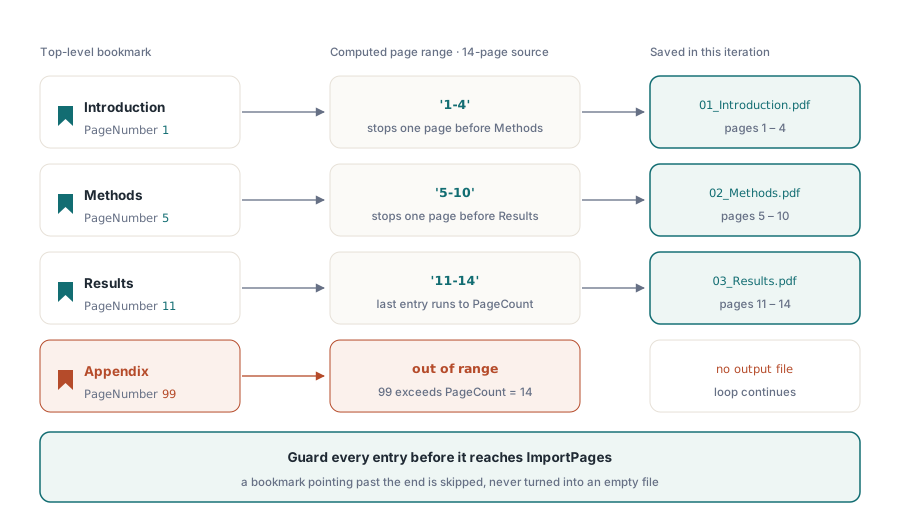
procedure SplitByBookmarks(Source: TPdf; const OutputDir: string);
var
  Bm: TBookmarks;
  I, StartPage, EndPage: Integer;
  PdfOut: TPdf;
  RangeStr, OutFile, SafeTitle: string;
begin
  Bm := Source.Bookmarks;
  if Length(Bm) = 0 then
    Exit;

  PdfOut := TPdf.Create(nil);
  try
    for I := 0 to High(Bm) do
    begin
      StartPage := Bm[I].PageNumber;
      if I < High(Bm) then
        EndPage := Bm[I + 1].PageNumber - 1
      else
        EndPage := Source.PageCount;

      if (StartPage < 1) or (EndPage < StartPage) then
        Continue;

      RangeStr := Format('%d-%d', [StartPage, EndPage]);

      PdfOut.CreateDocument;
      if not PdfOut.ImportPages(Source, RangeStr, 1) then
      begin
        PdfOut.Active := False;
        Continue;   // 跳过格式错误的节,而不是写入空文件
      end;

      SafeTitle := StringReplace(Bm[I].Title, '/', '_', [rfReplaceAll]);
      SafeTitle := StringReplace(SafeTitle, ':', '_', [rfReplaceAll]);
      OutFile := Format('%s\%02d_%s.pdf', [OutputDir, I + 1, SafeTitle]);
      if not PdfOut.SaveAs(OutFile) then
        raise Exception.Create('Failed to save ' + OutFile);

      PdfOut.Active := False;
    end;
  finally
    PdfOut.Free;
  end;
end;
文档没有书签不应当视作错误,只说明该模式无效,可通过 Length(Bm) = 0 分支静默返回。真正该报告的问题是书签页码越界,这通常发生在文档删页后没有同步书签的异常文件中。StartPage 与 EndPage 的边界检查就是为这类脏数据保留的
输出命名与 Active 重置
书签名经常包含在 PDF 字符串中合法但不适合做文件名的字符。至少要替换正斜杠、反斜杠和冒号,Windows 还要额外处理 *、?、"、<、> 与 |,固定字符循环替换即可,无需借助正则
每次循环末尾的 Active := False 是关键约定。若 Active 在下一次 CreateDocument 之前仍是 True,上一次的输出文档虽然还在内存中,但未被可靠地关闭或保存,行为定义不明确,因此必须在每次循环间显式重置。把它视为 try/finally 的伙伴:后者负责释放外层对象,前者负责清理内层文档状态
这种模式下,拆分过程中只会同时持有一个输出文档,内存占用保持平稳。源文档始终保持打开且只读,ImportPages 将页面数据复制到新文档而不改写源。若源文档加密,先用密码打开它,拆分结果通常会是未加密的副本,方便分发给多个接收方
再强调一次 SaveAs。它返回 Boolean,例如输出目录不存在、路径包含非法字符或磁盘满都会返回 False 而不抛异常。批量拆分 200 页为 200 个文件时,某页静默失败很容易被忽略,最好每次记录返回值,并在结束时和预期总数核对
本文展示的 ImportPages 与 CreateDocument 均属于 PDFium 组件 的功能范围,支持 Delphi 与 C++Builder 使用