PDF 页面里是不存像素的,它也不像 SVG 那样存着一棵形状对象树。它存的是一段程序。页面上的每一条线、每一道曲线、每一块填充,还有每一张贴上去的图片,全都是内容流(content stream)里一长串操作符从上到下挨个对着当前图形状态(graphics state)一通操作猛如虎的结果。只要你把这条死理给咽下去,这格式里绝大多数那些看起来像闹鬼一样的奇葩事就全都有了解释:为啥非得在路修好了之后再跑出一个专门的绘制操作符来上色,为啥要是你忘了加个括号(状态保护),颜色和线宽就会像瘟疫一样从上一个形状传染到下一个,为啥明明是同一套画画的代码,只要前头稍微动了下手脚(坐标变换),画出来的东西就能飞到十万八千里外去。这就带你在 ISO 32000 规范定下的这套执行模型里溜达一圈:让你见识见识当你扒开一个内容流时到底会撞见哪些操作符,以及那些决定最终到底是个啥玩意儿会落在页面上的死规矩
内容流就是一堆后缀字节码
内容流说白了就是一长条扁平的字节串,前头排着操作数(operands),后头跟着操作符(operators)。操作数负责先登场,而那个负责把它吃干抹净的操作符总是拖到最后才露脸,这跟我们平时见惯的函数调用正好是反着来的,倒是个纯正的栈机(stack machine)做派:先把数字全给推上去,然后再喊动作指令。这里头没啥嵌套,没有花里胡哨的表达式语法,更没啥变量。随便画个三角形的轮廓,在这儿就得写成这五行破代码:
100 100 m    % moveto:在 (100, 100) 这个坐标点上另起一条子路径
200 200 l    % lineto:甩出一条线段连到 (200, 200) 去
300 100 l    % lineto:再甩出一条线段连到 (300, 100) 去
h            % closepath:把线给拉回到起点,闭门谢客
S            % stroke:拿笔沿着这条路径的轮廓画上一圈
这些操作符之所以长得这么抠门(短小),那是有意为之的。一个真实的页面上随随便便就挤着成千上万个这玩意儿,通常还会被 FlateDecode 给狠狠压缩一把。这种抠门到极致的代价就是,这流里头压根就没给你留哪怕一点儿能供你查询的结构:阅读器根本没法开口问“这页的标题藏在哪儿”,它唯一能干的就是蒙着头把这程序跑完,然后瞪大眼睛看墨水到底呲到了哪儿。这正是为啥想从随便哪个 PDF 里扒拉出点文字来,会难得让人想撞墙的根本原因
原点死死钉在左下角,Y 轴更是反常地往天上爬
在去谈论任何坐标之前,你得先搞清楚 (0, 0) 这个点到底在哪儿蹲着。PDF 把这原点死死钉在了页面的左下角,X 轴向右边溜达,Y 轴则是一路往天上爬越往上越大,量地的尺子用的是磅,而且是 1 英寸换 72 磅(ISO 32000-2 规范第 8.3.2 节)。要是换到一张美式信纸(US Letter)上,它最顶上的那条边可是踩在 y = 792 上,绝不是 y = 0。但凡是个在屏幕画图堆里摸爬滚打出来的老兵,那帮人的原点全在左上角而且 Y 轴是一路往下砸的,一上来绝对会按着老皇历把第一条线直接画到页面的裤裆底下。另外,这单位还是个六亲不认的主,它压根不管你到底是用啥玩意儿来展示:不管是挤在手机屏幕上,还是拿到高端的照排机上去出图,72 个单位永远死死地等于一英寸
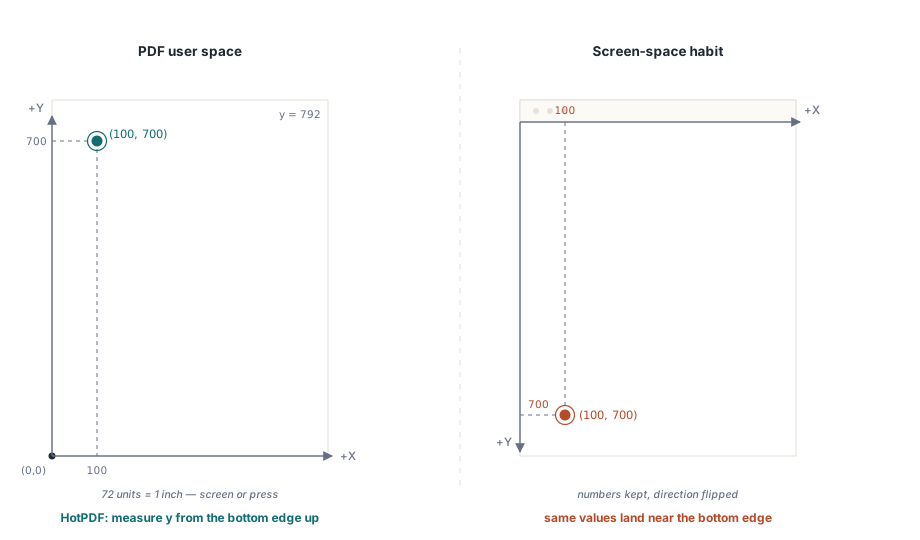
绝大多数负责在页面上画画的库,全都是原封不动地照搬了这套老规矩。就拿 HotPDF 来说,它的 TextOut 和那些画路径的调用,全都是从左下角开始拿着磅尺量出来的,所以你要是扔给它一个快赶上页面身高那么大的值,那内容稳稳当当就会出现在页面顶端:
// HotPDF,在 Delphi 里头:y 值是从页面的脚底板往上量出来的,单位是磅
Pdf.CurrentPage.SetLineWidth(2.0);
Pdf.CurrentPage.MoveTo(100, 700);   // 这点大概就在页面的脑门附近
Pdf.CurrentPage.LineTo(300, 700);
Pdf.CurrentPage.Stroke;             // 库在这儿就会偷偷吐出 moveto/lineto/stroke 那套操作符
这套调用连招最后被编译出来,不偏不倚正好就是上面提到的那几个 m、l 和 S 操作符。这些库说白了就是一个帮你在内容流里敲键盘的打字员,仅此而已,只有摸清了它暗地里到底吐出了些啥,当一个形状莫名其妙地飞到了一个连你都找不着北的犄角旮旯时,你才能顺藤摸瓜找出猫腻
先老老实实把路给铺好,然后再上色
PDF 把铺路(路径构建)和上色(路径绘制)给劈成了两半,这绝对不是在瞎矫情。你得先用一堆铺路操作符把形状给勾勒出来,这会儿纸上连根毛的痕迹都不会有,最后再甩出一个上色操作符,由它来决定到底该拿这堆铺好的路干点啥。还是同一个三角形,它是想当个空心轮廓、当个实心疙瘩、还是俩都要,全凭你最后甩出的那个动词说了算
铺路操作符翻来覆去就那么几个。m 负责在一个点上另起炉灶开一条子路径。l 负责甩出一段直挺挺的线段。c 用来画三次贝塞尔曲线,一口气得吃下六个操作数:俩控制点加一个终点。re 是个专门用来画长方形的抄捷径大招,只要喂给它 x、y、宽、高四个参数,它直接就能给你圈出一个自立门户的子路径。h 负责把当前的子路径一把给拉回到它的老家闭门谢客。这帮家伙里没一个能真在纸上印下哪怕一滴墨的;它们纯粹就是在这儿攒几何数据
200 250 m                    % 另起炉灶开一条子路径
300 350 400 450 500 250 c    % 三次贝塞尔曲线:先报俩控制点,再报终点
150 200 re                   % 一个 150 x 200 的长方形,自己玩自己的子路径
h                            % 关门
当年那些老古董教材里还爱用一个早被扫进历史垃圾堆的 y 曲线变种;现在真正在江湖上混的、也是你真正该去抱大腿的,是这个把三个点摆得明明白白的 c 操作符。只要路一铺好,一个上色操作符就能出来收工。这词汇表短得可怜,绝对值得你把它死记硬背下来,因为这页面上冒出来的每一个形状,屁股后头绝对都拖着下面这帮家伙里的一个:
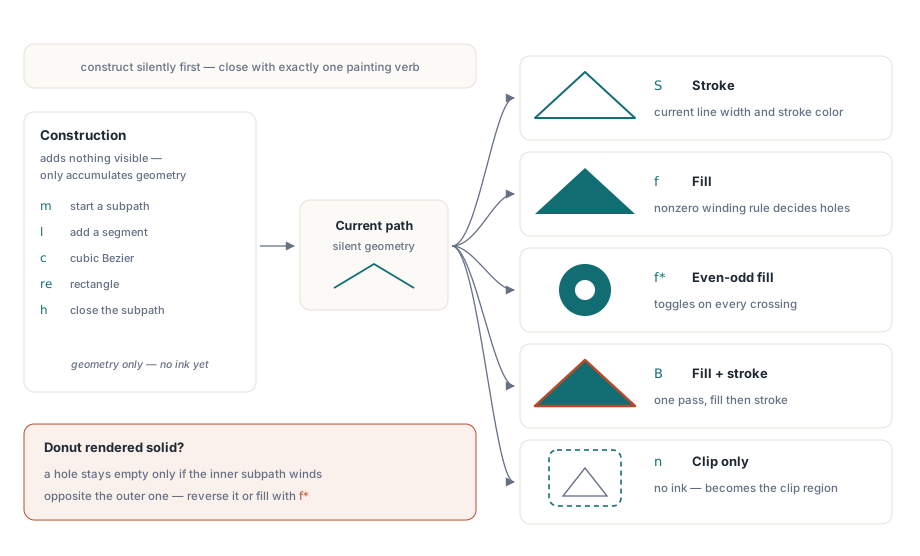
S拿当前的线宽和描边颜色,沿着路径的轮廓给它描上一圈f拿当前的填充颜色和非零环绕规则(nonzero winding rule),把路径的肚子给填满f*也是填肚子,不过它走的是奇偶规则(even-odd rule),你要是画那些自己跟自己打架(自相交)的形状,或者肚子里带着窟窿的形状,这规则就是能救你命的法宝B是个狠角色,填肚子外加描边,一步到位;b则是先关门再干这俩活n拔剑四顾心茫然,啥都不画,这就是为啥一条路径能悄无声息地变成一个裁剪区,而不在纸上留下半点蛛丝马迹的猫腻所在
这环绕规则绝对是个能把一票人都给绕进去的大坑。非零规则(f、B)的玩法是,从你要查的那个点射出一条射线,然后去数这条线到底被穿过了多少次(带方向算正负),只要数出来不是零,它就毫不留情地往里填色,所以你要是想留个窟窿不填,那个窟窿的子路径就必须得绕得跟外头那圈大路反着来才行。而奇偶规则(f*、B*)就粗暴多了,每穿过一次它就翻个脸(填或不填),压根不管你是顺时针还是逆时针绕的。要是你本来想画个带窟窿的“甜甜圈”,结果印出来却是个实心的烙饼,那肯定是因为你内圈和外圈是顺着同一个方向绕的,这会儿你要么乖乖地去把内圈给反过来,要么就干脆切到奇偶规则去图个省事
颜色不是啥参数,那是个会传染的状态(模式)
内容流里的颜色,那就像沾在手上的狗皮膏药,甩都甩不掉。你只要设了个颜色,那它就会死死地挂在那儿,除非你大发慈悲换了个新颜色,或者是把之前的老状态给请回来,这就是为啥你只要稍微少写了个括号(没圈起来),后来画的那些玩意儿全都会不知不觉地被染上色的罪魁祸首。不仅如此,PDF 还死板地把填充色和描边色劈成了老死不相往来的两家,小写操作符管填充,大写操作符管描边。不同的设备颜色空间还各自占了套山头(简写):
0.5 g                % DeviceGray 填充,中性灰(0 就是死黑,1 就是纯白)
0.2 0.6 0.8 rg       % DeviceRGB 填充
0.8 0.2 0.1 RG       % DeviceRGB 描边(注意这大写字母,那就是在吼“老子是管描边的”)
0.2 0.8 0.0 0.1 k    % DeviceCMYK 填充
DeviceRGB 就是用来伺候屏幕的,DeviceCMYK 则是那帮印厂老爷子们点名要的,而 DeviceGray 则是个给黑白活计专门准备的瘦身首选。这些个设备空间虽然用起来顺手,但这帮家伙全是一群连校准都没做过的野路子:同一组 RGB 的值,到了两台不同的显示器上,画出来的东西能让你觉得它俩压根不是一个妈生的,这也就是为啥后来非得搞出个基于 ICC 的颜色空间和 PDF/A 输出意图来给这烂摊子擦屁股的原因。要是碰上那种对颜色要求比对爹还亲的活儿,你得老老实实拿 cs 和 CS 去请出校准空间,再用 sc 和 scn 去一点点兑颜色,不过对于那些普普通通的文档来说,这些设备空间的简写就足够对付了。各家开发库也会把这些操作符包上一层带着类型的皮拿出来卖。就拿 HotPDF 来说,你只要扔给它一个 TColor,它就能在底下帮你把这些配套的操作符给拼出来:
Pdf.CurrentPage.SetRGBFillColor(clRed);
Pdf.CurrentPage.Rectangle(100, 100, 200, 150);  // x、y、宽、高
Pdf.CurrentPage.Fill;

Pdf.CurrentPage.SetRGBFillColor(RGB(0, 255, 0));
Pdf.CurrentPage.Circle(150, 400, 50);           // x、y、半径
Pdf.CurrentPage.Fill;
图形状态与那个大名鼎鼎的 q/Q 栈
在内容流里,除了路径本身,剩下的所有破烂全都被塞进了一个叫“图形状态(graphics state)”的大筐里:什么当前变换矩阵、填充和描边颜色、线宽、虚线样式、裁剪区,甚至透明度(alpha),都在里头。这状态可是个全局的、能随便被人动刀子的主,所以你要是想悄悄咪咪地搞点只管自己的小动作,唯一能保命的活法就是:先把全套家当原封不动地存起来,再去瞎折腾,画完了,再把老本给掏出来盖在上面。这正是 q 和 Q 这俩哥们儿存在的唯一意义。q 负责把当前状态复刻一份,一股脑儿全塞进栈里;Q 则是一脚把栈顶的玩意儿给踹出来,同时把你打完匹配的 q 之后搞的所有幺蛾子全给一笔勾销:
q                    % 把全副身家(图形状态)打包存好
2 0 0 2 100 100 cm   % 往上叠一个变换矩阵:放大 2 倍,然后一把薅到 (100,100) 那个坑去
0.8 g                % 灰色填充,出了这个圈它就不管用了
% ... 这会儿画出来的东西,全是被放大过的灰色玩意儿 ...
Q                    % 读档:那些个变形和颜色全都被一脚踹回了老样子
要是 q 和 Q 这俩哥们儿没凑成对,这通常是一份手工打造或者到处缝补出来的内容流走向毁灭的第一步。一个孤苦伶仃、没等来 Q 的野 q,到了这页纸的尽头,会让整个栈被撑得下不了台;反过来要是不小心多塞了个 Q,那这栈直接就被你给掏空干碎了。不管是哪种死法,这阅读器搞不好都会把某个早该入土的裁剪区或者变换给死死捏在手里当成圣旨,结果就是你要画的东西要么人间蒸发,要么飞到一个你这辈子都找不着的地方。所以但凡遇到图形莫名其妙地没了,而且路径看起来比脸还干净的时候,头一件事,去查你的状态栈
CTM(当前变换矩阵)对每一个坐标都是照杀不误
当前变换矩阵(Current Transformation Matrix,简称 CTM)这尊大神,它就稳稳地坐在你敲的那堆数字和真实的页面之间。任何一个坐标在真正落到纸上之前,都得先在这矩阵里扒层皮(乘一遍),所以只要你在这矩阵上动了手脚,接下来的每一笔它都能让你神不知鬼不觉地改头换面、挪窝走人,而你甚至连路径里的半个坐标都不用改。cm 操作符就是干这活的,它能把一个新的矩阵往当前的矩阵上硬叠上去,它吃六个操作数,这六个操作数正好对应了仿射矩阵(affine matrix)里的 [a b c d e f]:
1 0 0 1 100 50 cm        % 平移个 (100, 50):这俩带路的偏移量全靠 e 和 f 扛着
2 0 0 1.5 0 0 cm         % 把 x 轴拉大 2 倍,y 轴拉大 1.5 倍:a 和 d 在这儿充当缩放的打手
0.707 0.707 -0.707 0.707 0 0 cm % 拧个 45 度(全靠把 cos/sin 塞进 a、b、c、d 里去搞鬼)在这儿有俩坑,无数人排着队往里跳。头一个,cm 它是叠罗汉而不是一脚踢开(组合而不是替换),所以这变换是一层层积攒起来的,顺序那就是大爷:先放大再平移,跟先平移再放大,那画出来的绝对是俩完全不沾边的玩意儿。第二个,旋转和缩放这俩货,它们是死死绕着当前的原点在那儿转圈的,压根不管你画的那个形状的中心在哪儿,所以你要是想让个东西在自己地盘上原地打滚,你得先把它拉回到原点,给它拧过去,然后再把它给丢回老地方去,而且这一整套杂耍都必须得拿 q/Q 给裹严实了。最后还得提一嘴,把图片拍在页面上,也是靠的这同一个矩阵在这儿发功,这是最后一块值得说道说道的硬骨头
图片和那些被复用的破烂,统统都是 XObject
像素图片是绝对不会不要脸地直接挤在内容流里的。它们会被打包成一种叫图像 XObject 的外挂,这玩意儿是个躲在外头的对象,带着属于自己的小词典,里头记着自己有多宽、多高、位深多少、颜色空间是个啥、被哪种滤镜给压缩过,而内容流只需要隔空喊一嗓子(引用)就行了。一张在底下被 JPEG 给撑着的照片,它的档案大概就长这样:
/Photo <<
  /Type /XObject
  /Subtype /Image
  /Width 640
  /Height 480
  /BitsPerComponent 8
  /ColorSpace /DeviceRGB
  /Filter /DCTDecode        % 这里头装的是一坨 JPEG 数据流
>>
一张图像 XObject 生来就只会往一个单位正方形(unit square)里头画:在用户空间里,它永远死皮赖脸地占着从 (0, 0) 到 (1, 1) 的那一亩三分地。你压根没机会给它塞什么位置或者大小。你能干的,就是去捏那个 CTM,把那个破单位正方形强行拉扯、挪动到你想要的那个框框的形状,最后再喊一声 Do 把它给召唤出来。这也就是为啥但凡是放图片,永远都是一通疯狂的矩阵变换外加一句召唤,而且这全套动作还必须得裹在个保存/恢复状态的套子里,免得它那股子缩放的邪气漏出来把下一个操作给霍霍了:
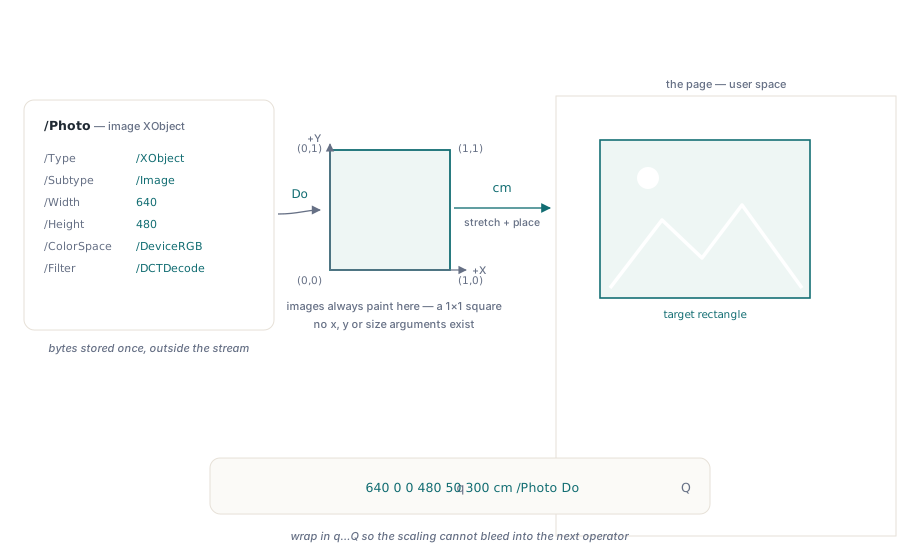
q
640 0 0 480 50 300 cm    % 把那个单位正方形强行扯成一个 640x480 的大框,一把扔到 (50, 300) 去
/Photo Do                % 出来吧,图像 XObject
Q
表单 XObject(form XObjects)也是靠着同一套 Do 的机制在那儿装神弄鬼,这玩意儿肚子里装的是一块可以随时拿出来用的图形破烂,比如个商标或者是到处盖的图章,它自己有一套带着边界框的内容流。你只要费劲定义它一次,以后就可以拿各种千奇百怪的 CTM 去召唤它无数次,而那些占用空间的字节,在文件里实打实就只存了一份。绝大多数库都会把这堆破烂封装成一个极其傻瓜的放置调用:在 HotPDF 里,你拿 AddImage 把位图给挂上号,然后再拿 ShowImage 把它拍出来,这调用直接管你要 x、y、宽、高这些大白话数据,压根不逼着你自己去用手捏那个见鬼的矩阵:
var
  Bmp: TBitmap;
  ImgIndex: Integer;
begin
  Bmp := TBitmap.Create;
  try
    Bmp.LoadFromFile('logo.bmp');
    ImgIndex := Pdf.AddImage(Bmp, icFlate);
    // x, y(依然是那个死性不改的左下角), 宽, 高, 旋转角度
    Pdf.CurrentPage.ShowImage(ImgIndex, 50, 300, 200, 150, 0);
  finally
    Bmp.Free;
  end;
end;
在这短短一行代码的屁股后头,库正像个苦力一样在那儿疯狂地写着图像 XObject 词典、捏着 CTM 把单位正方形给揉圆搓扁,最后声嘶力竭地喊出那句 Do。但真正值钱的,是你得把这底下的这套破规矩给摸透,因为只有它能给你解释所有那些看了想骂娘的画面:一张被拉扯成鬼的图片,那是因为 CTM 里的缩放因子没对上号;一个在四十页里长得一模一样的公司商标,那是一个表单 XObject 被召唤了四十次的功劳;而一张印出来大头朝下的图片,那也只是矩阵里有个符号被弄反了,绝对不是你的文件烂透了
这堆破事最后能引向哪儿
一旦你看穿了它的底牌,这图形模型其实小的可怜。内容流就是一堆跑在一个能被人随便动刀子的状态上的后缀字节码;坐标永远是从左下角起步而且还必须得从 CTM 那里过个堂;路全都是闷声不响铺出来的,最后再拿一个专门的操作符给一锤定音地画出来;颜色和线型这些设置,只要你不拿 q/Q 去关它们禁闭,它们就敢一直在那儿发疯;至于图片和那些被到处用的图形,统统都是些靠着揉捏单位正方形给摆出来的 XObject。几乎所有那些让你看了直挠头的渲染事故,最后都能被揪着耳朵按到这五条死规矩的其中一条上。要是你想看看这帮图形操作符到底是咋在这个庞然大物的对象模型里安身立命的,想去会会那些给它们指路的页面词典和交叉引用表,那篇 PDF 文件结构的技术概览 就是专门挖这层祖坟的,而 从零开始手搓个简单的 PDF 则会带你把这帮字节从头到尾给撸一遍。至于画字这档子事,人家自有一套独立的操作符家族,坑也全都是自己家特产的,这就得去翻那篇专门对付 PDF 文本与字体处理 的姐妹篇了
这儿拉出来示众的这堆 Delphi 画图调用:MoveTo、LineTo、Stroke、Rectangle、Fill、SetRGBFillColor、AddImage,还有 ShowImage,全都是那套在 Delphi 和 C++Builder 里打拼的 HotPDF 组件 家的人,正是这位苦力在底层替你把这些内容流操作符给硬生生地敲了出来