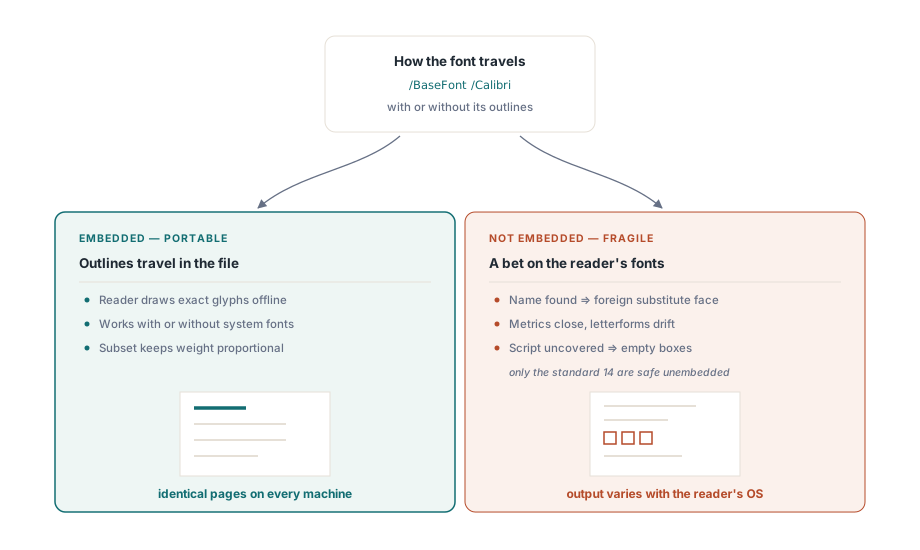
一个在您的机器上看起来完美无瑕的 PDF 文件,到了别人的机器上却被渲染成一排排空白的方块框,这是文档处理软件中最常见的一类字体缺陷问题,但这几乎从来就不意味着是文本本身出了错。字符完好无损,编码也没毛病,仅仅是因为绘制字形的画笔(glyphs)不在场而已。这背后的差异在于这两台机器的操作系统各自安装了哪些字体,而一份便携式文件与一份脆弱文件的鸿沟,其实早在写入页面那一刻的一个决定中就已经注定了:究竟是把字体打包带入 PDF 内部,还是赌对方的机器上也装了这款字体
要弄清楚为什么会发生这种事,以及为什么另一种截然不同的故障会制造出看起来能被搜索但复制出来全是乱码的文本,我们就得去探究一下 PDF 是如何存储文本的。它存储的并不是句子。它存储的是字形编码(glyph codes),再外加一套字体程序以及将这两者映射对应起来的几张映射表,所有那些渲染上或是提取上的 Bug,无一例外全都潜伏在这三者的缝隙之中。下面我们将以 ISO 32000 规范为根基,带领大家来参观一下这套内部机制,并在关键之处配以负责掌控这些机制的 Delphi 代码
字符、编码与字形:这是三个截然不同的概念
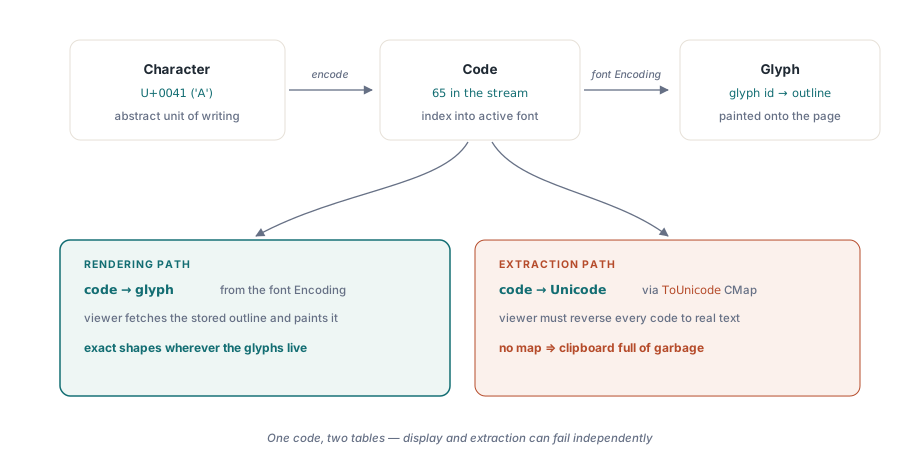
之所以这套词汇系统常常把人绕晕,是因为在日常表达中,我们往往习惯于把这三个原本相互独立的概念全盘捏合进“字母”这一个词里。字符(character)是书写体系里的一个抽象单元,比如大写字母 A 这个概念,在 Unicode 中它的身份标识是 U+0041。字形(glyph)则是一个被绘制出来的形状,是某一款特定的字体用来描绘那个字符时所使用的由曲线和直线构成的轮廓轮廓。而介于这两者之间的是编码(code):那是内容流(content stream)里的一个或几个字节,它们负责告诉阅读器究竟该调取当前字体库中的哪一个字形去进行涂色绘制
PDF 体系是以编码来运转的。当一条内容流展示出一串字符串时,那些字节所代表的是指向当前活动字体库的索引标号,而非 Unicode。该字体的编码表判定编码 65 意味着“画出那个被归档在 65 号抽屉里的字形”,在整个这一操作流程中,没有任何一个环节知晓最后画出来的这玩意儿在人类眼里看作是个 A。正是凭借着这种机制,PDF 才得以在任何能够找到对应字形的地方都能渲染出分毫不差的结果,也正是由于这个原因,文本提取与文本显示变成了两个相互剥离的难题:绘制操作仅仅需要把编码映射到字形(code-to-glyph)即可,而读取操作却需要把编码映射回 Unicode(code-to-Unicode),这完全是两套截然不同的映射表,它们既有可能相互打架,也有可能各自独立地出现缺失
你实际上会打交道的那些字体类型
ISO 32000 规范定义了好几种字体字典类型,然而在实际应用中,你所收到或是生成的一份文档只会使用到其中的三种。摸清你当前面对的究竟是哪一种,也就弄懂了绝大部分可能出岔子的地方
Type 1 是 Adobe 最初推出的 PostScript 轮廓格式,由三次贝塞尔曲线构建而成。所有符合规范的阅读器都必须自带那名噪一时的“十四款标准字体”,涵盖了 Helvetica、Times、Courier、Symbol 以及 ZapfDingbats 这几个家族,它们全都是 Type 1 字体,如果一个字体字典点名要用它们当中的某一款,那么在法律层面上它是可以免于嵌入字体程序的。只有在这一种特定情形下,不嵌入字体还能确保安全靠的是规范的庇护,而非凭运气。对于除此以外的任何一款 Type 1 字体,其程序都必须被嵌入进去,否则阅读器就会去寻找替代品,最终往往会换成一款在度量尺寸上相近但在视觉上却截然不同的代班字体
TrueType 采用二次曲线,脱胎于苹果和微软阵营。如今绝大多数的系统字体都属于这个阵营,这也是你在嵌入操作中打交道最多的一种类型。PDF 中的一个简单 TrueType 字体受限于单字节编码,因此这样一个字体一次最多只能索引 256 个字形。正是这道结构上的天花板,断绝了中日韩(CJK)以及其他大型文字体系搭乘简单字体这班车的可能性
Type 0,又名复合字体或 CID 键入字体,正是为了突破上述限制而生。它采用多字节编码,并通过一张 CMap 将这些编码路由投递给一个后代的 CIDFont 字体库,而后者的轮廓数据本身则要么是 TrueType 的,要么是 CFF/Type 1 的。这是唯一一种能够负载成千上万个字形的字体类型,因此,任何一份包含中文、日文、韩文或者大范围多语言混排的 PDF 文件,不管其作者当时有没有意识到,它都在使用 Type 0 字体。代价则是复杂性的攀升:引入了更多的活动部件,并且为了兼顾渲染与文本提取这两头,所有这些部件都得严丝合缝才行
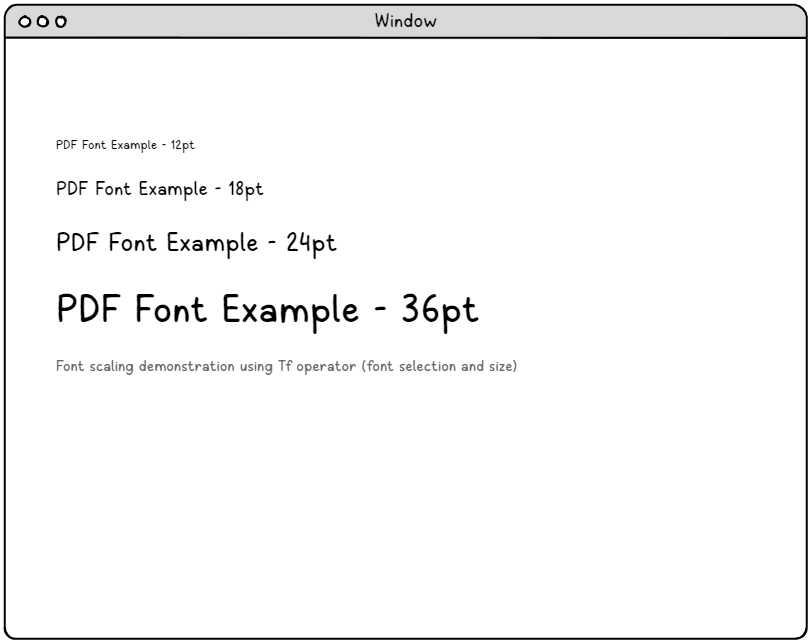
在那张演示图的背后,隐藏着一个关乎文件体积的细节真相。字体本质上是一座由矢量轮廓构成的库房,而不是尺寸定死了的位图,因此,同一套被嵌入的字体程序就能通吃页面上的所有字号。所谓的缩放,无非是在绘制那一刻加上个变换操作(transform)罢了,这就是为什么一个标题及其正文可以共享同一套嵌入字体,同时这也解释了为什么嵌入字体的开销是按字体种类来算的,而不是按字号尺寸来算的
嵌入与否:便携式文件与脆弱文件的分水岭
所谓的嵌入,就是将字体程序,也就是那些实打实的轮廓数据,以数据流的形式直接写入到 PDF 文件内部。这样一来,哪怕是一台对你的字体闻所未闻的机器上的阅读器,也能直接从文件中读取出那些轮廓,并精准无误地画出对应的字形。如果你跳过了嵌入这一步,那你就是在赌目标机器上也装有一款同名的字体;赌输了的话,阅读器就会退而求其次去找个替代品。如果是那标准的十四款字体,这种替代是有明确定义且无伤大雅的。可要是换成别的字体,这替代效果的跨度可就大了去了,好一点的也就是找个长得差不多的不同字体来顶班,而若是连能覆盖该文字体系的替代品都找不到,那你就只能收获满屏的空方块了
在 HotPDF 之中,掌控这一关的仅仅是一个属性值,而且必须在文档打开之前设置妥当。FontEmbedding 属性会指示开发库将它在绘制时所使用的那些字体连同文件一块儿打包:
var
  Pdf: THotPDF;
begin
  Pdf := THotPDF.Create(nil);
  try
    Pdf.FileName := 'report.pdf';
    Pdf.Compression := cmFlateDecode;
    Pdf.FontEmbedding := True;          // 将轮廓数据打包进文件内部
    Pdf.BeginDoc;
    Pdf.CurrentPage.SetFont('Calibri', [], 11);
    Pdf.CurrentPage.TextOut(72, 760, 0, '即便在没有安装 Calibri 字体的机器上,这行字的渲染效果也是一模一样的。');
    Pdf.EndDoc;
  finally
    Pdf.Free;
  end;
end;这个执行顺序可不是随便写着玩的。BeginDoc 是 HotPDF 将文档结构落锤定音的时刻,所以 FontEmbedding 必须在这个调用发出之前就被设为 True。如果在这之后才去赋值,不会有报错,也不会有警告,只会悄无声息地生成一份没带字体的文件。这堪称是最恶劣的一种 Bug:它能在开发者的机器上一路绿灯通过所有测试,因为开发者机器上碰巧装了这字体,然后只在没有装这字体的客户机器上才爆发出来
此外,嵌入环节也是版权许可与工程技术交锋的前沿阵地。一款字体程序会自带一系列描述其权限的标志位,用以声明它是可以被自由嵌入的、仅限预览用途嵌入的,还是压根就严禁嵌入的。去遵守这些标志位的约束是您的责任,而不是渲染器的责任,“技术上跑得通”跟“法律上允许这么干”可不是一码事儿
子集化:只嵌入你用到的那些字形
全量嵌入会把整套字体程序全都写进文件里。一款涵盖了中日韩(CJK)文字的大型 TrueType 字体轻轻松松就能跑到好几兆,若是为了显示那区区十来个字就把一整套字体全搬进去,这种浪费若是放到多页文档里那更是会被成倍放大。子集化(Subsetting)巧妙地化解了这一难题,它只把文档实际引用到的那些字形写进去,然后给这套精简版字体换个名字,加上一个由六个字母组成的标签外加一个加号,也就是你在任何经过子集化处理的 PDF 字体列表里都能见到的那种 ABCDEF+Calibri 格式,这样一来阅读器就再也不会把这款残缺版的字体跟系统里同名的全量原版字体给搞混了
对于绝大多数由程序生成的文档而言,把子集化作为默认选项是明智之举。它能将文件的大小与内容的多少挂钩,而不是由源头字体的大小说了算,这对于那些不然就会成为文件体积大户的大型多语言字体来说尤为重要。但有一条必须提前打好招呼:一个子集化的字体仅仅包含了在创建的那一刻所用到的东西。如果位于下游流程的某个处理程序试图在事后向一款经过子集化的字体中添加文本,那它需要的字形极有可能并不在这个文件里,这对于你想在这份由别人生成的 PDF 上进行增量式编辑来说,可谓是一道实质性的紧箍咒
Unicode 字体与令人头疼的中日韩方块问题
只要文本不再是单纯的拉丁字母,简单字体这条路就走不通了,解决之道是显式注册一款支持 Unicode 的字体,并让 HotPDF 根据它来构建一个 Type 0 字体。RegisterUnicodeTTF 负责根据文件路径加载一个 TrueType 文件;在此之后,这个被注册的名字就可以像其他字体那样被放入 SetFont 中去调用了:
Pdf.FontEmbedding := True;
Pdf.RegisterUnicodeTTF('C:\Fonts\NotoSansCJKsc-Regular.ttf');
Pdf.BeginDoc;
Pdf.CurrentPage.SetFont('NotoSansCJKsc-Regular', [], 14);
Pdf.CurrentPage.TextOut(72, 720, 0, '你好,世界 こんにちは 안녕하세요');
Pdf.EndDoc;
有两件事决定了这条路到底能不能走得通。首先,这款字体必须能够覆盖该字符串中所包含的文字体系:一款仅支持拉丁字母的 TrueType 字体绝不可能因为你强行发出了指令就凭空长出汉字的字形来,其结果将又是一排空白方块,只不过这一次是因为那字形确确实实并不存在于该字体库之中。其次,嵌入功能必须保持开启,因为一个由注册的 TTF 拼装而成的 Type 0 字体,对于一个根本找不到其轮廓数据的阅读器而言那就是个毫无意义的空壳。对于混合着多国语言的文本内容而言,最经得起考验的策略就是选一款覆盖面极广的字体,Noto 家族以及 Arial Unicode MS 通常都是标答,然后对它们进行嵌入以及子集化处理
从右向左阅读的文本序列以及复杂的文字体系,会在覆盖范围的基础上再多盖一层塑形机制(shaping layer)。HotPDF 为阿拉伯语和希伯来语提供了 RtLTextOut 接口,它包揽了方向性的重排序工作,你只需按逻辑顺序把文本传进去,开发库自会负责将它们排布妥当。想要搞定阿拉伯语,覆盖面、塑形机制以及方向处理这三大要素缺一不可,如果在这儿冒出来一个方块,那就意味着这三关里的某一关失守了
ToUnicode 映射表:复制粘贴功能安身立命之本
上面讲的所有这些全都是围绕着“绘制”展开的。而文本提取则是它的镜像反面,而且它有它自己的一套跌跤理由。阅读器在渲染一个页面时用的是字体的编码到字形(code-to-glyph)的映射机制,可当用户框选文本并按下复制键时,阅读器需要把刚才那些编码全都变回到 Unicode 去。这套反向的映射机制就是 ToUnicode CMap 映射表,这是一段作为附件绑定在字体身上的可选数据流
只要这玩意儿还在,而且没出错,那么复制出来的文本就会是正确的字符。可要是它丢了或者写错了,亦或者这字体在被子集化处理时采用了自定义的字形编码,却没把 ToUnicode 给写进去,那么页面看起来完美无缺,可一到剪贴板里全变成了乱七八糟的乱码:因为那些字形编码被硬生生地当成 Unicode 来读取了,可对于一套采用了自定义编码的子集化字体而言,它们压根就不是。这也就是为什么一份由扫描仪扫出来带 OCR 文本层的文档可以搜得到字,而一份由某个粗制滥造的生成器搞出来的纯数字版 PDF 反而搜不到的原因所在。渲染和提取依赖的是两套完全不同的映射表,因此一份文件完全可以做到在其中一头拿满分而在另一头交白卷。如果您在乎您的输出成果能否被顺畅提取文本,那就请将一张准确无误的 ToUnicode 映射表视为一项硬性指标,并且通过实际去那个样本文件里复制一段文本出来这种办法去验证它,而绝不要只是因为看到文件里有这么个东西就盲目轻信它
怎样快速诊断出字体 Bug 出在哪
看它是怎么死机的,就能知道该往哪儿查。在别人的机器上变成一排排空白方块,绝大多数情况都是因为字体根本就没被嵌入进去,所以先去查嵌入有没有开启,然后再去查字形覆盖面。如果连你自己的机器上都开始冒方块了,那这箭头直指字形覆盖面:这款字体根本就不包含这套文字,这跟你嵌没嵌入没半毛钱关系。文本渲染得好好的,可一复制出来全是乱码,这是个 ToUnicode 问题,跟渲染毫不相干,你在那些字体或者嵌入选项上瞎折腾是修不好它的,因为绘制那一环压根就没出过毛病。想要看透一份成品文件,用 Acrobat 打开它,然后去查文档属性里的字体选项卡:一个健康的条目会标明它的类型,会显示它已被“嵌入(Embedded)”或者“内嵌子集(Embedded Subset)”,并且会指明它的编码方式。一款本该被嵌入却漏了网的字体,会在客户发飙之前先在这里把自己给出卖了
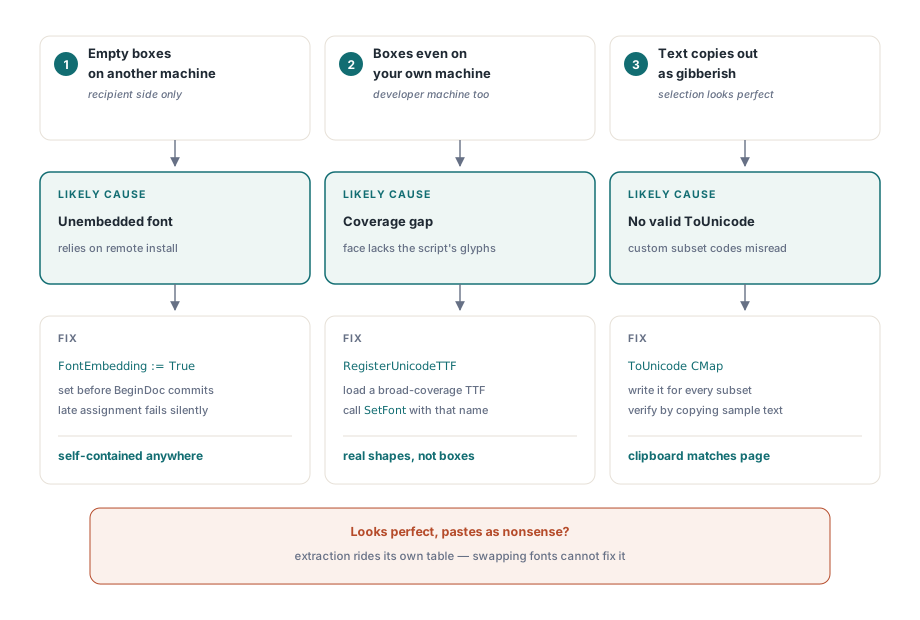
只要你把字符、编码与字形这三者的界限划清,所有这些门道看起来就一点也不神奇了。嵌把你画图用的字体给嵌入进去,把那些大块头的字体做子集化处理,只要文本一脱离拉丁字母的舒适区立马就换上 Unicode 字体并打出 RegisterUnicodeTTF 这张牌,以及只要有人可能要去提取文本,就死死保住一张正确的 ToUnicode 映射表。只要把这几件事办妥了,那些方块框自然也就消停了。至于外围的那些机制原理,您可以去参阅 最小 PDF 剖析 看看字体字典到底蹲在对象树里的哪个旮旯,也可以去看看 文档结构演练 里是怎么讲解那些资源是如何跨页面被共享利用的
本文展示的包含 SetFont、FontEmbedding 以及 RegisterUnicodeTTF 在内的各类调用,属于为 Delphi 和 C++Builder 设计的 HotPDF 组件 的一部分