Bir PDF alım inceleme çalışma tezgahı, tek bir işi olan küçük bir programdır: aşağı akıştaki herhangi bir şeyin dokunmasına izin verilmeden önce her dosyaya bakmak. Bu işi yapmak için bir avuç yeteneği tek bir geçişte bir araya getirmesi gerekir. Dosyayı açar (ona güvenmeden), dosyanın kendisi hakkında ne iddia ettiğini okur, saf bir çıkarıcıyı yanıltacak ya da bir saldırı taşıyacak içeriği arar, hiç çıkarılabilir metin olup olmadığına karar verir ve ardından bulduklarına göre belgeyi bir kuyruğa yönlendirir. İncelemeyi atlarsanız, hatalar sessiz olur: bir XFA formunu saran, sahip parolasıyla şifrelenmiş bir PDF, bir metin çıkarıcıdan boş dizeler olarak sızar, boş bir belge olarak indekslenir ve aşağı akışta biri hiç okunmamış içeriği aramaya başlayana kadar kimse fark etmez. PDFium Component, Delphi, C++Builder ve Lazarus için kaynak kodlu bir VCL/LCL görüntüleyici ve inceleme kütüphanesidir ve bu çalışma tezgahının ihtiyaç duyduğu iç gözlem çağrılarını sunar. Aşağıdaki bölümler, hangi çağrının hangi soruyu yanıtladığını ve bariz çağrının size güvenle yanlış bir cevap verdiği iki yeri ele alır
Bir dosya yönlendirilmeden önce yanıtlanacak beş soru
Izgarayı ve küçük resim şeridini bir kenara bırakırsak, alım triyajı beş soruya indirgenir:
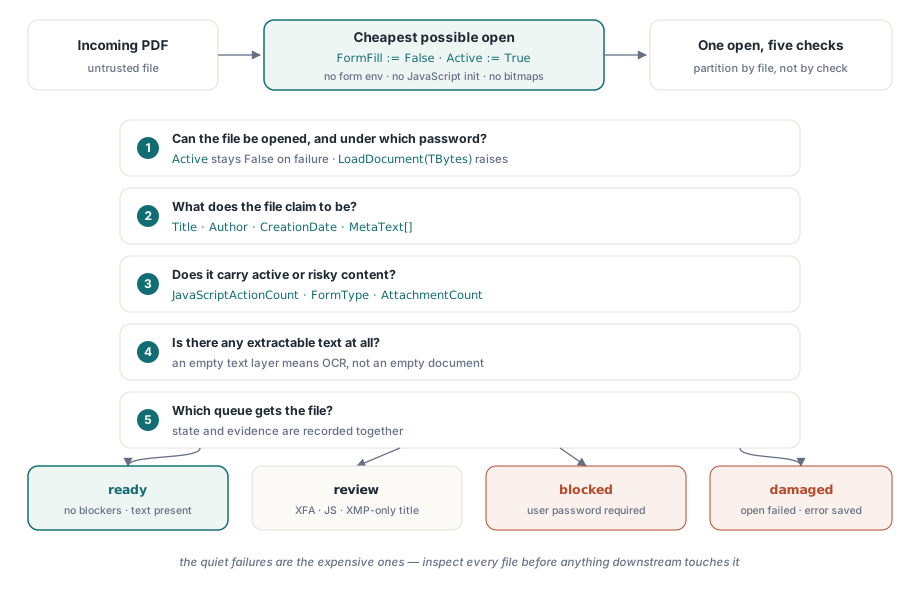
- Dosya hiç açılabiliyor mu ve hangi parola altında?
- Ne olduğunu iddia ediyor: başlık, yazar, oluşturma tarihi?
- JavaScript, bir XFA formu ya da gömülü dosyalar gibi etkin ya da riskli içerik taşıyor mu?
- Çıkarılabilir metin var mı, yoksa OCR'a giden bir tarama mı?
- Tüm bunlar göz önüne alındığında, hangi kuyruğa gidiyor: doğrudan işleme, manuel inceleme ya da karantina?
Her soru bir ya da iki PDFium Component çağrısına eşlenir. Bu eşlemelerden ikisinin, üretimde hata ayıklamak zorunda kaldığım yanlış yönlendirilmiş dosyaların çoğunu açıklayan keskin köşeleri var. Belge meta verisi, anlaşamayabilecek iki farklı yerde yaşar ve şifreleme, bir belgenin açılmasını mutlaka durdurmaz
Ucuz açılış: form doldurma kapalı, sıfır sayfa render edilmiş
Triyaj, mümkün olan en ucuz açılış olmalıdır. Active := True'dan önce FormFill := False ayarlamak, bileşene form doldurma ortamını tamamen atlamasını söyler. Bu yükleme süresini kısaltır ve (kökeni bilinmeyen dosyalar için aynı derecede önemli) herhangi bir belge düzeyinde JavaScript'in başlatılmasını engeller. Aşağıda kullanılan inceleme özelliklerinin hiçbiri bir sayfanın render edilmesini gerektirmez, bu yüzden bir triyaj geçişi hiçbir zaman tek bir bit eşlem üretmek zorunda kalmaz
procedure InspectIncoming(const IncomingPath: string; var Rec: TIntakeRecord);
var
  Pdf: TPdf;
begin
  Pdf := TPdf.Create(nil);
  try
    Pdf.FileName := IncomingPath;
    Pdf.FormFill := False;     // form ortamı yok, JavaScript başlatması yok
    Pdf.Active := True;        // hata sessizdir: Active yalnızca False kalır

    if not Pdf.Active then
    begin
      Rec.OpenFailed := True;  // bozuk dosya veya kullanıcı parolası kilidi
      Exit;                    // finally bloğu yine de çalışır
    end;

    Rec.PageCount := Pdf.PageCount;
    CollectIdentity(Pdf, IncomingPath, Rec);
    CollectRiskSignals(Pdf, Rec);
  finally
    Pdf.Active := False;
    Pdf.Free;                  // bozuk bir dosyada örneği asla sızdırmayın
  end;
end;
Atamadan sonraki kontrol isteğe bağlı değildir ve bir nedenden dolayı bir istisna işleyicisi yerine bir kontroldür. Motor dosyayı yükleyemediğinde, bileşen dahili EPdfError'ı yutar ve onu yaymak yerine Active'i False olarak bırakır. Bir istisna bekleyen kod, hiç açılmamış bir belgeden PageCount'u seve seve okuyacaktır. Reddetme iş akışının motorun gerçek hata metnine ihtiyacı varsa, dosyayı bir bayt dizisine okuyun ve TBytes alan LoadDocument aşırı yüklemesini çağırın; bu yol, parola durumu dahil, mesajla birlikte gerçekten EPdfError fırlatır. try..finally yine de yerini hak eder. Alım servisleri haftalarca gözetimsiz çalışır ve hiçbir sonraki istisna, TPdf örneğini sızdırmamalı ya da yeniden deneme geçişinin takılacağı bir kilit tutmamalıdır
Verim nadiren darboğaz haline gelir. Form doldurma devre dışı ve render yokken, bir triyaj açılışına G/Ç hakimdir ve tek bir işçi, yerel diskten saniyede birkaç dosyayı rahatça inceler. Alım hacmi bir işçinin kapasitesini bir gün aşarsa, işi kontrole göre değil, dosyaya göre bölümlere ayırın. Beş soru bir açılışı paylaşır ve bunları süreçler arasında bölmek, en pahalı adımı amortize etmek yerine çoğaltır
Meta veri iki yerde yaşar ve anlaşamazlar
ISO 32000-1, belge meta verisi için iki ev tanımlar: belge bilgi sözlüğü (madde 14.3.3) ve katalog'a eklenmiş bir XMP paketi (madde 14.3.2). Title, Author, Subject ve CreationDate özellikleri Info sözlüğünü okur, başka herhangi bir anahtar için MetaText[] ve D:YYYYMMDD... tarih dizesini ayrıştırmak için DecodeDate vardır. Sorun şu ki, modern üreticiler giderek yalnızca XMP yazıyor, bu da ISO 32000-2'nin PDF 2.0'da çoğu Info sözlüğü anahtarını kullanımdan kaldırarak resmileştirdiği bir yön. Bir alım aracındaki belirti somuttur. Çalışma tezgahınız boş bir başlık gösterirken Adobe Acrobat bir tane gösterir, çünkü Acrobat, Info sözlüğü özelliklerinin hiç dokunmadığı XMP paketi içindeki dc:title'a geri döndü
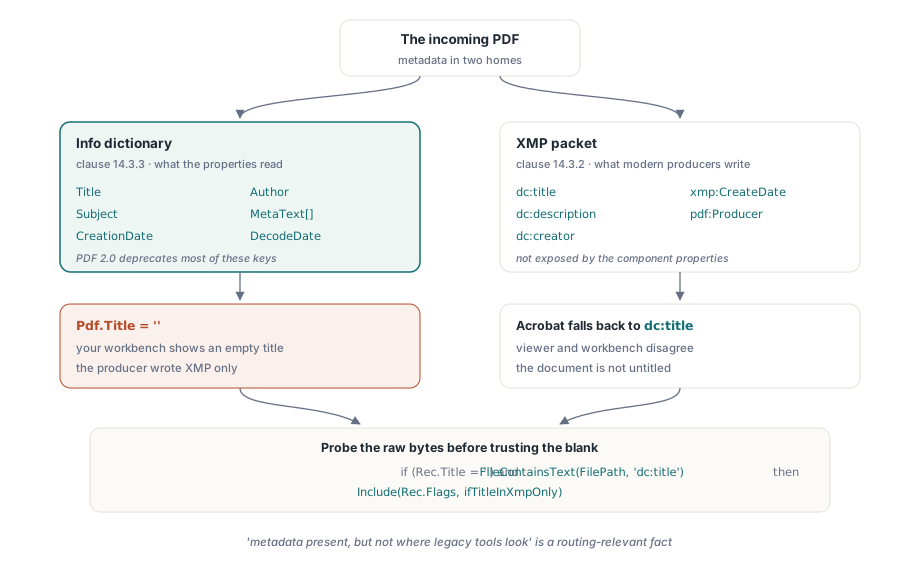
procedure CollectIdentity(Pdf: TPdf; const FilePath: string;
  var Rec: TIntakeRecord);
begin
  Rec.Title := Pdf.Title;             // Info sözlüğü değeri
  Rec.Author := Pdf.Author;
  Rec.CreatedAt := Pdf.CreationDate;  // ham PDF tarih dizesi ("D:2026...")

  // Boş bir Info başlığı belgenin başlıksız olduğu anlamına gelmez. Bileşen
  // XMP paketini açığa çıkarmaz, bu yüzden boşluğa güvenmeden önce ham
  // dosya baytlarını dc:title öğesi için yoklayın.
  if (Rec.Title = '') and FileContainsText(FilePath, 'dc:title') then
    Include(Rec.Flags, ifTitleInXmpOnly);
end;
Yukarıdaki kaba alt dize yoklaması bile hakkını verir: "meta veri mevcut, ama eski araçların baktığı yerde değil" ifadesi, başlık ya da yazara göre indeksleme yapan herhangi bir arşiv hattı için yönlendirmeyle ilgili bir gerçektir. Aşağı akış indeksiniz yalnızca Info sözlüğünü okuyorsa, bu şekilde işaretlenen dosyalar sessizce aranamaz hale gelir
Yine de açılan şifreli dosyalar
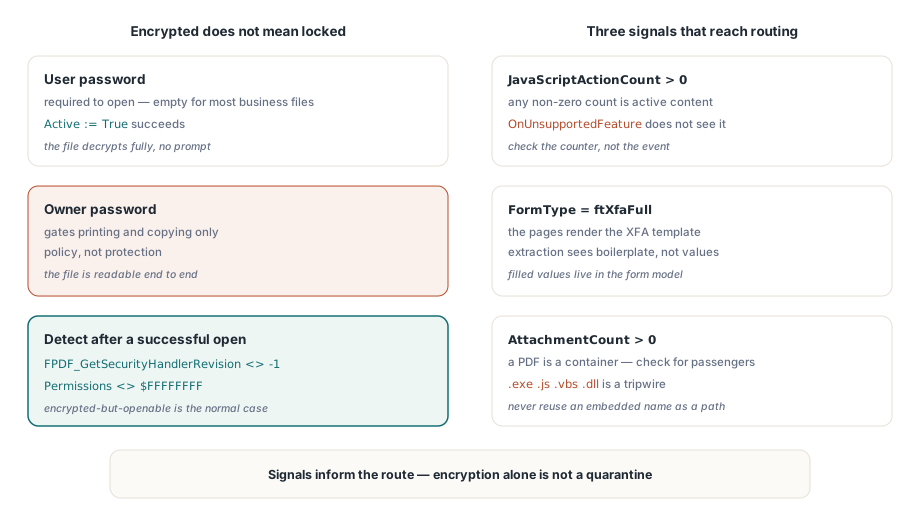
Şifreli bir belge mutlaka açılmakta başarısız olmaz. Standart güvenlik işleyicisi (ISO 32000-1 madde 7.6.3), belgeyi açmak için gerekli bir kullanıcı parolasını, yalnızca yazdırma ve kopyalama gibi izinleri kapı gibi kontrol eden bir sahip parolasından ayırır. "Korumalı" iş belgelerinin büyük bir kısmı bir sahip parolası ve boş bir kullanıcı parolasıyla şifrelenmiştir. Sormadan açılırlar, tamamen şifresi çözülür ve görüntüleyicilerin izin bayraklarına gönüllü olarak saygı göstermesine güvenirler. Bu koruma değil politikadır ve alım durumlarınız bu farkı yansıtmalıdır
Başarılı bir açılıştan sonra şifrelemeyi tespit etmek bir motor çağrısı artı bir yedek gerektirir. FPDF_GetSecurityHandlerRevision(Pdf.Document), korunmamış dosyalar için -1 döndürür, aksi halde işleyici revizyonunu döndürür ve Pdf.Permissions'ın tüm bitlerin ayarlı olduğu $FFFFFFFF maskesinden başka bir şey döndürmesi, doğrulayıcı sinyaldir. Gerçekten kullanıcı parolasıyla kilitlenmiş dosyalar için, Active := True ayarlamadan önce Password'u atayın; açılış yine de başarısız olursa, dosyayı kör kör yeniden denemek yerine güvenli bir kanaldan göndericiden kimlik bilgisi isteyen engellenmiş bir duruma yönlendirin. Ve "şifreli" ifadesini otomatik bir karantina olarak ele alma dürtüsüne direnin. Belge ağırlıklı çoğu sektörde, şifreli ama açılabilir dosyalar şüpheli değil, normal durumdur
Etkin içerik: JavaScript, XFA ve gömülü dosyalar
Üç bulgu her zaman yönlendirme kararına ulaşmalıdır. Birincisi, JavaScript: OnUnsupportedFeature olayı, motor karşılaştıkça XFA veya 3D içerik gibi yapısal özellikleri bildirir, ancak JavaScript'i tespit etmez. Bunun yerine JavaScriptActionCount'u kontrol edin ve sıfır olmayan bir sonucu etkin içerik olarak ele alın. İkincisi, XFA: FormType, ftXfaFull döndürdüğünde, görünen sayfalar genellikle XFA şablonunun bir render edilmesinden fazlası değildir ve geleneksel metin çıkarma, doldurulmuş değerler yerine kalıp metni görecektir. Üçüncüsü, ekler: bir PDF bir konteyner biçimidir ve AttachmentCount, bu belirli dosyanın yolcu taşıyıp taşımadığını söyler
procedure CollectRiskSignals(Pdf: TPdf; var Rec: TIntakeRecord);
var
  i, PageNo: Integer;
  Ext: string;
begin
  Rec.IsEncrypted := Assigned(FPDF_GetSecurityHandlerRevision) and
    (FPDF_GetSecurityHandlerRevision(Pdf.Document) <> -1);
  Rec.HasForms := Pdf.FormType <> ftNone;
  Rec.IsXfa := Pdf.FormType = ftXfaFull;
  Rec.HasJavaScript := Pdf.JavaScriptActionCount > 0;

  // AnnotationCount sayfa başına bir özelliktir; toplamak için sayfaları gezin.
  // Bir sayfa nesnesini yüklemek hiçbir şey render etmez, bu yüzden bu ucuz kalır.
  Rec.Annotations := 0;
  for PageNo := 1 to Pdf.PageCount do
  begin
    Pdf.PageNumber := PageNo;
    Inc(Rec.Annotations, Pdf.AnnotationCount);
  end;

  Rec.Attachments := Pdf.AttachmentCount;

  for i := 0 to Rec.Attachments - 1 do
  begin
    Ext := LowerCase(ExtractFileExt(string(Pdf.AttachmentName[i])));
    if (Ext = '.exe') or (Ext = '.js') or (Ext = '.vbs') or (Ext = '.dll') then
      Include(Rec.Flags, ifDangerousAttachment);
  end;
end;
Bu döngüde iki ayrıntı dikkati hak ediyor. Ek adı belgenin içinden gelir, bu yüzden önce temizlemeden onu asla bir çıktı yolu olarak yeniden kullanmayın; ..\..\start.exe gibi gömülü bir ad, dikkatsiz bir kaydetme çağrısını bekleyen bir yol geçişidir. Ve bir uzantı kara listesi bir garanti değil, bir tuzak teli'dir. İşi, dosyayı temiz olarak onaylamak değil, insan kararını zorlamaktır
Sinyalleri yönlendirme durumlarına dönüştürmek
Çalışabilir bir durum modeli, çoğu ekibin beklediğinden daha az duruma ihtiyaç duyar: hazır (engelleyici yok, metin mevcut), inceleme (açılış başarılı oldu ama bir XFA formu, JavaScript, boş bir metin katmanı ya da yalnızca XMP'de olan bir başlık gibi bir şeyin göz atılması gerekiyor), engellendi (kullanıcı parolası gerekli) ve bozuk (açılış başarısız oldu). Kanıtı durumla birlikte kaydedin. Dosya özeti, sayfa sayısı, tam bayraklar ve bozuk dosyalar için motor hata mesajı, hepsi önemlidir, çünkü bir yönlendirme kararını sorgulayan kişi bunu haftalar sonra, o zamana kadar değiştirilmiş ya da düzenlenmiş olabilecek bir dosyaya karşı yapacaktır
Bir operatörün karantinaya alınmış bir dosyaya gerçekten bakması gerektiğinde, onu varsayılan kabuk görüntüleyicisine vermeyin. Onu, betikleme ve bağlantı işlemenin devre dışı bırakıldığı sağlamlaştırılmış bir bölmenin içinde render edin, Delphi'de güvenli bir PDF önizleme yüzeyi oluşturma makalesinde anlatılan yaklaşım. Ve alımınız uyumluluk gereksinimleri olan bir arşivi besliyorsa, triyaj geçişi daha derin bir kontrolü planlamak için doğal yerdir; PDF/A ve PDF/UA profillerine karşı toplu ön kontrol doğrulaması, tam olarak bu incelemenin durduğu yerden devam eder
Bileşenin ürün sayfası lisanslamayı, tam inceleme API'sini ve bir alım tarzı belge denetleyicisi dahil paketlenmiş demoları kapsar: PDFium Component