Kendi uygulamanız içinde güvenilmeyen bir PDF'yi önizlemek bir yürütme kararıdır ve önemli olan kısım görüntüleyicinin kabuğu değil, bölmenin kendi başına yapmayı reddettiği şeydir. Dosyayı diske yazmayın. Bağlantılarının bir kabuğa çıkmasına izin vermeyin. Eklerine bir yol vermeyin. Düşman bir belgeden gelen hasarın çoğu bir motor açığından değil, bir görüntüleyicinin saldırgan tarafından sağlanan girdiyle tamamen sıradan şeyler yapmasından gelir: NTLM kimlik bilgilerini sızdıran bir UNC paylaşımına bir file:// bağlantısını açmak, geçici dizinde aşamalandırılmış bir kopya bırakmak, gömülü yükleri bir dosya adı dizesinin söylediği yere kopyalamak. PDFium Component, Delphi, C++Builder ve Lazarus için kaynak kodlu bir PDF görüntüleyicisidir ve ilgili anahtarları erişebileceğiniz yere koyar: betiklemeyi öldüren bir yükleme zamanı bayrağı, veto edebileceğiniz bağlantı tıklama olayları, kendi kodunuzdan geçen ek erişimi ve okuyabileceğiniz izin bitleri. Aşağıdaki sıra, bir belgeyi indiği andan bir kullanıcının içinde bir şeye tıkladığı ana kadar izler
Bir önizleme bölmesinin tehdit modeli
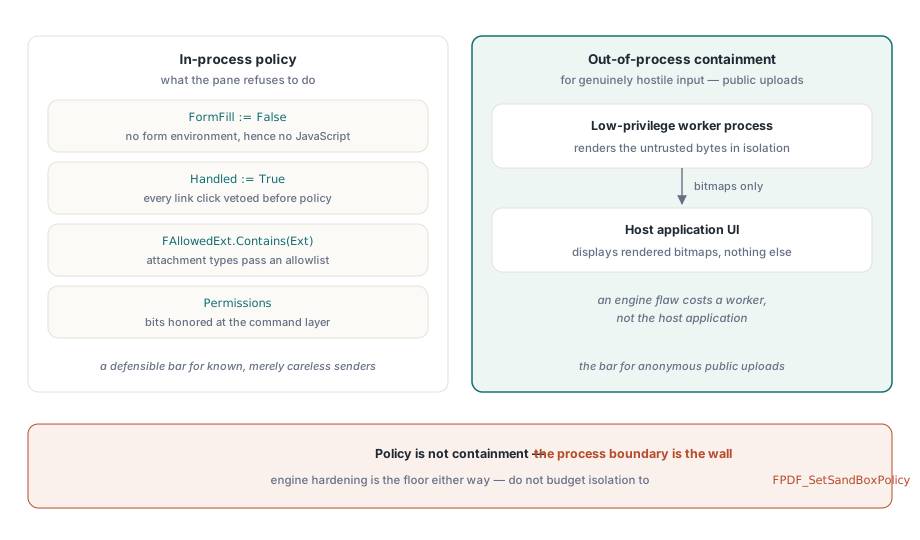
"Güvenli önizleme"nin size ne sağladığı konusunda dürüst olun. Render motoru ne yaparsanız yapın güvenilmeyen baytları ayrıştırır ve motorun kendi sağlamlaştırması üzerinde durduğunuz tabandır. O tabanın üzerindeki her şey uygulama politikasıdır: betiklerin başlayıp başlamayacağı, bir bağlantı tıklamasının ne yaptığı, gömülü dosyaların diske ulaşıp ulaşamayacağı, panonun ve yazıcının kapı mı duvar mı olduğu. Erkenden vazgeçilmesi gereken bir şey motorun FPDF_SetSandBoxPolicy anahtarıdır. Çoğu motor kısıtlaması derlenmiş haldedir, anahtar pratikte çok az şeyi değiştirir ve yalıtım hikayenizin herhangi bir kısmını buna bütçelemek, sadece bir şey yapmış olma yanlış hissi üretir. Girdi gerçekten düşman olduğunda, örneğin genel bir yükleme portalı, tek gerçek yalıtım, ayrı, düşük ayrıcalıklı bir süreçte render etmek ve arayüze bit eşlemler göndermektir. Süreç içi bayraklar politikadır. Sınırlama değildir
İki yüzey, hiçbir tıklama onlara hiç dokunmadığı için unutulması kolaydır. Birincisi geçici dosyalardır. Hattınız önizlemeden önce gelen belgeleri diske aşamalandırıyorsa, bu aşamalandırılmış kopyalar bir şey onları doğrulanabilir şekilde silmedikçe oturumdan daha uzun yaşar ve "geçici dizinden kurtarılabilir" bir dosya, bölmenin kendisinin uyguladığı her kontrolü sessizce yenmiştir. Bunun yerine TPdfStreamAdapter aracılığıyla bellekten yükleyin, böylece düşman baytlar hiç kendi yollarına sahip olmaz. İkincisi panodur. Seç-ve-kopyala'ya izin veren bir önizleme, belgeyi bir seferde bir ekran dolusu olarak zaten dışa aktarmıştır ve hiçbir bağlantı yakalama bunu yakalamaz
JavaScript'i arayüzde değil, yükleme zamanında öldürün
PDFium Component'te belge JavaScript'i yalnızca form doldurma ortamıyla birlikte başlar. Bu yüzden FormFill := False ile yüklemek, belirtileri bastırmak yerine betiklemeyi kökten devre dışı bırakır:
procedure TPreviewPane.LoadUntrusted(const FilePath: string);
begin
  Pdf.FileName := FilePath;
  Pdf.FormFill := False;     // form ortamı yok, dolayısıyla JavaScript motoru yok
  Pdf.Active := True;

  FPermissions := Pdf.Permissions;   // ham bayrak sözcüğü; tüm bitler ayarlıysa = sınırsız
end;
Ödünleşim gerçektir ve spesifikasyonunuzda yer almalıdır. Form doldurma devre dışıyken, meşru AcroForm etkileşimi ve doğrulama betikleri de gider; alanlar son kaydedilen görünümleriyle render edilir ama düzenlenemez. Bir önizleme bölmesi için bu genellikle doğru karardır, çünkü önizleme bakmak demektir, doldurmak değil. Ama aynı pencere güvenilir dahili belgeler için bir form doldurma yüzeyi olarak da işlev görüyorsa, cevap, düşman durum için çok gevşek ve güvenilir durum için çok sıkı bir uzlaşma ayarına sahip tek bir yol değil, aralarında açık bir güven kararı olan iki yükleme yoludur. Bu ayrımın form doldurma tarafının kendi tuzakları vardır, form alanı gezinimi ve görünüm yeniden oluşturma makalesinde ele alınmıştır
Bağlantılar: varsayılan işleyici kabuğa çıkar
Kendi haline bırakılırsa, bağlantı tıklamaları doğrudan işletim sistemine gider. Görüntüleyicinin varsayılan LinkOptions'ı, gerçekleşmeyi bekleyen bir file://'dan UNC paylaşımına sızıntı olan loAutoOpenURI'yi içerir. İki olay boğaz noktasını oluşturur: sayfa metninde tespit edilen URL'ler için OnWebLinkClick ve URI veya başlatma eylemleri taşıyan bağlantı açıklamaları için OnAnnotationLinkClick. Herhangi bir karar vermeden önce ikisinde de koşulsuz olarak Handled := True ayarlayın, ardından yalnızca politikanın izin verdiğini yeniden izin verin. İkinci bir katman olarak, düşman girdi için LinkOptions'tan loAutoOpenURI'yi çıkarın ve varsayılan olarak kapalı olan loAutoLaunch'ın kopyalanmış bir yapılandırma üzerinden asla geri sızmadığından emin olun:

procedure TPreviewPane.PdfViewWebLinkClick(Sender: TObject;
  const Url: WString; var Handled: Boolean);
begin
  Handled := True;   // asla varsayılan kabuk davranışına düşme

  if (AnsiStartsText('https://', Url) or AnsiStartsText('http://', Url))
    and HostIsAllowed(Url) then
    OpenInBrowser(Url)
  else
    FAudit.LogBlockedLink(FDocumentId, Url);
end;
İki ayrıntı bunun gerçekten tutup tutmadığına karar verir. Birincisi, şema kontrolü herhangi bir ayrıştırmadan önce ham dize üzerinde bir önek kontrolü olmalıdır, çünkü file://, UNC yolları ve egzotik şemalar, saf bir URL ayrıştırıcısını çökertecek ya da fazla hevesle normalleştiren birinden sızacak tam olarak o değerlerdir. İkincisi, her engellemeyi belge kimliği ekli olarak günlüğe kaydedin. Bir avuç engellenmiş file:// bağlantısı arka plan gürültüsüdür; kısa bir pencerede çok sayıda gelen belge genelinde bunlardan bir patlama, güvenlik ekibinizin başka bir yerden değil sizden duymayı tercih edeceği bir olaydır
Ekler: uzantı politikası ve seçmediğiniz dosya adı
Bir PDF bir konteynerdir ve AttachmentName[] özelliğiyle birlikte AttachmentCount, hiçbir şey diske dokunmadan önce ne taşıdığını size söyler. Burada iki ayrı kontrol önemlidir ve yalnızca biri açıktır. Açık olanı tür politikasıdır: hiç dışa aktarılabilecek uzantıların bir izin listesi. İnce olanı, ekin adının saldırgan tarafından kontrol edilen veri olduğu, nokta. ..\..\Startup\update.exe gibi gömülü bir ad, dikkatsiz bir kaydetmeyi, Windows'un girişte çalıştırdığı bir klasöre bir yürütülebilir dosya bırakan bir yol geçişine dönüştürür. Bileşen, yükü size Attachment[] aracılığıyla bayt olarak verir ve yolu seçmeyi kodunuza bırakır, bu yüzden o yolu temizlenmiş bir temel addan oluşturun, ham gömülü dizeden asla değil:
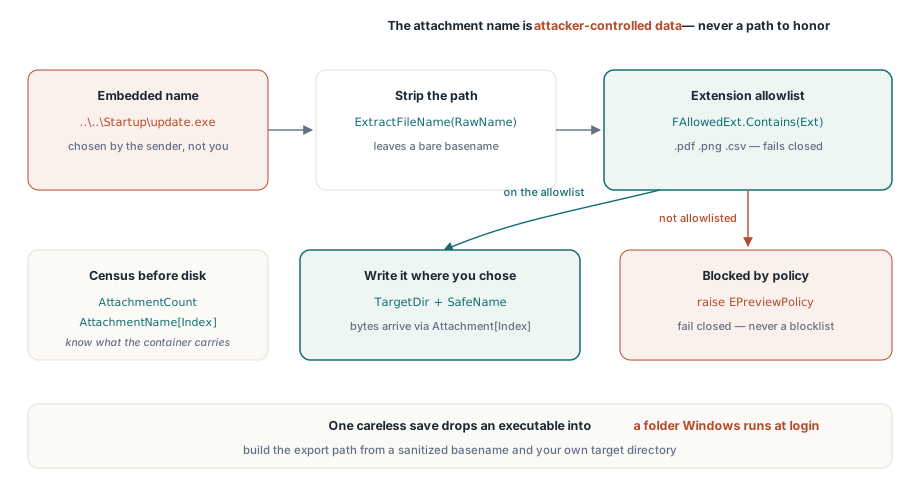
procedure TPreviewPane.ExportAttachment(Index: Integer; const TargetDir: string);
var
  RawName, SafeName, Ext: string;
  Data: TBytes;
begin
  RawName := string(Pdf.AttachmentName[Index]);
  SafeName := ExtractFileName(RawName);    // herhangi bir yol bileşenini çıkarır
  Ext := LowerCase(ExtractFileExt(SafeName));

  if not FAllowedExt.Contains(Ext) then    // izin listesi, kara liste değil
    raise EPreviewPolicy.CreateFmt('Attachment type %s blocked by policy', [Ext]);

  Data := Pdf.Attachment[Index];           // ham bayt olarak gömülü yük
  TFile.WriteAllBytes(
    IncludeTrailingPathDelimiter(TargetDir) + SafeName, Data);
end;
İzin listesi yönünü tercih edin. "Tehlikeli" uzantıların bir kara listesi, birisi hiç duymadığınız bir uzantıyı silahlandırdığı gün kaybettiğiniz bir yarıştır; .pdf, .png ve .csv'nin bir izin listesi kapalı olarak başarısız olur
Şifreleme izinlerinin gerçekte ne vaat ettiği
ISO 32000-1'in standart güvenlik işleyicisi, yazdırma, içerik kopyalama ve değiştirme için izin bayraklarını kodlar ve Permissions ve UserPermissions özellikleri, belge açıldığında bunları ham bit maskeleri olarak yüzeye çıkarır. ISO 32000-1 Tablo 22 bitleri tanımlar ve şifrelenmemiş bir dosya tüm bitleri ayarlı olarak bildirir. Bunları okuyun ve komut katmanınızda saygı gösterin, ama ne oldukları konusunda net olun. Bir sahip parolası ve boş bir kullanıcı parolasıyla şifrelenmiş bir belge için içerik açılışta tamamen çözülür ve bayraklar uyumlu görüntüleyicilere bir istektir, bir uygulama mekanizması değil. Bunun iki sonucu var ve zıt yönlere çekiyorlar. İzin bayraklarını asla kullanıcılara aldıkları belgelerin bir güvenlik özelliği olarak sunmayın, çünkü öyle değiller. Aynı zamanda, genel kopyalama (bit 5) reddedilse bile erişilebilirlik çıkarma bitine (bit 10) saygı gösterin; ekran okuyucu erişimi izin modelinde kasıtlı olarak ayrı tutulmuştur ve "kopyalama kapalı" diye onu çıkarmak, hiçbir güvenlik kazancı olmadan yardımcı teknolojiyi bozar
Reddedilen eylemleri araç çubuğu düğmelerini gizleyerek değil, komut düzeyinde uygulayın. Ctrl+C, bağlam menüleri ve sürükle-seç, hepsi bir araç çubuğunu atlar; kopyalama komutunun içindeki tek bir izin kontrolü hiçbir şeyi atlamaz
Gerçekten bir kullanıcı parolası gerektiren belgeler için, Password'u Active := True'dan önce atayın ve değeri olduğu sır gibi ele alın: oturum başına kimlik bilgisi deponuzdan alın, günlüklerden ve çökme raporlarından uzak tutun ve belgenin yanında asla kalıcı hale getirmeyin. Parolaları "kolaylık için" önbelleğe alan bir önizleme bölmesi, hiçbir korumaya sahip olmayan bir parola veritabanına sessizce dönüşmüştür
Yazdırma, kopyalama kuralının nereye indiği miras almak yerine kendi kararını hak eder. Fiziksel bir çıktı tanım gereği denetlenmemiştir, ancak yazdırmayı tamamen engellemek kullanıcıları her eksende daha kötü olan ekran görüntülerine itme eğilimindedir. Yaygın bir orta yol, yazdırmaya izin vermek ama her sayfayı kullanıcının kimliği ve bir zaman damgasıyla damgalamak, yazdırma komutunun içinde uygulanır. Yalnızca bunun için doğru beklentiyi taşıyın: bir filigran caydırıcılık ve atıftır. Önleme değildir
Alımın size zaten söylemiş olması gereken şey
Bir önizleme bölmesi, dosya zaten ekli bir dosyayla ortaya çıktığında daha iyi kararlar verir: şifreli olup olmadığı, JavaScript'in var olup olmadığı, bir ek sayımı, form türü. Bu inceleme geçişi görüntüleyicinin yukarı akışına aittir ve bir PDF alım inceleme çalışma tezgahı oluşturma makalesindeki kalıp, tam olarak bir önizleme politikasının tüketmek isteyeceği bayrakları üretir. Alımın riskli olarak işaretlediği dosyalar otomatik olarak sağlamlaştırılmış yoldan açılır; rutin belgeler kolaylıklarını korur. İki aşamayı iki yapılandırma ekranına değil, bir paylaşılan politika nesnesine bağlayın, aksi halde ne kadar dikkatli yazarsanız yazın ikinci sürüme kadar birbirinden ayrılırlar
Süreç içi ile süreç dışı arasındaki çizginin nereye düştüğü size dosya gönderen kişiye bağlıdır. Sıradan iş alımı için, belge gönderen kişiler bilinir ve yalnızca dikkatsizdir, betikleme kapalı ve bağlantılar yakalanmış süreç içi önizleme savunulabilir bir bardır. Anonim genel yüklemeler için değildir ve hiçbir miktarda süreç içi bayrak ayarlama onu öyle yapmaz; bunları ayrı, düşük ayrıcalıklı bir işçide render edin ve arayüze bit eşlemler gönderin, böylece bir motor kusuru size ana bilgisayar uygulaması yerine bir işçiye mal olur. Bu ayrımı bilinçli olarak yapın ve her alım yolunun hangi kovaya girdiğini yazın, çünkü yanlış tahmin etmenin maliyeti asimetriktir
Lisanslama, güvenlikle ilgili API yüzeyi ve sağlamlaştırılmış bir görüntüleyici demosu ürün sayfasındadır: PDFium Component