Kodunuzun oluşturduğu bir PDF formunda Tab tuşuna basın; imleç olması gereken yerden iki alan uzağa iner, ya da ikinci sütunu tamamen atlar, ya da üçüncü alandan sonra dördüncü yerine en başa döner. Görüntüleyicinizde bir fatura dolduran kişi, klavyenin formu, şimdiye kadar kullandığı her web formunda yürüdüğü gibi yürümesini bekler. Bu olmadığında fareye uzanır, bir sonraki kutuyu arar ve sessizce aracınızın bitmemiş olduğuna karar verir. Öngörülebilir alan gezinimi, insanların katlandığı bir veri girişi görüntüleyicisi ile güvendikleri bir görüntüleyici arasındaki farktır ve neredeyse tamamen simüle edilmiş tıklamalarla klavye girdisini taklit etmek yerine doğru odak API'sini kullanma meselesidir
Aşağıdaki örnekler, Delphi, C++Builder ve Lazarus için PDFium tabanlı bir VCL/LCL bileşeni olan PDFium Component'i kullanır. Gezinim, bir form görüntüleyicisinin doğru yapması gereken üç şeyden biridir; diğer ikisi, formu doğru açmak ve doldurulmuş değerleri gerçekten görünecek şekilde kaydetmek, sürprizlerin çoğunun saklandığı yerdir, bu yüzden aşağıda üçü de ele alınmıştır
Bir formu açmak: FormFill, FormType ve XFA sorusu
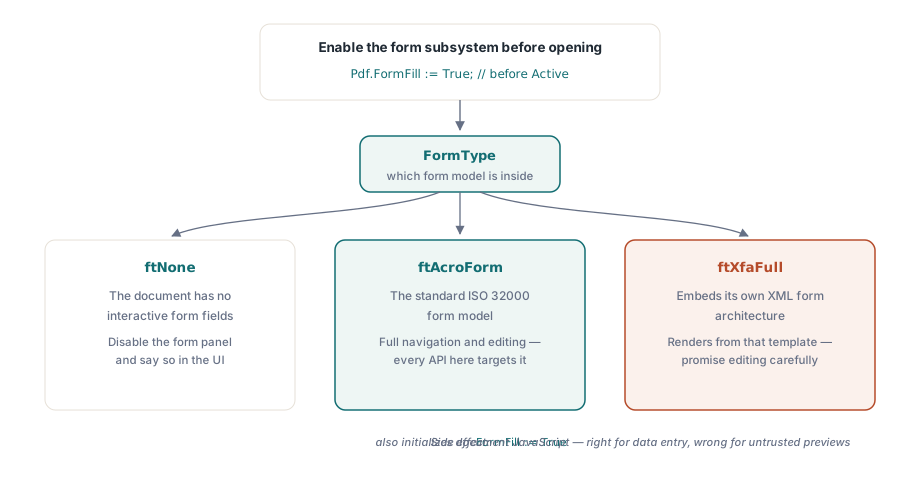
Alan erişimi, belge açılmadan önce FormFill özelliğiyle kontrol edilen form doldurma alt sisteminin etkinleştirilmesini gerektirir. Etkinleştirildikten sonra FormType ne tür bir formla karşı karşıya olduğunuzu söyler ve cevap, vaat edebileceğiniz özellik kümesini değiştirir:
Pdf.FileName := FormPath;
Pdf.FormFill := True;   // Active'den önce etkinleştirin; herhangi bir alan erişimi için gereklidir
Pdf.Active := True;

case Pdf.FormType of
  ftNone:
    DisableFormPanel('This document has no interactive form');
  ftAcroForm:
    BuildFieldList;     // tam alan gezinimi ve düzenleme mevcuttur
  ftXfaFull:
    ShowXfaNotice;      // XFA kendi XML şablonundan render edilir;
                        // alan düzenlemesini sınırlı sayın
end;
Bu anahtardan iki pratik not çıkar. AcroForm, standart ISO 32000 form modelidir ve buradaki her API'nin hedeflediği şey budur. XFA belgeleri kendi XML form mimarilerini gömer, bu yüzden hızlı bir AcroForm demosundan sonra bir müşteriye tam XFA düzenleme vaat etmek pişman olacağınız bir taahhüttür. İkinci not yan etkilerle ilgilidir: FormFill'i True olarak ayarlamak aynı zamanda belge JavaScript'ini de başlatır. Bir veri girişi görüntüleyicisinde bu tam olarak doğrudur, çünkü hesaplama betikleri, biri yazarken çalışan bir toplamı güncel tutan şeydir. Kökeni bilinmeyen dosyalar için bir önizleme penceresinde ise tam olarak yanlıştır. Güvenli PDF önizleme makalesi, bu ödünleşimin FormFill := False tarafını ele alır
Kullanıcıların beklediği yere inen Tab tuşu gezinimi
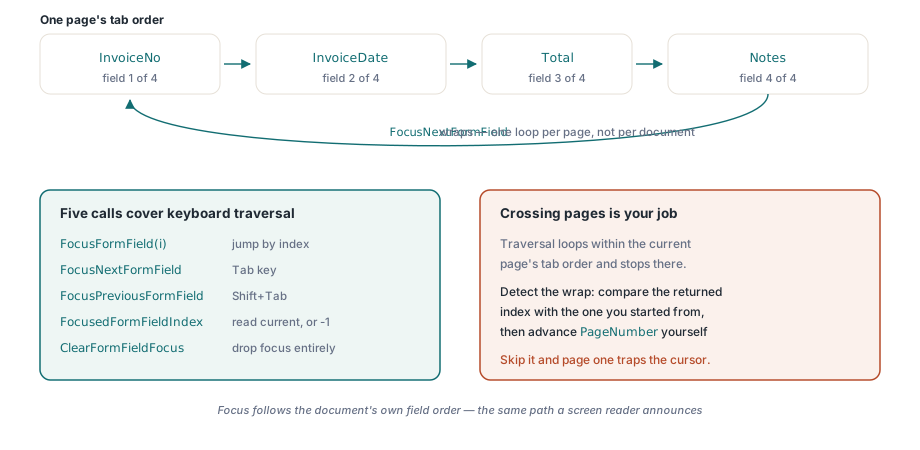
Başlangıçtaki klavye problemine geri dönelim. Cazibe, bir sonraki widget'ın dikdörtgeninde bir fare tıklaması sentezleyerek Tab'ı taklit etmektir, ki bu bir alan ekran dışına kaydırıldığı ya da iki widget çakıştığı anda bozulur. Odak API'si bunun yerine formun kendi odağını, hiçbir geometri tahmini olmadan doğrudan taşır. Beş çağrı bunu kapsar: indekse göre FocusFormField, adım adım ilerlemek için FocusNextFormField ve FocusPreviousFormField, nerede olduğunuzu okumak için FocusedFormFieldIndex ve odağı tamamen bırakmak için ClearFormFieldFocus
procedure TFormViewer.HandleTabKey(Shift: TShiftState);
begin
  if ssShift in Shift then
    PdfView.FocusPreviousFormField
  else
    PdfView.FocusNextFormField;
  UpdateFieldStatus;  // örn. "Field 4 of 17: InvoiceDate"
end;
İnsanları takılmasına neden olan tek davranış parçası sarmalamadır. Gezinim, geçerli sayfanın tab sırası boyunca çalışır ve bunun içinde döngü yapar: son alanı geçin, ilkine geri dönmüş olursunuz. Her iki adım fonksiyonu da yeni alan indeksini döndürür, ya da sayfa hiç alan içermiyorsa -1 döndürür. Bu döngü sayfa başınadır, belge başına değildir, bu da bir sonraki sayfaya geçmenin sizin işiniz olduğu, kütüphanenin işi olmadığı anlamına gelir. Döndürülen indeksi başladığınızla karşılaştırın, ne zaman sarmaladığını fark edin ve form tek bir sürekli sıra olarak okunmak üzere tasarlanmışsa PageNumber'ı kendiniz ilerletin. Bu kontrolü atlarsanız, iki sayfalık bir form imleci sessizce birinci sayfada hapseder, ki bu da bozuk-Tab şikayetinin kendi çeşididir
Gezinim, arayüzün geri kalanı ona tepki verdiğinde faydalı hale gelir. OnFormFieldEnter olayı odak vardığında tetiklenir ve görüntüleyicide OnFormFieldFocusChange yeni alan indeksini bildirir, böylece bir yan panel klavyenin az önce seçtiği şeyle adım adım kalabilir. Ters eşlemeye, bir ekran konumundan bir alana ihtiyaç duyduğunuzda, indeksli FormFieldAt özelliği araç ipucu önizlemeleri ve tıkla-düzenle panelleri için isabet testini yapar. Bunların hepsinde sessiz bir erişilebilirlik kazancı var: odak belgenin kendi alan sırasını izlediğinden, Tab tuşu için bağladığınız yol, hiçbir ek çalışma olmadan bir ekran okuyucunun anons ettiği aynı yoldur
Ham indeks numaraları yerine alan adlarını göstermek bir özellik daha gerektirir. FormFieldInfo[], indeks başına alan adını, türünü, font boyutunu, işaretli durumunu, dışa aktarma değerini ve grup üyeliğini taşıyan bir TPdfFormFieldInfo kaydı döndürür, ki bir gezinim listesinin göstermesi gereken de budur ("4" yerine "Field 4 of 17: InvoiceDate"). Radyo grupları özel bir test dosyasını hak eden bir durumdur. Birkaç widget tek bir alan adını paylaşabilir, bu yüzden widget'lardan saf bir şekilde derlenen bir liste aynı grubu birkaç kez gösterir ve onu okuyan herkesi şaşırtır
Doldurulmuş değerler neden boş çıkıyor ve bunu düzelten çağrı
Destek kuyruklarını dolduran diğer şikayet, kötü davranan bir Tab tuşundan daha alarm verici: bir form programatik olarak doldurulur, müşteri onu Acrobat'ta açar ve her alan boş görünür. Bir alana tıklayın, değeri hemen görünür hale gelir. Veri, tüm bu süre boyunca dosyadadır. Eksik olan verinin resmidir ve neden, bir kez anlaşılmaya değer, çünkü bütün bir hata ailesini açıklar
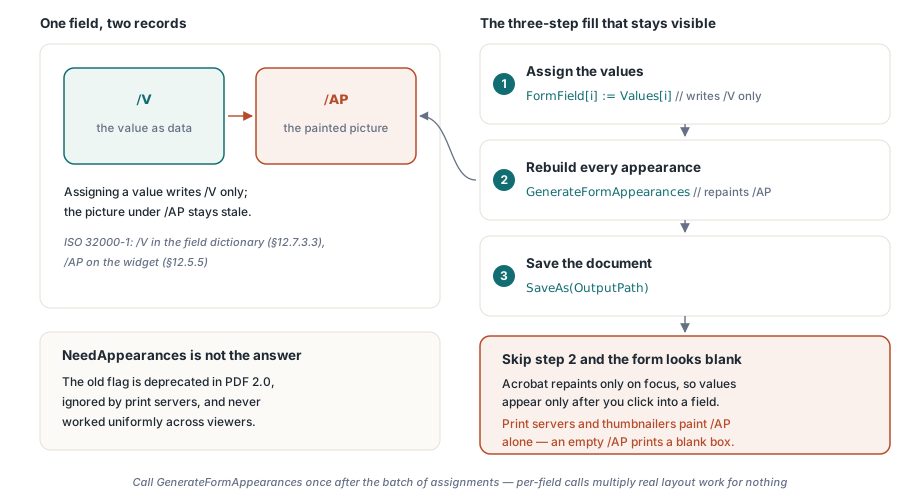
Bir AcroForm metin alanı, değerini alan sözlüğünün /V girdisinde saklar (ISO 32000-1 §12.7.3.3). Bir görüntüleyicinin gerçekte boyadığı şey ayrı bir şeydir: /AP altındaki widget'ın görünüm akışı (§12.5.5), küçük, önceden render edilmiş bir içerik parçası. /V'yi yazın ve /AP'ye dokunmayın, ikisi birbirinden uzaklaşır. Değer oradadır; onun render edilmiş sürümü ise bayat ya da yok. Acrobat, bir alan odak kazandığında onun görünümünü yeniden oluşturur, ki bu yalnızca tıklamada görünen değerlerin tüm açıklamasıdır. Görüntüleyicilerden görünümleri sizin için yeniden oluşturmalarını isteyen eski NeedAppearances bayrağı hiçbir zaman düzgün çalışmadı ve PDF 2.0'da kullanımdan kaldırıldı, yazıcı sunucuları ve küçük resim oluşturucuları onu tamamen görmezden gelir. Yalnızca /AP'yi boyarlar, başka hiçbir şeyi değil, bu yüzden /AP boşsa boş bir kutu yazdırırlar
FormField[i] aracılığıyla bir değer atamak yalnızca /V yazar. Bu yüzden bir formu doldurmak üç adımlık bir dizidir ve ekiplerin düşürdüğü adım ortadaki adımdır:
procedure TFormViewer.FillAndSave(const Values: array of WString;
  const OutputPath: string);
var
  i: Integer;
begin
  for i := 0 to Pdf.FormFieldCount - 1 do
    Pdf.FormField[i] := Values[i];   // yalnızca /V yazar

  // /AP görünüm akışlarını yeniden oluşturur; bu olmadan form
  // her alan tıklanana kadar Acrobat'ta boş görünür
  Pdf.GenerateFormAppearances;

  Pdf.SaveAs(OutputPath);
end;GenerateFormAppearances, düzeltmenin tamamıdır. Geçerli değerlerden, fontlardan ve hizalamadan her widget'ın görünüm akışını yeniden oluşturur, böylece hiçbir zaman bir odak olayı çalıştırmayan bir görüntüleyici, bir yazıcı sunucusu ya da bir küçük resim oluşturucu, yine de doldurulmuş durumu boyar. Onu atama toplu işinden sonra bir kez çağırın, alan başına bir kez değil. Görünüm oluşturma gerçek bir düzen işi yapar ve alan başına çağrılar bunu büyük bir formda boşuna çoğaltır
Görünümleri yeniden oluşturmak aynı zamanda fontların ve hizalamanın kendini gösterdiği andır, ki bu da ikinci derece bir sürprizin kaynağıdır. Yeni akış, her değeri widget dikdörtgeninin içine, alanın fontunu, boyutunu ve hizalamasını kullanarak yerleştirir. Test formunuzda rahatça oturan bir değer, aynı alanın daha dar olduğu bir müşteri kopyasında kırpılabilir veya küçülebilir. Otomatik boyutlandırılmış alanlar (font boyutu sıfır) metni sığdırmak için küçültür; sabit boyutlu alanlar ise onu yalnızca kırpar. İkisi de geçerlidir ve verilen bir formun hangisini yaptığını bilmenin tek dürüst yolu, yazdığınız dizeye değil, yeniden oluşturulan çıktıya bakmaktır. Birisi bir kutunun kenarında kesilmiş metin bildirdiğinde, neredeyse her zaman neden budur
Doğrulamayı işin bitirilmesinin bir parçası olarak ele alın, sonradan akla gelen bir şey değil. Kaydedilmiş dosyayı Acrobat'ta açın ve herhangi bir alana dokunmadan önce değerlerin görünür olduğunu doğrulayın. Ardından onu form mantığını tamamen görmezden gelen farklı bir görüntüleyiciden PDF'e ya da bir görüntüye yazdırın ve değerlerin bu yolu da atlattığını doğrulayın. İkisi birlikte, /V'ye karşı /AP kaymasının her varyantını yakalar
Demoyu geçen ve sahada başarısız olan alan yapılandırmaları
Temiz demo formları, müşteri dosyalarının gizlemediği bir dizi uç durumu gizler. Bunlardan dördü "benim makinemde çalıştı" raporlarının çoğunu oluşturur
- Onay kutusu dışa aktarma değerleri. "Açık" durum her zaman
Yesdeğildir. Bir form kendi dışa aktarma değerini tanımlamakta özgürdür ve yanlış dizeyi yazmak, kodunuz onu ayarladığına ikna olmuşken kutuyu görsel olarak işaretsiz bırakır. Bir değer varsaymak yerine dışa aktarma değeriniFormFieldInfo[]'dan okuyun - Paylaşılan adlı radyo grupları. Bir alan, birkaç widget. Atadığınız değer, hangi widget'ın seçili olarak okunacağına karar verir, bu yüzden bir adın bir dikdörtgene eşlendiğini varsayan arayüz kodu, odak halkasını yanlış düğmeye çizmekle sonuçlanır
- Hesaplanan alanlar. Belge JavaScript'i tarafından tutulan toplamlar, alan olaylarına yanıt olarak güncellenir. Bu olayları atlayan programatik bir doldurma, ya yeniden hesaplamayı tetiklemeli ya da hesaplanan alanların üzerine doğrudan yazmalıdır. Kalem kalemler ile toplamın uyuşmadığı bir form, iki düzeltmenin herhangi birinden daha kötüdür
- Gizli zorunlu alanlar. Koşullu formlar, hâlâ zorunlu olarak işaretlenmiş alanları gizler. Doğrulamanızın görünürlüğe mi yoksa ham zorunlu bayrağına mı saygı göstereceğine önceden karar verin, ardından bu kararı desteğin bulabileceği bir yere yazın
Sizi ısırmadan önce çözülmeye değer bir ayrım var: görünüm oluşturmak düzleştirmek değildir. GenerateFormAppearances, alanları düzenlenebilir bırakırken değerleri her yerde görünür yapar. Düzleştirme ise görünümü statik sayfa içeriğine gömer ve etkileşimi kalıcı olarak çıkarır, ki bu bir arşiv kopyası için doğru, bir sonraki kişinin hâlâ doldurması gereken bir form için yanlıştır. FormType, ftAcroForm yerine ftXfaFull bildiriyorsa, buradaki düzenleme yüzeyinin hiçbiri zaten temiz bir şekilde uygulanmaz, çünkü belge kendi XML şablonundan render edilir; bu durumu tespit edin ve kullanıcının sınırı kendi başına bulmasına izin vermek yerine ona söyleyin
Burada gösterilen form doldurma alt sistemi, odak gezinimi ve görünüm oluşturma, Delphi, C++Builder ve Lazarus/FPC için PDFium Component'in bir parçasıdır. Görüntüleyiciniz form verisinin yanı sıra inceleyici işaretlemesini de ele alıyorsa, açıklama incelemesi makalesi bu komşu modeli ele alır