Bir PDF sayfasını yazdırma önizlemesi için bir Windows device context'ine render etmek, aynı kod satırına üç koordinat sistemini sokar ve bunlar nadiren uyuşur. PDF sayfası, orijini sol altta olacak şekilde punto cinsinden ölçülür. Ekran DC'si, orijini sol üstte olacak şekilde piksel cinsinden ve sizin seçtiğiniz bir yakınlaştırma faktörüyle ölçülür. Önizlemenin tahmin etmesi gereken yazıcı DC'si, pikselleri aygıt çözünürlüğünde ölçer ama orijinini kağıdın köşesine değil, yazdırılabilir alanın köşesine yerleştirir. Bunlardan herhangi birini yanlış yaparsanız önizleme iyi görünür ama basılan sayfa kaymış, ölçeklenmiş veya bir kenardan kırpılmış çıkar. Sıradan belirti, ortalanmış görünen ama üst ve sol çizgileri kesilmiş basılan sınırlı bir formdur, çünkü lazer yazıcı en dıştaki birkaç milimetreye mürekkep koyamaz ve kimse bunu önizlemeye söylemez. losLab PDF Library (PDF Library for Delphi), tüm bu yolu device-context render çağrıları, sanal yazıcı yapılandırma katmanı ve yazıcının kendi ölçümlerinden üretilen önizleme bit eşlemleriyle kapsar; önizlemeyi bu kenar boşluğu konusunda dürüst kılan da tam olarak budur
Kağıt geometrisi, yazdırılabilir geometri değildir
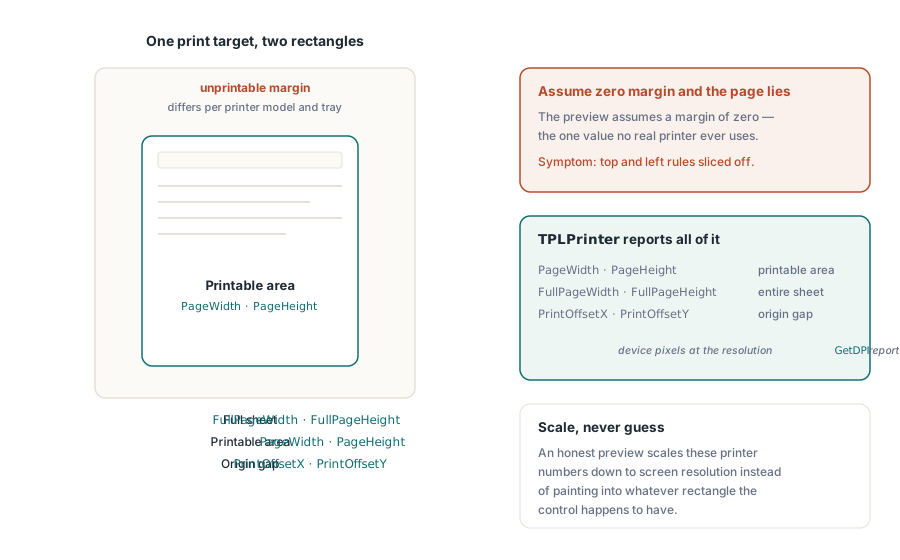
Herhangi bir yazdırma hedefini iki dikdörtgen tarif eder ve önizleme hatalarının çoğu bu ikisi arasındaki kaymada yaşar. Kağıt dikdörtgeni, fiziksel yapraktır. Yazdırılabilir dikdörtgen ise yazdırma motorunun gerçekten ulaşabildiği, yazıcı modeline ve bazen tepsiye göre değişen bir donanım kenar boşluğuyla içe çekilmiş daha küçük bölgedir. Kütüphanenin yazdırma katmanı ikisini de ölçer. Altta yatan TPLPrinter sınıfı, yazdırılabilir alan için PageWidth ve PageHeight'ı, tam yaprak için FullPageWidth ve FullPageHeight'ı, orijinleri arasındaki boşluk için ise PrintOffsetX ile PrintOffsetY'yi, hepsini GetDPI'nin bildirdiği çözünürlükte aygıt pikseli cinsinden sunar. Dürüst bir önizleme, sayfayı kontrolün o an sahip olduğu herhangi bir dikdörtgene boyamak yerine, aynı bu sayıları ekran çözünürlüğüne ölçekler. Bu adımı atlarsanız önizleme, sessizce sıfır bir kenar boşluğu varsayar; bu da hiçbir gerçek yazıcının kullanmadığı tek değerdir
RenderPageToDC üzerinden ekran önizlemesi
Ekran üzerindeki bir önizleme kontrolü için RenderPageToDC(DPI, Page, DC), yüklenen belgenin bir sayfasını, ister bir TPaintBox tuvali, ister ekran dışı bir bit eşlem, ister bir metadosya DC'si olsun, herhangi bir GDI device context'inin üzerine doğrudan çizer. DPI bağımsız değişkeni yakınlaştırmayı ayarlar. 96, klasik bir ekranda %100'lük bir görünüme yaklaşır ve onu ikiye katlamak render edilen boyutu ikiye katlar
procedure TPreviewForm.PreviewBoxPaint(Sender: TObject);
begin
  // bu üçü, çağrı başına parametre değil, yapışkan kütüphane durumudur:
  FPdf.SetRenderDCOffset(FOffsetX, FOffsetY);
  FPdf.SetRenderDCErasePage(1);
  FPdf.SetRenderCropType(0);
  FPdf.RenderPageToDC(FPreviewDpi, FCurrentPage, PreviewBox.Canvas.Handle);
end;
Tuzak, DC render yolunun çağrı başına parametrelerle değil, yapışkan kütüphane durumuyla yönlendirilmesidir. SetRenderDCOffset, SetRenderDCErasePage ve SetRenderCropType'ın her biri, bir şey onları değiştirene kadar kalıcıdır; bu yüzden kullanıcı yakınlaştırılmış görünümü ayarladıktan sonra çalışan bir küçük resim döngüsü, önceki kod yolunun bıraktığı ofseti veya kırpmayı devralır. Belirti, yalnızca belirli gezinme dizilerinde kayan bir önizlemedir ve bu, bir hatanın yeniden üretilmesi açısından olabileceği kadar sefildir. Yukarıdaki gibi, ilgili tüm durumu boyama işleyicisinin en başında ayarlamak hiçbir şeye mal olmaz ve tüm bu sınıfı ortadan kaldırır. Yakınlarda ikinci bir çarpan gizlenir. Etkili çıktı çözünürlüğü, render ölçeği çarpı DPI bağımsız değişkenidir ve SetRenderScale varsayılan olarak 1,0 olsa da, bir kez değiştirildiğinde o da kalıcı olur; bu yüzden onu artıran bir dışa aktarma özelliği, bir şey onu geri ayarlayana kadar sonraki her önizlemeyi sessizce yeniden ölçekler
Kaydırılabilir görüntüleyiciler ve kısmi yeniden boyamalar için özel bir varyant vardır. RenderPageToDCClip, device context ile birlikte bir kırpma belirtimi alır; böylece pencerenin bir bandını geçersiz kılmak, tüm sayfayı yeniden rasterize etmek yerine yalnızca o bandı yeniden boyar. Büyük format sayfalarda yüksek yakınlaştırmada bu, kaydırma çubuğunu takip eden bir görüntüleyici ile arkasında bulaşan bir görüntüleyici arasındaki farktır
Önizlemeyle eşleşen bir yazdırma işi
Yazdırma tarafı bir sanal yazıcı üzerinden çalışır. NewCustomPrinter, bir sistem yazıcısını kütüphaneye özel bir yapılandırmaya klonlar ve SetupPrinter, makine genelindeki DevMode'a dokunmadan bu klonu ayarlar: kağıt, ayar 1 olarak (bir DMPAPER_* sabiti) ve yönlendirme ayar 11 olarak girer. Kazanç izolasyondur. Bir servis, ana bilgisayarın varsayılan yazıcısı Letter'da kalırken A4 etiketler basabilir ve sonrasında hiçbir şeyin geri yüklenmesi gerekmez

var
  Pdf: TPDFlib;
  Virt: WideString;
  Opt: Integer;
begin
  Pdf := TPDFlib.Create;
  try
    if Pdf.LoadFromFile('report.pdf', '') <> 1 then
      raise Exception.Create('load failed');
    Virt := Pdf.NewCustomPrinter(Pdf.GetDefaultPrinterName);
    Pdf.SetupPrinter(Virt, 1, 9);        // ayar 1 = kağıt, DMPAPER_A4
    Pdf.SetupPrinter(Virt, 11, 1);       // ayar 11 = yönlendirme, 1 = dikey
    Opt := Pdf.PrintOptions(1, 1, 'Monthly Report');  // kağıda sığdır, otomatik döndür + ortala
    Pdf.PrintDocument(Virt, 1, Pdf.PageCount, Opt);
  finally
    Pdf.Free;
  end;
end;
PrintOptions dikkatli bir okumayı hak eder. PrintDocument veya PrintPages'e geçirmeniz gereken bir seçenekler tanıtıcısı döndürür; bu, ortam durumu değildir. Seçenekleri oluşturup ardından tanıtıcıyı geçirmeyi unutmak sessizce başarısız olur. İş varsayılanlarla basılır ve bir kağıda-sığdır politikası beklenip de aşırı büyük bir sayfa bunun yerine kırpılmış çıkana kadar kimse fark etmez. Sayfa ölçekleme bağımsız değişkeni, o politikanın yaşadığı yerdir. Ölçekleme yok, bir cetvele karşı ölçülen formlar için önemli olan boyutsal doğruluğu korur. Kağıda-sığdır her şeyi yaprağa yeniden ölçekler. Büyük-sayfaları-küçült, normal sayfaları olduğu gibi bırakır ve yalnızca bir sayfa yazdırılabilir alanı aştığında devreye girer; bu da karışık bir belge kümesi için genellikle doğru varsayılandır. Otomatik-döndür-ve-ortala bayrağı, ikinci bir kod yolu olmadan yatay sayfaları ele alır
VCL diyalog akışı üzerinden zaten bir TPrinter'ı yöneten uygulamalar onu doğrudan devredebilir. PrintDocumentToPrinterObject ve PrintPagesToPrinterObject, yapılandırılmış TPrinter örneğini kabul eder; bu, standart yazdırma diyaloğunu kullanıcıya dönük yapılandırma yüzeyi olarak tutarken sayfa render işini kütüphaneye bırakır. İki yaklaşımı tek bir kod yolunda karıştırmak, bu çalışmanın geri kalanının ortadan kaldırmayı amaçladığı geometri kaymasını yeniden getirme eğilimindedir, bu yüzden birini seçin. Sanal yazıcı yolu gözetimsiz servislere uyar; TPrinter yolu ise etkileşimli uygulamalara uyar
Seçici çıktı da aynı şekilde çalışır. PrintPages bir aralık dizesi alır; bu yüzden sanal yazıcı adını, '2-5,12''yi ve seçenekler tanıtıcısını geçirmek, geometri sözleşmesi bozulmadan 2'den 5'e kadar olan sayfaları ve 12. sayfayı basar; aynı sözdizimi dosyaya-yazdır varyantlarını da yönetir. Bu dosya varyantları, hiçbir fiziksel aygıtın bağlı olmadığı gözetimsiz bir ortam için pratik cevaptır: hiçbir sürücü kuyruğu olmayan bir derleme sunucusunda yazdırma geometrisini regresyon testine tabi tutmak. Aynı belgeyi aynı seçeneklerle her derlemede bir dosya eserine render edin ve bir geometri regresyonu, üç hafta sonra bir müşteri raporu olmak yerine bir fark çıktısına dönüşsün
Yazıcının kendi ölçümleriyle önizleme bit eşlemleri
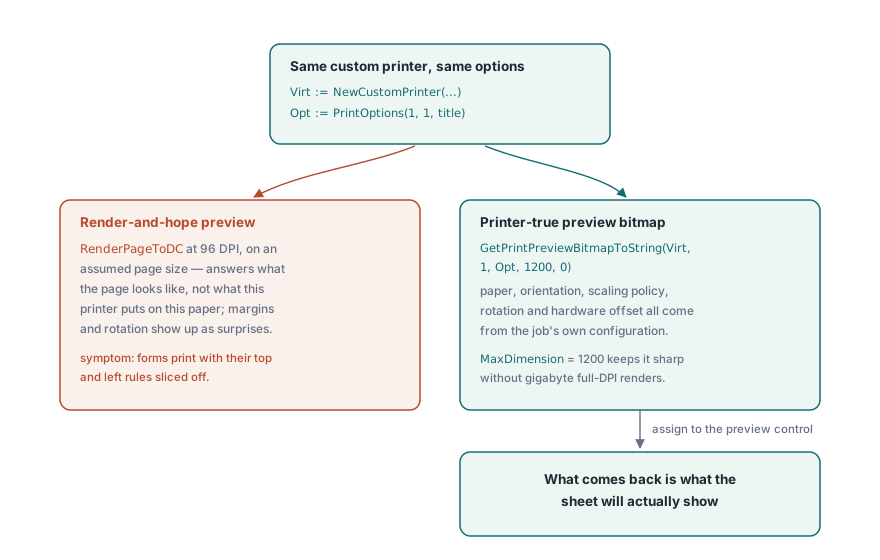
Varsayılan bir sayfa boyutuna karşı 96 DPI'de render edilen bir önizleme, yanlış soruyu yanıtlar. Sayfanın nasıl göründüğünü gösterir, bu yazıcının bu kağıda ne basacağını değil. GetPrintPreviewBitmapToString, önizlemeyi eninde sonunda kullanılacak iş ile aynı özel yazıcıdan ve aynı seçenekler tanıtıcısından kurarak bu boşluğu kapatır; böylece kağıt boyutu, yönlendirme, ölçekleme politikası, döndürme ve donanım ofseti bit eşlemine besler. Geri gelen şey, yaprağın göstereceği şeydir
procedure ShowPrinterTruePreview(Pdf: TPDFlib; const Virt: WideString; Opt: Integer);
var
  Data: AnsiString;
  Strm: TMemoryStream;
  Bmp: TBitmap;
begin
  Data := Pdf.GetPrintPreviewBitmapToString(Virt, 1, Opt, 1200, 0);
  Strm := TMemoryStream.Create;
  try
    Strm.WriteBuffer(PAnsiChar(Data)^, Length(Data));
    Strm.Position := 0;
    Bmp := TBitmap.Create;
    try
      Bmp.LoadFromStream(Strm);
      PreviewImage.Picture.Assign(Bmp);
    finally
      Bmp.Free;
    end;
  finally
    Strm.Free;
  end;
end;
MaxDimension bağımsız değişkeni, bit eşlemin uzun kenarını sınırlar. 1200 piksel, bir önizleme diyaloğu için keskin kalır ve yazıcının 600 DPI'sinde tam çözünürlüklü bir render'ın gigabaytlara çıkacağı E boyutu mühendislik çizimlerinde bile belleği makul tutar
Kullanıcının yazıcı seçimlerini hatırlamak
Oturumlar arasında ayarlarını unutan yazdırma diyalogları, kendi destek taleplerini üretir. DevMode çifti, GetPrinterDevModeToString ve SetPrinterDevModeFromString, bir yazıcının tam sürücü yapılandırmasını, hiçbir genel API'nin modellemeye zahmet etmediği sürücüye özel seçenekler dahil, kullanıcı tercihlerinde saklayıp bir sonraki oturumda geri yükleyebileceğiniz opak bir dizeye serileştirir. Yazıcıyı GetPrinterNames'ten gelen adına göre kalıcı kılın, asla liste indeksine göre değil. Bir yazıcı eklendiğinde veya kaldırıldığında indeks sırası değişir; bu yüzden kaydedilmiş bir indeks, liste bir sonraki kaydığında sessizce yanlış aygıta işaret eder. GetDefaultPrinterName, hatırlanan aygıt tamamen ortadan kalktığında yedek durumu kapsar
Tepsi seçimi, kalıcılık hikayesini tamamlar. GetPrinterBins, bir sürücünün sunduğu kağıt kaynaklarını bildirir; bu, ilk sayfanın antetli kağıt tepsisinden, geri kalanının ise düz kağıttan çekildiği antetli kağıt iş akışları için önemlidir. Bu, kullanıcıların uygulamanın diğer her şeyle birlikte hatırlamasını beklediği bir politikadır ve PDF'in her baytı doğru olsa bile yanlış kağıda düşen bir yazdırma işi bir hata olarak okunur
Önizleme ve yazdırma boyunca tek bir motor kullanın
Son bir karar, sadakati sessizce yönetir. Render motoru seçimi hem ekran hem de yazıcı hedeflerine uygulanır, bu yüzden ayartı hızlı bir motorla önizleme yapıp hassas bir motorla basmaktır. Buna direnin. Önizlemeyi ve işi farklı motorlar üzerinden sürmek, yazıcıya-sadık bir önizlemenin ortadan kaldırmak için inşa edildiği tam o sadakat kaymasını yeniden getirir ve bunu yalnızca kağıt üzerinde ortaya çıkacak bir biçimde yapar. Yerleşik, Cairo ve PDFium motorları arasındaki ödünleşimler Delphi'de çok motorlu PDF render etme makalesinde tartılır; birini seçin ve her iki tarafta da onu kullanın
Yazdırmadan önce rahatça yüklenemeyecek kadar büyük belgeler, belge ağacını kurmadan sayfaları bir dosya tanıtıcısından device context'e render eden, büyük PDF birleştirme, bölme ve doğrudan erişim makalesinde açıklanan doğrudan erişim yolu üzerinden açılabilir. Eksiksiz yazdırma API referansı, losLab PDF Library for Delphi ürün sayfasındadır