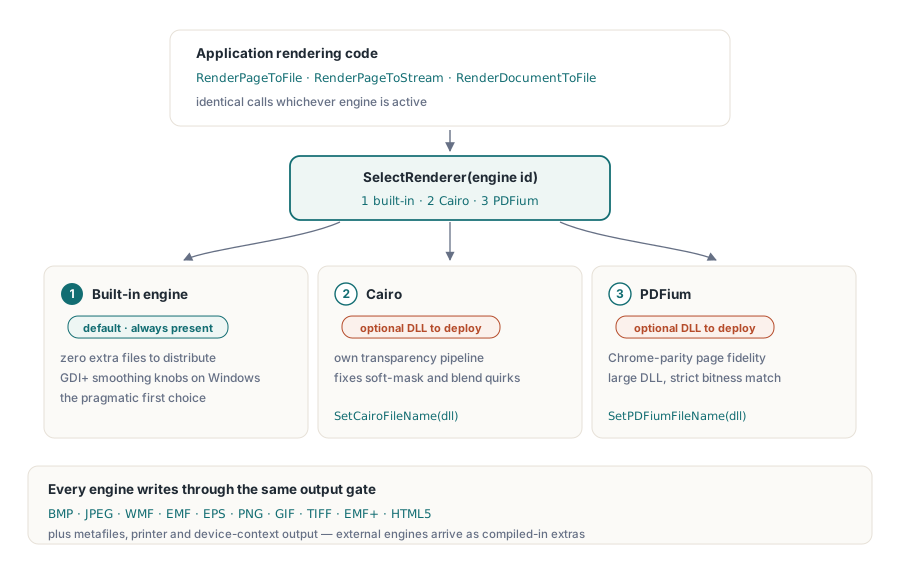
Üç raster motoru aynı PDF'yi okuyabilir ve ne söylediği konusunda anlaşamayabilir. PDF Library for Delphi'ın yerleşik motoru, hiçbir ek dosya olmadan gönderilen ve her şeyi yeterince render eden motordur, bu yüzden varsayılan yuvayı kazanır. Cairo farklı bir saydamlık ve kenar yumuşatma hattı getirir ve yumuşak maskeler ya da harmanlama modları başka yerlerde yanlış çıktığında insanların yöneldiği motor olma eğilimindedir. PDFium, Chrome'un render kodunu taşır, bu yüzden bir tarayıcıda doğru görünen bir sayfa genellikle PDFium altında da doğru görünür, büyük bir DLL ve ısrarla eşleşmesini istediği bir bit genişliği pahasına. Üçünden hiçbiri soyut olarak "doğru" değildir. Doğruluk belge başınadır ve verilen bir belge kümesini hangi motorun ele aldığını öğrenmenin tek dürüst yolu, o kümeyi her birinden geçirmektir
Bu, motoru bir derleme zamanı seçimi yerine bir çalışma zamanı seçimi olarak ele almanın gerekçesidir. losLab'ın Delphi ve C++Builder PDF kütüphanesi PDF Library for Delphi, üçünü de tek bir render yüzeyinin arkasına koyar, böylece karar bir kod dalı yerine tek bir tam sayıya mal olur. Bunun geri kalanı, motorlar arasında güvenle seçim yapmaya, dağıtılmış bir ikili dosyanın gerçekte hangi motorları taşıdığını doğrulamaya ve render durumunun sessizce bir sonraki işi zehirlemesini önlemeye iner
Tek çağrı yüzeyinin arkasındaki üç raster motoru
Kütüphane motorlarını numaralandırır. Motor 1, Windows'ta GDI+ yumuşatma seçenekleriyle birlikte gelen varsayılan yerleşik render motorudur. Motor 2 Cairo, motor 3 PDFium'dur, ikisi de çalışma zamanında SelectRenderer aracılığıyla seçilir. İki harici motor, onları seçmeden önce SetCairoFileName ve SetPDFiumFileName ile sağladığınız yollardan DLL'lerden yüklenir. Hangi motor etkin olursa olsun, iş aynı çağrılardan geçer: RenderPageToFile, RenderPageToStream, RenderDocumentToFile. Motor değiştirmek bir sayıyı taşır; render kodunuzun geri kalanı bunu asla fark etmez
Hedef modeli bit eşlemlerin çok ötesine uzanır. Render sınıfı ayrıca meta dosyaları (WMF, EMF, EMF+), EPS'yi, doğrudan aygıt bağlamlarını, yazıcıları ve HTML5'i hedefler; Cairo ve PDFium yalnızca derlemeye dahil edildiklerinde ek hedefler olarak görünür. Üç motorun en görünür şekilde ayrıştığı yer raster çıktıdır, bu yüzden buradaki örnekler onu kullanır
Bir motorun var olduğunu asla varsaymayın: başlangıçta yoklayın
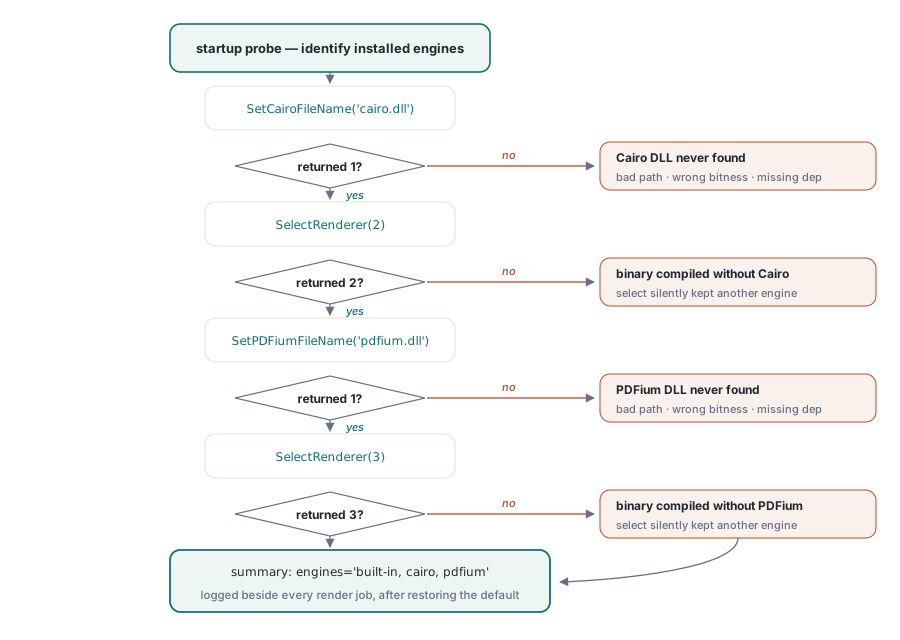
Cairo ve PDFium koşullu derleme özellikleridir, bu da bir ikili dosyanın onlar hiç olmadan derlenebileceği anlamına gelir. Bu olduğunda, motor 2 veya 3'ü istemek hiçbir şey fırlatmaz. SelectRenderer yalnızca istediğiniz ID'den farklı bir değer döndürür ve dönüş değerini görmezden gelen kod, halihazırda etkin olan motorla render etmeye devam eder. Savunma, her motordan kendini tanımlamasını isteyen ve cevabı kaydeden bir başlangıç yoklamasıdır:
function ProbeEngines(PDF: TPDFlib): string;
begin
  Result := 'built-in';                        // motor 1 her zaman mevcuttur
  if (PDF.SetCairoFileName('cairo.dll') = 1) and (PDF.SelectRenderer(2) = 2) then
    Result := Result + ', cairo';
  if (PDF.SetPDFiumFileName('pdfium.dll') = 1) and (PDF.SelectRenderer(3) = 3) then
    Result := Result + ', pdfium';
  PDF.SelectRenderer(1);                       // gerçek işten önce varsayılana geri dön
end;
Bu yoklamayı başlangıçta bir kez çalıştırın ve sonucunu her render işiyle birlikte günlüğe yazın. Bir müşteri bir render farkı bildirdiğinde en yaygın tek soru, kurulumlarının gerçekte hangi motorlara sahip olduğudur ve günlükte duran tek satırlık bir cevap, bunu uzaktan masaüstü oturumu olmadan çözer. Faydalı bir yan etki: SetPDFiumFileName'in kendisi 0 döndürürse, sorunun PDFium desteği olmadan derlenmiş bir ikili dosya değil, DLL olduğunu (yanlış yol, yanlış bit genişliği, eksik bir bağımlılık) zaten bilirsiniz, çünkü yol çağrısı SelectRenderer hiç çalışmadan önce hiçbir şey çözemedi
Tek bir Options tam sayısının arkasındaki on çıktı biçimi
Render çağrılarındaki Options parametresi çıktı kodlamasını seçer: 0 BMP, 1 JPEG, 2 WMF, 3 EMF, 4 EPS, 5 PNG, 6 GIF, 7 TIFF, 8 EMF+ ve 9 HTML5'tir. PNG (5), önizlemeler ve arşiv sayfa görüntüleri için makul varsayılandır. SetJPEGQuality ile eşleştirilen JPEG (1), dosya boyutunun keskin kenarlardan daha önemli olduğu fotoğrafik taramalar için daha iyi bir seçimdir
Bir biçim, hedef akış hakkında bir gereksinimi gizler. BMP yolu, önce görüntü verisini yazar, ardından başlıktaki çözünürlük alanlarını yamalamak için 0x26 ofsetine geri sarar. Bunu ileri yönlü bir akışa, bir sıkıştırma sarmalayıcısına veya bir ağ soketine yöneltirseniz, çağrı bir motor hatası gibi okunan ama öyle olmayan bir şekilde başarısız olur. Aranabilir olmayan bir hedef kaçınılmaz olduğunda, bunun yerine PNG render edin veya BMP'yi bir bellek akışı üzerinden aşamalandırın ve tamamlandığında ileri kopyalayın
Geçirdiğiniz DPI, aldığınız DPI değildir
Her render çağrısı bir DPI argümanı alır, ancak gerçekte aldığınız çözünürlük bu değerin küresel render ölçeğiyle çarpımıdır. SetRenderScale 1.0'da başlar ve onu değiştirdiğinizde yeni çarpan, o örnekteki her sonraki render'a sessizce uygulanır:
PDF.SetRenderScale(2.0);                    // sonraki her render ikiye katlanır
PDF.RenderPageToFile(150, 1, 5, 'p1.png');  // etkin olarak 300 DPI
PDF.SetRenderScale(1.0);                    // sıfırlayın, aksi halde küçük resimleriniz dev boyutta gelir
Aynı yapışkanlık SetRenderCropType ve JPEG kalite ayarı için de geçerlidir. Tek bir paylaşılan örnekten küçük resimler, önizlemeler ve baskı çözünürlüğünde görüntüler üreten bir serviste, ara sıra ortaya çıkan "küçük resimler birden 40 MB oldu" biletinin arkasındaki gerçek şey bu geriye kalan ayarlardır. Buradan çıkışın iki temiz yolu var: ilgili durumu her işlemin başında sıfırlayın veya her çıktı profiline ayrı bir örnek ayırın, böylece hiçbir şey aralarına sızmaz
Başka bir motora yönelmeden önce varsayılan motoru ayarlamak
"Farklı bir motora ihtiyacımız var" isteklerinin şaşırtıcı bir oranının aslında kılık değiştirmiş bir ayar sorunu olduğu ortaya çıkar. Yerleşik render motoru, yumuşatma davranışını SetGDIPlusOptions ve daha geniş SetRenderOptions ailesi üzerinden açığa çıkarır ve SetGDIPlusFileName, bir dağıtım ortamı sıra dışı bir sürüm gönderdiğinde onu belirli bir GDI+ çalışma zamanına yöneltmenize izin verir. Düşük DPI'da tırtıklı çizgi sanatı, küçük resimlerde bulanık metin, gradyanlarda bantlanma: bunların hepsi bu düğmelere yanıt verir ve onları çevirmek kurulum programında hiçbir şeye mal olmaz. Buna karşılık Cairo veya PDFium eklemek, daha fazla DLL göndermek, ikinci veya üçüncü bir bit genişliği varyantını izlemek ve onları güncelleme yükümlülüğüne sahip olmak anlamına gelir
Bu yüzden bir kalite şikayetinin doğal bir işlem sırası vardır. Önce müşterinin tam DPI ve ölçeğinde yeniden üretin, çünkü çoğu zaman bunlar eşleştiğinde fark buharlaşır. Ardından yerleşik motorun yumuşatma seçeneklerini deneyin. Ancak o zaman sayfayı, diğer her değişken sabit tutularak motorlar arasında yan yana koyun: onu 1, 2 ve 3 motorları üzerinden aynı DPI'de PNG'ye render edin ve üçünü de ekleyin. Genellikle üçünden ikisi anlaşır ve bu çoğunluk, sapan olanın farklı yorumlanan belge mi yoksa yanlış olan kendi temel beklentiniz mi olduğunu söyler. Üç somut görüntü, bir "yanlış render ediliyor" anlaşmazlığını bir paragraf sıfattan çok daha hızlı çözer
Kendini açıklayan bir yedek zinciri
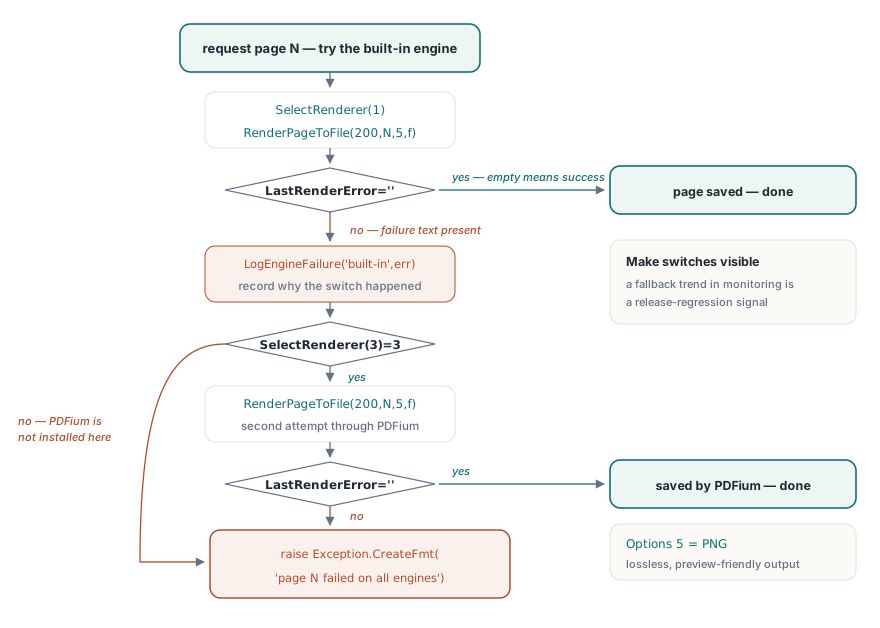
Yoklama ve durum disiplini yerine oturduğunda, yedek zincirinin kendisi kısadır. Bir hatayı tespit etmek, en son render için motorun kendi mesaj metnini tutan ve render başarılı olduğunda boş olan LastRenderError'a dayanır:
procedure RenderPageWithFallback(PDF: TPDFlib; Page: Integer; const OutFile: string);
begin
  PDF.SelectRenderer(1);                            // önce yerleşik
  PDF.RenderPageToFile(200, Page, 5, OutFile);      // 5 = PNG
  if PDF.LastRenderError = '' then Exit;
  LogEngineFailure('built-in', Page, PDF.LastRenderError);
  if PDF.SelectRenderer(3) = 3 then                 // ağır yedek olarak PDFium
  begin
    PDF.RenderPageToFile(200, Page, 5, OutFile);
    if PDF.LastRenderError = '' then Exit;
    LogEngineFailure('pdfium', Page, PDF.LastRenderError);
  end;
  raise Exception.CreateFmt('Page %d failed on all available engines', [Page]);
end;
Burada ağırlık taşıyan iki tasarım noktası vardır. Zincir, her geçişin neden olduğunu kaydeder, çünkü "bu sayfa sürüm 3.7'den beri PDFium'a geri düşüyor" diyen bir günlük satırı, kaybolmak yerine izlemede trend olmasını istediğiniz bir regresyon sinyalidir. Yedek sırasının kendisi, iş yükü başına seçilmeye değer bir politikadır. Yerleşik motor ek DLL olmadan dağıtılır, bu da onu çoğu kurulumda doğru ilk deneme yapar, saydamlık grupları veya sıra dışı gölgeleme ile ağır belgeler ise bir ekibin alternatif bir motoru hiç devreye sokmasının olağan nedenidir. Hiçbir motor genel olarak en hızlı değildir, ki bu da çağrı başına seçim yapmanın tüm anlamıdır: her birini gerçek belgelerinizin bir örneğine karşı gerçek DPI'nizde kıyaslayın ve motor DLL'leri veya belge karışımı değiştiğinde bu ölçümü yeniden ziyaret edin. Belge kümesi tartışmayı her seferinde kazanır
Tek sayfaların ötesinde: TIFF toplu işleri ve canlı aygıt bağlamları
Sayfa başına çağrıların iki komşusu araç kutusunu tamamlar. RenderAsMultipageTIFFToFile, bir sayfa aralığı ifadesini doğrudan çok sayfalı bir TIFF'e render eder, ki bu PDF'den önce gelen belge yönetim sistemlerine arşiv devirleri için doğal biçimdir. RenderPageToDC, önizleme kontrolleri için doğrudan bir Windows aygıt bağlamına boyar; ölçek çarpanıyla aynı sıfırlama disiplinini gerektiren kendi yapışkan ayar üçlüsü (SetRenderDCOffset, SetRenderDCErasePage, artı kırpma türü) tarafından yönetilir. Ekran önizlemesi ve baskı yolu render işlemi, aşağıda bağlantısı verilen özel bir makaleyi hak edecek kadar kendi tuzaklarını taşır
Sırada ne var
İleriye taşınmaya değer bir alışkanlık: SelectRenderer, örnekteki her sonraki çağrı için geçerli olduğundan, belgenin geri kalanı varsayılanda kalırken tek bir inatçı sayfa başka bir motorda yeniden denenebilir. Önizleme boyama, yazıcı seçimi ve DevMode işleme için baskı önizleme ve aygıt bağlamı makalesiyle devam edin. Render'lar çok büyük dosyalar üzerinde yüksek hacimli bir iş hattını beslediğinde, doğrudan erişim rehberindeki tutamaç tabanlı yaklaşım, DARenderPageToFile üzerinden sayfa başına render ile doğal olarak eşleşir
Motor paketleme, desteklenen biçimler ve deneme sürümleri PDF Library for Delphi ürün sayfasında ayrıntılandırılmıştır