Tryck Tab i ett PDF-formulär din kod byggde, och markören hamnar två fält bort från där den borde, eller hoppar över den andra kolumnen helt, eller hoppar tillbaka till toppen efter det tredje fältet i stället för det fjärde. Personen som fyller i en faktura i din visare förväntar sig att tangentbordet vandrar genom formuläret på samma sätt som det vandrar genom varje webbformulär de någonsin använt. När det inte gör det tar de till musen, jagar efter nästa ruta, och bestämmer sig tyst för att ditt verktyg är oavslutat. Förutsägbar fältnavigering är skillnaden mellan en dataregistreringsvisare folk tolererar och en de litar på, och det är nästan uteslutande en fråga om att använda rätt fokus-API i stället för att fejka tangentbordsinmatning med simulerade klick
Exemplen nedan använder PDFium Component, en PDFium-baserad VCL/LCL-komponent för Delphi, C++Builder och Lazarus. Navigering är en av tre saker en formulärvisare måste få rätt; de andra två, att öppna formuläret korrekt och spara ifyllda värden så att de faktiskt syns, är där de flesta överraskningarna gömmer sig, så alla tre täcks nedan
Att öppna ett formulär: FormFill, FormType och XFA-frågan
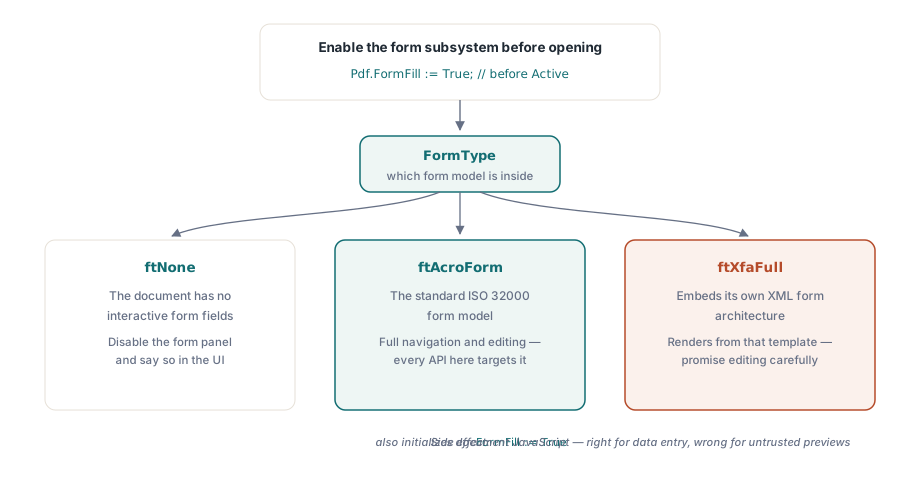
Fältåtkomst kräver att formulärifyllningssystemet, styrt av egenskapen FormFill, aktiveras innan dokumentet öppnas. Väl aktiv talar FormType om vilken sorts formulär du står inför, och svaret ändrar funktionsuppsättningen du kan utlova:
Pdf.FileName := FormPath;
Pdf.FormFill := True;   // aktivera före Active; krävs för all fältåtkomst
Pdf.Active := True;

case Pdf.FormType of
  ftNone:
    DisableFormPanel('This document has no interactive form');
  ftAcroForm:
    BuildFieldList;     // full fältnavigering och redigering tillgänglig
  ftXfaFull:
    ShowXfaNotice;      // XFA renderar från sin egen XML-mall;
                        // behandla fältredigering som begränsad
end;
Två praktiska noteringar följer av den switchen. AcroForm är standardformulärmodellen enligt ISO 32000, och det är vad varje API här riktar sig mot. XFA-dokument bäddar in sin egen XML-formulärarkitektur, så att lova en kund full XFA-redigering efter en snabb AcroForm-demo är ett åtagande du kommer att ångra. Den andra noteringen handlar om sidoeffekter: att sätta FormFill till True initierar också dokumentets JavaScript. I en dataregistreringsvisare är det precis rätt, eftersom beräkningsskript är vad som håller en löpande summa aktuell medan någon skriver. I ett förhandsgranskningsfönster för filer av okänt ursprung är det precis fel. Artikeln om säker PDF-förhandsgranskning täcker FormFill := False-sidan av den avvägningen
Tab-tangentnavigering som hamnar där användare förväntar sig
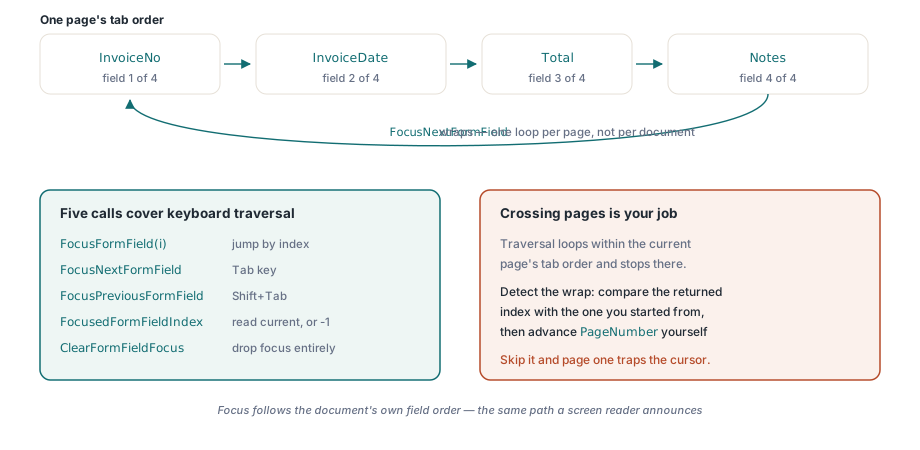
Tillbaka till tangentbordsproblemet från början. Frestelsen är att fejka Tab genom att syntetisera ett musklick på nästa widgets rektangel, vilket går sönder i samma ögonblick ett fält rullas utanför skärmen eller två widgetar överlappar. Fokus-API:et flyttar i stället formulärets eget fokus direkt, utan geometrigissningar. Fem anrop täcker det: FocusFormField efter index, FocusNextFormField och FocusPreviousFormField för stegning, FocusedFormFieldIndex för att läsa var du är, och ClearFormFieldFocus för att släppa fokus helt
procedure TFormViewer.HandleTabKey(Shift: TShiftState);
begin
  if ssShift in Shift then
    PdfView.FocusPreviousFormField
  else
    PdfView.FocusNextFormField;
  UpdateFieldStatus;  // t.ex. "Fält 4 av 17: InvoiceDate"
end;
Den enda beteendedetaljen som snubblar folk är omslaget. Navigeringen arbetar genom aktuell sidas tabbordning och loopar inom den: stega förbi det sista fältet och du är tillbaka vid det första. Båda stegningsfunktionerna returnerar det nya fältindexet, eller -1 när sidan inte har några fält alls. Den loopningen är per sida, inte per dokument, vilket betyder att korsa till nästa sida är ditt jobb, inte bibliotekets. Jämför det returnerade indexet mot det du började med, märk när det har slagit runt, och avancera PageNumber själv om formuläret är tänkt att läsas som en enda sammanhängande sekvens. Hoppa över den kontrollen och ett tvåsidigt formulär fångar tyst markören på sida ett, vilket är sin egen variant av det trasiga Tab-klagomålet
Navigeringen blir användbar när resten av gränssnittet reagerar på den. Händelsen OnFormFieldEnter utlöses när fokus anländer, och på visaren rapporterar OnFormFieldFocusChange det nya fältindexet, så att en sidopanel kan hålla jämna steg med vad tangentbordet just valde. När du behöver den omvända mappningen, från en skärmposition till ett fält, gör den indexerade egenskapen FormFieldAt träffprövningen för verktygstipsförhandsgranskningar och klicka-för-att-redigera-paneler. Det finns en tyst tillgänglighetsvinst i allt det här: eftersom fokus följer dokumentets egen fältordning är vägen du kopplar in för Tab-tangenten samma väg en skärmläsare tillkännager, utan extra arbete
Att visa fältnamn i stället för råa indexnummer tar en egenskap till. FormFieldInfo[] returnerar en TPdfFormFieldInfo-post per index, som bär fältnamnet, typen, teckenstorleken, det ikryssade tillståndet, exportvärdet och gruppmedlemskapet, vilket är vad en navigeringslista ska visa ("Fält 4 av 17: InvoiceDate" snarare än "4"). Radiogrupper är fallet värt en dedikerad testfil. Flera widgetar kan dela ett enda fältnamn, så en lista naivt sammansatt från widgetar visar samma grupp flera gånger och förvirrar alla som läser den
Varför ifyllda värden kommer ut tomma, och anropet som fixar det
Den andra klagomålstypen som fyller supportköer är mer alarmerande än en Tab-tangent som beter sig illa: ett formulär fylls i programmatiskt, kunden öppnar det i Acrobat, och varje fält ser tomt ut. Klicka in i ett fält och dess värde knäpps fram. Datan finns i filen hela tiden. Det som saknas är bilden av datan, och skälet är värt att förstå en gång eftersom det förklarar en hel familj av buggar
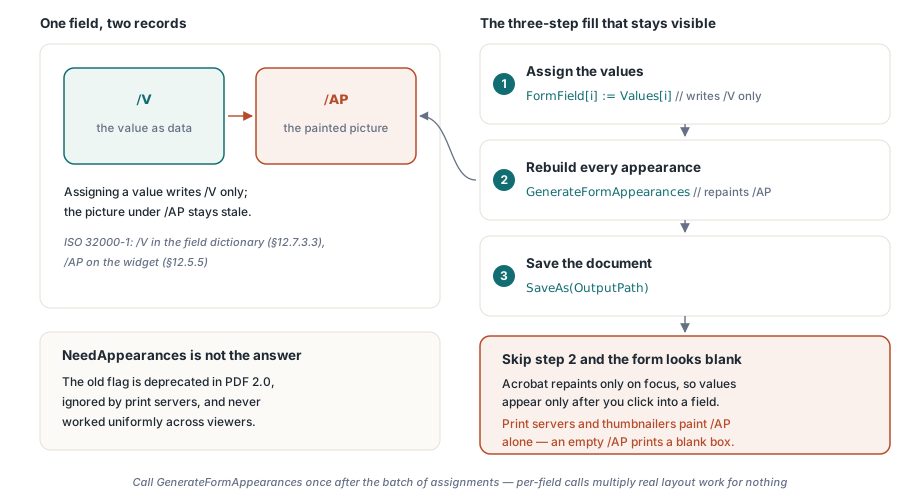
Ett AcroForm-textfält lagrar sitt värde i fältordbokens /V-post (ISO 32000-1 §12.7.3.3). Vad en visare faktiskt målar är något separat: widgetens utseendeström under /AP (§12.5.5), ett litet förrenderat innehållsutdrag. Skriv /V och lämna /AP orört, och de två glider isär. Värdet finns där; den renderade versionen av det är föråldrad eller frånvarande. Acrobat råkar bygga om ett fälts utseende när det får fokus, vilket är hela förklaringen till värden som bara syns vid klick. Den gamla NeedAppearances-flaggan, som bad visare att regenerera utseenden åt dig, fungerade aldrig enhetligt och är utfasad i PDF 2.0, och utskriftsservrar och miniatyrbildsgeneratorer ignorerar den helt. De målar /AP och inget annat, så om /AP är tomt skriver de ut en tom ruta
Att tilldela ett värde via FormField[i] skriver bara /V. Det är därför att fylla i ett formulär är en tresteg-sekvens, och steget team hoppar över är det mellersta:
procedure TFormViewer.FillAndSave(const Values: array of WString;
  const OutputPath: string);
var
  i: Integer;
begin
  for i := 0 to Pdf.FormFieldCount - 1 do
    Pdf.FormField[i] := Values[i];   // skriver bara /V

  // Bygg om /AP-utseendeströmmarna; utan det här ser
  // formuläret tomt ut i Acrobat tills varje fält klickas
  Pdf.GenerateFormAppearances;

  Pdf.SaveAs(OutputPath);
end;
GenerateFormAppearances är hela fixen. Den bygger om varje widgets utseendeström från de aktuella värdena, typsnitten och quaddingen, så att en visare som aldrig kör en fokushändelse, en utskriftsserver eller en miniatyrgenerator, ändå målar det ifyllda tillståndet. Anropa den en gång efter batchen av tilldelningar, inte en gång per fält. Utseendegenerering gör verkligt layoutarbete, och anrop per fält multiplicerar det över ett stort formulär i onödan
Att regenerera utseenden är också ögonblicket då typsnitt och justering hävdar sig, vilket är källan till en andra ordningens överraskning. Den nya strömmen lägger ut varje värde inuti widgetrektangeln med hjälp av fältets typsnitt, storlek och quadding. Ett värde som sitter bekvämt i ditt testformulär kan klippas eller krympa i en kunds kopia där samma fält är smalare. Fält med automatisk storlek (teckenstorlek noll) krymper texten så att den passar; fält med fast storlek klipper den bara. Båda är lagliga, och det enda ärliga sättet att veta vilken ett givet formulär gör är att titta på den regenererade utdatan snarare än strängen du skrev. När någon rapporterar text avklippt vid kanten av en ruta är det här nästan alltid skälet
Behandla verifiering som en del av att avsluta arbetet, inte en eftertanke. Öppna den sparade filen i Acrobat och bekräfta att värdena syns innan du rör något fält. Skriv sedan ut den till PDF eller till en bild från en annan visare, en som ignorerar formulärlogik helt, och bekräfta att värdena överlever den vägen också. Tillsammans fångar de två kontrollerna varje variant av /V-mot-/AP-glidningen
Fältkonfigurationer som klarar demot och misslyckas i fält
Rena demoformulär döljer en uppsättning specialfall som kundfiler inte gör. Fyra av dem står för de flesta "det fungerade på min maskin"-rapporterna
- Kryssrutans exportvärden. "På"-tillståndet är inte alltid
Yes. Ett formulär är fritt att definiera sitt eget exportvärde, och att skriva fel sträng lämnar rutan visuellt okryssad medan din kod är övertygad om att den satte den. Läs exportvärdet frånFormFieldInfo[]i stället för att anta ett - Radiogrupper med delat namn. Ett fält, flera widgetar. Värdet du tilldelar avgör vilken widget läses som vald, så gränssnittskod som antar att ett namn mappar till en rektangel hamnar med att rita fokusringen på fel knapp
- Beräknade fält. Totalsummor underhållna av dokumentets JavaScript uppdateras som svar på fälthändelser. En programmatisk ifyllning som kringgår de händelserna måste antingen utlösa omberäkning eller skriva över de beräknade fälten direkt. Ett formulär där radposterna och totalsumman är oense är värre än endera fixen
- Dolda obligatoriska fält. Villkorliga formulär döljer fält som fortfarande är flaggade som obligatoriska. Bestäm i förväg om din validering respekterar synlighet eller den råa obligatorisk-flaggan, skriv sedan ner det beslutet någonstans support kan hitta det
En distinktion är värd att reda ut innan den biter dig: att generera utseenden är inte utplattning. GenerateFormAppearances gör värden synliga överallt medan fälten förblir redigerbara. Utplattning bränner in utseendet i statiskt sidinnehåll och tar bort interaktiviteten för gott, vilket är rätt för en arkivkopia och fel för ett formulär nästa person fortfarande måste fylla i. Om FormType rapporterar ftXfaFull snarare än ftAcroForm, gäller ändå ingenting av redigeringsytan här rent, eftersom dokumentet renderas från sin egen XML-mall; upptäck det fallet och berätta för användaren, i stället för att låta dem hitta gränsen på egen hand
Formulärifyllningssystemet, fokusnavigeringen och utseendegenereringen som visas här är en del av PDFium Component för Delphi, C++Builder och Lazarus/FPC. Om din visare också hanterar granskarmarkeringar vid sidan av formulärdata, täcker artikeln om granskning av annoteringar den angränsande modellen