Två formulär kan bära samma fält och bete sig fullständigt olika. Ett AcroForm behåller sina fält som vanliga PDF-objekt ovanpå verkligt sidinnehåll, så varje läsare som följer standarden ritar det. Ett dynamiskt XFA-formulär behåller nästan ingenting som PDF: fälten, layouten, till och med sidgeometrin lever i ett XML-paket, och de synliga sidorna produceras vid öppningstillfället av en layoutmotor som bara Adobe någonsin levererat i bred skala. Mata den filen till en webbvisare, en arkivrenderare eller en textextraktor och du får inte formuläret. Du får en enda grå sida som lyder "Please wait... If this message is not eventually replaced by the proper contents of the document, your PDF viewer may not be able to display this type of document." Var och en som tagit emot myndighets- eller försäkringspapper känner igen den sidan direkt
Platshållaren är inte korruption. Det är exakt vad formatet specificerar ska hända när ingen XFA-processor finns, och från och med 2026 beskriver det nästan varje visare utanför skrivbords-Acrobat. Så det praktiska draget är att konvertera det dynamiska formuläret till ett vanligt AcroForm innan det når något nedströms. HotPDF, losLabs PDF-bibliotek för Delphi och C++Builder, gör den konverteringen i kod, och bygger om XML-formuläret som inbyggda fält på inbyggda sidor
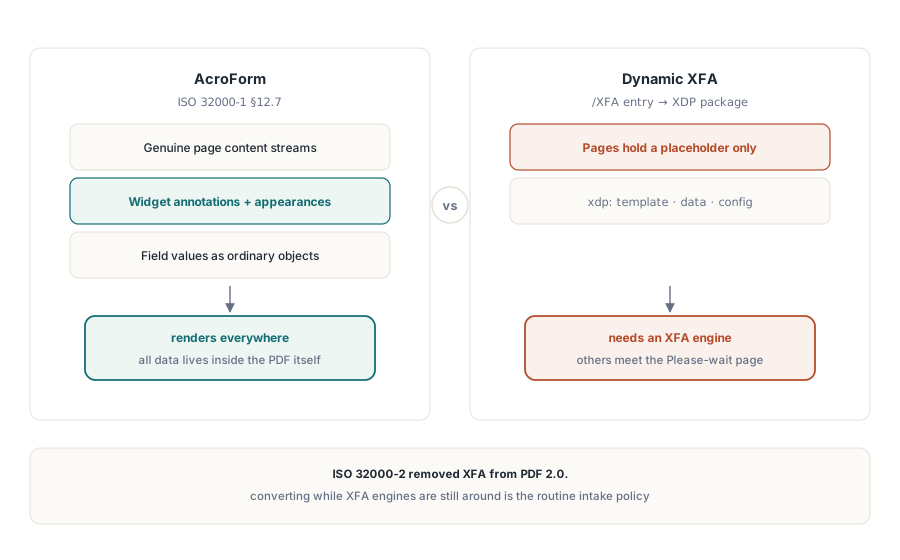
Varför de två modellerna inte kan samexistera
AcroForm definieras i ISO 32000-1 §12.7. Varje fält är ett PDF-objekt med en widgetannotering och en utseendeström, sidan är genuint PDF-innehåll, och datan rider ovanpå det. XFA vänder på det: formuläret är ett XML-dokument, ett XDP-paket lagrat i AcroForm-ordbokens /XFA-post, och ett dynamiskt formulärs PDF-sidor håller bara "Please wait"-platshållaren och inget annat, eftersom det verkliga innehållet aldrig serialiserades som PDF. En läsare bearbetar en fil som den ena modellen eller den andra. Ignorera /XFA-posten och du ser det tomma skalet; respektera den utan en XFA-motor och du ser varningen. ISO 32000-2 avslutade debatten genom att släppa XFA från PDF 2.0, vilket är huvudskälet till att "konvertera medan vi fortfarande kan" gick från specialfall till rutinmässig intagspolicy
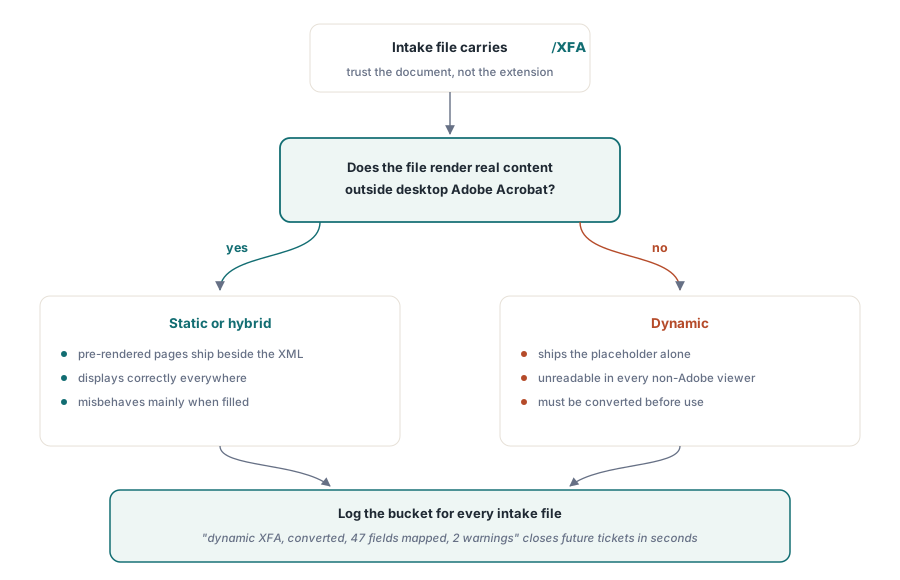
Innan du konverterar något, klassificera det, eftersom inte varje XFA-fil visar platshållaren. Statiska XFA-formulär levereras med förrenderade PDF-sidor bredvid XML:en, så de visas överallt och beter sig bara fel när de fylls i. Dynamiska formulär levereras med bara platshållaren och är oanvändbara till de konverteras. Det du ska lita på är dokumentet, aldrig filändelsen eller avsändaren. En fil som återger verkligt innehåll i en visare som inte är från Adobe men ändå bär en /XFA-post är statisk eller hybrid; en fil som visar varningssidan är dynamisk. Registrera vilken hink varje intagsfil hamnade i. De två sorterna går sönder på olika sätt senare, och ett ärende om ett tomt arkiverat formulär stängs på sekunder när intagsloggen redan lyder "dynamisk XFA, konverterad, 47 fält mappade, 2 varningar"
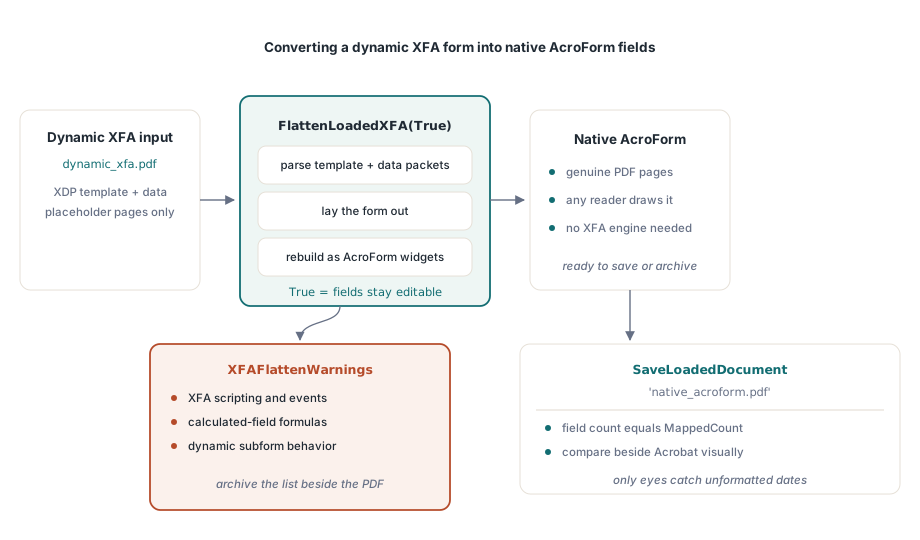
Att konvertera ett laddat XFA-dokument till inbyggda fält
Konverteringen körs mot ett dokument som redan finns i minnet. FlattenLoadedXFA parsar XFA-mallen och dess datapaket, lägger ut formuläret, och bygger om det som AcroForm-fält på verkliga PDF-sidor:
var
  Pdf: THotPDF;
  MappedCount, I: Integer;
  Warnings: TStrings;
begin
  Pdf := THotPDF.Create(nil);
  try
    Pdf.LoadFromFile('dynamic_xfa.pdf');
    MappedCount := Pdf.FlattenLoadedXFA(True);   // True = fälten förblir redigerbara
    Warnings := Pdf.XFAFlattenWarnings;
    for I := 0 to Warnings.Count - 1 do
      Log('XFA flatten warning: ' + Warnings[I]); // omappade element
    Pdf.SaveLoadedDocument('native_acroform.pdf');
    Log(Format('Mapped %d fields', [MappedCount]));
  finally
    Pdf.Free;
  end;
end;
Returvärdet och varningslistan är utdata, inte felsökningsbrus, så behåll båda. Konvertering förlorar information till sin natur: XFA-skriptning, beräknade fält och dynamiskt delformulärsbeteende har ingen AcroForm-motsvarighet, och XFAFlattenWarnings namnger varje mallelement som inte mappades. Arkivera den konverterade filen utan dess varningslista och en dag stirrar du på en tom totalsummeruta i en arkiverad kopia utan någon uppgift om varför. Editable-flaggan styr om de nya fälten förblir ifyllningsbara. Skicka True när folk fortsätter arbeta med formuläret efteråt, och lås värdena när målet är en fryst post
Att kontrollera en konvertering är dels visuellt, dels strukturellt, och du behöver båda halvorna. Den strukturella halvan är enkel: bekräfta att fältantalet matchar MappedCount. Den visuella halvan är den som fångar verklig skada. Öppna källformuläret i skrivbords-Acrobat, fortfarande den enda visaren som kör XFA-motorn, bredvid den konverterade filen i en vanlig läsare, och jämför värden och layout på minst ett ifyllt exemplar per mall. Ett datum XFA-motorn visade som 2026-06-11 kan hamna i AcroForm-kopian som ett rått, oformaterat värde, och bara dina ögon kommer att fånga det
När indatan är ett XDP-paket
Inte varje jobb börjar från en ifylld PDF. Ibland tar du emot XDP-paketet på egen hand, exporterat från ett formulärdesignverktyg eller överlämnat av ett partnersystem. ApplyXFAAsAcroForm hoppar över laddningssteget och applicerar paketet direkt på det aktuella dokumentet:
XDPBytes := TFile.ReadAllBytes('benefit-claim.xdp');
MappedCount := Pdf.ApplyXFAAsAcroForm(XDPBytes, True);
Samma grupp anrop körs också åt andra hållet, för det ovanligare fallet där du måste generera XFA snarare än konsumera det. AddXFAPacket fäster individuella namngivna paket som 'xdp' eller 'config'. SetXFADocument installerar en komplett enströmslast i ett enda anrop. ClearXFAPackets rensar registreringen så att du kan börja om, och AddXFASignaturePacket bäddar in XAdES-material för arbetsflöden som signerar XML-formulärdatan direkt. Att producera XFA 2026 är ett nischbehov, nästan alltid framtvingat av en äldre konsument som vägrar allt annat, men när ett avtal namnger det håller de här anropen det nere på ett konfigurationsval i stället för ett separat verktyg
Den andra betydelsen av "flatten"
Ordet "flatten" snubblar upp många samtal, eftersom det namnger en helt andra operation: att bränna in AcroForm-fältens utseenden i sidinnehållsströmmen tills inga interaktiva objekt återstår. HotPDF har inget API för det i dag, och du vill veta det nu snarare än halvvägs in i ett projekt. Vad biblioteket ger dig i stället är låsning på fältnivå när fältet skapas, understödd av dokumentbehörigheter:
// Lås värdet vid fältskapande: skrivskyddat textfält
Pdf.CurrentPage.AddTextField('CaseNumber', 'BC-2026-0117',
  Rect(50, 700, 220, 720), 0, [ffReadOnly]);

// Bälte och hängslen: begränsa formulärifyllning dokumentomfattande
Pdf.ActivateProtection := True;
Pdf.CryptKeyLength := aes256;
Pdf.OwnerPassword := 'records-owner';
Pdf.ProtectOptions := [prPrint, prInformationCopy, prExtractContent];
// ifyllningsbehörighet undanhållen: prFillAnnotations saknas i uppsättningen
Var tydlig med vad det köper dig och vad det inte gör. Ett skrivskyddat fält är fortfarande ett formulärobjekt. Det dyker upp i visarens fältpanel, dess värde är läsbart via formulär-API:et, och ett verktyg som skriver om filen kan rensa skrivskyddsflaggan igen. Behörighetsflaggor höjer ribban men beror på att visaren väljer att respektera dem, en begränsning ISO 32000-1 anger rakt ut. När en tillsynsmyndighet insisterar på att en arkiverad post inte innehåller några formulärobjekt alls, är det ärliga svaret med HotPDF i dag att bygga om dokumentet: läs ut värdena, rita dem sedan som vanligt TextOut-innehåll på en ny sida, i stället för att klä ut skrivskyddsflaggor som utplattning. En sak att komma ihåg på behörighetsvägen är att CryptKeyLength måste sättas före BeginDoc; resten finns i vår artikel om AES-256-kryptering och behörigheter
Vad XFA betyder för arkivefterlevnad
PDF/A och PDF/X avvisar båda XFA rakt av. En pipeline som matar ett ISO 19005-arkiv måste därför konvertera först, och ordningen är inte förhandlingsbar: ladda, FlattenLoadedXFA, spara, kör sedan arkivgenerering eller validering på AcroForm-resultatet. Behandla inte konvertering som bevis på efterlevnad. Den fixar formulärmodellen och lämnar typsnitt, färg och metadata exakt som de var, så validera utdatan med veraPDF innan du litar på den. När formuläret väl är på AcroForm-sidan får dess beteende sin egen uppsättning kontroller. JavaScript-utlösare, skicka-åtgärder och valideringsskript täcks i artikeln om HotPDF AcroForm-fält och åtgärder
XFA-registrerings-, konverterings- och formulär-API:erna som visas här levereras med HotPDF Delphi Component för Delphi och C++Builder, vars dokumentation följer XFA-funktionsuppsättningen allteftersom den vuxit över de senaste versionerna