Att generera en rapport handlar i grunden om att placera tre saker på en sida och få dem att komma överens om var de sitter: text vid kända koordinater, typsnitt som återges likadant på servern som på skrivbordet, och bilder anpassade i storlek. Allt annat ett rapportbibliotek gör är ordnat kring dessa tre. HotPDF, losLabs PDF-genereringsbibliotek för Delphi och C++Builder, ger dig var och en av dem som ett direkt anrop på sidobjektet, och den enda verkliga friktionen är koordinatsystemet under ytan, som löper åt motsatt håll jämfört med VCL-ritytan du är van vid. Reda ut den orienteringen först, så slutar resten av layoutarbetet kämpa emot dig
Textplacering och origo nere till vänster
Nästan allas första rapport kommer ut upp och ned. Rubriken hamnar nära underkanten och varje rad under den klättrar mot toppen. Ingenting är trasigt. PDF:ens användarrymd, definierad i ISO 32000-1 §8.3, lägger origo i hörnet nere till vänster med Y växande uppåt, vilket är spegelbilden av GDI-ritytan där Y växer nedåt från övre vänstra hörnet. Fem minuter spenderade på att göra upp med det sparar en layout du annars skulle skriva om så fort siffrorna slutar gå ihop
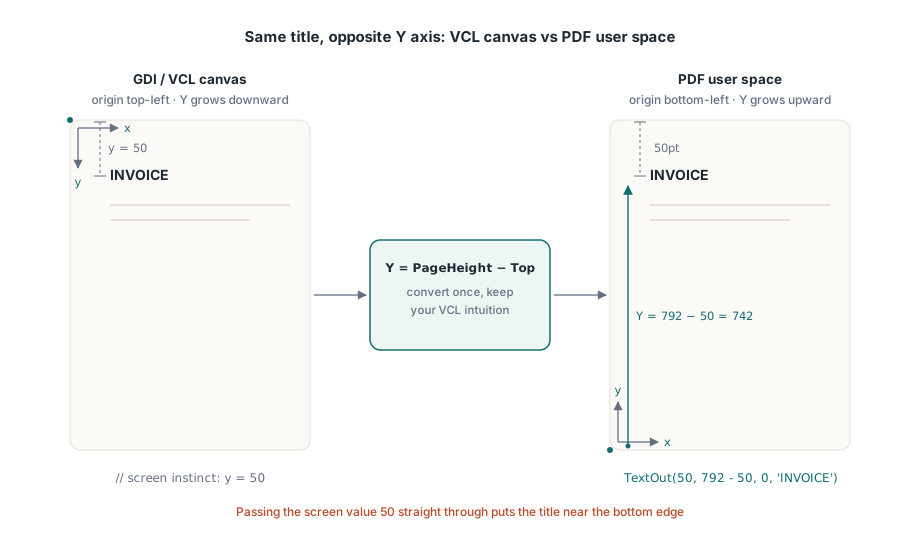
Sidobjektets centrala anrop är TextOut(X, Y, Angle, Text). X och Y lokaliserar texten i punkter från hörnet nere till vänster, och Angle roterar den i grader, vilket är hur en diagonal DRAFT- eller COPY-stämpel ritas utan något särskilt stöd. Knepet som låter VCL-tränad intuition fortsätta fungera är att uttrycka Y som sidhöjden minus avståndet du vill ha från toppen:
var
  Pdf: THotPDF;
begin
  Pdf := THotPDF.Create(nil);
  try
    Pdf.FileName := 'invoice-0001.pdf';
    Pdf.BeginDoc;
    Pdf.CurrentPage.SetFont('Arial', [fsBold], 16);
    Pdf.CurrentPage.TextOut(50, 792 - 50, 0, 'INVOICE');       // 50pt från toppen av Letter
    Pdf.CurrentPage.SetFont('Arial', [], 10);
    Pdf.CurrentPage.TextOut(50, 792 - 70, 0, 'Date: 2026-06-11');
    Pdf.CurrentPage.TextOut(300, 400, 45, 'COPY');              // roterad stämpel
    Pdf.AddPage;                                                // CurrentPage pekar nu hit
    Pdf.CurrentPage.SetFont('Arial', [], 10);                   // typsnittstillståndet följer inte med
    Pdf.CurrentPage.TextOut(50, 742, 0, 'Page 2 detail rows');
    Pdf.EndDoc;
  finally
    Pdf.Free;
  end;
end;
De två tillståndsberoende beteendena i den listningen står för de flesta buggarna som bara dyker upp på sida två. AddPage pekar om CurrentPage mot sidan den just skapade, så en sidreferens du cachat tidigare ritar inte längre där du förväntar dig. Typsnittsvalet är också per sida snarare än per dokument. Hoppar du över SetFont efter en AddPage faller den första TextOut på den nya sidan tillbaka på vad sidan än startade med som standard, inte det feta rubriktypsnitt du satte tre sidor tidigare. Den säkra vanan är att behandla "starta en ny sida" och "återupprätta texttillståndet" som ett enda oskiljaktigt steg i rapportloopen
Typsnitt som finns på servern, inte bara på skrivbordet
De flesta typsnittsproblem är egentligen distributionsproblem i förklädnad. Din utvecklingsmaskin har företagets typsnitt installerat, så rapporten ser rätt ut på din skärm och skickas iväg. Produktionsservern kör jobbet under ett tjänstekonto som aldrig haft det typsnittet installerat, renderaren byter tyst ut det mot något den kan hitta, och det första någon hör om det är en kund som frågar varför brevhuvudet ändrades. Vägen ut är att sluta lita på operativsystemets typsnittskatalog och i stället läsa in typsnittet från en fil din installationsrutin lägger på disk. HotPDF:s Unicode-registreringsanrop tar en sökväg och gör precis det:
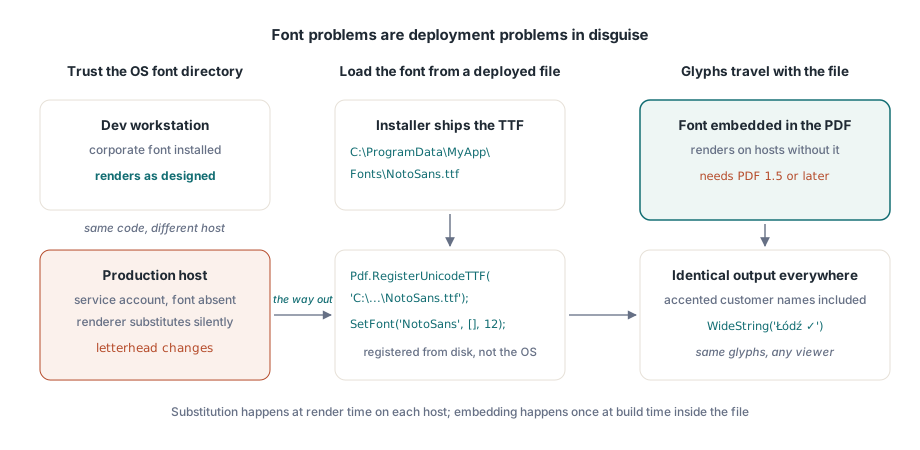
Pdf.RegisterUnicodeTTF('C:\ProgramData\MyApp\Fonts\NotoSans.ttf');
Pdf.CurrentPage.SetFont('NotoSans', [], 12);
Pdf.CurrentPage.TextOut(50, 700, 0, WideString('Łódź - Ünïcode test ✓'));
TextOut tar emot en WideString direkt, vilket betyder mer än det ser ut vid första anblicken. Ett kundnamn med en accent, en tysk gata, en polsk stad: dessa är inte specialfall, de är det normala innehållet i en kundtabell, och de går genom samma anrop som de ASCII-etiketter du hårdkodar, så länge det registrerade typsnittet faktiskt innehåller glyferna. En versionsbegränsning följer med inbäddade typsnitt: dokumentet måste vara PDF 1.5 eller senare, så om ett orelaterat krav låser dig vid en äldre version är det den saken som tyst går sönder. Höger-till-vänster-skriftsystem som arabiska och hebreiska behöver riktig formgivning i stället för en rak glyfuppslagning, och det har sin egen pipeline; se vår artikel om formgivning av komplexa skriftsystem med HotPDF
När inget installerat typsnitt kan uttrycka det du behöver, tänk MICR-tecken på en check eller en egen symboluppsättning, fyller Type 3-typsnitt luckan. Du definierar varje glyf som en liten innehållsström via RegisterType3Font och AddType3Glyph. Det är ett specialiserat hörn av API:et och du kommer sällan att behöva ta till det, men det är betydligt renare än att strö ut hundratals små symbolbitmappar över en sida
Bilder: de mittersta argumenten är en bredd och höjd, inte ett hörn
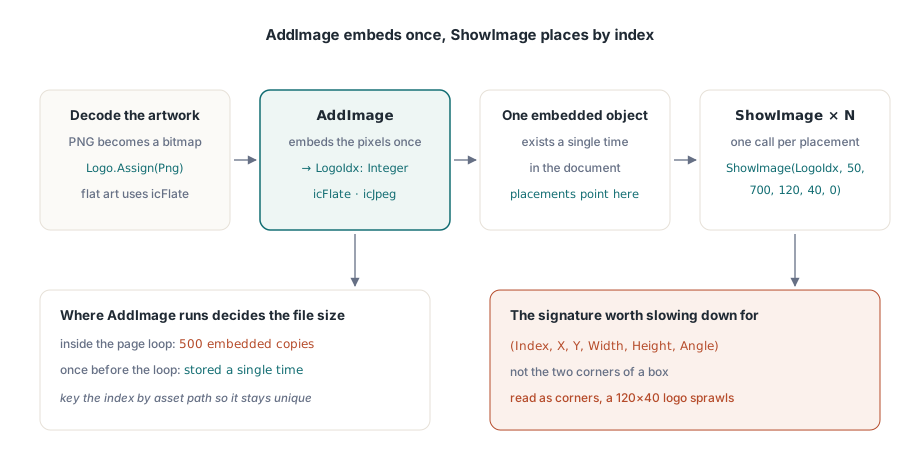
Bildhantering delas upp i två steg, och att hålla dem åtskilda är själva poängen. AddImage tar en TBitmap eller TJPEGImage, bäddar in den en gång, och lämnar tillbaka ett index. PNG-grafik måste avkodas till en bitmapp innan den kommer dit. ShowImage ritar sedan det indexet var och hur ofta du vill. Argumentordningen på ShowImage är den enda platsen värd att sakta ner och läsa noga:
var
  Png: TPngImage;
  Logo: TBitmap;
  LogoIdx: Integer;
begin
  Png := TPngImage.Create;
  Logo := TBitmap.Create;
  try
    Png.LoadFromFile('brand-logo.png');
    Logo.Assign(Png);                       // avkoda PNG till en bitmapp
    LogoIdx := Pdf.AddImage(Logo, icFlate); // förlustfritt för platt-färgad grafik
  finally
    Logo.Free;
    Png.Free;
  end;
  // (Index, X, Y, Width, Height, Angle): inte (X1, Y1, X2, Y2)
  Pdf.CurrentPage.ShowImage(LogoIdx, 50, 700, 120, 40, 0);
end;
De två talen efter positionen är en bredd och en höjd. De är inte koordinaterna för det motsatta hörnet, och det sista argumentet är en rotationsvinkel i grader. Läs signaturen som en X1/Y1/X2/Y2-ruta och en 120-gånger-40-logotyp placerad vid (50, 700) sträcker sig i stället därifrån till (120, 40), och breder ut sig över större delen av sidan. Utdatan gör misstaget uppenbart medan källkoden ser fullt rimlig ut, vilket är det som gör att det tar en eftermiddag att spåra. KeepImageAspectRatio är som standard True, så en ruta med fel proportioner brevlådeformaterar bilden i stället för att förvränga den; slå om den till False bara när du verkligen menar att sträcka ut
Uppdelningen mellan registrering och placering lönar sig på långa körningar. Eftersom AddImage bäddar in pixlarna en gång och varje ShowImage med det indexet pekar tillbaka på samma inbäddade objekt, är det var du anropar AddImage som avgör filstorleken. Anropa den inuti sidloopen för ett 500-sidigt kontoutdrag och samma logotyp bäddas in 500 gånger. Anropa den en gång före loopen, spara indexet, och logotypen lagras en enda gång. En liten uppslagstabell nyckelbaserad på tillgångens sökväg räcker för att säkerställa att varje distinkt bild registreras exakt en gång
Valet av kodek är den andra spaken för storlek. Fotografiskt innehåll, skannade bilagor och liknande, hör hemma i JPEG: skicka icJpeg till AddImage och sänk JpegQuality till runt 85, eftersom egenskapen börjar på 100 och skillnaden vid 85 är osynlig på en utskriven sida. Platt-färgad grafik som logotyper, diagram och linjeteckningar hör hemma i icFlate, där förlustfri komprimering redan är kompakt och JPEG skulle smeta ut synlig ringning kring de skarpa kanterna. En körning av kontoutdrag som trycker in ett foto i full kvalitet på varje sida kan svälla till gigabyte; samma innehåll vid JPEG 85 landar på ungefär en tiondel av storleken, och ingen läsare kan märka skillnaden
Linjer, rutor och skuggning med grundläggande banor
Den horisontella linjen under en tabellrubrik och den grå rutan bakom en totalsumma behöver inte vara bilder. Rita dem som vektorer och de förblir skarpa vid vilken zoomnivå som helst, skrivs ut skarpt, och lägger till nästan ingenting till filen. HotPDF följer samma modell som råa PDF-innehållsströmmar använder: bygg en bana, anropa sedan en operator som målar den
// Horisontell linje under tabellrubriken
Pdf.CurrentPage.SetLineWidth(0.75);
Pdf.CurrentPage.MoveTo(50, 660);
Pdf.CurrentPage.LineTo(545, 660);
Pdf.CurrentPage.Stroke;

// Skuggad totalsummeruta: X, Y, bredd, höjd
Pdf.CurrentPage.SetRGBFillColor(RGB(235, 235, 235));
Pdf.CurrentPage.Rectangle(395, 120, 150, 40);
Pdf.CurrentPage.Fill;
Ordningen är inte valfri: sätt måltillståndet, konstruera banan, anropa sedan Stroke eller Fill. En bana du bygger men aldrig målar bidrar med ingenting till sidan, vilket nästan alltid är svaret när en linje "inte syns". SetRGBFillColor tar en enda TColor, så de välbekanta VCL-konstanterna som clNavy och clBlack passar rakt in, och Rectangle använder samma bredd-och-höjd-argument som bildplacering i stället för två hörn. En varning om tunna linjer: allt under ungefär en halv punkt kan se elegant ut på en skärm och sedan försvinna på en kontorsskrivare med 600 dpi, så 0,75pt är en rimlig lägstanivå för varje linje som måste överleva att bli utskriven
Paginering mot verklig data, inte exempeldata
En detalj att få rätt innan layouten fastnar: numeriska kolumner ska högerjusteras, och sättet att göra det är att mäta den renderade bredden på varje värde och positionera det tillbaka från kolumngränsen, inte att fylla ut strängen med inledande mellanslag. Utfyllnad med mellanslag ligger bara i linje i ett typsnitt med fast breddsteg, och ingen sätter en finansiell rapport i ett typsnitt med fast breddsteg. Kör värdena genom Delphis lokalmedvetna rutiner som FormatFloat först, så att tusentalsavgränsaren du mäter bredden på är samma som kundens lokal faktiskt kommer att visa
Faran med paginering är att du skriver den mot exempeldatamängden, där tio korta rader ryms på en sida och loopen aldrig behöver bryta. Produktionen ger dig en kund vars företagsnamn löper på 140 tecken och ett kontoutdrag med 4 000 radposter, och nu måste loopen bryta korrekt varje gång. Mönstret som håller är en enda Y-markör som rör sig nedåt när du drar av varje rads höjd, och en kontroll som startar en ny sida i samma ögonblick markören skulle korsa nedre marginalen. Nedåt betyder här minskande Y, vilket är den enda plats där origo nere till vänster förblir kontraintuitivt. Håll allt det i en enda rutin som också återutfärdar SetFont och ritar om den löpande sidhuvudet på den nya sidan, så får off-by-one-sidbuggarna aldrig fotfäste. När samma rapporter också måste uppfylla arkiverings- eller tillgänglighetsregler är valen du gör just här, vilka typsnitt du bäddar in, om utdatan är taggad, vilka färgrymder du använder, de som de standarderna kontrollerar; HotPDF:s guide till PDF/A, PDF/X och PDF/UA är värd att läsa innan mallen stelnar
Varje anrop som visas här, textpositioneringen, typsnittsregistreringen, bildinbäddningen och banritningen, levereras med HotPDF Delphi Component för Delphi och C++Builder, vars referens dokumenterar hela utdata-API:et tillsammans med formulär-, krypterings- och signeringsfunktionerna det står bredvid