PDF/A, PDF/X och PDF/UA är tre olika standarder som löser tre olika problem: långtidsarkivering, tryckutbyte och tillgänglighet. De är inte tre kryssrutor på ett enda efterlevnadsformulär, och det vanligaste misstaget är att behandla dem som om de vore det. En fil kan vara felfri PDF/A och oanvändbar för ett tryckeri; en perfekt tryckoriginal kan vara oläsbar för en skärmläsare. Värre än så är alla tre begränsningar på filens interna struktur, inte på hur den ser ut. Ett dokument som öppnas felfritt i varje visare du äger kan ändå misslyckas vid validering på första försöket, och gör det oftast
HotPDF, losLabs inbyggda VCL PDF-bibliotek, behandlar efterlevnad som något du deklarerar innan den första sidan existerar. Du sätter en efterlevnadsegenskap, kopplar på de strukturer standarden kräver, och biblioteket avvisar konfigurationer som motsäger profilen vid sparning. Det är en bättre modell än att generera en fil och hoppas att en efterbehandling kan lägga till det i efterhand, eftersom det mesta av det dessa standarder kräver inte kan läggas till i efterhand
Tre ISO-standarder, tre olika löften
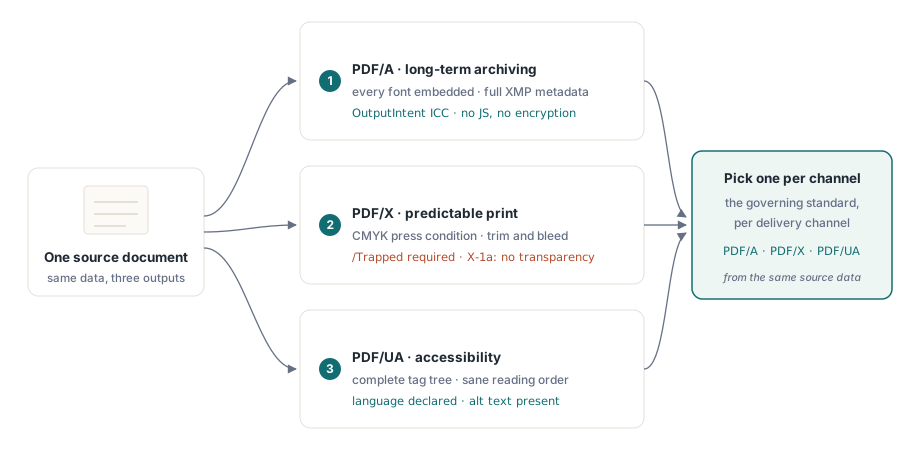
PDF/A (ISO 19005) handlar om tid. Den lovar att en fil kommer att återges identiskt även decennier framåt, så den kräver fullständig självförsörjning: varje typsnitt inbäddat, varje färg given enhetsoberoende betydelse via en OutputIntent, fullständig XMP-metadata, och ett förbud mot allt vars beteende beror på miljön. Kryptering och JavaScript är uteslutna, eftersom ingen kan garantera att dekrypteraren eller skriptmotorn kommer att finnas 2050
PDF/X (ISO 15930) handlar om färg på papper. Den finns så att en designer kan lämna en fil till ett tryckeri utan att någon av dem behöver diskutera saken, vilket innebär karakteriserade tryckförhållanden, en obligatorisk /Trapped-nyckel, definierad utfalls- och beskärningsgeometri, och, i X-1a-varianten, ingen levande transparens för RIP:en att gissa sig till. PDF/UA (ISO 14289) handlar om vem som kan läsa resultatet. Hjälpmedelsteknik behöver ett komplett taggträd, en förnuftig läsordning, ett deklarerat dokumentspråk, och textalternativ för allt som inte är text
Eftersom de tre drar åt olika håll, välj den styrande standarden per utdatakanal i stället för att jaga en enda fil som tillfredsställer alla tre. Ett rent CMYK-tryckoriginal är precis det fel att lämna till en skärmläsaranvändare som aldrig ser färg, och arkivprofilens nedlåsning av dynamiskt beteende krockar med allt interaktivt. Generera per kanal från samma källdata så undviker du hela konflikten
PDF/A: OutputIntent är delen alla glömmer
Om en PDF/A-fil misslyckas vid validering är OutputIntent det första att kontrollera. Det är strukturen generatorer hoppar över oftast, just eftersom inget synligt beror på den. ISO 19005 kräver en: en inbäddad ICC-profil som fastställer vad dokumentets enhetsfärger faktiskt betyder. HotPDF gör den profilen till en explicit indata snarare än en eftertanke:
var
  Pdf: THotPDF;
  ICC: TFileStream;
begin
  Pdf := THotPDF.Create(nil);
  try
    Pdf.FileName := 'invoice-archival.pdf';
    Pdf.PDFACompliance := 'B';            // nivå B: visuell trohet
    Pdf.Lang := 'en-US';
    Pdf.StandardFontEmulation := False;   // bädda in riktiga typsnitt, ingen Base-14-emulering
    ICC := TFileStream.Create('sRGB.icc', fmOpenRead);
    try
      Pdf.AddPDFAOutputIntent('sRGB IEC61966-2.1', '', ICC, 3, 'DeviceRGB');
    finally
      ICC.Free;
    end;
    Pdf.BeginDoc;
    Pdf.CurrentPage.SetFont('Arial', [], 11);
    Pdf.CurrentPage.TextOut(50, 760, 0, 'Archival invoice body');
    Pdf.EndDoc;
  finally
    Pdf.Free;
  end;
end;
Ett fåtal detaljer avgör godkänt eller underkänt här. StandardFontEmulation måste vara av: emulerade Base-14-typsnitt bäddas inte in, och inbäddning är inte förhandlingsbart under ISO 19005. Kryptering måste förbli avstängd, så kombinera aldrig PDFACompliance med ActivateProtection; en krypterad arkivfil är en motsägelse som validatorn fångar omedelbart. Komponentantalet i AddPDFAOutputIntent måste matcha profilen, vilket är 3 för en RGB-profil som sRGB IEC61966-2.1 och 4 för CMYK. HotPDF spårar DeviceRGB- och DeviceCMYK-användning mot den deklarerade avsikten medan den skriver, så en förlupen CMYK-fyllning i ett dokument med RGB-avsikt blir ett rapporterat problem i stället för ett tyst
En sak värd att säga om ICC-profilen: behandla den som en versionshanterad distributionsartefakt, inte en fil någon en gång släppte på byggservern. Dess byte bäddas in i varje dokument du genererar, så en trunkerad eller korrupt profil förgiftar tyst en hel batch, och du upptäcker det bara vid valideringstillfället. Skicka med den i din installationsrutin, registrera dess checksumma i körloggen, och läs in den via TFileStream-mönstret som visas ovan så att en saknad fil misslyckas högljutt under generering i stället för tyst vid arkivgrinden
PDF/X för tryck: Trapped, CMYK och tryckprofilen
Tryckoriginal vänder på färghistorien. Tryckpressen vill ha karakteriserad CMYK, och standarden tvingar dig att ange om fångst (trapping) har tillämpats även när det ärliga svaret är att du inte har en aning. /Trapped-nyckeln är obligatorisk oavsett:
Pdf.PDFXCompliance := 'X-1a';
Pdf.Trapped := 'Unknown';        // obligatorisk nyckel enligt ISO 15930
ICC := TFileStream.Create('FOGRA39.icc', fmOpenRead);
try
  Pdf.AddPDFXOutputIntent('FOGRA39 (ISO 12647-2:2004)', '', ICC, 4, 'DeviceCMYK');
finally
  ICC.Free;
end;
Pdf.BeginDoc;
// rita med CMYK-säkra färger, ingen transparens, ingen kryptering
Pdf.EndDoc;
Komponentantalet är nu 4 för CMYK-tryckprofilen. X-1a förbjuder också levande transparens, så granska all ritkod som lagrar genomskinliga element; vad en visare än komponerar på skärmen är exakt vad en RIP kommer att vägra tolka. När ditt tryckeri skickar en annan karakterisering, byt ut profilens byte och identifierarsträngen men lämna den omgivande strukturen orörd
PDF/UA: strukturen genereras, läggs aldrig till i efterhand
Tillgänglighet är standarden team oftast försöker skruva på i sista stund, och den straffar det tillvägagångssättet hårdare än de andra två. Taggträdet måste spegla ordningen i vilken innehållet logiskt skapades, vilket är information du helt enkelt inte längre har när filen väl är skriven. Att sätta PDFUACompliance slår på taggad utdata, och strukturens API binder varje ritanrop till dess semantiska roll allt eftersom:
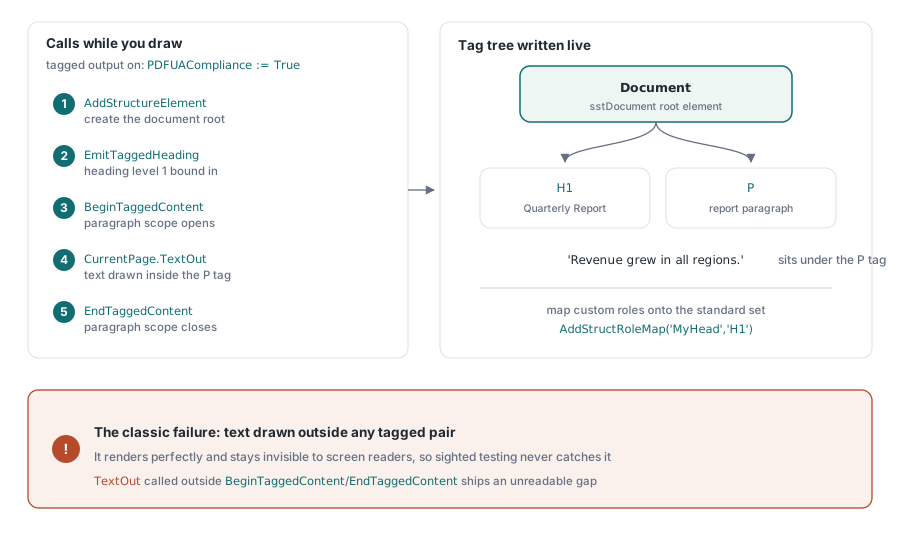
Pdf.PDFUACompliance := True;     // aktiverar automatiskt taggad PDF
Pdf.Lang := 'en-US';             // sätts explicit; tomt faller tillbaka på 'en'
Pdf.BeginDoc;

Root := Pdf.AddStructureElement(sstDocument, nil);
H1 := Pdf.EmitTaggedHeading(1, Root, 50, 700, 'Quarterly Report');
Para := Pdf.BeginTaggedContent('P', Root);
Pdf.CurrentPage.TextOut(50, 650, 0, 'Revenue grew in all regions.');
Pdf.EndTaggedContent;

Pdf.EndDoc;
Felet att hålla utkik efter är text ritad utanför varje par av BeginTaggedContent/EndTaggedContent. Den återges perfekt och förblir osynlig för en skärmläsare, så ingen seende testare fångar den någonsin; buggen skickas och dyker upp först när en verklig hjälpmedelsteknikanvändare stöter på luckan. När dina mallar bär anpassade strukturrollnamn, mappa dem mot standarduppsättningen med AddStructRoleMap('MyHead', 'H1') så att läsare som följer standarden vet vad de betyder. ISO 14289 kräver också ett deklarerat språk. HotPDF faller tillbaka på 'en' när Lang är tomt, men det är ett skyddsnät, inte en anledning att lämna det verkliga dokumentspråket osatt
Verifiering: lita på validatorn, inte visaren
En visare som öppnar din fil bevisar ingenting om efterlevnad, så verifiering hör hemma i releaseflödet med verktyg som kontrollerar struktur snarare än rendering. För PDF/A och PDF/UA är veraPDF referensvalidatorn med öppen källkod; den rapporterar fel efter ISO-paragraf, vilket mappar rakt tillbaka till konfigurationen ovan. För PDF/X är Adobe Acrobats Preflight-profiler fortfarande den praktiska kontrollen, eftersom tryckefterlevnad handlar lika mycket om färgavsikt som syntax
Generatorn gör sin egen del av detta. Vid sparning stämmer HotPDF av funktionsflaggorna mot den konfigurerade PDF-versionen, och nedgraderar tyst det versionen inte kan uttrycka, som AES-256 som faller ner till AES-128 under PDF 1.7. Efterlevnadsspärrarna i EndDoc går längre och höjer ett undantag rakt av vid hårda motsägelser, som att begära PDFACompliance tillsammans med kryptering. Ingen av dessa ersätter den externa validatorn. De hindrar bara omöjliga konfigurationer från att någonsin nå den
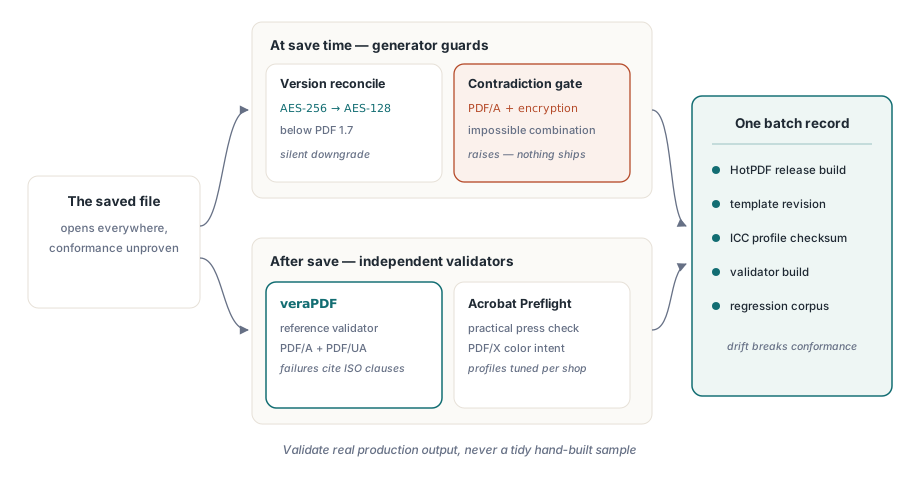
En vana lönar sig gång på gång: versionshantera hela efterlevnadsuppsättningen som en enhet. HotPDF-versionen, mallrevisionen, ICC-profilens checksumma, valideringsbyggen som godkände. Efterlevnaden glider i samma ögonblick någon av dem ändras under de andra, och de fulaste granskningarna är de där ingen kan rekonstruera vilken kombination som producerade en femårig arkivfil. En enda konfigurationspost per batch löser det för gott
Slutligen, kör validatorn på verklig produktionsutdata, aldrig på ett prydligt handbyggt exempel. Felen som biter kommer från data ingen förutsåg: en kundlogotyp som anländer som CMYK medan avsikten säger RGB, en malljustering som smyger in ett oinbäddat typsnitt, en ny kodväg som ritar text utanför taggträdet. Behåll en känt trasig fil från varje tidigare incident som regressionsindata så förblir efterlevnadsspärren ärlig över tid. För renderingssidan av dessa pipelines, se vår artikel om rapportutdata, typsnitt och bilder med HotPDF; för att koppla in validatorer i en bygge finns en följdartikel om att automatisera PDF-preflight-kontroller
Efterlevnadsegenskaperna, output-avsikterna och tagg-API:et som används i dessa exempel levereras med HotPDF Delphi Component för Delphi och C++Builder; produktsidan länkar den fullständiga referensen för varje anrop som visas här