Att rendera en PDF-sida på en Windows device context för utskriftsförhandsgranskning (print preview) sätter tre koordinatsystem på samma kodrad, och de är sällan överens. PDF-sidan mäts i punkter med origo nere till vänster. Skärm-DC:n mäts i pixlar med origo uppe till vänster och en zoomfaktor du väljer. Skrivar-DC:n, den som förhandsgranskningen förväntas förutsäga (predict), mäter pixlar vid enhetens upplösning men placerar sitt origo i hörnet av det utskrivbara området (printable area), inte pappersarkets hörn. Få ett enda av dessa fel och förhandsgranskningen ser bra ut medan den utskrivna sidan kommer ut förskjuten, skalad eller klippt (clipped) längs en kant. Det vanliga symptomet är ett inramat formulär (bordered form) som förhandsgranskas centrerat och skrivs ut med de övre och vänstra linjerna avskurna, eftersom laserskrivaren inte kan lägga bläck i de yttre millimetrarna och ingen berättade det för förhandsgranskningen. losLab PDF Library (PDF Library for Delphi) täcker hela vägen med anrop för device-context-rendering, ett konfigurationslager för virtuella skrivare, och förhandsgransknings-bitmappar genererade från skrivarens egna mått (metrics), vilket är den del som gör förhandsgranskningen ärlig angående den marginalen
Pappersgeometri är inte utskrivbar geometri
Två rektanglar beskriver varje utskriftsmål, och förskjutningen (offset) mellan dem är där de flesta förhandsgransknings-buggar lever. Pappersrektangeln är det fysiska arket. Den utskrivbara rektangeln är den mindre region som utskriftsmotorn (print engine) faktiskt kan nå, infälld (inset) av en hårdvarumarginal som skiljer sig åt per skrivarmodell och ibland per fack (tray). Bibliotekets utskriftslager mäter båda. Den bakomliggande (underlying) klassen TPLPrinter exponerar PageWidth och PageHeight för det utskrivbara området, FullPageWidth och FullPageHeight för hela arket, samt PrintOffsetX med PrintOffsetY för gapet mellan deras origo, alla i enhetspixlar vid den upplösning GetDPI rapporterar. En ärlig förhandsgranskning skalar ned de siffrorna till skärmupplösning i stället för att måla sidan i vilken rektangel kontrollen än råkar (happens to) ha. Hoppa över det steget och förhandsgranskningen antar i tysthet (silently assumes) en marginal på noll, vilket är det enda värde ingen riktig skrivare använder
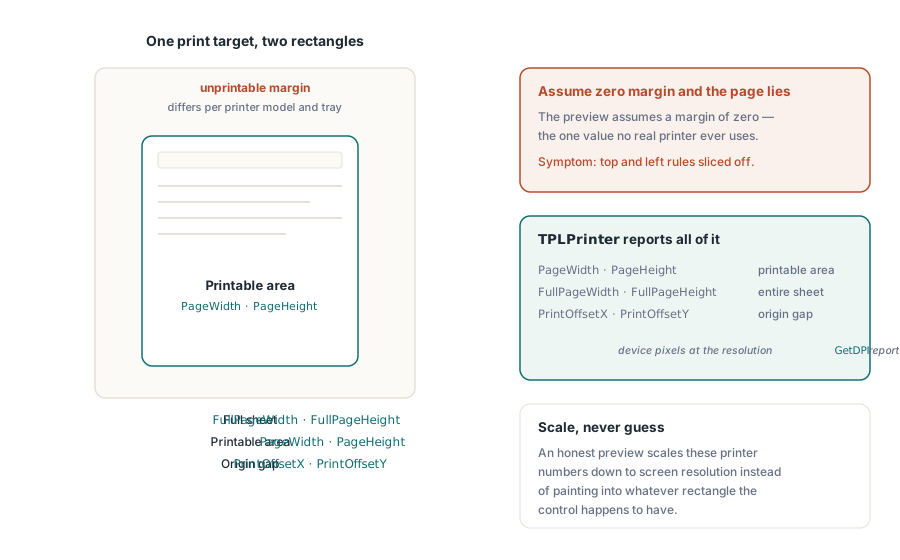
Förhandsgranskning på skärm (on-screen preview) genom RenderPageToDC
För en skärm-baserad förhandsgranskningskontroll ritar RenderPageToDC(DPI, Page, DC) en sida av det inlästa dokumentet rakt på en valfri GDI device context, vare sig det är en TPaintBox-canvas, en off-screen-bitmapp eller en metafil-DC. DPI-argumentet sätter zoomen. 96 uppskattar (approximates) en 100-procentig vy på en klassisk skärm, och att dubbla det dubblar den renderade storleken
procedure TPreviewForm.PreviewBoxPaint(Sender: TObject);
begin
  // de här tre är sticky state i biblioteket, inte parametrar per anrop:
  FPdf.SetRenderDCOffset(FOffsetX, FOffsetY);
  FPdf.SetRenderDCErasePage(1);
  FPdf.SetRenderCropType(0);
  FPdf.RenderPageToDC(FPreviewDpi, FCurrentPage, PreviewBox.Canvas.Handle);
end;
Fällan (trap) är att DC-renderingsvägen styrs av klibbigt (sticky) bibliotekstillstånd (library state), inte av anrops-specifika parametrar. SetRenderDCOffset, SetRenderDCErasePage och SetRenderCropType kvarstår (persist) alla tills någonting ändrar dem, så en miniatyrbildsslinga (thumbnail loop) som körs efter att användaren justerat den inzoomade vyn ärver vilken offset eller beskärning den tidigare kodvägen än lämnade efter sig. Symptomet är en förhandsgranskning som driver i väg (drifts) endast i specifika navigerings-sekvenser, vilket är ungefär så miserabelt att återskapa som en bugg kan bli. Att sätta alla relevanta tillstånd högst upp i rithanteraren (paint handler), som ovan, kostar ingenting och tar bort hela klassen (av buggar). En andra multiplikator gömmer sig i närheten. Den effektiva utdata-upplösningen (effective output resolution) är renderings-skalan gånger DPI-argumentet, och även om SetRenderScale som standard är 1.0, kvarstår även det när det väl har ändrats, så en exportfunktion som höjde den om-skalar (rescales) i tysthet varje senare förhandsgranskning tills någonting återställer den
Scrollande visare (Scrolling viewers) och partiella om-ritningar (partial repaints) har en tillägnad variant (dedicated variant). RenderPageToDCClip tar en beskärnings-specifikation (clip specification) tillsammans med device contexten, så att ogiltigförklara (invalidating) ett band (band) av fönstret ritar endast om det bandet i stället för att rastrera om (re-rasterizing) hela sidan. Vid hög zoom på storformats-sidor är det skillnaden mellan en visare som spårar (tracks) rullningslisten och en som smetar (smears) bakom den
Ett utskriftsjobb som matchar förhandsgranskningen
Utskriftssidan arbetar genom en virtuell skrivare. NewCustomPrinter klonar en systemskrivare till en biblioteks-privat konfiguration, och SetupPrinter justerar den klonen utan att röra (touching) maskinens globala DevMode: papper går in som inställning 1 (en DMPAPER_*-konstant) och orientering som inställning 11. Belöningen är isolering. En tjänst kan skriva ut A4-etiketter medan värdens standardskrivare förblir på Letter, och ingenting behöver återställas efteråt

var
  Pdf: TPDFlib;
  Virt: WideString;
  Opt: Integer;
begin
  Pdf := TPDFlib.Create;
  try
    if Pdf.LoadFromFile('report.pdf', '') <> 1 then
      raise Exception.Create('load failed');
    Virt := Pdf.NewCustomPrinter(Pdf.GetDefaultPrinterName);
    Pdf.SetupPrinter(Virt, 1, 9);        // setting 1 = paper, DMPAPER_A4
    Pdf.SetupPrinter(Virt, 11, 1);       // setting 11 = orientation, 1 = portrait
    Opt := Pdf.PrintOptions(1, 1, 'Monthly Report');  // anpassa till papper, autorotera + centrera
    Pdf.PrintDocument(Virt, 1, Pdf.PageCount, Opt);
  finally
    Pdf.Free;
  end;
end;
PrintOptions förtjänar en noggrann genomläsning (careful read). Den returnerar ett inställningshandtag (options handle) som du måste skicka till PrintDocument eller PrintPages; det är inte ett omgivande tillstånd (ambient state). Att bygga inställningarna och sedan glömma att skicka med handtaget fallerar i tysthet. Jobbet skrivs ut med standardvärden, och ingen märker något förrän en anpassa-till-papper-policy (fit-to-paper policy) förväntades och en överdimensionerad sida kom ut beskuren (cropped) i stället. Sido-skalnings-argumentet (page-scaling argument) är var den policyn lever. Ingen skalning (No scaling) bevarar dimensionell noggrannhet, vilket spelar roll för formulär som mäts med en linjal. Anpassa-till-papper om-skalar allt efter pappersarket. Krymp-stora-sidor (Shrink-large-pages) lämnar normala sidor ifred och griper in endast när en sida överskrider (exceeds) det utskrivbara området, vilket oftast är rätt standardval för en blandad dokumentuppsättning. Den automatiska rotera-och-centrera-flaggan hanterar landskapssidor (landscape pages) utan en andra kodväg
Applikationer som redan hanterar en TPrinter genom VCL-dialogflödet kan överlämna den direkt. PrintDocumentToPrinterObject och PrintPagesToPrinterObject accepterar den konfigurerade TPrinter-instansen, vilket behåller den vanliga utskriftsdialogen som den användarvända konfigurationsytan medan biblioteket hanterar sid-rendering. Att blanda de två ansatserna i en enda kodväg tenderar att återintroducera den geometri-drift som resten av detta arbete var tänkt att döda, så välj en. Vägen med virtuell skrivare (virtual-printer route) passar obevakade (unattended) tjänster; TPrinter-vägen passar interaktiva applikationer
Selektiv utmatning fungerar på samma sätt. PrintPages tar en intervallsträng (range string), så att skicka in den virtuella skrivarens namn, '2-5,12', och inställningshandtaget skriver ut sidorna 2 till och med 5 samt 12 med geometrikontraktet intakt, och samma syntax driver varianterna för utskrift-till-fil. Dessa fil-varianter är det praktiska svaret för en obevakad miljö (unattended environment) utan någon fysisk enhet (device) ansluten: regressions-testning (regression-testing) av utskriftsgeometri på en bygg-server som inte har någon drivrutins-kö över huvud taget. Rendera samma dokument genom samma inställningar till en fil-artefakt (file artifact) på varje bygge, och en geometri-regression förvandlas till en diff i stället för en kundrapport tre veckor senare
Förhandsgransknings-bitmappar med skrivarens egna mått (metrics)
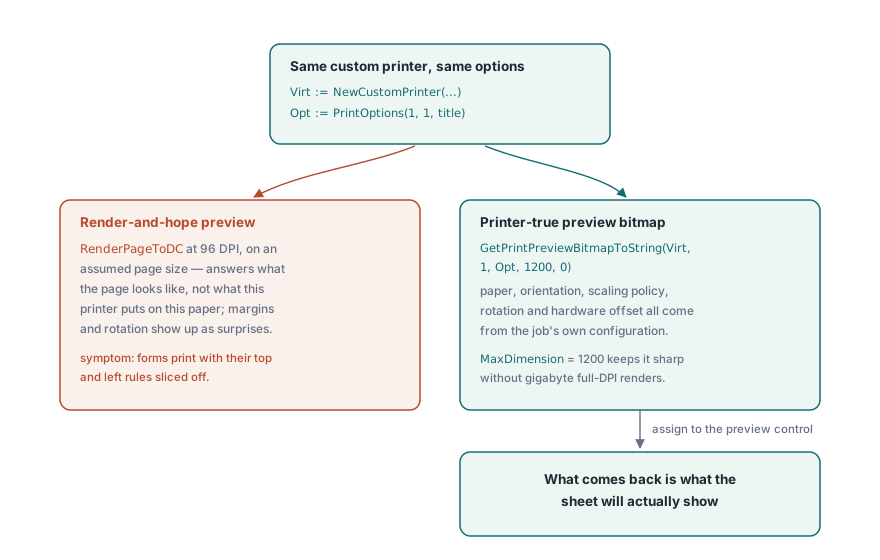
En förhandsgranskning renderad vid 96 DPI mot en antagen sidstorlek svarar på fel fråga. Den visar hur sidan ser ut, inte vad den här skrivaren kommer att sätta på det här papperet. GetPrintPreviewBitmapToString stänger det gapet genom att bygga förhandsgranskningen från samma anpassade skrivare och samma inställningshandtag som det slutliga jobbet, så pappersstorlek, orientering, skalningspolicy, rotation och hårdvaruförskjutningen matas (feed) alla in i bitmappen. Det som kommer tillbaka är vad arket kommer att visa
procedure ShowPrinterTruePreview(Pdf: TPDFlib; const Virt: WideString; Opt: Integer);
var
  Data: AnsiString;
  Strm: TMemoryStream;
  Bmp: TBitmap;
begin
  Data := Pdf.GetPrintPreviewBitmapToString(Virt, 1, Opt, 1200, 0);
  Strm := TMemoryStream.Create;
  try
    Strm.WriteBuffer(PAnsiChar(Data)^, Length(Data));
    Strm.Position := 0;
    Bmp := TBitmap.Create;
    try
      Bmp.LoadFromStream(Strm);
      PreviewImage.Picture.Assign(Bmp);
    finally
      Bmp.Free;
    end;
  finally
    Strm.Free;
  end;
end;
MaxDimension-argumentet sätter ett tak för (caps) bitmappens långsida. 1200 pixlar förblir skarpt för en förhandsgransknings-dialog och håller minnet blygsamt (modest) även för E-storleks (E-size) tekniska ritningar, där en fullupplöst rendering vid skrivarens 600 DPI skulle springa upp (run to) i gigabyte
Att komma ihåg användarens skrivarval
Utskriftsdialoger som glömmer sina inställningar mellan sessioner genererar alldeles egna supportärenden. DevMode-paret, GetPrinterDevModeToString och SetPrinterDevModeFromString, serialiserar en skrivares fullständiga drivrutinskonfiguration till en opak sträng som du kan stuva undan i användarinställningarna (user preferences) och återställa (restore) vid nästa session, inklusive de drivrutinsspecifika inställningarna (driver-specific options) inget generiskt API bryr sig om att modellera. Beständiggör (Persist) skrivaren via namn från GetPrinterNames, aldrig via list-index. Indexordning ändras varje gång en skrivare läggs till eller tas bort, så ett sparat index pekar i tysthet på fel enhet nästa gång listan flyttar på sig. GetDefaultPrinterName täcker fallet (fallback) när den ihågkomna (remembered) enheten har försvunnit helt (vanished entirely)
Fack-val (Tray selection) rundar av beständighets-historien. GetPrinterBins rapporterar de papperskällor (paper sources) en drivrutin exponerar, vilket spelar roll för brevpappers-arbetsflöden där sida ett drar (pulls) från brevpappersfacket (letterhead tray) och resten från vanligt lager (plain stock). Det är en policy användare förväntar sig att applikationen ska komma ihåg (remember) tillsammans med allt annat, och ett utskriftsjobb som landar på fel lager läses som en bugg (bug) även när varje byte av PDF:en var korrekt
Behåll en motor tvärs över förhandsgranskning och utskrift
Ett sista beslut styr i tysthet troheten (fidelity). Valet av renderingsmotor (rendering engine selection) gäller (applies) för både skärm- och skrivarmål, så frestelsen är att förhandsgranska med en snabb motor och skriva ut med en precis sådan. Motstå den. Att driva förhandsgranskningen och jobbet genom olika motorer återintroducerar den exakta trohets-drift som en skrivar-sann (printer-true) förhandsgranskning byggdes för att ta bort, och den gör det på ett sätt som bara visar sig (shows up) på papper. Avvägningarna (The trade-offs) mellan de inbyggda, Cairo- och PDFium-motorerna vägs (are weighed) i flermotorig PDF-rendering (multi-engine PDF rendering) i Delphi; välj en och använd den på båda sidor
Dokument som är för stora för att bekvämt (comfortably) läsas in innan utskrift kan öppnas genom direktåtkomst-vägen (direct-access path) beskriven i sammanslagning, uppdelning och direktåtkomst av stora PDF-filer, vilket renderar sidor till en device context från ett filhandtag (file handle) utan att bygga dokumentträdet. Den fullständiga referensen (reference) till utskrifts-API:et finns på produktsidan för losLab PDF Library för Delphi