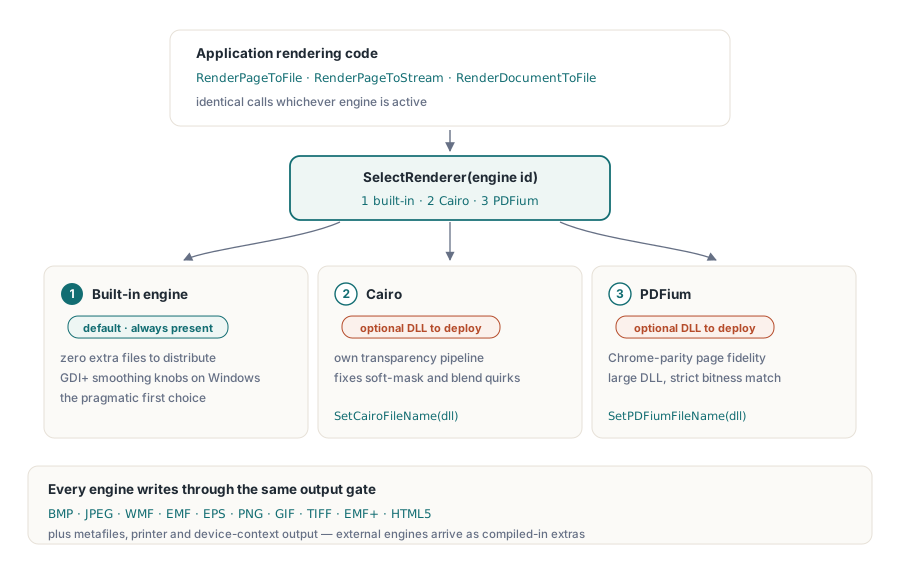
Tre rasteriserare (rasterizers) kan läsa samma PDF och vara oense (disagree) om vad den säger. Den inbyggda motorn i PDF Library for Delphi är den som skeppas utan extra filer och renderar allt kompetent, vilket är anledningen till varför den förtjänar (earns) sin plats som standardval (default slot). Cairo för (brings) med sig en annorlunda transparens- och kantutjämnings-pipeline (anti-aliasing pipeline), och brukar vara den folk sträcker sig efter när mjuka masker (soft masks) eller blandningslägen (blend modes) blir fel någon annanstans. PDFium bär med sig Chromes renderingskod, så en sida som ser rätt ut i en webbläsare ser oftast rätt ut även under PDFium, till priset av en ansenlig (sizable) DLL och en bithet (bitness) den insisterar på att matcha. Ingen av de tre är korrekt i teorin (in the abstract). Korrekthet är per dokument, och det enda ärliga sättet att lära sig vilken motor som hanterar en given korpus är att köra den korpusen genom var och en av dem
Det utgör skälet (is the case) till att behandla motorn som ett val vid körning (runtime choice) snarare än vid byggning (build-time). PDF Library for Delphi, PDF-biblioteket för Delphi och C++Builder från losLab, sätter alla tre bakom en enda renderingsyta så att beslutet kostar ett heltal i stället för en kodförgrening (code branch). Resten av detta handlar om att välja mellan dem säkert, bekräfta vilka motorer en utrullad binär (deployed binary) faktiskt bär på, och hålla renderingstillståndet (rendering state) från att i tysthet förgifta nästa jobb
Tre rasteriserare bakom en enda anropsyta (call surface)
Biblioteket numrerar sina motorer. Motor 1 är den inbyggda renderaren (built-in renderer), standardvalet, med GDI+-utjämningsalternativ på Windows. Motor 2 är Cairo och motor 3 är PDFium, båda väljs vid körning (at runtime) genom SelectRenderer. De två externa motorerna laddas från DLL:er vars sökvägar du tillhandahåller (supply) med SetCairoFileName och SetPDFiumFileName innan du väljer dem. Oavsett vilken motor som är aktiv går arbetet genom samma anrop: RenderPageToFile, RenderPageToStream, RenderDocumentToFile. Att byta motor (Switching engines) förflyttar ett tal; resten av din renderingskod märker det aldrig
Destinationsmodellen når väl förbi punktuppbyggda bilder (bitmaps). Renderarklassen riktar (targets) sig också mot metafiler (WMF, EMF, EMF+), EPS, direkta enhetskontexter (direct device contexts), skrivare och HTML5, där Cairo och PDFium dyker upp som extra destinationer enbart när de kompilerats in. Rasterutmatning är där de tre motorerna avviker (diverge) som tydligast, så det är vad exemplen här använder
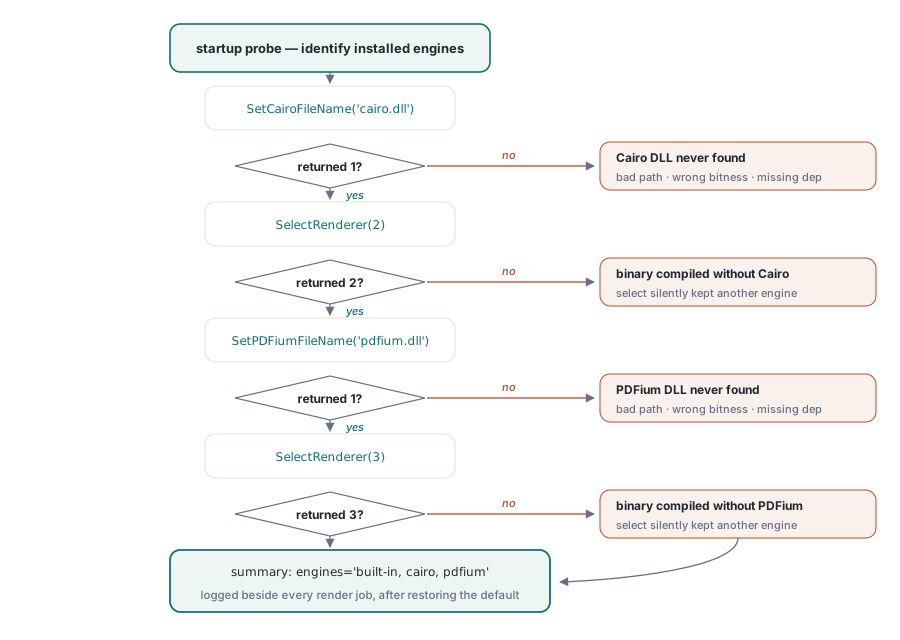
Anta aldrig att en motor existerar: sondera (probe) vid uppstart
Cairo och PDFium är villkorliga kompileringsfunktioner (conditional compilation features), vilket innebär att en binär kan byggas helt utan dem. När det händer kastar inte ett försök att anropa (asking for) motor 2 eller 3 något undantag (does not raise anything). SelectRenderer returnerar bara ett annat värde än det ID du begärde, och kod som ignorerar returvärdet fortsätter rendera med den motor som redan var aktiv. Försvaret (defense) är en uppstarts-sondering (startup probe) som ber varje motor att identifiera sig själv och registrerar svaret:
function ProbeEngines(PDF: TPDFlib): string;
begin
  Result := 'built-in';                        // motor 1 finns alltid
  if (PDF.SetCairoFileName('cairo.dll') = 1) and (PDF.SelectRenderer(2) = 2) then
    Result := Result + ', cairo';
  if (PDF.SetPDFiumFileName('pdfium.dll') = 1) and (PDF.SelectRenderer(3) = 3) then
    Result := Result + ', pdfium';
  PDF.SelectRenderer(1);                       // återställ standarden innan det verkliga arbetet
end;
Kör den sonderingen en gång vid uppstart och skriv dess resultat i loggen jämsides med (alongside) varje renderingsjobb. Den i särklass vanligaste frågan när en kund rapporterar en renderingsskillnad är vilka motorer deras installation faktiskt har, och ett enradigt svar liggandes i loggen avgör det (settles it) utan en fjärrskrivbordsession (remote-desktop session). En användbar sidoeffekt: om SetPDFiumFileName i sig returnerar 0 vet du redan att DLL:en är problemet (fel sökväg, fel bithet, ett saknat beroende) snarare än att det handlar om en binär kompilerad utan PDFium-stöd, eftersom sökvägsanropet inte hittade någonting (resolved nothing) innan SelectRenderer någonsin kördes
Tio utmatningsformat bakom ett enda Options-heltal
Parametern Options på renderingsanropen väljer utmatningskodningen: 0 är BMP, 1 JPEG, 2 WMF, 3 EMF, 4 EPS, 5 PNG, 6 GIF, 7 TIFF, 8 EMF+ och 9 HTML5. PNG (5) är det förnuftiga (sensible) standardvalet för förhandsgranskningar och arkiv-sidbilder. JPEG (1), i kombination med SetJPEGQuality, är det bättre valet för fotografiska inläsningar (photographic scans) där filstorlek spelar större roll än skarpa kanter (crisp edges)
Ett format döljer ett krav gällande målströmmen (target stream). BMP-sökvägen (The BMP path) skriver bilddatan först och spolar (seeks) sedan tillbaka till offset 0x26 för att lappa (patch) upplösningsfälten i headern. Peka det mot en framåt-enbart-ström (forward-only stream), ett komprimeringshölje (compression wrapper) eller en nätverkssocket (network socket), och anropet fallerar på ett sätt som ser ut som (reads like) ett motorfel men inte är det. När ett icke-spolbart (non-seekable) mål är oundvikligt (unavoidable), rendera till PNG i stället, eller mellanlanda (stage) BMP:n via en minnesström (memory stream) och kopiera den framåt så fort den är komplett
DPI:n du skickar är inte den DPI du får
Varje renderingsanrop tar ett DPI-argument, men den upplösning du faktiskt får är det värdet multiplicerat med den globala renderingsskalan. SetRenderScale börjar på 1.0, och när du väl ändrar den appliceras i tysthet den nya faktorn (the new factor silently applies) på varje senare rendering på den instansen (instance):
PDF.SetRenderScale(2.0);                    // varje senare rendering fördubblas
PDF.RenderPageToFile(150, 1, 5, 'p1.png');  // effektivt 300 DPI
PDF.SetRenderScale(1.0);                    // återställ, annars blir dina miniatyrbilder enorma
Samma klibbighet (stickiness) gäller SetRenderCropType och JPEG-kvalitetsinställningen. I en tjänst som producerar miniatyrbilder (thumbnails), förhandsgranskningar och bilder i utskriftsupplösning från en delad instans, är dessa kvarlämnade inställningar (leftover settings) vad som i själva verket ligger bakom det tillfälliga "miniatyrbilderna är plötsligt 40 MB"-ärendet (ticket). Två rena vägar ut: återställ det relevanta tillståndet i toppen av varje operation, eller tillägna (dedicate) en separat instans åt varje utmatningsprofil (output profile) så ingenting läcker över dem
Trimmande av standardmotorn innan man sträcker sig efter en annan
En förvånansvärd andel "vi behöver en annan motor"-förfrågningar visar sig (turn out) vara inställningsproblem i förklädnad (wearing a disguise). Den inbyggda renderaren exponerar sitt utjämningsbeteende (smoothing behavior) genom SetGDIPlusOptions och den bredare SetRenderOptions-familjen, och SetGDIPlusFileName låter dig rikta den (aim it) mot en specifik GDI+-körtid (runtime) när en utrullningsmiljö (deployment environment) skeppar med en ovanlig sådan. Taggig (Jagged) line art vid låg DPI, luddig (fuzzy) text i miniatyrbilder, ränder (banding) tvärs över övertoningar (gradients): alla dessa svarar på de reglagen (knobs), och att vrida på dem kostar ingenting i installeraren (installer). Att lägga till Cairo eller PDFium innebär däremot (by contrast) att man skeppar fler DLL:er, spårar en andra eller tredje bithetsvariant och äger förpliktelsen (owning the obligation) att uppdatera dem
Ett klagomål om kvalitet har därmed (So) en naturlig operationsordning. Reproducera det först vid kundens exakta DPI och skala, eftersom skillnaden hälften av gångerna (half the time) dunstar bort (evaporates) när dessa väl matchar. Prova den inbyggda motorns utjämningsalternativ härnäst (next). Lägg först då sidan sida vid sida över olika motorer med varje annan variabel hållen konstant: rendera den till PNG genom motor 1, 2 och 3 vid identisk DPI och bifoga (attach) alla tre. Oftast stämmer två av de tre överens, och den majoriteten berättar ifall det som avviker (the outlier) handlar om att dokumentet tolkas annorlunda, eller om din egen baslinje-förväntning (baseline expectation) är fel. Tre konkreta bilder avgör (settle) en "renderas fel"-dispyt mycket snabbare än ett stycke med adjektiv
En fallback-kedja som förklarar sig själv
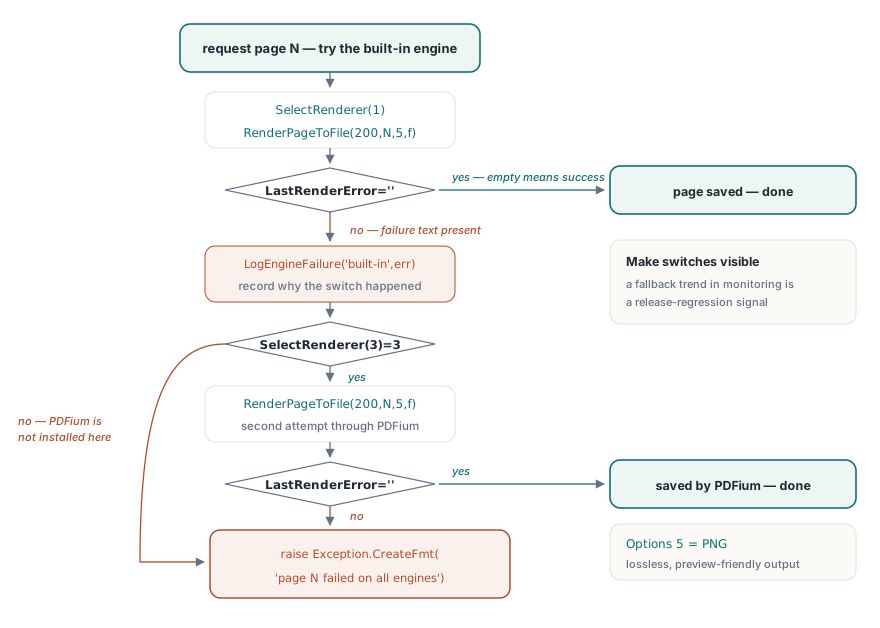
När väl (Once) sondering (probing) och tillståndsdisciplin (state discipline) är på plats är själva fallback-kedjan kort. Att detektera ett fel vilar på LastRenderError, som bär på motorns egen meddelandetext för den senaste renderingen och är tom när renderingen lyckades:
procedure RenderPageWithFallback(PDF: TPDFlib; Page: Integer; const OutFile: string);
begin
  PDF.SelectRenderer(1);                            // inbyggd först
  PDF.RenderPageToFile(200, Page, 5, OutFile);      // 5 = PNG
  if PDF.LastRenderError = '' then Exit;
  LogEngineFailure('built-in', Page, PDF.LastRenderError);
  if PDF.SelectRenderer(3) = 3 then                 // PDFium som den tunga reservlösningen
  begin
    PDF.RenderPageToFile(200, Page, 5, OutFile);
    if PDF.LastRenderError = '' then Exit;
    LogEngineFailure('pdfium', Page, PDF.LastRenderError);
  end;
  raise Exception.CreateFmt('Page %d failed on all available engines', [Page]);
end;
Två designpoänger väger tungt (carry weight) här. Kedjan registrerar varför varje byte skedde, eftersom en loggrad som lyder "denna sida föll tillbaka (fell back) på PDFium sedan version 3.7" är en regressionssignal du vill se som en trend i övervakningen i stället för förlorad. Själva fallback-ordningen är en policy värd att välja per arbetsbelastning (workload). Den inbyggda motorn rullas ut (deploys) utan några extra DLL:er, vilket gör den till det rätta första försöket (first try) i de flesta installationer, medan dokument tunga av transparensgrupper eller ovanlig skuggning (shading) utgör den vanliga orsaken till att ett team över huvud taget (at all) kopplar in (wires in) en alternativ motor. Ingen motor är snabbast i allmänhet, vilket är hela poängen med att välja per anrop: benchmarka var och en gentemot (against) ett urval av dina verkliga dokument vid din verkliga DPI, och omvärdera den mätningen (revisit that measurement) närhelst (whenever) motor-DLL:erna eller dokumentmixen förändras. Korpusen (The corpus) vinner diskussionen varje gång
Bortom enskilda sidor: TIFF-batcher och levande enhetskontexter
Två grannar till (neighbors of) de anrop som görs per sida (the per-page calls) avrundar verktygslådan. RenderAsMultipageTIFFToFile renderar ett sidintervallsuttryck (page-range expression) direkt in i en flersidig TIFF, den naturliga formen för arkiv-överlämningar (archival hand-offs) till dokumenthanteringssystem som härrör från före PDF. RenderPageToDC målar direkt på en Windows device context för förhandsgranskningskontroller (preview controls), styrd (governed) av sin egen trio av klibbiga inställningar (SetRenderDCOffset, SetRenderDCErasePage, plus beskärningstypen (crop type)) vilka behöver samma återställningsdisciplin (reset discipline) som skalfaktorn. Skärmförhandsgranskning (Screen preview) och utskriftssökvägsrendering (print-path rendering) bär på (carry) tillräckligt många egna fällor för att rättfärdiga (warrant) en tillägnad (dedicated) artikel, länkad här nedan
Vart man går härnäst
En vana värd att ta med sig vidare (carrying forward): eftersom SelectRenderer tar effekt på (takes effect for) varje senare anrop på instansen, kan en enda envis sida försökas (retried) på nytt på en annan motor medan resten av dokumentet stannar på standardvalet. För förhandsgransknings-utritning (preview painting), skrivarval och DevMode-hantering, fortsätt med artikeln om utskriftsförhandsgranskning och device context. När renderingar matar en pipeline med hög volym via (over) mycket stora filer, paras handtags-ansatsen (the handle-based approach) i direktåtkomstguiden (direct-access guide) naturligt ihop med rendering per sida via DARenderPageToFile
Motor-paketering, stödda format och testbyggen beskrivs i detalj på PDF Library for Delphi produktsida