Верстак приёмки и проверки PDF — небольшая программа с одной задачей: посмотреть на каждый файл прежде, чем к нему позволят прикоснуться чему-либо ниже по течению. Чтобы выполнить эту задачу, ей приходится собрать в один проход горстку возможностей. Она открывает файл (не доверяя ему), читает, что файл о себе заявляет, ищет содержимое, которое собьёт с толку наивный извлекатель или пронесёт атаку, решает, есть ли вообще извлекаемый текст, а затем направляет документ в очередь по итогам находок. Пропустите проверку — и отказы будут тихими: PDF, зашифрованный паролем владельца и обёрнутый вокруг формы XFA, проплывает через извлекатель текста пустыми строками, индексируется как чистый документ, и никто этого не замечает, пока кто-то ниже по течению не пойдёт искать содержимое, которое так и не прочли. PDFium Component — поставляемая с исходным кодом библиотека просмотра и инспекции VCL/LCL для Delphi, C++Builder и Lazarus, и она открывает те вызовы интроспекции, которые нужны такому верстаку. Разделы ниже проходят по тому, какой вызов отвечает на какой вопрос, и по двум местам, где очевидный вызов даёт вам уверенно неверный ответ
Пять вопросов, на которые надо ответить до маршрутизации файла
Уберите сетку и полосу миниатюр — и сортировка на приёмке сводится к пяти вопросам:
- Открывается ли файл вообще и под каким паролем?
- Чем он себя называет: заголовок, автор, дата создания?
- Несёт ли он активное или рискованное содержимое вроде JavaScript, формы XFA или вложенных файлов?
- Есть ли извлекаемый текст или это скан, которому дорога в OCR?
- С учётом всего этого, в какую очередь он идёт: сквозная обработка, ручная проверка или карантин?
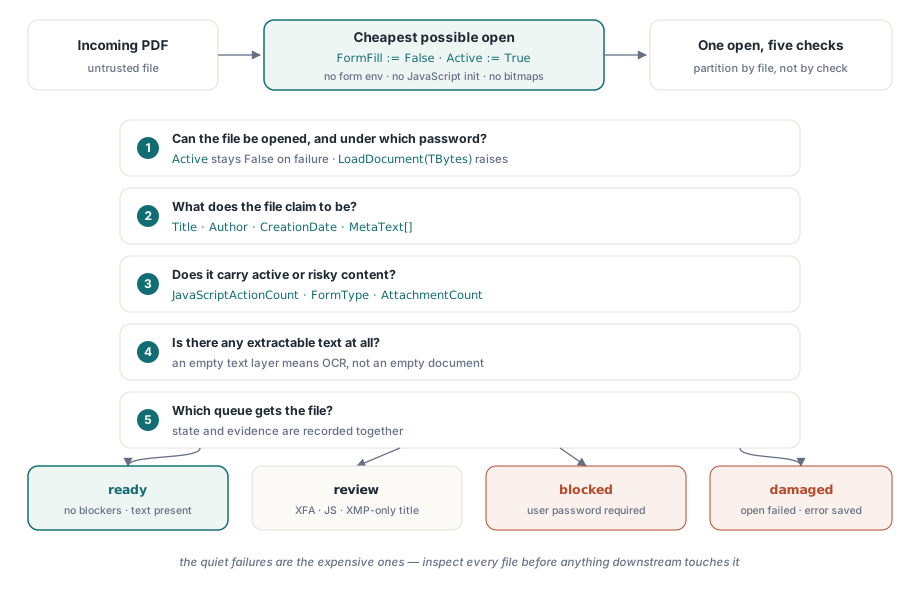
Каждый вопрос ложится на один или два вызова PDFium Component. У двух из этих соответствий есть острые углы, на которые приходится большинство неверно направленных файлов, которые мне доводилось разбирать в промышленной эксплуатации. Метаданные документа живут в двух разных местах, которые могут расходиться, а шифрование вовсе не обязательно мешает документу открыться
Открывайте дёшево: заполнение форм выключено, страниц не отрисовано
Сортировка должна быть максимально дешёвым открытием. Установка FormFill := False до Active := True велит компоненту полностью пропустить среду заполнения форм. Это сокращает время загрузки и (что не менее важно для файлов неизвестного происхождения) не даёт инициализироваться никакому JavaScript уровня документа. Ни одно из используемых ниже свойств инспекции не требует отрисовки страницы, поэтому проходу сортировки никогда не приходится производить ни одного растра
procedure InspectIncoming(const IncomingPath: string; var Rec: TIntakeRecord);
var
  Pdf: TPdf;
begin
  Pdf := TPdf.Create(nil);
  try
    Pdf.FileName := IncomingPath;
    Pdf.FormFill := False;     // нет среды форм, нет инициализации JavaScript
    Pdf.Active := True;        // отказ беззвучен: Active просто остаётся False

    if not Pdf.Active then
    begin
      Rec.OpenFailed := True;  // повреждённый файл или замок с паролем пользователя
      Exit;                    // блок finally всё равно отработает
    end;

    Rec.PageCount := Pdf.PageCount;
    CollectIdentity(Pdf, IncomingPath, Rec);
    CollectRiskSignals(Pdf, Rec);
  finally
    Pdf.Active := False;
    Pdf.Free;                  // никогда не терять экземпляр на кривом файле
  end;
end;
Проверка после присваивания не факультативна, и это именно проверка, а не обработчик исключения, и на то есть причина. Когда движок не может загрузить файл, компонент проглатывает внутреннее EPdfError и оставляет Active равным False, вместо того чтобы его пробросить. Код, ждущий исключения, преспокойно прочитает PageCount у документа, который так и не открылся. Если рабочему процессу отказа нужен настоящий текст ошибки движка, прочитайте файл в массив байтов и вызовите перегрузку LoadDocument, принимающую TBytes; этот путь действительно возбуждает EPdfError с сообщением, включая случай с паролем. try..finally всё равно оправдывает своё место. Сервисы приёмки работают без присмотра неделями, и никакое позднейшее исключение не вправе потерять экземпляр TPdf или удержать блокировку, о которую споткнётся повторный проход
Пропускная способность узким местом становится редко. При отключённом заполнении форм и без отрисовки открытие для сортировки упирается в ввод-вывод, и один рабочий процесс спокойно проверяет несколько файлов в секунду с локального диска. Если объём приёмки всё же перерастёт одного работника, делите работу по файлам, а не по проверкам. Пять вопросов делят одно открытие, и разнесение их по процессам умножило бы самый дорогой шаг вместо того, чтобы его амортизировать
Метаданные живут в двух местах, и они расходятся
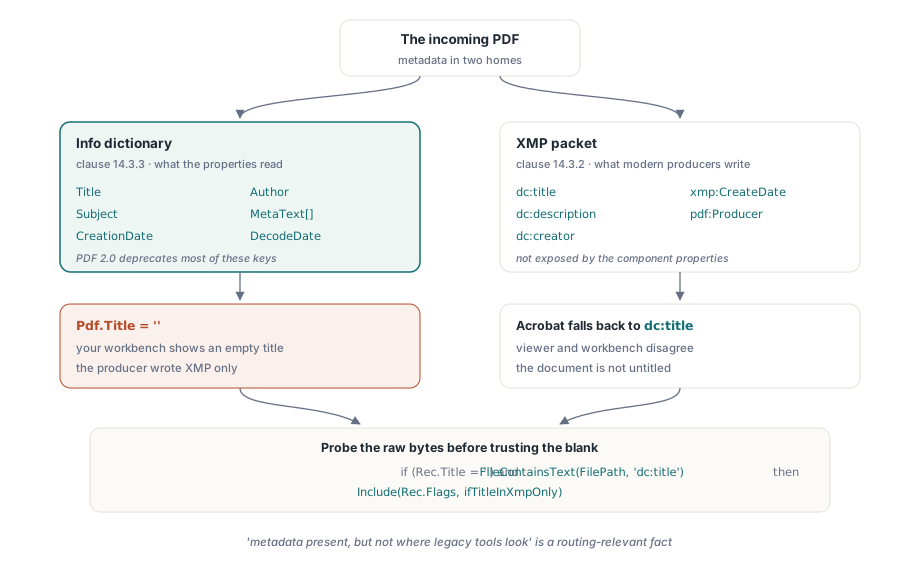
ISO 32000-1 определяет два дома для метаданных документа: информационный словарь документа (пункт 14.3.3) и пакет XMP, прикреплённый к каталогу (пункт 14.3.2). Свойства Title, Author, Subject и CreationDate читают словарь Info, а MetaText[] отвечает за любой другой ключ и DecodeDate разбирает строку даты вида D:YYYYMMDD.... Подвох в том, что современные производители всё чаще пишут только XMP, и ISO 32000-2 официально закрепляет это направление, объявляя большинство ключей словаря Info устаревшими в PDF 2.0. Симптом в инструменте приёмки вполне конкретен. Ваш верстак показывает пустой заголовок, тогда как Adobe Acrobat его отображает, потому что Acrobat откатился к dc:title внутри пакета XMP, которого свойства словаря Info вообще не касаются
procedure CollectIdentity(Pdf: TPdf; const FilePath: string;
  var Rec: TIntakeRecord);
begin
  Rec.Title := Pdf.Title;             // значение из словаря Info
  Rec.Author := Pdf.Author;
  Rec.CreatedAt := Pdf.CreationDate;  // сырая строка даты PDF ("D:2026...")

  // Пустой заголовок в Info не означает, что документ без названия.
  // Компонент не открывает пакет XMP, поэтому прощупайте сырые байты
  // файла на элемент dc:title, прежде чем поверить в пустоту.
  if (Rec.Title = '') and FileContainsText(FilePath, 'dc:title') then
    Include(Rec.Flags, ifTitleInXmpOnly);
end;
Даже грубая проба подстроки выше окупает себя: «метаданные есть, но не там, где смотрят старые инструменты» — факт, значимый для маршрутизации в любом архивном конвейере, который индексирует по заголовку или автору. Если ваш индекс ниже по течению читает только словарь Info, помеченные так файлы молча станут ненаходимыми
Зашифрованные файлы, которые всё равно открываются
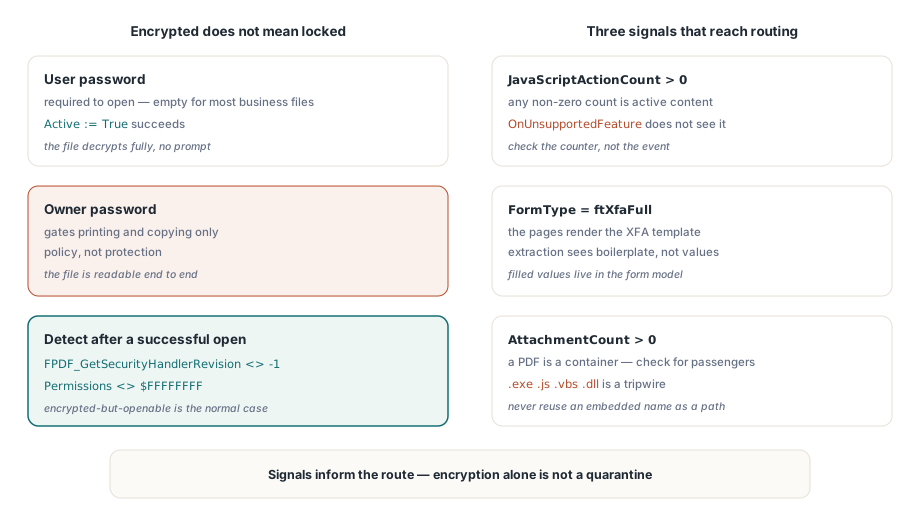
Зашифрованный документ вовсе не обязательно не откроется. Стандартный обработчик безопасности (ISO 32000-1, пункт 7.6.3) различает пароль пользователя, необходимый для открытия документа, и пароль владельца, который лишь ограждает разрешения вроде печати и копирования. Изрядная доля «защищённых» деловых документов зашифрована паролем владельца при пустом пароле пользователя. Они открываются без запроса, полностью расшифровываются и полагаются на добровольное согласие просмотрщиков соблюдать флаги разрешений. Это политика, а не защита, и ваши состояния приёмки должны эту разницу отражать
Обнаружение шифрования после успешного открытия стоит одного вызова движка плюс запасного варианта. FPDF_GetSecurityHandlerRevision(Pdf.Document) возвращает -1 для незащищённых файлов и номер ревизии обработчика в остальных случаях, а Pdf.Permissions, вернувший что-либо кроме маски со всеми битами $FFFFFFFF, служит подтверждающим сигналом. Для файлов, действительно запертых паролем пользователя, присвойте Password до установки Active := True; если открытие всё равно не удалось, направьте файл в заблокированное состояние, которое запрашивает у отправителя учётные данные по защищённому каналу, вместо слепых повторов. И не поддавайтесь искушению считать «зашифрован» автоматическим карантином. В большинстве отраслей, живущих документами, зашифрованные, но открываемые файлы — обычный случай, а не подозрительный
Активное содержимое: JavaScript, XFA и вложенные файлы
Три находки должны непременно доходить до решения о маршруте. Первая — JavaScript: событие OnUnsupportedFeature сообщает о структурных особенностях вроде XFA или 3D-содержимого по мере того, как движок с ними сталкивается, но JavaScript оно не обнаруживает. Проверяйте вместо этого JavaScriptActionCount и считайте ненулевой результат активным содержимым. Вторая — XFA: когда FormType возвращает ftXfaFull, видимые страницы часто немногим больше, чем отрисовка шаблона XFA, и обычное извлечение текста увидит заготовку вместо заполненных значений. Третья — вложения: PDF является форматом-контейнером, и AttachmentCount сообщает вам, везёт ли этот экземпляр пассажиров
procedure CollectRiskSignals(Pdf: TPdf; var Rec: TIntakeRecord);
var
  i, PageNo: Integer;
  Ext: string;
begin
  Rec.IsEncrypted := Assigned(FPDF_GetSecurityHandlerRevision) and
    (FPDF_GetSecurityHandlerRevision(Pdf.Document) <> -1);
  Rec.HasForms := Pdf.FormType <> ftNone;
  Rec.IsXfa := Pdf.FormType = ftXfaFull;
  Rec.HasJavaScript := Pdf.JavaScriptActionCount > 0;

  // AnnotationCount - свойство отдельной страницы; обойдите страницы,
  // чтобы сложить итог. Загрузка объекта страницы ничего не отрисовывает.
  Rec.Annotations := 0;
  for PageNo := 1 to Pdf.PageCount do
  begin
    Pdf.PageNumber := PageNo;
    Inc(Rec.Annotations, Pdf.AnnotationCount);
  end;

  Rec.Attachments := Pdf.AttachmentCount;

  for i := 0 to Rec.Attachments - 1 do
  begin
    Ext := LowerCase(ExtractFileExt(string(Pdf.AttachmentName[i])));
    if (Ext = '.exe') or (Ext = '.js') or (Ext = '.vbs') or (Ext = '.dll') then
      Include(Rec.Flags, ifDangerousAttachment);
  end;
end;
Две детали в этом цикле заслуживают внимания. Имя вложения приходит изнутри документа, поэтому никогда не используйте его как путь для вывода без предварительной санитизации; встроенное имя вроде ..\..\start.exe — это обход каталога, поджидающий небрежный вызов сохранения. И список запрещённых расширений — сигнальная растяжка, а не гарантия. Его задача — вынудить решение человека, а не удостоверить чистоту файла
Превращаем сигналы в состояния маршрутизации
Работоспособной модели состояний нужно меньше состояний, чем ожидает большинство команд: готов (нет препятствий, текст есть), на проверку (открытие удалось, но что-то требует человеческого взгляда — форма XFA, JavaScript, пустой слой текста или заголовок только в XMP), заблокирован (нужен пароль пользователя) и повреждён (открытие не удалось). Записывайте доказательства рядом с состоянием. Хэш файла, число страниц, точные флаги и сообщение движка об ошибке для повреждённых файлов — всё это важно, потому что тот, кто оспорит решение о маршруте, сделает это недели спустя, против файла, который к тому времени мог быть заменён или изменён
Когда оператору всё же нужно взглянуть на файл в карантине, не отдавайте его просмотрщику по умолчанию из оболочки. Отрисуйте его в укреплённой панели с отключёнными сценариями и обработкой ссылок — подход, описанный в статье построение защищённой поверхности предпросмотра PDF в Delphi. А если ваша приёмка питает архив с требованиями по соответствию, проход сортировки — естественное место, чтобы запланировать более глубокую проверку; пакетная предполётная проверка по профилям PDF/A и PDF/UA подхватывает ровно там, где эта инспекция заканчивается
Страница продукта компонента охватывает лицензирование, полный API инспекции и поставляемые демонстрации, включая инспектор документов в стиле приёмки: PDFium Component