Предпросмотр недоверенного PDF внутри вашего собственного приложения — это решение об исполнении, и важна здесь не оболочка просмотрщика, а то, чего панель сама по себе отказывается делать. Не записывайте файл на диск. Не позволяйте его ссылкам выходить в шелл. Не выдавайте его вложениям путь. Основной ущерб от враждебного документа приходит не от эксплойта в движке, а от того, что просмотрщик делает совершенно обычные вещи с данными, предоставленными атакующим: открывает ссылку file:// на сетевой ресурс UNC, утекающую учётные данные NTLM, оставляет промежуточную копию во временном каталоге, копирует встроенные полезные нагрузки туда, куда скажет строка имени файла. PDFium Component — просмотрщик PDF с открытым исходным кодом для Delphi, C++Builder и Lazarus, и он выносит нужные переключатели туда, где вы можете до них дотянуться: флаг времени загрузки, убивающий скриптинг, события клика по ссылке, которые можно отменить, доступ к вложениям, идущий через ваш собственный код, и биты разрешений, которые можно прочитать. Порядок ниже следует за документом от момента, когда он появляется, до момента, когда пользователь на что-то в нём кликает
Модель угроз панели предпросмотра
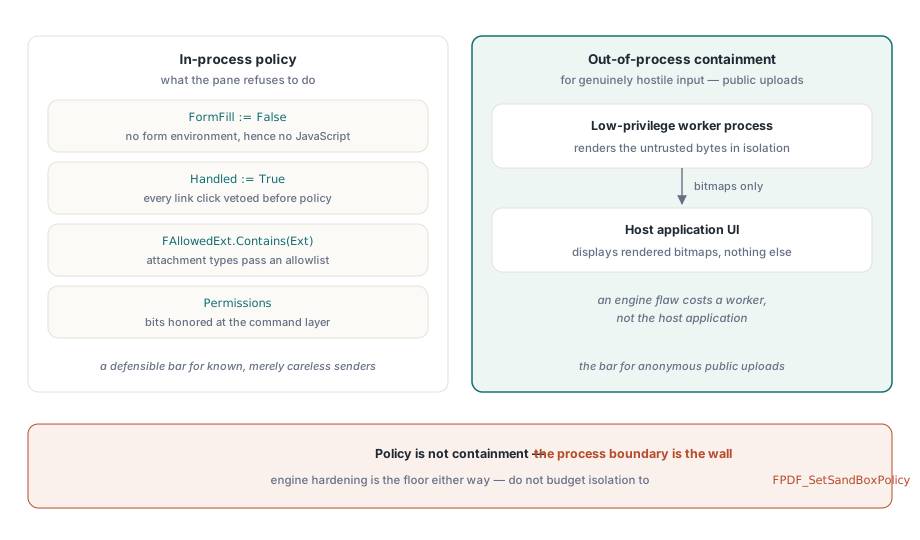
Будьте честны насчёт того, что на самом деле даёт «безопасный предпросмотр». Рендерер разбирает недоверенные байты, что бы вы ни делали, и собственная защищённость движка — это пол, на котором вы стоите. Всё, что выше этого пола, — политика приложения: инициализируются ли скрипты, что делает клик по ссылке, могут ли встроенные файлы добраться до диска, являются ли буфер обмена и принтер дверями или стенами. Одну вещь стоит сразу списать со счетов — переключатель движка FPDF_SetSandBoxPolicy. Большинство ограничений движка вкомпилированы намертво, переключатель на практике почти ничего не меняет, и если заложить в него хоть часть своей истории изоляции, получится лишь ложное чувство, будто что-то сделано. Когда входные данные по-настоящему враждебны — скажем, это публичный портал загрузки, — единственная реальная изоляция состоит в том, чтобы рендерить в отдельном процессе с низкими привилегиями и отправлять в UI уже готовые битмапы. Флаги в рамках процесса — это политика. Это не изоляция
Две поверхности легко забыть именно потому, что до них никогда не дотрагивается ни один клик. Первая — временные файлы. Если ваш конвейер выкладывает входящие документы на диск перед предпросмотром, эти промежуточные копии переживают сеанс, если что-то не удаляет их с проверкой, а файл, который «можно восстановить из временного каталога», незаметно свёл на нет весь контроль, который применяет сама панель. Вместо этого загружайте из памяти через TPdfStreamAdapter, чтобы враждебные байты никогда не получали собственного пути на диске. Вторая поверхность — буфер обмена. Предпросмотр, допускающий выделение и копирование, уже экспортировал документ, по одному экрану за раз, и никакой перехват ссылок этого не поймает
Убивайте JavaScript при загрузке, а не в интерфейсе
JavaScript документа в PDFium Component инициализируется только вместе с окружением заполнения форм. Поэтому загрузка с FormFill := False отключает скриптинг у самого корня, а не подавляет его симптомы:
procedure TPreviewPane.LoadUntrusted(const FilePath: string);
begin
  Pdf.FileName := FilePath;
  Pdf.FormFill := False;     // нет окружения форм, а значит нет и движка JavaScript
  Pdf.Active := True;

  FPermissions := Pdf.Permissions;   // сырое слово флагов; все биты установлены = без ограничений
end;
Компромисс здесь настоящий, и ему место в вашей спецификации. С отключённым заполнением форм пропадает и легитимное взаимодействие с AcroForm, и скрипты проверки; поля отрисовываются с последним сохранённым видом, но их нельзя редактировать. Для панели предпросмотра это обычно правильное решение, поскольку предпросмотр означает «посмотреть», а не «заполнить». Но если то же самое окно одновременно служит поверхностью для заполнения форм у доверенных внутренних документов, ответ — два пути загрузки с явным решением о доверии между ними, а не один путь с компромиссной настройкой, которая слишком слаба для враждебного случая и слишком строга для доверенного. У стороны заполнения форм этого разделения свои ловушки, разобранные в статье навигация по полям форм и регенерация представления
Ссылки: обработчик по умолчанию выходит в шелл
Если ничего не делать, клики по ссылкам уходят прямиком в операционную систему. Стандартный LinkOptions просмотрщика включает loAutoOpenURI — это готовая к срабатыванию утечка file:// в сетевой ресурс UNC. Два события образуют узкое горлышко: OnWebLinkClick для URL, обнаруженных в тексте страницы, и OnAnnotationLinkClick для аннотаций-ссылок, несущих действия URI или запуска. Ставьте Handled := True в обоих безусловно, ещё до того, как что-либо решите, а затем заново разрешайте только то, что позволяет политика. Вторым слоем уберите loAutoOpenURI из LinkOptions для враждебного ввода и убедитесь, что loAutoLaunch, выключенный по умолчанию, никогда не прокрадётся обратно через скопированную конфигурацию:

procedure TPreviewPane.PdfViewWebLinkClick(Sender: TObject;
  const Url: WString; var Handled: Boolean);
begin
  Handled := True;   // никогда не проваливаться в поведение шелла по умолчанию

  if (AnsiStartsText('https://', Url) or AnsiStartsText('http://', Url))
    and HostIsAllowed(Url) then
    OpenInBrowser(Url)
  else
    FAudit.LogBlockedLink(FDocumentId, Url);
end;
Две детали решают, действительно ли это работает. Во-первых, проверка схемы должна быть проверкой префикса сырой строки ещё до какого-либо разбора, потому что file://, пути UNC и экзотические схемы — это ровно те значения, которые обрушивают наивный парсер URL или проскальзывают сквозь тот, что слишком рьяно нормализует. Во-вторых, логируйте каждую блокировку с привязкой к идентичности документа. Горстка заблокированных ссылок file:// — это фоновый шум; всплеск их числа по многим входящим документам за короткое окно — это инцидент, о котором ваша служба безопасности предпочтёт узнать от вас, а не откуда-то ещё
Вложения: политика расширений и имя файла, которое выбрали не вы
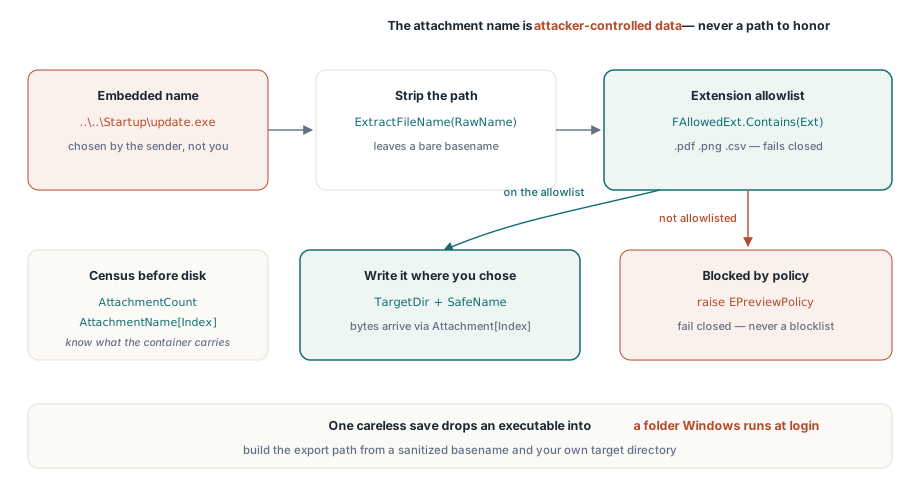
PDF — это контейнер, и AttachmentCount вместе со свойством AttachmentName[] сообщают вам, что он несёт, ещё до того, как что-либо коснётся диска. Здесь важны два отдельных механизма контроля, и очевиден из них только один. Очевидный — политика типов: разрешающий список расширений, которые вообще можно экспортировать. Неочевидный — то, что имя вложения — это данные, полностью контролируемые атакующим. Встроенное имя вроде ..\..\Startup\update.exe превращает небрежное сохранение в обход пути (path traversal), который сбрасывает исполняемый файл в папку, которую Windows запускает при входе в систему. Компонент отдаёт вам полезную нагрузку в виде байтов через Attachment[] и оставляет выбор пути вашему коду, так что стройте этот путь из очищенного базового имени и никогда — из сырой встроенной строки:
procedure TPreviewPane.ExportAttachment(Index: Integer; const TargetDir: string);
var
  RawName, SafeName, Ext: string;
  Data: TBytes;
begin
  RawName := string(Pdf.AttachmentName[Index]);
  SafeName := ExtractFileName(RawName);    // убирает любые компоненты пути
  Ext := LowerCase(ExtractFileExt(SafeName));

  if not FAllowedExt.Contains(Ext) then    // разрешающий список, а не запрещающий
    raise EPreviewPolicy.CreateFmt('Attachment type %s blocked by policy', [Ext]);

  Data := Pdf.Attachment[Index];           // встроенная полезная нагрузка как сырые байты
  TFile.WriteAllBytes(
    IncludeTrailingPathDelimiter(TargetDir) + SafeName, Data);
end;
Отдавайте предпочтение направлению разрешающего списка. Запрещающий список «опасных» расширений — это гонка, которую вы проиграете в тот день, когда кто-то превратит в оружие расширение, о котором вы никогда не слышали; разрешающий список из .pdf, .png и .csv отказывает по умолчанию безопасно
Что разрешения шифрования на самом деле обещают
Стандартный обработчик безопасности ISO 32000-1 кодирует флаги разрешений для печати, копирования содержимого и изменения, а свойства Permissions и UserPermissions раскрывают их как сырые битовые маски сразу после открытия документа. ISO 32000-1, таблица 22, определяет эти биты, и незашифрованный файл сообщает, что установлены все биты. Читайте их и уважайте на уровне ваших команд, но чётко понимайте, что это такое. Для документа, зашифрованного паролем владельца с пустым паролем пользователя, содержимое полностью расшифровывается при открытии, а флаги — это просьба к совместимым просмотрщикам, а не механизм принуждения. Отсюда два следствия, и тянут они в противоположные стороны. Никогда не представляйте флаги разрешений пользователям как свойство безопасности получаемых ими документов, потому что таковым они не являются. В то же время уважайте бит извлечения для вспомогательных технологий (бит 10), даже когда общее копирование (бит 5) запрещено; доступ для экранного диктора намеренно выделен в модели разрешений отдельно, и его отключение просто потому, что «копирование выключено», ломает вспомогательные технологии, не давая никакого выигрыша в безопасности
Обеспечивайте запрет действий на уровне команд, а не пряча кнопки панели инструментов. Ctrl+C, контекстные меню и выделение перетаскиванием — всё это обходит панель инструментов; единственная проверка разрешения внутри самой команды копирования не обходит ничего
Для документов, которые действительно требуют пароля пользователя, присваивайте Password до Active := True и обращайтесь со значением как с настоящим секретом: получайте его из вашего хранилища учётных данных на каждый сеанс, держите вне логов и отчётов о падениях и никогда не сохраняйте рядом с документом. Панель предпросмотра, кэширующая пароли «для удобства», незаметно превратилась в базу паролей без единой из положенных ей защит
Печать заслуживает собственного решения, а не наследования того, на чём остановилось правило для копирования. Физический отпечаток по определению неаудируем, однако прямая блокировка печати обычно толкает пользователей к скриншотам, которые хуже по всем осям. Обычный компромисс — разрешить печать, но проштамповать каждую страницу личностью пользователя и меткой времени, применяемой внутри самой команды печати. Просто держите верное ожидание от этого: водяной знак — это сдерживание и атрибуция. Это не предотвращение
Что приём файла должен был сообщить вам заранее
Панель предпросмотра принимает решения лучше, когда файл появляется с уже приложенным досье: зашифрован он или нет, присутствует ли JavaScript, перепись вложений, тип формы. Этот проход инспекции должен происходить до просмотрщика, выше по цепочке, и паттерн из статьи о построении рабочего стенда проверки при приёме PDF выдаёт ровно те флаги, которые хочет потреблять политика предпросмотра. Файлы, которые приём пометил как рискованные, автоматически открываются через усиленный путь; обычные документы сохраняют свои удобства. Свяжите оба этапа с одним общим объектом политики, а не с двумя экранами конфигурации, которые разойдутся уже ко второму релизу, как бы аккуратно вы их ни написали в первый раз
Где именно проходит граница между работой в процессе и вне процесса, зависит от того, кто присылает вам файлы. Для обычного делового приёма люди, отправляющие документы, известны и просто неаккуратны, и предпросмотр в процессе с отключённым скриптингом и перехватом ссылок — это защитимая планка. Для анонимных публичных загрузок это не так, и никакое количество флагов в рамках процесса этого не изменит; рендерите их в отдельном воркере с низкими привилегиями и отправляйте в UI уже готовые битмапы, чтобы изъян движка стоил вам воркера, а не хост-приложения. Принимайте это разделение осознанно и записывайте, в какую корзину попадает каждый путь приёма, потому что цена ошибочной догадки асимметрична
Лицензирование, поверхность API, связанная с безопасностью, и демонстрация защищённого просмотрщика — на странице продукта: PDFium Component