Аннотация PDF — это словарь, прикреплённый к странице, а не отметка, нарисованная на ней. ISO 32000-1 §12.5 определяет примерно два десятка подтипов, и каждый несёт /Subtype, прямоугольник в координатах страницы, набор флагов и обычно поток внешнего вида, который решает, что программа просмотра на самом деле рисует. Подтипы не для всех означают одно и то же для человека, проверяющего документ. Highlight и штрих Ink — это комментарии; Link — это навигация; Popup — это маленькое окно, которое открывается при щелчке по стикеру, хранится как собственный объект и на которое указывает родитель. Ответы — это полноценные аннотации Text, ссылающиеся на комментарий, на который они отвечают, через запись in-reply-to. Так что массив аннотаций на уровне страницы — это не список комментариев рецензента. Это плоский мешок, содержащий комментарии, сантехнику, которая их связывает, и несколько вещей, которые ни один рецензент вообще не назвал бы комментарием. Панель, которая обращается с массивом как со списком комментариев, разойдётся во мнениях с любой другой программой просмотра, которую запустит клиент
Построение рабочего процесса проверки аннотаций на основе PDFium Component, компонента VCL/LCL на базе PDFium для Delphi, C++Builder и Lazarus, означает сосредоточение на тех точках, где этот разрыв между сырым массивом и человеческим представлением создаёт проблемы: подсчёт, индексация, перекраска отметок, уже зафиксированных движком, удаление без оставления призраков, и добавление собственных отметок
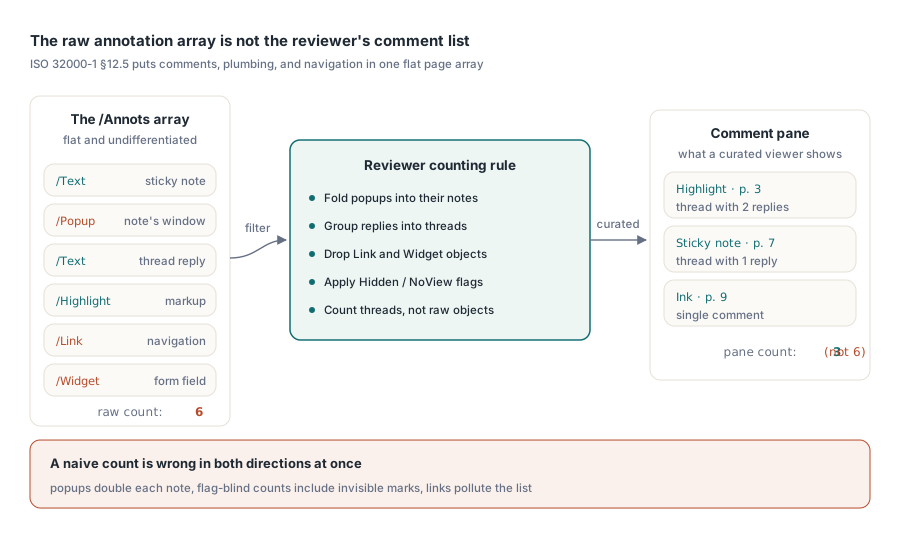
Почему ваш подсчёт никогда не совпадает с панелью комментариев Acrobat
Откройте размеченный договор в своей программе просмотра и в Acrobat рядом, и итоги редко совпадают. Acrobat показывает курированное представление: разметка сгруппирована в цепочки ответов, всплывающие окна свёрнуты в заметки, которым они принадлежат, ссылки и виджеты форм исключены. Сырой массив содержит всё это без разделения, поэтому наивный подсчёт одновременно завышен в одних отношениях и занижен в других
Всплывающие окна раздувают итог, потому что каждый стикер поставляется с отдельным объектом Popup, и подсчёт обоих удваивает заметку. Ответы занижают его, если вы фильтруете по видимым отметкам, поскольку ответ — это аннотация Text, ничего не рисующая, пока кто-то не развернёт цепочку, и его отбрасывание теряет обсуждение. Флаги Hidden и NoView убирают аннотацию с экрана, не убирая её из массива, поэтому подсчёт, слепой к флагам, включает отметки, которые пользователь не может увидеть. Аннотации Link сидят в том же массиве, что и комментарии, и не принадлежат ни подсчёту, ни списку. Определите правило подсчёта прежде, чем писать цикл, и запишите это решение, потому что «почему ваша панель показывает другое число, чем Acrobat» — это первый тикет, который заслуживает функция проверки
Проиндексируйте всё один раз, затем никогда не разбирайте страницу заново
Одно правило проектирования управляет всем, что следует дальше: фильтрация по автору, типу или странице никогда не должна заново разбирать объекты страницы. На 300-страничном документе с плотной разметкой повторный разбор при каждом изменении выпадающего списка превращает панель в нечто, зависающее на секунды за раз. Компонент открывает AnnotationCount и индексированное свойство Annotation[], оба привязаны к текущей загруженной странице, а запись TPdfAnnotation, которую они возвращают, несёт то, что нужно представлению списка: Subtype, Flags, Color, Rectangle, ContentsText, AuthorText. Правильный ход — пройти каждую страницу один раз при открытии и вести собственный плоский индекс:
procedure TReviewPanel.BuildIndex;
var
  PageNo, i: Integer;
  A: TPdfAnnotation;
begin
  FItems.Clear;
  for PageNo := 1 to Pdf.PageCount do
  begin
    Pdf.PageNumber := PageNo;
    for i := 0 to Pdf.AnnotationCount - 1 do
    begin
      A := Pdf.Annotation[i];
      // Оставляем только подтипы, важные для рецензента; записываем пару
      // страница-индекс, потому что все последующие правки адресуются по ней
      if A.Subtype in [anText, anHighlight, anInk] then
        FItems.Add(TReviewItem.Create(PageNo, i,
          A.AuthorText, A.ContentsText, A.Rectangle, A.Color));
    end;
  end;
end;
Пара, которую стоит подчеркнуть, — это (PageNo, i). Каждое последующее изменение, будь то перекраска или удаление, адресуется номером страницы плюс индексом аннотации, а индекс хрупок: удаление аннотации перенумеровывает всё, что идёт после неё на этой странице. Поэтому планируйте перестраивать записи затронутой страницы после любого удаления, а не исправлять номера индекса на месте. Перестроение стоит миллисекунду. Устаревший же индекс удаляет комментарий не того рецензента, а это тот вид ошибки, который подрывает доверие ко всей функции
Потоки заслуживают места в индексе, даже если ваш первый релиз только считает ответы, а не показывает их. Группируйте элементы по их родительской ссылке, пока страница у вас открыта, чтобы панель могла позже свернуть цепочку так, как это делает Acrobat. Восстановление этой группировки лениво во время прокрутки сводит на нет весь смысл однократной индексации, потому что заново открывает страницы, за разбор которых вы уже заплатили. Геометрия требует той же дисциплины. Rectangle в каждой записи задан в пространстве страницы, и его преобразование в координаты представления должно жить в одном общем помощнике, а не быть разбросанным по коду. У панелей заводятся ошибки координат, когда выбор, проверка попадания и рисование каждые изобретают свою собственную математику масштаба и поворота; проведите все три через единое преобразование, и выделение, его строка в списке и цель клика останутся привязанными к одним и тем же чернилам
Перекраска разметки и вето потока внешнего вида
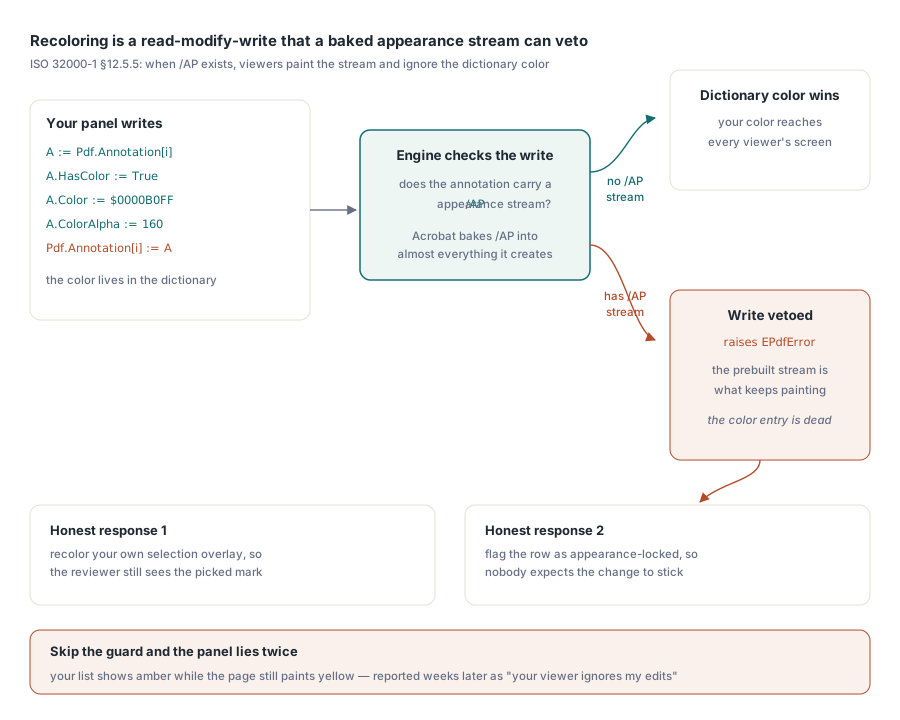
Смена цвета выделения с жёлтого на янтарный звучит как однострочная правка, и иногда так и есть. Загвоздка в ISO 32000-1 §12.5.5. Когда аннотация несёт поток внешнего вида /AP, соответствующая программа просмотра рисует этот заранее построенный поток и обращается с записью цвета в словаре как с мёртвыми метаданными. Acrobat пишет потоки внешнего вида практически для всего, что создаёт, поэтому большинство аннотаций, приходящих от клиентов, уже находятся в этом состоянии, и цвет, который вы так уверенно задали, никогда не доходит до экрана. Перекраска — это чтение-изменение-запись через свойство Annotation[], и компонент честен насчёт конфликта: когда движок отказывается позволить цвету словаря переопределить встроенный внешний вид, запись выбрасывает EPdfError
A := Pdf.Annotation[Item.Index];
A.HasColor := True;
A.Color := $0000B0FF;       // янтарный
A.ColorAlpha := 160;
try
  Pdf.Annotation[Item.Index] := A;
except
  on EPdfError do
  begin
    // У аннотации есть заранее отрисованный поток /AP; цвет в словаре
    // сам по себе не может изменить то, что рисуют программы просмотра
    Item.AppearanceLocked := True;
    StatusBar.SimpleText := 'Color is fixed by the annotation appearance';
  end;
end;
Ловите это исключение каждый раз и относитесь к нему как к информации, а не как к сбою. Пропустите защиту, и ваша панель бодро показывает янтарный в своём собственном списке, пока страница продолжает рисовать жёлтый; пользователь оформляет это неделями позже как «ваша программа просмотра игнорирует мои правки», а вы тратите вечер, безуспешно пытаясь воспроизвести это на файле, у которого просто нет потока внешнего вида. Как только вы узнаёте, что внешний вид заблокирован, у вас есть два честных ответа: перекрасить собственный оверлей выделения вместо аннотации, чтобы рецензент хотя бы увидел выбранное им выделение, или пометить строку как заблокированную по внешнему виду, чтобы никто не ожидал, что изменение сохранится
Удаление аннотаций без оставления призраков
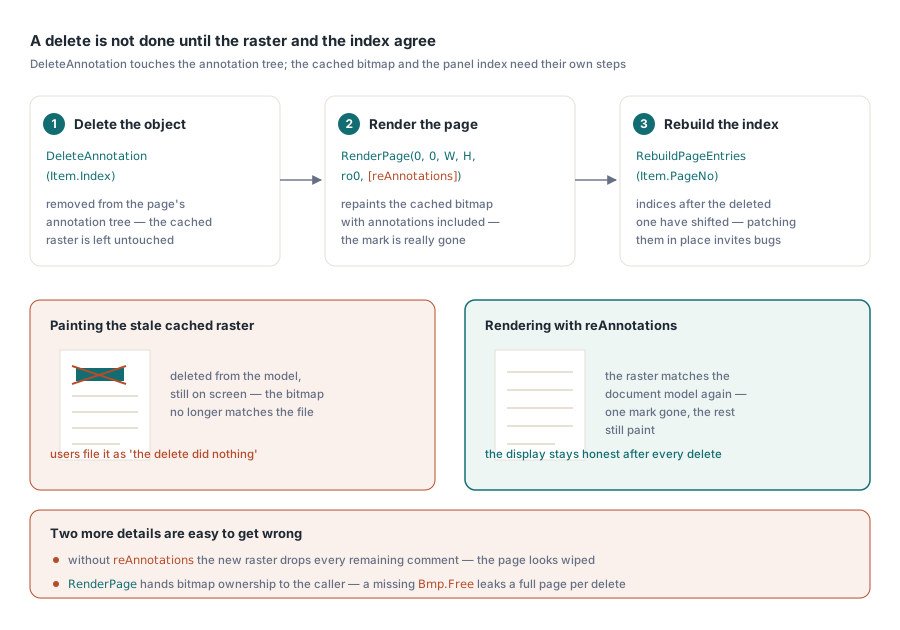
DeleteAnnotation удаляет объект из дерева аннотаций текущей страницы, но оставляет кэшированный растр страницы нетронутым. Нарисуйте сразу после вызова, и удалённое выделение всё ещё на экране, сидя в растровом изображении, которое больше не соответствует стоящей за ним модели документа. Решение — относиться к перерисовке как к части удаления, а не к шагу, который вызывающий может забыть:
Pdf.PageNumber := Item.PageNo;
Pdf.DeleteAnnotation(Item.Index);   // выбрасывает EPdfError при неудаче
Bmp := Pdf.RenderPage(0, 0, ViewWidth, ViewHeight, ro0, [reAnnotations]);
try
  PaintPageBitmap(Bmp);
finally
  Bmp.Free;  // RenderPage передаёт владение битмапом вызывающему коду
end;
RebuildPageEntries(Item.PageNo);  // индексы после Item.Index сместились
Две детали в этом блоке легко перепутать. Опция reAnnotations должна присутствовать, иначе новый растр отбрасывает все оставшиеся аннотации, и страница выглядит так, будто вы стёрли весь набор комментариев, а не одну отметку. И Bmp.Free не является необязательным: функциональная перегрузка RenderPage передаёт владение битмапом вызывающему коду, поэтому пропущенное освобождение утекает полностраничный растр при каждом отдельном удалении, что для рецензента, работающего с длинным документом, за считаные минуты превратится в реальное давление на память
Добавление отметок рецензента из собственного интерфейса
Создание аннотаций проходит через CreateAnnotation, которая принимает заполненную запись TPdfAnnotation (подтип, прямоугольник, цвет, содержимое, автор) и прикрепляет её к текущей странице. Стикер, подтип anText, — простой случай: задайте позицию, содержимое и автора, и всё готово. На аннотациях Ink люди попадаются. Прямоугольник записи лишь ограничивает рисунок; сами штрихи — это массивы точек, которые нужно прикреплять отдельно через вызов движка для штрихов чернил, FPDFAnnot_AddInkStroke, которому подаются данные FS_POINTF, захватываемые с мыши или пера по одному штриху за раз. Постройте аннотацию Ink из прямоугольника и ничего больше, и вы получите пустую каракулю, которая отрисовывается как пустое место, что выглядит как ошибка в движке, а на деле является наполовину законченной аннотацией
Определитесь с политикой авторства в тот же момент. Каждая отметка, которую создаёт ваш интерфейс, должна нести согласованный AuthorText, потому что фильтр рецензентов, который вы построите в следующем месяце, настолько хорош, насколько хороши имена, которые вы проставляете на комментариях сегодня. Пустые или несогласованные строки автора невозможно исправить задним числом без повторного открытия каждого файла
Вывод проверки за пределы программы просмотра
Данные проверки окупаются, как только могут покинуть программу просмотра — в виде сводки, которую руководитель проекта читает без открытия файла, или CSV, который питает лист отслеживания. Экспортируйте из индекса, который вы уже построили, никогда из свежего разбора, и выберите устойчивый способ ссылаться на каждую отметку. Номер страницы в паре с прямоугольником аннотации переживает циклы туда-обратно, которые не переживает индекс массива, потому что следующее удаление незаметно перенумеровывает индексы, и ваш CSV начинает указывать не на те комментарии
Строка, которую стоит сохранить, несёт страницу, подтип, автора, временную метку создания, когда файл её записывает, текст содержимого и столбец статуса, которым владеете вы, а не тот, что поставляет PDF. Тот же проход индексации полезен и раньше, во время приёмки, когда документ приходит извне команды и вы хотите знать, что в нём есть, прежде чем кто-то его проверит. Статья рабочее место приёмки и проверки PDF проходит через эту сортировку, а навигация по полям форм покрывает зеркальную задачу: проверку документов, построенных для сбора данных, а не комментариев
Один случай, который массив вам не покажет
Один режим сбоя заслуживает флага, потому что он выглядит как дефект в вашем коде, а им не является. Клиент сообщает о видимых выделениях по всей странице, а ваша панель ничего не перечисляет, и AnnotationCount возвращает ноль. Обычное объяснение состоит в том, что отметки были сведены в плоскость где-то выше по потоку. Сведение запекает внешний вид аннотаций в обычное содержимое страницы, поэтому выделения становятся частью графики страницы и полностью перестают существовать как объекты аннотаций. Для API аннотаций больше не остаётся ничего, что можно перечислить, перекрасить или удалить. Когда вы видите нарисованную разметку при нулевом подсчёте, перестаньте искать ошибку в своём цикле перечисления и спросите, как был создан файл
Поверхность аннотаций, использованная здесь, от перечисления и создания до перекраски, удаления и опций рендеринга, которые сохраняют отображение честным, поставляется вместе с PDFium Component для Delphi, C++Builder и Lazarus/FPC