Отрисовка страницы PDF в контекст устройства Windows для предварительного просмотра печати сводит в одну строку кода три системы координат, и они редко совпадают друг с другом. Страница PDF измеряется в пунктах с началом координат в левом нижнем углу. Экранный DC измеряется в пикселях с началом координат в левом верхнем углу и коэффициентом масштабирования, который выбираете вы. DC принтера — тот самый, который предпросмотр должен предсказать, — измеряет пиксели в разрешении устройства, но помещает начало координат в угол области печати, а не в угол листа. Ошибитесь хоть в одном из этих пунктов, и предпросмотр будет выглядеть нормально, а напечатанная страница выйдет сдвинутой, масштабированной или обрезанной по краю. Типичный симптом — форма с рамкой, которая в предпросмотре центрирована, а при печати выходит с обрезанными верхней и левой линиями, потому что лазерный принтер не может нанести краску на внешние несколько миллиметров, а предпросмотр об этом никто не предупредил. losLab PDF Library (PDF Library for Delphi) закрывает весь этот путь вызовами отрисовки в контекст устройства, слоем настройки виртуального принтера и превью-битмапами, построенными по метрикам самого принтера, — и именно это делает предпросмотр честным насчёт этого поля
Геометрия бумаги — не геометрия печати
Любую цель печати описывают два прямоугольника, и именно в смещении между ними живёт большинство ошибок предпросмотра. Прямоугольник бумаги — это физический лист. Прямоугольник печати — меньшая область, которую движок печати действительно может охватить, уменьшенная на аппаратное поле, которое различается для каждой модели принтера, а иногда и для каждого лотка. Слой печати библиотеки измеряет оба прямоугольника. Класс TPLPrinter нижнего уровня выдаёт PageWidth и PageHeight для области печати, FullPageWidth и FullPageHeight для полного листа и PrintOffsetX вместе с PrintOffsetY для зазора между их началами координат — всё в пикселях устройства при разрешении, которое сообщает GetDPI. Честный предпросмотр масштабирует именно эти числа до экранного разрешения, а не рисует страницу в тот прямоугольник, который случайно оказался у элемента управления. Пропустите этот шаг — и предпросмотр молча предполагает нулевое поле, а это единственное значение, которое не использует ни один настоящий принтер
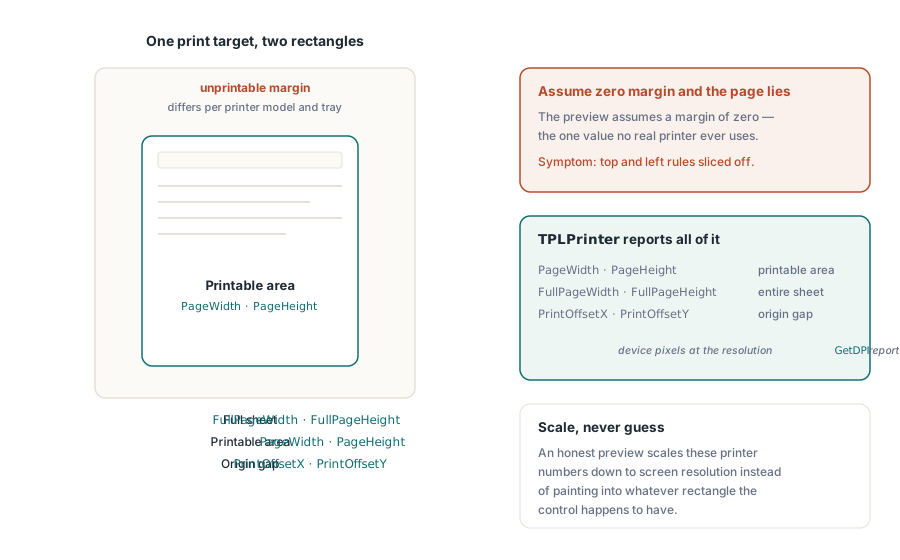
Экранный предпросмотр через RenderPageToDC
Для элемента предпросмотра на экране RenderPageToDC(DPI, Page, DC) рисует страницу загруженного документа прямо в любой контекст устройства GDI, будь то канва TPaintBox, внеэкранный битмап или DC метафайла. Аргумент DPI задаёт масштаб. 96 приблизительно соответствует виду 100% на классическом дисплее, а его удвоение удваивает и размер отрисованного изображения
procedure TPreviewForm.PreviewBoxPaint(Sender: TObject);
begin
  // эти три параметра — липкое состояние библиотеки, а не параметры конкретного вызова:
  FPdf.SetRenderDCOffset(FOffsetX, FOffsetY);
  FPdf.SetRenderDCErasePage(1);
  FPdf.SetRenderCropType(0);
  FPdf.RenderPageToDC(FPreviewDpi, FCurrentPage, PreviewBox.Canvas.Handle);
end;
Ловушка в том, что путь отрисовки в DC управляется липким состоянием библиотеки, а не параметрами конкретного вызова. SetRenderDCOffset, SetRenderDCErasePage и SetRenderCropType — каждый из них сохраняется, пока что-то его не изменит, так что цикл построения миниатюр, запущенный после того, как пользователь подстроил увеличенный вид, наследует смещение или обрезку, оставленные предыдущим путём кода. Симптом — предпросмотр, который «уплывает» только в определённых последовательностях навигации, а это едва ли не самый неприятный тип бага для воспроизведения. Установка всего нужного состояния в начале обработчика отрисовки, как показано выше, ничего не стоит и убирает весь этот класс проблем. Рядом прячется второй множитель. Эффективное разрешение вывода — это масштаб отрисовки, умноженный на аргумент DPI, и хотя SetRenderScale по умолчанию равен 1.0, он тоже сохраняется после изменения, так что функция экспорта, которая однажды его подняла, незаметно масштабирует каждый последующий предпросмотр, пока что-то не вернёт его обратно
У прокручиваемых просмотрщиков и частичных перерисовок есть отдельный вариант. RenderPageToDCClip принимает спецификацию области отсечения вместе с контекстом устройства, так что инвалидация одной полосы окна перерисовывает только эту полосу, а не растрирует страницу заново целиком. При большом увеличении на страницах крупного формата это разница между просмотрщиком, который следует за полосой прокрутки, и тем, который размазывается позади неё
Задание печати, совпадающее с предпросмотром
Сторона печати работает через виртуальный принтер. NewCustomPrinter клонирует системный принтер в приватную для библиотеки конфигурацию, а SetupPrinter настраивает этот клон, не трогая общесистемный DevMode: бумага задаётся как параметр 1 (константа DMPAPER_*), а ориентация — как параметр 11. Награда за это — изоляция. Служба может печатать этикетки A4, пока принтер хоста по умолчанию остаётся настроен на Letter, и после этого ничего не нужно восстанавливать

var
  Pdf: TPDFlib;
  Virt: WideString;
  Opt: Integer;
begin
  Pdf := TPDFlib.Create;
  try
    if Pdf.LoadFromFile('report.pdf', '') <> 1 then
      raise Exception.Create('load failed');
    Virt := Pdf.NewCustomPrinter(Pdf.GetDefaultPrinterName);
    Pdf.SetupPrinter(Virt, 1, 9);        // параметр 1 = бумага, DMPAPER_A4
    Pdf.SetupPrinter(Virt, 11, 1);       // параметр 11 = ориентация, 1 = книжная
    Opt := Pdf.PrintOptions(1, 1, 'Monthly Report');  // по размеру листа, автоповорот + центрирование
    Pdf.PrintDocument(Virt, 1, Pdf.PageCount, Opt);
  finally
    Pdf.Free;
  end;
end;
PrintOptions заслуживает внимательного прочтения. Функция возвращает дескриптор параметров, который нужно передать в PrintDocument или PrintPages, — это не окружающее состояние. Построить параметры и забыть передать дескриптор — значит получить молчаливый сбой. Задание напечатается со значениями по умолчанию, и никто этого не заметит, пока не ожидалась политика «по размеру листа», а вместо неё вышла обрезанная страница увеличенного размера. Именно в аргументе масштабирования страницы и живёт эта политика. Без масштабирования сохраняется точность размеров, что важно для форм, которые потом измеряют линейкой. «По размеру листа» пересчитывает всё под размер бумаги. «Сжимать только крупные страницы» не трогает обычные страницы и вступает в игру только тогда, когда страница превышает область печати, — обычно это правильное значение по умолчанию для смешанного набора документов. Флаг автоповорота с центрированием обрабатывает альбомные страницы без отдельного пути кода
Приложения, уже управляющие объектом TPrinter через диалоговый поток VCL, могут передать его напрямую. PrintDocumentToPrinterObject и PrintPagesToPrinterObject принимают настроенный экземпляр TPrinter, благодаря чему стандартный диалог печати остаётся поверхностью настройки для пользователя, а рендеринг страниц берёт на себя библиотека. Смешивание обоих подходов в одном пути кода обычно возвращает то самое расхождение геометрии, которое вся эта работа была призвана устранить, так что выбирайте что-то одно. Маршрут с виртуальным принтером подходит необслуживаемым службам; маршрут с TPrinter подходит интерактивным приложениям
Выборочный вывод работает так же. PrintPages принимает строку диапазона, так что передача имени виртуального принтера, '2-5,12' и дескриптора параметров печатает страницы с 2 по 5 и страницу 12 с сохранением контракта геометрии, и тот же синтаксис управляет вариантами печати в файл. Эти файловые варианты — практичный ответ для необслуживаемой среды без физического устройства: регрессионное тестирование геометрии печати на сборочном сервере, где вообще нет очереди драйверов. Отрисовывайте один и тот же документ с теми же параметрами в файловый артефакт при каждой сборке, и регрессия геометрии превращается в diff, а не в жалобу клиента тремя неделями позже
Превью-битмапы по метрикам самого принтера
Предпросмотр, отрисованный при 96 DPI против предполагаемого размера страницы, отвечает не на тот вопрос. Он показывает, как выглядит страница, а не что этот принтер нанесёт на эту бумагу. GetPrintPreviewBitmapToString закрывает этот разрыв, строя предпросмотр из того же пользовательского принтера и того же дескриптора параметров, что и итоговое задание, так что размер бумаги, ориентация, политика масштабирования, поворот и аппаратное смещение — всё это учтено в битмапе. То, что вы получаете, — это именно то, что покажет лист бумаги
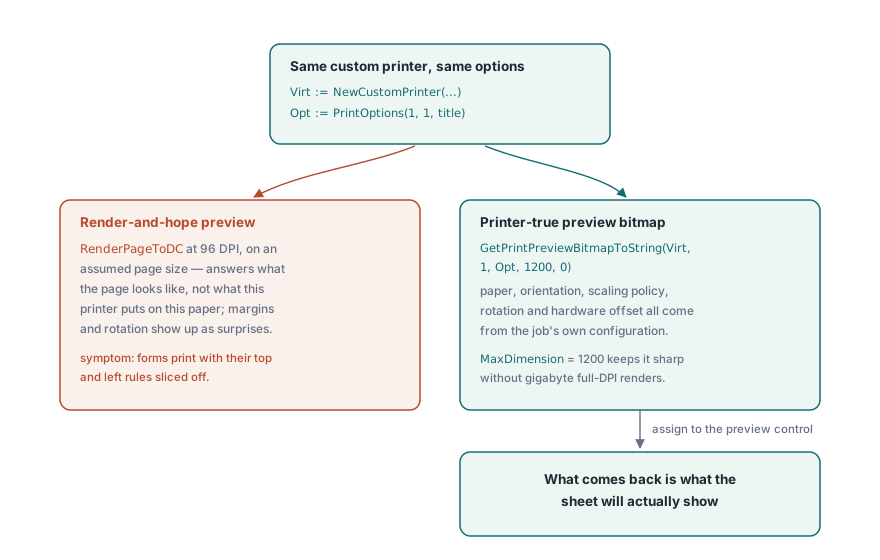
procedure ShowPrinterTruePreview(Pdf: TPDFlib; const Virt: WideString; Opt: Integer);
var
  Data: AnsiString;
  Strm: TMemoryStream;
  Bmp: TBitmap;
begin
  Data := Pdf.GetPrintPreviewBitmapToString(Virt, 1, Opt, 1200, 0);
  Strm := TMemoryStream.Create;
  try
    Strm.WriteBuffer(PAnsiChar(Data)^, Length(Data));
    Strm.Position := 0;
    Bmp := TBitmap.Create;
    try
      Bmp.LoadFromStream(Strm);
      PreviewImage.Picture.Assign(Bmp);
    finally
      Bmp.Free;
    end;
  finally
    Strm.Free;
  end;
end;
Аргумент MaxDimension ограничивает длинную сторону битмапа. 1200 пикселей остаются чёткими для диалога предпросмотра и держат потребление памяти скромным даже для инженерных чертежей формата E, где отрисовка в полном разрешении при 600 DPI принтера потянула бы на гигабайты
Запоминание выбора принтера пользователем
Диалоги печати, забывающие свои настройки между сеансами, сами порождают обращения в поддержку. Пара функций для DevMode, GetPrinterDevModeToString и SetPrinterDevModeFromString, сериализует полную конфигурацию драйвера принтера в непрозрачную строку, которую можно сохранить в пользовательских настройках и восстановить в следующем сеансе, включая специфичные для драйвера параметры, которые не моделирует ни один общий API. Сохраняйте принтер по имени из GetPrinterNames, никогда — по индексу в списке. Порядок индексов меняется каждый раз, когда принтер добавляется или удаляется, так что сохранённый индекс молча начинает указывать не на то устройство, когда список в следующий раз сдвигается. GetDefaultPrinterName закрывает запасной вариант на случай, если запомненное устройство исчезло совсем
Выбор лотка дополняет историю с сохранением настроек. GetPrinterBins сообщает источники бумаги, которые предоставляет драйвер, а это важно для сценариев с фирменными бланками, где первая страница берётся из лотка с бланком, а остальные — из обычной бумаги. Это как раз та политика, которую пользователи ожидают от приложения запомнить наряду со всем остальным, и задание печати, попавшее не на ту бумагу, воспринимается как баг, даже если каждый байт PDF был корректен
Один движок для предпросмотра и печати
Последнее решение незаметно определяет точность результата. Выбор движка рендеринга применяется и к экрану, и к принтеру, поэтому возникает соблазн показывать предпросмотр через быстрый движок, а печатать через точный. Не поддавайтесь ему. Прогон предпросмотра и задания печати через разные движки возвращает ровно то расхождение точности, которое честный по отношению к принтеру предпросмотр был призван устранить, причём проявляется это только на бумаге. Компромиссы между встроенным движком, Cairo и PDFium разобраны в статье мультидвижковый рендеринг PDF в Delphi; выберите один движок и используйте его с обеих сторон
Документы, слишком крупные для комфортной загрузки перед печатью, можно открывать через путь прямого доступа, описанный в статье слияние, разделение и прямой доступ к большим PDF, который отрисовывает страницы в контекст устройства прямо из файлового дескриптора, не строя дерево документа. Полный справочник API печати — на странице продукта losLab PDF Library для Delphi