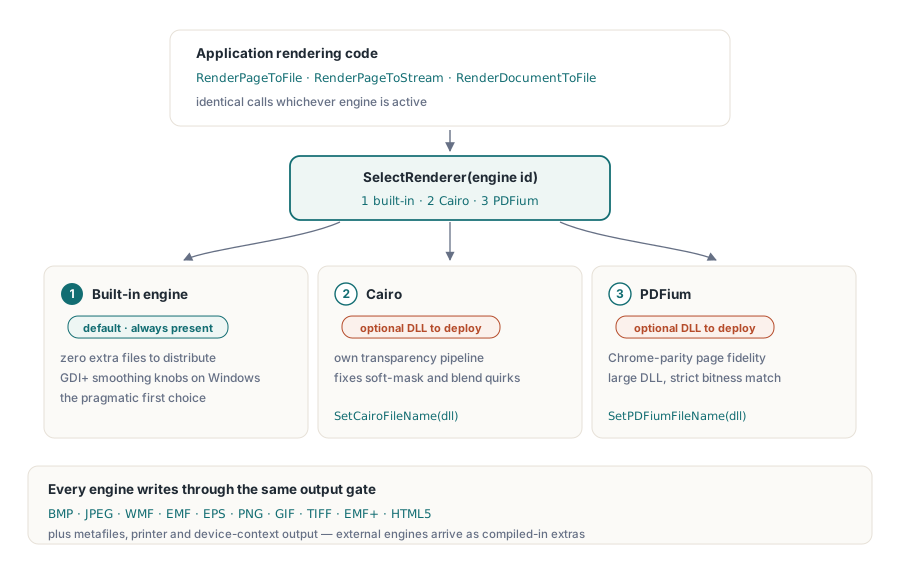
Три растеризатора могут прочитать один и тот же PDF и разойтись во мнении о том, что в нём написано. Встроенный движок PDF Library for Delphi — тот, что поставляется без дополнительных файлов и грамотно отрисовывает всё подряд, за что и получает слот по умолчанию. Cairo несёт другой конвейер прозрачности и сглаживания и обычно оказывается тем движком, к которому тянутся, когда где-то ещё неправильно выходят мягкие маски или режимы наложения. PDFium несёт в себе код рендеринга Chrome, так что страница, которая правильно выглядит в браузере, обычно правильно выглядит и под PDFium — ценой заметной по размеру DLL и разрядности, которую он настойчиво требует совпадающей. Ни один из трёх не является правильным в абстрактном смысле. Правильность определяется для каждого документа отдельно, и единственный честный способ узнать, какой движок справляется с конкретным корпусом файлов, — прогнать этот корпус через каждый из них
Это и есть аргумент в пользу того, чтобы трактовать выбор движка как решение времени выполнения, а не времени сборки. PDF Library for Delphi, PDF-библиотека losLab для Delphi и C++Builder, прячет все три движка за единой поверхностью рендеринга, так что решение обходится в одно целое число, а не в ветвление кода. Всё остальное здесь сводится к тому, чтобы безопасно выбирать между ними, подтверждать, какие движки реально несёт развёрнутый бинарник, и не давать состоянию рендеринга незаметно отравлять следующую задачу
Три растеризатора за одной поверхностью вызовов
Библиотека нумерует свои движки. Движок 1 — встроенный рендерер, используемый по умолчанию, с опциями сглаживания GDI+ на Windows. Движок 2 — это Cairo, а движок 3 — PDFium, оба выбираются во время выполнения через SelectRenderer. Оба внешних движка загружаются из DLL, чьи пути вы передаёте через SetCairoFileName и SetPDFiumFileName перед их выбором. Какой бы движок ни был активен, работа идёт через одни и те же вызовы: RenderPageToFile, RenderPageToStream, RenderDocumentToFile. Смена движка сдвигает одно число; остальной ваш код рендеринга этого даже не замечает
Модель назначений выходит далеко за пределы битмапов. Класс рендерера также нацеливается на метафайлы (WMF, EMF, EMF+), EPS, прямые контексты устройства, принтеры и HTML5, причём Cairo и PDFium появляются как дополнительные назначения только тогда, когда были вкомпилированы. Растровый вывод — это место, где три движка расходятся заметнее всего, поэтому именно его используют примеры здесь
Никогда не предполагайте, что движок существует: зондируйте при запуске
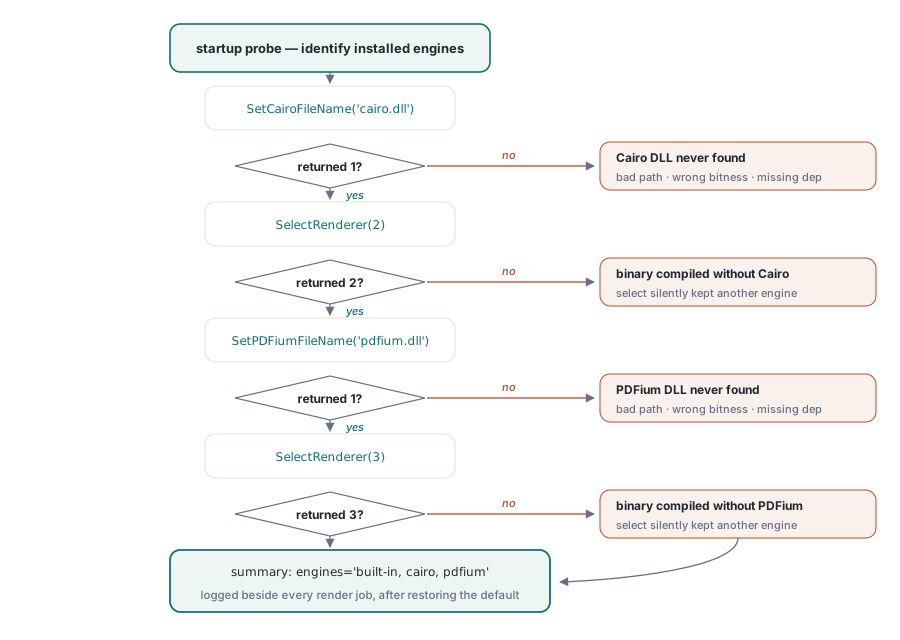
Cairo и PDFium — это функции условной компиляции, а значит, бинарник можно собрать вообще без них. Когда так и происходит, запрос движка 2 или 3 ничего не выбрасывает. SelectRenderer просто возвращает значение, отличное от запрошенного ID, а код, игнорирующий возвращаемое значение, продолжает рендерить тем движком, который уже был активен. Защита — зонд при запуске, который просит каждый движок идентифицировать себя и записывает ответ:
function ProbeEngines(PDF: TPDFlib): string;
begin
  Result := 'built-in';                        // движок 1 присутствует всегда
  if (PDF.SetCairoFileName('cairo.dll') = 1) and (PDF.SelectRenderer(2) = 2) then
    Result := Result + ', cairo';
  if (PDF.SetPDFiumFileName('pdfium.dll') = 1) and (PDF.SelectRenderer(3) = 3) then
    Result := Result + ', pdfium';
  PDF.SelectRenderer(1);                       // восстановить движок по умолчанию перед настоящей работой
end;
Запускайте этот зонд один раз при старте и записывайте его результат в лог рядом с каждой задачей рендеринга. Самый частый вопрос, когда клиент сообщает о различии в рендеринге, — это какие движки на самом деле есть в его инсталляции, и однострочный ответ в логе снимает его без сеанса удалённого рабочего стола. Полезный побочный эффект: если сам SetPDFiumFileName возвращает 0, вы уже знаете, что проблема в DLL (неверный путь, не та разрядность, отсутствующая зависимость), а не в бинарнике, собранном без поддержки PDFium, потому что вызов с путём ничего не разрешил ещё до того, как вообще выполнился SelectRenderer
Десять форматов вывода за одним целым числом Options
Параметр Options в вызовах рендеринга выбирает выходное кодирование: 0 — BMP, 1 — JPEG, 2 — WMF, 3 — EMF, 4 — EPS, 5 — PNG, 6 — GIF, 7 — TIFF, 8 — EMF+ и 9 — HTML5. PNG (5) — разумный выбор по умолчанию для предпросмотров и архивных изображений страниц. JPEG (1) в паре с SetJPEGQuality — лучший выбор для фотографических сканов, где размер файла важнее чётких границ
Один формат скрывает требование к целевому потоку. Путь BMP сначала записывает данные изображения, а затем перематывается назад к смещению 0x26, чтобы подправить поля разрешения в заголовке. Направьте его в поток только для последовательной записи, обёртку сжатия или сетевой сокет — и вызов упадёт так, что это будет выглядеть как сбой движка, хотя это не так. Когда цель без возможности перемотки неизбежна, рендерите вместо этого PNG либо выкладывайте BMP через поток в памяти и копируйте его дальше, когда он полностью готов
DPI, который вы передаёте, — не тот DPI, что вы получаете
Каждый вызов рендеринга принимает аргумент DPI, но реально получаемое разрешение — это значение, умноженное на глобальный масштаб рендеринга. SetRenderScale стартует со значения 1.0, и как только вы его меняете, новый коэффициент молча применяется к каждому последующему рендерингу на этом экземпляре:
PDF.SetRenderScale(2.0);                    // каждый последующий рендеринг удваивается
PDF.RenderPageToFile(150, 1, 5, 'p1.png');  // фактически 300 DPI
PDF.SetRenderScale(1.0);                    // сбросьте, иначе миниатюры выйдут огромными
Та же липкость касается SetRenderCropType и настройки качества JPEG. В сервисе, который генерирует миниатюры, предпросмотры и изображения печатного разрешения из одного общего экземпляра, именно эти забытые настройки на самом деле стоят за нет-нет да и всплывающим тикетом «миниатюры вдруг стали по 40 МБ». Два чистых выхода: сбрасывать нужное состояние в начале каждой операции либо выделять отдельный экземпляр под каждый профиль вывода, чтобы между ними ничего не протекало
Настройка движка по умолчанию прежде, чем тянуться к другому
Удивительная доля запросов «нам нужен другой движок» на поверку оказывается проблемами настроек в маскировке. Встроенный рендерер раскрывает своё поведение сглаживания через SetGDIPlusOptions и более широкое семейство SetRenderOptions, а SetGDIPlusFileName позволяет нацелить его на конкретную среду выполнения GDI+, когда окружение развёртывания несёт нестандартную версию. Рваная векторная графика при низком DPI, размытый текст на миниатюрах, полосатость на градиентах — всё это реагирует на эти рычаги, а их подкрутка ничего не стоит в инсталляторе. Добавление же Cairo или PDFium означает поставку дополнительных DLL, отслеживание второго или третьего варианта разрядности и обязанность их обновлять
Так что у жалобы на качество есть естественный порядок действий. Сначала воспроизведите её точно на DPI и масштабе клиента, поскольку в половине случаев разница испаряется, как только эти значения совпадают. Затем попробуйте опции сглаживания встроенного движка. И только потом сравнивайте страницу бок о бок между движками при всех остальных зафиксированных переменных: отрендерите её в PNG через движки 1, 2 и 3 при одинаковом DPI и приложите все три. Обычно два из трёх сходятся, и это большинство подсказывает, действительно ли выброс объясняется тем, что документ интерпретируется по-другому, или же сбилось ваше собственное базовое ожидание. Три конкретных изображения решают спор «рендерится неправильно» намного быстрее, чем абзац прилагательных
Цепочка отката, которая объясняет сама себя
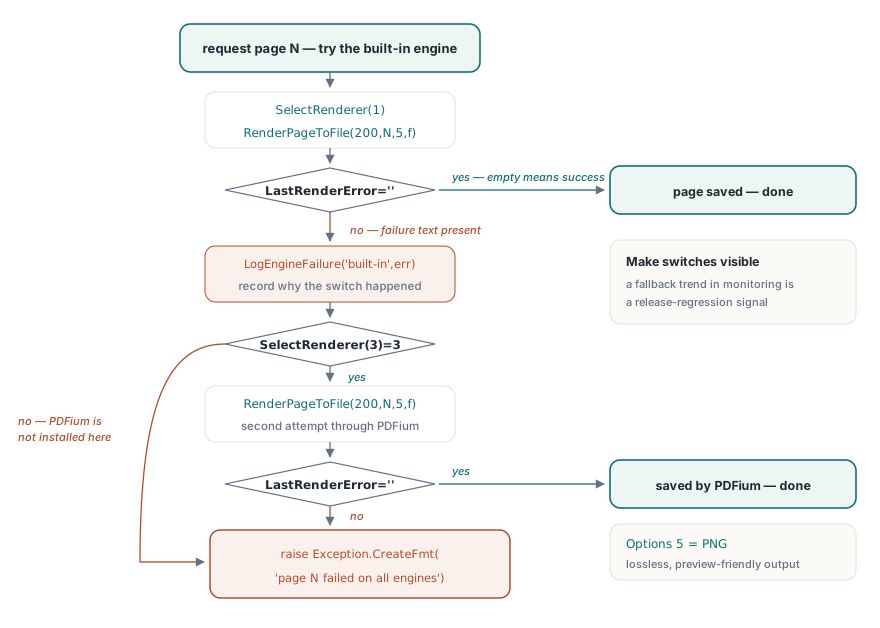
Когда зондирование и дисциплина состояния уже на месте, сама цепочка отката оказывается короткой. Обнаружение сбоя опирается на LastRenderError, который хранит собственный текст сообщения движка для самого недавнего рендеринга и пуст, если рендеринг прошёл успешно:
procedure RenderPageWithFallback(PDF: TPDFlib; Page: Integer; const OutFile: string);
begin
  PDF.SelectRenderer(1);                            // сначала встроенный
  PDF.RenderPageToFile(200, Page, 5, OutFile);      // 5 = PNG
  if PDF.LastRenderError = '' then Exit;
  LogEngineFailure('built-in', Page, PDF.LastRenderError);
  if PDF.SelectRenderer(3) = 3 then                 // PDFium как тяжёлый запасной вариант
  begin
    PDF.RenderPageToFile(200, Page, 5, OutFile);
    if PDF.LastRenderError = '' then Exit;
    LogEngineFailure('pdfium', Page, PDF.LastRenderError);
  end;
  raise Exception.CreateFmt('Page %d failed on all available engines', [Page]);
end;
Здесь имеют вес два проектных решения. Цепочка записывает, почему произошло каждое переключение, потому что строка лога вида «эта страница откатилась на PDFium начиная с релиза 3.7» — это сигнал регрессии, который вы хотите видеть в трендах мониторинга, а не потерянным. Сам порядок отката — это политика, которую стоит выбирать под конкретную нагрузку. Встроенный движок разворачивается без дополнительных DLL, что делает его правильной первой попыткой в большинстве инсталляций, тогда как документы, перегруженные группами прозрачности или необычным затенением, — обычная причина, по которой команда вообще подключает альтернативный движок. Ни один движок не является самым быстрым в общем случае, и в этом весь смысл выбора для каждого вызова: прогоните бенчмарк каждого на выборке ваших реальных документов при вашем реальном DPI и пересматривайте это измерение всякий раз, когда меняются DLL движков или состав документов. Корпус файлов выигрывает этот спор каждый раз
За пределами отдельных страниц: пакеты TIFF и живые контексты устройства
Два соседа постраничных вызовов дополняют набор инструментов. RenderAsMultipageTIFFToFile отрисовывает выражение диапазона страниц прямо в многостраничный TIFF — естественную форму для архивной передачи в системы управления документами, появившиеся ещё до PDF. RenderPageToDC рисует прямо в контекст устройства Windows для элементов управления предпросмотром, подчиняясь собственной тройке липких настроек (SetRenderDCOffset, SetRenderDCErasePage, плюс тип обрезки), которым нужна та же дисциплина сброса, что и коэффициенту масштаба. У экранного предпросмотра и рендеринга по пути печати достаточно собственных ловушек, чтобы заслужить отдельную статью, ссылка на которую ниже
Что читать дальше
Одна привычка, которую стоит взять с собой дальше: поскольку SelectRenderer вступает в силу для каждого последующего вызова на экземпляре, одну упрямую страницу можно повторно отрендерить на другом движке, пока остальной документ остаётся на движке по умолчанию. Про отрисовку предпросмотра, выбор принтера и работу с DevMode — читайте дальше в статье о предварительном просмотре печати и контексте устройства. Когда рендеринг питает высокообъёмный конвейер на очень больших файлах, подход на основе дескрипторов из руководства по прямому доступу естественно сочетается с постраничным рендерингом через DARenderPageToFile
Комплектация движков, поддерживаемые форматы и пробные сборки подробно описаны на странице продукта PDF Library for Delphi