Naciśnij Tab w formularzu PDF, który zbudował twój kod, a kursor ląduje dwa pola dalej, niż powinien, albo pomija całą drugą kolumnę, albo skacze z powrotem na górę po trzecim polu zamiast na czwarte. Osoba wypełniająca fakturę w twojej przeglądarce oczekuje, że klawiatura przejdzie formularz tak, jak przechodzi każdy formularz webowy, jaki widziała. Gdy tak się nie dzieje, sięga po mysz, poluje na następne pole i po cichu uznaje twoje narzędzie za niedokończone. Przewidywalne obchodzenie pól to różnica między przeglądarką do wprowadzania danych, którą ludzie tolerują, a taką, której ufają, i jest to niemal wyłącznie kwestia użycia właściwego API fokusu zamiast udawania wejścia z klawiatury symulowanymi kliknięciami
Poniższe przykłady używają PDFium Component, opartego na PDFium komponentu VCL/LCL dla Delphi, C++Builder i Lazarusa. Nawigacja to jedna z trzech rzeczy, które przeglądarka formularzy musi zrobić dobrze; pozostałe dwie, czyli poprawne otwarcie formularza i zapisanie wypełnionych wartości tak, by naprawdę było je widać, to miejsca, w których kryje się większość niespodzianek, więc omawiamy poniżej wszystkie trzy
Otwieranie formularza: FormFill, FormType i kwestia XFA
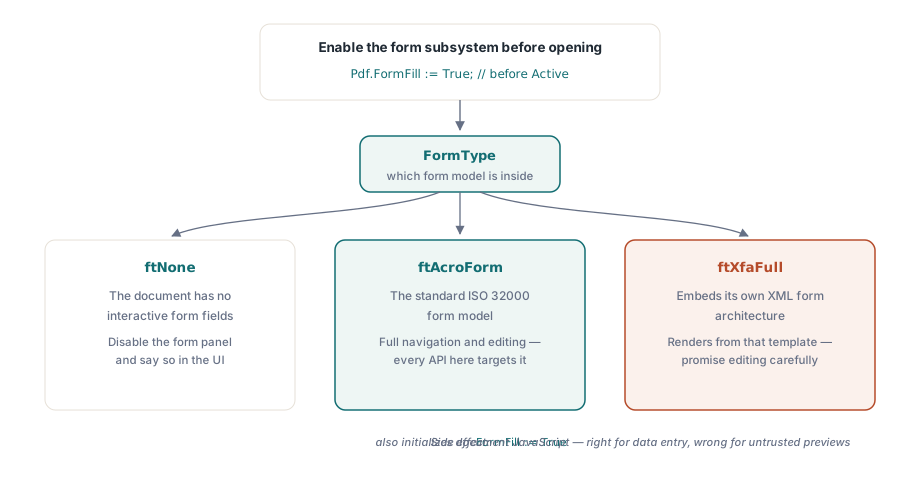
Dostęp do pól wymaga włączenia podsystemu wypełniania formularzy, sterowanego właściwością FormFill, zanim dokument zostanie otwarty. Gdy już działa, FormType mówi ci, z jakim rodzajem formularza masz do czynienia, a odpowiedź zmienia zestaw funkcji, jakie możesz obiecać:
Pdf.FileName := FormPath;
Pdf.FormFill := True;   // włącz przed Active; wymagane do dostępu do pól
Pdf.Active := True;

case Pdf.FormType of
  ftNone:
    DisableFormPanel('This document has no interactive form');
  ftAcroForm:
    BuildFieldList;     // pełna nawigacja i edycja pól dostępna
  ftXfaFull:
    ShowXfaNotice;      // XFA renderuje z własnego szablonu XML;
                        // traktuj edycję pól jako ograniczoną
end;
Z tego przełącznika wynikają dwie praktyczne uwagi. AcroForm to standardowy model formularzy wg ISO 32000 i to w niego celuje każde tutejsze API. Dokumenty XFA osadzają własną architekturę formularzy w XML, więc obiecanie klientowi pełnej edycji XFA po szybkiej demonstracji AcroForm to zobowiązanie, którego pożałujesz. Druga uwaga dotyczy efektów ubocznych: ustawienie FormFill na prawdę inicjalizuje też JavaScript dokumentu. W przeglądarce do wprowadzania danych jest to dokładnie właściwe, bo to skrypty obliczeniowe utrzymują aktualną sumę bieżącą, gdy ktoś pisze. W oknie podglądu plików nieznanego pochodzenia jest to dokładnie niewłaściwe. Artykuł o bezpiecznym podglądzie PDF omawia stronę FormFill := False tego kompromisu
Przechodzenie klawiszem Tab, które ląduje tam, gdzie użytkownik oczekuje
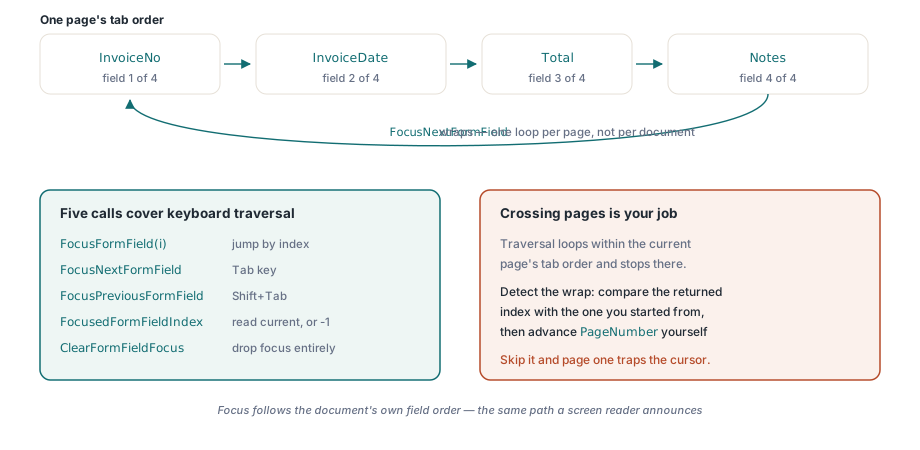
Wracamy do problemu z klawiaturą z początku tekstu. Pokusą jest udawanie Taba przez syntezowanie kliknięcia myszą w prostokąt następnego widgetu, co pęka w chwili, gdy pole jest przewinięte poza ekran albo dwa widgety się nakładają. API fokusu przesuwa zamiast tego bezpośrednio własny fokus formularza, bez zgadywania geometrii. Pokrywa to pięć wywołań: FocusFormField po indeksie, FocusNextFormField i FocusPreviousFormField do krokowania, FocusedFormFieldIndex do odczytania, gdzie jesteś, oraz ClearFormFieldFocus do całkowitego zdjęcia fokusu
procedure TFormViewer.HandleTabKey(Shift: TShiftState);
begin
  if ssShift in Shift then
    PdfView.FocusPreviousFormField
  else
    PdfView.FocusNextFormField;
  UpdateFieldStatus;  // np. "Field 4 of 17: InvoiceDate"
end;
Jedynym zachowaniem, na którym ludzie się potykają, jest zawijanie. Przechodzenie działa w kolejności tabulacji bieżącej strony i zapętla się w jej obrębie: przekrocz ostatnie pole, a wracasz na pierwsze. Obie funkcje krokujące zwracają nowy indeks pola albo -1, gdy strona nie ma żadnych pól. To zapętlenie jest w obrębie strony, a nie dokumentu, co oznacza, że przejście na następną stronę należy do ciebie, a nie do biblioteki. Porównuj zwrócony indeks z tym, od którego zacząłeś, zauważ moment zawinięcia i sam zwiększ PageNumber, jeśli formularz ma się czytać jako jedna ciągła sekwencja. Pomiń tę kontrolę, a dwustronicowy formularz po cichu uwięzi kursor na stronie pierwszej, co jest własną odmianą skargi na zepsutego Taba
Przechodzenie staje się użyteczne, gdy reszta interfejsu na nie reaguje. Zdarzenie OnFormFieldEnter odpala się, gdy fokus przybywa, a w przeglądarce OnFormFieldFocusChange raportuje nowy indeks pola, więc panel boczny może iść w parze z tym, co właśnie wybrała klawiatura. Gdy potrzebujesz odwzorowania odwrotnego, z pozycji ekranowej na pole, indeksowana właściwość FormFieldAt wykonuje trafianie na potrzeby podglądów w dymkach i paneli edycji po kliknięciu. W tym wszystkim jest cicha korzyść dla dostępności: ponieważ fokus podąża za własną kolejnością pól dokumentu, ścieżka, którą podpinasz pod Tab, jest tą samą ścieżką, którą ogłasza czytnik ekranu, bez dodatkowej pracy
Pokazanie nazw pól zamiast surowych numerów indeksów wymaga jeszcze jednej właściwości. FormFieldInfo[] zwraca rekord TPdfFormFieldInfo na indeks, niosący nazwę pola, typ, rozmiar czcionki, stan zaznaczenia, wartość eksportu i przynależność do grupy, czyli to, co lista nawigacyjna powinna wyświetlać („Field 4 of 17: InvoiceDate” zamiast „4”). Grupy przycisków opcji to przypadek wart dedykowanego pliku testowego. Kilka widgetów może dzielić jedną nazwę pola, więc lista złożona naiwnie z widgetów pokazuje tę samą grupę kilka razy i myli każdego, kto ją czyta
Dlaczego wypełnione wartości wychodzą puste i wywołanie, które to naprawia
Druga skarga zapełniająca kolejki wsparcia jest bardziej niepokojąca niż źle zachowujący się Tab: formularz zostaje wypełniony programowo, klient otwiera go w Acrobacie, a każde pole wygląda na puste. Kliknij w pole, a jego wartość wskakuje na widok. Dane są w pliku przez cały czas. Brakuje obrazu tych danych, a powód warto zrozumieć raz, bo wyjaśnia całą rodzinę błędów
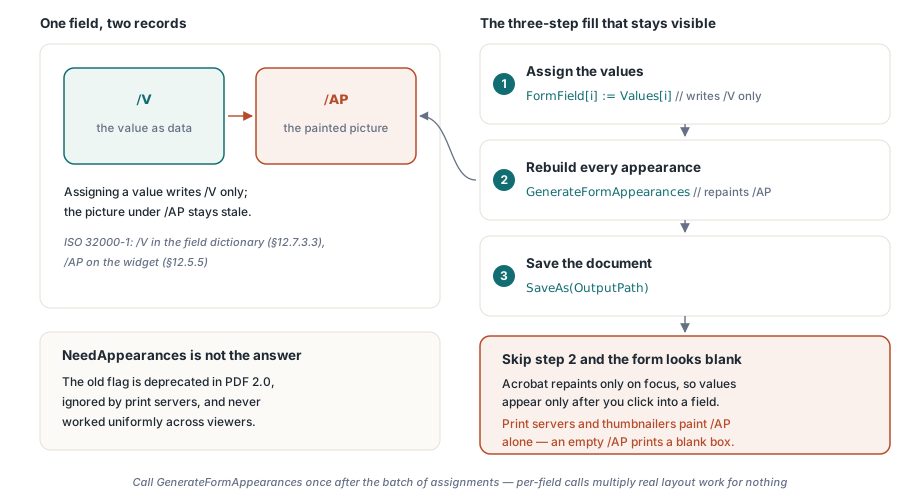
Pole tekstowe AcroForm przechowuje swoją wartość we wpisie /V słownika pola (ISO 32000-1 §12.7.3.3). To, co przeglądarka faktycznie maluje, jest czymś odrębnym: strumieniem wyglądu widgetu pod /AP (§12.5.5), małym, wcześniej wyrenderowanym wycinkiem treści. Zapisz /V, zostawiając /AP w spokoju, a te dwa rozjadą się. Wartość tam jest; jej wyrenderowana wersja jest nieaktualna albo jej nie ma. Acrobat akurat odbudowuje wygląd pola, gdy otrzymuje ono fokus, i to całe wyjaśnienie wartości pojawiających się dopiero po kliknięciu. Stara flaga NeedAppearances, która prosiła przeglądarki o regenerację wyglądów za ciebie, nigdy nie działała jednolicie i jest wycofana w PDF 2.0, a serwery druku i generatory miniatur ignorują ją całkowicie. Malują /AP i nic więcej, więc jeśli /AP jest puste, drukują pustą ramkę
Przypisanie wartości przez FormField[i] zapisuje wyłącznie /V. Dlatego wypełnienie formularza jest sekwencją trzykrokową, a krokiem, który zespoły gubią, jest ten środkowy:
procedure TFormViewer.FillAndSave(const Values: array of WString;
  const OutputPath: string);
var
  i: Integer;
begin
  for i := 0 to Pdf.FormFieldCount - 1 do
    Pdf.FormField[i] := Values[i];   // zapisuje wyłącznie /V

  // Odbuduj strumienie wyglądu /AP; bez tego formularz wygląda
  // w Acrobacie na pusty, dopóki nie klikniesz każdego pola
  Pdf.GenerateFormAppearances;

  Pdf.SaveAs(OutputPath);
end;
GenerateFormAppearances jest całą naprawą. Odbudowuje strumień wyglądu każdego widgetu z bieżących wartości, czcionek i wyrównania, więc przeglądarka, która nigdy nie uruchamia zdarzenia fokusu, serwer druku albo generator miniatur, i tak maluje stan wypełniony. Wywołaj je raz po całej partii przypisań, a nie raz na pole. Generowanie wyglądu wykonuje realną pracę układową, a wywołania na pole mnożą ją przez cały duży formularz bez żadnego pożytku
Regeneracja wyglądów jest też momentem, w którym upominają się o swoje czcionki i wyrównanie, i stąd bierze się niespodzianka drugiego rzędu. Nowy strumień układa każdą wartość wewnątrz prostokąta widgetu, używając czcionki pola, jej rozmiaru i wyrównania. Wartość, która wygodnie mieści się w twoim formularzu testowym, może zostać przycięta albo zmniejszona w kopii klienta, gdzie to samo pole jest węższe. Pola z automatycznym rozmiarem (rozmiar czcionki zero) zmniejszają tekst, żeby się zmieścił; pola o stałym rozmiarze po prostu go przycinają. Oba są legalne, a jedynym uczciwym sposobem, by wiedzieć, które robi dany formularz, jest spojrzeć na zregenerowane wyjście, a nie na ciąg, który zapisałeś. Gdy ktoś zgłasza tekst ucięty przy krawędzi ramki, to prawie zawsze jest przyczyna
Traktuj weryfikację jako część kończenia pracy, a nie jako refleksję po fakcie. Otwórz zapisany plik w Acrobacie i potwierdź, że wartości są widoczne, zanim dotkniesz jakiegokolwiek pola. Potem wydrukuj go do PDF albo do obrazu z innej przeglądarki, takiej, która całkowicie ignoruje logikę formularzy, i potwierdź, że wartości przeżywają też tę ścieżkę. Razem te dwie kontrole łapią każdy wariant rozjazdu między /V a /AP
Konfiguracje pól, które przechodzą demo, a padają w terenie
Czyste formularze demonstracyjne ukrywają zestaw przypadków brzegowych, których pliki klientów nie ukrywają. Cztery z nich odpowiadają za większość zgłoszeń w stylu „u mnie działało”
- Wartości eksportu pól wyboru. Stan włączenia nie zawsze brzmi
Yes. Formularz może zdefiniować własną wartość eksportu, a zapisanie niewłaściwego ciągu zostawia pole wizualnie niezaznaczone, podczas gdy twój kod jest przekonany, że je ustawił. Odczytaj wartość eksportu zFormFieldInfo[], zamiast ją zakładać - Grupy przycisków opcji o wspólnej nazwie. Jedno pole, kilka widgetów. Przypisana wartość decyduje, który widget czyta się jako wybrany, więc kod interfejsu zakładający, że jedna nazwa odwzorowuje się na jeden prostokąt, rysuje obwódkę fokusu na niewłaściwym przycisku
- Pola obliczane. Sumy utrzymywane przez JavaScript dokumentu aktualizują się w odpowiedzi na zdarzenia pól. Wypełnienie programowe, które omija te zdarzenia, musi albo wyzwolić przeliczenie, albo nadpisać pola obliczane bezpośrednio. Formularz, w którym pozycje i suma się nie zgadzają, jest gorszy niż którakolwiek z tych napraw
- Ukryte pola wymagane. Formularze warunkowe ukrywają pola, które wciąż są oznaczone jako wymagane. Zdecyduj z góry, czy twoja walidacja szanuje widoczność, czy surową flagę wymagalności, a potem zapisz tę decyzję tam, gdzie wsparcie ją znajdzie
Jedno rozróżnienie warto rozstrzygnąć, zanim ugryzie: generowanie wyglądów to nie spłaszczanie. GenerateFormAppearances czyni wartości widocznymi wszędzie, zostawiając pola edytowalne. Spłaszczanie zapieka wygląd w statyczną treść strony i odbiera interaktywność na zawsze, co jest właściwe dla kopii archiwalnej i niewłaściwe dla formularza, który następna osoba musi jeszcze wypełnić. Jeśli FormType raportuje ftXfaFull, a nie ftAcroForm, żadna z tutejszych powierzchni edycyjnych i tak nie stosuje się czysto, bo dokument renderuje z własnego szablonu XML; wykryj ten przypadek i powiedz o nim użytkownikowi, zamiast pozwalać mu odkryć to ograniczenie samodzielnie
Pokazany tutaj podsystem wypełniania formularzy, przechodzenie fokusem i generowanie wyglądów są częścią PDFium Component dla Delphi, C++Builder i Lazarus/FPC. Jeśli twoja przeglądarka obsługuje obok danych formularza także oznaczenia recenzentów, artykuł o przeglądzie adnotacji omawia ten sąsiedni model