Podgląd niezaufanego PDF wewnątrz własnej aplikacji to decyzja o wykonaniu kodu, a tym, co się liczy, nie jest oprawa przeglądarki, lecz to, czego panel z własnej woli odmawia. Nie zapisuj pliku na dysk. Nie pozwól jego linkom wychodzić do powłoki. Nie podawaj jego załącznikom ścieżki. Większość szkód wyrządzanych przez wrogi dokument bierze się nie z podatności silnika, lecz z tego, że przeglądarka robi całkowicie zwyczajne rzeczy z wejściem dostarczonym przez atakującego: otwiera link file:// do udziału UNC, który wycieka poświadczenia NTLM, zostawia kopię roboczą w katalogu tymczasowym, kopiuje osadzone ładunki tam, dokąd każe jej ciąg z nazwą pliku. PDFium Component to przeglądarka PDF z kodem źródłowym dla Delphi, C++Builder i Lazarusa, która umieszcza istotne przełączniki tam, gdzie możesz po nie sięgnąć: flaga w czasie wczytania ubijająca skrypty, zdarzenia kliknięcia linku, które możesz zawetować, dostęp do załączników biegnący przez twój własny kod i bity uprawnień, które możesz odczytać. Poniższa kolejność podąża za dokumentem od chwili, gdy przybywa, do chwili, gdy użytkownik coś w nim klika
Model zagrożeń panelu podglądu
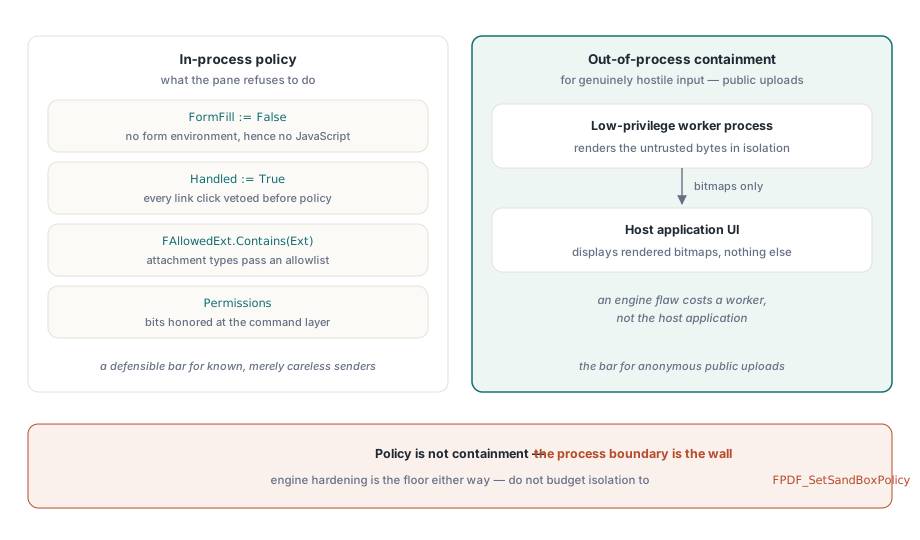
Bądź uczciwy co do tego, co daje ci „bezpieczny podgląd”. Renderer parsuje niezaufane bajty niezależnie od tego, co zrobisz, a własne utwardzenie silnika to podłoga, na której stoisz. Wszystko powyżej tej podłogi to polityka aplikacji: czy skrypty się inicjalizują, co robi kliknięcie linku, czy pliki osadzone mogą sięgnąć dysku, czy schowek i drukarka są drzwiami, czy ścianą. Jedną rzecz warto od razu spisać na straty: silnikowy przełącznik FPDF_SetSandBoxPolicy. Większość ograniczeń silnika jest wkompilowana, przełącznik zmienia w praktyce niewiele, a przypisanie mu jakiejkolwiek roli w twojej historii izolacji produkuje tylko fałszywe poczucie zrobienia czegoś. Gdy wejście jest naprawdę wrogie, powiedzmy przy publicznym portalu wysyłania plików, jedyną prawdziwą izolacją jest renderowanie w osobnym procesie o niskich uprawnieniach i wysyłanie bitmap do interfejsu. Flagi w procesie to polityka. Nie są ograniczeniem
O dwóch powierzchniach łatwo zapomnieć właśnie dlatego, że żadne kliknięcie ich nie dotyka. Pierwszą są pliki tymczasowe. Jeśli twój potok odkłada przychodzące dokumenty na dysk przed podglądem, te odłożone kopie przeżywają sesję, chyba że coś je sprawdzalnie usunie, a plik „do odzyskania z katalogu tymczasowego” po cichu pokonał każdą kontrolę, którą egzekwuje sam panel. Wczytuj zamiast tego z pamięci przez TPdfStreamAdapter, żeby wrogie bajty nigdy nie dostały własnej ścieżki. Drugą jest schowek. Podgląd, który pozwala zaznaczyć i skopiować, już wyeksportował dokument, po jednym ekranie naraz, i żadne przechwytywanie linków tego nie złapie
Ubij JavaScript w czasie wczytania, a nie w interfejsie
JavaScript dokumentu w PDFium Component inicjalizuje się wyłącznie razem ze środowiskiem wypełniania formularzy. Wczytanie z FormFill := False wyłącza więc skrypty u korzenia, zamiast tłumić ich objawy:
procedure TPreviewPane.LoadUntrusted(const FilePath: string);
begin
  Pdf.FileName := FilePath;
  Pdf.FormFill := False;     // brak środowiska formularzy, więc brak silnika JavaScript
  Pdf.Active := True;

  FPermissions := Pdf.Permissions;   // surowe słowo flag; wszystkie bity = bez ograniczeń
end;
Kompromis jest realny i należy do twojej specyfikacji. Przy wyłączonym wypełnianiu formularzy znika też legalna interakcja z AcroForm i skrypty walidujące; pola renderują się z ostatnim zapisanym wyglądem, ale nie da się ich edytować. Dla panelu podglądu jest to zwykle właściwy wybór, bo podgląd oznacza patrzenie, a nie wypełnianie. Ale jeśli to samo okno służy zarazem jako powierzchnia do wypełniania zaufanych dokumentów wewnętrznych, odpowiedzią są dwie ścieżki wczytania z jawną decyzją o zaufaniu pomiędzy nimi, a nie jedna ścieżka z ustawieniem kompromisowym, zbyt luźnym dla przypadku wrogiego i zbyt ciasnym dla zaufanego. Strona formularzowa tego podziału ma własne pułapki, omówione w artykule o nawigacji po polach formularza i regeneracji wyglądów
Linki: domyślna obsługa wychodzi do powłoki
Zostawione samym sobie kliknięcia linków idą prosto do systemu operacyjnego. Domyślne LinkOptions przeglądarki zawierają loAutoOpenURI, czyli czekający na swoją chwilę wyciek z file:// do udziału UNC. Punkt przewężenia tworzą dwa zdarzenia: OnWebLinkClick dla adresów URL wykrytych w tekście strony i OnAnnotationLinkClick dla adnotacji linków niosących akcje URI albo launch. Ustaw Handled := True w obu, bezwarunkowo, zanim cokolwiek zdecydujesz, a potem ponownie dopuść wyłącznie to, na co pozwala polityka. Jako drugą warstwę usuń loAutoOpenURI z LinkOptions dla wrogiego wejścia i upewnij się, że loAutoLaunch, domyślnie wyłączone, nigdy nie wraca tylnymi drzwiami przez skopiowaną konfigurację:

procedure TPreviewPane.PdfViewWebLinkClick(Sender: TObject;
  const Url: WString; var Handled: Boolean);
begin
  Handled := True;   // nigdy nie przepuszczaj do domyślnego zachowania powłoki

  if (AnsiStartsText('https://', Url) or AnsiStartsText('http://', Url))
    and HostIsAllowed(Url) then
    OpenInBrowser(Url)
  else
    FAudit.LogBlockedLink(FDocumentId, Url);
end;
O tym, czy to naprawdę się utrzyma, decydują dwa szczegóły. Po pierwsze, kontrola schematu musi być kontrolą przedrostka na surowym ciągu, przed jakimkolwiek parsowaniem, bo file://, ścieżki UNC i egzotyczne schematy to dokładnie te wartości, które wywalają naiwny parser adresów URL albo prześlizgują się przez taki, który normalizuje zbyt gorliwie. Po drugie, loguj każdą blokadę z dołączoną tożsamością dokumentu. Garść zablokowanych linków file:// to szum tła; ich seria w wielu przychodzących dokumentach w krótkim oknie czasu to incydent, o którym twój zespół bezpieczeństwa wolałby usłyszeć od ciebie niż skądinąd
Załączniki: polityka rozszerzeń i nazwa pliku, której nie wybrałeś
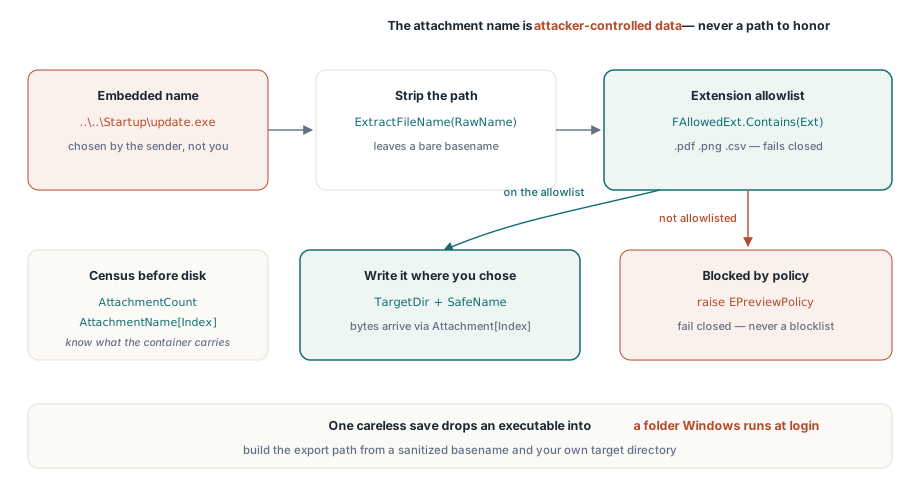
PDF jest kontenerem, a AttachmentCount wraz z właściwością AttachmentName[] mówi ci, co niesie, zanim cokolwiek dotknie dysku. Liczą się tu dwie osobne kontrole i tylko jedna z nich jest oczywista. Oczywista to polityka typów: lista dozwolonych rozszerzeń, które w ogóle wolno wyeksportować. Subtelna jest taka, że nazwa załącznika to dane kontrolowane przez atakującego, kropka. Osadzona nazwa w rodzaju ..\..\Startup\update.exe zamienia niedbały zapis w przejście po ścieżce, które upuszcza plik wykonywalny do folderu uruchamianego przez Windows przy logowaniu. Komponent podaje ci ładunek jako bajty przez Attachment[] i pozwala twojemu kodowi wybrać ścieżkę, więc buduj tę ścieżkę z odkażonej nazwy bazowej, a nigdy z surowego ciągu osadzonego:
procedure TPreviewPane.ExportAttachment(Index: Integer; const TargetDir: string);
var
  RawName, SafeName, Ext: string;
  Data: TBytes;
begin
  RawName := string(Pdf.AttachmentName[Index]);
  SafeName := ExtractFileName(RawName);    // usuwa wszelkie składniki ścieżki
  Ext := LowerCase(ExtractFileExt(SafeName));

  if not FAllowedExt.Contains(Ext) then    // lista dozwolonych, nie zabronionych
    raise EPreviewPolicy.CreateFmt('Attachment type %s blocked by policy', [Ext]);

  Data := Pdf.Attachment[Index];           // osadzony ładunek jako surowe bajty
  TFile.WriteAllBytes(
    IncludeTrailingPathDelimiter(TargetDir) + SafeName, Data);
end;
Wybieraj kierunek listy dozwolonych. Lista zabronionych „niebezpiecznych” rozszerzeń to wyścig, który przegrywasz w dniu, gdy ktoś uzbroi rozszerzenie, o jakim nigdy nie słyszałeś; lista dozwolonych z .pdf, .png i .csv zawodzi w stronę odmowy
Co naprawdę obiecują uprawnienia szyfrowania
Standardowy handler bezpieczeństwa z ISO 32000-1 koduje flagi uprawnień do drukowania, kopiowania treści i modyfikacji, a właściwości Permissions i UserPermissions wystawiają je jako surowe maski bitowe, gdy dokument się otworzy. Tabela 22 w ISO 32000-1 definiuje te bity, a plik niezaszyfrowany raportuje wszystkie bity ustawione. Odczytuj je i honoruj w swojej warstwie poleceń, ale miej jasność, czym są. Dla dokumentu zaszyfrowanego hasłem właściciela i pustym hasłem użytkownika treść odszyfrowuje się w pełni przy otwarciu, a flagi są prośbą do zgodnych przeglądarek, nie mechanizmem egzekwowania. Ma to dwie konsekwencje ciągnące w przeciwnych kierunkach. Nigdy nie przedstawiaj użytkownikom flag uprawnień jako właściwości bezpieczeństwa dokumentów, które otrzymują, bo nią nie są. Zarazem honoruj bit wydobywania na potrzeby dostępności (bit 10) nawet tam, gdzie ogólne kopiowanie (bit 5) jest odmówione; dostęp dla czytników ekranu jest w modelu uprawnień celowo wydzielony osobno, a odbieranie go, bo „kopiowanie jest wyłączone”, psuje technologie wspomagające bez żadnego zysku dla bezpieczeństwa
Egzekwuj odmówione akcje na poziomie poleceń, a nie przez ukrywanie przycisków paska narzędzi. Ctrl+C, menu kontekstowe i zaznaczanie przeciągnięciem omijają pasek narzędzi; pojedyncza kontrola uprawnień wewnątrz polecenia kopiowania nie omija niczego
Dla dokumentów, które faktycznie wymagają hasła użytkownika, przypisz Password przed Active := True i traktuj tę wartość jak sekret, którym jest: pobieraj ją z magazynu poświadczeń na każdą sesję, trzymaj poza logami i raportami awarii i nigdy nie utrwalaj obok dokumentu. Panel podglądu, który buforuje hasła „dla wygody”, po cichu stał się bazą haseł bez żadnej z ochron, jakie ta powinna mieć
Drukowanie zasługuje na własną decyzję, a nie na odziedziczenie tego, co wypadło z reguły kopiowania. Wydruk fizyczny jest z definicji nieaudytowalny, ale blokowanie druku na sztywno zwykle pcha użytkowników w stronę zrzutów ekranu, które są gorsze pod każdym względem. Częstym środkiem pośrednim jest dopuszczenie druku ze stemplowaniem każdej strony tożsamością użytkownika i znacznikiem czasu, egzekwowanym wewnątrz polecenia drukowania. Miej tylko wobec tego właściwe oczekiwania: znak wodny to odstraszanie i przypisanie autorstwa. Nie jest zapobieganiem
Co przyjmowanie powinno ci już powiedzieć
Panel podglądu podejmuje lepsze decyzje, gdy plik przychodzi z dołączoną teczką: zaszyfrowany czy nie, JavaScript obecny czy nie, spis załączników, typ formularza. Ten przebieg inspekcyjny należy przed przeglądarkę, a wzorzec z artykułu o budowaniu warsztatu przyjmowania i przeglądu PDF produkuje dokładnie te flagi, które chce konsumować polityka podglądu. Pliki oznaczone przy przyjmowaniu jako ryzykowne otwierają się automatycznie ścieżką utwardzoną; rutynowe dokumenty zachowują swoje wygody. Zwiąż oba etapy z jednym wspólnym obiektem polityki, a nie z dwoma ekranami konfiguracji, które rozjadą się do drugiego wydania, choćbyś nie wiem jak starannie pisał je za pierwszym razem
To, gdzie pada linia między w procesie a poza procesem, zależy od tego, kto przysyła ci pliki. W zwykłym przyjmowaniu biznesowym ludzie przysyłający dokumenty są znani i najwyżej niedbali, a podgląd w procesie z wyłączonymi skryptami i przechwyconymi linkami to poprzeczka, której da się bronić. Dla anonimowych wysyłek publicznych już nie, i żadna ilość ustawiania flag w procesie tego nie zmieni; renderuj te pliki w osobnym robotniku o niskich uprawnieniach i wysyłaj bitmapy do interfejsu, żeby wada silnika kosztowała cię robotnika, a nie aplikację hosta. Wybierz ten podział świadomie i zapisz, do którego koszyka wpada każda ścieżka przyjmowania, bo koszt złego zgadnięcia jest asymetryczny
Licencjonowanie, powierzchnia API związana z bezpieczeństwem i demonstracja utwardzonej przeglądarki są na stronie produktu: PDFium Component