Generowanie raportu sprowadza się do umieszczenia na stronie trzech rzeczy i sprawienia, by zgodziły się co do tego, gdzie leżą: tekstu w znanych współrzędnych, czcionek renderowanych tak samo na serwerze jak na pulpicie, i obrazów dopasowanych rozmiarem. Wszystko inne, co robi biblioteka raportująca, jest zorganizowane wokół tych trzech elementów. HotPDF, biblioteka losLab do generowania PDF dla Delphi i C++Builder, daje ci każdy z nich jako bezpośrednie wywołanie na obiekcie strony, a jedynym prawdziwym tarciem jest leżący pod spodem układ współrzędnych, który działa w przeciwnym kierunku niż znane z płótna VCL. Ustal sobie tę orientację najpierw, a reszta pracy nad układem przestanie z tobą walczyć
Umieszczanie tekstu i początek układu w lewym dolnym rogu
Prawie każdy pierwszy raport wychodzi do góry nogami. Tytuł ląduje blisko dolnej krawędzi, a każda kolejna linia pod nim wspina się w stronę góry. Nic się nie psuje. Przestrzeń użytkownika PDF, zdefiniowana w ISO 32000-1 §8.3, umieszcza początek układu w lewym dolnym rogu, z Y rosnącym w górę, co jest lustrzanym odbiciem płótna GDI, gdzie Y rośnie w dół od lewego górnego rogu. Pięć minut poświęcone na pogodzenie się z tym oszczędza przebudowywania układu, do którego i tak wróciłbyś, gdy liczby przestają się zgadzać
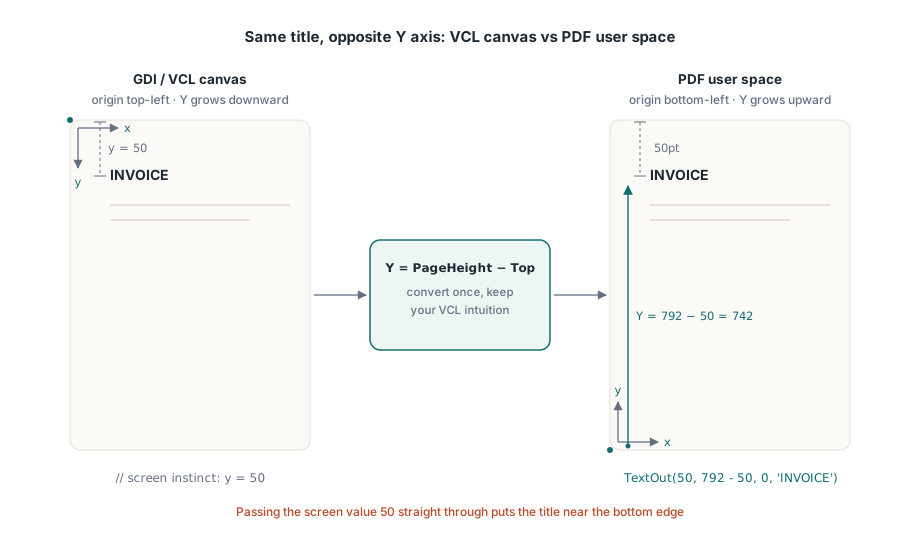
Centralnym wywołaniem obiektu strony jest TextOut(X, Y, Angle, Text). X i Y lokalizują tekst w punktach od lewego dolnego rogu, a Angle obraca go w stopniach, co jest sposobem, w jaki rysuje się ukośną pieczątkę DRAFT albo COPY bez żadnego specjalnego wsparcia. Sztuczka pozwalająca zachować intuicję wyniesioną z VCL polega na wyrażeniu Y jako wysokości strony pomniejszonej o odległość, jaką chcesz mieć od góry:
var
  Pdf: THotPDF;
begin
  Pdf := THotPDF.Create(nil);
  try
    Pdf.FileName := 'invoice-0001.pdf';
    Pdf.BeginDoc;
    Pdf.CurrentPage.SetFont('Arial', [fsBold], 16);
    Pdf.CurrentPage.TextOut(50, 792 - 50, 0, 'INVOICE');       // 50pt od góry strony Letter
    Pdf.CurrentPage.SetFont('Arial', [], 10);
    Pdf.CurrentPage.TextOut(50, 792 - 70, 0, 'Date: 2026-06-11');
    Pdf.CurrentPage.TextOut(300, 400, 45, 'COPY');              // obrócona pieczątka
    Pdf.AddPage;                                                // CurrentPage wskazuje teraz tutaj
    Pdf.CurrentPage.SetFont('Arial', [], 10);                   // stan czcionki się nie przenosi
    Pdf.CurrentPage.TextOut(50, 742, 0, 'Page 2 detail rows');
    Pdf.EndDoc;
  finally
    Pdf.Free;
  end;
end;
Dwa stanowe zachowania w tym listingu odpowiadają za większość błędów ujawniających się dopiero na drugiej stronie. AddPage przekierowuje CurrentPage na stronę, którą właśnie utworzył, więc referencja do strony zapisana wcześniej już nie rysuje tam, gdzie się spodziewasz. Wybór czcionki też jest ustawiany per strona, a nie per dokument. Jeśli pominiesz SetFont po AddPage, pierwszy TextOut na świeżej stronie wraca do jakiegokolwiek domyślnego ustawienia, z jakim strona wystartowała, a nie do pogrubionej czcionki nagłówka ustawionej trzy strony wcześniej. Bezpiecznym nawykiem jest traktowanie "rozpoczęcia nowej strony" i "ponownego ustanowienia stanu tekstu" jako jednego, nierozdzielnego kroku w pętli raportu
Czcionki, które istnieją na serwerze, a nie tylko na twoim pulpicie
Większość problemów z czcionkami to tak naprawdę problemy z wdrożeniem w przebraniu. Twoja maszyna deweloperska ma zainstalowaną firmową czcionkę, więc raport wygląda dobrze na ekranie i trafia do produkcji. Host produkcyjny uruchamia zadanie na koncie usługi, na którym ta czcionka nigdy nie była zainstalowana, renderer po cichu podstawia coś, co znajdzie, a pierwszą wiadomością o tym jest pytanie klienta, dlaczego zmienił się papier firmowy. Wyjściem jest przestać ufać katalogowi czcionek systemu operacyjnego i wczytywać czcionkę z pliku, który instalator kładzie na dysku. Wywołanie rejestracji Unicode w HotPDF przyjmuje ścieżkę i robi dokładnie to:
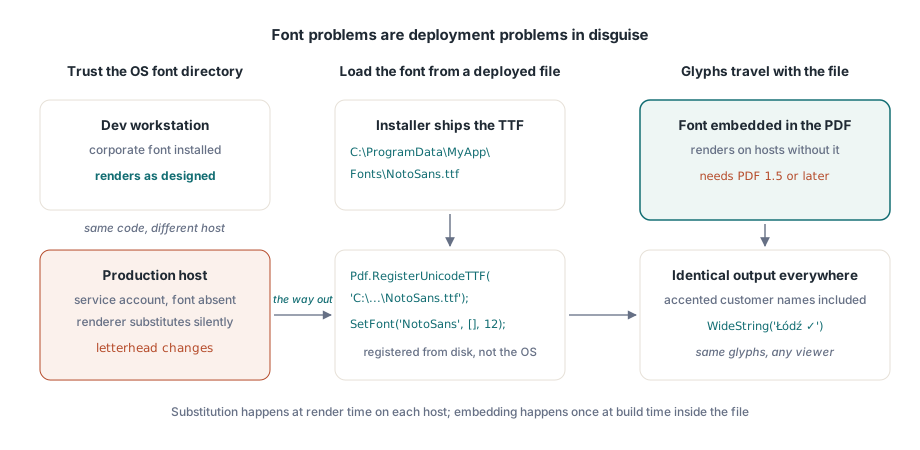
Pdf.RegisterUnicodeTTF('C:\ProgramData\MyApp\Fonts\NotoSans.ttf');
Pdf.CurrentPage.SetFont('NotoSans', [], 12);
Pdf.CurrentPage.TextOut(50, 700, 0, WideString('Łódź - Ünïcode test ✓'));
TextOut przyjmuje WideString bezpośrednio, co ma większe znaczenie, niż się wydaje na pierwszy rzut oka. Nazwisko klienta z akcentem, niemiecka ulica, polskie miasto: to nie są przypadki brzegowe, to normalna zawartość tabeli klientów, i przechodzą przez to samo wywołanie co zaszyte na stałe etykiety ASCII, o ile zarejestrowana czcionka rzeczywiście zawiera te glify. Wraz z osadzonymi czcionkami jeździ jedno ograniczenie wersji: dokument musi być w PDF 1.5 lub nowszym, więc jeśli jakiś niezwiązany wymóg przypina cię do starszej wersji, to właśnie to po cichu się zepsuje. Pisma od prawej do lewej, takie jak arabski i hebrajski, potrzebują prawdziwego kształtowania (shaping), a nie prostego wyszukiwania glifów, i mają własny potok przetwarzania; zobacz nasz artykuł o kształtowaniu tekstu w pismach złożonych z HotPDF
Gdy żadna zainstalowana czcionka nie potrafi wyrazić tego, czego potrzebujesz, pomyśl o znakach MICR na czeku albo o własnym zestawie symboli, lukę wypełniają czcionki Type 3. Każdy glif definiujesz jako mały strumień treści przez RegisterType3Font i AddType3Glyph. To wyspecjalizowany zakątek API, po który sięgniesz rzadko, ale jest o wiele czystszy niż rozrzucanie setek małych bitmap symboli po całej stronie
Obrazy: środkowe argumenty to szerokość i wysokość, nie róg
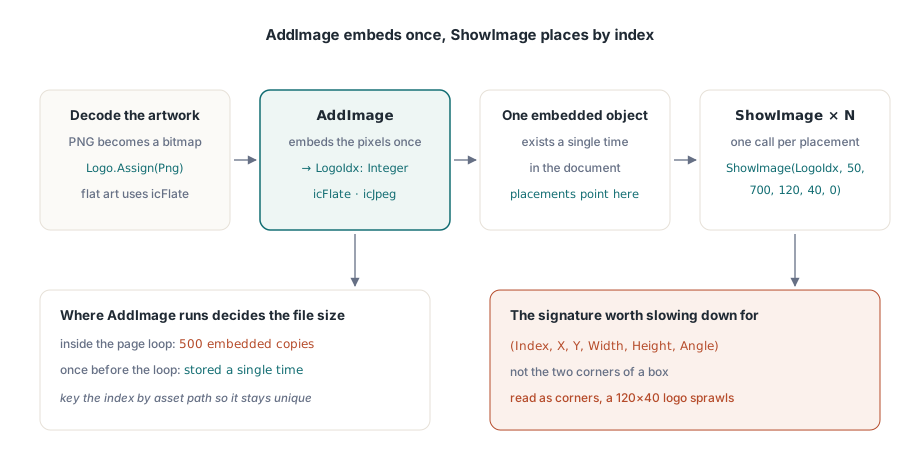
Obsługa obrazów dzieli się na dwa kroki, a utrzymanie ich rozdzielności jest całym sensem. AddImage przyjmuje TBitmap lub TJPEGImage, osadza go raz i zwraca indeks. Grafika PNG musi zostać zdekodowana do bitmapy, zanim tam trafi. ShowImage rysuje potem ten indeks tam, gdzie chcesz i tyle razy, ile chcesz. Kolejność argumentów w ShowImage to jedyne miejsce, nad którym warto zwolnić i uważnie przeczytać:
var
  Png: TPngImage;
  Logo: TBitmap;
  LogoIdx: Integer;
begin
  Png := TPngImage.Create;
  Logo := TBitmap.Create;
  try
    Png.LoadFromFile('brand-logo.png');
    Logo.Assign(Png);                       // dekoduj PNG do bitmapy
    LogoIdx := Pdf.AddImage(Logo, icFlate); // bezstratne dla grafiki płaskokolorowej
  finally
    Logo.Free;
    Png.Free;
  end;
  // (Index, X, Y, Width, Height, Angle): nie (X1, Y1, X2, Y2)
  Pdf.CurrentPage.ShowImage(LogoIdx, 50, 700, 120, 40, 0);
end;
Dwie liczby po pozycji to szerokość i wysokość. Nie są współrzędnymi przeciwległego rogu, a końcowy argument to kąt obrotu w stopniach. Odczytaj sygnaturę jako pole X1/Y1/X2/Y2, a logo 120 na 40 umieszczone w (50, 700) rozciągnie się zamiast tego stamtąd aż do (120, 40), rozlewając się na większość strony. Wynik czyni ten błąd oczywistym, podczas gdy kod źródłowy wygląda całkiem rozsądnie, co właśnie sprawia, że marnuje się na to całe popołudnie. KeepImageAspectRatio domyślnie ma wartość True, więc pole o złych proporcjach obramowuje obraz czarnymi pasami zamiast go zniekształcać; przełącz na False tylko wtedy, gdy naprawdę chcesz rozciągnąć
Rozdzielenie rejestrowania i umieszczania opłaca się przy długich seriach. Ponieważ AddImage osadza piksele raz, a każde ShowImage z tym indeksem wskazuje z powrotem na ten sam osadzony obiekt, to miejsce, w którym wywołasz AddImage, decyduje o rozmiarze pliku. Wywołaj go wewnątrz pętli stron dla 500-stronicowego wyciągu, a to samo logo zostanie osadzone 500 razy. Wywołaj go raz przed pętlą, zachowaj indeks, a logo zostanie zapisane jednokrotnie. Mały słownik kluczowany ścieżką zasobu wystarcza, by upewnić się, że każdy odrębny obraz jest zarejestrowany dokładnie raz
Wybór kodeka to druga dźwignia rozmiaru. Treść fotograficzna, skanowane załączniki i temu podobne, należy do JPEG: przekaż icJpeg do AddImage i obniż JpegQuality do około 85, ponieważ właściwość zaczyna się od 100, a różnica przy 85 jest niewidoczna na wydrukowanej stronie. Grafika płaskokolorowa, taka jak logotypy, wykresy i rysunki liniowe, należy do icFlate, gdzie bezstratna kompresja jest już zwarta, a JPEG rozmazywałby widoczne obwódki wokół ostrych krawędzi. Wyciąg, który wpycha jedno zdjęcie w pełnej jakości na każdą stronę, może rozdąć się do gigabajtów; ta sama treść w JPEG 85 lokuje się mniej więcej na jednej dziesiątej rozmiaru, a żaden czytelnik tego nie zauważy
Linie, pola i cieniowanie za pomocą prymitywów ścieżki
Pozioma linia pod nagłówkiem tabeli i szare pole za sumą wcale nie muszą być obrazami. Narysuj je jako wektory, a pozostaną ostre przy każdym powiększeniu, wydrukują się wyraźnie i dodadzą do pliku niemal nic. HotPDF podąża za tym samym modelem, którego używają surowe strumienie treści PDF: zbuduj ścieżkę, a potem wywołaj operator, który ją maluje
// Pozioma linia pod nagłówkiem tabeli
Pdf.CurrentPage.SetLineWidth(0.75);
Pdf.CurrentPage.MoveTo(50, 660);
Pdf.CurrentPage.LineTo(545, 660);
Pdf.CurrentPage.Stroke;

// Cieniowane pole sumy: X, Y, szerokość, wysokość
Pdf.CurrentPage.SetRGBFillColor(RGB(235, 235, 235));
Pdf.CurrentPage.Rectangle(395, 120, 150, 40);
Pdf.CurrentPage.Fill;
Kolejność nie jest opcjonalna: ustaw stan malowania, skonstruuj ścieżkę, a potem wywołaj Stroke lub Fill. Ścieżka, którą zbudujesz, ale nigdy nie pomalujesz, nie wnosi nic do strony, co niemal zawsze jest odpowiedzią, gdy linia "się nie pokazuje." SetRGBFillColor przyjmuje pojedynczy TColor, więc znajome stałe VCL, takie jak clNavy i clBlack, wpadają tam bez przeróbek, a Rectangle używa tych samych argumentów szerokości i wysokości co umieszczanie obrazów, a nie dwóch rogów. Jedna przestroga dotycząca cienkich linii: cokolwiek poniżej mniej więcej pół punktu może wyglądać elegancko na monitorze, a potem zniknąć na biurowej drukarce 600 dpi, więc 0,75pt to rozsądny próg dla każdej linii, która ma przetrwać wydruk
Paginacja na rzeczywistych danych, nie na danych przykładowych
Jedna rzecz, którą trzeba dopracować, zanim układ się utrwali: kolumny liczbowe powinny być wyrównane do prawej krawędzi, a sposobem na to jest zmierzenie wyrenderowanej szerokości każdej wartości i cofnięcie jej pozycji od granicy kolumny, a nie dopełnianie łańcucha spacjami wiodącymi. Dopełnianie spacjami wyrównuje się tylko w czcionce o stałej szerokości, a nikt nie składa raportu finansowego w czcionce o stałej szerokości. Przepuść wartości najpierw przez świadome ustawień regionalnych procedury Delphi, takie jak FormatFloat, żeby separator tysięcy, którego szerokość mierzysz, był tym samym, który ustawienia regionalne klienta rzeczywiście wyświetlą
Niebezpieczeństwo paginacji polega na tym, że piszesz ją pod zestaw demo, gdzie dziesięć krótkich wierszy mieści się na jednej stronie, a pętla nigdy nie musi się przerwać. Produkcja podsuwa ci klienta, którego nazwa firmy ciągnie się przez 140 znaków, i wyciąg z 4000 pozycji, i teraz pętla musi przerywać się poprawnie za każdym razem. Wzorzec, który się sprawdza, to pojedynczy kursor Y przesuwający się w dół w miarę odejmowania wysokości każdego wiersza, oraz sprawdzenie rozpoczynające nową stronę w chwili, gdy kursor przekroczyłby dolny margines. W dół oznacza tu malejące Y, co jest jedynym miejscem, w którym początek układu w lewym dolnym rogu pozostaje nieintuicyjny. Trzymaj to wszystko w jednej procedurze, która też ponownie wywołuje SetFont i przerysowuje bieżący nagłówek na nowej stronie, a błędy przesunięcia o jedną stronę nigdy się nie zakorzenią. Gdy te same raporty muszą też spełniać zasady archiwizacji lub dostępności, wybory dokonywane właśnie tutaj, jakie czcionki osadzasz, czy wyjście jest otagowane, jakich przestrzeni kolorów używasz, to te same, których pilnują te standardy; przewodnik HotPDF po PDF/A, PDF/X i PDF/UA warto przeczytać, zanim szablon się utrwali
Każde wywołanie pokazane tutaj, pozycjonowanie tekstu, rejestracja czcionek, osadzanie obrazów i rysowanie ścieżek, jest dostępne w HotPDF Delphi Component dla Delphi i C++Builder, którego dokumentacja opisuje pełne API wyjścia obok funkcji formularzy, szyfrowania i podpisywania, z którymi sąsiaduje