PDF/A, PDF/X i PDF/UA to trzy różne standardy rozwiązujące trzy różne problemy: długoterminowe archiwizowanie, wymianę do druku i dostępność. Nie są trzema polami wyboru na jednym formularzu zgodności, a najczęstszym błędem jest traktowanie ich tak, jakby nimi były. Plik może być bez zarzutu w PDF/A i bezużyteczny dla drukarni; doskonały master do druku może być nieczytelny dla czytnika ekranu. Co gorsza, wszystkie trzy są ograniczeniami wewnętrznej struktury pliku, a nie tego, jak wygląda. Dokument, który otwiera się bezbłędnie w każdej przeglądarce, jaką masz, wciąż może nie przejść walidacji za pierwszym razem, i zwykle tak się dzieje
HotPDF, natywna biblioteka PDF VCL od losLab, traktuje zgodność jako coś, co deklarujesz, zanim jeszcze istnieje pierwsza strona. Ustawiasz właściwość zgodności, dołączasz struktury wymagane przez standard, a biblioteka odrzuca w chwili zapisu konfiguracje sprzeczne z profilem. To lepszy model niż generowanie pliku i liczenie, że post-processor dorobi to później, bo większości tego, czego wymagają te standardy, nie da się dodać po fakcie
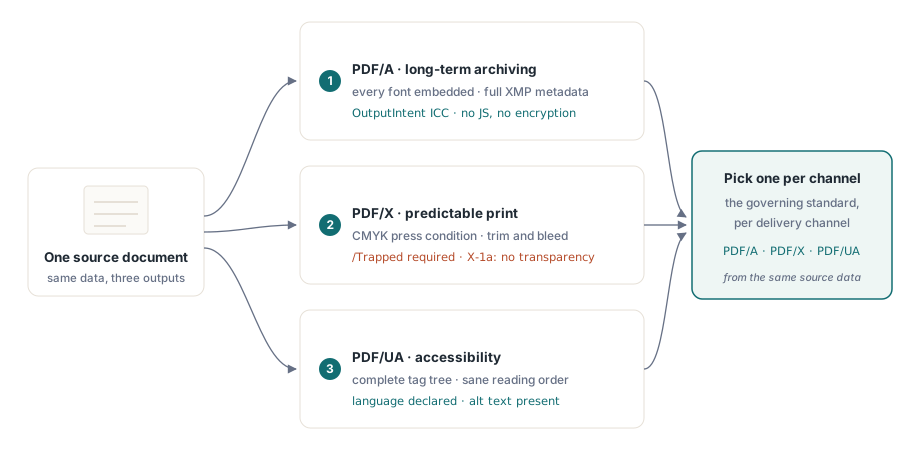
Trzy standardy ISO, trzy różne obietnice
PDF/A (ISO 19005) dotyczy czasu. Obiecuje, że plik będzie renderował się identycznie za dekady, więc wymaga pełnej samowystarczalności: każdej osadzonej czcionki, każdego koloru z niezależnym od urządzenia znaczeniem nadanym przez OutputIntent, pełnych metadanych XMP i zakazu wszystkiego, czego zachowanie zależy od środowiska. Szyfrowanie i JavaScript odpadają, bo nikt nie może zagwarantować, że deszyfrator albo silnik skryptowy będą istnieć w 2050 roku
PDF/X (ISO 15930) dotyczy koloru na papierze. Istnieje po to, by projektant mógł przekazać plik do drukarni, o którym żadne z nich nie musi dyskutować, co oznacza scharakteryzowane warunki druku, obowiązkowy klucz /Trapped, zdefiniowaną geometrię przycięcia i spadu, oraz, w wariancie X-1a, brak żywej przezroczystości, którą RIP musiałby zgadywać. PDF/UA (ISO 14289) dotyczy tego, kto może odczytać wynik. Technologia wspomagająca potrzebuje kompletnego drzewa tagów, sensownej kolejności czytania, zadeklarowanego języka dokumentu i alternatyw tekstowych dla wszystkiego, co nie jest tekstem
Ponieważ te trzy standardy ciągną w różne strony, wybieraj obowiązujący standard dla każdego kanału wyjściowego, zamiast gonić za jednym plikiem, który zadowoli wszystkie naraz. Master do druku tylko w CMYK to dokładnie zła rzecz do przekazania użytkownikowi czytnika ekranu, który nigdy nie widzi koloru, a blokada dynamicznego zachowania w profilu archiwalnym koliduje z czymkolwiek interaktywnym. Generuj osobno dla każdego kanału z tych samych danych źródłowych, a ominiesz cały ten konflikt
PDF/A: OutputIntent to część, o której wszyscy zapominają
Jeśli plik PDF/A nie przechodzi walidacji, OutputIntent to pierwsza rzecz do sprawdzenia. To struktura, którą generatory pomijają najczęściej, właśnie dlatego, że nic widocznego od niej nie zależy. ISO 19005 wymaga jednego: osadzonego profilu ICC, który precyzuje, co naprawdę oznaczają kolory urządzenia w dokumencie. HotPDF czyni ten profil jawnym wejściem, a nie refleksją po fakcie:
var
  Pdf: THotPDF;
  ICC: TFileStream;
begin
  Pdf := THotPDF.Create(nil);
  try
    Pdf.FileName := 'invoice-archival.pdf';
    Pdf.PDFACompliance := 'B';            // poziom B: wierność wizualna
    Pdf.Lang := 'en-US';
    Pdf.StandardFontEmulation := False;   // osadzaj prawdziwe czcionki, bez emulacji Base-14
    ICC := TFileStream.Create('sRGB.icc', fmOpenRead);
    try
      Pdf.AddPDFAOutputIntent('sRGB IEC61966-2.1', '', ICC, 3, 'DeviceRGB');
    finally
      ICC.Free;
    end;
    Pdf.BeginDoc;
    Pdf.CurrentPage.SetFont('Arial', [], 11);
    Pdf.CurrentPage.TextOut(50, 760, 0, 'Archival invoice body');
    Pdf.EndDoc;
  finally
    Pdf.Free;
  end;
end;
Kilka szczegółów decyduje tu o zaliczeniu lub porażce. StandardFontEmulation musi być wyłączone: emulowane czcionki Base-14 nie są osadzane, a osadzanie jest nienegocjowalne pod ISO 19005. Szyfrowanie musi pozostać wyłączone, więc nigdy nie łącz PDFACompliance z ActivateProtection; zaszyfrowany plik archiwalny to sprzeczność, którą walidator wyłapuje natychmiast. Liczba składowych w AddPDFAOutputIntent musi odpowiadać profilowi, czyli 3 dla profilu RGB, takiego jak sRGB IEC61966-2.1, i 4 dla CMYK. HotPDF śledzi użycie DeviceRGB i DeviceCMYK względem zadeklarowanej intencji w trakcie zapisu, więc zabłąkane wypełnienie CMYK w dokumencie z intencją RGB zamienia się w zgłoszony problem, a nie w cichy błąd
Jedna rzecz warta powiedzenia o profilu ICC: traktuj go jako wersjonowany artefakt wdrożeniowy, a nie plik, który ktoś kiedyś rzucił na serwer budowania. Jego bajty są osadzane w każdym generowanym dokumencie, więc obcięty lub uszkodzony profil po cichu zatruwa całą partię, a ty dowiadujesz się o tym dopiero w chwili walidacji. Dołącz go do instalatora, zapisuj jego sumę kontrolną w dzienniku uruchomienia i wczytuj go przez wzorzec TFileStream pokazany powyżej, żeby brakujący plik zawiódł głośno podczas generowania, a nie po cichu przy bramce archiwum
PDF/X do druku: Trapped, CMYK i profil maszyny drukarskiej
Mastery do druku odwracają historię koloru. Maszyna drukarska chce scharakteryzowanego CMYK, a standard wymaga zadeklarowania, czy zastosowano trapping, nawet gdy szczerą odpowiedzią jest, że nie masz pojęcia. Klucz /Trapped jest obowiązkowy niezależnie od tego:
Pdf.PDFXCompliance := 'X-1a';
Pdf.Trapped := 'Unknown';        // klucz obowiązkowy pod ISO 15930
ICC := TFileStream.Create('FOGRA39.icc', fmOpenRead);
try
  Pdf.AddPDFXOutputIntent('FOGRA39 (ISO 12647-2:2004)', '', ICC, 4, 'DeviceCMYK');
finally
  ICC.Free;
end;
Pdf.BeginDoc;
// rysuj kolorami bezpiecznymi dla CMYK, bez przezroczystości, bez szyfrowania
Pdf.EndDoc;
Liczba składowych wynosi teraz 4 dla profilu CMYK maszyny drukarskiej. X-1a zabrania też żywej przezroczystości, więc sprawdź każdy kod rysujący, który nakłada elementy półprzezroczyste; cokolwiek przeglądarka złoży na ekranie, dokładnie to RIP odmówi zinterpretować. Gdy drukarnia przysyła inną charakterystykę, zamień bajty profilu i ciąg identyfikatora, ale zostaw otaczającą strukturę bez zmian
PDF/UA: struktura jest generowana, nigdy dorabiana później
Dostępność to standard, który zespoły najczęściej próbują doczepić na końcu, i karze za takie podejście surowiej niż pozostałe dwa. Drzewo tagów musi odzwierciedlać kolejność, w jakiej treść powstawała logicznie, a to informacja, której po prostu już nie masz, gdy plik jest zapisany. Ustawienie PDFUACompliance włącza wyjście otagowane, a API struktury wiąże każde wywołanie rysujące z jego rolą semantyczną na bieżąco:
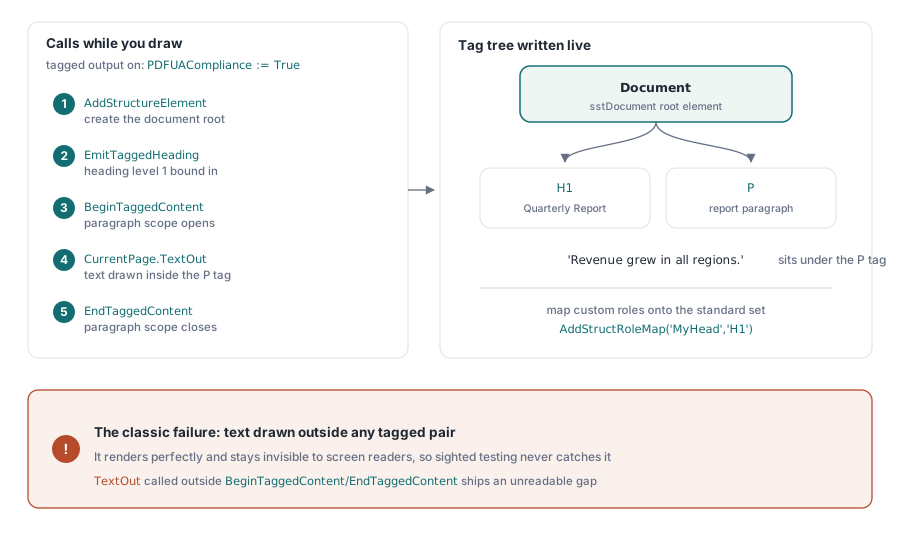
Pdf.PDFUACompliance := True;     // automatycznie włącza otagowany PDF
Pdf.Lang := 'en-US';             // ustaw jawnie; puste wraca do 'en'
Pdf.BeginDoc;

Root := Pdf.AddStructureElement(sstDocument, nil);
H1 := Pdf.EmitTaggedHeading(1, Root, 50, 700, 'Quarterly Report');
Para := Pdf.BeginTaggedContent('P', Root);
Pdf.CurrentPage.TextOut(50, 650, 0, 'Revenue grew in all regions.');
Pdf.EndTaggedContent;

Pdf.EndDoc;
Błędem, na który trzeba uważać, jest tekst narysowany poza jakąkolwiek parą BeginTaggedContent/EndTaggedContent. Renderuje się bez zarzutu i pozostaje niewidoczny dla czytnika ekranu, więc żaden widzący tester tego nie wychwyci; błąd trafia do produkcji i wypływa dopiero wtedy, gdy natrafi na tę lukę prawdziwy użytkownik technologii wspomagającej. Gdy twoje szablony niosą własne nazwy ról struktury, odwzoruj je na zestaw standardowy przez AddStructRoleMap('MyHead', 'H1'), żeby zgodne czytniki wiedziały, co znaczą. ISO 14289 wymaga też zadeklarowanego języka. HotPDF wraca do 'en', gdy Lang jest puste, ale to siatka bezpieczeństwa, a nie powód, by zostawiać prawdziwy język dokumentu nieustawiony
Weryfikacja: zaufaj walidatorowi, nie przeglądarce
Przeglądarka, która otwiera twój plik, niczego nie dowodzi na temat zgodności, więc weryfikacja należy do ścieżki wydania, z narzędziami sprawdzającymi strukturę, a nie renderowanie. Dla PDF/A i PDF/UA veraPDF to referencyjny otwarty walidator; zgłasza awarie według klauzuli ISO, co odwzorowuje się wprost na powyższą konfigurację. Dla PDF/X praktycznym sprawdzianem wciąż są profile Preflight Adobe Acrobat, bo zgodność dla druku dotyczy w równym stopniu intencji koloru, co składni
Generator robi tu swoją część. W chwili zapisu HotPDF godzi flagi funkcji ze skonfigurowaną wersją PDF, po cichu obniżając to, czego wersja nie potrafi wyrazić, na przykład AES-256 spadające do AES-128 poniżej PDF 1.7. Bramki zgodności w EndDoc idą dalej i wprost zgłaszają wyjątek przy twardych sprzecznościach, jak żądanie PDFACompliance razem z szyfrowaniem. Żadne z nich nie zastępuje zewnętrznego walidatora. Po prostu nie dopuszczają, by niemożliwe konfiguracje w ogóle do niego dotarły
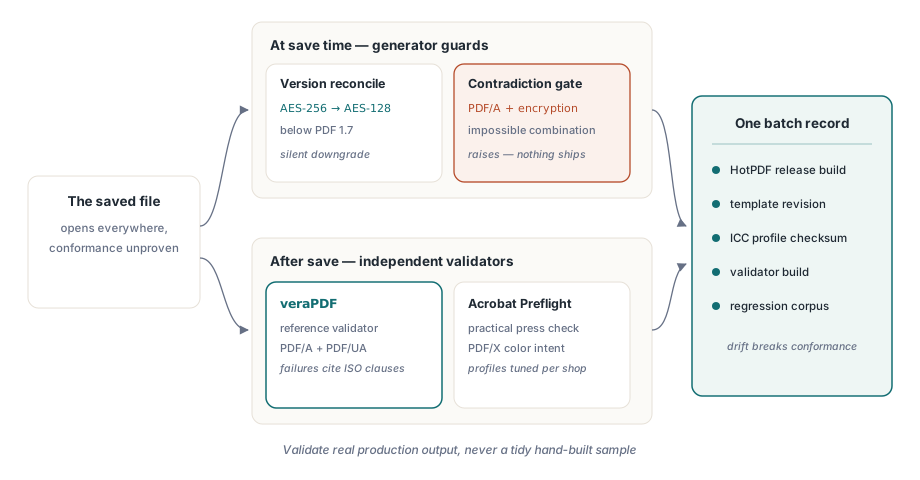
Jeden nawyk opłaca się wielokrotnie: wersjonuj całą konfigurację zgodności jako jedność. Wydanie HotPDF, wersję szablonu, sumę kontrolną profilu ICC, kompilację walidatora, która to zatwierdziła. Zgodność zaczyna dryfować w chwili, gdy którykolwiek z tych elementów zmienia się pod pozostałymi, a najbrzydsze audyty to te, w których nikt nie potrafi odtworzyć, jaka kombinacja wyprodukowała pięcioletni plik archiwalny. Jeden rekord konfiguracji na partię rozwiązuje to raz na zawsze
Na koniec, uruchamiaj walidator na prawdziwym wyjściu produkcyjnym, nigdy na starannie ręcznie zbudowanej próbce. Awarie, które bolą, biorą się z danych, których nikt nie przewidział: logo klienta, które przychodzi jako CMYK, podczas gdy intencja mówi RGB, poprawka szablonu, która przemyca nieosadzoną czcionkę, nowa ścieżka kodu rysująca tekst poza drzewem tagów. Zachowaj po jednym znanym wadliwym pliku z każdego przeszłego incydentu jako wejście regresyjne, a bramka zgodności pozostanie uczciwa z biegiem czasu. Po stronie renderowania tych potoków zobacz nasz artykuł o wyjściu raportów, czcionkach i obrazach w HotPDF; do podpięcia walidatorów pod build służy towarzyszący artykuł o automatyzacji kontroli preflight PDF
Właściwości zgodności, output intenty i API tagowania użyte w tych przykładach są dostępne w HotPDF Delphi Component dla Delphi i C++Builder; strona produktu odsyła do pełnej dokumentacji każdego wywołania pokazanego tutaj