Renderowanie strony PDF na kontekst urządzenia Windows dla podglądu wydruku stawia trzy układy współrzędnych w tej samej linii kodu, i rzadko się one zgadzają. Strona PDF jest mierzona w punktach, z początkiem układu w lewym dolnym rogu. DC ekranu jest mierzony w pikselach, z początkiem w lewym górnym rogu i współczynnikiem powiększenia, który wybierasz. DC drukarki, ten, który podgląd ma za zadanie przewidzieć, mierzy piksele w rozdzielczości urządzenia, ale umieszcza swój początek w rogu obszaru drukowalnego, nie rogu arkusza. Zrób którykolwiek z nich źle, a podgląd wygląda dobrze, podczas gdy wydrukowana strona wychodzi przesunięta, przeskalowana albo obcięta wzdłuż krawędzi. Zwykłym objawem jest formularz z obramowaniem, który w podglądzie jest wyśrodkowany, a drukuje się z odciętymi górną i lewą linią, bo drukarka laserowa nie potrafi położyć tuszu w zewnętrznych kilku milimetrach, a nikt nie powiedział o tym podglądowi. losLab PDF Library (PDF Library for Delphi) pokrywa całą tę ścieżkę wywołaniami renderującymi na kontekst urządzenia, warstwą konfiguracji drukarki wirtualnej i mapami bitowymi podglądu generowanymi z własnych metryk drukarki, co jest właśnie tą częścią, która czyni podgląd uczciwym co do tego marginesu
Geometria papieru to nie geometria drukowalna
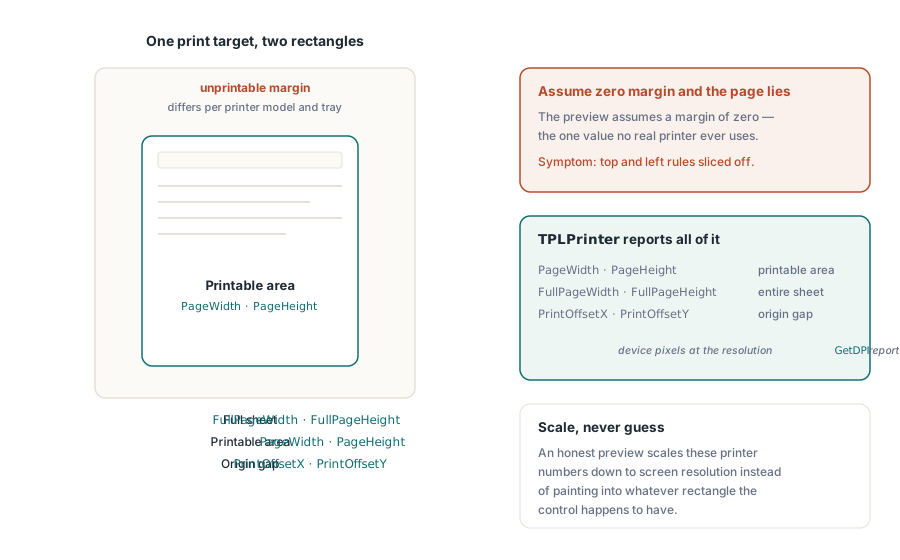
Dwa prostokąty opisują każdy cel wydruku, a przesunięcie między nimi jest miejscem, gdzie mieszka większość błędów podglądu. Prostokąt papieru to fizyczny arkusz. Prostokąt drukowalny to mniejszy region, do którego silnik druku faktycznie dociera, wcięty o sprzętowy margines różniący się w zależności od modelu drukarki, a czasem od podajnika. Warstwa druku biblioteki mierzy oba. Leżąca u podstaw klasa TPLPrinter udostępnia PageWidth i PageHeight dla obszaru drukowalnego, FullPageWidth i FullPageHeight dla pełnego arkusza oraz PrintOffsetX z PrintOffsetY dla luki między ich początkami układu, wszystko w pikselach urządzenia przy rozdzielczości, jaką zgłasza GetDPI. Uczciwy podgląd skaluje te same liczby w dół do rozdzielczości ekranu, zamiast malować stronę w jakikolwiek prostokąt, który akurat ma kontrolka. Pomiń ten krok, a podgląd po cichu zakłada zerowy margines, czyli jedyną wartość, której nie używa żadna prawdziwa drukarka
Podgląd na ekranie przez RenderPageToDC
Dla kontrolki podglądu na ekranie RenderPageToDC(DPI, Page, DC) rysuje stronę wczytanego dokumentu wprost na dowolny kontekst urządzenia GDI, czy to płótno TPaintBox, bitmapa poza ekranem, czy DC metapliku. Argument DPI ustawia powiększenie. 96 przybliża widok 100% na klasycznym wyświetlaczu, a podwojenie go podwaja renderowany rozmiar
procedure TPreviewForm.PreviewBoxPaint(Sender: TObject);
begin
  // te trzy to trwały stan biblioteki, nie parametry per wywołanie:
  FPdf.SetRenderDCOffset(FOffsetX, FOffsetY);
  FPdf.SetRenderDCErasePage(1);
  FPdf.SetRenderCropType(0);
  FPdf.RenderPageToDC(FPreviewDpi, FCurrentPage, PreviewBox.Canvas.Handle);
end;
Pułapka polega na tym, że ścieżka renderowania DC jest sterowana trwałym stanem biblioteki, a nie parametrami per wywołanie. SetRenderDCOffset, SetRenderDCErasePage i SetRenderCropType każde utrzymuje się, dopóki coś ich nie zmieni, więc pętla miniatur uruchomiona po tym, jak użytkownik dostosował powiększony widok, dziedziczy jakikolwiek offset albo przycięcie pozostawione przez poprzednią ścieżkę kodu. Objawem jest podgląd, który dryfuje tylko w konkretnych sekwencjach nawigacji, co jest tak nędzne do odtworzenia, jak tylko błąd może być. Ustawienie całego istotnego stanu na górze procedury obsługi malowania, jak powyżej, nic nie kosztuje i usuwa całą tę klasę błędów. W pobliżu chowa się drugi mnożnik. Efektywna rozdzielczość wyjściowa to skala renderowania razy argument DPI, i chociaż SetRenderScale domyślnie wynosi 1.0, też utrzymuje się po zmianie, więc funkcja eksportu, która ją podbiła, po cichu przeskalowuje każdy późniejszy podgląd, dopóki coś jej nie ustawi z powrotem
Przewijane przeglądarki i częściowe przemalowania mają dedykowany wariant. RenderPageToDCClip przyjmuje specyfikację przycięcia obok kontekstu urządzenia, więc unieważnienie jednego pasa okna przemalowuje tylko ten pas zamiast ponownie rasteryzować całą stronę. Przy dużym powiększeniu na stronach wielkoformatowych to różnica między przeglądarką, która nadąża za paskiem przewijania, a taką, która rozmazuje się za nim
Zadanie druku, które pasuje do podglądu
Strona druku działa poprzez drukarkę wirtualną. NewCustomPrinter klonuje drukarkę systemową do konfiguracji prywatnej dla biblioteki, a SetupPrinter dostosowuje ten klon bez dotykania DevMode ogólnosystemowego: papier wchodzi jako ustawienie 1 (stała DMPAPER_*), a orientacja jako ustawienie 11. Wypłatą jest izolacja. Usługa może drukować etykiety A4, podczas gdy domyślna drukarka hosta zostaje na Letter, i niczego nie trzeba potem przywracać

var
  Pdf: TPDFlib;
  Virt: WideString;
  Opt: Integer;
begin
  Pdf := TPDFlib.Create;
  try
    if Pdf.LoadFromFile('report.pdf', '') <> 1 then
      raise Exception.Create('load failed');
    Virt := Pdf.NewCustomPrinter(Pdf.GetDefaultPrinterName);
    Pdf.SetupPrinter(Virt, 1, 9);        // ustawienie 1 = papier, DMPAPER_A4
    Pdf.SetupPrinter(Virt, 11, 1);       // ustawienie 11 = orientacja, 1 = pionowa
    Opt := Pdf.PrintOptions(1, 1, 'Monthly Report');  // dopasuj do papieru, auto-obrót + wyśrodkowanie
    Pdf.PrintDocument(Virt, 1, Pdf.PageCount, Opt);
  finally
    Pdf.Free;
  end;
end;
PrintOptions zasługuje na uważną lekturę. Zwraca uchwyt opcji, który musisz przekazać do PrintDocument albo PrintPages; to nie stan otoczenia. Zbudowanie opcji, a potem zapomnienie o przekazaniu uchwytu zawodzi po cichu. Zadanie drukuje się z ustawieniami domyślnymi, i nikt tego nie zauważa, dopóki nie oczekiwano polityki dopasowania do papieru, a zamiast tego wyszła obcięta strona przewymiarowana. Argument skalowania strony to miejsce, gdzie mieszka ta polityka. Brak skalowania zachowuje dokładność wymiarową, co ma znaczenie dla formularzy mierzonych linijką. Dopasowanie do papieru przeskalowuje wszystko do arkusza. Zmniejszanie dużych stron zostawia zwykłe strony w spokoju i wkracza tylko wtedy, gdy strona przekracza obszar drukowalny, co zwykle jest właściwym domyślnym ustawieniem dla mieszanego zestawu dokumentów. Flaga auto-obrotu i wyśrodkowania obsługuje strony poziome bez drugiej ścieżki kodu
Aplikacje, które już zarządzają TPrinter poprzez przepływ okien dialogowych VCL, mogą przekazać go bezpośrednio. PrintDocumentToPrinterObject i PrintPagesToPrinterObject przyjmują skonfigurowaną instancję TPrinter, co utrzymuje standardowe okno dialogowe druku jako powierzchnię konfiguracji dla użytkownika, podczas gdy biblioteka zajmuje się renderowaniem strony. Mieszanie obu podejść w jednej ścieżce kodu ma tendencję do ponownego wprowadzania dryfu geometrii, który reszta tej pracy miała zabić, więc wybierz jedno. Ścieżka drukarki wirtualnej pasuje do usług bezobsługowych; ścieżka TPrinter pasuje do aplikacji interaktywnych
Selektywne wyjście działa tak samo. PrintPages przyjmuje ciąg zakresu, więc przekazanie nazwy drukarki wirtualnej, '2-5,12', i uchwytu opcji drukuje strony od 2 do 5 oraz 12 z nienaruszonym kontraktem geometrii, a ta sama składnia napędza warianty drukowania do pliku. Te warianty plikowe są praktyczną odpowiedzią dla środowiska bezobsługowego bez podłączonego fizycznego urządzenia: testowanie regresyjne geometrii druku na serwerze budującym, który w ogóle nie ma kolejki sterownika. Renderuj ten sam dokument przez te same opcje do artefaktu plikowego przy każdym buildzie, a regresja geometrii zamienia się w diff zamiast w zgłoszenie od klienta trzy tygodnie później
Mapy bitowe podglądu z własnymi metrykami drukarki
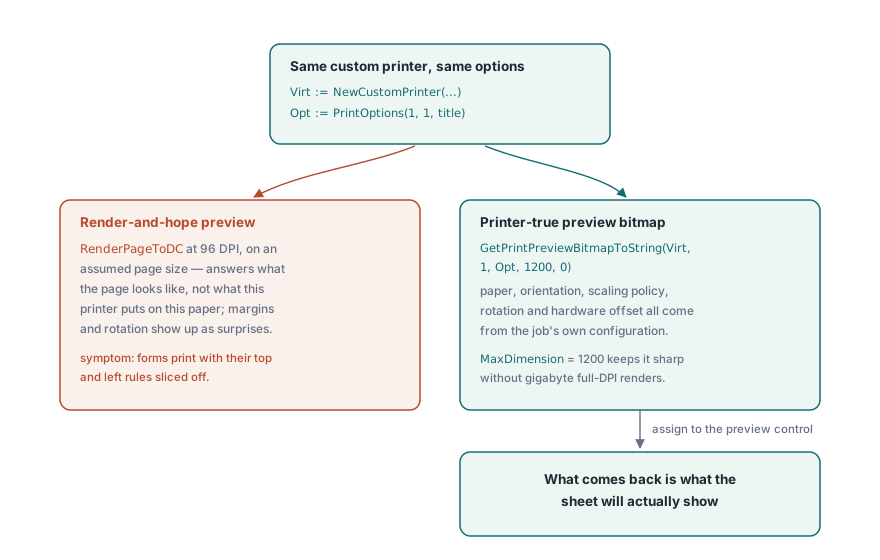
Podgląd wyrenderowany przy 96 DPI wobec zakładanego rozmiaru strony odpowiada na niewłaściwe pytanie. Pokazuje, jak wygląda strona, nie to, co ta drukarka położy na tym papierze. GetPrintPreviewBitmapToString zamyka tę lukę, budując podgląd z tej samej niestandardowej drukarki i tego samego uchwytu opcji co ostateczne zadanie, więc rozmiar papieru, orientacja, polityka skalowania, obrót i sprzętowe przesunięcie wszystkie zasilają bitmapę. To, co wraca, jest tym, co pokaże arkusz
procedure ShowPrinterTruePreview(Pdf: TPDFlib; const Virt: WideString; Opt: Integer);
var
  Data: AnsiString;
  Strm: TMemoryStream;
  Bmp: TBitmap;
begin
  Data := Pdf.GetPrintPreviewBitmapToString(Virt, 1, Opt, 1200, 0);
  Strm := TMemoryStream.Create;
  try
    Strm.WriteBuffer(PAnsiChar(Data)^, Length(Data));
    Strm.Position := 0;
    Bmp := TBitmap.Create;
    try
      Bmp.LoadFromStream(Strm);
      PreviewImage.Picture.Assign(Bmp);
    finally
      Bmp.Free;
    end;
  finally
    Strm.Free;
  end;
end;
Argument MaxDimension ogranicza długą krawędź bitmapy. 1200 pikseli pozostaje ostre dla okna dialogowego podglądu i utrzymuje skromne zużycie pamięci nawet dla rysunków inżynierskich w formacie E, gdzie render w pełnej rozdzielczości przy 600 DPI drukarki sięgnąłby gigabajtów
Zapamiętywanie wyborów drukarki użytkownika
Okna dialogowe druku, które zapominają swoich ustawień między sesjami, generują własne zgłoszenia wsparcia. Para DevMode, GetPrinterDevModeToString i SetPrinterDevModeFromString, serializuje pełną konfigurację sterownika drukarki do nieprzezroczystego ciągu, który możesz schować w preferencjach użytkownika i przywrócić w następnej sesji, łącznie z opcjami specyficznymi dla sterownika, których żadne generyczne API nie zawraca sobie głowy modelować. Zapisuj drukarkę po nazwie z GetPrinterNames, nigdy po indeksie listy. Kolejność indeksów zmienia się za każdym razem, gdy drukarka jest dodawana albo usuwana, więc zapisany indeks po cichu wskaże niewłaściwe urządzenie przy następnym przesunięciu listy. GetDefaultPrinterName pokrywa awaryjny wariant, gdy zapamiętane urządzenie całkiem zniknęło
Wybór podajnika dopełnia historię trwałości ustawień. GetPrinterBins zgłasza źródła papieru, które udostępnia sterownik, co ma znaczenie dla przepływów pracy z papierem firmowym, gdzie strona pierwsza pobiera z podajnika papieru firmowego, a reszta ze zwykłego zapasu. To polityka, którą użytkownicy oczekują, że aplikacja zapamięta razem ze wszystkim innym, a zadanie druku, które ląduje na złym zapasie, czyta się jak błąd, nawet gdy każdy bajt PDF był poprawny
Trzymaj jeden silnik między podglądem a drukiem
Jedna ostatnia decyzja po cichu rządzi wiernością. Wybór silnika renderującego dotyczy zarówno miejsca docelowego ekranu, jak i drukarki, więc pokusa polega na podglądzie szybkim silnikiem, a druku precyzyjnym. Oprzyj się jej. Prowadzenie podglądu i zadania przez różne silniki na nowo wprowadza dokładnie ten dryf wierności, który podgląd wierny drukarce miał usunąć, i robi to w sposób widoczny tylko na papierze. Kompromisy między silnikami wbudowanym, Cairo i PDFium są ważone w wielosilnikowym renderowaniu PDF w Delphi; wybierz jeden i używaj go po obu stronach
Dokumenty zbyt duże, by wygodnie wczytać je przed drukiem, można otworzyć przez ścieżkę bezpośredniego dostępu opisaną w łączeniu, dzieleniu i bezpośrednim dostępie do dużych PDF, która renderuje strony na kontekst urządzenia z uchwytu pliku bez budowania drzewa dokumentu. Kompletna dokumentacja API druku znajduje się na stronie produktu losLab PDF Library for Delphi