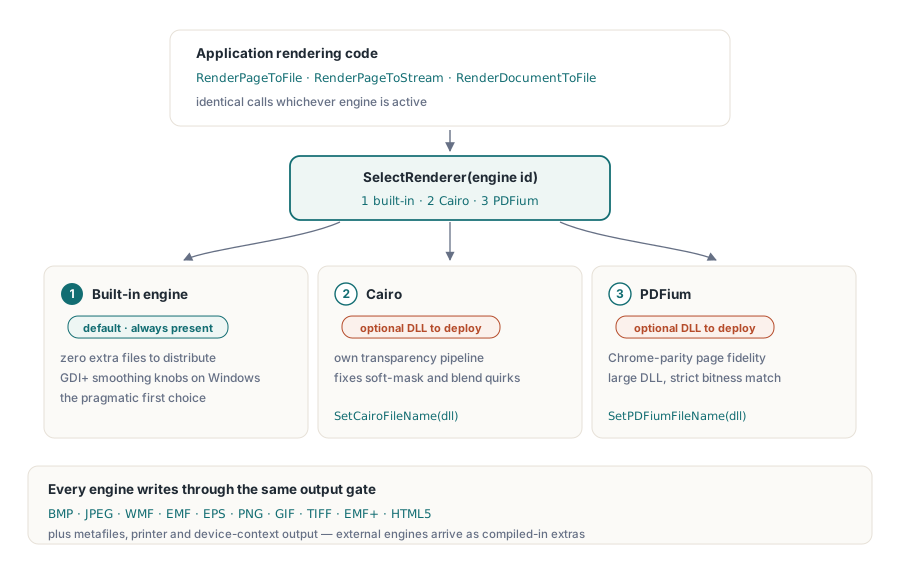
Trzy rasteryzatory mogą przeczytać ten sam plik PDF i nie zgodzić się co do tego, co on mówi. Wbudowany silnik w PDF Library for Delphi to ten, który przychodzi bez żadnych dodatkowych plików i kompetentnie renderuje wszystko, dlatego zajmuje miejsce domyślnego. Cairo wnosi inny potok przezroczystości i wygładzania krawędzi i bywa tym, po który ludzie sięgają, gdy maski miękkie albo tryby mieszania wychodzą gdzie indziej źle. PDFium niesie kod renderujący Chrome, więc strona, która wygląda dobrze w przeglądarce, zwykle wygląda dobrze i pod PDFium, kosztem sporej biblioteki DLL i bitowości, której dopasowania się domaga. Żaden z tych trzech nie jest poprawny w oderwaniu od kontekstu. Poprawność jest kwestią konkretnego dokumentu, a jedynym uczciwym sposobem na ustalenie, który silnik radzi sobie z danym korpusem, jest przepuszczenie tego korpusu przez każdy z nich
Taki jest argument za traktowaniem silnika jako wyboru czasu wykonania, a nie czasu kompilacji. PDF Library for Delphi, biblioteka PDF firmy losLab dla Delphi i C++Builder, stawia wszystkie trzy za jedną powierzchnią renderowania, więc decyzja kosztuje jedną liczbę całkowitą zamiast gałęzi w kodzie. Reszta sprowadza się do bezpiecznego wybierania między nimi, potwierdzania, które silniki faktycznie niesie wdrożone binarium, i pilnowania, by stan renderowania po cichu nie zatruł kolejnego zadania
Trzy rasteryzatory za jedną powierzchnią wywołań
Biblioteka numeruje swoje silniki. Silnik 1 to renderer wbudowany, domyślny, z opcjami wygładzania GDI+ na Windows. Silnik 2 to Cairo, a silnik 3 to PDFium, oba wybierane w czasie wykonania przez SelectRenderer. Dwa silniki zewnętrzne wczytują się z bibliotek DLL, których ścieżki podajesz przez SetCairoFileName i SetPDFiumFileName przed ich wybraniem. Niezależnie od tego, który silnik jest aktywny, praca idzie przez te same wywołania: RenderPageToFile, RenderPageToStream, RenderDocumentToFile. Przełączenie silnika przesuwa jedną liczbę; reszta twojego kodu renderującego nigdy tego nie zauważa
Model miejsca docelowego sięga daleko poza bitmapy. Klasa renderera celuje też w metapliki (WMF, EMF, EMF+), EPS, bezpośrednie konteksty urządzeń, drukarki i HTML5, przy czym Cairo i PDFium pojawiają się jako dodatkowe miejsca docelowe tylko wtedy, gdy zostały wkompilowane. Wyjście rastrowe jest tym, w czym trzy silniki rozchodzą się najbardziej widocznie, więc właśnie tego używają tutejsze przykłady
Nigdy nie zakładaj, że silnik istnieje: sonduj przy starcie
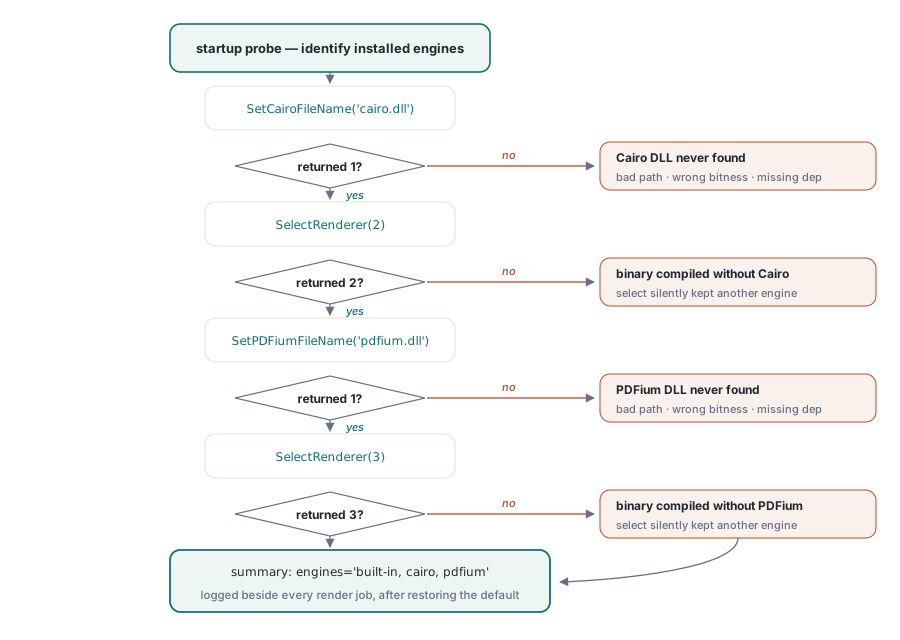
Cairo i PDFium są funkcjami kompilacji warunkowej, co oznacza, że binarium może zostać zbudowane całkowicie bez nich. Gdy tak się stanie, poproszenie o silnik 2 albo 3 niczego nie zgłasza. SelectRenderer po prostu zwraca wartość inną niż żądany identyfikator, a kod ignorujący wartość zwracaną renderuje dalej tym silnikiem, który już był aktywny. Obroną jest sonda startowa, która prosi każdy silnik o przedstawienie się i zapisuje odpowiedź:
function ProbeEngines(PDF: TPDFlib): string;
begin
  Result := 'built-in';                        // silnik 1 jest zawsze obecny
  if (PDF.SetCairoFileName('cairo.dll') = 1) and (PDF.SelectRenderer(2) = 2) then
    Result := Result + ', cairo';
  if (PDF.SetPDFiumFileName('pdfium.dll') = 1) and (PDF.SelectRenderer(3) = 3) then
    Result := Result + ', pdfium';
  PDF.SelectRenderer(1);                       // przywróć domyślny przed prawdziwą pracą
end;
Uruchom tę sondę raz przy starcie i zapisz jej wynik do logu obok każdego zadania renderowania. Najczęstsze pytanie, gdy klient zgłasza różnicę w renderowaniu, brzmi, które silniki faktycznie ma jego instalacja, a jednolinijkowa odpowiedź leżąca w logu rozstrzyga je bez sesji zdalnego pulpitu. Użyteczny efekt uboczny: jeśli samo SetPDFiumFileName zwróci 0, już wiesz, że problemem jest biblioteka DLL (zła ścieżka, zła bitowość, brakująca zależność), a nie binarium zbudowane bez wsparcia dla PDFium, ponieważ wywołanie ścieżki niczego nie rozwiązało, zanim SelectRenderer w ogóle się uruchomiło
Dziesięć formatów wyjściowych za jedną liczbą Options
Parametr Options w wywołaniach renderowania wybiera kodowanie wyjścia: 0 to BMP, 1 JPEG, 2 WMF, 3 EMF, 4 EPS, 5 PNG, 6 GIF, 7 TIFF, 8 EMF+, a 9 HTML5. PNG (5) to rozsądny domyślny wybór dla podglądów i archiwalnych obrazów stron. JPEG (1), w parze z SetJPEGQuality, jest lepszym wyborem dla skanów fotograficznych, gdzie rozmiar pliku liczy się bardziej niż ostre krawędzie
Jeden format ukrywa wymaganie wobec strumienia docelowego. Ścieżka BMP zapisuje najpierw dane obrazu, a potem cofa się do przesunięcia 0x26, by załatać pola rozdzielczości w nagłówku. Skieruj to na strumień tylko do przodu, opakowanie kompresujące albo gniazdo sieciowe, a wywołanie zawiedzie w sposób, który czyta się jak usterka silnika, choć nią nie jest. Gdy celu bez możliwości przewijania nie da się uniknąć, renderuj zamiast tego PNG albo przygotuj BMP przez strumień w pamięci i skopiuj go dalej, gdy będzie kompletny
DPI, które podajesz, to nie DPI, które dostajesz
Każde wywołanie renderowania przyjmuje argument DPI, ale rozdzielczość, którą faktycznie dostajesz, to ta wartość pomnożona przez globalną skalę renderowania. SetRenderScale startuje od 1.0, a gdy raz ją zmienisz, nowy współczynnik po cichu stosuje się do każdego późniejszego renderowania na tej instancji:
PDF.SetRenderScale(2.0);                    // każde późniejsze renderowanie jest podwojone
PDF.RenderPageToFile(150, 1, 5, 'p1.png');  // w praktyce 300 DPI
PDF.SetRenderScale(1.0);                    // zresetuj, albo miniatury przyjdą olbrzymie
Ta sama lepkość dotyczy SetRenderCropType i ustawienia jakości JPEG. W usłudze, która produkuje miniatury, podglądy i obrazy w rozdzielczości druku z jednej współdzielonej instancji, te resztkowe ustawienia stoją naprawdę za okazjonalnym zgłoszeniem w stylu „miniatury nagle ważą 40 MB”. Dwa czyste wyjścia: resetuj istotny stan na początku każdej operacji albo przeznacz osobną instancję na każdy profil wyjściowy, żeby nic między nimi nie przeciekało
Strojenie domyślnego silnika, zanim sięgniesz po inny
Zaskakująca część próśb „potrzebujemy innego silnika” okazuje się problemem z ustawieniami w przebraniu. Wbudowany renderer udostępnia swoje zachowanie wygładzania przez SetGDIPlusOptions i szerszą rodzinę SetRenderOptions, a SetGDIPlusFileName pozwala wycelować go w konkretne środowisko uruchomieniowe GDI+, gdy środowisko wdrożenia dostarcza nietypowe. Poszarpana grafika liniowa przy niskim DPI, rozmyty tekst w miniaturach, pasmowanie na gradientach: wszystko to reaguje na te pokrętła, a ich kręcenie nic nie kosztuje w instalatorze. Dodanie Cairo albo PDFium oznacza natomiast dostarczanie kolejnych bibliotek DLL, pilnowanie drugiego czy trzeciego wariantu bitowości i wzięcie na siebie obowiązku ich aktualizowania
Skarga na jakość ma więc naturalną kolejność działań. Odtwórz ją najpierw przy dokładnie takim DPI i takiej skali, jakie ma klient, bo w połowie przypadków różnica wyparowuje, gdy tylko te się zgadzają. Następnie wypróbuj opcje wygładzania silnika wbudowanego. Dopiero potem zestaw stronę obok siebie w różnych silnikach, trzymając każdą inną zmienną bez zmian: wyrenderuj ją do PNG silnikami 1, 2 i 3 przy identycznym DPI i załącz wszystkie trzy. Zwykle dwa z trzech się zgadzają, a ta większość mówi ci, czy odstający wynik to dokument interpretowany inaczej, czy twoje własne oczekiwanie odniesienia, które jest przesunięte. Trzy konkretne obrazy rozstrzygają spór o „źle renderuje” znacznie szybciej niż akapit przymiotników
Łańcuch zapasowy, który sam się tłumaczy
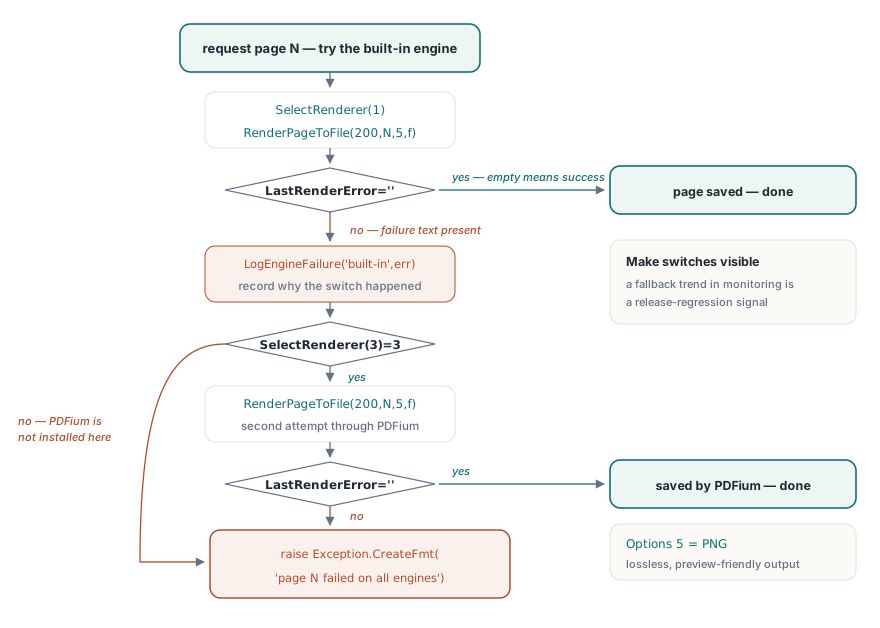
Gdy sondowanie i dyscyplina stanu są już na miejscu, sam łańcuch zapasowy jest krótki. Wykrycie niepowodzenia opiera się na LastRenderError, które trzyma własny tekst komunikatu silnika dla ostatniego renderowania i jest puste, gdy renderowanie się powiodło:
procedure RenderPageWithFallback(PDF: TPDFlib; Page: Integer; const OutFile: string);
begin
  PDF.SelectRenderer(1);                            // najpierw wbudowany
  PDF.RenderPageToFile(200, Page, 5, OutFile);      // 5 = PNG
  if PDF.LastRenderError = '' then Exit;
  LogEngineFailure('built-in', Page, PDF.LastRenderError);
  if PDF.SelectRenderer(3) = 3 then                 // PDFium jako ciężkie zabezpieczenie
  begin
    PDF.RenderPageToFile(200, Page, 5, OutFile);
    if PDF.LastRenderError = '' then Exit;
    LogEngineFailure('pdfium', Page, PDF.LastRenderError);
  end;
  raise Exception.CreateFmt('Page %d failed on all available engines', [Page]);
end;
Dwa punkty projektowe mają tu wagę. Łańcuch zapisuje, dlaczego doszło do każdego przełączenia, ponieważ linia logu brzmiąca „ta strona przeszła na PDFium od wydania 3.7” jest sygnałem regresji, który chcesz mieć w trendach monitoringu, a nie zgubiony. Sama kolejność zapasowa jest polityką wartą wybrania osobno dla każdego rodzaju obciążenia. Silnik wbudowany wdraża się bez dodatkowych bibliotek DLL, co czyni go właściwą pierwszą próbą w większości instalacji, podczas gdy dokumenty gęste od grup przezroczystości albo nietypowych cieniowań są zwykłym powodem, dla którego zespół w ogóle wpina alternatywny silnik. Żaden silnik nie jest najszybszy w ogólności, i o to właśnie chodzi w wyborze przy każdym wywołaniu: zmierz każdy z nich na próbce swoich prawdziwych dokumentów przy swoim prawdziwym DPI i wróć do tego pomiaru, gdy tylko zmienią się biblioteki DLL silników albo mieszanka dokumentów. Korpus wygrywa spór za każdym razem
Poza pojedynczymi stronami: partie TIFF i żywe konteksty urządzeń
Dwaj sąsiedzi wywołań pojedynczej strony domykają zestaw narzędzi. RenderAsMultipageTIFFToFile renderuje wyrażenie zakresu stron wprost do wielostronicowego TIFF, naturalnej postaci przy przekazywaniu materiału archiwalnego do systemów zarządzania dokumentami starszych niż PDF. RenderPageToDC maluje bezpośrednio na kontekście urządzenia Windows na potrzeby kontrolek podglądu, rządząc się własną trójką lepkich ustawień (SetRenderDCOffset, SetRenderDCErasePage oraz typ przycięcia), które wymagają tej samej dyscypliny resetowania co współczynnik skali. Podgląd ekranowy i renderowanie na ścieżce druku niosą dość własnych pułapek, by zasłużyć na osobny artykuł, podlinkowany niżej
Dokąd dalej
Jeden nawyk warto zabrać ze sobą: ponieważ SelectRenderer działa na każde późniejsze wywołanie na instancji, pojedynczą uparcie oporną stronę można ponowić na innym silniku, podczas gdy reszta dokumentu zostaje na domyślnym. Po malowanie podglądu, wybór drukarki i obsługę DevMode sięgnij do artykułu o podglądzie wydruku i kontekście urządzenia. Gdy renderowanie zasila potok o dużej przepustowości na bardzo dużych plikach, podejście oparte na uchwytach z przewodnika po dostępie bezpośrednim naturalnie łączy się z renderowaniem strona po stronie przez DARenderPageToFile
Pakowanie silników, obsługiwane formaty i wersje próbne opisano szczegółowo na stronie produktu PDF Library for Delphi