PDF 주석은 페이지에 그려진 마크가 아니라 페이지에 첨부된 딕셔너리(dictionary)입니다. ISO 32000-1 §12.5는 대략 24개의 하위 유형을 정의하며, 각각은 /Subtype, 페이지 좌표의 사각형, 플래그 세트, 그리고 보통 뷰어가 실제로 그릴 내용을 결정하는 모양 스트림(appearance stream)을 포함합니다. 문서를 검토하는 사람에게 하위 유형이 모두 같은 의미를 가지는 것은 아닙니다. Highlight 및 Ink 스트로크는 코멘트이고, Link는 탐색이며, Popup은 스티키 노트를 클릭할 때 열리는 작은 창으로, 자체 객체로 저장되고 부모가 가리킵니다. 답글은 in-reply-to 항목을 통해 답하는 코멘트를 참조하는 전체 Text 주석입니다. 따라서 페이지 수준 주석 배열은 검토자의 코멘트 목록이 아닙니다. 이것은 코멘트, 코멘트를 연결하는 배관, 그리고 검토자가 전혀 코멘트라고 부르지 않을 여러 항목이 들어 있는 평면적인 가방입니다. 배열을 코멘트 목록으로 취급하는 패널은 고객이 실행하는 다른 모든 뷰어와 의견이 다를 것입니다
Delphi, C++Builder 및 Lazarus용 PDFium 기반 VCL/LCL 컴포넌트인 PDFium Component에서 주석 검토 워크플로를 빌드하는 것은 원시 배열과 사람의 시각 사이의 차이가 문제를 일으키는 지점에 집중하는 것을 의미합니다. 개수 계산, 인덱싱, 엔진이 이미 고정한 마크의 색상 변경, 잔상을 남기지 않고 삭제하기, 그리고 자신만의 마크 추가하기가 이에 해당합니다
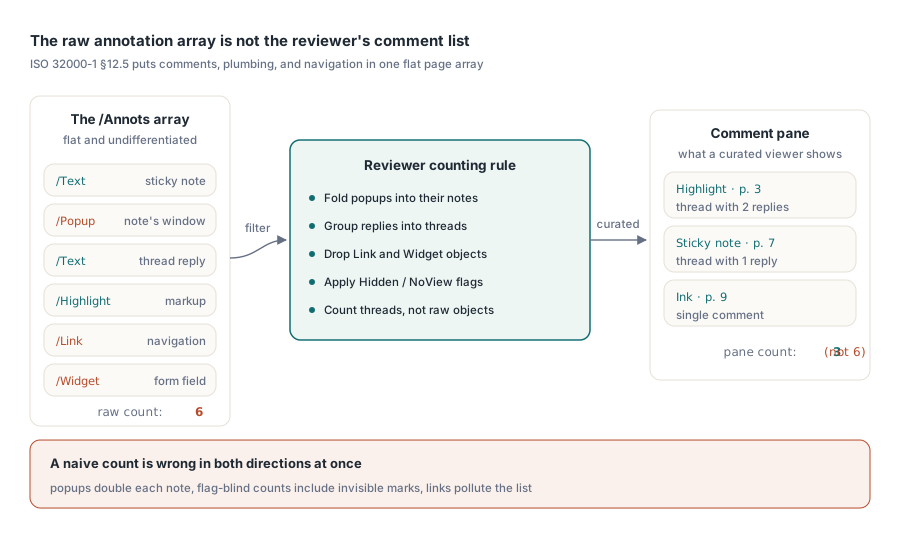
주석 개수가 Acrobat의 코멘트 창과 일치하지 않는 이유
마크업된 계약서를 뷰어와 Acrobat에서 나란히 열어보면 총합이 일치하는 경우가 거의 없습니다. Acrobat은 선별된 뷰를 보여줍니다. 마크업은 답글 스레드로 그룹화되고, 팝업은 속한 노트로 접혀 들어가며, 링크 및 폼 위젯은 제외됩니다. 원시 배열은 이 모든 것을 구분 없이 보관하므로, 단순한 개수 계산은 일부 측면에서는 높게 나오고 동시에 다른 측면에서는 낮게 나옵니다
팝업은 총합을 부풀립니다. 각 스티키 노트는 별도의 Popup 객체와 함께 제공되며, 둘 다 계산하면 노트 수가 두 배가 되기 때문입니다. 표시되는 마크로 필터링할 경우 답글은 총합을 줄입니다. 답글은 누군가 스레드를 확장할 때까지 아무것도 그려지지 않는 Text 주석이므로, 이를 제외하면 토론 내용이 손실됩니다. Hidden 및 NoView 플래그는 배열에서 제거하지 않고 화면에서 주석을 보이지 않게 하므로, 플래그를 무시한 개수 계산에는 사용자가 볼 수 없는 마크가 포함됩니다. Link 주석은 코멘트와 같은 배열에 있지만 개수나 목록 어디에도 속하지 않습니다. 루프를 작성하기 전에 개수 계산 규칙을 결정하고, 그 결정을 기록해 두십시오. "왜 패널에 Acrobat과 다른 숫자가 표시되나요?"가 검토 기능이 받는 첫 번째 이슈 티켓이기 때문입니다
모든 것을 한 번 인덱싱하고, 이후에는 페이지를 다시 파싱하지 않기
이후의 모든 것을 이끄는 하나의 설계 규칙이 있습니다. 작성자, 유형 또는 페이지별 필터링은 절대로 페이지 객체를 다시 파싱해서는 안 됩니다. 마크업이 많은 300페이지 문서에서, 드롭다운이 변경될 때마다 다시 파싱하면 패널이 한 번에 몇 초씩 끊기게 됩니다. 이 컴포넌트는 모두 현재 로드된 페이지로 범위가 지정된 AnnotationCount 및 인덱싱된 Annotation[] 속성을 노출하며, 이들이 반환하는 TPdfAnnotation 레코드에는 목록 뷰에 필요한 Subtype, Flags, Color, Rectangle, ContentsText, AuthorText가 들어 있습니다. 올바른 접근 방식은 열기 시간에 모든 페이지를 한 번 쓸고 자체 평면 인덱스를 유지하는 것입니다
procedure TReviewPanel.BuildIndex;
var
  PageNo, i: Integer;
  A: TPdfAnnotation;
begin
  FItems.Clear;
  for PageNo := 1 to Pdf.PageCount do
  begin
    Pdf.PageNumber := PageNo;
    for i := 0 to Pdf.AnnotationCount - 1 do
    begin
      A := Pdf.Annotation[i];
      // reviewer와 관련된 subtype만 유지하고 page와
      // index pair를 기록; 이후 모든 편집이 이를 기준으로 지정됨
      if A.Subtype in [anText, anHighlight, anInk] then
        FItems.Add(TReviewItem.Create(PageNo, i,
          A.AuthorText, A.ContentsText, A.Rectangle, A.Color));
    end;
  end;
end;
강조할 만한 쌍은 (PageNo, i)입니다. 이후의 모든 변경 사항(색상 변경이든 삭제이든)은 페이지 번호와 주석 인덱스로 주소가 지정되며, 이 인덱스는 취약합니다. 주석을 제거하면 해당 페이지에서 그 뒤에 있는 모든 항목의 번호가 다시 매겨집니다. 따라서 제자리에서 인덱스 번호를 패치하는 대신 삭제 후 영향을 받는 페이지의 항목을 다시 빌드할 계획을 세우십시오. 다시 빌드하는 데는 1밀리초밖에 걸리지 않습니다. 반면, 오래된 인덱스는 잘못된 검토자의 코멘트를 삭제하게 되며, 이는 기능 전체에 대한 신뢰를 떨어뜨리는 종류의 버그입니다
첫 번째 릴리스에서 답글을 표시하지 않고 개수만 세더라도 스레딩은 인덱스에 자리를 마련할 가치가 있습니다. 페이지를 열어 둔 상태에서 항목을 부모 참조별로 그룹화하면 나중에 패널에서 Acrobat과 같은 방식으로 스레드를 접을 수 있습니다. 스크롤 중에 해당 그룹화를 지연 재구성하는 것은 이미 파싱 비용을 지불한 페이지를 다시 열기 때문에 한 번 인덱싱하는 것의 전체적인 의미를 잃게 합니다. 지오메트리도 같은 규칙을 원합니다. 각 레코드의 Rectangle은 페이지 공간이며, 이를 뷰 좌표로 변환하는 작업은 코드 전체에 흩어져 있는 것이 아니라 하나의 공유 헬퍼에 속해야 합니다. 선택, 적중 테스트(hit-testing), 페인팅이 각각 고유한 확대/축소 및 회전 수학을 고안할 때 패널에 좌표 버그가 발생합니다. 이 세 가지를 모두 단일 변환을 통해 라우팅하면 하이라이트, 목록의 행, 클릭 대상이 동일한 잉크에 고정된 상태로 유지됩니다
마크업 색상 변경 및 모양 스트림 거부
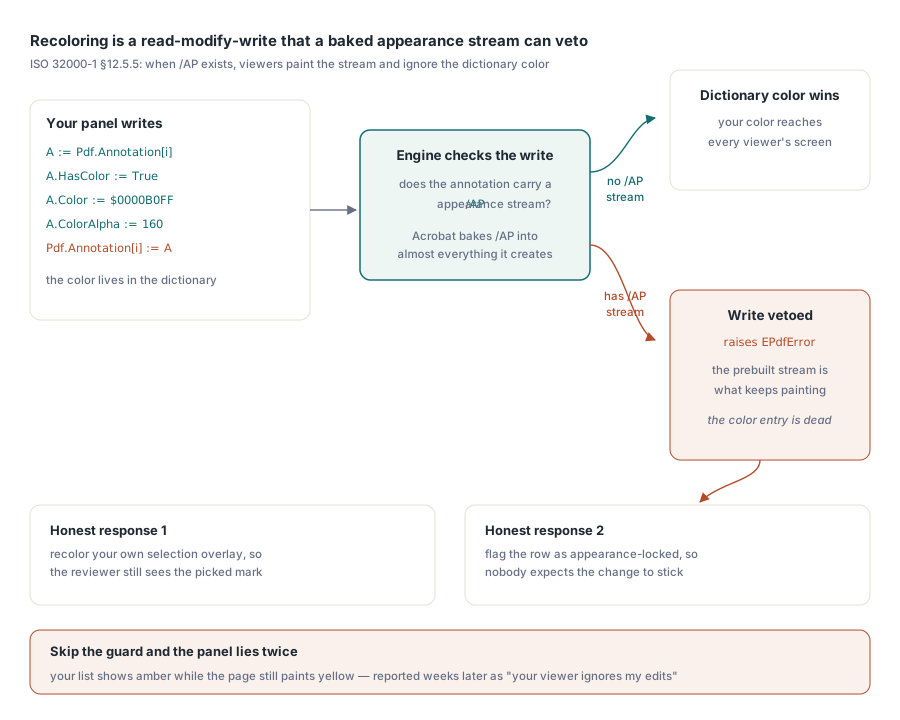
하이라이트를 노란색에서 호박색으로 바꾸는 것은 코드 한 줄처럼 들리며, 때로는 그렇습니다. 문제의 핵심은 ISO 32000-1 §12.5.5입니다. 주석에 /AP 모양 스트림이 포함된 경우, 규정을 준수하는 뷰어는 사전 빌드된 스트림을 그리고 딕셔너리의 색상 항목을 죽은 메타데이터로 취급합니다. Acrobat은 생성하는 본질적으로 모든 것에 대해 모양 스트림을 작성하므로 고객으로부터 도착하는 대부분의 주석은 이미 이 상태에 있으며, 자신 있게 설정한 색상은 결코 화면에 도달하지 않습니다. 색상 변경은 Annotation[] 속성을 통한 읽기-수정-쓰기 작업이며, 컴포넌트는 충돌에 대해 정직합니다. 엔진이 딕셔너리 색상이 구워진 모양을 재정의하는 것을 거부하면 쓰기 작업에서 EPdfError가 발생합니다
A := Pdf.Annotation[Item.Index];
A.HasColor := True;
A.Color := $0000B0FF;       // amber
A.ColorAlpha := 160;
try
  Pdf.Annotation[Item.Index] := A;
except
  on EPdfError do
  begin
    // annotation이 pre-rendered /AP stream을 소유하지만 dictionary
    // color만으로 viewer가 그리는 내용을 바꿀 수 없음
    Item.AppearanceLocked := True;
    StatusBar.SimpleText := 'Color is fixed by the annotation appearance';
  end;
end;
매번 해당 예외를 포착하고 실패가 아닌 정보로 취급하십시오. 이 방어를 건너뛰면 패널은 자체 목록에 호박색을 기분 좋게 표시하는 반면 페이지는 계속 노란색으로 그려집니다. 사용자는 몇 주 후에 "귀하의 뷰어가 내 편집 내용을 무시합니다"라며 이슈를 등록하고, 당신은 우연히 모양 스트림이 없는 파일에서 이를 재현하지 못해 오후 시간을 허비하게 됩니다. 모양이 잠겨 있다는 것을 알게 되면 두 가지 정직한 대응책이 있습니다. 주석 대신 자체 선택 오버레이의 색상을 변경하여 검토자가 최소한 자신이 선택한 하이라이트를 볼 수 있도록 하거나, 아무도 변경 사항이 적용될 것으로 기대하지 않도록 행을 모양 잠금 상태로 표시하는 것입니다
잔상을 남기지 않고 주석 삭제하기
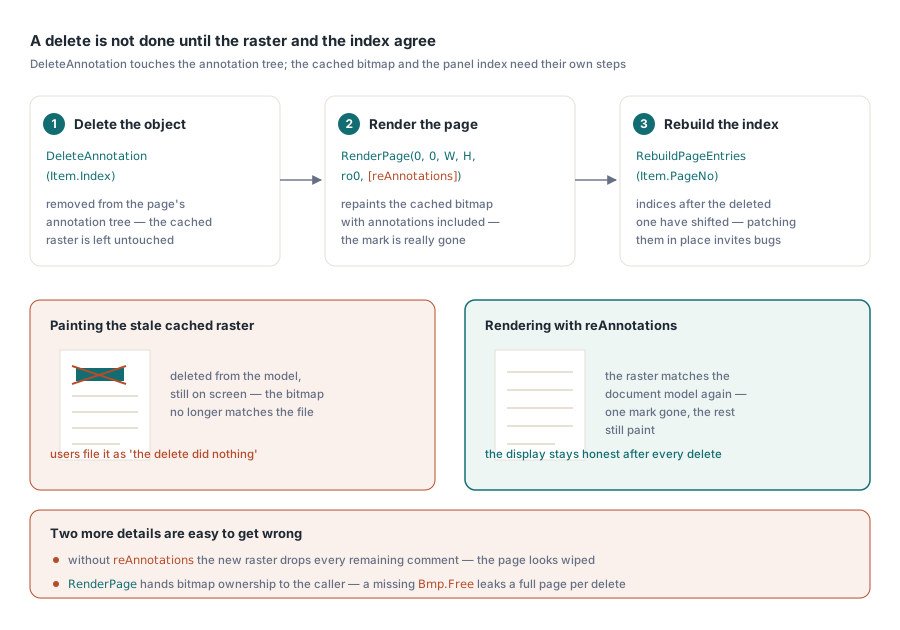
DeleteAnnotation은 현재 페이지의 주석 트리에서 객체를 제거하지만, 캐시된 페이지 래스터는 그대로 둡니다. 호출 직후에 페인팅하면 삭제된 하이라이트가 화면에 여전히 남아, 뒤에 있는 문서 모델과 더 이상 일치하지 않는 비트맵에 놓여 있습니다. 해결책은 재렌더링을 호출자가 잊어버릴 수 있는 단계가 아니라 삭제의 일부로 취급하는 것입니다
Pdf.PageNumber := Item.PageNo;
Pdf.DeleteAnnotation(Item.Index);   // 실패 시 EPdfError 발생
Bmp := Pdf.RenderPage(0, 0, ViewWidth, ViewHeight, ro0, [reAnnotations]);
try
  PaintPageBitmap(Bmp);
finally
  Bmp.Free;  // RenderPage가 bitmap ownership을 caller에게 넘김
end;
RebuildPageEntries(Item.PageNo);  // Item.Index 이후의 index가 이동됨
해당 블록에서 두 가지 세부 사항을 잘못 이해하기 쉽습니다. reAnnotations 옵션이 있어야 합니다. 그렇지 않으면 새 래스터가 남은 모든 주석을 누락하여 하나의 마크 대신 전체 코멘트 세트를 지운 것처럼 페이지가 보입니다. 그리고 Bmp.Free는 선택 사항이 아닙니다. 함수 스타일 RenderPage 오버로드는 비트맵 소유권을 호출자에게 넘기므로, 해제를 누락하면 삭제할 때마다 전체 페이지 래스터가 누출되며, 긴 문서를 검토하는 사용자는 몇 분 안에 실제 메모리 압박을 받게 됩니다
자체 UI에서 검토자 마크 추가하기
주석 생성은 채워진 TPdfAnnotation 레코드(하위 유형, 사각형, 색상, 내용, 작성자)를 가져와 현재 페이지에 첨부하는 CreateAnnotation을 통해 진행됩니다. anText 하위 유형인 스티키 노트는 쉬운 사례입니다. 위치, 내용 및 작성자를 설정하면 끝납니다. 잉크 주석은 사람들이 곤경에 처하는 곳입니다. 레코드의 사각형은 그림의 경계만 나타냅니다. 스트로크 자체는 한 번에 한 스트로크씩 마우스나 펜 입력에서 캡처한 FS_POINTF 데이터가 주입된 엔진의 잉크 스트로크 호출인 FPDFAnnot_AddInkStroke를 통해 별도로 첨부해야 하는 점 배열입니다. 사각형만으로 잉크 주석을 빌드하면 빈 공간으로 렌더링되는 빈 낙서가 나타나며, 이는 엔진 버그처럼 보이지만 실제로는 반쯤 완성된 주석입니다
단번에 작성자 정책을 정하십시오. 다음 달에 빌드할 검토자 필터는 오늘 코멘트에 찍는 이름만큼만 유용하기 때문에, UI에서 생성하는 모든 마크는 일관된 AuthorText를 가지고 있어야 합니다. 비어 있거나 일관되지 않은 작성자 문자열은 모든 파일을 다시 열지 않고서는 소급하여 복구할 수 없습니다
뷰어 밖으로 검토 내용 내보내기
검토 데이터는 프로젝트 책임자가 파일을 열지 않고 읽는 요약이나 추적 시트에 공급되는 CSV로서 뷰어를 벗어날 수 있을 때 그 가치를 증명합니다. 새로 파싱하지 말고 이미 빌드한 인덱스에서 내보내고, 각 마크를 다시 참조할 안정적인 방법을 선택하십시오. 다음 삭제가 조용히 인덱스 번호를 다시 매겨 CSV가 잘못된 코멘트를 가리키기 시작하기 때문에, 주석의 사각형과 짝을 이룬 페이지 번호는 배열 인덱스가 불가능한 라운드트립에서 살아남습니다
유지할 가치가 있는 행에는 페이지, 하위 유형, 작성자, 파일이 기록할 경우의 생성 타임스탬프, 내용 텍스트, 그리고 PDF가 제공하는 상태 열이 아닌 자체적으로 보유한 상태 열이 포함됩니다. 문서가 팀 외부에서 도착하고 누군가 검토하기 전에 그 안에 무엇이 있는지 알고 싶을 때 접수하는 동안 동일한 인덱싱 과정이 일찍 유용합니다. PDF 접수 워크벤치 문서는 해당 분류 작업(triage)을 설명하고, 폼 필드 탐색은 거울상 문제, 즉 코멘트가 아닌 데이터를 수집하기 위해 작성된 문서를 검토하는 문제를 다룹니다
배열이 보여주지 않는 한 가지 사례
코드의 결함처럼 보이지만 실제로는 그렇지 않은 한 가지 실패 모드는 표시해 둘 가치가 있습니다. 고객이 페이지 전체에 눈에 띄는 하이라이트가 있다고 보고하지만, 패널에는 아무것도 나열되지 않고 AnnotationCount가 0으로 반환됩니다. 일반적인 설명은 업스트림 어딘가에서 마크가 병합(flattened)되었다는 것입니다. 병합은 주석 모양을 일반 페이지 콘텐츠로 구워 하이라이트가 페이지 그래픽의 일부가 되고 주석 객체로서의 존재를 완전히 멈추게 합니다. 주석 API가 열거하거나, 색상을 변경하거나, 삭제할 대상이 아무것도 남지 않습니다. 그려진 마크업이 있는데 개수가 0으로 표시되면 열거 루프에서 버그를 찾지 말고 파일이 어떻게 생성되었는지 물어보십시오
열거 및 생성부터 색상 변경, 삭제, 그리고 디스플레이를 정직하게 유지하는 렌더링 옵션에 이르기까지 여기에 사용된 주석 표면(surface)은 Delphi, C++Builder 및 Lazarus/FPC용 PDFium Component와 함께 제공됩니다