PDF 수집 검토 워크벤치는 하위 시스템에서 파일을 다루기 전에 모든 파일을 확인하는 단일 작업을 수행하는 작은 프로그램입니다. 이 작업을 수행하려면 한 번의 패스에서 여러 기능을 결합해야 합니다. 파일을 신뢰하지 않은 상태로 열고, 파일이 주장하는 정보를 읽으며, 단순한 추출기를 오도하거나 공격을 수행할 수 있는 콘텐츠를 찾고, 추출 가능한 텍스트가 있는지 결정한 다음 발견한 내용에 따라 문서를 대기열로 라우팅합니다. 이 검사를 건너뛰면 조용히 실패가 발생합니다. XFA 양식을 래핑하는 소유자 암호로 암호화된 PDF는 텍스트 추출기에서 빈 문자열로 통과하고 빈 문서로 색인화되며, 하위 시스템의 누군가가 읽힌 적 없는 콘텐츠를 찾을 때까지 아무도 눈치채지 못합니다. PDFium Component는 Delphi, C++Builder 및 Lazarus를 위한 소스 코드 VCL/LCL 뷰어 및 검사 라이브러리이며, 이 워크벤치에 필요한 내부 검사 호출을 노출합니다. 아래 섹션에서는 어떤 호출이 어떤 질문에 답하는지, 그리고 뻔해 보이는 호출이 확실하게 잘못된 답을 제공하는 두 부분에 대해 설명합니다
파일이 라우팅되기 전에 답해야 할 5가지 질문
그리드와 썸네일 스트립을 떼어놓고 보면, 수집 분류는 다음 5가지 질문으로 요약됩니다
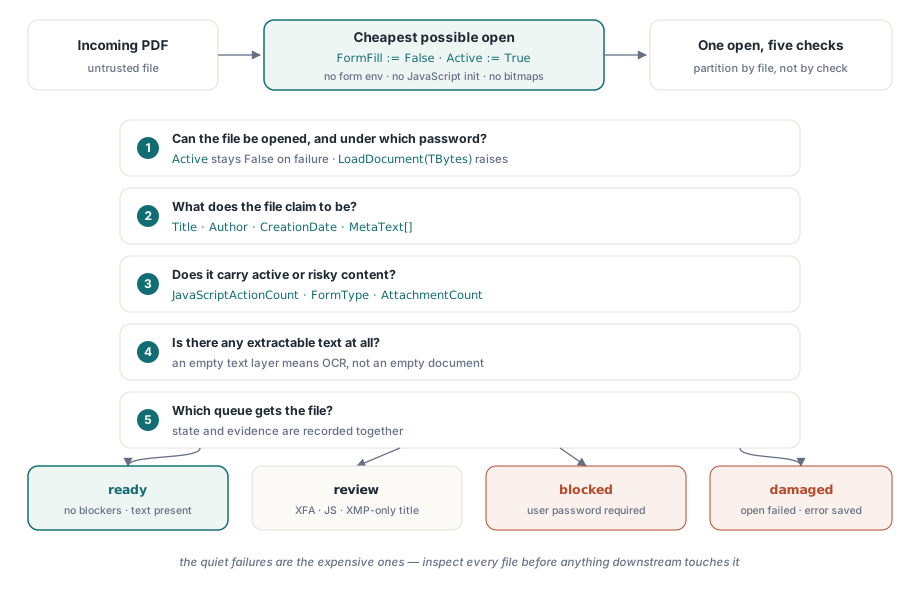
- 파일을 열 수 있습니까? 그렇다면 어떤 암호로 열 수 있습니까?
- 제목, 작성자, 생성 날짜 등 파일이 무엇이라고 주장합니까?
- JavaScript, XFA 양식 또는 포함된 파일과 같은 활성 또는 위험 콘텐츠가 있습니까?
- 추출 가능한 텍스트가 있습니까? 아니면 OCR을 거쳐야 하는 스캔본입니까?
- 이 모든 것을 고려할 때 직접 처리, 수동 검토 또는 격리 중 어느 대기열로 이동해야 합니까?
각 질문은 하나 또는 두 개의 PDFium Component 호출에 매핑됩니다. 이러한 매핑 중 두 가지에는 프로덕션 환경에서 디버깅해야 했던 잘못 라우팅된 파일의 대부분을 차지하는 까다로운 부분이 있습니다. 문서 메타데이터는 일치하지 않을 수 있는 두 곳에 상주하며, 암호화가 반드시 문서가 열리는 것을 막는 것은 아닙니다
비용 효율적인 열기: 양식 채우기 해제, 렌더링된 페이지 없음
분류는 가능한 가장 저렴한 비용으로 열 수 있어야 합니다. Active := True 전에 FormFill := False를 설정하면 컴포넌트가 양식 채우기 환경을 완전히 건너뛰도록 지시합니다. 이렇게 하면 로드 시간이 단축되고 (출처를 알 수 없는 파일에 대해서도 동일하게 중요함) 문서 수준 JavaScript가 초기화되는 것을 방지합니다. 아래에 사용된 검사 속성 중 어느 것도 페이지 렌더링이 필요하지 않으므로 분류 패스는 단일 비트맵을 생성할 필요가 없습니다
procedure InspectIncoming(const IncomingPath: string; var Rec: TIntakeRecord);
var
  Pdf: TPdf;
begin
  Pdf := TPdf.Create(nil);
  try
    Pdf.FileName := IncomingPath;
    Pdf.FormFill := False;     // 양식 환경 없음, JavaScript 초기화 없음
    Pdf.Active := True;        // 실패는 조용함: Active는 단순히 False로 유지됨

    if not Pdf.Active then
    begin
      Rec.OpenFailed := True;  // 손상된 파일 또는 사용자 암호 잠금
      Exit;                    // finally 블록은 여전히 실행됨
    end;

    Rec.PageCount := Pdf.PageCount;
    CollectIdentity(Pdf, IncomingPath, Rec);
    CollectRiskSignals(Pdf, Rec);
  finally
    Pdf.Active := False;
    Pdf.Free;                  // 형식이 잘못된 파일에서 인스턴스를 절대 누출하지 마십시오
  end;
end;
할당 후 검사는 선택 사항이 아니며 예외 핸들러가 아닌 이유가 있습니다. 엔진이 파일을 로드할 수 없을 때 컴포넌트는 내부 EPdfError를 삼키고 예외를 전파하는 대신 Active를 False로 둡니다. 예외를 기다리는 코드는 열리지도 않은 문서에서 기꺼이 PageCount를 읽습니다. 거부 워크플로우에 엔진의 실제 오류 텍스트가 필요한 경우, 파일을 바이트 배열로 읽고 TBytes를 사용하는 LoadDocument 오버로드를 호출하십시오. 해당 경로는 암호 사례를 포함하여 메시지와 함께 EPdfError를 발생시킵니다. try..finally는 여전히 그 역할을 합니다. 수집 서비스는 몇 주 동안 무인 상태로 실행되며, 나중에 발생하는 예외로 인해 TPdf 인스턴스가 누출되거나 재시도 패스에서 걸림돌이 될 잠금을 유지해서는 안 됩니다
처리량이 병목 현상이 되는 경우는 드뭅니다. 양식 채우기가 비활성화되고 렌더링이 없으면 분류 열기는 I/O가 지배하며 단일 작업자가 로컬 디스크에서 초당 여러 파일을 편안하게 검사합니다. 수집량이 단일 작업자를 초과하는 경우 검사 기준이 아닌 파일별로 작업을 분할하십시오. 5가지 질문은 한 번의 열기를 공유하며 이를 프로세스 간에 분할하면 가장 비싼 단계를 상쇄하는 대신 배가시킵니다
메타데이터는 두 곳에 상주하며 서로 일치하지 않습니다
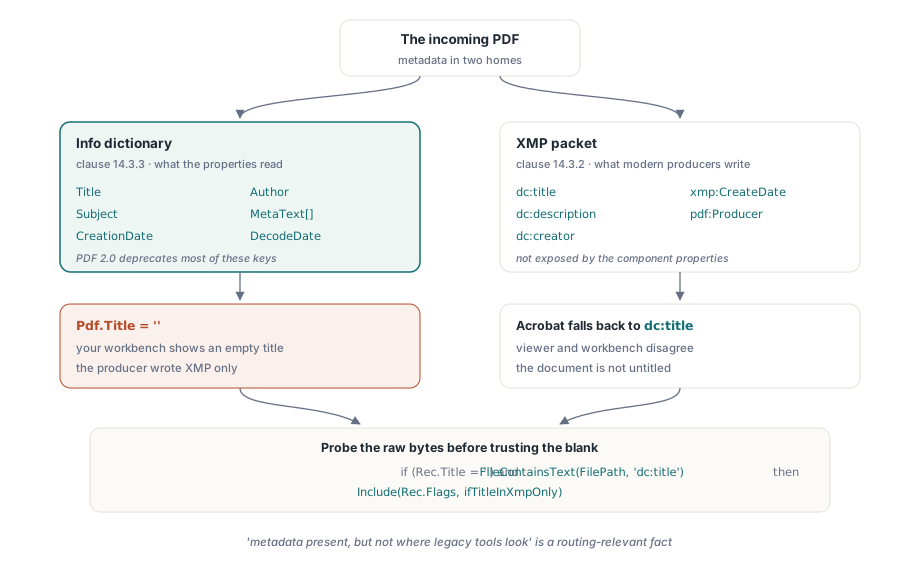
ISO 32000-1은 문서 정보 사전 (조항 14.3.3)과 카탈로그에 첨부된 XMP 패킷 (조항 14.3.2)이라는 문서 메타데이터에 대한 두 개의 공간을 정의합니다. Title, Author, Subject 및 CreationDate 속성은 다른 키에 대해 MetaText[]를 사용하고 D:YYYYMMDD... 날짜 문자열을 구문 분석하기 위해 DecodeDate를 사용하여 정보 사전을 읽습니다. 문제점은 최신 제작 소프트웨어가 점점 더 XMP만 작성한다는 점인데, 이는 ISO 32000-2에서 PDF 2.0의 대부분의 정보 사전 키를 더 이상 사용하지 않도록 하여 공식화된 방향입니다. 수집 도구의 증상은 구체적입니다. Adobe Acrobat은 제목을 표시하는 반면 워크벤치에는 빈 제목이 표시되는데, 그 이유는 Acrobat이 정보 사전 속성이 전혀 닿지 않는 XMP 패킷 내부의 dc:title로 대체되었기 때문입니다
procedure CollectIdentity(Pdf: TPdf; const FilePath: string;
  var Rec: TIntakeRecord);
begin
  Rec.Title := Pdf.Title;             // 정보 사전 값
  Rec.Author := Pdf.Author;
  Rec.CreatedAt := Pdf.CreationDate;  // 원시 PDF 날짜 문자열 ("D:2026...")

  // 빈 정보 제목이 제목 없는 문서를 의미하지는 않습니다.
  // 컴포넌트는 XMP 패킷을 노출하지 않으므로 빈 공간을 신뢰하기 전에
  // dc:title 요소를 위해 원시 파일 바이트를 조사하십시오.
  if (Rec.Title = '') and FileContainsText(FilePath, 'dc:title') then
    Include(Rec.Flags, ifTitleInXmpOnly);
end;
위의 조잡한 하위 문자열 조사조차도 제 역할을 합니다. "메타데이터가 존재하지만 레거시 도구가 보는 위치에는 없음"은 제목이나 작성자를 기준으로 색인화하는 아카이브 파이프라인과 관련된 라우팅 사실입니다. 하위 인덱스가 정보 사전만 읽는 경우, 이 방식으로 플래그가 지정된 파일은 조용히 검색할 수 없게 됩니다
어쨌든 열리는 암호화된 파일
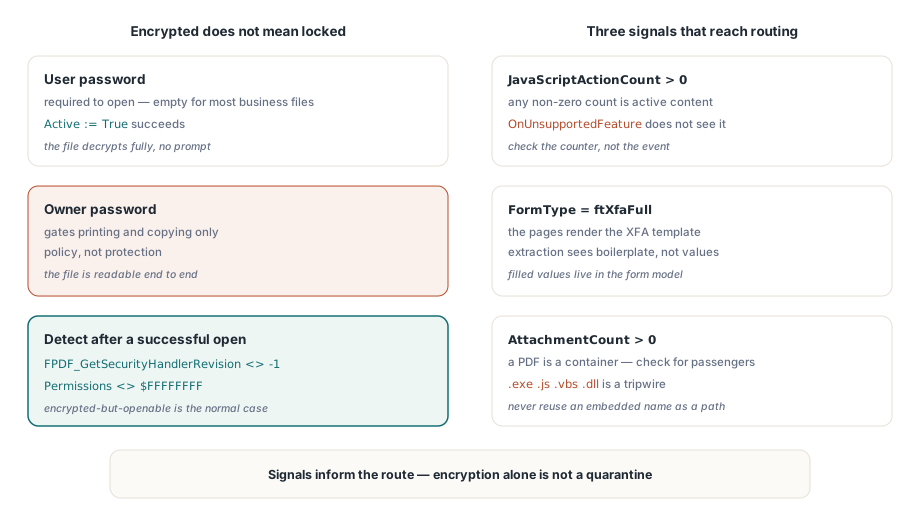
암호화된 문서가 반드시 열리지 않는 것은 아닙니다. 표준 보안 핸들러(ISO 32000-1 조항 7.6.3)는 문서를 여는 데 필요한 사용자 암호와 인쇄 및 복사와 같은 권한을 제한하는 소유자 암호를 구분합니다. "보호된" 비즈니스 문서의 상당 부분은 소유자 암호와 빈 사용자 암호로 암호화됩니다. 프롬프트 없이 열리고 완전히 암호가 해독되며 권한 플래그를 존중하는 뷰어에 의존합니다. 이는 보호가 아니라 정책이며 수집 상태에 그 차이가 반영되어야 합니다
성공적으로 연 후 암호화를 감지하려면 하나의 엔진 호출과 폴백이 필요합니다. FPDF_GetSecurityHandlerRevision(Pdf.Document)는 보호되지 않은 파일에 대해 -1을 반환하고 그렇지 않은 경우 핸들러 수정 버전을 반환하며, Pdf.Permissions가 모든 비트가 설정된 $FFFFFFFF 마스크 이외의 항목을 반환하는 것은 이를 확증하는 신호입니다. 진정한 사용자 암호로 잠긴 파일의 경우 Active := True를 설정하기 전에 Password를 할당하십시오. 여전히 열 수 없는 경우 무작정 다시 시도하지 않고 보안 채널을 통해 보낸 사람에게 자격 증명을 요청하는 차단된 상태로 파일을 라우팅하십시오. 그리고 "암호화됨"을 자동 격리로 처리하려는 유혹에 저항하십시오. 문서가 많은 대부분의 산업에서 암호화되어 있지만 열 수 있는 파일은 의심스러운 것이 아니라 정상적인 경우입니다
활성 콘텐츠: JavaScript, XFA 및 포함된 파일
세 가지 결과는 항상 라우팅 결정에 도달해야 합니다. 첫째, JavaScript입니다. OnUnsupportedFeature 이벤트는 엔진이 XFA 또는 3D 콘텐츠와 같은 구조적 기능을 발견할 때 보고하지만 JavaScript는 감지하지 못합니다. 대신 JavaScriptActionCount를 확인하고 0이 아닌 결과를 활성 콘텐츠로 처리하십시오. 둘째, XFA입니다. FormType이 ftXfaFull을 반환하면 표시되는 페이지는 XFA 템플릿의 렌더링에 지나지 않는 경우가 많으며 기존의 텍스트 추출은 채워진 값 대신 상용구를 볼 수 있습니다. 셋째, 첨부 파일입니다. PDF는 컨테이너 형식이며 AttachmentCount는 이 파일에 승객이 있는지 여부를 알려줍니다
procedure CollectRiskSignals(Pdf: TPdf; var Rec: TIntakeRecord);
var
  i, PageNo: Integer;
  Ext: string;
begin
  Rec.IsEncrypted := Assigned(FPDF_GetSecurityHandlerRevision) and
    (FPDF_GetSecurityHandlerRevision(Pdf.Document) <> -1);
  Rec.HasForms := Pdf.FormType <> ftNone;
  Rec.IsXfa := Pdf.FormType = ftXfaFull;
  Rec.HasJavaScript := Pdf.JavaScriptActionCount > 0;

  // AnnotationCount는 페이지별 속성입니다. 페이지를 순회하여 총계를 냅니다.
  // 페이지 개체를 로드해도 아무것도 렌더링되지 않으므로 저렴하게 유지됩니다.
  Rec.Annotations := 0;
  for PageNo := 1 to Pdf.PageCount do
  begin
    Pdf.PageNumber := PageNo;
    Inc(Rec.Annotations, Pdf.AnnotationCount);
  end;

  Rec.Attachments := Pdf.AttachmentCount;

  for i := 0 to Rec.Attachments - 1 do
  begin
    Ext := LowerCase(ExtractFileExt(string(Pdf.AttachmentName[i])));
    if (Ext = '.exe') or (Ext = '.js') or (Ext = '.vbs') or (Ext = '.dll') then
      Include(Rec.Flags, ifDangerousAttachment);
  end;
end;
해당 루프에서 두 가지 세부 사항에 주의해야 합니다. 첨부 파일 이름은 문서 내부에서 가져오므로 먼저 소독하지 않고 출력 경로로 재사용하지 마십시오. ..\..\start.exe와 같이 포함된 이름은 부주의한 저장 호출을 기다리는 경로 탐색 기법입니다. 그리고 확장자 차단 목록은 보증이 아니라 트립와이어입니다. 이 역할은 파일이 깨끗하다고 인증하는 것이 아니라 사람이 결정하도록 강제하는 것입니다
신호를 라우팅 상태로 전환
실행 가능한 상태 모델은 대부분의 팀이 예상하는 것보다 더 적은 상태를 필요로 합니다. 준비 완료(ready) (차단 요소 없음, 텍스트 존재), 검토(review) (열기 성공했지만 XFA 양식, JavaScript, 빈 텍스트 레이어 또는 XMP에만 있는 제목과 같이 확인할 항목이 있음), 차단됨(blocked) (사용자 암호 필요), 손상됨(damaged) (열기 실패). 상태와 함께 증거를 기록하십시오. 파일 해시, 페이지 수, 정확한 플래그 및 손상된 파일에 대한 엔진 오류 메시지는 모두 중요합니다. 라우팅 결정에 의문을 제기하는 사람은 몇 주 후에 이미 교체되거나 수정되었을 수 있는 파일에 대해 문의할 것이기 때문입니다
작업자가 격리된 파일을 봐야 할 때 기본 셸 뷰어에 맡기지 마십시오. Delphi에서 안전한 PDF 미리보기 표면 구축하기에 설명된 방식대로 스크립팅 및 링크 처리가 비활성화된 강화된 창 렌더링 내부에 렌더링하십시오. 또한 수집이 규정 준수 요구 사항이 있는 아카이브를 제공하는 경우 분류 패스는 더 깊은 검사를 예약하기에 자연스러운 위치입니다. PDF/A 및 PDF/UA 프로필에 대한 일괄 프리플라이트 검증은 이 검사가 중지되는 위치에서 정확하게 시작됩니다
컴포넌트의 제품 페이지에는 라이선스, 전체 검사 API 및 수집 스타일 문서 검사기를 포함한 번들 데모가 포함되어 있습니다. PDFium Component