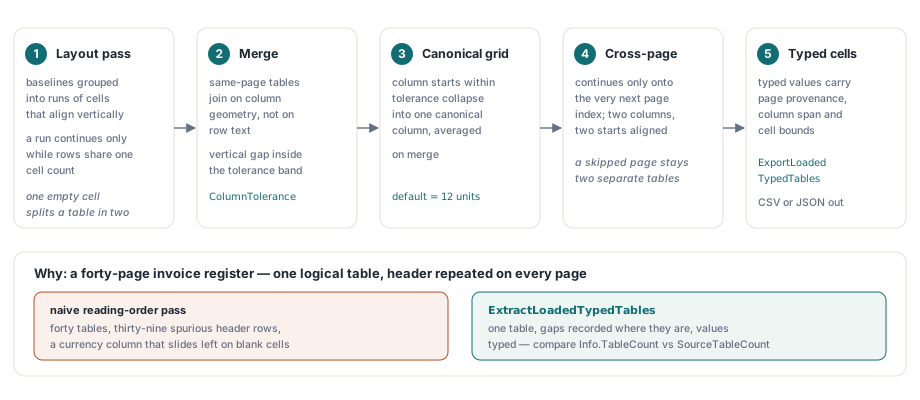
HotPDF는 기존 PDF에서 ExtractLoadedTypedTables를 통해 표를 복구합니다. 이 Delphi API는 layout pass가 만든 row fragment를 합치고 표마다 하나의 canonical column grid를 만들며 geometry가 허용하면 page break를 넘어 표를 이어 붙이고 모든 cell을 page provenance, column span과 bounds를 가진 typed value로 반환합니다. ExportLoadedTypedTables는 같은 결과를 CSV 또는 JSON으로 바로 씁니다. 이 기능을 만들 가치가 있는 상황은 지루하지만 매우 흔합니다. 논리적으로는 하나의 표인 40-page invoice register가 있고 각 page 위에는 header가 반복됩니다. naive reading-order pass를 실행하면 40개 표, 39개의 가짜 header row와 중간 cell이 비어 있던 row마다 한 칸 왼쪽으로 밀리는 currency column을 얻게 됩니다. calling application에서 downstream cleanup으로 이를 고치는 순간 document-import project는 죽어 갑니다
PDF page가 표 대신 fragment를 건네는 이유
문서에 tag가 없는 한 PDF page에는 table semantics가 전혀 없기 때문입니다. content stream은 text-showing operator와 positioning matrix(ISO 32000-1 §9.4.3)를 담을 뿐이며 화면에서 보이는 ruled box는 text와 관련 없는 path painting이므로 extractor가 이를 연관시킬 의무가 없습니다. Structure element type Table, TR, TH, TD는 tagged PDF의 logical structure hierarchy(ISO 32000-1 §14.8.4)에만 존재하고 유통되는 business document 대부분은 tag가 없습니다. 아래에서 말하는 모든 것은 parsing이 아니라 geometric recovery이므로 reconciliation report를 그 위에 만들기 전에 이 점을 분명히 해야 합니다
그래서 HotPDF는 먼저 extracted glyph에 대해 semantic layout analysis를 실행합니다. 이는 loaded PDF에서 structure-order text extraction과 structured HTML 및 XML export를 뒷받침하는 것과 같은 pass입니다. 이 pass는 baseline을 cell이 수직으로 정렬되는 run에 묶고 consecutive row의 cell count가 같을 때만 run을 계속합니다. layout engine에는 옳고 저렴한 규칙이지만 caller에게는 잘못된 형태입니다. 빈 interior cell 하나가 visual table 하나를 두 개의 source table로 나누기 때문입니다. typed table layer는 바로 이 조각을 다시 합치기 위해 그 pass 위에 놓입니다
canonical column grid와 ColumnTolerance knob
ExtractLoadedTypedTables는 다른 작업을 하기 전에 same-page fragment를 합치며 row text가 아니라 column geometry로 merge합니다. 인접한 두 source table은 둘 다 최소 두 column을 가지고 첫 표의 마지막 row와 둘째 표의 첫 row 사이 vertical gap이 tolerance band 안에 있으며 column start position이 정렬되면 합쳐집니다. 서로 ColumnTolerance 이내인 column start는 하나의 canonical column으로 collapse되고 merge하면서 평균을 냅니다. 기본 tolerance는 12 user-space unit이며 일반적인 business typography에 맞고 wide-tracked 또는 깊게 들여쓴 layout에서는 높이는 편이 좋습니다
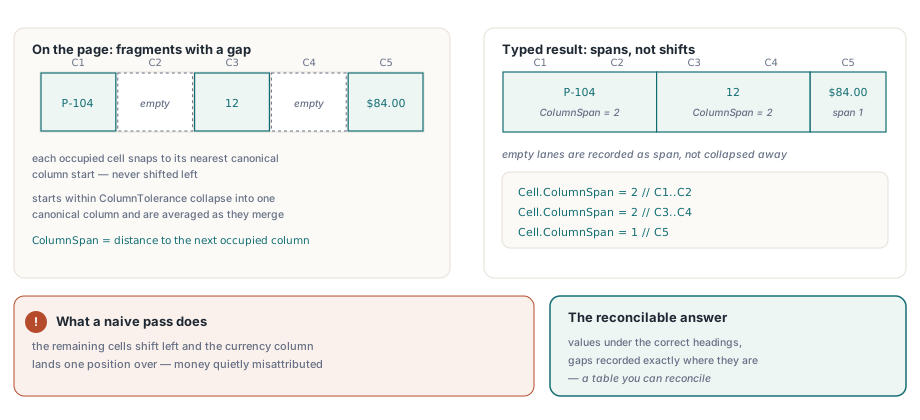
interior value가 없는 row에서 일어나는 일이 핵심입니다. HotPDF는 각 cell을 가장 가까운 canonical column start에 snap한 다음 그 column에서 다음 occupied column까지의 거리를 ColumnSpan으로 설정하고 나머지 cell을 왼쪽으로 밀지 않습니다. 5-column grid의 3-cell row도 값을 올바른 heading 아래에 유지하고 gap이 정확히 어디인지 기록합니다. 이것이 reconcile할 수 있는 표와 돈을 조용히 잘못 귀속하는 표의 차이입니다
var
  Pdf: THotPDF;
  Options: THPDFTypedTableExtractionOptions;
  Tables: THPDFTypedTables;
  Info: THPDFTypedTableExtractionInfo;
begin
  Pdf := THotPDF.Create(nil);
  try
    if Pdf.LoadFromFile('register.pdf', '') <= 0 then
      Exit;
    Options := THPDFTypedTableExtractionOptions.Default;
    Options.ColumnTolerance := 12;           // user-space unit
    Options.MinimumTableConfidence := 0.55;  // 이보다 낮으면 table을 버립니다
    Options.DateOrder := ttdoDMY;            // 03/04/2026은 3 April
    Options.DecimalSeparator := ',';
    Options.ThousandsSeparator := '.';
    if Pdf.ExtractLoadedTypedTables([0, 1, 2, 3], Options, Tables, Info) then
      // Info.TableCount와 Info.SourceTableCount가 merge된 양을 보여 줍니다
      ProcessTables(Tables)
    else if Info.Status = ttesBudgetExceeded then
      Log(string(Info.Diagnostic));
  finally
    Pdf.Free;
  end;
end;
cross-page merging이 실제로 보장하는 것
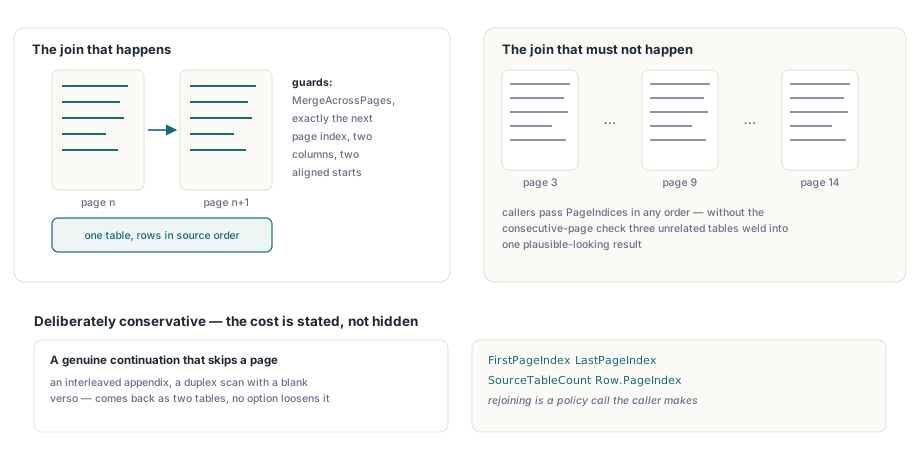
의도적으로 보수적인 결과를 보장합니다. HotPDF가 page boundary를 가로질러 두 table을 join하는 조건은 MergeAcrossPages가 enable되어 있고, 두 번째 table이 첫 번째 table이 끝난 바로 다음 page index에서 시작하며, 둘 다 최소 두 column을 가지고, 최소 두 canonical column start가 ColumnTolerance 안에서 정렬되는 경우입니다. consecutive-page 조건이 핵심입니다. caller는 PageIndices를 원하는 순서의 open array로 넘길 수 있는데 이 검사가 없으면 page 3, 9, 14 요청이 서로 관계없는 세 table을 그럴듯한 하나의 결과로 용접할 수 있습니다. 대가는 page를 건너뛰는 실제 continuation, 사이에 appendix가 있는 경우 또는 빈 verso가 있는 duplex scan이 두 table로 돌아오며 이를 느슨하게 하는 option이 없다는 것입니다. 재결합은 calling application만 결정할 수 있는 policy이므로 API는 FirstPageIndex, LastPageIndex, SourceTableCount와 row별 PageIndex를 노출하고 결정을 있어야 할 곳에 남깁니다
반복 header는 삭제하지 않고 label만 붙입니다
ExtractLoadedTypedTables는 result에서 repeated header row를 절대 제거하지 않습니다. cross-page merge가 incoming table의 시작 header text가 accumulated table과 trim 및 case folding 후 동일하다는 것을 찾으면 그 row에 IsHeader와 IsRepeatedHeader를 표시하고 source order 그대로 append합니다. 삭제는 lossy하고 되돌릴 수 없는 선택이며 consumer마다 원하는 결과가 다릅니다. CSV import는 반복을 없애고 싶지만 audit trail은 page number와 함께 보존하고 diffing tool은 source order를 byte 단위로 유지하고 싶어 합니다. 그래서 library가 보고 caller가 결정합니다
var
  T, R, C: Integer;
  Row: THPDFTypedTableRow;
  Total: Double;
begin
  Total := 0;
  for T := 0 to High(Tables) do
    for R := 0 to High(Tables[T].Rows) do
    begin
      Row := Tables[T].Rows[R];
      if Row.IsRepeatedHeader then
        Continue;                    // 첫 header block만 유지합니다
      for C := 0 to High(Row.Cells) do
        if Row.Cells[C].ValueKind = ttvkCurrency then
          Total := Total + Row.Cells[C].NumberValue;
    end;
end;
typed value와 caller가 제공해야 하는 separator
type inference는 ambiguity를 유일하게 합리적인 방향으로 해결하는 고정 순서로 실행됩니다. boolean, date, percentage, currency, plain number 순이며 어느 것에도 맞지 않으면 string으로 남습니다. 이 순서가 있어야 date column의 2026이 date parser가 보기 전에 number parser에 의해 결정되지 않습니다. currency는 선행 $, £, ¥, € 또는 공백 뒤의 세 글자 ISO 4217 code에서 인식하고 code는 CurrencyCode에 보존합니다. 중요한 점은 HotPDF가 locale을 추측하지 않는다는 것입니다. DecimalSeparator, ThousandsSeparator, DateOrder는 option에서 오며 1.234가 하나의 number인지 1,234인지 PDF에 없는 사실에 달려 있기 때문입니다. raw Unicode Text도 typed value와 함께 모든 cell에 보존되므로 잘못된 추측은 두 번째 extraction pass 없이 복구할 수 있습니다
var
  Stream: TFileStream;
  Info: THPDFTypedTableExtractionInfo;
begin
  Stream := TFileStream.Create('tables.json', fmCreate);
  try
    if not Pdf.ExportLoadedTypedTables([0, 1, 2], ttefJSON,
      Stream, Options, Info) then
      case Info.Status of
        ttesInvalidOptions:   ReportBadConfiguration;
        ttesBudgetExceeded:   ReportOversizedDocument;
        ttesCancelled:        ReportUserCancelled;
        ttesWriteFailed:      ReportDestinationProblem;
      else
        ReportExtractionFailure;
      end;
  finally
    Stream.Free;
  end;
end;
두 export format은 서로 다른 질문에 답하며 일부러 동일하지 않습니다. CSV는 merged span의 continuation column을 empty field로 써 spreadsheet나 bulk loader가 기대하는 형태를 만들고 JSON은 extraction이 알고 있던 모든 것을 보존합니다. typed value는 자체 kind 아래에 들어가고 columnSpan, cell과 row별 confidence, cell bounds, page와 source-table provenance가 함께 갑니다. 두 format 모두 전체 document를 제한된 in-memory buffer에 staging한 뒤 destination stream에 publish하고 write가 중간에 실패하면 원래 byte, length와 position을 복원하므로 failed export가 half-written file을 남기지 않습니다. page, page당 glyph, table, row, cell, character와 output byte budget은 각각 따로 계산하며 row는 allocation 전에 count합니다. row마다 SetLength를 수행하면 million-row default ceiling에 도달하기 훨씬 전부터 quadratic copying으로 퇴화하기 때문입니다
geometric table recovery가 포기하는 곳
feature list보다 failure mode를 명시하는 것이 더 유용합니다. 각각은 caller가 더 나은 option value가 아니라 자체 policy를 필요로 하는 지점이기 때문입니다
- vertical merge는 복구하지 않습니다. HotPDF는 horizontal span에 대해
ColumnSpan을 보고하고RowSpan은 1로 두므로 printed table에서 세 row에 걸친 cell은 하나의 cell과 두 gap으로 도착합니다 - header detection은 visual이 아니라 data-driven입니다. header block은 첫 번째 non-string typed value를 담은 row 전까지의 row run이므로 body가 전부 text인 table은 아무리 꾸며도
HeaderRowCount가 0으로 보고됩니다 MinimumTableConfidence아래의 table은 error 없이 result에서 버립니다. 무엇인가 버려졌는지 알아야 할 때Info.TableCount와Info.SourceTableCount를 비교하세요- run은 layout pass가 table이라고 부르려면 최소 두 row와 두 column이 필요하므로 한 줄짜리 pseudo-table 또는 긴 prose의 two-column layout은 올바르지만 유용하지 않게 table이 아닙니다
- scanned page에는 text operator가 없으므로 page에 OCR text layer가 생기기 전에는 geometry로 복구할 것이 없습니다
PDF가 자체 reporting stack에서 나온다면 이 모든 문제에 대한 가장 싼 수정은 upstream에 있습니다. tagged table을 내보내거나 source data를 보관하고 직접 만들지 않은 document에 대한 fallback으로 extraction을 취급하세요. 그 밖의 pipeline은 각 layer가 아래 layer 위에 세워지므로 다음 순서로 익힐 가치가 있습니다. 먼저 loaded PDF에서 plain text extraction을 시작하고 geometry를 보존해야 할 때 typed table API로 올라간 다음, 생성하는 쪽에서 output을 얼마나 recoverable하게 만들지 결정할 수 있다면 data table을 새 PDF로 render하는 방법을 살펴보세요
ExtractLoadedTypedTables와 ExportLoadedTypedTables는 Delphi와 C++Builder용 native HotPDF Delphi PDF Component에 포함되어 있으며 외부 DLL이나 runtime dependency가 없습니다. 제품 페이지에서 typed table API의 전체 option, status와 record reference를 확인할 수 있습니다