HotPDF v2.743.0은 /AP appearance stream이 없는 PDF annotation을 조용히 건너뛰는 대신 flatten합니다. FlattenLoadedAnnotations는 이제 appearance-less widget을 EnsureLoadedFieldAppearanceStream으로 보내고 appearance-less markup은 annotation 자체의 property에서 Form XObject를 만들어 처리합니다. 따라서 /NeedAppearances form에 입력한 값이 flatten 시 사라지지 않고 page content에 남습니다. 이 변경을 강제한 실패는 no-op처럼 보입니다. 고객이 browser에서 인쇄한 filled application form을 보냅니다. HotPDF에서 load하고 FlattenLoadedAnnotations를 호출한 뒤 0을 받고 save하여 applicant가 입력한 이름과 금액이 빈 box로 남은 document를 배포합니다. 아무것도 raise하지 않고 log도 남지 않습니다. 값은 내내 file 안의 각 field /V entry에 있었지만 bake할 appearance stream이 어느 widget에도 없어 flatten pass가 곧장 지나갔습니다
browser에서 인쇄한 form을 flatten하면 입력값이 사라지는 이유
/NeedAppearances form은 value는 저장하지만 value의 그림은 저장하지 않기 때문입니다. ISO 32000-1 12.7.2에 따르면 interactive form은 AcroForm dictionary에 /NeedAppearances true를 설정할 수 있으며 이는 viewer가 open 시점에 /V, /DA, /Q에서 각 field의 visual surface를 구성하도록 합니다. browser print path, server-side filler, 일부 scanning front end처럼 저렴하게 form을 생성하는 producer는 이 기회를 사용하고 /AP는 전혀 쓰지 않습니다. ISO 32000-1 12.5.5의 appearance algorithm에서 정의하는 flattening은 transcription 작업입니다. annotation의 normal appearance stream을 가져와 /BBox를 /Rect에 매핑하고 page content stream에서 Do operator로 호출한 뒤 annotation을 삭제합니다. source stream이 없으면 옮겨 적을 것이 없습니다. v2.386.0부터의 원래 HotPDF implementation은 이를 "skip"으로 처리했는데 단독으로는 방어 가능한 동작이지만 전체적으로는 치명적입니다. flatten이 가장 필요한 문서가 appearance를 가지고 있을 가능성이 가장 낮기 때문입니다. producer가 viewer가 그려 주기를 기대한 markup도 같은 구멍으로 사라졌습니다. review tool의 Highlight, redline pass의 Square, Ink signature가 그 예입니다
HotPDF가 FlattenLoadedAnnotations에 synthesis를 연결하는 위치
hook point는 의도적으로 늦게 잡았습니다. appearance lookup이 실패한 뒤이며 그 전이 아닙니다. FlattenLoadedAnnotations는 여전히 먼저 GetLoadedAnnotationAppearanceStream에 normal appearance를 요청하고 이미 가진 annotation은 v2.386.0과 똑같이 bake합니다. nil result이면서 non-degenerate /Rect를 가지고 hidden flag가 없는 annotation만 synthesis path로 들어갑니다. 순서가 중요한 이유는 /AP를 작성하기 위해 수고한 document author의 byte를 HotPDF가 재구성한 값으로 바꾸지 않기 위해서입니다
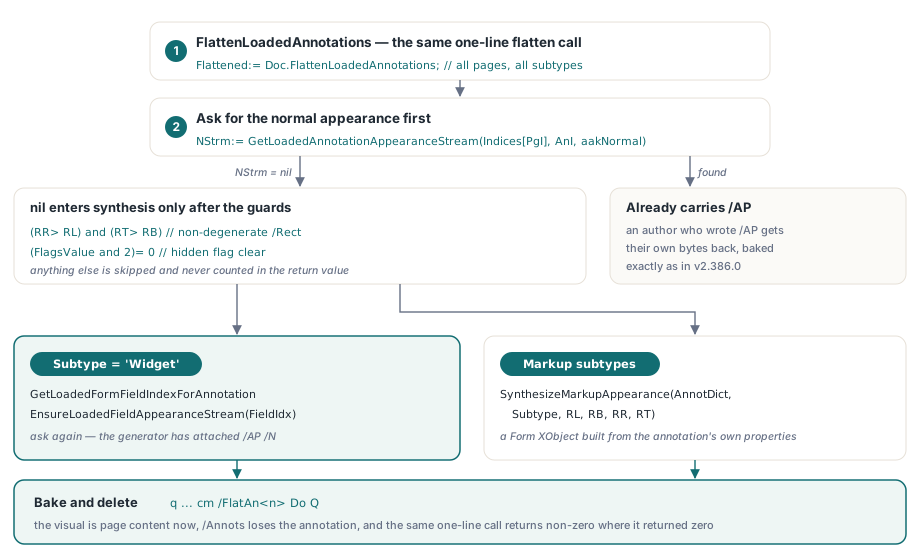
NStrm:= GetLoadedAnnotationAppearanceStream(Indices[PgI], AnI, aakNormal);
if (NStrm= nil) and (RR> RL) and (RT> RB) and ((FlagsValue and 2)= 0) then
begin
  if Subtype= 'Widget' then
  begin
    FieldIdx:= GetLoadedFormFieldIndexForAnnotation(Indices[PgI], AnI, WidgetIdx);
    if FieldIdx>= 0 then
      EnsureLoadedFieldAppearanceStream(FieldIdx);
    // 다시 요청합니다: generator가 widget에 /AP /N을 붙였습니다
    NStrm:= GetLoadedAnnotationAppearanceStream(Indices[PgI], AnI, aakNormal);
  end
  else
    NStrm:= SynthesizeMarkupAppearance(AnnotDict, Subtype, RL, RB, RR, RT);
end;
그 다음 두 annotation family가 갈라집니다. widget은 GetLoadedFormFieldIndexForAnnotation으로 owner field를 찾아 EnsureLoadedFieldAppearanceStream으로 넘깁니다. 이 field appearance generator는 v2.328.0부터 이 Delphi PDF library에 있었습니다. 두 번째 field renderer를 쓰지 않고 재사용하는 것이 핵심입니다. 이미 Type0 font, line wrapping, quadding, checkbox와 radio /AS state, /MK rotation을 모두 다루며 이미 loaded된 PDF에 AcroForm field를 추가하는 과정과 같은 machinery입니다. 나머지는 markup synthesizer로 갑니다. caller 입장에서는 아무것도 바뀌지 않습니다. 예전에는 0을 반환하던 document에서도 같은 한 줄의 flatten call이 이제 non-zero count를 반환합니다
Doc:= THotPDF.Create(nil);
try
  Doc.LoadFromFile('needappearances-form.pdf');
  // v2.743.0: AP가 없는 widget과 markup을 합성한 뒤 bake합니다
  Flattened:= Doc.FlattenLoadedAnnotations;          // 모든 page와 모든 subtype
  // Flattened:= Doc.FlattenLoadedAnnotations('1-3', 'Highlight');
  if Flattened= 0 then
    raise Exception.Create('nothing was flattened');
  Doc.SaveLoadedDocument('flattened.pdf');
finally
  Doc.Free;
end;
QuadPoints와 InkList가 잘못된 위치에 놓이는 이유
그 coordinate는 page user space에 있지만 synthesized appearance stream은 자체 /BBox space에 그리며 두 origin이 같은 점이 아니기 때문입니다. ISO 32000-1 Table 176은 text markup annotation의 /QuadPoints를 default user space에서 정의하고 Table 174도 line annotation의 /L endpoint에 같은 convention을 사용하며 /InkList도 같습니다. HotPDF는 synthesized form에 origin이 /Rect의 lower-left corner에 놓인 [0 0 W H] /BBox를 줍니다. 그러므로 /QuadPoints, /L 또는 /InkList에서 꺼낸 모든 point는 content stream에 쓰기 전에 /Rect lower-left의 음수를 더해 translation해야 합니다. 이것을 틀리면 page 위로 700 point 올라간 line의 highlight가 자기 box에서 700 point 더 위에 그려져 사실상 아무 데도 나타나지 않습니다. coordinate마다 한 번 빼는 수정은 bake가 뒤에서 내보내는 cm과 조합됩니다. 그 matrix가 /BBox를 다시 /Rect에 매핑하므로 두 단계가 상쇄되어 absolute geometry가 올바르게 됩니다
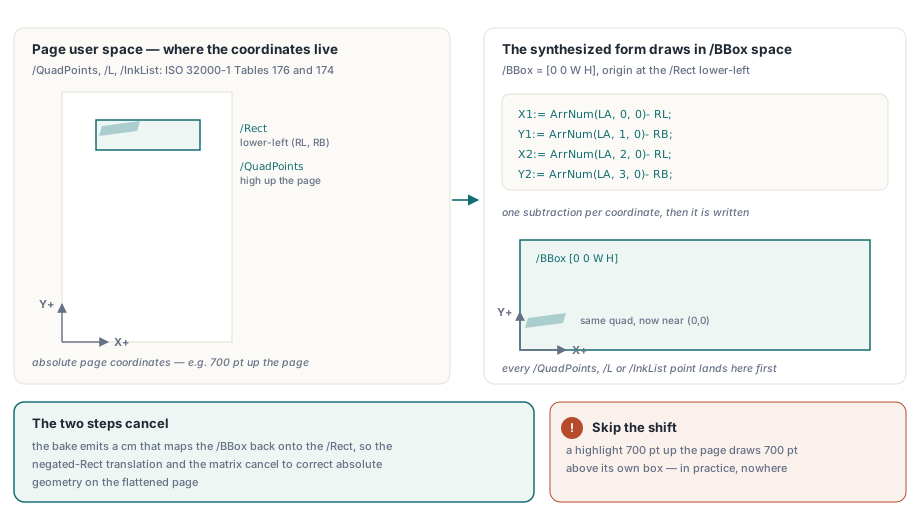
// /L endpoint는 page user space입니다(ISO 32000-1 Table 174). form의
// BBox origin은 /Rect lower-left이므로 -(RL, RB)만큼 이동합니다
X1:= ArrNum(LA, 0, 0)- RL;
Y1:= ArrNum(LA, 1, 0)- RB;
X2:= ArrNum(LA, 2, 0)- RL;
Y2:= ArrNum(LA, 3, 0)- RB;
StrokeOp:= ColorOp(DArr('C'), true);
if StrokeOp= '' then
  StrokeOp:= '0 G';
Result:= _FloatToStrR(BW)+ ' w '#10+ StrokeOp+ #10+
  _FloatToStrR(X1)+ ' '+ _FloatToStrR(Y1)+ ' m '+
  _FloatToStrR(X2)+ ' '+ _FloatToStrR(Y2)+ ' l S'#10;
합성된 markup appearance가 실제로 그리는 것
markup synthesizer는 annotation dictionary만 읽으므로 output이 예측 가능하고 알 수 없는 것을 아는 척하지 않습니다. FreeText와 Stamp는 /DA에서 parse한 font와 color로 /Contents를 그리고 /Q에 맞춰 2 pt padding을 둡니다. Square와 Circle은 /C로 stroke한 re 또는 네 arc Bezier outline을 그리며 /IC가 있으면 fill하고 width는 /BS /W에서 가져옵니다. Line과 Ink는 vertex를 stroke합니다. Highlight는 각 quad를 fill하고 Underline, StrikeOut과 Squiggly는 quad bottom, quad midpoint 또는 one-point zigzag에 rule을 stroke합니다. 1보다 작은 /CA는 ca entry를 가진 ExtGState가 되고 stream head에서 /GSA gs로 참조됩니다
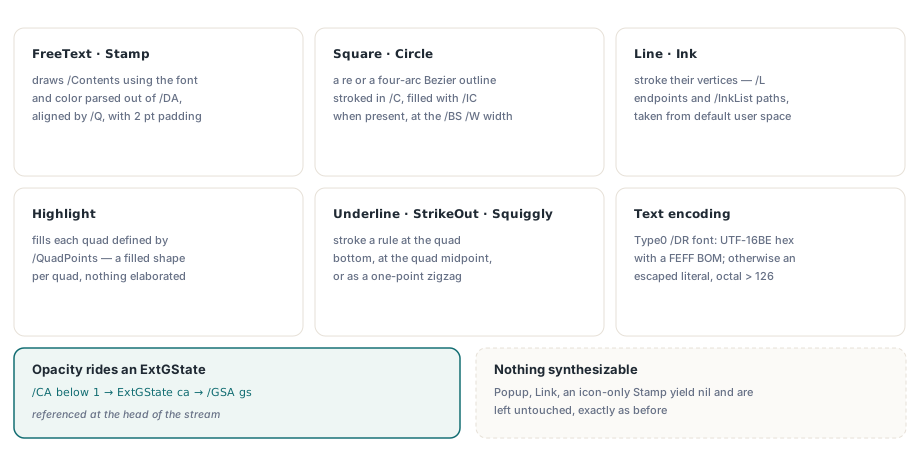
text encoding은 /DA가 이름으로 지정한 AcroForm /DR /Font entry에서 결정됩니다. 그 font의 /Subtype가 Type0이면 HotPDF는 FEFF byte order mark를 가진 UTF-16BE hex literal로 string을 쓰고, 그렇지 않으면 parenthesis와 backslash를 escape하고 126을 넘는 byte는 octal로 쓴 escaped literal string을 씁니다. /DA의 Tf operator는 BT 전에 내보내는데 text state가 text object boundary를 넘어 지속되므로 legal하며 /DA string을 분해하는 수고를 줄입니다. 제한 두 가지도 분명히 말해야 합니다. wrapping과 quadding을 위한 line width는 실제 font metric이 아니라 half-em / full-em heuristic으로 추정하므로 proportional font의 alignment가 가깝지만 정확하지는 않습니다. 또한 합성할 것이 없는 subtype은 nil을 반환하고 이전과 정확히 같이 그대로 둡니다. Popup, Link, icon name만 content인 Stamp가 그 예입니다
도움이 되려는 cleanup을 벌하는 임시 /Annots swap
FlattenOneWidget은 FlattenLoadedFormFields가 사용하는 per-widget path이며 shared flatten loop 내부에서 어떤 변경을 하든 존중해야 하는 aliasing trap입니다. generic flatten pass가 단일 widget에서 동작하도록 page의 /Annots value를 잠시 one-element array로 바꾼 다음 finally block에서 원래 PHPDFDictionaryItem pointer를 복원합니다. restore는 call 전에 capture한 dictionary slot에 다시 씁니다
DictItem:= PHPDFDictionaryItem(PageObj.Items.Items[AnnotsIndex]);
Item:= DictItem^.Value;
TemporaryAnnots:= THPDFArrayObject.Create(nil);
TemporaryAnnots.AddObject(Target);
DictItem^.Value:= TemporaryAnnots;
try
  Result:= FlattenLoadedAnnotations(IntToStr(PageIndex+ 1), 'Widget')= 1;
finally
  DictItem^.Value:= Item;   // inner loop가 이 item을 free하면 dangling입니다
  TemporaryAnnots.Free;
end;
shared inner loop에 합리적으로 보이는 tidy-up을 추가한다고 해 봅시다. array가 비면 DeleteValue('Annots')를 호출해 saved page에 vestigial empty array가 남지 않도록 하는 작업입니다. 그런데 그 call이 바로 DictItem이 가리키는 dictionary item을 free합니다. 그러면 finally가 dangling pointer를 통해 write하고 process가 "Invalid pointer operation"과 함께 죽습니다. 기존 test 두 개가 이를 즉시 잡았으며 그 덕분에 이것이 support ticket이 아닌 footnote로 남았습니다. 교훈은 일반화됩니다. shared loop에 cleanup을 추가하기 전 caller가 alias 또는 swap contract를 가지는지 확인하세요. 남은 empty /Annots array는 cosmetic wart일 뿐 pointer lifetime guarantee와 바꿀 가치가 없습니다
bake되지 않는 것과 flattening의 비용
hidden annotation은 의도적으로 제외됩니다. /F integer에서 bit position 2가 set된 annotation은 ISO 32000-1 12.5.3에 따라 hidden이며 /AP도 없을 때 다른 것처럼 synthesize해 bake하고 싶은 유혹이 생깁니다. 그러나 보안상 문제가 있는 bug가 됩니다. invisible note를 page content에 bake하면 file을 여는 모든 사람에게 보이기 때문입니다. HotPDF는 그런 annotation을 그대로 두고 return value에도 포함하지 않습니다. bake되는 것의 대가도 사용자에게 분명히 말해야 합니다. Flattening은 되돌릴 수 없습니다. annotation이 page의 /Annots array에서 삭제되고 visual이 page content가 되므로 field value를 더 편집할 수도, comment thread를 유지할 수도, /AS state를 toggle할 수도 없으며 original file 없이는 structured data를 복구할 방법도 없습니다. copy를 flatten하고 original을 보관한 뒤 document가 form에서 record로 바뀌는 지점에만 사용하세요. 문제가 appearance-less가 아니라 XFA-backed라면 HotPDF의 XFA to AcroForm flattening path에서 시작하고 아직 form을 만들고 있다면 AcroForm field action과 validation 연결에 관한 notes가 write side를 다룹니다
그렇지 않으면 반나절을 잃게 될 verification caveat도 하나 있습니다. ExtractLoadedPageGlyphs는 Form XObject 안으로 내려가지 않으며 baked appearance는 그 안에 있습니다. page content stream에는 q ... cm /FlatAn<n> Do Q sequence만 들어갑니다. 따라서 flattened page의 glyph extraction이 아무것도 보고하지 않는 것은 bake가 사라졌기 때문이 아니라 올바른 동작입니다. byte level에서 /FlatAn resource name, Do invocation과 /Subtype /Form을 확인하거나 XObject를 expand하는 rendering pipeline으로 검증하세요
annotation flattening은 실제로 생성된 document를 만나기 전까지 세 줄짜리 transcription처럼 보입니다. Delphi나 C++Builder에서 filled form, review markup 또는 archival output을 다룬다면 자체 appearance generator를 그 위에 만들기 전에 HotPDF Delphi PDF component가 loaded-document 쪽 AcroForm과 annotation을 어떻게 처리하는지 읽어 볼 가치가 있습니다