AcroForm 액션은 위젯에 붙어서, 그 위젯에 무슨 일이 일어났을 때 뷰어가 무엇을 해야 하는지 알려 주는 딕셔너리다. 버튼을 클릭하면 뷰어는 그 액션 딕셔너리를 읽는다: URI 액션은 웹 주소를 열고, JavaScript 액션은 스크립트를 실행하고, SubmitForm 액션은 수집된 필드 값을 엔드포인트로 전송하며, ResetForm 액션은 값을 기본값으로 되돌린다. 액션은 파일에 구워 넣은 동작이 아니라 데이터다. ISO 32000-1 §12.6이 딕셔너리 모양을 정의하고, 이를 해석하는 엔진은 뷰어가 제공한다. 이 분리가 중요한 이유는, PDF에 완벽하게 작성된 액션이라도 반대편 리더에 그것을 위한 엔진이 없으면 아무 일도 일어나지 않기 때문이며, 수많은 AcroForm 관련 골칫거리는 잘못된 필드가 아니라 바로 이 간극에서 비롯된다
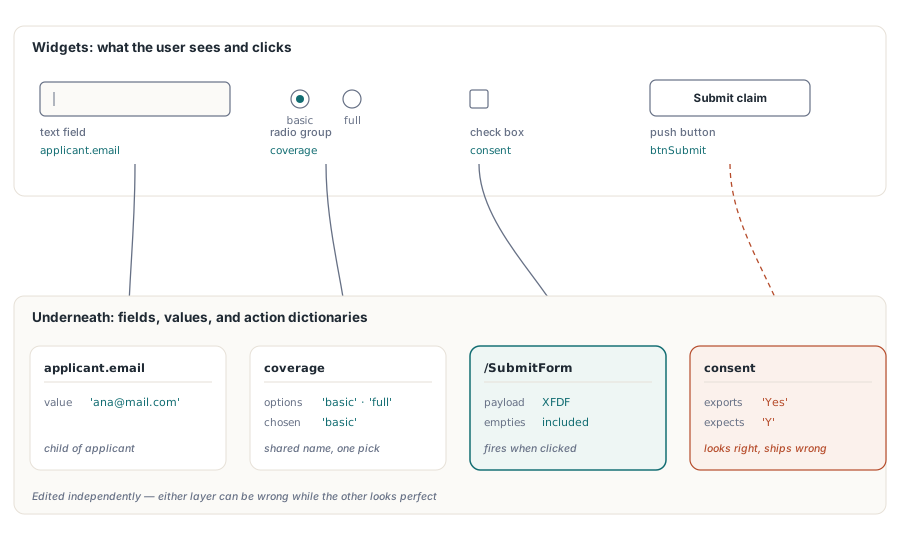
HotPDF는 그 딕셔너리들을 Delphi와 C++Builder에서 직접 작성하며, 이들이 매달려 있는 필드 위젯과 함께 작성한다. 모든 상호작용 양식에는 두 가지 구조가 관여한다: 사용자가 페이지에서 보는 위젯, 그리고 그 아래에서 데이터와 연결을 담당하는 필드와 액션 메커니즘이다. 이 둘은 독립적으로 편집되며, 하나는 잘못되어 있어도 다른 하나는 멀쩡해 보일 수 있다. 아래 절들은 필드 이름 짓기, 버튼 액션 자체, 필드 수준 JavaScript, 그리고 전적으로 두 번째 구조 안에서만 존재하기 때문에 시각적 검사를 통과해 버리는 부류의 결함을 차례로 다룬다
필드 이름은 캡션이 아니라 라우팅 키다
모든 AcroForm 필드는 완전한 정규화된 이름(fully qualified name)을 갖는다. ISO 32000-1 §12.7.3은 눈에 보이는 캡션이 아니라 바로 이 이름을, 양식이 내보내지거나 제출될 때 필드 값이 실려 이동하는 키로 삼는다. VCL 설계에서 넘어온 개발자들은 컨트롤의 이름을 코드 내부에서만 쓰이는 사적인 식별자로 취급하는 경향이 있는데, 여기서는 그렇지 않다. 이것은 실제 전송 형식이다
여기서 곧바로 따라 나오는 사실은, 완전한 정규화된 이름이 같은 두 필드는 두 개의 필드가 아니라는 것이다. PDF는 이 둘을 하나의 필드에 속한 두 개의 위젯 주석으로 취급해서 하나의 값을 공유하므로, 한쪽에 입력하면 다른 쪽도 그 자리에서 갱신된다. 계약서의 모든 페이지에 고객 이름이 반복되어야 할 때는 이것이 정확히 원하는 동작이다. 반면 생성 루프가 실수로 세 페이지에 걸쳐 'Field1'을 재사용한다면 이는 버그다. 어떤 시각적 검사도 후자를 잡아내지 못한다. 각 페이지는 여전히 자신만의 박스를 그리며, 그 연결은 누군가 실제로 입력을 시작해야만 드러난다
applicant.email 같은 점으로 구분된 이름은 계층 구조를 만든다. 부모 노드인 applicant는 그 자식들을 묶어 주는데, 이것이 재설정이나 제출이 양식의 일부만을 대상으로 할 수 있게 해 주는 방법이다. 처음부터 이런 방식으로 필드 이름을 지어도 비용은 전혀 들지 않으며, 받는 쪽 시스템이 applicant 블록만 요청하는 순간 바로 본전을 뽑는다
라디오 버튼에는 나름의 규칙이 있다. 함께 토글되어야 하는 버튼들은 반드시 같은 그룹 이름을 공유해야 한다. HotPDF에서는 같은 그룹 이름을 넘기는 AddRadioButton 호출들이 자신의 위젯을 하나의 부모 필드에 붙이며, 각 버튼의 내보내기 값('basic' 또는 'full')이 선택된 옵션을 식별한다. 모든 버튼에 서로 다른 이름을 주면 상호 배타적인 하나의 그룹 대신 독립된 켜기/끄기 스위치들이 늘어선 형태가 되는데, 이는 렌더링은 똑같아 보이면서 동작만 잘못되는 결과를 낳는다
페이지별로 필드 집합 만들기
HotPDF는 THPDFPage 메서드를 통해 필드를 배치하므로, 모든 필드는 그것을 만든 페이지 객체에 속한다. 주의해야 할 순서상의 함정은 AddPage다. 이 함수는 반환하는 즉시 CurrentPage를 새 페이지로 다시 지정하므로, 필드가 논리적으로는 방금 떠난 페이지에 속했더라도 그 이후의 모든 필드 호출은 새 페이지 위에 놓이게 된다. AddPage를 호출하기 전에 그려진 콘텐츠와 필드를 함께 각 페이지마다 완성해 두라
procedure BuildClaimForm(Pdf: THotPDF);
begin
  // 페이지 1: applicant 블록
  Pdf.CurrentPage.AddTextField('applicant.name', '', Rect(50, 70, 300, 92));
  Pdf.CurrentPage.AddTextField('applicant.email', '', Rect(50, 110, 300, 132));
  Pdf.CurrentPage.AddCheckBox('consent', 'Y', Rect(50, 152, 70, 172), False);
  Pdf.CurrentPage.AddRadioButton('coverage', 'basic', Rect(50, 192, 70, 212), True);
  Pdf.CurrentPage.AddRadioButton('coverage', 'full', Rect(90, 192, 110, 212), False);
  Pdf.CurrentPage.AddComboBox('plan', 'Standard',
    ['Basic', 'Standard', 'Premium'], Rect(50, 227, 200, 252));

  Pdf.AddPage;  // 이제 CurrentPage는 페이지 2를 가리킴
  Pdf.CurrentPage.AddListBox('riders', 'None',
    ['None', 'Flood', 'Earthquake'], Rect(50, 192, 200, 292));
end;
좌표는 TextOut과 다른 페이지 드로잉 호출들과 같은 왼쪽 위 기준 프레임을 쓴다: X는 오른쪽으로, Y는 위쪽 모서리에서 아래로 포인트 단위로 커지며, 각 TRect는 VCL 방식으로 읽어 Top이 작은 쪽 Y, Bottom이 큰 쪽 Y다. HotPDF는 위젯의 /Rect를 기록할 때 이 사각형을 아래가 원점인 PDF 사용자 공간으로 변환하므로, Rect(50, 100, 200, 120)은 페이지 아래쪽이 아니라 Letter 용지의 위쪽 근처에 놓인다. Y가 이미 아래 모서리에서 위로 세는 raw PDF 좌표로 짜인 레이아웃 테이블을 그대로 옮겨 오면 수직으로 뒤집혀 나오며, 모든 필드가 페이지의 엉뚱한 끝으로 뒤바뀐다. 양식 전체를 한 프레임으로 유지하고 변환은 HotPDF에 맡기면 된다. 예외는 기존 파일에 필드를 추가하는 AddLoaded* 계열로, 이들은 원점이 왼쪽 아래인 PDF 사용자 공간 좌표를 받는다
버튼에 URI, JavaScript, 제출 액션 연결하기
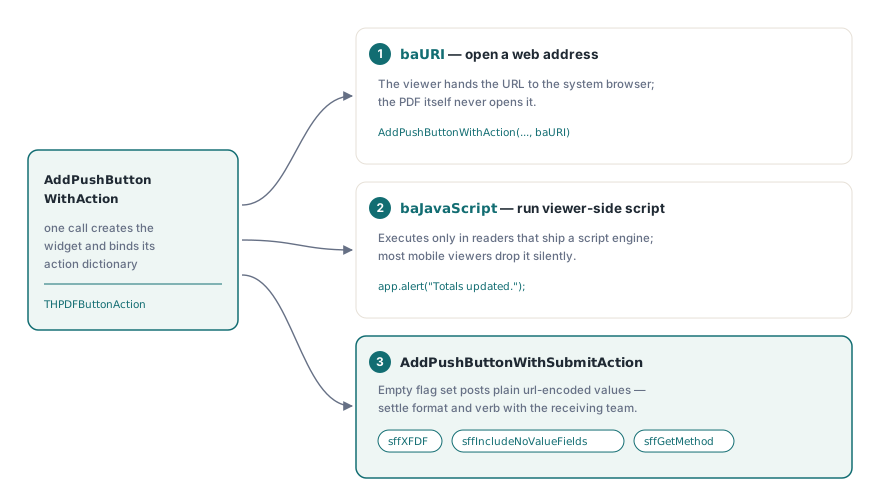
푸시 버튼은 액션이 붙기 전까지는 아무 반응도 하지 않는다. HotPDF는 ISO 32000-1 §12.6.4에 정의된 액션 타입들을 THPDFButtonAction 열거형(baURI, baJavaScript, baSubmitURL, baResetForm, baHide, baShow, baNamed)으로 드러내며, 버튼을 만들면서 동시에 그 액션을 연결해 주는 메서드 두 개를 제공한다
// 시스템 브라우저에서 도움말 페이지 열기
Pdf.CurrentPage.AddPushButtonWithAction('btnHelp', 'Help',
  'https://www.example.com/claims-help', Rect(320, 62, 420, 92), baURI);

// 뷰어 쪽 JavaScript 실행
Pdf.CurrentPage.AddPushButtonWithAction('btnRecalc', 'Recalculate',
  'app.alert("Totals updated.");', Rect(320, 102, 420, 132), baJavaScript);

// XFDF로 제출하고 빈 필드도 페이로드에 유지
Pdf.CurrentPage.AddPushButtonWithSubmitAction('btnSubmit', 'Submit claim',
  'https://api.example.com/claims', Rect(320, 142, 420, 172),
  [sffXFDF, sffIncludeNoValueFields]);
제출 플래그는 흔히 받는 것보다 더 많은 고민을 받을 가치가 있다. AddPushButtonWithSubmitAction은 THPDFSubmitFormFlags 집합을 받으며, 빈 집합은 일반적인 URL 인코딩 POST를 만들어 내는데, 이는 많은 샘플 엔드포인트가 받아들이지만 많은 프로덕션 엔드포인트가 거부하는 형식이다. sffXFDF를 추가하면 페이로드가 XFDF로 바뀐다. sffGetMethod는 HTTP 메서드를 바꾼다. sffIncludeNoValueFields는 빈 필드를 조용히 빠뜨리는 대신 페이로드에 유지하는데, 이는 수신 측이 "값 없음"과 "빈 값"을 구분하는 순간부터 중요해진다. 이 플래그 집합은 수신 엔드포인트와의 인터페이스 계약의 일부이므로, 첫 제출이 거부된 뒤가 아니라 제출 내용을 파싱하는 팀과 미리 맞춰 두라
필드 수준 JavaScript: 키 입력, 포맷, 검증
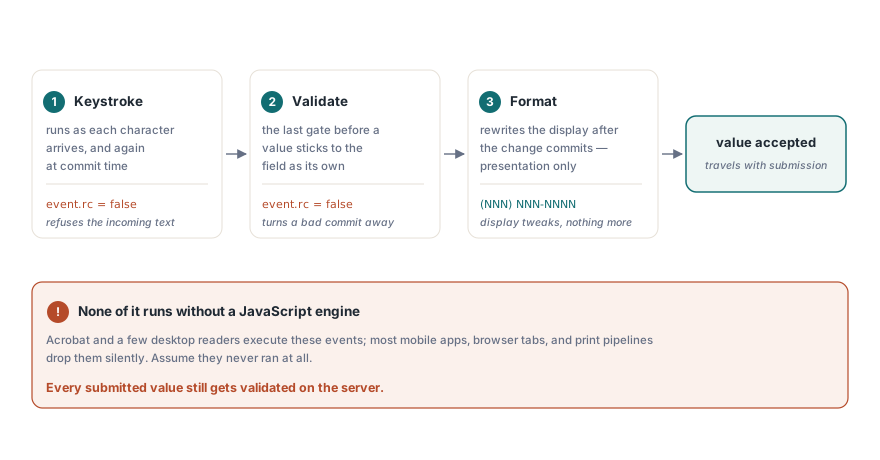
액션이 존재하는 곳은 버튼 클릭만이 아니다. HotPDF는 스크립트를 실행할 수 있는 뷰어가 사용자가 데이터를 입력하는 동안 발생시키는 필드별 이벤트에도 JavaScript를 붙인다. 트리거는 세 가지이며, 입력 생애주기의 서로 다른 시점에 발생한다. 키 입력 액션은 각 문자가 입력될 때마다, 그리고 커밋 시점에 다시 한번 실행된다. 포맷 액션은 변경 사항이 커밋된 이후 순전히 표시 목적으로 화면 값을 다시 쓴다. 검증 액션은 마지막 발언권을 가지며, 커밋된 값이 필드의 값이 되기 전에 이를 받아들이거나 거부한다
// 이메일 주소로 그럴듯하지 않은 커밋된 값을 거부
Pdf.AttachFieldKeyStrokeAction('applicant.email',
  'if (event.willCommit && !/^[\w.-]+@[\w.-]+\.\w+$/.test(event.value)) event.rc = false;');

// 미국 전화번호를 (NNN) NNN-NNNN 형식으로 표시
Pdf.AttachFieldFormatAction('applicant.phone',
  'event.value = event.value.replace(/(\d{3})(\d{3})(\d{4})/, "($1) $2-$3");');

// 커밋 시점에 18세 미만 신청자를 거부
Pdf.AttachFieldValidateAction('applicant.age',
  'if (parseInt(event.value) < 18) event.rc = false;');
키 입력이나 검증 스크립트 안에서 event.rc = false를 설정하면 뷰어에게 입력을 거부하라고 알려 준다. 함정은 뷰어가 JavaScript 엔진을 탑재하고 있지 않으면 이 중 아무것도 실행되지 않는다는 점이다. Acrobat과 몇몇 데스크톱 제품은 이를 갖고 있다. 대부분의 모바일 리더, 브라우저 내장 렌더러, 인쇄 파이프라인은 그렇지 않으며, 아무 불평 없이 그 스크립트를 그냥 버린다. 그러므로 필드 스크립트는 자신의 리더가 실제로 이를 실행해 주는 사용자 부분집합에 대해서만 데이터 품질을 개선해 줄 뿐, 딱 그만큼만 한다. 이는 보안 경계가 아니다. 클라이언트가 무언가를 검사했으리라고 가정할 수 없으므로, 제출된 모든 값은 도착한 뒤 서버에서 반드시 다시 검증해야 한다
시각적 검토는 통과하는 결함들
가장 잡아내기 어려운 AcroForm 결함은 렌더링이 아니라 데이터 구조 안에 존재하는 것들인데, 파일을 열어 눈으로 보는 것만으로는 아무것도 알 수 없기 때문이다. 이름을 붙일 만큼 자주 나오는 것이 네 가지 있으며, 각각 출시 전에 이를 찾아내는 기계적인 테스트 방법이 있다
- 내보내기 값 표류.
AddCheckBox('consent', 'Yes', ...)로 만든 체크박스는Yes를 전송한다.Y에 매칭하는 수신 측은 페이지가 완벽해 보이는 와중에도 모든 제출을 거부한다. 양식을 채우고, Acrobat에서 XFDF로 내보낸 다음, 수신 측이 실제로 기대하는 스키마와 값을 비교하라 - 의도치 않은 값 미러링. 완전한 정규화된 이름을 공유하는 두 필드는 하나로 합쳐진다. 이 증상은 생성 시점이 아니라 데이터 입력 시점에만 나타나므로, 테스트 방법은 양식을 렌더링해서 눈으로 확인하는 것이 아니라 실제로 입력해 보는 것이다
- 옵션 목록 밖의 콤보 값.
AddComboBox에 전달한 현재 값이 나열된 옵션 중 하나가 아닐 때, 뷰어마다 그 값을 보여줄지, 비워 둘지, 표시할지에 대해 다르게 반응한다. 기본값을 항상 목록 안에 두면 이런 불일치는 사라진다 - 워크플로가 끝난 뒤에도 여전히 편집 가능한 필드. HotPDF에는 AcroForm 필드를 위한 외관 플래튼(flatten) 호출이 없다. 완성된 양식을 고정하는 지원되는 방법은 필드를
ffReadOnly플래그와 함께 만드는 것으로, 이는 편집은 거부하면서도 필드 자체의 외관 스트림을 통해 값을 계속 보이게 해 준다. 필드는 여전히 살아 있는 양식 객체로 남는데, 이는 다운스트림의 조립 및 서명 도구가 마주치기를 기대하는 형태다
코드 변경으로는 해결할 수 없더라도 회귀 노트에 적어 둘 만한 뷰어 쪽 동작이 하나 있다. 기업용 Acrobat 배포는 정책에 따라 JavaScript를 비활성화하거나 제출 대상을 제한할 수 있으므로, 모든 개발 빌드에서 잘 동작하던 액션도 잠긴 고객 데스크톱에서는 아무 반응이 없을 수 있다. 버튼이 아무 일도 하지 않는 경우를 대비해 눈에 보이는 폴백을 마련해 두라. 그 폴백이 대신 무엇을 해야 하는지 알려 주는 인쇄된 안내문뿐이더라도 말이다
양식 작업이 문서의 나머지 부분과 연결되는 지점
서명 필드 자체도 AcroForm 필드 타입 중 하나다. 나중에 인증되거나 부서명될 양식이라면, 그 필드를 나중에 덧붙이는 것보다 생성 시점에 미리 예약해 두는 편이 낫다. 그 이유가 되는 바이트 수준의 근거는 HotPDF의 디지털 서명 및 PAdES 서명에 관한 관련 글에 있다. 네이티브 AcroForm이 아니라 XFA 패키지로 들어오는 입력은 상황이 다르다: XFA를 AcroForm 필드로 플래튼하는 것은 그 자체로 별도의 손실 모델을 가진 별개의 워크플로인데, 두 양식 기술이 하나의 파일 안에서 공존할 수 없기 때문이다
여기서 다룬 필드, 액션, 트리거 메서드는 Delphi 및 C++Builder용 표준 HotPDF Delphi Component API의 일부이며, 제품 페이지에는 필드 플래그 오버로드와 전체 제출 플래그 열거형을 포함한 전체 레퍼런스가 링크되어 있다