HotPDFは、既存PDFからExtractLoadedTypedTablesを通じてtableを復元します。これはDelphi APIで、layout passが生成したrow fragmentをmergeし、tableごとにcanonical column gridを構築し、geometryが対応すればpage breakを越えてtableをcontinuationし、すべてのcellをtyped valueとして返します。各valueにはpage provenance、column span、boundsが付きます。ExportLoadedTypedTablesを使えば同じ結果をCSVまたはJSONへ直接書けます。この機能を作る価値がある状況は、地味ですが非常によくあります。40-pageのinvoice registerが論理的には1つのtableで、各pageの先頭にheaderがrepeatされています。naiveなreading-order passを実行すると、40個のtable、39個のspurious header row、そしてmiddle cellが空だったrowごとに1つ左へ滑るcurrency columnが得られます。これをcalling applicationの下流でclean upするところで、document-import projectは行き詰まります
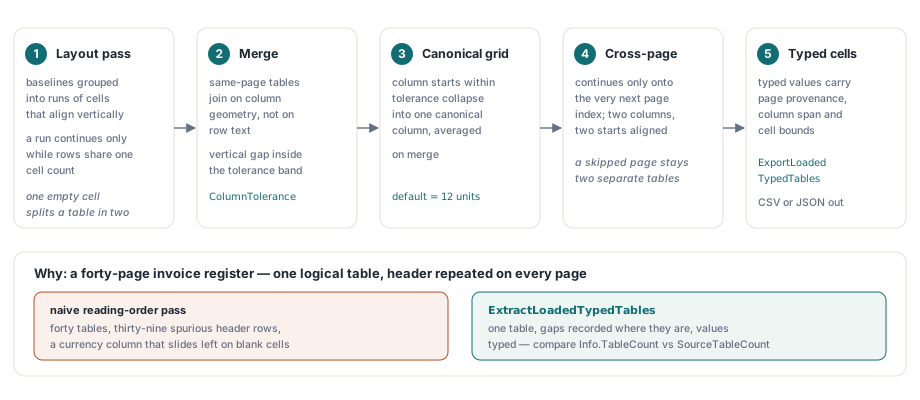
PDF pageがtableではなくfragmentを渡す理由
tagged documentでない限り、PDF pageはtable semanticsをまったく持たないからです。content streamが持つのはtext-showing operatorとpositioning matrix(ISO 32000-1 §9.4.3)だけです。画面で見えるruled boxは、textと相関付ける義務をextractorに課さない無関係なpath paintingです。structure element typeのTable、TR、TH、TDはtagged PDFのlogical structure hierarchy(ISO 32000-1 §14.8.4)にしかありません。流通しているbusiness documentの圧倒的多数にはtagがありません。以下で説明するのはすべてgeometric recoveryであり、parsingではありません。これを明言しておかないと、その上にreconciliation reportを構築する人が出てきます
そのためHotPDFは、最初にextracted glyphへsemantic layout analysisを行います。これはloaded PDFからのstructure-order text extractionやstructured HTML、XML exportを支えるものと同じpassです。このpassはbaselineを、cellがverticalにalignするrunへgroup化し、連続するrowのcell countが同じ間だけrunを続けます。layout engineにとっては正しく安価なruleです。しかしcallerにとっては形が違います。interior cellが1つ空のrowだけで、1つのvisual tableが2つのsource tableに分割されます。typed table layerはまさに、分かれたpieceを元へ戻すためにこのpassの上に置かれています
canonical column gridとColumnTolerance knob
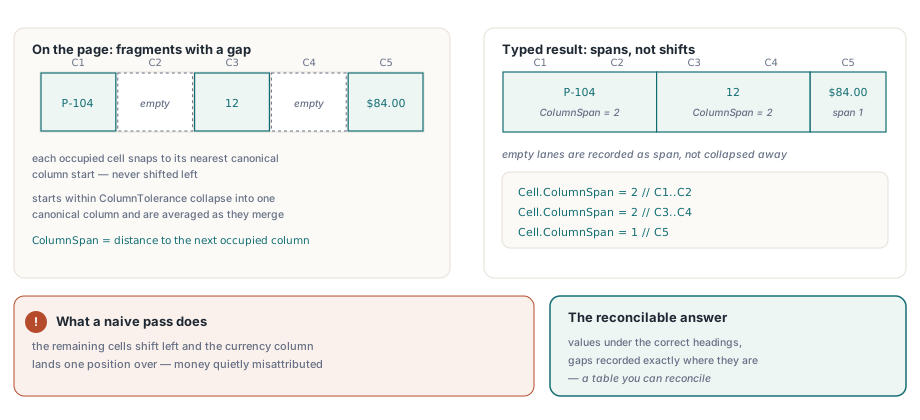
ExtractLoadedTypedTablesは他のことをする前にsame-page fragmentをmergeし、row textではなくcolumn geometryでmergeします。2つのadjacent source tableは、両方に少なくとも2 columnがあり、最初のtableのlast rowと次のtableのfirst rowとのvertical gapがtolerance band内にあり、column start positionが揃う場合にjoinします。ColumnTolerance以内のcolumn startは1つのcanonical columnへcollapseし、merge時にaverageされます。default toleranceは12 user-space unitで、通常のbusiness typographyに合います。wide-trackedまたはdeeply indented layoutでは引き上げる必要があります
interior valueが欠けたrowをどう扱うかが重要です。HotPDFは各cellをnearest canonical column startへsnapし、残りのcellを左へshiftするのではなく、そのcolumnから次のoccupied columnまでの距離をColumnSpanに設定します。5-column gridの3-cell rowは、valueを正しいheadingの下に保ち、gapがどこにあるかを正確に記録します。tableをreconcileできるものと、moneyの帰属を静かに誤るものとの差はそこにあります
var
  Pdf: THotPDF;
  Options: THPDFTypedTableExtractionOptions;
  Tables: THPDFTypedTables;
  Info: THPDFTypedTableExtractionInfo;
begin
  Pdf := THotPDF.Create(nil);
  try
    if Pdf.LoadFromFile('register.pdf', '') <= 0 then
      Exit;
    Options := THPDFTypedTableExtractionOptions.Default;
    Options.ColumnTolerance := 12;           // user-space unit
    Options.MinimumTableConfidence := 0.55;  // これ未満のtableはdropする
    Options.DateOrder := ttdoDMY;            // 03/04/2026は3 April
    Options.DecimalSeparator := ',';
    Options.ThousandsSeparator := '.';
    if Pdf.ExtractLoadedTypedTables([0, 1, 2, 3], Options, Tables, Info) then
      // Info.TableCountとInfo.SourceTableCountでmerge量が分かる
      ProcessTables(Tables)
    else if Info.Status = ttesBudgetExceeded then
      Log(string(Info.Diagnostic));
  finally
    Pdf.Free;
  end;
end;
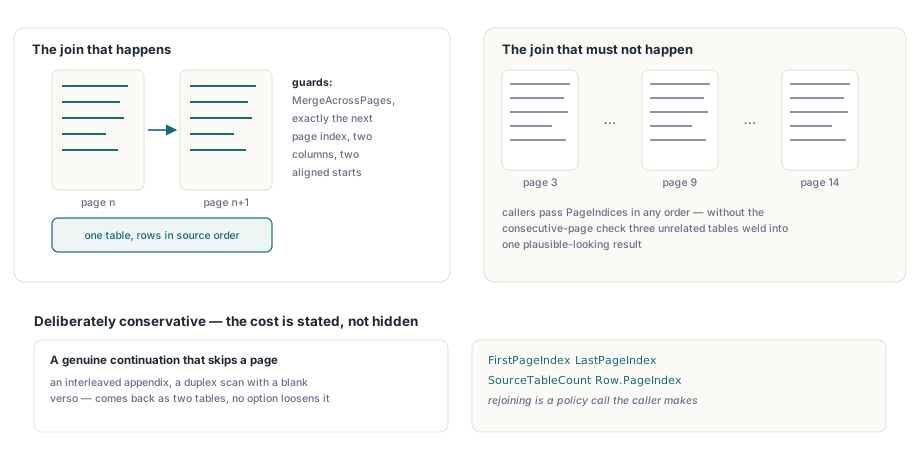
cross-page mergingが実際に保証するもの
意図的にconservativeであることを保証します。HotPDFが2つのtableをpage boundary越しにjoinするのは、MergeAcrossPagesがenableで、2つ目のtableが最初のtableの終端のpage indexのちょうど次に始まり、両方に少なくとも2 columnがあり、canonical column startの少なくとも2つがColumnTolerance内でalignする場合だけです。連続するpage条件がload-bearingです。callerはPageIndicesをopen arrayとして好きな順序で渡せます。これをcheckしないと、page 3、9、14のrequestが、無関係な3つのtableをもっともらしい1つのresultへ溶接してしまいます。その代償として、pageをskipする本当のcontinuation、interleaved appendix、blank versoを持つduplex scanは2つのtableとして返り、緩めるoptionはありません。それらを再joinするかはcalling applicationだけが決められるpolicyなので、APIはFirstPageIndex、LastPageIndex、SourceTableCount、rowごとのPageIndexを公開し、判断をあるべき場所に残します
repeated headerは削除せずlabelを付ける
ExtractLoadedTypedTablesはresultからrepeated header rowを削除しません。cross-page mergeでincoming tableの冒頭に、trimとcase foldingの後でaccumulated tableと同じheader textを見つけると、そのrowをIsHeaderとIsRepeatedHeaderでmarkし、source orderのままappendします。削除はlossyでirreversibleな選択です。consumerによって欲しい答えが違います。CSV importはrepeatを消したがり、audit trailはpage number付きで残したがり、diffing toolはsource orderをbyte単位で保ちたがります。だからlibraryは報告し、callerが決めます
var
  T, R, C: Integer;
  Row: THPDFTypedTableRow;
  Total: Double;
begin
  Total := 0;
  for T := 0 to High(Tables) do
    for R := 0 to High(Tables[T].Rows) do
    begin
      Row := Tables[T].Rows[R];
      if Row.IsRepeatedHeader then
        Continue;                    // 最初のheader blockだけを残す
      for C := 0 to High(Row.Cells) do
        if Row.Cells[C].ValueKind = ttvkCurrency then
          Total := Total + Row.Cells[C].NumberValue;
    end;
end;
typed valueとcallerが指定すべきseparator
type inferenceは固定順で走り、ambiguityを唯一まともな方向へ解決します。boolean、date、percentage、currency、plain numberの順で、どれにも合わなければstringのままです。順序があるため、date columnの2026がdate parserより先にnumber parserで決まりません。currencyは先頭の$、£、¥、€、またはspaceで続く3文字のISO 4217 codeから認識し、codeはCurrencyCodeに保持します。重要なのは、HotPDFがlocaleを推測しないことです。DecimalSeparator、ThousandsSeparator、DateOrderはoptionから来ます。1.234が1つのnumberなのか、1,234なのかはPDFに含まれない事実に依存するためです。raw Unicode Textはtyped valueと並べてすべてのcellに残るので、誤った推測もsecond extraction passなしでrecoverできます
var
  Stream: TFileStream;
  Info: THPDFTypedTableExtractionInfo;
begin
  Stream := TFileStream.Create('tables.json', fmCreate);
  try
    if not Pdf.ExportLoadedTypedTables([0, 1, 2], ttefJSON,
      Stream, Options, Info) then
      case Info.Status of
        ttesInvalidOptions:   ReportBadConfiguration;
        ttesBudgetExceeded:   ReportOversizedDocument;
        ttesCancelled:        ReportUserCancelled;
        ttesWriteFailed:      ReportDestinationProblem;
      else
        ReportExtractionFailure;
      end;
  finally
    Stream.Free;
  end;
end;
2つのexport formatは異なる質問に答えるもので、意図的にequivalentではありません。CSVはmerged spanのcontinuation columnをempty fieldとして書き、spreadsheetやbulk loaderの期待に合わせます。JSONはextractionが知っていたものをすべて保持します。own kindのtyped value、columnSpan、cellごととrowごとのconfidence、cell bounds、pageとsource-table provenanceです。両formatはdocument全体をbounded in-memory bufferへstageしてからdestination streamへpublishします。途中でwriteが失敗すればoriginal byte、length、positionをrestoreするため、失敗したexportがhalf-written fileを残すことはありません。page、glyph per page、table、row、cell、character、output byteのbudgetはすべて個別にaccountされ、million-row default ceilingよりかなり前にper-row SetLengthがquadratic copyingへ退化するため、rowはallocation前にcountされます
geometric table recoveryが諦める場所
failure modeを明示するほうがfeature listより役立ちます。これらはすべて、callerがbetter optionではなく自身のpolicyを必要とする場所だからです
- vertical mergeはrecoverしません。HotPDFはhorizontal spanの
ColumnSpanを報告し、RowSpanは1のままにします。印刷されたtableで3 rowにまたがるcellは、1つのcellと2つのgapとして届きます - header detectionはvisualではなくdata-drivenです。header blockは、non-string typed valueを含む最初のrowの前にあるrow runなので、bodyがすべてtextのtableはどんなstyleでも
HeaderRowCountが0になります MinimumTableConfidence未満のtableはerrorなしでresultからdropされます。何かがdiscardされたか知りたい場合はInfo.TableCountとInfo.SourceTableCountを比較してください- runがtableと呼ばれるには少なくとも2 rowと2 columnが必要です。そのため1行のpseudo-tableや、長いproseを2 columnに配置したlayoutは、正しくも不便にもtableになりません
- scan pageにはtext operatorがないため、page上にOCR text layerができるまでgeometrically recoverするものがありません
PDFが自分のreporting stackから出てくるなら、すべての問題への最も安いfixはupstreamです。tagged tableをemitするか、source dataを保持し、extractionは自分で生成しなかったdocument用のfallbackとして扱います。それ以外では、pipelineを下のlayerから順に学ぶ価値があります。まずloaded PDFからのplain text extraction、geometryを保持する必要が出たらtyped table API、生成側でoutputのrecoverabilityを決められるならdata tableをnew PDFへrenderする処理へ進みます
ExtractLoadedTypedTablesとExportLoadedTypedTablesは、DelphiとC++Builder向けnative HotPDF Delphi PDF Componentの一部として提供されます。外部DLLもruntime dependencyもありません。product pageにtyped table APIのoption、status、record referenceが掲載されています