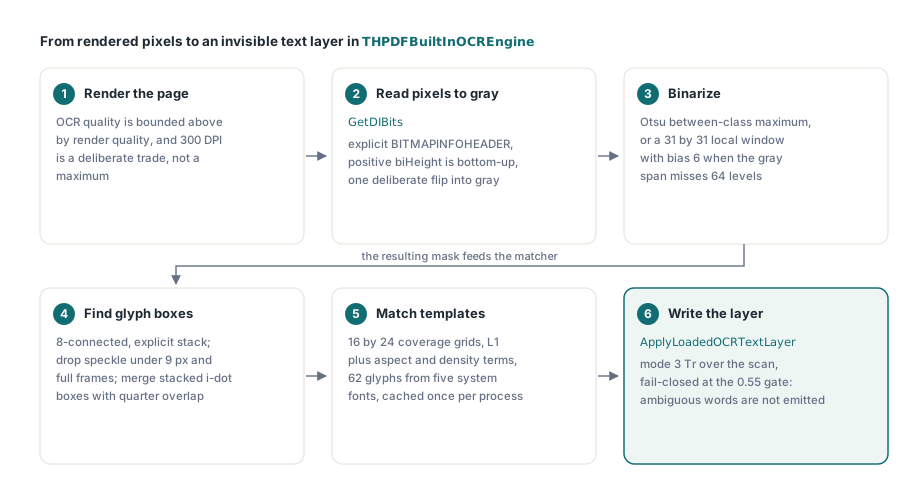
HotPDFにはTHPDFBuiltInOCREngineが搭載されています。これはObject Pascalだけで書かれた範囲限定のtemplate matching OCR engineで、render済みpageをOtsu thresholdingでbinarizeし、connected componentとしてglyphを抽出し、cacheした複数fontのtemplateに対してgrayscale coverageで各glyphをscoreします。そのためDelphi applicationは外部OCR dependencyなしでsearchable text layerを構築できます。engineはv2.731.0でゼロから再構築する必要がありました。理由はmatcherではなくpixelでした
旧engineはtestに合格していました。synthetic bitmap上のuppercase ASCIIを認識し、Win32では何か月もそのまま動いていました。その後同じcodeをWin64で実行すると、何も出ませんでした。「found no high-contrast foreground」というdiagnostic以外にwordはなく、crashもありません。bugはpixel-reading pathにある独立した2つの誤りが互いを打ち消していたことでした。それをほどくと、OCR codeが大きな音ではなく静かに失敗する理由がよく分かります
旧OCR engineが偶然だけで動いていた理由
旧engineが動いていたのは、template bitmapとtarget bitmapが同じ向きに反転していたためです。pixel readerのvertical inversionはmatcherから見えませんでした。TBitmap.ScanLineは、残りのimaging pathが前提とするpositive-biHeightのDIB conventionとは逆順でrowを返します。Mを上下逆にrenderし、同じく上下逆のtemplateと比較すると、L1 differenceは正しい比較と同じです。すべてのglyphがmatchしました。正しい部分は何もありませんでした
この対称性こそが、この種のbugを高くつくものにします。片側だけを直すとmatchingが壊れます。target readを直してtemplateをそのままにすればrecognitionはnoiseになり、先にtemplateを直しても逆方向から同じ崩壊が起きます。段階的なrepair pathはありません。そのため再構築では、read全体を明示的に宣言したBITMAPINFOHEADERに対するGetDIBitsへ置き換えました。positive biHeightはVCL conventionではなくcontractによってbottom-up rowを意味し、grayscale bufferへcopyするときに意図的に1回だけ反転します
2つ目の誤りが表面化したのはWin64だけでした。GetDIBitsへ渡すHDCはbitmap自身のmemory DCであってはいけません。bitmapがすでにそこへselectされており、Windowsがinvalidと文書化しているためです。Bitmap.Canvas.Handleを渡す方法はWin32 processでは許容されましたが、Win64 test processでは一貫して失敗しました。修正はGetDC(0)から得る使い捨てscreen DCです。bitmapには何も依存せず、finally blockでreleaseします
procedure BitmapToGray(Bitmap: TBitmap; out Gray: TBytes);
var
  Work: TBitmap;
  Info: TBitmapInfo;
  Buffer: TBytes;
  DC: HDC;
  P: PByte;
  Stride, X, Y: Integer;
begin
  Work := TBitmap.Create;
  try
    Work.Assign(Bitmap);
    Work.PixelFormat := pf24bit;
    Stride := ((Work.Width * 24 + 31) div 32) * 4;
    SetLength(Buffer, Stride * Work.Height);
    FillChar(Info, SizeOf(Info), 0);
    Info.bmiHeader.biSize := SizeOf(BITMAPINFOHEADER);
    Info.bmiHeader.biWidth := Work.Width;
    Info.bmiHeader.biHeight := Work.Height;   // positive => bottom-up rows
    Info.bmiHeader.biPlanes := 1;
    Info.bmiHeader.biBitCount := 24;
    Info.bmiHeader.biCompression := BI_RGB;
    DC := GetDC(0);            // Work.Canvas.Handleは不可。Workがそこへselectされている
    if DC = 0 then
      raise EInvalidOperation.Create('Recognition bitmap pixels could not be read');
    try
      if GetDIBits(DC, Work.Handle, 0, Work.Height,
        @Buffer[0], Info, DIB_RGB_COLORS) <> Work.Height then
        raise EInvalidOperation.Create('Recognition bitmap pixels could not be read');
    finally
      ReleaseDC(0, DC);
    end;
    SetLength(Gray, Work.Width * Work.Height);
    for Y := 0 to Work.Height - 1 do
    begin
      P := @Buffer[(Work.Height - 1 - Y) * Stride];   // 意図した反転は1回だけ
      for X := 0 to Work.Width - 1 do
        Gray[Y * Work.Width + X] :=
          (Integer(P[X * 3]) * 29 + Integer(P[X * 3 + 1]) * 150 +
           Integer(P[X * 3 + 2]) * 77) shr 8;
    end;
  finally
    Work.Free;
  end;
end;
gray pixelからglyph boxまでのbinarizationとconnected component
HotPDFはまずOtsu methodでbinarizeし、Otsuが適用できないときだけlocal-window thresholdへfallbackします。global pathが要求するのは本当のbimodal histogramです。engineはbetween-class varianceのmaximumを計算し、さらにgray rangeが少なくとも64 levelに広がっていることを要求してから結果を信頼します。色あせたscan、gradient backgroundのpage、ほぼ全体がinkのbitmapはすべてこのtestに失敗します。fallbackでは31×31 windowのmeanと各pixelを比較し、biasは6 gray levelです。sliding windowがpixel countに対してlinearに保たれるよう、running column sumで計算します
glyph extractionは、生成されたmaskに対する8-connected component labelingです。deep flood fillでfull-page maskがDelphi thread stackを簡単に使い切るため、recursionではなく明示的なstackを使います。labeling時には2つのfilterを適用します。9 pixel未満のcomponentはspeckle noiseとして捨て、imageのwidthとheightの両方の3/5を超えて広がるcomponentはglyphではなくframeまたはruleとして捨てます。second passでは、狭いほうのboxの少なくとも1/4以上でhorizontal overlapする、verticalにstackされたboxをmergeします。これでiやjのdotとstemが再結合されます。すべてはraster上で動き、そのrasterはDelphiでloaded PDF pageをbitmapへrenderする処理と同じrendererから来ます。実用上重要なのは、OCR qualityにはrender quality以上のものが出ないことです。default text-layer DPIの300はmaximumではなく、意図したtrade-offです
大文字Iと小文字lが判別不能になる理由
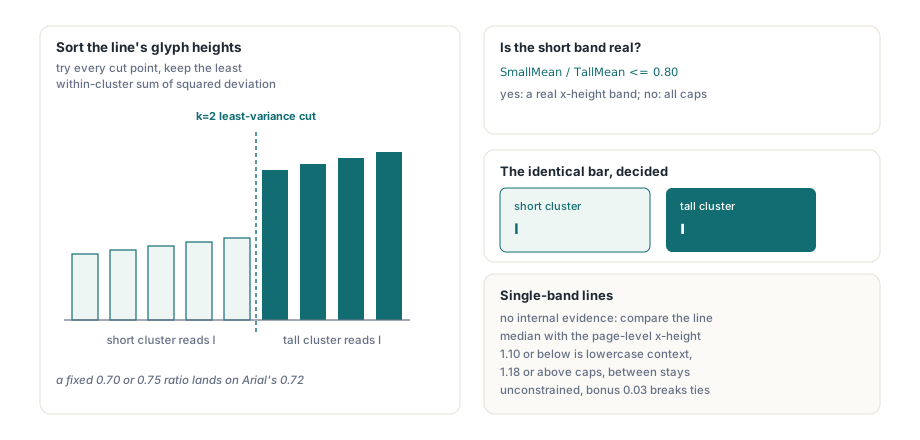
Arialでは大文字Iと小文字lがpixel単位で同じbarへrasterizeされます。そのためshape featureでは分離できず、大文字小文字の情報はまったく別の場所から来なければなりません。engineの答えはline-level height clusteringです。glyph boxをvertical overlapでtext lineにgroup化し、各lineのcap heightとmodal baselineを分析し、line内のheightをshort clusterとtall clusterに分けます。short clusterにあるbarはl、同じbarでもtall clusterにあればIです
この分割を固定ratio thresholdで実装するのが自然に見えますが、うまくいきません。Arialのx-heightとcap-heightのratioは約0.72で、最初に誰もが試す0.70と0.75の値のちょうど間に入ります。constantをどちらかへ0.01動かすだけでcorpus全体のcaseが反転します。HotPDFは代わりに1次元のk=2 variance-minimizing splitを行います。candidate heightをsortし、すべてのcut pointを試し、within-cluster sum of squared deviationが最小のcutを残します。thresholdはsource内のconstantではなくpageのpropertyになります
// ClusterHeightsは昇順にsort済み。varianceが最小のk=2 splitを探す
BestSplit := 1;
BestVariance := 1E18;
for I := 1 to ClusterCount - 1 do
begin
  SumA := 0;
  for J := 0 to I - 1 do SumA := SumA + ClusterHeights[J];
  SumB := 0;
  for J := I to ClusterCount - 1 do SumB := SumB + ClusterHeights[J];
  MeanA := SumA / I;
  MeanB := SumB / (ClusterCount - I);
  Variance := 0;
  for J := 0 to I - 1 do
    Variance := Variance + Sqr(ClusterHeights[J] - MeanA);
  for J := I to ClusterCount - 1 do
    Variance := Variance + Sqr(ClusterHeights[J] - MeanB);
  if Variance < BestVariance then
  begin
    BestVariance := Variance;
    BestSplit := I;
  end;
end;
// short bandを決めるのは2つのcluster meanのratioだけ
if SmallMean / TallMean <= 0.80 then
  SmallGroup := ggSmall          // 本当のx-height band:lowercase shape
else
  SmallGroup := ggTall;          // 1つのheight band:すべてcap height
Line.LowercaseContext := (SmallGroup = ggSmall);
height bandが1つだけのlineには内部的な証拠がありません。all-caps headingとall-lowercase captionは、単独では同じに見えます。その場合HotPDFは、splitできたlineから得たpage-level median x-heightとlineのmedian heightを比較します。ratioが1.10以下ならlowercase context、1.18以上ならcap contextとし、その間は制約なしのままです。matchingでは、そのcontextに合うcandidateへ0.03の小さなcase-preference bonusを加えます。明確なshape differenceを上書きせず、tieだけを少し動かします
12x18のtemplate gridがcとoを混同した理由
template gridは12×18 cellから16×24へ広げられました。小さいresolutionではcとoのgrayscale coverage marginが0.007未満になり、engineのambiguity threshold内に入ったためです。各glyph boxはbinary stencilではなく、0から255のcoverage valueとしてgridへresampleされます。1/3だけinkのcellは、blackまたはwhiteへ丸められず、およそ85として読み取られます。12×18ではcのopen sideが1 cell columnをわずかに超える程度で、antialiased averageがgapを洗い流します。16×24ならresampling後もgapが残り、混同しやすいpairの大部分が安全な距離へ戻ります
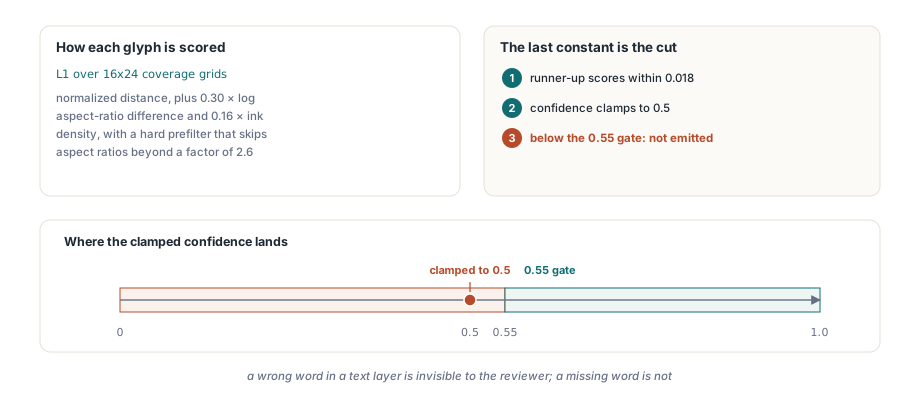
scoreは2つのcoverage grid間のnormalized L1 distanceに、log aspect-ratio differenceの0.30倍とink-density differenceの0.16倍のpenaltyを加えたものです。aspect ratioが2.6倍を超えて異なるtemplateは、hard prefilterでskipします。templateは5つのsystem font(Arial、Times New Roman、Courier New、Tahoma、Segoe UI)から62-character alphabetを対象にprocessごとに1回rasterizeし、critical sectionの背後でcacheして、以降のcallで再利用します
最後のconstantが興味深いところです。runner-up characterのscoreがwinnerから0.018以内に入ると、HotPDFはglyphのconfidenceを0.5へclampします。0.55のacceptance gateを下回るため、glyphは出力されません。これはtuning artifactではなく、意図したfail-closed cutです。推測する範囲限定engineは、imageと一致しないsearchable layerを作ります。scanを確認する人には見えないtext layerの誤ったwordは、欠落したwordより悪いからです
固定gap thresholdなしでwordを分割する
HotPDFは、平均glyph widthの固定倍数ではなく、glyph間gapの分布からlineごとのword-space thresholdを求めます。「mean advanceの0.75より広いgapはspace」というclassic heuristicは、lineにdigitとnarrow letterが混ざると壊れます。mean advanceが現実の何も表さなくなるためです。engineはlineのgapをsortし、連続するsorted valueの間で最大のjumpを探します。clusterが存在すれば、それがintra-word clusterとinter-word clusterの境界です。noiseで発火しないよう3つのguardがあります。jumpは平均glyph widthの少なくとも0.22、splitより上の最初のgapは少なくとも0.32、splitより下の最後のgapは0.65を超えてはいけません。guardのどれかが失敗するとthresholdはMaxIntのままで、line全体が1つのwordになります。最後のguardは、異常に広いkerning pair 1つでwordが2つに分割されるのを防ぎます。2つのwordをmergeするほうが、merged tokenに正しいcharacterが正しい順序で残るためsubstring searchにはまだ使え、wordを途中で切るより被害が小さいからです
scan imageの上へ見えないtext layerを書く
ApplyLoadedOCRTextLayerは認識したwordをsearchable layerへ変換します。ISO 32000-1 §9.3.6に定義されたfillもstrokeもしないtext rendering mode 3で描き、元のscan imageの上へ配置します。content streamはBTで始まり、続いて3 Trが置かれます。各wordは、報告されたbaseline、request DPIからpixelを変換したcap height、synthetic glyph runを測定したword widthへ伸縮するhorizontal scaleからtext matrixを構築して配置します。結果はtextのようにcopyとsearchができ、何もpaintしません
engine-free overloadもあり、built-in recognizerを自動でinstantiateします。built-in pathの大半のcallerが使うべきなのはこちらです。recognition、Unicode validation、budget accounting、content constructionはcopy-on-write transactionが開く前にすべて完了します。そのためcancellation、budget overrun、engine failureが起きてもobject graphとversion numberは変わりません。wordは2回filterされます。engineが自身の0.55 per-glyph confidence gate未満を捨て、続いてTHPDFOCRTextLayerOptions.MinimumConfidence(default 0.5)がcallerの基準未満のword全体を捨てます
var
  Doc: THotPDF;
  Options: THPDFOCRTextLayerOptions;
  Info: THPDFOCRTextLayerInfo;
begin
  Doc := THotPDF.Create(nil);
  try
    Doc.AutoLaunch := False;
    if Doc.LoadFromFile('scan.pdf') < 1 then
      Exit;
    Options := THPDFOCRTextLayerOptions.Default;   // DPI 300、MinimumConfidence 0.5
    Options.SkipPagesWithText := True;             // born-digital pageはそのままにする
    Options.UseOptionalContentGroup := True;
    Options.OptionalContentGroupName := 'OCR Text Layer';
    // engine-free overload:HotPDFがbuilt-inの範囲限定recognizerを供給する
    if Doc.ApplyLoadedOCRTextLayer([0], Options, Info) then
    begin
      Writeln(Info.AcceptedWordCount, ' words accepted by ',
        string(Info.EngineName));
      Doc.SaveLoadedDocument('scan-searchable.pdf');
    end
    else
      Writeln('No text layer written: ', string(Info.Diagnostic));
  finally
    Doc.Free;
  end;
end;
1つの制限は、後から発見するのではなく明確に述べる価値があります。invisible layerは共有のsynthetic unembedded Type0 fontを使います。すべてのviewerでsearchとcopyには十分ですが、ISO 19005のfont-embedding requirementは満たしません。outputをPDF/Aにする必要があるなら、callerが適合するfontを別途embedしなければなりません。またOCR text layerが持つのはgeometryでありstructureではないため、reading orderはglyph positionだけから決まります。すでにreal textがあるpageからlogical orderが必要なら、tag treeで駆動するstructure-order text extractionという別の問題向けの別のtoolを使います
built-in engineの限界
built-in engineは意図的に狭く作られており、その境界を知ることが有用さを保ちます。5つのtemplate faceに近いfontの高contrastなmachine-printed ASCIIを対象とし、それ以外は推測ではなくwordなしを返します。具体的な境界は次の通りです
- 最大4096×4096、4,194,304 pixelのimage、recognition deadlineは2000 ms、
THPDFCancellationTokenを通じたcooperative cancellation - ASCII letterとdigitからなる62-character alphabet。punctuation、accented character、CJKは対象外
- axis-aligned textだけで、rendererがすでにnormalizeしたpage rotationを使います。skewしたscanはdeskewしません
- ambiguous glyph pairは未解決のままなので、pageがpartial wordや「found no unambiguous ASCII words」というdiagnosticを返すことがあります
このenvelopeでは小さすぎる場合、接続点はIHPDFOCREngineです。自分のengineに対してRecognizeを実装し、3引数のApplyLoadedOCRTextLayer overloadへ渡せば、その後のすべて、coordinate mapping、rotation handling、Unicode validation、budget、atomic commitは同じままです。bitmapはsynchronous callの期間だけborrowされ、保持してはいけません。layerが正しく配置されたことを確認するには、保存したfileをreloadし、Delphiでloaded PDFからtextをextractする処理に書かれた通常のtext pathを実行します。wordが戻ればlayerは実在します
built-in template-matching OCR、invisible text layer、それらへ入力するpage renderer、そして確認に使うloaded-document text extractionは、すべて同じnative VCL componentに含まれています。外部OCR runtimeもapplicationと一緒に配布するDLLも不要です。DelphiまたはC++Builderでscan PDFのdocument capture、archival、searchを構築するなら、HotPDF Delphi PDF componentが1つのdependencyでpipeline全体を提供します