Un file PDF è, in sostanza, una raccolta di oggetti che si collegano tra loro. Eliminando la compressione, la gestione dei riferimenti incrociati e gli offset dei byte, ciò che rimane è un grafo: un piccolo insieme di valori tipizzati, collegati tra loro da riferimenti, con radice in un unico oggetto che il lettore sa come trovare. Tutto ciò che un PDF può esprimere, da un paragrafo di testo a un font incorporato fino a una firma digitale, è costruito a partire da otto tipi di oggetti primitivi e dalla regola che consente a un oggetto di fare riferimento a un altro. Compresi questi, il resto del formato si rivela come una composizione anziché un mistero
Questo è il livello logico del PDF, definito nella clausola 7.3 dello standard ISO 32000-1, e si colloca un livello sopra il layout fisico del file (l'intestazione, il corpo, la tabella dei riferimenti incrociati e il trailer, trattati in modo specifico nella panoramica tecnica della struttura dei file PDF). Il modello logico rappresenta il significato di quei byte una volta analizzati. Un visualizzatore legge il file a ritroso per trovare il trailer, lo segue fino alla radice e da lì il documento si sviluppa come una serie di oggetti che fanno riferimento ad altri oggetti. Questa è la parte su cui si ragiona quando si esegue il debug di una pagina malformata, si scrive un parser o ci si affida a una libreria per assemblare un documento
Otto tipi di oggetti, e nient'altro
Il PDF definisce esattamente otto tipi di oggetti di base. Ogni valore in un documento appartiene a uno di essi, il che mantiene il formato gestibile nonostante la sua complessità
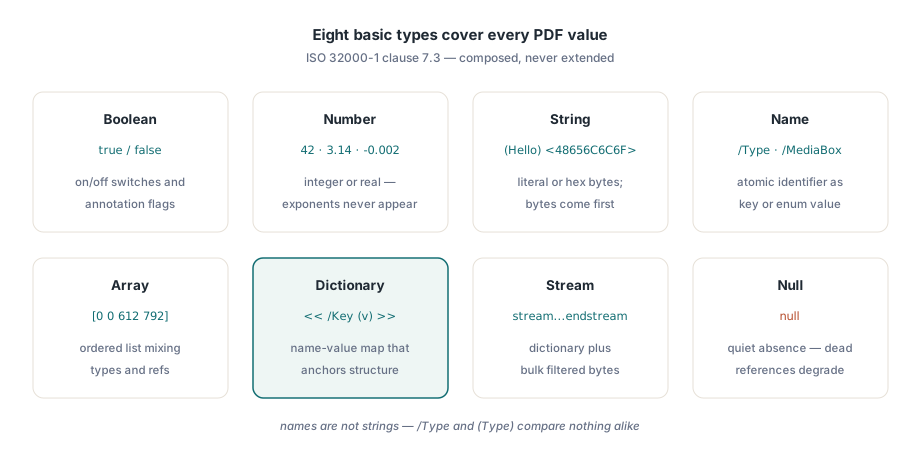
Booleans sono le parole chiave true e false. Attivano e disattivano i flag, ad esempio per stabilire se un'annotazione debba essere stampata
Numeri si presentano in due varianti che la specifica tratta come un unico tipo: interi come 42 e reali come 3.14 o -0.002. Il PDF non ha una notazione esponenziale, quindi non vedrai mai 1e6 in un file conforme. Coordinate, dimensioni dei font e angoli di rotazione sono tutti numeri
Stringhe contengono sequenze di byte, scritte tra parentesi tonde, come (Hello), o tra parentesi angolari in formato esadecimale, come <48656C6C6F>. Entrambe le notazioni codificano lo stesso identico contenuto; l'esadecimale è una via d'uscita per i byte difficili da inserire tra le parentesi. Le stringhe contengono testo, ma sono innanzitutto byte, il che diventa fondamentale non appena si gestisce qualcosa che va oltre i caratteri ASCII
Nomi sono token atomici introdotti da una barra: /Type, /Pages, /MediaBox. Un nome non è una stringa; è un identificatore, usato come chiave di un dizionario o come valore enumerato, e due nomi sono uguali solo se corrispondono byte per byte. La barra è una questione di sintassi e non fa parte del nome stesso. Questo spesso confonde i principianti, che trattano /Times-Roman e la stringa (Times-Roman) come intercambiabili; il formato, invece, li distingue chiaramente
Array sono elenchi ordinati ed eterogenei tra parentesi quadre: [0 0 612 792] è un rettangolo di pagina, e un array può mescolare liberamente tipi diversi, compresi i riferimenti ad altri oggetti. Dizionari sono il vero motore del formato. Scritti tra << e >>, un dizionario mappa chiavi di tipo nome a valori di qualsiasi tipo, e quasi tutte le strutture significative in un PDF (pagina, catalogo, font, annotazione) sono dizionari con una chiave /Type che ne dichiara la natura
Flussi (stream) sono dizionari seguiti da una sequenza di byte grezzi compresi tra le parole chiave stream ed endstream. Il dizionario descrive i byte (la loro lunghezza ed eventuali filtri come FlateDecode che li comprimono), mentre i byte contengono il carico utile più pesante: istruzioni sul contenuto della pagina, programmi di font incorporati, immagini. Un flusso è il luogo in cui il PDF colloca qualsiasi elemento troppo grande o troppo binario per essere inserito direttamente in linea
L'ottavo tipo è l'oggetto null, rappresentato dalla parola chiave null. Si tratta di un valore reale, distinto dall'assenza di una chiave. Una voce di dizionario impostata su null viene trattata come se non fosse presente, e un riferimento che si risolvesse in un oggetto inesistente restituisce anch'esso null anziché un errore. Questo comportamento tollerante è intenzionale: consente a un file danneggiato di funzionare parzialmente invece di rifiutarsi del tutto di aprirsi. Non esiste un nono tipo; tutto ciò che il PDF esprime deriva dalla combinazione di questi otto
Valori diretti, oggetti indiretti e riferimenti
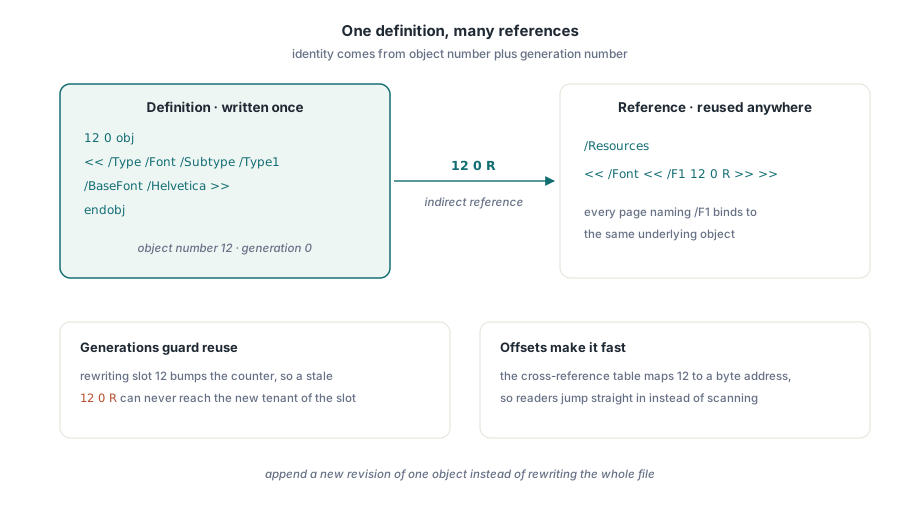
Ognuno di questi otto tipi può apparire in due modi. Un oggetto diretto è scritto direttamente sul posto, come il valore 612 all'interno di un array MediaBox. A un oggetto indiretto viene invece assegnata un'identità in modo che altri oggetti possano fare riferimento ad esso: due numeri interi (un numero di oggetto e un numero di generazione) racchiudono la definizione tra obj ed endobj:
12 0 obj
<< /Type /Font /Subtype /Type1 /BaseFont /Helvetica >>
endobj
Questo è l'oggetto 12, generazione 0, un dizionario di font. In qualsiasi altra parte del file, un altro oggetto vi fa riferimento tramite un riferimento indiretto: gli stessi due numeri seguiti dalla parola chiave R, ovvero 12 0 R. Il riferimento è un puntatore. Quando il dizionario delle risorse di una pagina indica /Font << /F1 12 0 R >>, definisce l'oggetto 12 come il font associato al nome di risorsa /F1, senza copiare la definizione del font all'interno della pagina
Il numero di generazione esiste per gestire le eliminazioni e il riutilizzo. Quando un oggetto viene liberato e la sua posizione riutilizzata, la generazione viene incrementata in modo che un vecchio riferimento a 12 0 R non possa risolversi nel nuovo occupante della posizione 12. I file scritti di recente sono quasi tutti di generazione 0, ma un file sottoposto a molte modifiche può presentare numeri più alti, e un parser che ignori la generazione finirà per leggere l'oggetto errato
L'indirezione è ciò che rende il PDF efficiente e modificabile. Un singolo font, un'immagine o uno spazio colore possono essere definiti una sola volta e richiamati da cento pagine diverse. Una piccola modifica può essere aggiunta come una nuova revisione che sostituisce un singolo oggetto, invece di riscrivere l'intero file. La tabella dei riferimenti incrociati è l'indice che trasforma un numero di oggetto in un offset di byte, consentendo al lettore di saltare direttamente a 12 0 obj senza fare una scansione, ma questa è un'ottimizzazione fisica. Logicamente, tutto ciò che occorre sapere è che 12 0 R significa "l'oggetto identificato come 12 0"
Il catalogo: dove inizia ogni documento
La risoluzione dei riferimenti deve pur iniziare da qualche parte, e quel punto di partenza è la voce /Root del trailer, che punta al catalogo del documento: la radice del grafo degli oggetti, un dizionario con /Type /Catalog. Il lettore lo raggiunge per primo perché il trailer viene trovato per primo, e da lì ogni altra parte del documento diventa accessibile seguendo i vari riferimenti
Il catalogo contiene solo due voci strettamente necessarie: il suo /Type e la voce /Pages, ovvero un riferimento indiretto alla radice dell'albero delle pagine. Le restanti voci sono facoltative e descrivono il comportamento a livello di intero documento piuttosto che il contenuto: /Outlines punta all'albero dei segnalibri, /Names contiene alberi di nomi indicizzati da stringhe, /Metadata fa riferimento a un flusso di metadati XMP, mentre /PageMode e /PageLayout suggeriscono come un visualizzatore dovrebbe aprire il documento. Nessuno di questi elementi è necessario per eseguire il rendering di una pagina; servono invece a configurare l'esperienza d'uso intorno alle pagine. Le strutture per segnalibri, metadati e annotazioni collegate al catalogo sono approfondite nell'articolo sui metadati, segnalibri e annotazioni PDF
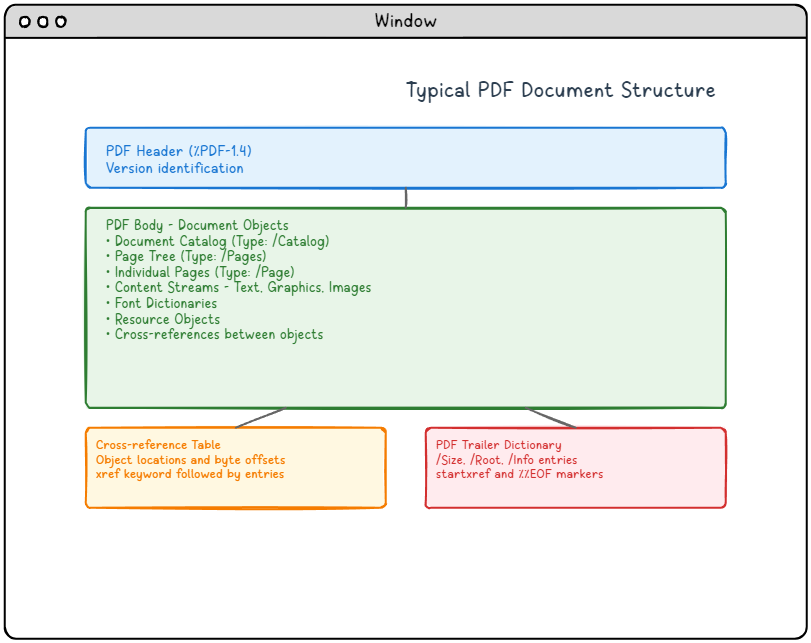
Il diagramma seguente mostra la posizione del corpo degli oggetti all'interno del file circostante. Il catalogo e l'albero delle pagine risiedono all'interno di questo corpo come normali oggetti indiretti; l'intestazione, la tabella dei riferimenti incrociati e il trailer che li circondano costituiscono l'impalcatura fisica che consente a un lettore di individuarli
L'albero delle pagine: una gerarchia bilanciata di pagine
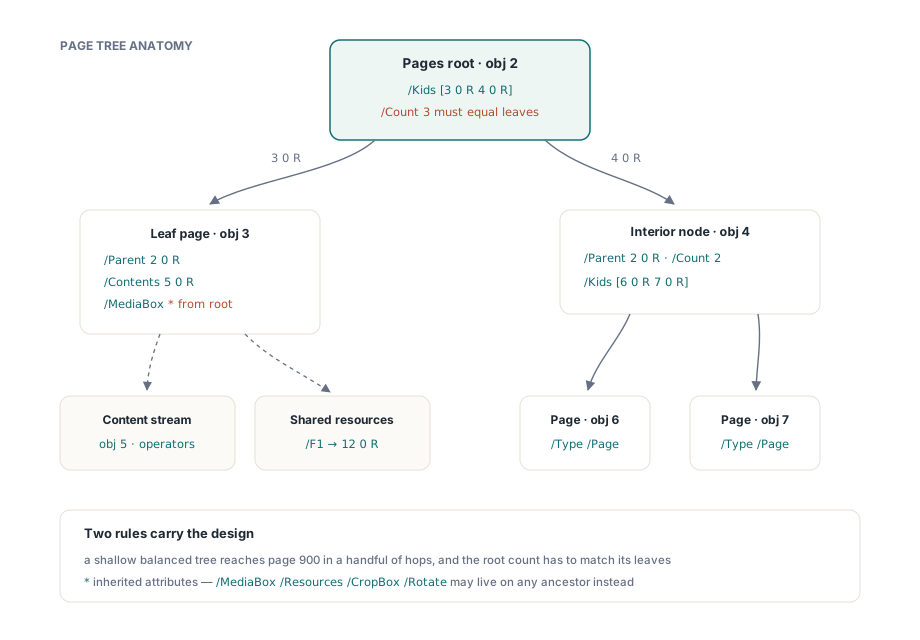
A partire da /Pages il documento si dirama nell'albero delle pagine, dove la scelta del PDF di utilizzare un grafo al posto di una lista piatta mostra tutta la sua utilità. Le pagine non sono memorizzate come una semplice sequenza lineare; esse dipendono da un albero i cui nodi interni sono nodi dell'albero delle pagine (/Type /Pages) e le cui foglie sono oggetti pagina (/Type /Page). Un nodo interno elenca i propri nodi figli in un array /Kids e registra, in /Count, quante pagine foglia si trovano sotto di esso. Ogni nodo, tranne la radice, contiene un riferimento /Parent che punta verso l'alto, consentendo di percorrere l'albero in entrambe le direzioni
2 0 obj                                  % radice del page tree
<< /Type /Pages /Kids [3 0 R 4 0 R] /Count 3 >>
endobj

3 0 obj                                  % a leaf page
<< /Type /Page /Parent 2 0 R
   /MediaBox [0 0 612 792]
   /Resources << /Font << /F1 12 0 R >> >>
   /Contents 5 0 R >>
endobj

4 0 obj                                  % un nodo interno che raggruppa altre due pagine
<< /Type /Pages /Parent 2 0 R /Kids [6 0 R 7 0 R] /Count 2 >>
endobj
In questo caso, l'oggetto 2 è la radice, con tre pagine sottostanti: la pagina foglia 3, più altre due raggiungibili tramite il nodo interno 4. Il valore /Count di 3 della radice deve corrispondere al totale delle foglie al di sotto di essa; un conteggio non coerente con la struttura effettiva è uno degli errori più comuni nei file modificati manualmente. Lo scopo dell'albero è la localizzazione degli accessi. Un lettore che apre la pagina 900 di un documento di mille pagine non deve scorrere 900 oggetti; scende invece lungo una manciata di nodi, poiché un albero ben formato rimane poco profondo e bilanciato. Costruire un albero del genere a mano è un'operazione abbastanza complessa da meritare di essere vista dall'inizio alla fine, cosa che viene fatta nella guida su come creare un documento PDF da zero
L'albero dimostra la sua utilità anche attraverso l'ereditarietà. Alcuni attributi di pagina, come /Resources, /MediaBox, /CropBox e /Rotate, possono essere impostati su un nodo interno e omessi nelle singole pagine, che quindi ereditano il valore dell'antenato più vicino. Impostando /MediaBox una sola volta sulla radice, ogni pagina foglia otterrà la stessa dimensione di pagina senza doverla ripetere; una pagina che richiede dimensioni differenti dichiarerà le proprie. Questo è l'unico punto del modello a oggetti in cui il significato di un valore dipende dalla posizione dell'oggetto all'interno dell'albero, e non solo dal suo contenuto specifico
Cosa contiene effettivamente una pagina foglia
Un oggetto pagina rappresenta il punto di incontro tra il modello strutturale e il contenuto visibile. La sua voce /Contents fa riferimento a uno o più flussi di contenuto, ovvero gli operatori grafici che disegnano testo e grafica sulla pagina. Il suo dizionario /Resources definisce i font, le immagini e gli spazi colore su cui si basano tali operatori, e ogni voce è un riferimento indiretto a un oggetto condiviso tra le varie pagine. La voce /MediaBox specifica il rettangolo della pagina in punti (1/72 di pollice), mentre voci come /Rotate e /CropBox regolano il modo in cui essa viene presentata
Questa divisione dei compiti è l'intero modello in miniatura. Il dizionario di pagina rappresenta la struttura: voci tipizzate e riferimenti che definiscono cosa sia la pagina e con cosa debba disegnare. Il flusso di contenuto rappresenta le istruzioni: un blocco separato e comprimibile che indica come disegnare. Il font associato a /F1 è una risorsa condivisa, definita una sola volta e richiamata ovunque venga utilizzata. Dizionario, flusso e riferimento cooperano per renderizzare una singola pagina, e questi stessi schemi si applicano su scala all'intero documento. Gli operatori del flusso di contenuto all'interno di quel blocco sono trattati separatamente per quanto riguarda testo e font e per grafica ed elementi visivi
/Count e può far discendere attributi come /MediaBox a ogni discendentePerché vale la pena conoscere questo modello
La maggior parte degli sviluppatori si scontra con il modello a oggetti solo quando qualcosa si rompe: una pagina viene renderizzata vuota perché il suo riferimento a /Contents è interrotto, il testo appare come rettangoli perché una risorsa di font non è mai stata incorporata, oppure uno strumento segnala un /Count che non corrisponde alle pagine trovate. Ognuno di questi casi è legato a uno stato del grafo, e leggere direttamente il grafo è di gran lunga preferibile ad andare a tentativi. Gli otto tipi e la regola dei riferimenti costituiscono un vocabolario abbastanza limitato da poter essere tenuto a mente; una volta compreso che il PDF è composto da oggetti che puntano ad altri oggetti, i file malformati cessano di essere un mistero
Detto questo, scrivere il modello a mano è raramente la scelta giusta al di fuori dell'apprendimento. Mantenere coerenti tra le varie modifiche gli offset dei riferimenti incrociati, i numeri di generazione, i conteggi dell'albero delle pagine e le lunghezze dei flussi è il tipo di gestione per cui esistono le librerie. In produzione, una libreria di sviluppo PDF matura gestisce il grafo degli oggetti, lasciandoti libero di pensare in termini di pagine e contenuti. Conoscere il modello è comunque utile: ti permette di comprendere cosa la libreria costruisce dietro le quinte, e perché