Un PDF est, au fond, un conteneur en texte brut. Ouvrez la plupart des fichiers dans un éditeur hexadécimal et leur début reste lisible : un commentaire de version, une suite d'objets numérotés, puis un petit index et, tout en bas, un pointeur qui indique au lecteur par où commencer. Sans compression, le format est assez accessible pour qu'un document fonctionnel puisse être saisi dans un éditeur de texte puis ouvert dans un lecteur. Réaliser cet exercice une fois apprend davantage sur l'assemblage d'un PDF qu'une longue lecture de la spécification, car il faut relier les objets à la main et le fichier refuse de s'ouvrir tant que ces connexions ne sont pas correctes
Ce guide construit le plus petit PDF qui affiche réellement quelque chose : une page au format Letter US, avec les mots "Hello, World!" dans une police intégrée au lecteur. Le fichier final requiert exactement cinq objets et quelques lignes de gestion autour d'eux. Nous écrirons d'abord les objets, puis assemblerons l'en-tête, la table de références croisées et le trailer qui en font un fichier accepté par un lecteur
Les cinq objets indispensables au lecteur
Un lecteur ne parcourt pas un PDF du début à la fin à la recherche de contenu. Il part du trailer, suit une référence vers le catalogue du document, puis chemine d'objet en objet. Chaque objet de cette chaîne doit exister, sinon l'ouverture échoue. Pour un document d'une page, la chaîne est courte et chaque maillon remplit une seule fonction :
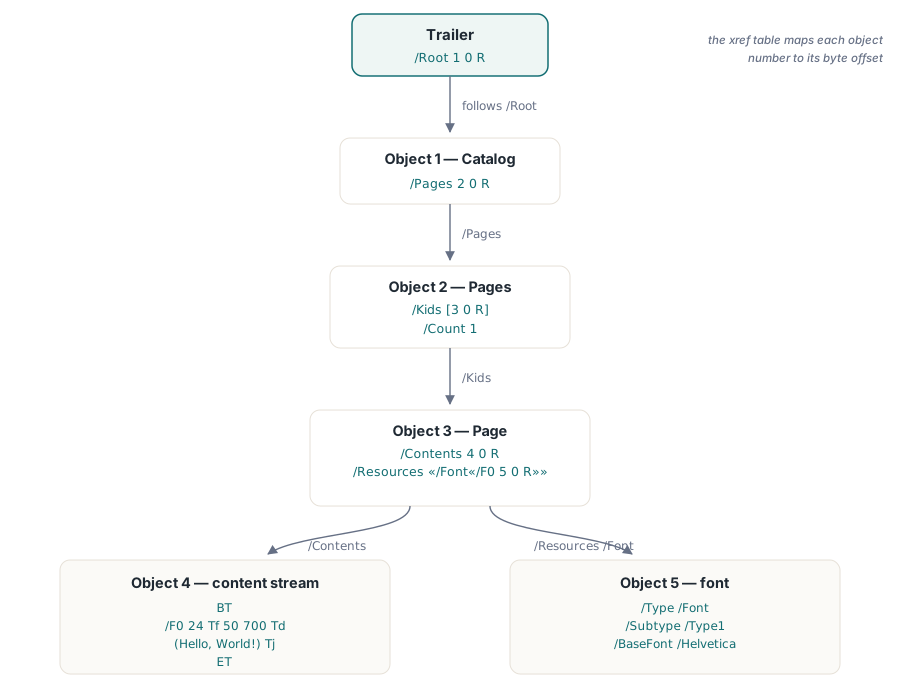
- Catalog est la racine. C'est l'objet désigné par le trailer et sa seule entrée obligatoire ici est une référence vers l'arborescence des pages
- Pages est le nœud de l'arborescence des pages. Il répertorie les pages du document et indique leur nombre
- Page décrit une page physique : ses dimensions, les ressources qu'elle utilise pour le rendu et le flux de contenu qui la dessine
- Content stream contient les opérateurs graphiques, ces commandes postfixées qui placent le texte et les éléments visuels sur la page
- Font déclare la police référencée par le flux de contenu. En choisissant l'une des 14 polices standard, aucun fichier de police ne doit être incorporé
Chaque objet est numéroté et adressable. Un objet indirect s'écrit N 0 obj ... endobj, où N est le numéro de l'objet et 0 son numéro de génération, toujours égal à 0 dans un fichier créé de toutes pièces. Ailleurs dans le fichier, une référence pointe vers cet objet : 5 0 R signifie « objet 5 ». Ces références constituent le câblage du document. Avec notre numérotation, le catalogue contient 2 0 R pour atteindre l'arborescence des pages, laquelle contient à son tour une référence vers la page, et ainsi de suite. Si un numéro est erroné, le lecteur suit un pointeur sans destination
Noms, dictionnaires et flux
Trois éléments de syntaxe portent presque toute la structure. Un nom commence par une barre oblique : /Type, /Page, /F0. Les noms sont des identifiants sensibles à la casse, pas des chaînes, et le PDF les utilise comme clés de dictionnaire et comme marqueurs du type d'un objet. Un dictionnaire est un ensemble de paires clé-valeur entre doubles chevrons, chaque clé étant un nom : << /Type /Page /MediaBox [0 0 612 792] >>. Une valeur peut être un nombre, un nom, un tableau entre crochets, une référence ou un dictionnaire imbriqué. La plupart des objets PDF sont des dictionnaires
Un flux est un dictionnaire suivi d'un bloc d'octets placé entre les mots-clés stream et endstream. Les opérateurs de dessin de la page y résident, tout comme les images compressées et les polices incorporées dans les fichiers réels. Le dictionnaire du flux décrit ces octets ; dans un fichier de production, il doit contenir une entrée /Length avec le nombre exact d'octets et souvent un /Filter, par exemple /FlateDecode, lorsque les données sont compressées. Nous laisserons un outil calculer /Length, car compter les octets à la main n'apporte rien à l'exercice et crée facilement une erreur de décalage d'une unité qui invalide le fichier
Écrire les objets
Voici les cinq objets dans l'ordre. Avant de lire le flux de contenu, retenez ce détail sur les coordonnées : le PDF mesure depuis le coin inférieur gauche de la page, en points, un point valant 1/72 de pouce, et l'axe Y progresse vers le haut. Une page Letter US mesure 612 sur 792 points ; la position 50 700 se trouve donc près du coin supérieur gauche, et non en bas
1 0 obj
<< /Type /Catalog
   /Pages 2 0 R
>>
endobj

2 0 obj
<< /Type /Pages
   /Kids [3 0 R]
   /Count 1
>>
endobj

3 0 obj
<< /Type /Page
   /Parent 2 0 R
   /MediaBox [0 0 612 792]
   /Resources << /Font << /F0 4 0 R >> >>
   /Contents 5 0 R
>>
endobj

4 0 obj
<< /Type /Font
   /Subtype /Type1
   /BaseFont /Helvetica
>>
endobj

5 0 obj
<< /Length 44 >>
stream
BT
/F0 36 Tf
50 700 Td
(Hello, World!) Tj
ET
endstream
endobj
Suivez les références et la structure apparaît. L'objet 1, le catalogue, fait pointer son entrée /Pages vers l'objet 2. L'objet 2, l'arborescence des pages, répertorie l'objet 3 dans /Kids et déclare /Count 1. L'objet 3, la page, renvoie à l'objet 2 avec /Parent, car l'arborescence et la page doivent se référencer mutuellement ; il définit ses dimensions avec /MediaBox, expose la police sous le nom local /F0 dans /Resources et désigne l'objet 5 comme son contenu. L'objet 4 est la police : /BaseFont /Helvetica sélectionne l'une des 14 polices standard dont dispose tout lecteur conforme, donc rien ne doit être incorporé. L'objet 5 est le flux de contenu
Ce que dit réellement le flux de contenu
Le corps du flux est un minuscule programme écrit dans le langage de description de page du PDF, qui utilise une notation postfixée : les opérandes précèdent l'opérateur qui les consomme. Cinq lignes suffisent. BT et ET ouvrent et ferment un objet texte ; tout ce qui positionne ou affiche du texte doit se trouver entre eux. /F0 36 Tf choisit la ressource de police nommée /F0 à une taille de 36 points, l'opérateur Tf servant à définir la police et sa taille. 50 700 Td déplace la position du texte aux coordonnées (50, 700) de la page. (Hello, World!) Tj affiche la chaîne, écrite en PDF comme texte littéral entre parenthèses, grâce à Tj qui la dessine à la position courante. Sans BT/ET, un lecteur strict rejette les opérateurs de texte ; sans définition préalable d'une police avant Tj, aucune police courante n'est disponible pour le rendu
La valeur /Length 44 du dictionnaire de flux correspond au nombre d'octets entre stream et endstream et doit être exacte. Il vaut mieux confier ce calcul à un outil que compter les retours à la ligne à la main, d'autant que le total change selon que l'éditeur écrit des fins de ligne LF ou CRLF
En-tête, xref et trailer
Les objets constituent le contenu. Trois éléments structurels en font un fichier. Le premier est l'en-tête, placé sur la toute première ligne, qui identifie le format et sa version :
%PDF-1.7Le caractère % commence un commentaire dans la syntaxe PDF, mais le lecteur traite ce commentaire précis comme la signature du format et en extrait la version. Un véritable générateur ajoute immédiatement une seconde ligne de commentaire contenant des octets dont le bit de poids fort est actif, afin de signaler aux outils de transfert que le fichier est binaire et ne doit pas être altéré comme du texte
À la fin du fichier se trouve la table de références croisées, l'index qui permet l'accès aléatoire. Elle enregistre l'offset en octets de chaque objet depuis le début du fichier, de sorte qu'un lecteur puisse atteindre directement l'objet 3 sans analyser d'abord les objets 1 et 2. Son format est rigide : chaque entrée occupe 20 octets, fin de ligne comprise, avec un offset sur 10 chiffres, une génération sur 5 chiffres, un mot-clé, n pour un objet utilisé ou f pour un objet libre, puis une terminaison de deux octets. Une table correcte pour nos six entrées, l'objet 0 étant toujours la tête de la liste libre, ressemble à ceci :
xref
0 6
0000000000 65535 f
0000000009 00000 n
0000000058 00000 n
0000000115 00000 n
0000000235 00000 n
0000000308 00000 n
trailer
<< /Size 6
   /Root 1 0 R
>>
startxref
408
%%EOF
Ces offsets sont la partie fragile de l'écriture manuelle d'un PDF. Chacun indique la position exacte en octets où commence le N 0 obj correspondant, et tous les offsets se décalent dès qu'un caractère est ajouté plus haut dans le fichier. Le trailer est le point d'entrée que le lecteur utilise en dernier et en premier : /Root 1 0 R désigne le catalogue, /Size 6 indique le nombre d'objets et startxref 408 fournit l'offset du mot xref lui-même. Le lecteur ouvre le fichier, saute à la fin, lit startxref, rejoint la table de références croisées, puis atteint le catalogue et tout ce qui en dépend. %%EOF marque le dernier octet
Laisser un outil corriger le comptage des octets
Les offsets ci-dessus sont donnés à titre d'exemple ; en pratique, ils seront probablement faux à la fin de la saisie, car ils dépendent de l'agencement exact des octets. Au lieu de les recalculer, écrivez la structure avec des valeurs provisoires et laissez un utilitaire reconstruire la table de références croisées et les longueurs de flux. L'outil libre et multiplateforme pdftk réalise cette opération en une seule passe :
pdftk hello-draft.pdf output hello.pdfIl analyse les objets, recalcule chaque offset, renseigne les valeurs /Length correctes, écrit une table xref et un trailer valides, puis produit hello.pdf. Ouvrez ce fichier dans n'importe quel lecteur : il affiche une page avec « Hello, World! » en Helvetica 36 points près du haut. Qpdf accomplit la même tâche et de nombreux lecteurs réparent également à la volée un fichier légèrement mal formé. Recourir à un outil n'est pas une facilité : le calcul des offsets est la partie du format qui apporte le moins à la compréhension tout en présentant le plus grand risque d'erreur, et son automatisation permet de concentrer l'apprentissage sur la structure
Pourquoi ce modèle s'applique aux documents réels
Un rapport de cent pages ne change pas la forme de ce que vous venez de construire. Le catalogue reste à la racine, l'arborescence regroupe toujours les pages et chaque page pointe encore vers ses ressources et un flux de contenu. C'est l'étendue qui augmente, pas l'ossature : l'arborescence se ramifie pour permettre au lecteur de sauter des sous-arbres entiers, les flux de contenu portent des centaines d'opérateurs au lieu de cinq, les polices sont incorporées dans leurs propres objets de flux avec des tables de largeurs et des encodages, et les images apparaissent sous forme de flux dotés de filtres spécifiques. Les fichiers modernes regroupent aussi souvent de nombreux objets dans des flux d'objets compressés et remplacent la table xref ordinaire par un flux de références croisées, ce qui explique pourquoi un PDF réel ouvert dans un éditeur de texte ressemble généralement à un mur de données binaires. Le modèle sous-jacent reste identique à celui du fichier créé à la main. Pour découvrir un graphe d'objets plus vaste et comprendre les relations entre le catalogue, l'arborescence des pages et les dictionnaires de ressources, consultez l'exploration approfondie de la structure d'un document PDF ; la présentation de la structure du fichier explique les mises à jour incrémentielles et l'enchaînement des trailers entre les révisions
De l'écriture manuelle à une bibliothèque
Saisir des objets à la main est un exercice pédagogique, pas une technique de production. Dès qu'il faut de vraies polices, du texte avec retour à la ligne, des images ou plus d'une page élémentaire, la gestion des octets corrigée ici par pdftk devient l'essentiel du travail et doit être confiée à une bibliothèque. Les mêmes cinq objets sont toujours écrits, mais la bibliothèque calcule chaque offset, gère les dictionnaires de polices et de ressources, puis compresse les flux de contenu sans vous obliger à suivre le moindre octet. Dans Delphi et C++Builder, le HotPDF Delphi Component réduit tout ce fichier à quelques appels : préparez le document, appelez BeginDoc, SetFont et TextOut pour placer le même message, puis EndDoc afin d'écrire un catalogue, une arborescence des pages, une table xref et un trailer corrects. Comprendre les objets sous-jacents permet ensuite d'analyser le résultat lorsqu'un document ne s'affiche pas comme prévu