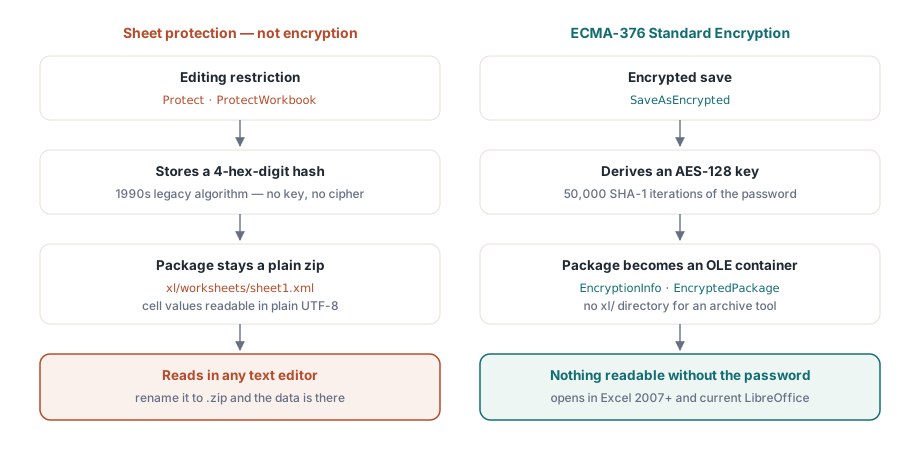
Excel expose deux éléments appelés tous deux « mot de passe », et un seul d'entre eux correspond à un chiffrement réel. Le mot de passe d'ouverture verrouille un véritable algorithme de chiffrement : sans lui, le fichier ne peut pas du tout être lu. Les mots de passe de protection des feuilles de calcul et des classeurs ne font rien de tel. Ils définissent simplement un drapeau (flag) qu'un éditeur coopérant s'engage à respecter, et un classeur ne portant que ce drapeau est un simple ZIP lisible dont les données apparaissent en clair. Choisissez le mauvais et vous enverrez des fiches de paie qui semblent verrouillées sous Excel mais qui se lisent dans n'importe quel éditeur de texte
La preuve prend dix secondes. Renommez un fichier .xlsx protégé en .zip, ouvrez-le avec n'importe quel outil d'archivage et examinez xl/worksheets/sheet1.xml. Si les valeurs des cellules s'y trouvent en texte brut UTF-8, le fichier n'est pas chiffré, quel que soit le nombre d'invites de mot de passe qu'Excel affiche lorsque quelqu'un tente de modifier une cellule. Cet écart perdure des années au sein d'équipes qui supposent que la protection des feuilles équivaut à de la confidentialité, et il refait généralement surface le jour où un audit de sécurité effectue précisément ce renommage
HotXLS est une bibliothèque de feuilles de calcul native pour Delphi et C++Builder, et elle maintient ces deux fonctionnalités bien distinctes. La protection des feuilles de calcul et des classeurs correspond à des restrictions d'édition appuyées sur un hachage hérité volontairement faible. SaveAsEncrypted produit un package chiffré en AES que seul le mot de passe permettra d'ouvrir. Les sections ci-dessous détaillent ce que cet appel génère, l'asymétrie que vous devez intégrer dans votre conception (HotXLS écrit des fichiers chiffrés mais ne peut pas les relire) et comment le chemin d'accès au format hérité XLS diffère
Pourquoi la protection des feuilles n'est pas un chiffrement
Les méthodes Protect sur les feuilles et ProtectWorkbook sur le classeur stockent un hachage à 4 chiffres hexadécimaux du mot de passe. Il s'agit de l'algorithme hérité qu'OOXML et BIFF ont tous deux reçu d'Excel des années 1990, et la documentation du format ne prétend jamais qu'il fasse plus que bloquer les modifications accidentelles. Le package reste un ZIP ordinaire lisible : données des cellules, formules et chaînes partagées s'affichent en clair dans le XML. La configuration par défaut aggrave la situation : chaque cellule commence avec l'état Locked=True, de sorte que l'appel à Protect sans déverrouiller préalablement une plage d'entrée bloque toute modification sur la feuille tout en laissant chaque valeur visible de tous
Rien de tout cela ne rend la protection inutile. Guider les utilisateurs vers des plages éditables et stabiliser une mise en page pour l'impression sont des tâches réelles, présentées dans notre article sur la protection des feuilles de calcul et la mise en page. Cependant, ce sont des tâches d'ergonomie. Dès lors que l'exigence porte sur la confidentialité, la seule API adéquate est SaveAsEncrypted
Ce que SaveAsEncrypted écrit réellement
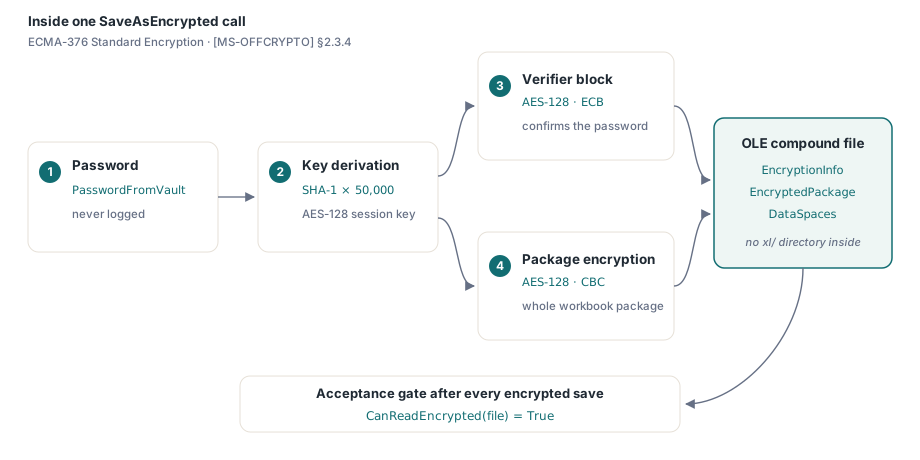
L'implémentation suit le chiffrement standard ECMA-376 (Standard Encryption), décrit dans la spécification [MS-OFFCRYPTO] section 2.3.4. Le mot de passe subit 50 000 itérations de SHA-1 pour dériver une clé AES-128. Un bloc de vérification, chiffré en AES-128 en mode ECB, permet au consommateur de confirmer le mot de passe avant de déchiffrer quoi que ce soit, puis l'intégralité du package du classeur est chiffrée en AES-128 en mode CBC. Ce qui est enregistré sur le disque n'est pas du tout un ZIP. C'est un fichier OLE composé contenant les flux EncryptionInfo, EncryptedPackage et DataSpaces, sans aucun répertoire xl/ qu'un outil d'archivage pourrait lister, d'où le fait que le test de renommage ne donne plus rien de lisible. Excel 2007 et les versions ultérieures l'ouvrent simplement avec le mot de passe, et la version actuelle de LibreOffice lit également le chiffrement standard
var
  Book: TXLSXWorkbook;
  Sheet: TXLSXWorksheet;
  rc: Integer;
begin
  Book := TXLSXWorkbook.Create;
  try
    Sheet := Book.Sheets.Add('Payroll');
    Sheet.Cells[1, 1].Value := 'Employee';
    Sheet.Cells[1, 2].Value := 'Net pay';
    Sheet.Cells[2, 1].Value := 'A. Garcia';
    Sheet.Cells[2, 2].Value := 4815.16;

    rc := Book.SaveAsEncrypted('payroll-2026-06.xlsx', PasswordFromVault);
    if rc <> 1 then
      raise Exception.CreateFmt('Encrypted save failed (rc=%d)', [rc]);
  finally
    Book.Free;
  end;
end;
Traitez la variable contenant le mot de passe avec le même soin qu'une chaîne de connexion. Récupérez-la d'un coffre-fort ou d'un service de secrets générés au dernier moment, ne la consignez jamais dans des journaux, et ne l'écrivez jamais dans le classeur lui-même. Le contrôle du code de retour n'est pas une simple formalité. Une sauvegarde chiffrée qui échoue en cours de route doit annuler la livraison, car la seule solution de repli que le code appelant peut proposer est une copie non chiffrée, précisément l'incident que cette fonctionnalité vise à éviter
Il existe également un test de validation automatisable qui ne coûte presque rien : appelez CanReadEncrypted sur le fichier que vous venez d'écrire. La fonction ne renvoie vrai que si la sortie correspond réellement à un conteneur chiffré, ainsi ce contrôle après chaque sauvegarde chiffrée permet de détecter immédiatement la régression la plus critique — un chemin de code qui se rabattrait silencieusement sur un simple SaveAs — au moment où elle survient plutôt que des semaines plus tard dans la boîte de réception d'un client. Le mot de la fin revient toutefois à une ouverture manuelle dans Excel avec le mot de passe réel lors des tests de version
En écriture seule par conception : gérer EXlsxEncryptionNotImplemented
Voici l'asymétrie qui doit guider l'architecture de votre pipeline : HotXLS chiffre à la sauvegarde mais ne décrypte pas à l'ouverture. OpenEncrypted lève l'exception EXlsxEncryptionNotImplemented lorsqu'on lui présente un véritable package chiffré ; sur un classeur non chiffré, la fonction bascule simplement sur un appel à Open normal. La fonction associée CanReadEncrypted détecte rapidement le conteneur chiffré OLE, ce qui permet au code de traitement d'aiguiller ces fichiers sans déclencher l'exception :
var
  Book: TXLSXWorkbook;
begin
  Book := TXLSXWorkbook.Create;
  try
    if Book.CanReadEncrypted(FileName) then
    begin
      // Conteneur chiffré : HotXLS ne sait pas le déchiffrer
      Writeln(FileName + ': needs manual decryption in Excel first');
      Exit;
    end;
    try
      Book.OpenEncrypted(FileName, '');   // les fichiers non chiffrés retombent sur Open
      Writeln(FileName + ': opened, ' + IntToStr(Book.Sheets.Count) + ' sheet(s)');
    except
      on EXlsxEncryptionNotImplemented do
        Writeln(FileName + ': encrypted - routed to manual queue');
    end;
  finally
    Book.Free;
  end;
end;
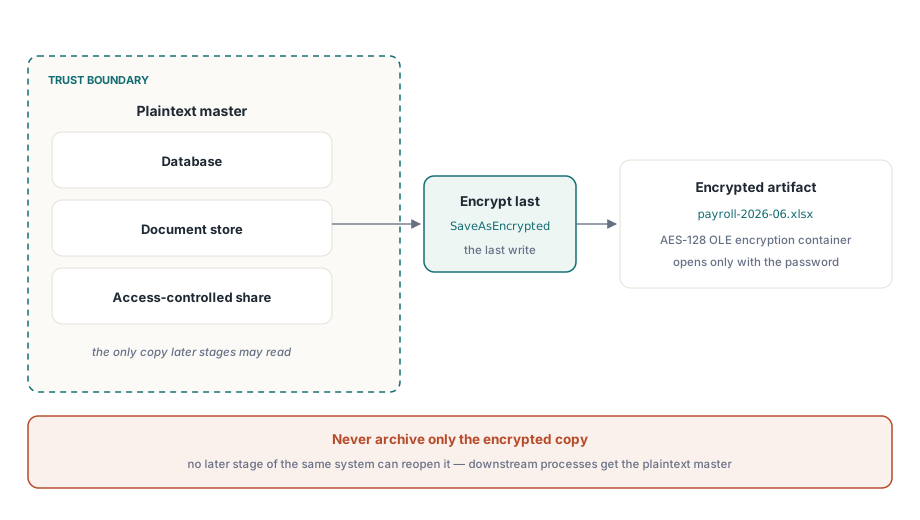
Cette asymétrie impose une orientation architecturale claire : chiffrez à la livraison, en tout dernier lieu. Conservez la version maîtresse en texte brut à l'intérieur de votre périmètre de confiance — dans une base de données, un entrepôt de documents ou un dossier à accès contrôlé — et générez la copie chiffrée comme étape finale avant que le fichier ne quitte le système. Un pipeline qui archiverait uniquement la sortie chiffrée se bloquerait l'accès à ses propres données, car aucune étape ultérieure de ce même système ne pourrait réouvrir ces fichiers. Lorsqu'un processus HotXLS en aval a de nouveau besoin du classeur, transmettez-lui la version maîtresse en texte brut, jamais le fichier chiffré de livraison
Le chiffrement standard AES-128 et la conformité AES-256
Le chiffrement des fichiers Office comporte deux générations. Le chiffrement standard (Standard Encryption), qu'écrit HotXLS, utilise de l'AES-128 avec une dérivation de clé SHA-1. Le chiffrement Agile (Agile Encryption) est arrivé plus tard et propose de l'AES-256 avec du SHA-512 et un conteneur de clé XML différent. Les deux types de chiffrement s'ouvrent de manière transparente sous Excel, et l'AES-128 reste mathématiquement robuste pour protéger un fichier lors de son transfert vers un client
La différence cesse d'être théorique le jour où un questionnaire de sécurité exige un « chiffrement AES-256 des fichiers au repos ». Le chiffrement standard ne remplit pas cette condition, quelle que soit la force du mot de passe, et aucun paramètre de SaveAsEncrypted ne permet de modifier l'algorithme généré. Formulez donc précisément les caractéristiques dans votre documentation de sécurité : AES-128, chiffrement standard ECMA-376, dérivation de clé SHA-1 à 50 000 itérations. Une déclaration exacte vaut mieux qu'une allégation optimiste qui s'effondrait lors d'un audit
La méthode héritée XLS : RC4 en sortie, RC4 et XOR en entrée
L'interface BIFF présente une configuration opposée. Son chiffrement est plus ancien et plus faible, mais l'aller-retour est complet : ce qu'elle écrit, elle peut également le relire. Définir EncryptionPassword avant l'appel à SaveAs génère un fichier .xls chiffré en RC4 via le mécanisme BIFF FilePass, et la méthode Open avec un paramètre de mot de passe lit les trois schémas hérités : RC4, RC4 CryptoAPI et l'ancien masquage XOR :
var
  Writer, Reader: IXLSWorkbook;   // interface refs: no manual Free
begin
  Writer := TXLSWorkbook.Create;
  Writer.Sheets.Add.Cells.Item[1, 1].Value := 'Confidential';
  Writer.EncryptionPassword := 'S3cret!';
  Writer.SaveAs('confidential.xls');

  Reader := TXLSWorkbook.Create;
  if Reader.Open('confidential.xls', 'S3cret!') > 0 then
    Writeln(Reader.Sheets[1].Cells.Item[1, 1].Value);  // Entries are 1-based
end;
Le RC4 est une cryptographie obsolète qui ne doit jamais servir à protéger des données importantes aujourd'hui ; sa seule valeur résiduelle tient à l'interopérabilité avec des systèmes qui échangent encore des fichiers .xls. Le volet lecture reste toutefois utile pour les tâches de migration. Un fichier hérité protégé par mot de passe s'ouvre avec Open(FileName, Password), bascule vers le modèle OOXML et se sécurise à nouveau via le chemin AES, une mise à niveau à sens unique qui s'exécute sans qu'Excel n'intervienne. Pour les livraisons chiffrées volumineuses, les remarques sur le débit d'écriture présentées dans our article on streaming writes for server batch jobs s'appliquent à la phase de construction du contenu préalable au chiffrement
Chiffrement et protection ne sont pas concurrents
Il convient de préciser un dernier point, car l'avertissement au début de cette page pourrait être interprété comme « la protection ne vaut rien ». C'est faux. Le chiffrement et la protection répondent à des questions différentes, et ils se complètent parfaitement. Le chiffrement détermine qui peut ouvrir le fichier ; la protection détermine ce qu'un lecteur déjà connecté est autorisé à modifier. Une transmission de fiches de paie peut légitimement combiner les deux : chiffrer le package pour que seul le détenteur du mot de passe puisse le consulter, et verrouiller les cellules de formules pour que le destinataire puisse filtrer et trier sans modifier les calculs. L'erreur n'est pas d'activer la protection. L'erreur est de la laisser remplacer le chiffrement lorsque la confidentialité est requise
La conservation du secret ne dispose d'aucun filet de sécurité, et cela est voulu. La dérivation de clé à 50 000 itérations est conçue pour rendre la recherche par force brute coûteuse, et rien dans le fichier ne stocke le secret. Un mot de passe perdu équivaut à des données perdues. Générez, transmettez et conservez ces mots de passe avec la même rigueur que celle appliquée aux identifiants de base de données, et le chiffrement jouera pleinement son rôle
Le chiffrement réel des fichiers tient en un seul appel dans HotXLS. La rigueur réside dans tout ce qui entoure cet appel : la conservation des mots de passe, la limite d'écriture seule qui empêche HotXLS de réouvrir ses propres fichiers générés, et des caractéristiques d'algorithmes que vous pouvez défendre lors d'un audit. SaveAsEncrypted et l'aller-retour hérité sont intégrés au composant HotXLS Delphi Component, s'exécutant nativement dans les processus Delphi et C++Builder sans aucune automatisation d'Excel sur le chemin