Imaginez un service Delphi nocturne qui génère un XLSX par client, quelques centaines de fichiers, dont certains larges de 400 000 lignes. Profilez-le et la surprise vient rarement de la boucle de remplissage des cellules. Elle vient de l'appel SaveAs. Avec l'écrivain par défaut, chaque feuille de calcul est sérialisée en une seule chaîne XML en mémoire avant que cette chaîne soit compressée dans le zip OOXML, et pour une feuille large la chaîne transitoire peut écraser en taille le modèle de cellules dont elle est issue. Un travail qui construit confortablement ses données et se tient à 800 Mo dépassera donc en pointe une limite de conteneur de 2 Go pendant la sauvegarde, et le tueur de processus déposera le rapport de bogue à 3 heures du matin quand personne ne regarde. HotXLS, la bibliothèque tableur native de losLab pour Delphi et C++Builder, possède une propriété braquée droit sur ce pic : StreamingWrite. Autour d'elle se tiennent deux autres leviers qui décident si un travailleur de lot reste dans son budget de mémoire et de temps, à savoir les rappels d'écriture au niveau de la ligne et le comportement du pool de styles à l'intérieur d'une boucle serrée
Ce que le chemin de sauvegarde par défaut met en tampon, et ce que StreamingWrite change
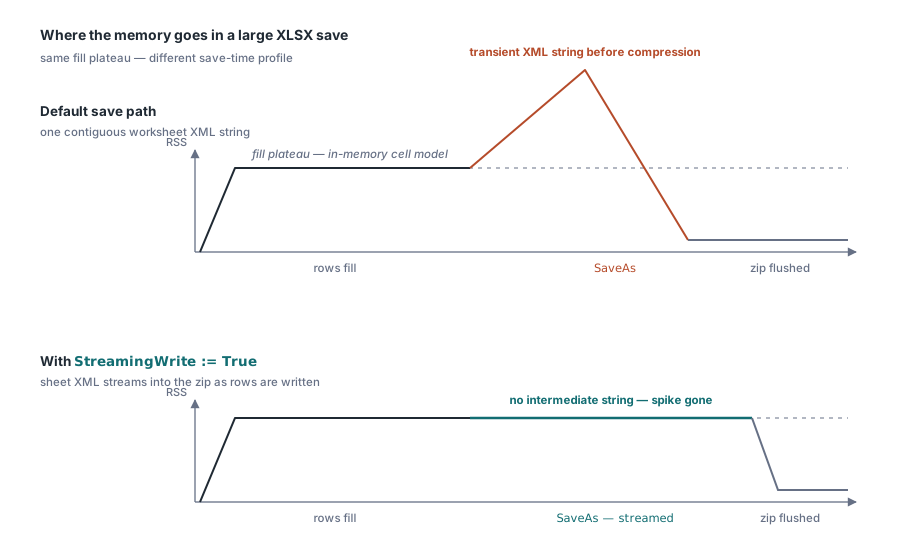
L'écrivain XLSX par défaut privilégie la simplicité. Il produit intégralement le XML de la feuille, puis remet la chaîne achevée au compresseur zip. C'est le bon compromis pour l'immense majorité des classeurs, où le XML de toute la feuille tient en quelques mégaoctets. Il cesse d'être le bon quand la forme sérialisée d'une seule feuille atteint des centaines de mégaoctets. Le XML des feuilles de calcul est verbeux : chaque cellule numérique coûte des dizaines de caractères de balisage, et la chaîne qui contient le tout doit être contiguë. Sur un graphe de mémoire, la signature est difficile à manquer. Un long plateau plat pendant que les lignes se remplissent, puis un pic triangulaire net pendant SaveAs, puis l'effondrement une fois le zip vidé
Poser Book.StreamingWrite := True fait basculer SaveAs vers un écrivain de feuille qui émet le XML directement dans le flux zip à mesure qu'il est généré. La chaîne intermédiaire n'est jamais allouée, et le pic triangulaire s'aplatit dans le bruit
Soyez précis sur ce que cela vous apporte réellement, car en survendre l'effet mène à de mauvais plans de capacité. L'indicateur ne change que le chemin de sauvegarde. Construire le classeur alloue toujours le modèle de cellules complet en mémoire, si bien que le plateau de la phase de remplissage est exactement aussi haut qu'avant. Ce qui disparaît, c'est le pic de sérialisation qui venait s'empiler sur ce plateau au moment de la sauvegarde, et pour un travail qui remplit 400 000 lignes ce pic fait couramment toute la différence entre tenir dans un budget mémoire et le faire exploser. La propriété vaut False par défaut afin de préserver le comportement historique, si bien que l'adhésion tient en une ligne explicite que vous écrivez exprès
Un export en masse avec l'indicateur activé
Book := TXLSXWorkbook.Create;
try
  BoldIdx := Book.Fonts.Add('Calibri', 11, True, False); // index du pool, en base 0
  Sheet := Book.Sheets.Add('Bulk');
  for R := 1 to 100000 do
  begin
    Sheet.Cells[R, 1].Value := R;
    Sheet.Cells[R, 2].Value := 'Row ' + IntToStr(R);
    Sheet.Cells[R, 3].Value := R * 1.5;
    if (R mod 1000) = 0 then
      Sheet.Cells[R, 2].FontIndex := BoldIdx + 1;        // base 1 au niveau de la cellule
  end;
  Book.StreamingWrite := True;   // diffuser le XML de la feuille droit dans le zip
  Book.SaveAs('bulk.xlsx');
finally
  Book.Free;
end;
Cells[R, C] crée les cellules à la demande, ce qui garde le corps de la boucle propre. Deux plafonds de grille méritent d'être mémorisés : 1 048 576 lignes et 16 384 colonnes, exposés comme XlsxMaxRow et XlsxMaxCol. Un flux de données qui dépasse le plafond de lignes doit être réparti sur plusieurs feuilles par votre propre code. Rien en aval ne remarque le dépassement ni ne le corrige pour vous, et le fichier finit simplement tronqué à la limite
Remplir des lignes sans le surcoût des Variant cellule par cellule
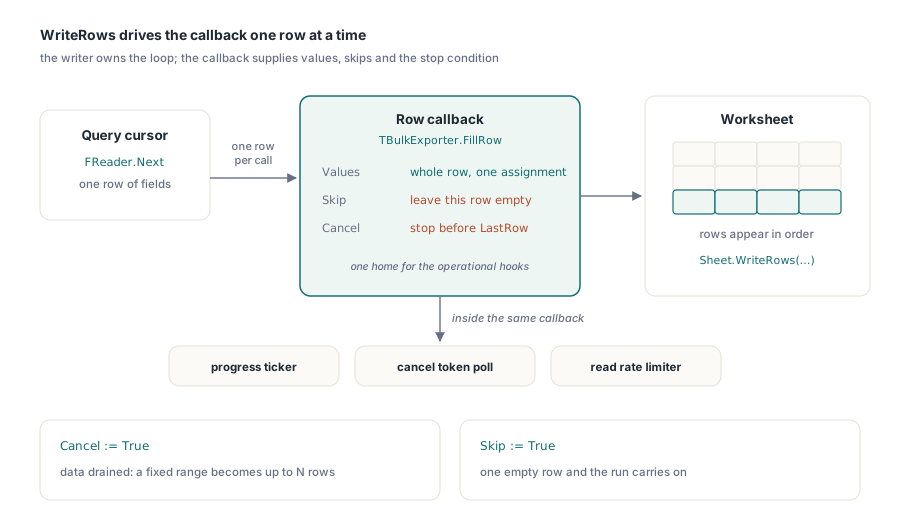
Chaque affectation Cells[R, C].Value paie une recherche de cellule et une conversion de Variant. À dix mille lignes, personne ne le remarque. À un million de lignes de vingt colonnes chacune, ce surcoût par appel devient le coût dominant de la phase de remplissage, et le profileur pointera droit dessus. Les interfaces par lots vous permettent de remettre à l'écrivain une ligne entière à la fois. WriteRows pilote un rappel qui fournit une ligne par invocation :
procedure TBulkExporter.FillRow(Sender: TObject; SheetIndex, Row, FirstCol,
  LastCol: Integer; var Values: Variant; var Skip: Boolean;
  var Cancel: Boolean);
begin
  if not FReader.Next then
  begin
    Cancel := True;              // source de données épuisée : arrêt net
    Exit;
  end;
  Values := VarArrayCreate([FirstCol, LastCol], varVariant);
  Values[FirstCol]     := FReader.RecordId;
  Values[FirstCol + 1] := FReader.CustomerName;
  Values[FirstCol + 2] := FReader.Amount;
end;

// remplir les lignes 2..100001, colonnes A..C, en tirant depuis le lecteur
Sheet.WriteRows(2, 1, 100001, 3, FillRow);
L'indicateur Cancel est ce qui transforme une plage de lignes fixe en « jusqu'à N lignes », la forme naturelle quand le nombre de lignes provient d'une requête que vous n'avez pas fini d'exécuter. Skip est la touche plus légère : il laisse une ligne individuelle vide sans arrêter le parcours. Au-delà du remplissage des cellules, le rappel se révèle un bon logement pour les préoccupations d'exploitation qui, sinon, se greffent maladroitement sur une boucle de remplissage. Un compteur de progression qui avance toutes les mille lignes, un jeton d'annulation interrogé auprès de l'ordonnanceur de travaux, un limiteur de débit sur les lectures de la base source : tout cela vit au même endroit au lieu d'être enfilé à travers du code d'écriture de cellules. Côté lecture, ForEachRow et ForEachCell reflètent le même motif, ce qui compte quand un travail par lots consomme et produit à la fois de gros fichiers
Les pools de styles récompensent la sortie de boucle
Le modèle de style XLSX est un ensemble de pools partagés. Fonts.Add, Fills.AddSolid et Borders.Add renvoient tous un index de pool en base 0, et une cellule référence une police en rangeant cet index plus un dans FontIndex, où zéro est réservé à la police par défaut du classeur. Le +1 est bien là dans l'exemple en masse ci-dessus. Oubliez-le et la cellule prend discrètement le mauvais style, car un décalage d'une unité dans un index de pool de styles reste un index valide et rien ne se déclenche
La discipline qui en découle consiste à créer chaque objet de style avant la boucle de lignes et à référencer son index dans la boucle. Fonts.Add dédoublonne les définitions identiques, si bien que l'appeler une fois par ligne ne gaspille que du processeur. Alignments.Add est le piège, car il renvoie une entrée neuve à chaque appel. À l'intérieur d'une boucle de 100 000 lignes, cela enterre styles.xml sous cent mille enregistrements d'alignement en double, ce qui gonfle le fichier sur disque et ralentit chaque ouverture ultérieure dans Excel puisque les doublons sont réanalysés. Construisez chaque style une fois hors de la boucle, puis référencez son index autant de fois que nécessaire
Flux, répertoires temporaires et la boucle de lot autour de tout cela
Rien de tout cela n'exige un système de fichiers. Les deux façades portent des surcharges TStream sur toute leur surface d'entrées-sorties, dont Open, SaveAs, SaveAsCSV, SaveAsHTML et SaveAsODS, si bien qu'un travailleur de lot peut produire son rendu droit dans un TMemoryStream destiné à un stockage objet ou à une réponse HTTP sans jamais toucher le disque. Il reste une arête vive à retenir. SaveAs(Stream) écrit depuis la position courante du flux et ne le rembobine pas ensuite, alors posez vous-même Position := 0 avant de remettre le flux à ce qui le livrera, sinon le consommateur lit zéro octet. La façade XLS ajoute deux boutons à elle. SetTempDir dirige les fichiers temporaires de l'écrivain BIFF vers un volume qui a la place et la marge d'entrées-sorties pour les absorber, ce qui compte sur les serveurs où le chemin temporaire par défaut siège sur un disque système à l'étroit. UseSharedFormulas replie les corps de formules répétés en groupes partagés, une vraie réduction de taille pour la forme de rapport classique où une formule est copiée le long d'une colonne entière
La boucle de lot elle-même reste ennuyeuse à dessein :
for FileName in SourceFiles do
begin
  Book := TXLSXWorkbook.Create;        // instance neuve : aucune fuite d'état
  try
    Book.StreamingWrite := True;
    if Book.Open(FileName) <> 1 then
      Continue;                        // une mauvaise entrée ne doit pas tuer le lot
    Book.SaveAsCSV(ChangeFileExt(FileName, '.csv'), 0, ',');
  finally
    Book.Free;
  end;
end;
Une instance de classeur neuve par fichier coûte des microsecondes et supprime toute une catégorie de bogues de contamination entre fichiers : les styles, les noms définis et les propriétés de document du fichier 17 n'ont aucun chemin pour fuir vers le fichier 18. Le saut et la poursuite après un Open en échec gagnent tout autant leur place, car un dépôt tronqué dans un lot de 600 fichiers devrait vous coûter une seule ligne de journal plutôt que le reste du parcours. Il vaut aussi la peine de signaler ce que la branche CSV ne fait délibérément pas. SaveAsCSV écrit les formules en texte littéral et ne les évalue jamais, si bien qu'un lot de conversion dont les consommateurs attendent des nombres calculés doit d'abord exécuter Calculate sur les cellules concernées, ou partir de classeurs qui portent déjà des résultats mis en cache par un calcul antérieur
Modèle de concurrence : un classeur par thread
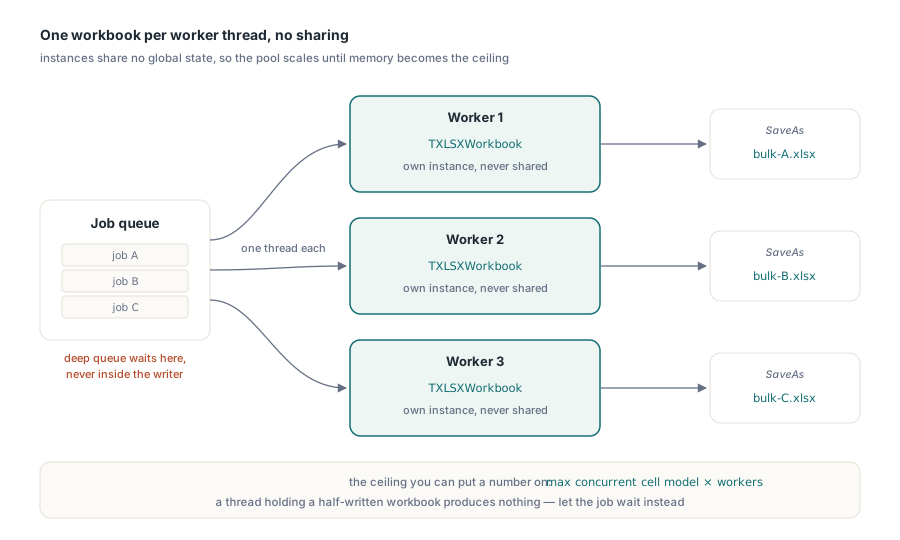
Les objets d'aucune des deux façades ne sont thread-safe, et la conception ne l'a jamais prétendu. Comme il n'y a aucun état global partagé entre instances, la règle de mise à l'échelle est simplement un classeur par thread travailleur, sans partage d'un classeur entre threads. Un pool de N travailleurs, chacun possédant son propre TXLSXWorkbook, monte presque linéairement jusqu'à ce que la mémoire devienne le plafond, et ce plafond est chiffrable : le plus grand modèle de cellules concurrent multiplié par le nombre de travailleurs, plus ce qui reste de surcoût à la sauvegarde une fois que StreamingWrite l'a aplati. Quand la file se creuse, appliquez la contre-pression au niveau de la file de travaux plutôt qu'à l'intérieur de l'écrivain. Un thread affamé qui a écrit à moitié un classeur n'a rien produit d'utile, alors qu'un travail qui a attendu quelques secondes un travailleur libre se termine intact
Pour le tableau de réglage plus large, y compris les formules partagées, le saut des graphiques côté lecture et les leviers propres au XLS, voyez le guide de performance des grands classeurs. Les travaux par lots dont les lignes sortent directement d'une requête sont traités à part dans les motifs d'export de base de données pour les rapports Delphi
HotXLS se compile dans votre service Delphi ou C++Builder en Object Pascal natif sans dépendance externe ; les éditions et les licences figurent sur la page produit du HotXLS Delphi Component