Une feuille de calcul porte deux couches d'identité. Il y a la grille de cellules, et il y a les métadonnées du document qui l'accompagnent : titre, auteur, société, mots-clés, horodatages. Excel ne montre jamais cette seconde couche dans la grille, et pourtant c'est elle que Windows Search indexe, celle que SharePoint lit pour intituler un document, celle sur laquelle un système de gestion documentaire classe. Lorsqu'un classeur généré hérite de ses champs Author et Title du modèle dont il est issu, tous les systèmes en aval enregistrent le concepteur du modèle comme auteur de quatre mille relevés clients. Les métadonnées ne sont justes nulle part et consultées partout
HotXLS fait remonter cette couche sous forme de propriétés ordinaires au niveau du classeur, sur ses deux moteurs : la façade BIFF pour les .xls et la façade OOXML pour les .xlsx. Vous lisez un champ après avoir ouvert un fichier et vous écrivez un champ avant d'en enregistrer un. La bibliothèque décide dans quel conteneur physique la valeur atterrit. Ce qui mérite d'être compris avant d'écrire un générateur, c'est quels champs chaque format prend réellement en charge, où ces champs vivent physiquement, et la règle unique qui décide si un .xlsx enregistre la moindre métadonnée
Deux formats, deux modèles de stockage
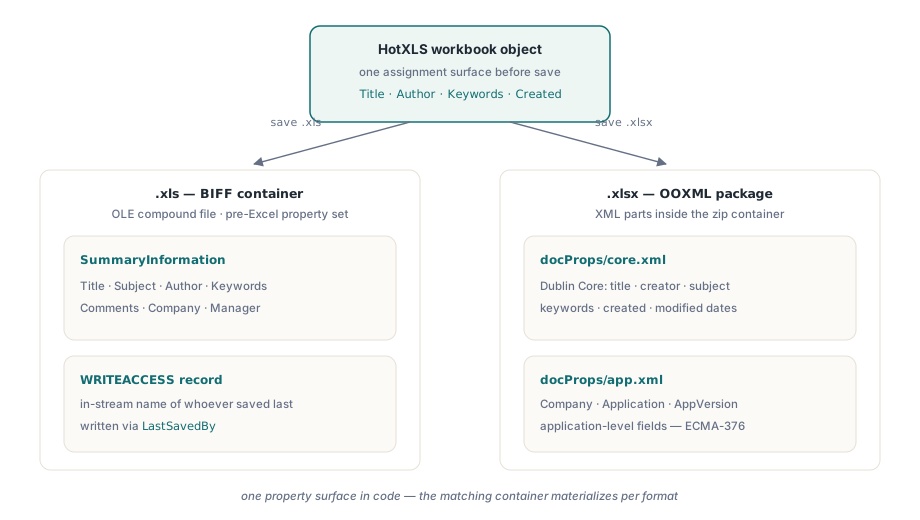
La raison pour laquelle une bibliothèque de feuilles de calcul a besoin de deux implémentations de métadonnées, et celle pour laquelle des outils à moitié finis estampillent correctement un format en oubliant l'autre, est que .xls et .xlsx gardent leurs propriétés dans des endroits sans rapport. Un classeur BIFF les écrit dans des flux de fichier composé OLE, principalement le jeu de propriétés SummaryInformation qui précède Excel lui-même, à côté de l'enregistrement WRITEACCESS présent dans le flux, qui nomme la dernière personne ayant enregistré le fichier. Un classeur OOXML les garde sous forme de parties XML dans le paquet zip, réparties par fonction : docProps/core.xml contient les champs Dublin Core (titre, créateur, sujet, mots-clés, dates) et docProps/app.xml contient les champs applicatifs tels que la société et l'application génératrice, selon ECMA-376 partie 1
HotXLS aplatit ces deux modèles de stockage en propriétés directes de l'objet classeur. Vous n'ouvrez jamais un flux de jeu de propriétés et ne modifiez jamais une partie XML à la main. Vous affectez des chaînes et des dates au classeur, et le bon conteneur se matérialise pour le format que vous enregistrez
Estampiller les classeurs générés à partir de la donnée métier
Côté XLSX, TXLSXWorkbook expose Title, Subject, Author, Keywords, Description, Category, LastModifiedBy, Company, Application et AppVersion sous forme de chaînes, plus Created et Modified sous forme de valeurs TDateTime où zéro signifie non défini. La règle qui ferme la brèche de l'héritage tient en une phrase : affectez chaque champ à chaque exécution, en prenant les valeurs dans la donnée métier plutôt qu'en faisant confiance à ce que le modèle portait par hasard
var
  Book: TXLSXWorkbook;
begin
  Book := TXLSXWorkbook.Create;
  try
    if Book.Open('statement-template.xlsx') <> 1 then
      raise Exception.Create('Template not available');

    // Écrasez chaque champ : tout ce qui reste intact est
    // hérité de la personne qui a conçu le modèle.
    Book.Title := 'Account Statement 2026-06 / ACME Corp';
    Book.Subject := 'Monthly account statement';
    Book.Author := 'Billing Service 4.2';
    Book.LastModifiedBy := 'Billing Service 4.2';
    Book.Company := 'Northwind Financial';
    Book.Category := 'Customer Delivery';
    Book.Keywords := 'statement;billing;2026-06;acct-10024';
    Book.Description := 'Generated document - manual edits are not retained';
    Book.Created := Now;
    Book.Modified := Now;

    Book.SaveAs('statement-10024.xlsx');
  finally
    Book.Free;
  end;
end;
Le champ Keywords mérite plus de réflexion qu'on ne lui en accorde d'habitude. Les infrastructures de recherche l'indexent tel quel, Windows Search, SharePoint et la plupart des produits de gestion documentaire pareillement, si bien qu'une convention séparée par des points-virgules portant le numéro de compte et la période transforme chaque classeur livré en enregistrement retrouvable, sans aucun aller-retour vers une base. Cette même portée est le piège. Les propriétés voyagent avec chaque copie du fichier, bien au-delà des contrôles d'accès du système qui les a écrites, si bien que les données personnelles n'y ont pas leur place
Le couple d'horodatages porte une sémantique qu'il vaut mieux fixer en règle plutôt que de laisser à l'habitude. Created devrait marquer le moment où votre chaîne a produit le document, puis rester figé. Modified est le champ qu'Excel met à jour chaque fois qu'un destinataire enregistre le fichier, si bien qu'un écart entre les deux après livraison est une preuve positive que quelqu'un a modifié le classeur en aval, ce qui tranche plus d'un litige sur les chiffres que porte réellement une feuille de calcul transférée. Un piège se cache dans l'état non défini : c'est la valeur littérale zéro, pas une exception ni une valeur nulle, donc le code d'audit doit tester explicitement le zéro. Formatez un TDateTime non défini sans cette garde et vos journaux se remplissent d'une date de décembre 1899 affirmée avec aplomb
DocPropsTouched : le classeur qui part sans docProps
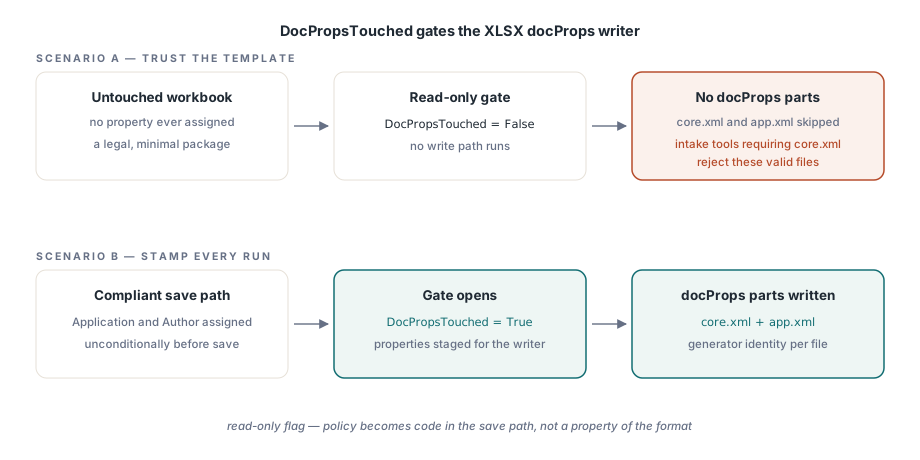
Un indicateur en lecture seule, DocPropsTouched, commande l'écriture des propriétés XLSX. Un classeur dans lequel aucune propriété n'a jamais été affectée ne produit aucune partie docProps ; HotXLS refuse d'écrire un squelette de métadonnées vide. Le comportement est propre, et il a deux conséquences à prendre en compte dans la conception
Le code de réception, côté consommateur, ne doit pas supposer que core.xml existe dans tous les paquets. Un outil qui l'exige en dur rejettera des fichiers minimaux parfaitement valides. Et si votre posture de conformité exige que tout document sortant porte au moins une identité de générateur, cette exigence devient du code plutôt qu'une propriété du format : affectez Application et Author sans condition dans le chemin de sauvegarde, puisqu'un classeur non touché est parfaitement légal au regard de la spécification tout en violant discrètement votre règle
La surface XLS héritée et le piège de Comments
La façade BIFF porte le jeu de champs plus ancien et plus restreint : Title, Subject, Author, Keywords, Comments, Company et Manager, plus LastSavedBy, un alias de UserName, qui écrit l'enregistrement WRITEACCESS qu'Excel affiche lorsqu'un autre utilisateur a verrouillé le fichier
var
  Legacy: IXLSWorkbook;     // interface à comptage de références : pas de Free manuel
begin
  Legacy := TXLSWorkbook.Create;
  if Legacy.Open('archive-1999.xls') <= 0 then
    raise Exception.Create('Cannot open archive file');

  Legacy.Title := 'FY1999 ledger (migrated copy)';
  Legacy.Author := 'Archive Migration Batch';
  Legacy.Company := 'Northwind Financial';
  Legacy.Comments := 'Migrated 2026-06-11; source retained in cold storage';
  Legacy.LastSavedBy := 'migration-svc';   // enregistrement BIFF WRITEACCESS

  Legacy.SaveAs('archive-1999-stamped.xls');
end;
Une collision de noms provoque une confusion récurrente. La propriété Comments au niveau du document est ici la remarque en texte libre affichée dans la boîte de dialogue des propriétés du fichier. Elle n'a rien à voir avec les commentaires de cellule, qui sont des objets de la couche de dessin rattachés à des plages par une API entièrement distincte. Une revue de code qui accepte un « nous écrivons déjà Comments » sans vérifier duquel il s'agit a accepté une affirmation portant sur la mauvaise fonctionnalité, et cela arrive plus souvent que le nom partagé ne le laisserait croire. Les deux partagent huit lettres et pas un octet de stockage
Lire les métadonnées à la réception, et le trou du sondage
La lecture est symétrique. Après Open, les mêmes propriétés reviennent renseignées depuis le fichier, ce qui transforme un audit des métadonnées des classeurs entrants en une courte boucle
var
  Book: TXLSXWorkbook;
begin
  Book := TXLSXWorkbook.Create;
  try
    if Book.Open(FileName) = 1 then
    begin
      Writeln(Format('%s | title="%s" author="%s" created=%s',
        [ExtractFileName(FileName), Book.Title, Book.Author,
         FormatDateTime('yyyy-mm-dd', Book.Created)]));
      if Book.Created = 0 then
        Writeln('  no creation date recorded');
    end;
  finally
    Book.Free;
  end;
end;
Prévoyez au passage une limitation. Il n'existe pas de sondage réservé aux propriétés. GetSheetNames sait lister les feuilles sans charger un classeur, mais lire Title ou Author impose un Open complet, si bien qu'un tri des métadonnées sur une grande archive paie le coût d'analyse entier sur chaque fichier. Côté BIFF, vous pouvez rogner ce coût pour des audits en lecture seule en mettant _DisableGraphics à true avant l'ouverture, ce qui saute purement la couche de dessin. Cela convient à une boucle qui ne lit que des propriétés et des statistiques de cellules, et c'est exactement la mauvaise idée dès que la même instance pourrait enregistrer, car le contenu de dessin sauté serait abandonné. Lorsque la seule structure des feuilles peut préfiltrer le lot, les exports mono-feuille étant l'évidence à écarter, les techniques peu coûteuses de notre article sur le listage des feuilles et l'inspection légère réduisent le nombre de fichiers qui atteignent la passe coûteuse. Et sur les travaux d'estampillage en masse, où des milliers de sorties sont écrites plutôt qu'inspectées, les schémas de débit en écriture de notre article sur les écritures en flux pour les travaux par lots se transposent sans changement, puisque l'affectation des propriétés n'ajoute rien de mesurable au temps de sauvegarde
Traverser les formats et contenir la fuite
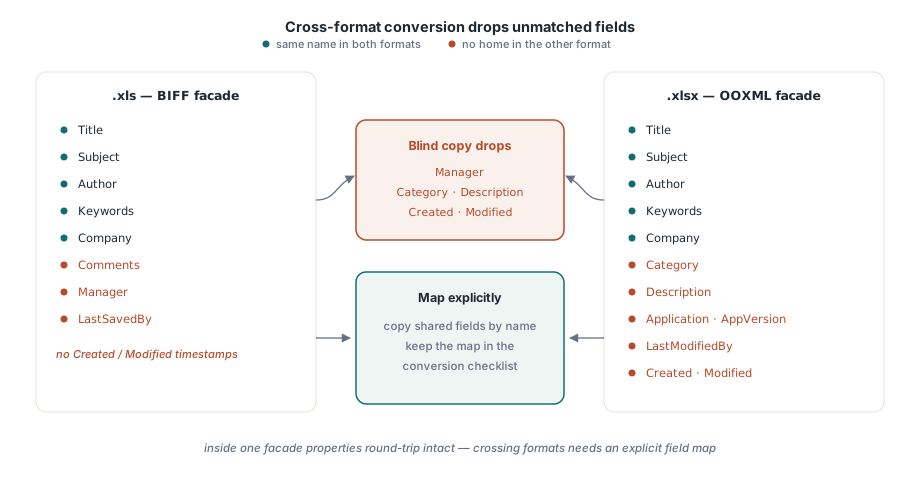
Les propriétés font un aller-retour propre à l'intérieur d'une même façade : ouvrez un .xlsx, modifiez-le, enregistrez-le, et le jeu revient intact. C'est en traversant les formats que l'hypothèse de parité se rompt, car les jeux de champs BIFF et OOXML ne se correspondent pas un pour un. BIFF a Manager et aucun horodatage ; OOXML a Category, Description et le couple Created/Modified. Un convertisseur qui recopie à l'aveugle perd tout ce que le format de destination ne peut pas contenir, donc faites correspondre les champs explicitement et inscrivez cette correspondance dans votre liste de contrôle de conversion, à côté de tout le reste qui ne survit pas au voyage
La fuite qu'ouvre l'héritage du modèle va dans l'autre sens : des informations que vous n'aviez jamais l'intention de diffuser. Des noms d'auteurs, des libellés de projets internes garés dans les mots-clés, un titre de brouillon que personne n'a validé. La discipline du tout écraser vue plus haut dans le générateur est toute la défense, et elle mérite d'être vérifiée comme le ferait un tiers, en ouvrant la boîte de dialogue Propriétés que n'importe quel client peut atteindre ou en décompressant le .xlsx pour lire docProps/core.xml directement dans le paquet. Ce que vous y voyez est exactement ce que voit chaque indexeur en aval
Cette visibilité en aval est aussi la raison pour laquelle quelques champs méritent plus de soin que les autres. Title, Author, Keywords (qui apparaissent comme Tags) et Comments ou Description portent l'essentiel du poids d'indexation dans SharePoint et Windows Search. Un Title véritablement distinct pour chaque document, portant la période et le compte, fait plus pour la recherche que n'importe quel plan de nommage de dossiers empilé par-dessus, et il coûte une affectation par sauvegarde
Les propriétés de document sont la finition professionnelle la moins chère qu'un classeur généré puisse porter, et le défaut le plus souvent livré quand personne ne les prend en charge. Les deux surfaces de propriétés décrites ici appartiennent au HotXLS Delphi Component, qui les écrit nativement pour XLS et XLSX sans automatisation Excel