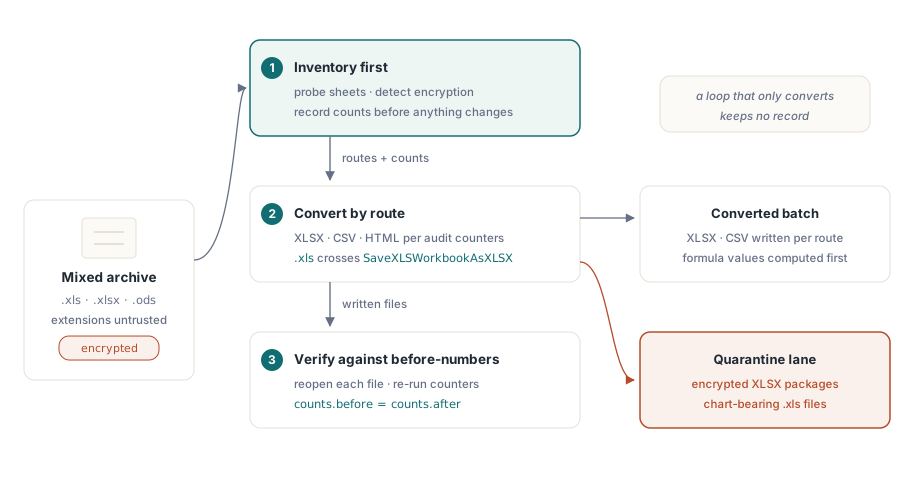
Une tâche de normalisation de feuilles de calcul en masse, ce sont trois problèmes sous un même manteau. Vous avez une archive de formats mêlés : des .xls de la grande époque BIFF, des .xlsx modernes, quelques .ods issus d'une expérience LibreOffice, et une poignée de fichiers que personne ne peut ouvrir parce que le mot de passe est parti avec un ancien collègue. Le but est de tout convertir en XLSX et CSV. La version de ce travail que la plupart des gens écrivent est une boucle qui ouvre chaque fichier et l'enregistre sous une nouvelle extension, et elle fonctionne jusqu'au moment où quelqu'un demande quels fichiers ont perdu leurs graphiques, abandonné leurs macros, ou ne se sont jamais ouverts. La boucle n'a aucune réponse, car la conversion seule ne tient aucun registre. Un atelier, lui, en tient un : il inventorie d'abord, convertit ensuite, vérifie enfin, et ces trois étapes doivent partager leurs informations pour que l'ensemble soit digne de confiance
Assembler cet atelier en Delphi ou C++Builder revient à relier quatre capacités de HotXLS, dont aucune n'exige Excel installé quelque part dans la chaîne. Il y a deux moteurs natifs, une façade BIFF8 pour les .xls et une façade OOXML pour les .xlsx et les .ods. Il y a des appels de sondage bon marché qui lisent les métadonnées sans analyser le fichier entier. Il y a des compteurs d'audit par feuille qui vous disent ce qu'un classeur contient vraiment. Et il y a une matrice de conversion avec un profil de fidélité documenté pour chaque route. Le travail consiste à savoir où chacune de ces briques a un tranchant, car toutes en ont un, et ces tranchants sont précisément ce qui transforme un lot nocturne sans histoire en incident du lundi matin
Sondez avant de charger : noms de feuilles et détection du chiffrement
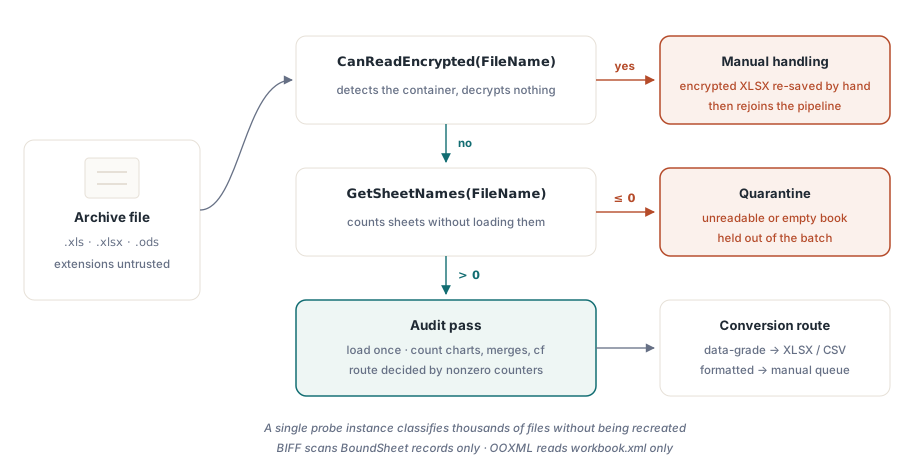
Ouvrir un classeur de 200 Mo pour découvrir seulement qu'il est chiffré gaspille des minutes par fichier, et multiplié sur une grande archive cela gaspille des jours. Les deux façades exposent GetSheetNames, qui lit les métadonnées des feuilles sans peupler le classeur. L'implémentation BIFF ne balaie que les enregistrements BoundSheet en tête de flux ; l'implémentation OOXML ne lit que workbook.xml dans le zip. À côté, CanReadEncrypted détecte un conteneur chiffré sans tenter de déchiffrer :
var
  Probe: TXLSXWorkbook;
  Names: TStringList;
begin
  Names := TStringList.Create;
  Probe := TXLSXWorkbook.Create;
  try
    if Probe.CanReadEncrypted(FileName) then
    begin
      Writeln(FileName + ': encrypted container - route to manual handling');
      Exit;
    end;
    if Probe.GetSheetNames(FileName, Names) <= 0 then
      Writeln(FileName + ': unreadable - quarantine')
    else
      Writeln(Format('%s: %d sheet(s), first "%s"',
        [FileName, Names.Count, Names[0]]));
  finally
    Probe.Free;
    Names.Free;
  end;
end;
Deux détails opérationnels rendent cette boucle peu coûteuse. GetSheetNames ne réinitialise ni ne peuple l'instance de classeur, si bien qu'un seul objet de sondage peut classer des milliers de fichiers sans être recréé. Et la version du même appel dans la façade XLS comprend aussi les paquets .xlsx, ce qui en fait un sondeur unique commode lorsque les extensions de fichier ne sont pas fiables, ce qui est rarement le cas dans une archive aussi ancienne. Le tri avant chargement mérite son propre traitement ; la mécanique de l'inspection légère est décrite dans notre article sur le listage des feuilles et l'inspection légère des classeurs
Compter ce qu'un classeur contient vraiment
Une fois qu'un fichier passe le tri, la passe d'audit décide de sa route de conversion. La façade XLSX expose un compteur pour chaque famille de fonctionnalités qui pèse sur une décision de fidélité : cellules fusionnées, graphiques, images, formats conditionnels, validations de données, tableaux, hyperliens et commentaires, plus des indicateurs au niveau du classeur pour les macros, la protection et le format d'origine. La route de conversion d'un fichier dépend presque entièrement de ceux qui reviennent non nuls
var
  Book: TXLSXWorkbook;
  Sheet: TXLSXWorksheet;
  I: Integer;
begin
  Book := TXLSXWorkbook.Create;
  try
    if Book.Open(FileName) <> 1 then Exit;
    for I := 0 to Book.Sheets.Count - 1 do
    begin
      Sheet := Book.Sheets[I];
      Writeln(Format('%s: cells=%d merges=%d charts=%d cf=%d dv=%d protected=%s',
        [Sheet.Name, Sheet.Cells.Count, Sheet.MergedCells.Count,
         Sheet.Charts.Count, Sheet.ConditionalFormats.Count,
         Sheet.DataValidations.Count, BoolToStr(Sheet.IsProtected, True)]));
    end;
    if Book.HasVbaProject then
      Writeln('  contains VBA project - macro policy applies');
    if Book.ExternalLinks.Count > 0 then
      Writeln(Format('  %d external link(s)', [Book.ExternalLinks.Count]));
  finally
    Book.Free;
  end;
end;
Lisez Cells.Count en gardant une réserve à l'esprit. Le magasin de cellules est creux, donc le nombre compte les cellules instanciées, pas la surface rectangulaire de la plage utilisée. Une feuille avec une valeur en A1 et une autre en ZZ9999 annonce deux cellules, pas le million et quelques qui les séparent. Le balayage équivalent côté BIFF utilise les bornes de UsedRange avec ForEachCell, et il traîne le décalage de un qui piège presque tout le monde la première fois : UsedRange.FirstRow et ses semblables partent de 0, tandis que Cells.Item[Row, Col] part de 1. Un parcours qui oublie d'ajouter un à chaque borne audite le mauvais rectangle et ne le dit jamais
Deux leviers réduisent le coût d'une passe d'audit seule sur de gros fichiers hérités. Mettre _DisableGraphics à true avant d'ouvrir un .xls saute entièrement l'analyse de la couche de dessin OfficeArt, ce qui fait gagner un temps réel sur les classeurs denses en formes. C'est strictement une optimisation en lecture seule, cependant : enregistrer depuis une instance ouverte ainsi abandonnerait les dessins jamais analysés, donc cet indicateur n'a sa place que sur des chemins qui ne réécriront jamais le fichier. Lorsque l'audit a besoin du contenu cellule par cellule plutôt que de compteurs, le rappel ForEachCell parcourt directement les cellules peuplées et contourne le surcoût de Variant que les propriétés de cellule indexées paient à chaque lecture, un surcoût qui s'additionne vite sur des millions de cellules
Normalisez tôt les codes de retour irréguliers
Les appels d'entrée-sortie de HotXLS signalent les erreurs par des résultats entiers plutôt que par des exceptions, et les conventions ne sont pas uniformes dans toute l'API. La plupart des appels d'ouverture et de sauvegarde renvoient 1 en cas de succès et -1 en cas d'échec. GetSheetNames renvoie le nombre de feuilles, ou -1 avec la liste vidée. Le SaveAsHTML de la façade XLSX rompt encore le schéma et renvoie 0 pour un succès, -1 pour un index de feuille hors plage. Un atelier qui teste partout = 1 classera mal, sans bruit, les appels qui signalent le succès autrement, et un atelier qui teste <> -1 avalera ceux qui échouent avec un autre code
La règle qui survit au contact de toute l'API est plus étroite qu'il n'y paraît : traitez <= 0 comme un échec pour les appels qui renvoient un décompte, vérifiez la valeur de succès documentée pour chaque routine de sauvegarde que vous employez réellement, et placez les deux derrière une petite fonction de contrôle des résultats pour que la convention vive en un seul endroit. Les chaînes de traitement par lots échouent bien plus souvent par accumulation lente de codes de retour non vérifiés que par un bogue exotique d'analyseur, et le prix d'une erreur ici se paie quarante mille fichiers plus tard, quand plus personne ne se souvient quelles conversions ont réellement abouti
La matrice de conversion et où chaque route perd des données
Les deux façades se partagent le travail de conversion. TXLSXWorkbook ouvre les formats XLSX, ODS et CSV, et enregistre en XLSX, ODS, CSV, HTML, RTF et XLSX chiffré en AES. TXLSWorkbook ouvre et enregistre le BIFF, et exporte en HTML, RTF et CSV. L'utile est que chaque chemin arrive avec un profil de fidélité documenté, non avec une vague promesse de justesse, si bien que vous pouvez décider à l'avance quelles routes sont sûres pour quels fichiers
L'export CSV écrit de l'UTF-8 avec BOM, des fins de ligne CRLF et un échappement conforme à RFC 4180. Ce qu'il ne fait pas, c'est évaluer les formules : une cellule contenant =SUM(...) s'exporte sous forme de texte de formule littéral, si bien qu'une feuille de formules devient une feuille de chaînes à moins de calculer les valeurs d'abord. L'export HTML produit un unique tableau, où colspan et rowspan tiennent lieu de cellules fusionnées et où les styles de base sont insérés en ligne. L'export RTF a une limite plus vive : il ne peut pas étendre les cellules fusionnées sur plusieurs colonnes, si bien que les cellules de continuation d'une fusion ressortent vides. L'import ODS est léger à dessein, selon la documentation même de la bibliothèque. Les valeurs scalaires et les résultats de formules mis en cache passent ; les styles, les expressions de formules ODF vivantes et les dessins, non. Cela compte dès l'instant où l'archive contient de vrais fichiers OpenDocument régis par OASIS ODF 1.3, où toute conversion proche de la fidélité visuelle demande plus que ce que ce chemin d'import a été bâti pour porter, et la passe d'audit est ce qui vous signale l'existence de ces fichiers avant que le lot ne les aplatisse en silence
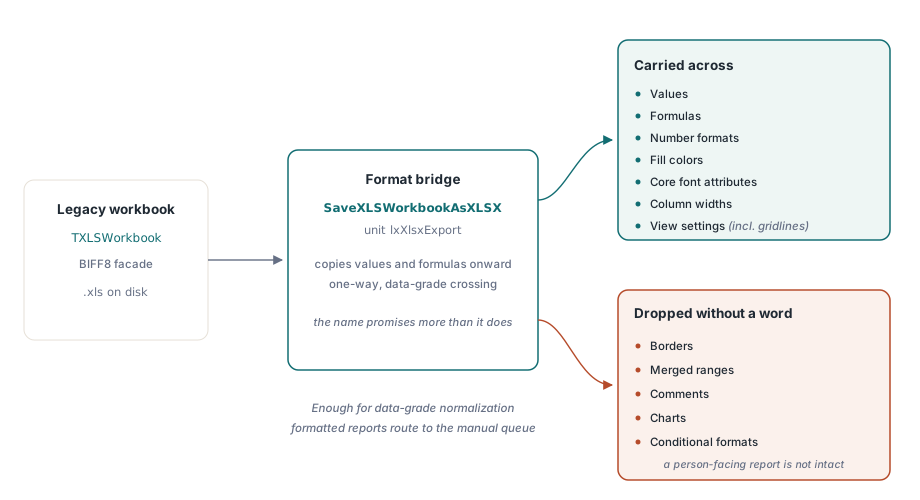
SaveXLSWorkbookAsXLSX est un pont de données, pas un pont de mise en forme
La façade BIFF ne sait pas écrire de l'OOXML directement, si bien que la traversée du .xls vers le .xlsx passe par la fonction SaveXLSWorkbookAsXLSX de l'unité lxXlsxExport. La fidélité de ce pont mérite un énoncé net, car le nom promet plus qu'il ne tient. Il recopie les valeurs, les formules, les formats de nombre, les couleurs de remplissage, les attributs de police essentiels, les largeurs de colonne et les réglages de vue tels que le quadrillage. Il ne recopie pas les bordures, les plages fusionnées, les commentaires, les graphiques ni les formats conditionnels. Pour une normalisation au niveau des données, où des systèmes en aval analyseront le résultat et où personne ne regarde la mise en forme, cela suffit exactement et rien de ce dont on a besoin ne se perd. Pour un rapport de direction mis en forme destiné à être lu par une personne, cela ne suffit pas, et c'est précisément là que les compteurs d'audit gagnent leur place : un fichier que l'audit a signalé comme porteur de graphiques et de formats conditionnels devrait aller vers une file manuelle, et non passer par un pont qui abandonnera les deux sans un mot
var
  Legacy: IXLSWorkbook;        // référence d'interface : ne pas libérer
  Modern: TXLSXWorkbook;
begin
  if SameText(ExtractFileExt(FileName), '.xls') then
  begin
    Legacy := TXLSWorkbook.Create;
    if Legacy.Open(FileName) <= 0 then Exit;
    if SaveXLSWorkbookAsXLSX(Legacy,
         ChangeFileExt(FileName, '.xlsx')) <= 0 then
      Writeln('bridge failed: ' + FileName);
  end
  else
  begin
    Modern := TXLSXWorkbook.Create;
    try
      Modern.StreamingWrite := True;     // diffuser le XML des feuilles dans le zip
      if Modern.Open(FileName) = 1 then
        Modern.SaveAsCSV(ChangeFileExt(FileName, '.csv'), 0, ',');
    finally
      Modern.Free;
    end;
  end;
end;
La boucle ci-dessus montre aussi le levier de débit côté OOXML. Mettre StreamingWrite à true diffuse le XML des feuilles directement dans le paquet de sortie au lieu de le préparer comme une gigantesque chaîne en mémoire, ce qui fait la différence entre une exécution confortable et un plantage par manque de mémoire dès que les fichiers atteignent des centaines de milliers de lignes. Le dimensionnement et le comportement mémoire de ce mode ont leur propre traitement dans notre article sur les écritures en flux pour les travaux par lots côté serveur. Une autre propriété compte pour un lot qui veut exploiter tous les cœurs : aucune des deux façades n'est sûre vis-à-vis des threads, mais aucune ne partage non plus d'état global, si bien que le modèle pris en charge pour une conversion parallèle est une instance de classeur par thread de travail, sans verrou entre elles
Les fichiers protégés par mot de passe, et ce qu'il faut en faire
Les fichiers verrouillés de l'archive se séparent proprement par format, et cette séparation décide de leur destination. Le chiffrement des .xls hérités, qu'il s'agisse de RC4, de RC4 via CryptoAPI ou de la vieille obfuscation XOR, est lisible : passez le mot de passe à Open et le fichier se convertit comme n'importe quel autre. Les paquets .xlsx chiffrés sont une tout autre histoire. HotXLS les détecte avec CanReadEncrypted mais ne sait pas les déchiffrer, si bien que la seule attitude honnête est de les aiguiller vers une file où une personne ouvre et réenregistre chacun d'eux dans Excel avant qu'il ne rejoigne la chaîne. Cette asymétrie mérite d'être prévue dès le départ, car les fichiers XLSX chiffrés sont ceux qui ont le plus de chances d'être les dossiers auxquels quelqu'un tient vraiment
Boucler la boucle par la vérification
La troisième étape est celle que l'on saute, et la sauter est ce qui transforme une conversion en masse en passif. Aucun chemin de sauvegarde de HotXLS n'évalue les formules. Excel recalcule à l'ouverture d'un fichier, donc une conversion XLSX vers XLSX reste correcte, mais une cible CSV reçoit le texte de la formule tel quel à moins que la chaîne n'exécute d'abord Calculate sur les cellules et ne réécrive les résultats. Le savoir à l'avance, c'est la différence entre un CSV plein de nombres et un CSV plein de chaînes =SUM(...) que personne ne remarque jusqu'à ce qu'un import en aval s'y étrangle
La vérification elle-même coûte assez peu pour qu'il n'y ait aucune excuse à l'omettre. Rouvrez chaque fichier converti avec la même bibliothèque, relancez les compteurs d'audit, et comparez-les aux chiffres d'avant conversion que la passe d'inventaire a déjà relevés. Un nombre de feuilles qui a baissé, un nombre de graphiques tombé à zéro là où la source en avait trois, un nombre de cellules qui s'effondre : chacun est une perte silencieuse attrapée pour le prix d'une ouverture. Ajoutez par-dessus un contrôle visuel sur un échantillon dans Excel ou LibreOffice, et la combinaison attrape l'immense majorité des dégâts de conversion avant la livraison. Voilà toute la raison pour laquelle l'étape d'inventaire alimente l'étape de vérification. Sans les chiffres de départ, les chiffres d'arrivée ne prouvent rien
Un atelier piloté par l'audit transforme une conversion en masse risquée en un processus mesurable, doté d'une voie de quarantaine pour les fichiers qui ne peuvent pas passer proprement. Tous les appels de sondage, de comptage et de conversion présentés ici font partie du HotXLS Delphi Component, qui les exécute nativement dans le processus, sans automatisation Excel