Korvauskäsittelytiimillä oli kolmenkymmenen vuoden edestä paperikansioita, jotka kulkivat arkkisyöttöisen skannerin läpi. Skanneri sylkäisi ulos yhden JPEG-kuvan per sivu kansioon, nimettynä 0001.jpg, 0002.jpg ja niin edelleen. Mitä arkisto todella tarvitsi, oli yksi PDF per tapauskansio, sivut järjestyksessä, jotta arvioija voisi avata yhden asiakirjan satojen kuvapikkukuvien läpiklikkailun sijaan. Tuo viimeinen vaihe, numeroidun skannauspinon muuttaminen yhdeksi järjestetyksi PDF-tiedostoksi, on työ tässä
PDFium Component käsittelee sen suoraan. Hahmontamisen ja tekstin purkamisen lisäksi komponentti voi rakentaa PDF:n alusta alkaen: luoda tyhjän asiakirjan, lisätä tyhjän sivun halutun kokoisena, pudottaa kuvan kyseiselle sivulle käyttäjätilan koordinaateissa ja sitten tallentaa. Koko liukuhihna asuu TPdf-komponentissa, joten erämuunnin on silmukka tiedostonimien yli sekä kourallinen kutsuja
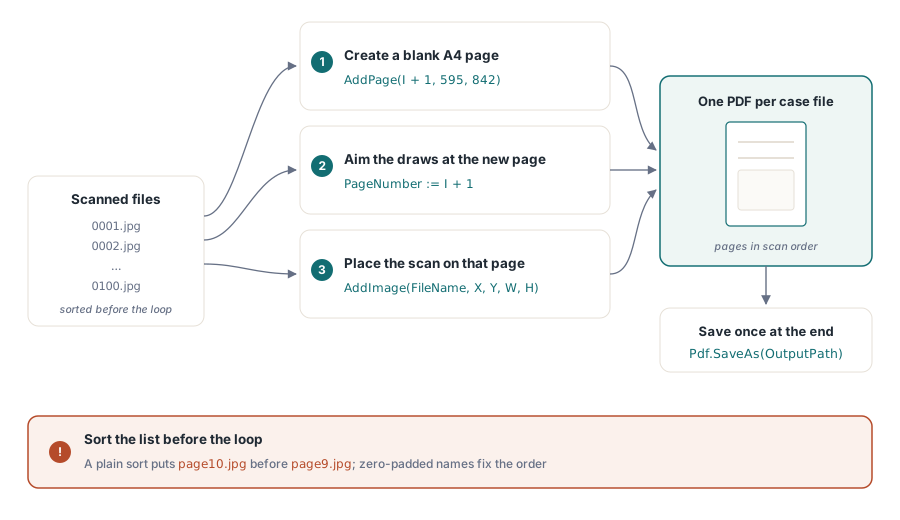
Muunnoksen kulku
Kolme asiaa on tapahduttava jokaiselle skannaukselle. Päätät sivukoon, sijoitat kuvan sivun sisälle jättäen marginaalin, ja siirryt seuraavalle sivulle. PDFium Component antaa sinulle yhden metodin kutakin varten: AddPage luo tyhjän sivun tietyssä koossa, AddImage (tai AddPicture, jos sinulla on jo TPicture) piirtää bittikartan nykyiselle sivulle, ja PageNumber kertoo komponentille, mihin sivuun myöhemmät piirtokutsut kohdistuvat
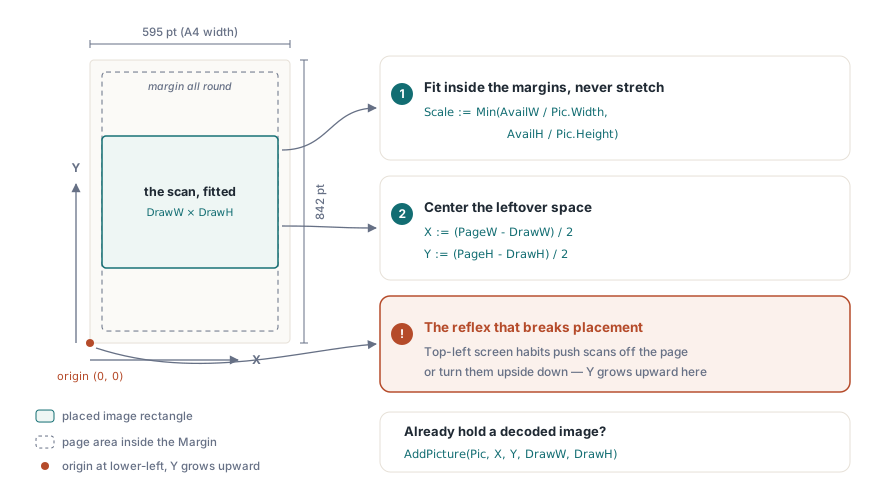
Yksi yksityiskohta, joka yllättää ihmiset, on koordinaattijärjestelmä. PDF:n käyttäjätila asettaa origon sivun vasempaan alakulmaan, jolloin Y kasvaa ylöspäin, päinvastoin kuin näyttökoordinaatit, joihin Delphi-kehittäjät kurottavat refleksinomaisesti. AddImage-metodille välittämäsi X, Y on kuvasuorakulmion vasen alakulma, ja Width, Height ovat asetuskoko pisteinä, ei lähdetiedoston pikselikoko. Tee se väärinpäin, ja skannauksesi laskeutuvat sivun ulkopuolelle tai ylösalaisin suhteessa siihen, minne odotit niiden tulevan
Asiakirjan ja yhden sivun luominen per skannaus
Aloita tyhjällä asiakirjalla. CreateDocument varaa uuden PDF:n ja jättää komponentin aktiiviseksi, joten erillistä avausvaihetta ei ole. Sieltä käsin käyt läpi skannattujen tiedostojen luettelon, ja jokaiselle niistä lisäät sivun, teet siitä nykyisen ja sijoitat kuvan. Sivun mitat ovat tässä A4 pisteinä (595 × 842 pystysuunnassa), arkistoidun kirjeenvaihdon vakioarkkikoko
procedure TArchiveForm.ScansToPdf(const Files: TStrings; const OutputPath: string);
const
  PageW = 595.0;   // A4-leveys pisteinä
  PageH = 842.0;   // A4-korkeus pisteinä
  Margin = 36.0;   // puolen tuuman reunus kunkin skannauksen ympärillä
var
  I: Integer;
  Pdf: TPdf;
begin
  Pdf := TPdf.Create(nil);
  try
    Pdf.CreateDocument;                       // uusi, tyhjä, jo aktiivinen
    for I := 0 to Files.Count - 1 do
    begin
      Pdf.AddPage(I + 1, PageW, PageH);       // 1-pohjainen sivuindeksi
      Pdf.PageNumber := I + 1;                // aseta uusi sivu nykyiseksi
      PlaceScan(Pdf, Files[I], PageW, PageH, Margin);
    end;
    Pdf.SaveAs(OutputPath);
  finally
    Pdf.Free;
  end;
end;
Jokainen iteraatio luo sivun ja asettaa välittömästi PageNumber-ominaisuuden siihen. Tuo toinen rivi on tärkeä: AddPage lisää sivun, mutta piirtometodit vaikuttavat siihen sivuun, joka sattuu olemaan nykyinen, joten PageNumber-ominaisuuden asettaminen on se, mikä kohdistaa AddImage-kutsun juuri tekemääsi sivuun. Ohita se, ja kuvasi pinoutuvat sille sivulle, joka sattui olemaan ladattuna aiemmin
Yksi oletus piiloutuu tuohon silmukkaan: Files-luettelon järjestys. Skanneri nimeää sivut väliltä 0001.jpg–0100.jpg, mutta hakemistoluettelointi ei aina palauta niitä lajiteltuina, ja sillä hetkellä kun osut tiedostoon page9.jpg tiedoston page10.jpg vieressä, tavallinen merkkijonolajittelu asettaa sivun 10 ennen sivua 9. Lajittele luettelo nimenomaisesti ennen silmukkaa, ja suosi nollatäytettyjä nimiä skannaushetkellä, jotta leksikaalinen järjestys vastaa sivujärjestystä. Sivujärjestys on se yksi asia, jonka arvioija huomaa välittömästi, ja se on halvin estettävissä oleva virhe
Skannauksen sijoittaminen ja kuvasuhteen säilyttäminen
Skannaus on harvoin samanmuotoinen kuin sivu. Jos venytät sen täyttämään arkin, vääristät tekstiä; jos sijoitat sen täydessä pikselikoossa, se pursuaa yli. Ratkaisu on skaalata kahdesta suhteesta, leveyssovituksesta tai korkeussovituksesta, pienemmällä, ja keskittää se, mitä jää yli. Koska origo on vasemmalla alhaalla, keskittäminen tarkoittaa jäännöstilan jakamista tasan ja sen lisäämistä sekä X- että Y-arvoon
procedure TArchiveForm.PlaceScan(Pdf: TPdf; const FileName: string;
  PageW, PageH, Margin: Double);
var
  Pic: TPicture;
  AvailW, AvailH, Scale, DrawW, DrawH, X, Y: Double;
begin
  Pic := TPicture.Create;
  try
    Pic.LoadFromFile(FileName);              // BMP, JPG, PNG jne. VCL:n grafiikkayksiköiden kautta

    AvailW := PageW - 2 * Margin;
    AvailH := PageH - 2 * Margin;

    // Sovita marginaalien sisään vääristämättä skannausta.
    Scale := Min(AvailW / Pic.Width, AvailH / Pic.Height);
    DrawW := Pic.Width * Scale;
    DrawH := Pic.Height * Scale;

    // Keskitys: ylijäävä tila jaetaan tasan. Y mitataan sivun alareunasta.
    X := (PageW - DrawW) / 2;
    Y := (PageH - DrawH) / 2;

    Pdf.AddImage(FileName, X, Y, DrawW, DrawH);
  finally
    Pic.Free;
  end;
end;
Tämä lataa tiedoston kerran lukeakseen sen pikselimitat, laskee yhden yhtenäisen skaalan ja välittää asettelusuorakulmion AddImage-kutsulle. AddImage hyväksyy tiedostopolun suoraan ja reitittää sen saman kuvaliukuhihnan kautta kuin AddPicture, joten mikä tahansa muoto, jonka VCL-grafiikkayksiköt tunnistavat, toimii ilman erikoiskäsittelyä. Jos kuva on jo purettu TPicture-objektiin esikatseluruudusta, kutsu AddPicture(Pic, X, Y, DrawW, DrawH) samalla suorakulmiolla ja ohita toinen tiedostonluku
Purun ohittaminen JPEG-skannauksissa
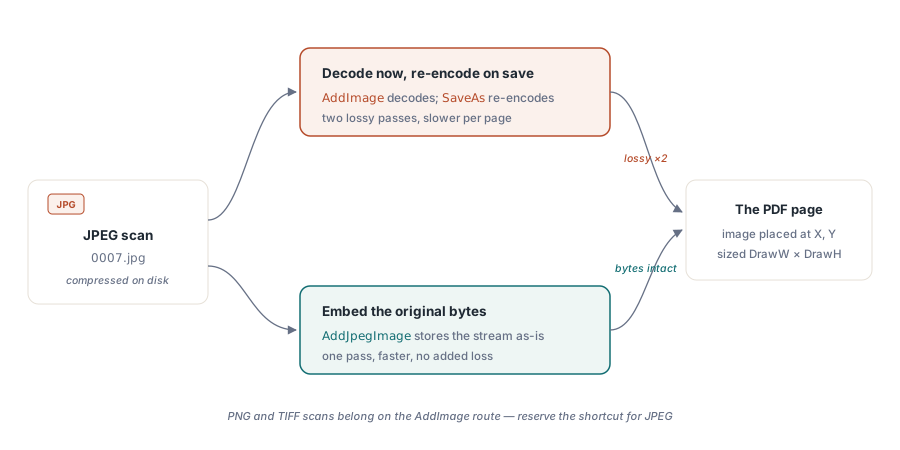
Skannerit tuottavat lähes aina JPEG-muotoa. JPEG:n lataaminen TPicture-objektiin purkaa sen bittikartaksi, ja sitten PDFium koodaa sen uudelleen tallennettaessa, kaksi häviöllistä edestakaista matkaa, joita et tarvitse. AddJpegImage upottaa alkuperäiset pakatut tavut suoraan sivulle virrasta, mikä on sekä nopeampaa että visuaalisesti siistimpää suuren volyymin eräajossa
var
  Stream: TFileStream;
begin
  // ... AddPage + PageNumber -kutsujen jälkeen nykyiselle sivulle ...
  Stream := TFileStream.Create(FileName, fmOpenRead);
  try
    // Upottaa JPEG-tavut sellaisenaan; ei purku-/uudelleenkoodauskiertoa.
    Pdf.AddJpegImage(Stream, X, Y, DrawW, DrawH);
  finally
    Stream.Free;
  end;
end;
Lasket silti X-, Y-, DrawW- ja DrawH-arvot samalla tavalla, koska tarvitset pikselimitat skaalausta varten. Lue ne tiedostosta tai nopealla otsikon jäsennyksellä, ja anna sitten raaka virta AddJpegImage-kutsulle. PNG- tai TIFF-skannauksille AddImage-polku on oikea; varaa JPEG-pikakuvake sille muodolle, johon se todella soveltuu
Jokaisen sivun merkitseminen
Arkistoituja skannauksia on helpompi auditoida, kun jokainen sivu kantaa lähdetiedostonsa nimeä. AddText piirtää merkkijonon käyttäjätilan koordinaattiin, joten kuvateksti asettuu juuri kuvan alapuolelle. Muista käännetty Y-akseli: asettaaksesi otsikon skannauksen alle, vähennät kuvan alareunasta sen sijaan, että lisäisit siihen
// Kuvateksti skannauksen alla: Y pienenee kohti sivun alareunaa.
Pdf.AddText('File: ' + ExtractFileName(FileName), 'Helvetica', 9,
  X, Y - 14, clGray);
Vielä yksi huomio tallentamisesta. SaveAs on funktio, joka palauttaa Boolen arvon, joten tarkista tuotantokoodissa sen tulos sen sijaan, että olettaisit kirjoituksen onnistuneen; täysi levy tai lukittu tulostepolku epäonnistuu muuten hiljaisesti. Kun silmukka päättyy ja tiedosto on kirjoitettu, sinulla on täsmälleen se, mitä arkisto tarvitsi: yksi järjestetty PDF per tapauskansio, sivut skaalattuna sopiviksi, valmiina luettavaksi missä tahansa katseluohjelmassa
Samat rakennuspalikat kattavat vastaavia töitä. Vaihda sivukohtainen mitoitussääntö, niin saat valokuvakirjan, jossa on yksi kuva per arkki; pidä silmukka, mutta lue monisivuisesta TIFF-lähteestä, ja sinulla on faksiarkiston muunnin. Jos haluat laajemman kuvan PDF-tiedostojen rakentamisesta ohjelmallisesti, katso PDF-asiakirjojen luominen tyhjästä PDFium Component -komponentilla; hahmontaaksesi tuloksen takaisin näytölle myöhemmin, katso PDF-sivujen muuntaminen JPEG-kuviksi PDFium Component -komponentilla
PDFium Component osoitteesta loslab.com niputtaa yhteen tässä sarjassa käytetyt asiakirjan luonti-, hahmonnus- ja teksti-API:t