PDFiumilla on maine katselumoottorina, hahmontajana Chromen PDF-välilehden takana, joten ensimmäinen selvennettävä asia on, että PDFium Component voi myös rakentaa asiakirjan, jota ei koskaan aiemmin ollut olemassa. Luontipuoli käärii sisäänsä PDFiumin sivuobjekti-API:n: teet tyhjän asiakirjan, lisäät sivuja nimenomaisilla mitoilla, ja pudotat tekstiä, vektoripolkuja ja kuvia jokaiselle sivulle valitsemiisi koordinaatteihin. Opittavana ei ole sivunkuvauskieltä eikä tulostinohjainta ole silmukassa. Kutsut metodeja, kirjasto kokoaa PDF-objektit, ja SaveAs-kutsu sarjallistaa tuloksen
Mitä et saa, on asettelumoottori. Tällä on tarpeeksi väliä, jotta se kannattaa sanoa suoraan, koska se muokkaa jokaista alla olevaa esimerkkiä. PDFium Component sijoittaa sisällön sinne, minne käsket sen sijoittaa, absoluuttisiin koordinaatteihin, eikä minnekään muualle. Se ei rivitä kappaletta, juoksuta tekstiä sivunvaihdon yli, eikä laske taulukkoa rivien ja sarakkeiden perusteella. Ne ovat sinun tehtäväsi. Jos saavuit odottaen jotain, mikä juoksuttaa suorasanaisen tekstin uudelleen kuten tekstinkäsittelyohjelma tekee, kalibroi itsesi nyt: tämä on tarkka, matalan tason sijoittelu-API, lähempänä kankaalle piirtämistä kuin asiakirjan latomista. Luoduille laskuille, todistuksille, tarroille ja raporttisivuille, joissa tiedät jo, mihin jokainen elementti kuuluu, tuo tarkkuus on juuri sitä, mitä haluat
Minimi, joka tuottaa tiedoston
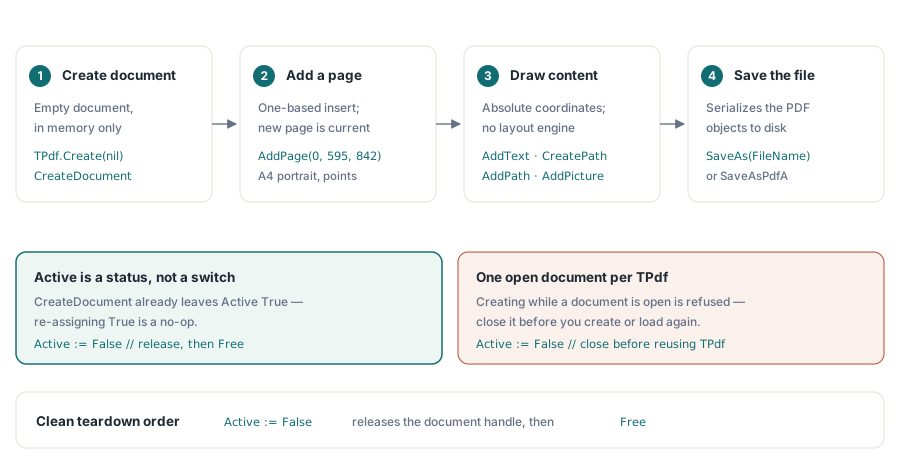
Kolme kutsua seisoo tyhjän TPdf-objektin ja tallennetun PDF:n välillä: luo asiakirja, lisää sivu, kirjoita se ulos. Kaikki muu on sisältöä, jota kerrostat siihen väliin
uses
  Vcl.Graphics,   // clBlack ja TColor varten
  PDFium;         // TPdf löytyy täältä

procedure CreateBlankPdf(const FileName: string);
var
  Pdf: TPdf;
begin
  Pdf := TPdf.Create(nil);
  try
    Pdf.CreateDocument;                 // tyhjä muistinvarainen asiakirja
    Pdf.AddPage(0, 595, 842);           // A4 pystysuunta, pisteinä
    Pdf.AddText('First page', 'Arial', 18, 50, 780);
    Pdf.SaveAs(FileName);               // sarjallista levylle
  finally
    Pdf.Active := False;
    Pdf.Free;
  end;
end;
Yksi yksityiskohta kompastuttaa niitä, jotka ovat nähneet vanhempia katkelmia: et aseta arvoa Pdf.Active := True CreateDocument-kutsun jälkeen. Active-ominaisuus kertoo, onko asiakirjakahva olemassa, ja CreateDocument on jo luonut sellaisen, joten ominaisuus on tosi sillä hetkellä, kun kutsu palautuu. Sen asettaminen uudelleen on parhaimmillaan nollatoiminto ja pahimmillaan harhaanjohtavaa seuraavalle lukijalle. Active ansaitsee paikkansa poistuttaessa: arvon False asettaminen vapauttaa alla olevan asiakirjan ennen Free-kutsua, mikä on puhdas purkamisjärjestys. Käsittele CreateDocument-kutsua ja tiedoston lataamalla avaamista toisensa poissulkevina. Kirjasto kieltäytyy luomasta uutta asiakirjaa TPdf-objektiin, jolla on jo yksi avattuna, joten uudelleenkäyttö tarkoittaa nykyisen asiakirjan sulkemista ensin
Koordinaatit alkavat alhaalta vasemmalta
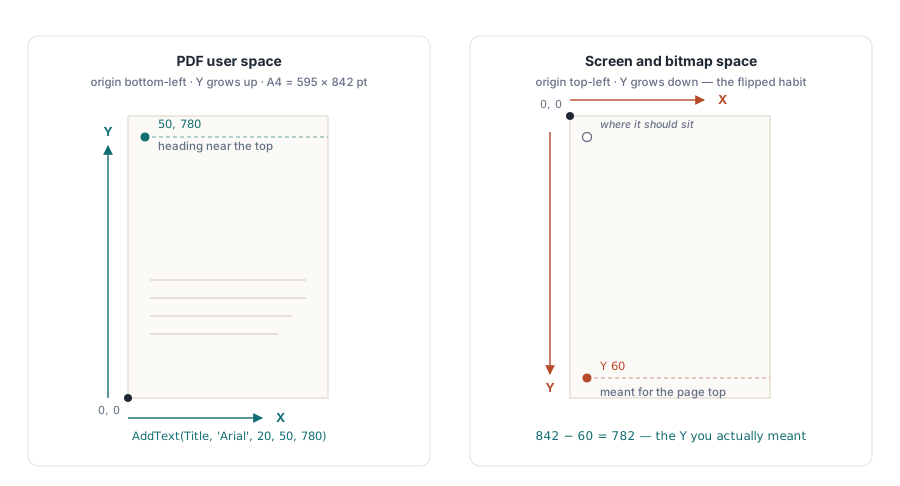
Toinen argumenttipari AddText-kutsulle, ja jokaiselle sijoittelukutsulle, on piste PDF:n käyttäjätilassa. Origo sijaitsee sivun vasemmassa alakulmassa, X juoksee oikealle, ja Y juoksee ylös. Yksi yksikkö on yksi piste, 1/72 tuumaa, joten A4-sivu on 595 kertaa 842 yksikköä ja US Letter on 612 kertaa 792. Tuo ylöspäin suuntautuva Y on ylivoimaisesti yleisin "tekstini on poissa sivulta" -hämmennyksen lähde, koska näytön ja bittikartan koordinaatit asettavat origon ylös, ja Y kasvaa alaspäin. 842 pistettä korkealla sivulla yläreunan lähellä oleva otsikko istuu suunnilleen kohdassa Y 780, ei Y 60. Kun suoritus päätyy johonkin odottamattomaan, sivun korkeus miinus Y-arvosi on lähes aina se luku, jota todella tarkoitit
AddPage ottaa lisäyskohdan ensimmäisenä argumenttinaan, yksipohjaisesti ilmaistuna, missä 0 on kätevä "asiakirjan alku" -lyhennys. Välitä 0 tai 1 ensimmäiselle sivulle, ja sivu lisätään alkuun; välitä lukumäärää vastaava arvo, johon liität, lisätäksesi loppuun. Äskettäin lisätystä sivusta tulee myös nykyinen sivu, se, johon myöhemmät piirtokutsut kohdistuvat, joten sen lisäämisen jälkeen ei ole erillistä "valitse tämä sivu" -vaihetta. Jos lisäät useita sivuja ja sinun täytyy myöhemmin piirtää takaisin aiemmalle sivulle, aseta PageNumber siirtääksesi kursoria; kun täytät sivuja järjestyksessä sitä mukaa kun luot niitä, voit jättää sen rauhaan
Tekstin kirjoittaminen ja fonttisääntö, joka puree hiljaa
AddText-allekirjoitus kantaa kaikkea, mitä yksittäinen veto tarvitsee: merkkijonon, fontin nimen, koon pisteinä, X- ja Y-ankkurin, sitten valinnaisen värin, alphatavun läpinäkyvyyttä varten ja kiertokulman asteina
procedure WriteHeader(Pdf: TPdf; const Title, Author: string);
begin
  // Otsikko mustana, oletuspeittävyys, ei kiertoa
  Pdf.AddText(Title, 'Arial', 20, 50, 780);
  // Vaaleampi tekijämerkintä 24 pistettä sen alapuolella
  Pdf.AddText('By ' + Author, 'Arial', 11, 50, 756, clGray);
  // Haalea diagonaalinen luonnosleima sivun poikki
  Pdf.AddText('DRAFT', 'Arial', 64, 180, 380, clGray, $30, 45.0);
end;
Alphatavu kulkee arvosta $00 (näkymätön) arvoon $FF (läpinäkymätön), mikä tekee luonnosleimasta vesileiman pikemminkin kuin yhtenäisen lohkon: $30 on karkeasti yhdeksäntoista prosentin peittävyys, tarpeeksi, jotta sen läpi voi lukea. Kulma kiertää vetoa vastapäivään ankkurinsa ympäri, joten 45 astetta antaa klassisen kulmasta kulmaan -leiman. Mikään tästä ei vaadi erillistä vesileimaominaisuutta. Vesileima on vain suuri, puoliksi läpinäkyvä, kierretty AddText-kutsu, ja sen piirtäminen ennen runkoa tai sen jälkeen päättää, istuuko se sisällön takana vai päällä
Fontit ansaitsevat huolellisen lauseen, koska vikatila on hiljainen. Kun välität fontin nimen, PDFium Component kysyy käyttöjärjestelmältä kyseisen fontin TrueType-tietoja ja upottaa ne asiakirjaan, minkä vuoksi koneellasi rakennettu tiedosto hahmontuu identtisesti koneella, jolle kyseistä fonttia ei koskaan ole asennettu. Juju on siinä, mitä tapahtuu, kun nimi ei ratkea: kyseessä voi olla lyöntivirhe tai kirjasin, jota ei yksinkertaisesti ole koontikoneella. Poikkeusta ei nosteta. Kirjasto turvautuu tekstiobjektin luomiseen, joka kantaa nimeä vain otsikkona, ilman mitään upotettua, ja jättää katseluohjelman korvaamaan sen millä tahansa, mitä se pitää läheisenä. Teksti näkyy testeissäsi, näyttää uskottavalta, ja muuttaa mittoja tai glyyfejä sillä hetkellä, kun tiedosto avataan jossakin, jossa on asennettuna eri fontit. Käytä nimiä, joiden tiedät olevan läsnä luontikoneella, käsittele fonttiluetteloa käyttöönottoriippuvuutena, ja avaa näyte katseluohjelmassa puhtaalla järjestelmällä ennen kuin luotat tulosteeseen
Vektorimuodot: rakenna polku ja ota se sitten käyttöön
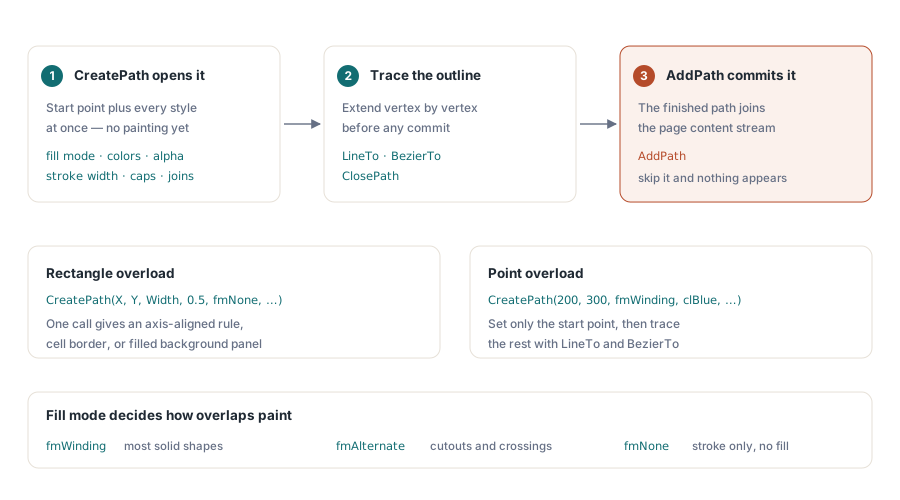
Viivat, suorakulmiot ja täytetyt alueet menevät polun kautta. Avaat sellaisen CreatePath-kutsulla, joka asettaa aloituspisteen ja kaikki tyylit kerralla: täyttötilan, täyttö- ja viivavärit omilla alphatavuillaan, viivan leveyden, viivan päät ja liitokset. Sitten laajennat sitä LineTo-, BezierTo- ja ClosePath-kutsuilla, ja lopuksi AddPath kiinnittää valmiin polun sivulle. Kiinnitysvaihe on helppo unohtaa, eikä se tuota mitään, jos ohitat sen
procedure DrawDivider(Pdf: TPdf; X, Y, Width: Single);
begin
  // Ohut vaakaviiva. Suorakulmion ylikuormitus asettaa laatikon suoraan:
  // X, Y, Width, Height, sitten täyttötila ja värit.
  Pdf.CreatePath(X, Y, Width, 0.5, fmNone, clBlack, $FF,
    True, clBlack, $FF, 1.0);
  Pdf.AddPath;
end;

procedure DrawTriangle(Pdf: TPdf);
begin
  // Pisteylikuormitus: aloita ensimmäisestä kärjestä, viivat loppuihin, sulje.
  Pdf.CreatePath(200, 300, fmWinding, clBlue, $80, True, clNavy, $FF, 2.0);
  Pdf.LineTo(300, 300);
  Pdf.LineTo(250, 400);
  Pdf.ClosePath;
  Pdf.AddPath;          // mitään ei piirry ennen kuin tämä ajetaan
end;
Kaksi ylikuormitusta kattaa yleiset tapaukset. Nelikoordinaattinen muoto ottaa X:n, Y:n, leveyden ja korkeuden ja antaa sinulle akselinsuuntaisen suorakulmion yhdellä kutsulla, mihin tartut piirtääksesi viivan, solun reunan tai täytetyn taustapaneelin. Kaksikoordinaattinen muoto asettaa vain aloituspisteen, ja jäljität loppuosan ääriviivasta itse LineTo- ja BezierTo-kutsuilla. Täyttötila ohjaa, miten päällekkäiset alueet maalataan: fmWinding (nollasta poikkeava kierto) sopii useimpiin yksivärisiin muotoihin, fmAlternate (parillinen/pariton) käsittelee leikkauksia ja itseään leikkaavia ääriviivoja, ja fmNone jättää pelkällä viivalla piirretyn polun ilman täyttöä, mitä yllä oleva jakaja käyttää
Taulukot ovat polkuja ja tekstiä, koottuna käsin
Koska taulukko-primitiiviä ei ole, taulukko on silmukka. Päätät sarakkeiden X-poikkeamat ja rivin korkeuden, kirjoitat jokaisen solun AddText-kutsulla ja piirrät viivat suorakulmiopoluilla. Aritmetiikka on sinun, mutta se on yksinkertaista, ja kerran kirjoitettuna se yleistyy mille tahansa tarvitsemallesi ruudukolle
procedure DrawTable(Pdf: TPdf; Left, Top: Double);
const
  ColX: array[0..2] of Double = (0, 110, 210);  // sarakkeiden poikkeamat
  RowH = 20;
var
  Y: Double;
  Row: Integer;
begin
  // Otsikkorivi
  Pdf.AddText('Item', 'Arial', 10, Left + ColX[0], Top);
  Pdf.AddText('Qty', 'Arial', 10, Left + ColX[1], Top);
  Pdf.AddText('Price', 'Arial', 10, Left + ColX[2], Top);

  // Viiva otsikon alla
  Pdf.CreatePath(Left, Top - 5, 260, 0.5, fmNone, clBlack, $FF);
  Pdf.AddPath;

  // Datarivit, Y astuu alaspäin joka iteraatiolla
  Y := Top;
  for Row := 1 to 3 do
  begin
    Y := Y - RowH;
    Pdf.AddText('Item ' + IntToStr(Row), 'Arial', 9, Left + ColX[0], Y);
    Pdf.AddText(IntToStr(Row * 2), 'Arial', 9, Left + ColX[1], Y);
    Pdf.AddText('$' + IntToStr(Row * 10) + '.00', 'Arial', 9, Left + ColX[2], Y);
  end;
end;
Huomaa Y:n astuminen alaspäin rivikorkeuden verran joka kierroksella, jälleen koska ylös on positiivinen. Tässä näkyy myös tekstinmittauksen puuttuminen: mikään ei estä pitkää kohteen nimeä valumasta seuraavaan sarakkeeseen, koska kirjasto ei tiedä, kuinka leveäksi merkkijonosi hahmonnettiin. Kiinteämuotoiselle tulosteelle, jossa ohjaat dataa, mitoitat sarakkeet reilusti ja jatkat matkaa. Aidosti muuttuvalle sisällölle joko rajoitat syötteitä tai mittaat glyyfien leveydet itse ennen niiden sijoittamista, mikä on se piste, jossa omistettu kompositiokirjasto alkaa maksaa itseään takaisin
Kuvat ja useat sivut
Rasterisisältö tulee sisään kuva-apulaisten kautta. AddPicture ottaa ladatun TPicture-objektin ja sijoittaa sen pisteeseen, jossa on valinnainen leveys ja korkeus sen skaalaamiseksi; AddImage hyväksyy tiedostopolun tai suoraan TBitmap-objektin, ja AddJpegImage virtaa JPEG-tavuja ilman edestakaista matkaa bittikartan kautta. Kuten kaiken muunkin kohdalla, sijoittelukoordinaatit ovat kuvan vasen alakulma käyttäjätilassa, ja leveys ja korkeus ovat sivulla oleva koko pisteinä, eivät lähteen pikselimitat
procedure CreateMultiPageReport(const FileName: string; PageCount: Integer);
var
  Pdf: TPdf;
  P: Integer;
begin
  Pdf := TPdf.Create(nil);
  try
    Pdf.CreateDocument;
    for P := 1 to PageCount do
    begin
      Pdf.AddPage(P, 595, 842);     // liitä; uudesta sivusta tulee nykyinen
      Pdf.AddText('Page ' + IntToStr(P) + ' of ' + IntToStr(PageCount),
        'Arial', 10, 50, 30);       // alatunniste lähellä alareunaa
      // ... piirrä tämän sivun runko tähän ...
    end;
    Pdf.SaveAs(FileName);
  finally
    Pdf.Active := False;
    Pdf.Free;
  end;
end;
Monisivuinen asiakirja on yksisivuinen kuvio silmukassa. Jokainen AddPage liittää sivun ja tekee siitä nykyisen, joten runko ja alatunniste, jotka piirrät seuraavaksi, laskeutuvat juuri lisäämällesi sivulle. Et määritä PageNumber-ominaisuutta uudelleen tämän silmukan sisällä, koska sivun lisääminen siirsi osoittimen jo sinne; tarvitset PageNumber-ominaisuutta vain silloin, kun palaat sivulle luomisjärjestyksen ulkopuolelta. Kutsu SaveAs-metodia kerran lopussa, kun viimeinen sivu on täytetty. Jos tarvitset arkistointiprofiilin etkä tavallista tiedostoa, sama asiakirjaobjekti paljastaa SaveAsPdfA-metodin ja muut yhteensopivuusmuunnokset, joten tulostestandardin valinta on eri tallennuskutsu, ei eri koontipolku
Mihin tämä sopii
Rehellinen kehystys on, että PDFium Component -komponentin luonti-API on luotettava, ohut kerros PDFiumin sivuobjektimallin päällä: todellinen asiakirjan luominen, todelliset upotetut fontit, todellinen vektori- ja rasterisisältö, sarjallistettuna standardien mukaiseen tiedostoon. Se ei ole, eikä teeskentele olevansa, tekstiä uudelleen juoksuttava asiakirjamoottori. Jakolinja on tekstin asettelu. Jos tulosteesi on mallipohjainen, laskuja, todistuksia, tarroja, kojelautoja hahmonnettuna kiinteään ruudukkoon, absoluuttisten koordinaattien malli on suora ja nopea, ja koodi pysyy luettavana. Jos tulosteesi on pitkämuotoista proosaa, jonka täytyy rivittyä ja sivuttua itsestään, rakennat asettelumoottoria uudelleen näiden kutsujen päälle, ja se on väärä työkalu kyseiseen tehtävään. Sen tietäminen, kummalla puolella tuota linjaa olet, muodostaa suurimman osan päätöksestä
Tässä kuvatut luontimetodit ovat osa PDFium Component -komponenttia Delphille, joka yhdistää tämän luontipolun hahmonnus- ja tekstinpurkuominaisuuksiin, joista PDFium tunnetaan paremmin