TPdf.SetFocusedFormFieldText in PDFium Component writes into the currently focused form field's live edit buffer, and for an XFA form that buffer never reaches the datasets packet that gets serialized to disk — so a value a user types, and your code confirms was accepted, is silently gone the next time the file opens. AcroForm fields do not have this problem: the same call commits to the field's /V entry the moment focus moves away. A user who fills out an XFA intake form, saves, and reopens to find the amount field blank again is not hitting a rendering glitch — they are hitting the edge of what the PDFium engine itself exposes for writing form data
This is a narrower question than detecting an XFA form in the first place, or getting its JavaScript to run: not "does PDFium support XFA" and not "how do I execute AcroForm scripts" but specifically what happens to a value after SetFocusedFormFieldText reports success. The short version is that AcroForm and XFA are not two dialects of the same form model as far as PDFium's write path is concerned — they are two form models with two completely different relationships between what a user types and what a save actually captures, and conflating the two is what turns a one-line API call into a support ticket three weeks after a customer's pilot deployment goes live. The AcroForm JavaScript article shows the one-line call and states the AcroForm-versus-XFA outcome in a code comment; this one stays on that same API and walks through the internal write path, the datasets-packet proof that the XFA write never lands, why the gap sits in PDFium itself rather than the Delphi binding, and a patch-your-own-XML workaround for documents that need the edit to survive a save
How Does SetFocusedFormFieldText Write a Field Value?
TPdf.SetFocusedFormFieldText works by simulating a keystroke-level edit, not by poking a value into the document model directly. Internally it calls FORM_SelectAllText to select the focused field's current content, then FORM_ReplaceSelection to overwrite the selection with the new string — the same two operations a keyboard-driven select-all-and-type would trigger. Because the write goes through PDFium's interactive text-editing path rather than around it, any keystroke, format, or calculate script bound to the field fires exactly as it would for a human typing, which is what makes the API useful for programmatic form filling in a viewer that keeps JavaScript live. The read-side counterpart is FocusedFormFieldText, backed by FORM_GetFocusedText, and it reflects the same live buffer SetFocusedFormFieldText just wrote
if Pdf.FocusedFormFieldIndex >= 0 then
begin
  if Pdf.SetFocusedFormFieldText('1284.50') then
    Log('Buffer now reads: ' + Pdf.FocusedFormFieldText)
  else
    Log('No field is focused, or it does not accept text');
end
else
  Log('Focus a field first - FocusFormField or a real click');
Why Does AcroForm Keep the Value and XFA Lose It?
AcroForm text and combo fields persist because PDFium's own form-fill environment commits the edit buffer for you: the instant the field loses focus, the buffer is written into the field's /V entry, the same key every conforming PDF reader looks at to know a field's stored value. TPdf.ClearFormFieldFocus — which calls FORM_ForceToKillFocus under the hood — forces that commit on demand, so code that sets a value programmatically does not have to wait for a real mouse click elsewhere in the UI. Save immediately after, and the new text is part of the document object graph before TPdf.SaveAs ever runs, because /V is a real entry in a real field dictionary, not something bolted on afterward

Pdf.FocusFormField(FieldIndex);
Pdf.SetFocusedFormFieldText('1284.50');
Pdf.ClearFormFieldFocus;              // forces the /V commit now
Pdf.SaveAs('invoice-acroform.pdf');

// Reopen and confirm - this is an AcroForm document, so it holds
Pdf.Active := False;
Pdf.FileName := 'invoice-acroform.pdf';
Pdf.Active := True;
Pdf.FocusFormField(FieldIndex);
Assert(Pdf.FocusedFormFieldValue = '1284.50');   // passes
Where Does an XFA Field Edit Actually Live?
XFA fields have no such wiring. The text a user types lands in a CPWL_Edit buffer that belongs to PDFium's XFA rendering and interaction layer, and that layer has no code path that copies the buffer back into the datasets packet stored in the PDF. TPdf.GetXfaDatasets makes the gap visible: call it before and after an edit on an XFA field and the bytes it returns are identical, because the method reads the original packet the document was opened with, never the live state of the widget you just edited. Nothing about that is a caching bug or a refresh-timing issue — the datasets packet on disk and the edit buffer in memory are simply two different pieces of state that PDFium's public API never connects
var
  Before, After: TBytes;
begin
  Before := Pdf.GetXfaDatasets;
  Pdf.FocusFormField(FieldIndex);
  Pdf.SetFocusedFormFieldText('1284.50');
  After := Pdf.GetXfaDatasets;
  // Before and After are byte-for-byte identical on an XFA document -
  // the edit never touched the packet GetXfaDatasets reads from
end;
Is This a PDFium Component Bug or a PDFium Limitation?
The missing piece sits in PDFium itself, not in the Delphi binding on top of it. PDFium's public API has no FPDF_SetXFAPacket to inject an updated packet and no FPDF_SaveAsXFA to ask the XFA engine to serialize its current DOM back into datasets XML before a save. FPDF_SaveAsCopy — the export that backs TPdf.SaveAs — writes out the document object graph PDFium already has; it has no hook to ask the XFA engine to flush its live state first, because that hook does not exist upstream. PDFium Component cannot add reconciliation PDFium itself never implemented, and shipping a homegrown DOM-to-XML serializer that guesses at PDFium's internal XFA state would be worse than the honest gap: it would look like it works until the next PDFium version changes something nobody outside the project can see
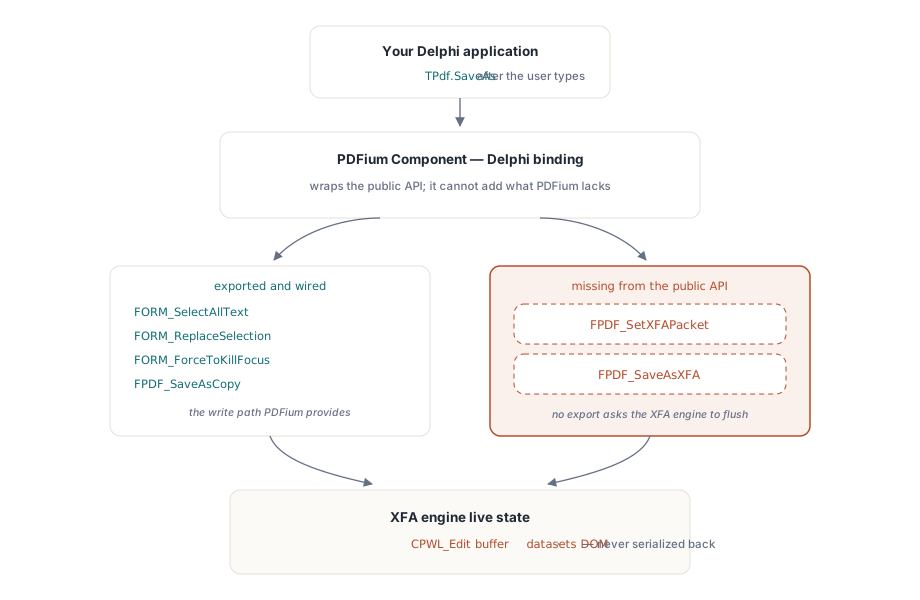
This boundary surfaced during the same v2.13.2 audit that built SetFocusedFormFieldText in the first place. FORM_ReplaceSelection had been bound in the DLL import table for versions without ever being called from Pascal code, and adding the write path that finally used it is what made the persistence gap concrete enough to document rather than theoretical. The same audit round turned up an unrelated but related-in-spirit gap: AcroForm JavaScript had been silently disabled since v2.13.0 because the JS platform was only wired up inside the XFA initialization branch, so ordinary AcroForm documents with app.alert or calculated fields never got a script engine at all. That one was fixable — extending the JS platform to every document regardless of XFA — and it shipped in the same version; the persistence gap covered here was not fixable, for the reasons above. The JavaScript fix and the host-veto events around it are covered in running AcroForm JavaScript with PDFium Component
What Should You Do About It in Delphi?
For AcroForm documents, the fix is nothing more than good habit: call ClearFormFieldFocus (or otherwise move focus away) before SaveAs whenever a value was set programmatically, rather than assuming a later UI interaction will trigger the commit for you. For a document that might be either AcroForm or XFA — which is the common case in a general-purpose viewer — check FormType or the XFA boolean before you promise a caller that a save will stick, and read detecting XFA forms and extracting XFA packets for the full set of probes, including the XFAF case where XFA content is layered over otherwise-ordinary AcroForm widgets that do honor /V
For a genuine dynamic XFA form where the edited values have to survive a save, the interactive edit buffer is not the right tool at all. The durable path is to treat GetXfaDatasets as your baseline, not your result: read it once when the document opens, keep your own record of what the user changed field by field — exactly the values your UI already has, since PDFium will not hand them back to you after the fact — patch those into the baseline XML yourself, and drive your own output. A write that goes through XML your own code controls survives a save that a CPWL_Edit buffer never could

function ExportEditedXfaValue(Pdf: TPdf; const FieldPath,
  NewValue: string): TBytes;
var
  DatasetsXml: string;
begin
  // GetXfaDatasets ships with PDFium Component; PatchXmlNode below is
  // your own helper over your own XML library, nothing PDFium provides
  DatasetsXml := TEncoding.UTF8.GetString(Pdf.GetXfaDatasets);
  DatasetsXml := PatchXmlNode(DatasetsXml, FieldPath, NewValue);
  Result := TEncoding.UTF8.GetBytes(DatasetsXml);
end;
Catching the Gap Before a Customer Does
TPdf.SaveAs returns True whether or not an XFA field value survived, because from PDFium's point of view the save genuinely succeeded — it wrote every byte it was asked to write. That makes this exactly the kind of defect that slips past a smoke test and reaches a customer: nothing throws, nothing logs, the file opens fine, only the specific value is wrong. A round-trip test that actually reopens the saved file and compares the field's value — or compares GetXfaDatasets before and after, per the earlier example — belongs in the regression suite for any viewer that lets users edit XFA content, not just the AcroForm paths that happen to work by default
None of this is a defect to file against PDFium Component so much as a boundary to design around: SetFocusedFormFieldText does precisely what its name says for both form models, and the difference in outcome traces cleanly to what AcroForm and XFA each wire that buffer to on the PDFium side. The API, the focus and save primitives, and the packet readers referenced here are part of the PDFium Component for Delphi and C++Builder