Two PDFs rendered from the same template and the same data, saved ten seconds apart, hash to two different SHA-256 values. Every page looks the same in a viewer. A binary diff shows why: the differences sit inside one small dictionary, where D:20261030094512 has become D:20261030094522, and at the very end of the file, where the trailer /ID is different. A few dozen bytes. For a golden-file test, a repository that stores generated output, or an archive that deduplicates by hash, that is enough to make every run look like a change
Where the nondeterminism lives in a PDF file
Two saves of an unchanged document differ in exactly two kinds of data: the date entries of the document information dictionary and the file identifier in the trailer. ISO 32000-1 §14.3.3 defines /CreationDate and /ModDate in the /Info dictionary, and a writer that refreshes /ModDate on save puts the wall clock straight into the bytes. ISO 32000-1 §14.4 defines /ID as a two-element array of byte strings, the first naming the original file and the second changing whenever the file is revised
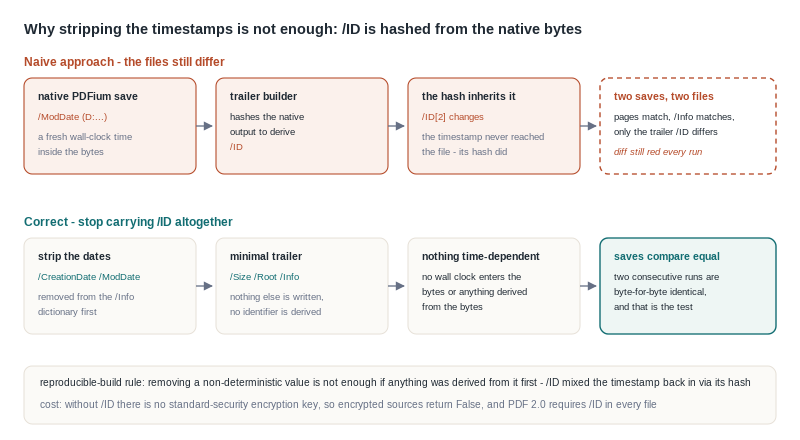
The identifier is the less obvious half. §14.4 suggests computing it with a message digest over the current time, the file location, the file size and the values in the information dictionary. Follow that recipe and the identifier changes on every save by design, because time is one of its inputs. A plain full save through PDFium behaves this way: the same unchanged document comes out with a fresh modification date and a fresh identifier each time
Everything else a writer emits is a matter of choice. Object numbering, the order objects appear in, the shape of the cross-reference table and the line endings can all be fixed, and once they are, the only moving parts left are the dates and the identifier
Using TPdf.SaveAsReproducible in Delphi
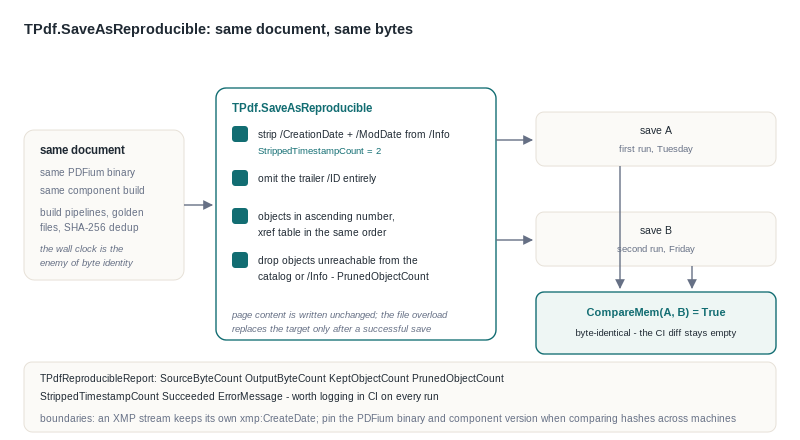
The PDFium Component handles this with TPdf.SaveAsReproducible, which saves the current document, removes /CreationDate and /ModDate from the /Info dictionary, writes no trailer /ID, and emits objects in a fixed order. There are two overloads, one for a TStream and one for a file name. Both return Boolean, fill an out Report: TPdfReproducibleReport, and take an optional AllowSignedDocument parameter that defaults to False. The return value matches Report.Succeeded, and Report.ErrorMessage holds the reason when it is False
var
  Pdf: TPdf;
  Report: TPdfReproducibleReport;
begin
  Pdf:= TPdf.Create(nil);
  try
    Pdf.FileName:= 'invoice-2026-10.pdf';
    Pdf.Active:= True;
    if Pdf.SaveAsReproducible('build\invoice-2026-10.pdf', Report) then
      Writeln(Format('%d -> %d bytes, %d objects kept, %d pruned, ' +
        '%d timestamps stripped', [Report.SourceByteCount,
        Report.OutputByteCount, Report.KeptObjectCount,
        Report.PrunedObjectCount, Report.StrippedTimestampCount]))
    else
      Writeln('Reproducible save failed: ', Report.ErrorMessage);
  finally
    Pdf.Free;
  end;
end;
The file overload writes to a temporary file beside the target and moves it into place only after the save succeeds. When the method returns False, the temporary file is deleted and whatever sat at the target path, typically the previous build output, is still there
The output has a predictable shape that you can check with a hex viewer. The header keeps the version digits from the document, such as %PDF-1.7, followed by a binary comment line. Each object is written as N G obj through endobj in ascending object number, then comes a classic cross-reference table in the same order, and the lines the method generates itself (object headers, table rows, trailer) end in CR LF. Object numbers are not renumbered: an object that is dropped shows up as a free entry in the table, so /Size stays at the highest object number plus one. The trailer holds /Size, /Root and, when the document has one, /Info. Nothing else
Log the report fields in CI. StrippedTimestampCount is 2 for a document whose /Info carries both dates, 1 when only one is present, and 0 when there is no /Info dictionary at all. KeptObjectCount and PrunedObjectCount split the objects into those reachable from the catalog or the /Info dictionary and those that nothing points to; the second group is left out of the file, so the output comes out the same size as an ordinary save or smaller. A sudden jump in PrunedObjectCount between two builds is worth a look, because it usually means an edit upstream left objects behind
Why stripping the timestamps is not enough
A homemade post-processor that deletes the two date keys and leaves the trailer alone still produces two different files. The pages match and the /Info dictionaries match; the second element of /ID does not. That element was computed before the post-processor ran, from bytes or inputs that still contained the fresh time. Deleting the date afterwards does nothing to a hash that already absorbed it
This is the general rule of reproducible builds turned up in a PDF trailer: removing a nondeterministic value is not enough if anything was derived from it first. TPdf.SaveAsReproducible takes the direct route and does not carry /ID at all. With no identifier in the trailer, there is nothing left that could have been derived from the clock, and two saves of the same document come out byte for byte the same
Testing this in CI should mimic two separate runs. Saving twice from one loaded TPdf only proves the method is stable within a process; loading the source into two independent instances is closer to what a build server does on Tuesday and again on Friday. The function below is a check for your own test suite; SavesMatchAcrossLoads is not part of the component
// Your own test helper: load the same source twice, as two separate
// builds would, and require identical reproducible output
function SavesMatchAcrossLoads(const SourceFile: string): Boolean;
var
  First, Second: TPdf;
  A, B: TMemoryStream;
  RA, RB: TPdfReproducibleReport;
begin
  First:= TPdf.Create(nil);
  Second:= TPdf.Create(nil);
  A:= TMemoryStream.Create;
  B:= TMemoryStream.Create;
  try
    First.FileName:= SourceFile;
    First.Active:= True;
    Second.FileName:= SourceFile;
    Second.Active:= True;
    Result:= First.SaveAsReproducible(A, RA) and
      Second.SaveAsReproducible(B, RB) and
      (A.Size = B.Size) and CompareMem(A.Memory, B.Memory, A.Size);
  finally
    B.Free;
    A.Free;
    Second.Free;
    First.Free;
  end;
end;
Removing dictionary keys without corrupting strings
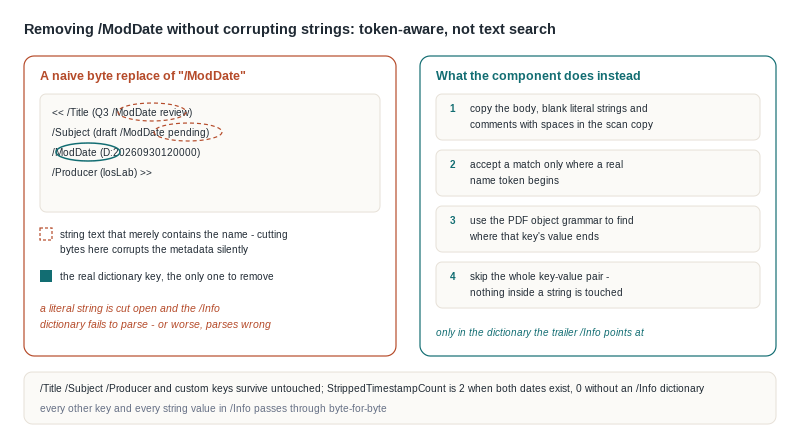
The date keys are removed by reading the /Info object as PDF tokens. A plain byte search for /ModDate would also hit a title such as (Q3 /ModDate review), and cutting bytes out of a literal string leaves a dictionary that either fails to parse or, worse, parses into different metadata. The PDFium Component first makes a scan copy of the object body in which every literal string and every comment is overwritten with spaces, tracking nested parentheses and backslash escapes so that a \) inside a title does not end the string early
On that scan copy, a match counts only where a real name token begins, and the comparison decodes #xx escapes the way ISO 32000-1 §7.3.5 requires, so /Mod#44ate is recognized as the same key as /ModDate. A longer name such as /ModDateLocal does not match, since the whole token has to equal the key. Once a key is found, the PDF object grammar locates where its value ends, and the key and value are skipped together; the original bytes outside that pair are copied unchanged
The effect is narrow on purpose. /Title, /Author, /Producer and any custom keys in /Info come through byte for byte, and the removal applies only to the object the trailer's /Info entry points to. A dictionary that held nothing but the two dates remains in the file as an empty << >>
What does omitting /ID cost for encrypted and signed PDFs?
Leaving out /ID is fine for plain PDF 1.x output and incompatible with encryption. ISO 32000-1 makes the trailer /ID optional unless /Encrypt is present, because the standard security handler feeds the first identifier string into the encryption key (§7.6.3.3, Algorithm 2). A file without /ID cannot be correctly encrypted, so TPdf.SaveAsReproducible returns False when the saved trailer carries /Encrypt, and Report.ErrorMessage reads The document is encrypted or its trailer is unreadable. PDF 2.0 goes further: ISO 32000-2 requires /ID in every file, so byte-identical output fits PDF 1.x targets; the article on exact PDF version conformance in Delphi covers how version targets are handled
Signed documents fail differently. TPdf.SaveAsReproducible is a full rewrite, so byte offsets move and each existing signature's /ByteRange no longer covers the bytes that were signed. When SignatureCount is greater than zero and AllowSignedDocument is False, the method raises EPdfError instead of returning False, which means a pipeline that only checks the Boolean will see an exception for signed input. Catch it, or check SignatureCount first
The code below handles both cases for an input folder that mixes plain, password-protected and signed files. Encrypted sources are decrypted in memory with SaveAs and saRemoveSecurity, reloaded, and only then normalized; signed sources are passed through with explicit consent because the result is a comparison copy
function SaveComparisonCopy(const SourceFile, Password,
  TargetFile: string; out Report: TPdfReproducibleReport): Boolean;
var
  Src, Clear: TPdf;
  Plain: TMemoryStream;
begin
  Src:= TPdf.Create(nil);
  Clear:= TPdf.Create(nil);
  Plain:= TMemoryStream.Create;
  try
    Src.Password:= Password;
    Src.FileName:= SourceFile;
    Src.Active:= True;
    // Write an unencrypted copy so the trailer carries no /Encrypt
    if not Src.SaveAs(Plain, saRemoveSecurity) then
      Exit(False);
    Clear.LoadDocument(Plain);
    // The output is a derived copy for diffing; the signed original
    // stays untouched and remains the record of truth
    Result:= Clear.SaveAsReproducible(TargetFile, Report,
      Clear.SignatureCount > 0);
  finally
    Plain.Free;
    Clear.Free;
    Src.Free;
  end;
end;
Pass True for signed input only when the output is that kind of derived file. The signed original should never be replaced by its reproducible rewrite; keep it as received, and keep encrypted deliverables out of byte-identity checks if they must ship encrypted. For adding a revision to a protected file while leaving the existing bytes alone, see why an encrypted PDF cannot be silently patched in Delphi
Boundaries of byte identity
Byte identity holds for the same document content saved by the same PDFium binary and the same component build. It covers what the method touches and nothing more. The save starts from the document's current in-memory state, so edits made before the call are part of the output and two runs that edit differently will differ, as they should
An XMP metadata stream is carried through as the bytes the document already holds, including its own xmp:CreateDate and xmp:ModifyDate. Those bytes are stable across saves, but the XMP dates then describe something the /Info dictionary no longer does, which matters for PDF/A profiles that require the two to agree; the article on PDF/A Info and XMP metadata equivalence explains those rules. The same applies to any custom /Info key you fill with a build time yourself: only the two date keys are removed, so a /BuildStamp written by your generator will still change from run to run
Pin both the PDFium binary and the component version in any pipeline that compares hashes across machines. A different build may serialize objects differently, and a golden file produced on a developer workstation will then disagree with the build server for reasons that have nothing to do with your documents
TPdf.SaveAsReproducible and TPdfReproducibleReport are part of the PDFium Component for Delphi and C++Builder, next to its other full-rewrite save methods for linearization, object streams and unreachable-object pruning