PDFium Component turns a fixed-layout PDF into a semantic model that can be reflowed, using BuildReflowDocument, and exports that model as self-contained HTML through ToHtml. Headings stay headings, list items stay list items, and tables detected on the page come out as real table markup with header cells and spans preserved. Nothing in the output references an external script or stylesheet
The reason to want this is that a PDF page is a set of positioned glyphs, which is exactly wrong for a phone screen, a screen reader, or a search index. Every attempt to solve it by extracting plain text loses the structure that made the document readable, and every attempt to solve it by converting pages to images loses the text entirely. A reflow model keeps both: the words and the relationships between them
Where does the semantic information come from?
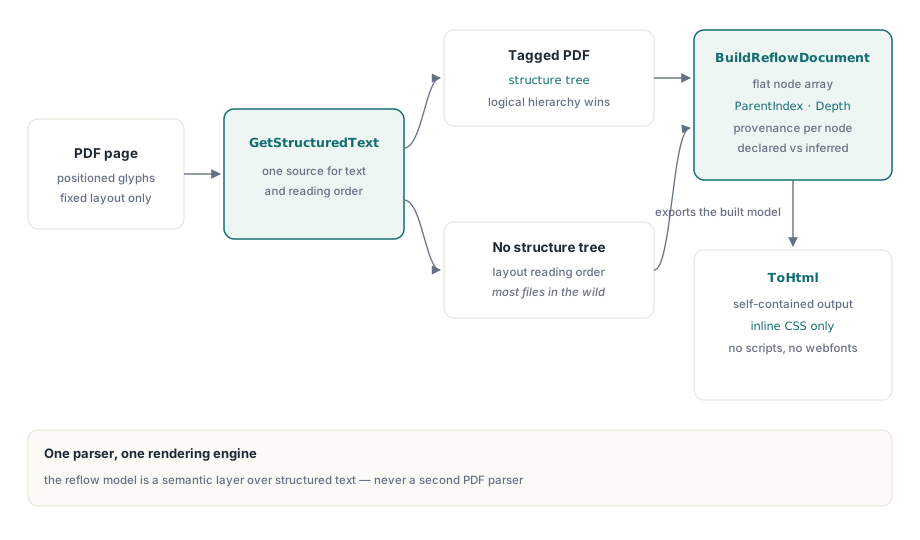
Everything starts from GetStructuredText, the single source of text and semantics in the component. When the PDF carries a structure tree, tagged PDF as defined in ISO 32000-1 clause 14.7, the model follows the logical hierarchy the producer recorded. When it does not, and most PDFs in the wild do not, the model falls back to the physical layout order already computed for reading-order purposes
That choice keeps a hard boundary: no second PDF parser and no second rendering engine are introduced to answer questions the existing one can answer. The reading-order machinery underneath is described in structured text blocks and reading order, and the reflow model is a semantic layer on top of it rather than a replacement
Each node records where its information came from, so a consumer can distinguish a heading the document declared from a heading the layout heuristics inferred. Confidence-sensitive pipelines should read that field rather than treating all nodes as equally authoritative
A flat tree, and why it is not a tree of objects
The model is a pre-order flattened tree: an array of nodes where each node carries a ParentIndex and a Depth, rather than a recursive record or an object graph with ownership. Pages, headings, paragraphs, lists, list items, figures, captions, tables, rows and cells all live in that one linear array
Two benefits follow. Consumers can stream the array in order without recursion, which makes emitting HTML, Markdown or a tree view a simple loop. And the layout stays portable across Delphi, C++Builder and Free Pascal, which differ in how they handle recursive managed types across an ABI boundary. A recursive record of dynamic arrays is exactly the kind of construct that compiles everywhere and behaves subtly differently in each
uses
  PDFium;

var
  Pdf: TPdf;
  Options: TPdfReflowOptions;
  Doc: TPdfReflowDocument;
  I: Integer;
begin
  Pdf := TPdf.Create(nil);
  try
    Pdf.FileName := 'report.pdf';
    Pdf.LoadDocument;

    Options := TPdfReflowOptions.Default;
    Options.FullDocument := True;
    Options.DetectTables := True;
    Options.IncludeCss := True;          // inline style block, no external file
    Options.MaxNodes := 200000;          // fail-closed budget
    Options.MaxCharacters := 4000000;

    Doc := Pdf.BuildReflowDocument(Options);

    for I := 0 to High(Doc.Nodes) do
      case Doc.Nodes[I].Kind of
        prnkHeading:
          Writeln(Format('%sH%d: %s', [StringOfChar(' ', Doc.Nodes[I].Depth),
            Doc.Nodes[I].HeadingLevel, Doc.Nodes[I].Text]));
        prnkParagraph:
          Writeln(Format('%sp: %s', [StringOfChar(' ', Doc.Nodes[I].Depth),
            Copy(Doc.Nodes[I].Text, 1, 60)]));
        prnkTable:
          Writeln(Format('table on page %d', [Doc.Nodes[I].PageNumber]));
      end;

    Writeln(Format('%d node(s), %d table(s), %d character(s)',
      [Length(Doc.Nodes), Doc.TableCount, Doc.CharacterCount]));
  finally
    Pdf.Free;
  end;
end;
How are tables kept from appearing twice?
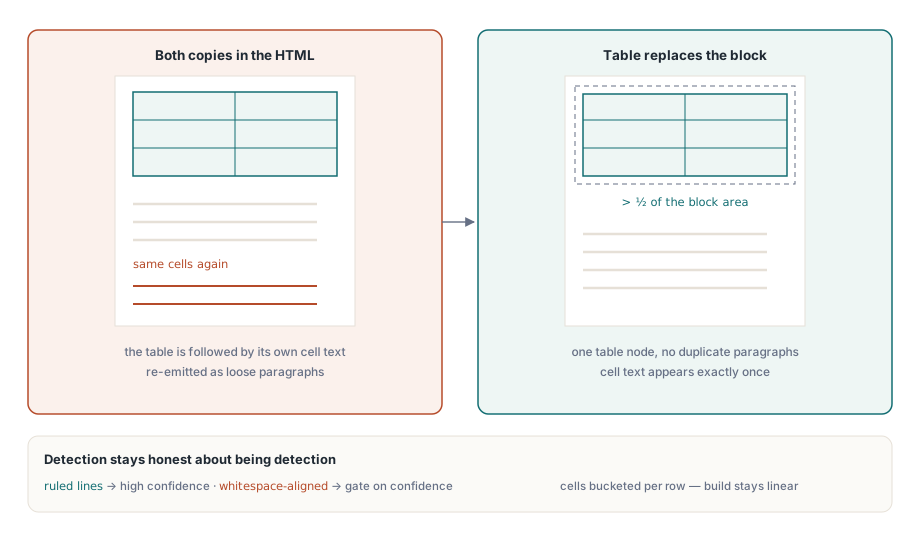
Table detection runs after structured text has been collected for a page, which creates an obvious hazard: the same cell content exists both in the text blocks and in the detected table. Emitting both produces HTML where every table is followed by its own contents again as loose paragraphs
The rule that resolves it is geometric. When a detected table covers more than half the area of a text block, the table node replaces that block rather than joining it. Cell indexing inside a row is built by counting into buckets, so building the model stays linear in cells plus rows instead of rescanning every cell for each row, which matters on financial documents where a single page can carry hundreds of cells
Detected structure is honest about being detection. A table with ruling lines is recognized more reliably than one aligned purely by whitespace, and the node's confidence reflects that. For content where a wrong table beats no table, keep detection on; for archival conversion where a wrong table is worse, gate on confidence
Exporting HTML that stays self-contained
ToHtml walks the model that has already been built and never revisits PDFium, so exporting twice costs nothing extra and cannot produce a different result from the same model. Text and attribute values are escaped uniformly, heading levels are clamped to the h1 through h6 range that HTML actually defines, and header cells, RowSpan and ColumnSpan pass through as written
The optional CSS is a plain inline style block. There is no script, no web font and no external resource of any kind, which is what makes the output safe to embed in an email, a help viewer or a sandboxed browser control:
var
  Html: WideString;
  Stream: TFileStream;
  Bytes: TBytes;
begin
  Options := TPdfReflowOptions.Default;
  Options.FullDocument := True;
  Options.IncludeCss := True;
  Options.IncludePageSections := True;   // keep page boundaries visible
  Options.PreserveLineBreaks := False;   // let the browser wrap paragraphs

  Html := Pdf.BuildReflowDocument(Options).ToHtml;

  Bytes := TEncoding.UTF8.GetBytes(string(Html));
  Stream := TFileStream.Create('report.html', fmCreate);
  try
    if Length(Bytes) > 0 then
      Stream.WriteBuffer(Bytes[0], Length(Bytes));
  finally
    Stream.Free;
  end;
end;
PreserveLineBreaks is the option most worth thinking about. A PDF line break is a typesetting decision made for a fixed page width, so preserving it on a narrow screen reproduces the very problem reflow exists to solve. Preserve breaks for poetry, code listings and addresses; drop them for prose
Budgets, cancellation and page state
Characters, nodes, tables and cells each have a ceiling, and each is checked before allocation rather than after, so a malformed or hostile document fails cleanly instead of consuming memory until something else does. The cancellation token is checked at page, block, table, row and cell boundaries, which keeps a canceled scan of a thousand-page document responsive
One behavior matters for GUI applications specifically: the whole document scan runs inside a scope that restores the active page, so success, budget failure and cancellation all leave the caller's current page untouched. A viewer that lets the user export while looking at page 340 finds itself still on page 340 afterward
What reflow is good for, and what it is not
Reflow output is excellent input for search indexing, accessible reading views, mobile display and content migration. It is not a fidelity-preserving converter: absolute positions, exact fonts, vector artwork and precise page geometry are outside its purpose by design. When a job needs the page to look the same, render it; when it needs the page to be readable somewhere else, reflow it
For assistive technology specifically, the reflow model pairs with the reading features described in building an accessible reader, and documents that carry a genuine structure tree produce noticeably better models, which is a good argument for validating tagging upstream as described in PDF/UA structure tree validation
Reflow, structured text, tagging validation and rendering share one document object across Delphi, C++Builder and Lazarus; the full API is described on the PDFium Component for Delphi page